
Shutdown and install updates button will not go away

cmckaycm

New member
Local time
1:09 PM
Messages
66
Location
United Kingdom
The shut down and install updates button won't go away. It keeps coming up after 1 minute of computer usage. There are failed updates and TuneUp Repair Wizard dosen't work.

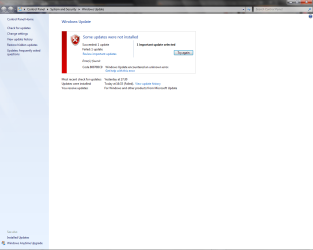
stupid update.png
failerrorAGAIN!!!!!!!!!!!!!!!!!!!!!!!!!!!!!.png
 

My Computer My Computer

Computer Manufacturer/Model Number
Custom Built
OS
Windows 7 Ultimate 32bit
CPU
AMD Athlon II X2 250
Motherboard
ASRock N68C-S UCC
Memory
2GB DDR3
Graphics Card(s)
Intergrated GPU
Sound Card
Intergrated HD Audio
Monitor(s) Displays
Belinea
Screen Resolution
1024 by 768
Hard Drives
Maxtor S TM3320613AS SATA 320GB 7200RPM 3.5" HDD
PSU
Compaq 100W PSU (might upgrade to 500W for performance)
Case
iCute Server/Gaming Case
Cooling
AMD CPU Cooler included with CPU
Keyboard
Genius USB Keyboard
Mouse
Microsoft Basic Optical Mouse v2.0
Internet Speed
10MBps
Other Info
BELKIN G Wireless Router (no internet access but used for intranet).

Attachments

  • windows update.JPG
    windows update.JPG
    63.3 KB · Views: 175

My Computer My Computer

Computer type
PC/Desktop
Computer Manufacturer/Model Number
Self Built
OS
Win 10 Pro x64
CPU
Intel I5-2500K @3.3GHz
Motherboard
Asrock P67 Extreme4
Memory
16GB G.Skill Ripjaws X (4x4GB)
Graphics Card(s)
EVGA GeForce 750 Ti SC 2GB
Sound Card
ASUS Xonar DG 5.1 Channels 24-bit 96KHz PCI Interface Sound
Monitor(s) Displays
auria eq2367
Screen Resolution
1920 x 1080
Hard Drives
250GB Samsung 850 EVO SSD
1TB WD Blue
1TB Hitachi
PSU
SeaSonic X 650W 80 Plus Gold
Case
Corsair Obsidian 750D
Cooling
Corsair H60, Three 140mm case fans
Keyboard
Logitech Wireless Keyboard K520
Mouse
Logitech Wireless Mouse M310
Internet Speed
Wave Broadband ~ 100 dn 5 up
Antivirus
Windows Defender, Malwarebytes Premium
Browser
Edge, IE11, Chrome
Other Info
Laptop specs: HP g7-1365dx /
CPU: AMD A6-3420M APU with Radeon(tm) HD Graphics /
RAM: Crucial 8Gb (2x4Gb) /
SSD: Crucial M4-CT128M4SSD2 ATA Device/ FW 000F /
GFX: AMD Radeon HD 6520G /
OS: Windows 10 Pro x64
The shut down and install updates button won't go away. It keeps coming up after 1 minute of computer usage. There are failed updates and TuneUp Repair Wizard dosen't work.
View attachment 67405

1.Reregister WU components in aggressive mode How do I reset Windows Update components?
you can also try reregister all WU modules Repair & Fix Windows Updates with Fix WU Utility | The Windows Club

2.Open regedit,and make sure you have this key:

HKEY_LOCAL_MACHINE\SOFTWARE\Microsoft\Windows\CurrentVersion\WindowsUpdate\Auto Update\RebootRequired

if you have it then delete this key +restart
 

My Computer My Computer

Computer Manufacturer/Model Number
Custom made
OS
Windows 7 Professional x64 PL
CPU
AMD Athlon 4450e
Motherboard
Giga-Byte GA-MA69G-S3H
Memory
GoodRam DDR2 2x2048MB (FSB 800MHz)
Graphics Card(s)
nVidia GeForce 9600GT (G94-300) 1024 MB
Monitor(s) Displays
SAMSUNG SyncMaster HS2P301688
Hard Drives
Seagate ST3750330AS 750GB
PSU
Corsair 550W
Cooling
AeroCool ExtremeEngine 3T
I reinstalled the OS because when I once shutted it down it corrupted Windows 7 and I can't repair it. It is working now.
 

My Computer My Computer

Computer Manufacturer/Model Number
Custom Built
OS
Windows 7 Ultimate 32bit
CPU
AMD Athlon II X2 250
Motherboard
ASRock N68C-S UCC
Memory
2GB DDR3
Graphics Card(s)
Intergrated GPU
Sound Card
Intergrated HD Audio
Monitor(s) Displays
Belinea
Screen Resolution
1024 by 768
Hard Drives
Maxtor S TM3320613AS SATA 320GB 7200RPM 3.5" HDD
PSU
Compaq 100W PSU (might upgrade to 500W for performance)
Case
iCute Server/Gaming Case
Cooling
AMD CPU Cooler included with CPU
Keyboard
Genius USB Keyboard
Mouse
Microsoft Basic Optical Mouse v2.0
Internet Speed
10MBps
Other Info
BELKIN G Wireless Router (no internet access but used for intranet).
Back
Top