Solved Shutdown problem on Lenovo Ideapad Laptop

corkeryu

New member
Local time
4:20 PM
Messages
11
Location
Dublin 16 Ireland
The display goes to black, but the Power light on the keyboard remains on indefinitely. To complete the sequence, the Power button has to be pressed for about 5 seconds.
(On the other hand a Restart seems to function correctly)
Lenovo Ideapad Z570 Windows 7 Ultimate x64
This is a rebuild so the Novo button just switches the machine on.
Any suggestions gratefully appreciated
Regards
Ulick Corkery
 

My Computers My Computers

  • At a glance

    Windows 7 Professional x64 SP1Intel Core2 Duo T7300 @2.00GHz4GBIntel GM965
    Computer type
    Laptop
    Computer Manufacturer/Model Number
    Dell LATITUDE D630
    OS
    Windows 7 Professional x64 SP1
    CPU
    Intel Core2 Duo T7300 @2.00GHz
    Motherboard
    Dell OKU184
    Memory
    4GB
    Graphics Card(s)
    Intel GM965
    Screen Resolution
    1440 x 900
    Hard Drives
    Seagate ST980813As 74.53GB
    Antivirus
    Avira free
    Browser
    Chrome
  • At a glance

    Windows 7 UltIntel i34GB
    Computer type
    Laptop
    System Manufacturer/Model Number
    Lenovo Ideapad Z570
    OS
    Windows 7 Ult
    CPU
    Intel i3
    Memory
    4GB
You are shutting down from withen Windows?

Launch an elevated command prompt by going to Windows search and entering CMD and right clicking command prompt and opening as Admin. Now in command prompt enter the following:

shutdown.exe /s /t 00

Does the light shut off now?

Have you tried playing with any of the power settings in the Windows Control panel? You can type power options into Windows search for quicker access.
 

My Computer My Computer

At a glance

Windows 7 Ultimate x64
Computer type
PC/Desktop
OS
Windows 7 Ultimate x64
Yes I am shutting down from within Windows. I am logging in as Administrator.
I tried shutdown.exe /s /t 00 (from CMD prompt) but problem remains
i.e. Display goes to black, but the Power light on the keyboard remains on indefinitely.
shutdown /r works (a bit slow but it gets there)
Sleep is also a problem, but as noted Restart works fine.
 

My Computers My Computers

  • At a glance

    Windows 7 Professional x64 SP1Intel Core2 Duo T7300 @2.00GHz4GBIntel GM965
    Computer type
    Laptop
    Computer Manufacturer/Model Number
    Dell LATITUDE D630
    OS
    Windows 7 Professional x64 SP1
    CPU
    Intel Core2 Duo T7300 @2.00GHz
    Motherboard
    Dell OKU184
    Memory
    4GB
    Graphics Card(s)
    Intel GM965
    Screen Resolution
    1440 x 900
    Hard Drives
    Seagate ST980813As 74.53GB
    Antivirus
    Avira free
    Browser
    Chrome
  • At a glance

    Windows 7 UltIntel i34GB
    Computer type
    Laptop
    System Manufacturer/Model Number
    Lenovo Ideapad Z570
    OS
    Windows 7 Ult
    CPU
    Intel i3
    Memory
    4GB
You might have an ACPI issue or a BIOS issue. I'd start with checking Windows integrity by entering sfc /scannow in an elevated command prompt. If there are issues found and can't be fixed then you're gonna have to do an in place repair install. If there are no Windows issues then see if that laptop has an updated BIOS by going to the manufacturer's website.
 

My Computer My Computer

At a glance

Windows 7 Ultimate x64
Computer type
PC/Desktop
OS
Windows 7 Ultimate x64
I ran SFC /SCANNOW as Admin.
Verification 100% complete. Windows Resource Protection did not find any integrity violations.
BIOS Version is 45CN38WW (Lenovo support site says this is latest for S/No WB03630242)
This is a clean install done within last week using bootable USB made with Microsoft x17-58997.iso.
 

My Computers My Computers

  • At a glance

    Windows 7 Professional x64 SP1Intel Core2 Duo T7300 @2.00GHz4GBIntel GM965
    Computer type
    Laptop
    Computer Manufacturer/Model Number
    Dell LATITUDE D630
    OS
    Windows 7 Professional x64 SP1
    CPU
    Intel Core2 Duo T7300 @2.00GHz
    Motherboard
    Dell OKU184
    Memory
    4GB
    Graphics Card(s)
    Intel GM965
    Screen Resolution
    1440 x 900
    Hard Drives
    Seagate ST980813As 74.53GB
    Antivirus
    Avira free
    Browser
    Chrome
  • At a glance

    Windows 7 UltIntel i34GB
    Computer type
    Laptop
    System Manufacturer/Model Number
    Lenovo Ideapad Z570
    OS
    Windows 7 Ult
    CPU
    Intel i3
    Memory
    4GB

My Computer My Computer

At a glance

W7 home premium 32bit/W7HP 64bit/w10 tp insid...E5300 dual core3gbNvidia Geforce 7100 Nforce 630i
Computer type
PC/Desktop
Computer Manufacturer/Model Number
medionl/Aspire 6930G/acer x55a
OS
W7 home premium 32bit/W7HP 64bit/w10 tp insider ring
CPU
E5300 dual core
Motherboard
medion MS7366
Memory
3gb
Graphics Card(s)
Nvidia Geforce 7100 Nforce 630i
Monitor(s) Displays
avixc
Internet Speed
n (isp resticted to 72)
Antivirus
mse/pands
Browser
palemoon
Other Info
Belkin Fd7050 n USB using Railink RT2870 drivers, more upto date
Tks for your guidance.
I have run the collector exe and am attaching the resulting zip file.
 

Attachments

My Computers My Computers

  • At a glance

    Windows 7 Professional x64 SP1Intel Core2 Duo T7300 @2.00GHz4GBIntel GM965
    Computer type
    Laptop
    Computer Manufacturer/Model Number
    Dell LATITUDE D630
    OS
    Windows 7 Professional x64 SP1
    CPU
    Intel Core2 Duo T7300 @2.00GHz
    Motherboard
    Dell OKU184
    Memory
    4GB
    Graphics Card(s)
    Intel GM965
    Screen Resolution
    1440 x 900
    Hard Drives
    Seagate ST980813As 74.53GB
    Antivirus
    Avira free
    Browser
    Chrome
  • At a glance

    Windows 7 UltIntel i34GB
    Computer type
    Laptop
    System Manufacturer/Model Number
    Lenovo Ideapad Z570
    OS
    Windows 7 Ult
    CPU
    Intel i3
    Memory
    4GB
Hi

nothing particularly stands out within the OS

However
You only have 4GB Ram, not really enough for X64 Ultimate

Am i correct in assuming you are Multi-booting this machine, i see multiple (USB/Sata) drives attached
EasyBCD configuration may be incorrect

quick check would be to disconnect them. see if shutdown works normally
 

My Computer My Computer

At a glance

W7 home premium 32bit/W7HP 64bit/w10 tp insid...E5300 dual core3gbNvidia Geforce 7100 Nforce 630i
Computer type
PC/Desktop
Computer Manufacturer/Model Number
medionl/Aspire 6930G/acer x55a
OS
W7 home premium 32bit/W7HP 64bit/w10 tp insider ring
CPU
E5300 dual core
Motherboard
medion MS7366
Memory
3gb
Graphics Card(s)
Nvidia Geforce 7100 Nforce 630i
Monitor(s) Displays
avixc
Internet Speed
n (isp resticted to 72)
Antivirus
mse/pands
Browser
palemoon
Other Info
Belkin Fd7050 n USB using Railink RT2870 drivers, more upto date
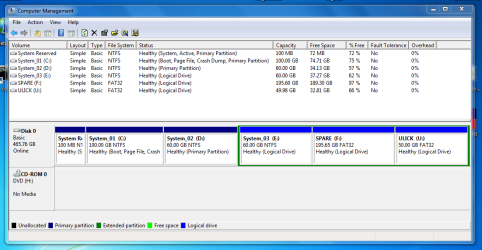
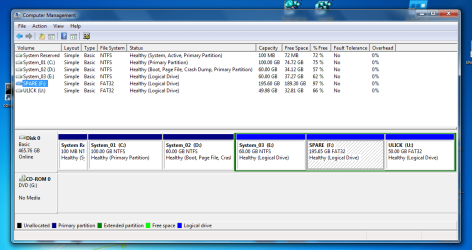
Yes you are correct, I am multi-booting the machine but there is only one Hard Disk (now with 6 Partitions 4 NTFS and 2 FAT32)

See attached slightly rambling txt file.
 

Attachments

My Computers My Computers

  • At a glance

    Windows 7 Professional x64 SP1Intel Core2 Duo T7300 @2.00GHz4GBIntel GM965
    Computer type
    Laptop
    Computer Manufacturer/Model Number
    Dell LATITUDE D630
    OS
    Windows 7 Professional x64 SP1
    CPU
    Intel Core2 Duo T7300 @2.00GHz
    Motherboard
    Dell OKU184
    Memory
    4GB
    Graphics Card(s)
    Intel GM965
    Screen Resolution
    1440 x 900
    Hard Drives
    Seagate ST980813As 74.53GB
    Antivirus
    Avira free
    Browser
    Chrome
  • At a glance

    Windows 7 UltIntel i34GB
    Computer type
    Laptop
    System Manufacturer/Model Number
    Lenovo Ideapad Z570
    OS
    Windows 7 Ult
    CPU
    Intel i3
    Memory
    4GB
Last edited:

My Computer My Computer

At a glance

W7 home premium 32bit/W7HP 64bit/w10 tp insid...E5300 dual core3gbNvidia Geforce 7100 Nforce 630i
Computer type
PC/Desktop
Computer Manufacturer/Model Number
medionl/Aspire 6930G/acer x55a
OS
W7 home premium 32bit/W7HP 64bit/w10 tp insider ring
CPU
E5300 dual core
Motherboard
medion MS7366
Memory
3gb
Graphics Card(s)
Nvidia Geforce 7100 Nforce 630i
Monitor(s) Displays
avixc
Internet Speed
n (isp resticted to 72)
Antivirus
mse/pands
Browser
palemoon
Other Info
Belkin Fd7050 n USB using Railink RT2870 drivers, more upto date
Here are Disk Management views from System 1 and System 2.
System 1 was installed from bootable USB.
Systems 2 (and 3) were installed from within System 1 using source files stored on U: drive.
 

Attachments

  • System1_Disk_Capture.PNG
    System1_Disk_Capture.PNG
    38.3 KB · Views: 1
  • System2_Disk_Capture.PNG
    System2_Disk_Capture.PNG
    47.4 KB · Views: 2

My Computers My Computers

  • At a glance

    Windows 7 Professional x64 SP1Intel Core2 Duo T7300 @2.00GHz4GBIntel GM965
    Computer type
    Laptop
    Computer Manufacturer/Model Number
    Dell LATITUDE D630
    OS
    Windows 7 Professional x64 SP1
    CPU
    Intel Core2 Duo T7300 @2.00GHz
    Motherboard
    Dell OKU184
    Memory
    4GB
    Graphics Card(s)
    Intel GM965
    Screen Resolution
    1440 x 900
    Hard Drives
    Seagate ST980813As 74.53GB
    Antivirus
    Avira free
    Browser
    Chrome
  • At a glance

    Windows 7 UltIntel i34GB
    Computer type
    Laptop
    System Manufacturer/Model Number
    Lenovo Ideapad Z570
    OS
    Windows 7 Ult
    CPU
    Intel i3
    Memory
    4GB
Hi

right this is not my area, jumanji Megahertz07 SIW2
hopefully these boys will follow up

do have 1 more question
Which option, (drive) do you select at startup C or D
 

My Computer My Computer

At a glance

W7 home premium 32bit/W7HP 64bit/w10 tp insid...E5300 dual core3gbNvidia Geforce 7100 Nforce 630i
Computer type
PC/Desktop
Computer Manufacturer/Model Number
medionl/Aspire 6930G/acer x55a
OS
W7 home premium 32bit/W7HP 64bit/w10 tp insider ring
CPU
E5300 dual core
Motherboard
medion MS7366
Memory
3gb
Graphics Card(s)
Nvidia Geforce 7100 Nforce 630i
Monitor(s) Displays
avixc
Internet Speed
n (isp resticted to 72)
Antivirus
mse/pands
Browser
palemoon
Other Info
Belkin Fd7050 n USB using Railink RT2870 drivers, more upto date
The default option on the boot menu, Sys1, launches the Windows stored on the 100GB partition adjacent to the System Reserved partition. Windows marks this 100G partition as the C: drive.
 

My Computers My Computers

  • At a glance

    Windows 7 Professional x64 SP1Intel Core2 Duo T7300 @2.00GHz4GBIntel GM965
    Computer type
    Laptop
    Computer Manufacturer/Model Number
    Dell LATITUDE D630
    OS
    Windows 7 Professional x64 SP1
    CPU
    Intel Core2 Duo T7300 @2.00GHz
    Motherboard
    Dell OKU184
    Memory
    4GB
    Graphics Card(s)
    Intel GM965
    Screen Resolution
    1440 x 900
    Hard Drives
    Seagate ST980813As 74.53GB
    Antivirus
    Avira free
    Browser
    Chrome
  • At a glance

    Windows 7 UltIntel i34GB
    Computer type
    Laptop
    System Manufacturer/Model Number
    Lenovo Ideapad Z570
    OS
    Windows 7 Ult
    CPU
    Intel i3
    Memory
    4GB
I have my doubts this is a boot or hard drive issue. You can test my theory by removing the hard drive and running a Live disk of Hiren's Boot CD or Linux, then shut down. If the power light still stays on, you know damn well it's not your hard drive or its many logical drives.

This sounds hardware related to the motherboard or a BIOS configuration. Or perhaps you're using the wrong power adapter not meant for that laptop. Maybe even the battery is non OEM.

I don't see a motherboard that's cheap and merits the cost based on how much that laptop costs... "Lenovo Ideapad Z570" in All Categories - PicClick UK
 

My Computer My Computer

At a glance

Windows 7 Ultimate x64
Computer type
PC/Desktop
OS
Windows 7 Ultimate x64
I removed the Hard Disk and ran separate tests with 2 boot USBs.
(Hiren's Boot PE Windows 10 and PartedMagic Linux 6.2.0)
In each case a Restart behaved correctly, but Shutdown gave black screen with Power Light remaining on indefinitely.

The Power Adapter and Battery are both marked Lenovo.
 

My Computers My Computers

  • At a glance

    Windows 7 Professional x64 SP1Intel Core2 Duo T7300 @2.00GHz4GBIntel GM965
    Computer type
    Laptop
    Computer Manufacturer/Model Number
    Dell LATITUDE D630
    OS
    Windows 7 Professional x64 SP1
    CPU
    Intel Core2 Duo T7300 @2.00GHz
    Motherboard
    Dell OKU184
    Memory
    4GB
    Graphics Card(s)
    Intel GM965
    Screen Resolution
    1440 x 900
    Hard Drives
    Seagate ST980813As 74.53GB
    Antivirus
    Avira free
    Browser
    Chrome
  • At a glance

    Windows 7 UltIntel i34GB
    Computer type
    Laptop
    System Manufacturer/Model Number
    Lenovo Ideapad Z570
    OS
    Windows 7 Ult
    CPU
    Intel i3
    Memory
    4GB
On BIOS settings, do you have a Power tab?
Did you try to reset BIOS to default or re flash the BIOS with new or same version?
 

My Computers My Computers

  • At a glance

    Windows 7 HP 64i5 6600K - 800MHz to 4200MHz4+4G GSkill DDR4 3000IG - Intel 530
    Computer type
    PC/Desktop
    Computer Manufacturer/Model Number
    custom build
    OS
    Windows 7 HP 64
    CPU
    i5 6600K - 800MHz to 4200MHz
    Motherboard
    GA-Z170-HD3P
    Memory
    4+4G GSkill DDR4 3000
    Graphics Card(s)
    IG - Intel 530
    Monitor(s) Displays
    Samsung 226BW
    Screen Resolution
    1680x1050
    Hard Drives
    (1) -1 SM951 – 128GB M.2 AHCI PCIe SSD drive for Windows 7 and Lubuntu
    (2) -1 WD SATA 3 - 1T for Data
    (3) -1 WD SATA 3 - 1T for backup
    PSU
    Thermaltake 450W TR2 gold
    Keyboard
    Old and good Chicony mechanical keyboard
    Mouse
    Logitech mX performance - 9 buttons (had to disable some)
    Internet Speed
    500Mb/s
    Browser
    Firefox 64
    Other Info
    TinyWall firewall
  • At a glance

    Windows 7 Proi7-4500U 800MHz to 3.0GHz(4+4)G DDR3 1600IG intel 4400 + NVIDIA GeForce GT 745M
    Computer type
    Laptop
    System Manufacturer/Model Number
    Asus Q550LF
    OS
    Windows 7 Pro
    CPU
    i7-4500U 800MHz to 3.0GHz
    Motherboard
    Asus Q550LF
    Memory
    (4+4)G DDR3 1600
    Graphics Card(s)
    IG intel 4400 + NVIDIA GeForce GT 745M
    Sound Card
    Realtek
    Monitor(s) Displays
    LG Display LP156WF4-SPH1
    Screen Resolution
    1920 x 1080
    Hard Drives
    BX500 120G SSD for Windows and programs +
    1T HDD for data
    Internet Speed
    500 Mb/s
    Browser
    Firefox
    Other Info
    TinyWall firewall
No, there is no 'Power' tab in BIOS settings.
I have reset the BIOS.
I also re-flashed (not updated) the BIOS from within Windows using download 45CN38WW.exe from Lenovo.
The problem behaviour remains, i.e. Shutdown gives black screen but Power light remains on indefinitely.
 

My Computers My Computers

  • At a glance

    Windows 7 Professional x64 SP1Intel Core2 Duo T7300 @2.00GHz4GBIntel GM965
    Computer type
    Laptop
    Computer Manufacturer/Model Number
    Dell LATITUDE D630
    OS
    Windows 7 Professional x64 SP1
    CPU
    Intel Core2 Duo T7300 @2.00GHz
    Motherboard
    Dell OKU184
    Memory
    4GB
    Graphics Card(s)
    Intel GM965
    Screen Resolution
    1440 x 900
    Hard Drives
    Seagate ST980813As 74.53GB
    Antivirus
    Avira free
    Browser
    Chrome
  • At a glance

    Windows 7 UltIntel i34GB
    Computer type
    Laptop
    System Manufacturer/Model Number
    Lenovo Ideapad Z570
    OS
    Windows 7 Ult
    CPU
    Intel i3
    Memory
    4GB
I also re-flashed (not updated) the BIOS from within Windows using download 45CN38WW.exe from Lenovo.
The problem behaviour remains, i.e. Shutdown gives black screen but Power light remains on indefinitely.

Any reason you didn't updated or there is no updated BIOS?

Is there any yellow alerts on Device Manager?
Did you install all the system applications to tour computer from the Lenovo site?
 

My Computers My Computers

  • At a glance

    Windows 7 HP 64i5 6600K - 800MHz to 4200MHz4+4G GSkill DDR4 3000IG - Intel 530
    Computer type
    PC/Desktop
    Computer Manufacturer/Model Number
    custom build
    OS
    Windows 7 HP 64
    CPU
    i5 6600K - 800MHz to 4200MHz
    Motherboard
    GA-Z170-HD3P
    Memory
    4+4G GSkill DDR4 3000
    Graphics Card(s)
    IG - Intel 530
    Monitor(s) Displays
    Samsung 226BW
    Screen Resolution
    1680x1050
    Hard Drives
    (1) -1 SM951 – 128GB M.2 AHCI PCIe SSD drive for Windows 7 and Lubuntu
    (2) -1 WD SATA 3 - 1T for Data
    (3) -1 WD SATA 3 - 1T for backup
    PSU
    Thermaltake 450W TR2 gold
    Keyboard
    Old and good Chicony mechanical keyboard
    Mouse
    Logitech mX performance - 9 buttons (had to disable some)
    Internet Speed
    500Mb/s
    Browser
    Firefox 64
    Other Info
    TinyWall firewall
  • At a glance

    Windows 7 Proi7-4500U 800MHz to 3.0GHz(4+4)G DDR3 1600IG intel 4400 + NVIDIA GeForce GT 745M
    Computer type
    Laptop
    System Manufacturer/Model Number
    Asus Q550LF
    OS
    Windows 7 Pro
    CPU
    i7-4500U 800MHz to 3.0GHz
    Motherboard
    Asus Q550LF
    Memory
    (4+4)G DDR3 1600
    Graphics Card(s)
    IG intel 4400 + NVIDIA GeForce GT 745M
    Sound Card
    Realtek
    Monitor(s) Displays
    LG Display LP156WF4-SPH1
    Screen Resolution
    1920 x 1080
    Hard Drives
    BX500 120G SSD for Windows and programs +
    1T HDD for data
    Internet Speed
    500 Mb/s
    Browser
    Firefox
    Other Info
    TinyWall firewall
The BIOS was already at the latest version i.e. 45CN38WW, but I re-flashed it with download 45CN38www.exe from Lenovo support site.
There are no yellow alerts on Device Manager.
I believe all System applications are up to date. An 'Automatic Update scan' on the Lenovo support site shows 'no driver updates are required for your machine'
 

My Computers My Computers

  • At a glance

    Windows 7 Professional x64 SP1Intel Core2 Duo T7300 @2.00GHz4GBIntel GM965
    Computer type
    Laptop
    Computer Manufacturer/Model Number
    Dell LATITUDE D630
    OS
    Windows 7 Professional x64 SP1
    CPU
    Intel Core2 Duo T7300 @2.00GHz
    Motherboard
    Dell OKU184
    Memory
    4GB
    Graphics Card(s)
    Intel GM965
    Screen Resolution
    1440 x 900
    Hard Drives
    Seagate ST980813As 74.53GB
    Antivirus
    Avira free
    Browser
    Chrome
  • At a glance

    Windows 7 UltIntel i34GB
    Computer type
    Laptop
    System Manufacturer/Model Number
    Lenovo Ideapad Z570
    OS
    Windows 7 Ult
    CPU
    Intel i3
    Memory
    4GB
Thanks to guidance from this forum (esp F22 Simpilot) I have finally sorted out the Shutdown problem on my Lenovo Z570 Ideapad laptop.
The answer was to remove the CMOS/RTC battery for about 10 mins.
(I removed mains power lead, the large battery & finally the CMOS/RTC cell batt for about 5 mins.) Time needed to be reset)
I am not sure when/how the Sleep & Shutdown functions got messed up, but they are behaving now.
 

My Computers My Computers

  • At a glance

    Windows 7 Professional x64 SP1Intel Core2 Duo T7300 @2.00GHz4GBIntel GM965
    Computer type
    Laptop
    Computer Manufacturer/Model Number
    Dell LATITUDE D630
    OS
    Windows 7 Professional x64 SP1
    CPU
    Intel Core2 Duo T7300 @2.00GHz
    Motherboard
    Dell OKU184
    Memory
    4GB
    Graphics Card(s)
    Intel GM965
    Screen Resolution
    1440 x 900
    Hard Drives
    Seagate ST980813As 74.53GB
    Antivirus
    Avira free
    Browser
    Chrome
  • At a glance

    Windows 7 UltIntel i34GB
    Computer type
    Laptop
    System Manufacturer/Model Number
    Lenovo Ideapad Z570
    OS
    Windows 7 Ult
    CPU
    Intel i3
    Memory
    4GB
Back
Top