Solved Sidebar.exe will not launch

ikjadoon

New member
Power User
VIP
Local time
3:45 AM
Messages
94
Freaky. I know.

When I right-click the desktop and click "Gadgets," it returns me this obtuse message:
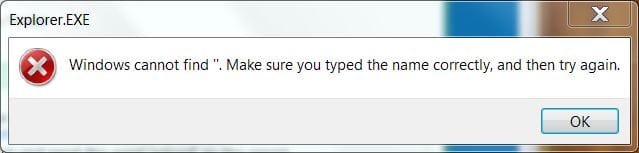
Gadget1.JPG

If I go directly to the EXE in Program Files (x86), I get this surprising error:
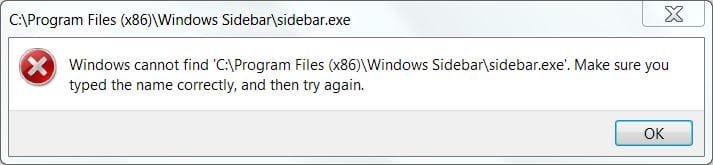
Gadget2.JPG

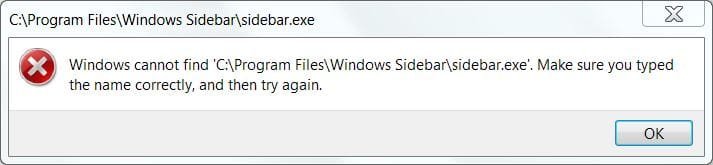
Likewise, the EXE in Program Files:
Gadget3.JPG

I don't know what could have caused this at all. I had a Dell technician control my computer yesterday; I wasn't terribly attentive. I particularly remember he deleted the contents of the Temp folder.

I tried sfc /scannow which found lots of errors in the the Sidebar and Gadgets from my view of the CBS.log; I tried resetting whatever Regsvr32 resets of the Sidebar.exe files; I also tried disabling/re-enabling "Windows Gadget Platform" in the Windows Features Turn On-Turn Off section = nothing. Same errors.

Any ideas what could be causing this confusing problem?

Thanks,

~Ibrahim~
 

My Computer My Computer

At a glance

Windows 7 Ultimate 64-biti7-720QM6GB DDR3-1.333GHzATI 4670 1GB
Computer Manufacturer/Model Number
Dell SXPS 1645
OS
Windows 7 Ultimate 64-bit
CPU
i7-720QM
Memory
6GB DDR3-1.333GHz
Graphics Card(s)
ATI 4670 1GB
Sound Card
IDT Integ.
Monitor(s) Displays
RGBLED
Screen Resolution
1920x1080
Hard Drives
Samsung PM800 256GB SSD
PSU
Dell 90W w/ 9-cell
Did the SFC scan say there were errors that could not be corrected? You may have to run the SFC several times. Is the only problem you are having the gadget problem? It sounds like the path for sidebar.exe is missing or changed somehow. You did say you tried to reregister the file?

Try this:

Start> In search box type cmd> Right click on cmd.exe in results above and when the command prompt opens, type the following, pressing enter after each:

Regsvr32 -u "%ProgramFiles%\Windows Sidebar\sbdrop.dll"

Regsvr32 -u "%ProgramFiles%\Windows Sidebar\wlsrvc.dll"

Regsvr32 atl.dll

Regsvr32 "%ProgramFiles%\Windows Sidebar\sbdrop.dll"

Regsvr32 "%ProgramFiles%\Windows Sidebar\wlsrvc.dll"

Reboot the PC and see if this fixes the problem.

A Guy
 

My Computer My Computer

At a glance

Windows 10 Home x64INTEL Core i5-750 Quad-Core 3.37GHzHyperX Fury Black Series 8GB (2 x 4GB) 1866MhzEVGA GeForce GTX 750 Superclocked 1GB 128-Bit...
Computer type
PC/Desktop
OS
Windows 10 Home x64
CPU
INTEL Core i5-750 Quad-Core 3.37GHz
Motherboard
ASUS P7P55D
Memory
HyperX Fury Black Series 8GB (2 x 4GB) 1866Mhz
Graphics Card(s)
EVGA GeForce GTX 750 Superclocked 1GB 128-Bit GDDR5
Monitor(s) Displays
LG 32MA68HY 32" IPS
Screen Resolution
1920 x 1080
Hard Drives
Samsung 840 Evo 120GB, SEAGATE 500GB Barracuda® 7200.12, SATA 3 Gb/s, 7200 RPM, 16MB cache
PSU
ANTEC TruePower New TP-550, 80 PLUS, 550W
Case
ANTEC Three Hundred Illusion
Cooling
COOLER MASTER Hyper 212 Plus, 4 x 120mm 1 x 140mm Noctua's
Internet Speed
85 + Mbps
Antivirus
Avast
Browser
Vivaldi
@A Guy

Right; I have tried that. I tried it again: no luck.

SFC: hmm..I do not remember the exact wording, but it found some problems that I think it was able to fix. Yes, this is seemingly the only problem I'm having, though I haven't completely tested my entire system. Most of the diagnostic scans (anti-virus, anti-spyware, Windows' built-in ones) have reported no other problems.

EDIT: OK, I just ran it again. This time: "Windows Resource Protection did not find any integrity violations." However, right, Sidebar still will not launch.

Hmm...it does sound like the path is missing. But, how can that be if I see the actual .EXE file and try to open it?

~Ibrahim~
 

My Computer My Computer

At a glance

Windows 7 Ultimate 64-biti7-720QM6GB DDR3-1.333GHzATI 4670 1GB
Computer Manufacturer/Model Number
Dell SXPS 1645
OS
Windows 7 Ultimate 64-bit
CPU
i7-720QM
Memory
6GB DDR3-1.333GHz
Graphics Card(s)
ATI 4670 1GB
Sound Card
IDT Integ.
Monitor(s) Displays
RGBLED
Screen Resolution
1920x1080
Hard Drives
Samsung PM800 256GB SSD
PSU
Dell 90W w/ 9-cell

My Computer My Computer

At a glance

Windows 10 Home x64INTEL Core i5-750 Quad-Core 3.37GHzHyperX Fury Black Series 8GB (2 x 4GB) 1866MhzEVGA GeForce GTX 750 Superclocked 1GB 128-Bit...
Computer type
PC/Desktop
OS
Windows 10 Home x64
CPU
INTEL Core i5-750 Quad-Core 3.37GHz
Motherboard
ASUS P7P55D
Memory
HyperX Fury Black Series 8GB (2 x 4GB) 1866Mhz
Graphics Card(s)
EVGA GeForce GTX 750 Superclocked 1GB 128-Bit GDDR5
Monitor(s) Displays
LG 32MA68HY 32" IPS
Screen Resolution
1920 x 1080
Hard Drives
Samsung 840 Evo 120GB, SEAGATE 500GB Barracuda® 7200.12, SATA 3 Gb/s, 7200 RPM, 16MB cache
PSU
ANTEC TruePower New TP-550, 80 PLUS, 550W
Case
ANTEC Three Hundred Illusion
Cooling
COOLER MASTER Hyper 212 Plus, 4 x 120mm 1 x 140mm Noctua's
Internet Speed
85 + Mbps
Antivirus
Avast
Browser
Vivaldi
@A Guy

No worries; it's all good.

I made a new account; still present. :(

I was actually just thinking that, too: to run a repair installation. I looked at the guide, but I only have the OEM disk Dell gave. I called them up and they were, unfortunately, unable to help. I have, however, run a repair installation off this disk during a technical support call to Microsoft about SP1. It is possible with the standard disk, I'm almost sure....

I think it will be the easiest and simplest solution.

Thank you for your help; I appreciated it! :)

~Ibrahim~
 

My Computer My Computer

At a glance

Windows 7 Ultimate 64-biti7-720QM6GB DDR3-1.333GHzATI 4670 1GB
Computer Manufacturer/Model Number
Dell SXPS 1645
OS
Windows 7 Ultimate 64-bit
CPU
i7-720QM
Memory
6GB DDR3-1.333GHz
Graphics Card(s)
ATI 4670 1GB
Sound Card
IDT Integ.
Monitor(s) Displays
RGBLED
Screen Resolution
1920x1080
Hard Drives
Samsung PM800 256GB SSD
PSU
Dell 90W w/ 9-cell
For anyone who had the same problem, an update:

It was spyware. SUPERAntiSpyware was the only program that could remove it. However, it came back the next day.

I just said screw it and did a clean install. Gadgets working perfectly for a week now. :D

~Ibrahim~
 

My Computer My Computer

At a glance

Windows 7 Ultimate 64-biti7-720QM6GB DDR3-1.333GHzATI 4670 1GB
Computer Manufacturer/Model Number
Dell SXPS 1645
OS
Windows 7 Ultimate 64-bit
CPU
i7-720QM
Memory
6GB DDR3-1.333GHz
Graphics Card(s)
ATI 4670 1GB
Sound Card
IDT Integ.
Monitor(s) Displays
RGBLED
Screen Resolution
1920x1080
Hard Drives
Samsung PM800 256GB SSD
PSU
Dell 90W w/ 9-cell
Sidebar.exe

Can anyone help me to get Windows 7 Home Premium to open?
 

My Computer My Computer

At a glance

Windows 7 Home Premium 64bitIntel 56GB DRAM
Computer Manufacturer/Model Number
HP Touchsmart 610
OS
Windows 7 Home Premium 64bit
CPU
Intel 5
Memory
6GB DRAM
Sidebar.exe

Is a system restore to an earlier point my safest bet to solve issues with Gadgets opening and possible regisrty probs?
 

My Computer My Computer

At a glance

Windows 7 Home Premium 64bitIntel 56GB DRAM
Computer Manufacturer/Model Number
HP Touchsmart 610
OS
Windows 7 Home Premium 64bit
CPU
Intel 5
Memory
6GB DRAM
Back
Top