Sleep & Hibernation modes

mzee 80

New member
Local time
5:33 AM
Messages
12
Ever since first installing Windows 7 I have experienced problems with both the Sleep and Hibernation modes. Having configured the the settings for these uncder Control Panel/Power options/Advanced settings it eems that these two modes then operate at the time intervals which have been configured.
However if I select Sleep from the Shut Down menu in order to introduce either mode immediately the display shuts down but re -appears within a matter of a few seconds. If the Hibernate option is selected again the display closes bt within 30 seconds the computer re-boots !
I have many endeavours to correct this all without success. The properties of the mouse in Device Manager reveal this is the only device where the power mangemeent tab is enabled. This is confirmed on running at he Command Prompt (run as an Administrator) the command poewercfg -devicequery wake -armed. Neither does the command powerfg -last wake reveal the source of ths involuntary waking or re-booting.
I would add that having also run the command powercfg -a this reveals that " the following states are available on this system: Standby (S3) Hibernate ie Hybrid Sleep". Reference to the bios settings also confirm that S3 is enabled.
Having re-configured the power options to Sleep and Hibernate as NEVER and permitting Hybrid Sleep the hibernate option disappears from the Shut Down menu. As a consequence of this on selecting sleep (assumed to be hybrid sleep) from this menu the display shuts down but now re-appears ater a 30 second interval.
Any suggestion for remedying this problem would be very welcome. I have assumed that Hybrid Sleep mode supplants both Sleep and Hibernation modes but under the re-configuration referred to in the last paragraph I would like this to be immediately effective on selecting Sleep from the Shut Down menu.
.
 

My Computer

Computer Manufacturer/Model Number
Mesh
OS
Windows XP & Windows 7
CPU
1.8gigaherz Intel Cire 2 Duo
Motherboard
AsusTek P5L-MX Rev 1xx
Memory
4Gb
Graphics Card(s)
Nvidia GeForce 7300 GS
Sound Card
AoundMax Integrated Gigital HD Audio
Monitor(s) Displays
22" Acer
Hard Drives
500 GB
Case
Mini tower
Does the computer wake up in 30 sec when it is shut down from the power plan? In other words, does the wake-up only happen when you manually sleep from the start menu?

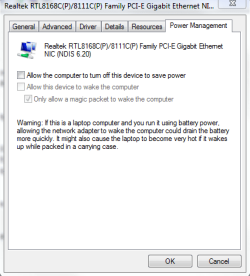
I have had troubles like that before when my wireless adapter was allowed to wake my computer. Make sure that is disabled. It should look like this when you are done:

Capture.PNG
 

My Computer

Computer Manufacturer/Model Number
Custom
OS
Windows 7 Professional x64
CPU
Intel i7 2600K OC'd @ 4620 MHz
Motherboard
Asus P8Z68-V Pro
Memory
16GB GSkill Sniper 2133 Mhz (4x4GB)
Graphics Card(s)
EVGA GeForce GTX 480 SuperClocked+
Sound Card
Realtek High Definition Audio
Monitor(s) Displays
2x Acer S273HLbmii 27"
Screen Resolution
2 x 1920x1080
Hard Drives
64GB Crucial M4 SSD

Storage: Hitachi 1TB 5400RPM, Samsung 1.5TB 5400RPM
PSU
Corsair HW Series 750w (modular)
Case
Cooler Master HAF 932 Advanced Blue Edition
Cooling
CM Hyper 212+ CPU cooler, 3x 230mm + 1x 140mm case fans
Keyboard
Logitech MK320 (wireless)
Mouse
Logitech MK320 (wireless)
Internet Speed
30 Mb/s : 2 Mb/s

My Computer

Computer type
PC/Desktop
Computer Manufacturer/Model Number
Dell XPS 420
OS
Windows 10, Home Clean Install
CPU
Intel Core2 processsor Q8200(2.33Ghz 1333FSB) Quad Core Tech
Motherboard
Dell
Memory
6 gb
Graphics Card(s)
ATI Radeon 256MB HD3650
Sound Card
Intergrated 7.1 Channel Audio
Monitor(s) Displays
Dell SP2009W 20"
Hard Drives
640 GB Serial ATA Hard drive
Cooling
Fan
Keyboard
Dell USB Keyboard
Mouse
Dell Premium Optical USB
Internet Speed
DSL 2.85
Many thanks for the responses. The wake -up only occurs follwing manually selecting sleep from the Start menu. I can confirm that the screen pictire for my wireless adaptor is as you depict. As previously indicated the mouse is the only device where the power management tab is enabled
 

My Computer

Computer Manufacturer/Model Number
Mesh
OS
Windows XP & Windows 7
CPU
1.8gigaherz Intel Cire 2 Duo
Motherboard
AsusTek P5L-MX Rev 1xx
Memory
4Gb
Graphics Card(s)
Nvidia GeForce 7300 GS
Sound Card
AoundMax Integrated Gigital HD Audio
Monitor(s) Displays
22" Acer
Hard Drives
500 GB
Case
Mini tower

My Computer

Computer Manufacturer/Model Number
Custom
OS
Windows 7 Professional x64
CPU
Intel i7 2600K OC'd @ 4620 MHz
Motherboard
Asus P8Z68-V Pro
Memory
16GB GSkill Sniper 2133 Mhz (4x4GB)
Graphics Card(s)
EVGA GeForce GTX 480 SuperClocked+
Sound Card
Realtek High Definition Audio
Monitor(s) Displays
2x Acer S273HLbmii 27"
Screen Resolution
2 x 1920x1080
Hard Drives
64GB Crucial M4 SSD

Storage: Hitachi 1TB 5400RPM, Samsung 1.5TB 5400RPM
PSU
Corsair HW Series 750w (modular)
Case
Cooler Master HAF 932 Advanced Blue Edition
Cooling
CM Hyper 212+ CPU cooler, 3x 230mm + 1x 140mm case fans
Keyboard
Logitech MK320 (wireless)
Mouse
Logitech MK320 (wireless)
Internet Speed
30 Mb/s : 2 Mb/s
Results of scannow indicated no integrity violations. Reverting to my earlier post I was wrong in saying that when prograamed sleep closed the display screen that it did not return of it's own accord but remained closed indefinitely.
As matters stand having selected sleep manually the display sceen returns within a matter of seconds of closing as previously notified.
My desktop is configured to sleep after 15 minutes. This it does but I found yesterday it awoke of it's own accord some 15 minutes or more later. It is the failure of selected sleep as opposed to programmed sleep which I find to be the more irritating.
 

My Computer

Computer Manufacturer/Model Number
Mesh
OS
Windows XP & Windows 7
CPU
1.8gigaherz Intel Cire 2 Duo
Motherboard
AsusTek P5L-MX Rev 1xx
Memory
4Gb
Graphics Card(s)
Nvidia GeForce 7300 GS
Sound Card
AoundMax Integrated Gigital HD Audio
Monitor(s) Displays
22" Acer
Hard Drives
500 GB
Case
Mini tower
Welcome
Read this tutuorial applicable to both windows 7 and Vista.

I think that you will find that your computer wakes due to the nic card. You will have to disable it as shown in the tutorial.
Power Options and Sleep Mode Problems - Vista Forums[11]=Power Management

I would try step 6, first. That is the usual cause.
 

My Computer

Computer type
PC/Desktop
Computer Manufacturer/Model Number
Dell XPS 420
OS
Windows 10, Home Clean Install
CPU
Intel Core2 processsor Q8200(2.33Ghz 1333FSB) Quad Core Tech
Motherboard
Dell
Memory
6 gb
Graphics Card(s)
ATI Radeon 256MB HD3650
Sound Card
Intergrated 7.1 Channel Audio
Monitor(s) Displays
Dell SP2009W 20"
Hard Drives
640 GB Serial ATA Hard drive
Cooling
Fan
Keyboard
Dell USB Keyboard
Mouse
Dell Premium Optical USB
Internet Speed
DSL 2.85
As has been said in previous posts, it is usually a device that wakes the computer from sleep mode. It could be one or more devices? :)
 

My Computer

Computer Manufacturer/Model Number
Dilithium Computers/Engineering (Myself) Star date 42.739285.5432.9
OS
Win7 Ultimate x64 on Desktop / Win7 Ultimate x86 on laptop / Win7 x86 Starter on Netbook
CPU
AMD Phenom 965 X4 3.4Ghz cpu Black Edition
Motherboard
Gigabyte 790XT
Memory
12 Gb DDR3
Graphics Card(s)
Nvidea Gforce GTX 470
Sound Card
Onboard Realtek hi-fi
Monitor(s) Displays
Lg 3D led 23"
Screen Resolution
1920x1080
Hard Drives
Loads maxstore sata 1 & 2/ loads of partitions + 1Tb Hitachi sata 2. 256Gb Crucial ssd.
PSU
OCZ 700W GameXstream
Case
Artec 10000
Cooling
On board + many case fans
Keyboard
Logitech wireless K350
Mouse
Inferno gaming mouse
Internet Speed
Talk talk. 10Mb
Other Info
My PC was hand built with matchsticks. xbox 360 controller. Printers,fax.........
I have painstakingly worked my way through all 13 steps detailed in the tutorial referred to with no success, that is to say that manual selection of sleep is followed by almost immediate waking whilst manual selection of hibernation causes the computer to re-boot after some 30 seconds. On the basis of the configured power option the computer does go to sleep as programmed but there follows a succession of wake and sleep periods at perhaps some 10 -15 minute intervals.
I have also run just about every possible powercfg command at the elevated command prompt in endeavours to locate the source of the problem experienced. The only device which has the power management tab enabled is my wireless mouse. This has been removed and substituted with a plain vanilla PS2 mouse but this makes no difference.
 

My Computer

Computer Manufacturer/Model Number
Mesh
OS
Windows XP & Windows 7
CPU
1.8gigaherz Intel Cire 2 Duo
Motherboard
AsusTek P5L-MX Rev 1xx
Memory
4Gb
Graphics Card(s)
Nvidia GeForce 7300 GS
Sound Card
AoundMax Integrated Gigital HD Audio
Monitor(s) Displays
22" Acer
Hard Drives
500 GB
Case
Mini tower

My Computer

Computer Manufacturer/Model Number
Custom
OS
Windows 7 Professional x64
CPU
Intel i7 2600K OC'd @ 4620 MHz
Motherboard
Asus P8Z68-V Pro
Memory
16GB GSkill Sniper 2133 Mhz (4x4GB)
Graphics Card(s)
EVGA GeForce GTX 480 SuperClocked+
Sound Card
Realtek High Definition Audio
Monitor(s) Displays
2x Acer S273HLbmii 27"
Screen Resolution
2 x 1920x1080
Hard Drives
64GB Crucial M4 SSD

Storage: Hitachi 1TB 5400RPM, Samsung 1.5TB 5400RPM
PSU
Corsair HW Series 750w (modular)
Case
Cooler Master HAF 932 Advanced Blue Edition
Cooling
CM Hyper 212+ CPU cooler, 3x 230mm + 1x 140mm case fans
Keyboard
Logitech MK320 (wireless)
Mouse
Logitech MK320 (wireless)
Internet Speed
30 Mb/s : 2 Mb/s
I have painstakingly worked my way through all 13 steps detailed in the tutorial referred to with no success, that is to say that manual selection of sleep is followed by almost immediate waking whilst manual selection of hibernation causes the computer to re-boot after some 30 seconds. On the basis of the configured power option the computer does go to sleep as programmed but there follows a succession of wake and sleep periods at perhaps some 10 -15 minute intervals.
I have also run just about every possible powercfg command at the elevated command prompt in endeavours to locate the source of the problem experienced. The only device which has the power management tab enabled is my wireless mouse. This has been removed and substituted with a plain vanilla PS2 mouse but this makes no difference.
.
Did you disable the "Allow Wake Timers" option in the Control/Panel/Power Options GUI?
 

My Computer

Computer type
PC/Desktop
OS
Windows 7 x64
CPU
Intel Core2 Extreme Q6850 3.00GHz
Motherboard
EVGA 132-CK-NF79
Memory
8 GB
Graphics Card(s)
Radeon R7 260X
Sound Card
Xonar DS
Hard Drives
Hitachi Deskstar 1 tb
I am beginning to think that install repair is, for want of any alternative should be the next step athough the system file check revealed no corrupted files. However I hesitate because this might bring in train prpblems of another nature - a case of jumping out of the frying pan into the fire
 

My Computer

Computer Manufacturer/Model Number
Mesh
OS
Windows XP & Windows 7
CPU
1.8gigaherz Intel Cire 2 Duo
Motherboard
AsusTek P5L-MX Rev 1xx
Memory
4Gb
Graphics Card(s)
Nvidia GeForce 7300 GS
Sound Card
AoundMax Integrated Gigital HD Audio
Monitor(s) Displays
22" Acer
Hard Drives
500 GB
Case
Mini tower

My Computer

Computer Manufacturer/Model Number
Custom
OS
Windows 7 Professional x64
CPU
Intel i7 2600K OC'd @ 4620 MHz
Motherboard
Asus P8Z68-V Pro
Memory
16GB GSkill Sniper 2133 Mhz (4x4GB)
Graphics Card(s)
EVGA GeForce GTX 480 SuperClocked+
Sound Card
Realtek High Definition Audio
Monitor(s) Displays
2x Acer S273HLbmii 27"
Screen Resolution
2 x 1920x1080
Hard Drives
64GB Crucial M4 SSD

Storage: Hitachi 1TB 5400RPM, Samsung 1.5TB 5400RPM
PSU
Corsair HW Series 750w (modular)
Case
Cooler Master HAF 932 Advanced Blue Edition
Cooling
CM Hyper 212+ CPU cooler, 3x 230mm + 1x 140mm case fans
Keyboard
Logitech MK320 (wireless)
Mouse
Logitech MK320 (wireless)
Internet Speed
30 Mb/s : 2 Mb/s
Omitted to confirm that no devices other than my nouse have the power management tab enabled as was indicated in my initial post
 

My Computer

Computer Manufacturer/Model Number
Mesh
OS
Windows XP & Windows 7
CPU
1.8gigaherz Intel Cire 2 Duo
Motherboard
AsusTek P5L-MX Rev 1xx
Memory
4Gb
Graphics Card(s)
Nvidia GeForce 7300 GS
Sound Card
AoundMax Integrated Gigital HD Audio
Monitor(s) Displays
22" Acer
Hard Drives
500 GB
Case
Mini tower
Wake after 15 minutes automatically

I found this in another forum:

"I have the same problem on more than one pc. But I think a norrowed it down:
my guess is, that it has something to do with Media Center, but I found no
Task (and no BIOS setting, device, ...) that could explain the RTC wake up.

Actually there is a "brutal" way to disable all wake events, I found that in
two Microsoft sources:

http://download.microsoft.com/downlo...mize_Power.doc
http://download.microsoft.com/downlo...T302_WH07.pptx

Search the registry for bd3b718a-0680-4d9d-8ab2-e1d2b4ac806d

You find the "Allow wake on timer" settings for all powerplans. Replace
(also in subfolders) the value 0x000000001 with 0x000000000. You could set
it seperatly, you can see there are settings for AC / DC (battery)."

Maybe this can help you.
Bonni24
 

My Computer

Computer Manufacturer/Model Number
OEM
OS
Win 7
CPU
Intel E6750 2,66 MHz
Motherboard
Intel DG33FB
Memory
4 GB
Graphics Card(s)
Nvidia GeForce 8600 GT
Sound Card
onboard
Monitor(s) Displays
Acer AL2016W
Hard Drives
2 x Samsung (500 GB & 750 GB)
PSU
420 W
Case
Miditower
Cooling
ARCTIC Alpine-7, 0.6 Sone, 500-2000 RPM, PWM
Back
Top