Sleep Shortcut - Create

How to Create a Sleep Shortcut in Windows

   Information
This will show you how to create or download a Sleep shortcut to put your computer to sleep with. You can also Pin to Taskbar or Pin to Start Menu this shortcut, or move where you like for easy use.
   Tip
If you would also like to create a keyboard shortcut key to use to open the shortcut with from either method below, then see: How to Create a Keyboard Shortcut for a Program


METHOD ONE

A Sleep Shortcut from a VBS File


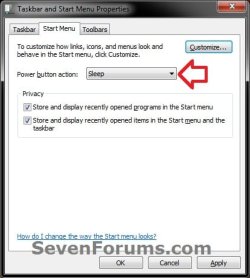
NOTE: This method for a sleep shortcut will allow you to put your computer to sleep no matter if hibernate is enabled or disabled, or what you have your power plan settings set to.1. Set your Start Menu power button to Sleep. (see screenshot below)
:warn:WARNING: This Sleep shortcut will do whatever you have your Start Menu power button set to, so it's important to have this set to Sleep for this shortcut to put your computer to sleep.Start_Menu_PWR_Button.jpg
2. Click on the download button below to download the file below.METHOD_1_Sleep_Shortcut.zip

Download


3. Click on Save, and save the .zip file to the desktop.

4. Select and extract both the Sleep shortcut and "Sleep Shortcut" folder to the desktop.

5. Open the "Sleep Shortcut" folder, then right click on the Sleep.vbs file, click on Properties, General tab, and on the Unblock button. (See screenshot below)
NOTE: If you do not have a Unblock button under the General tab, then the shortcut is already unblocked and you can continue on to step 6.
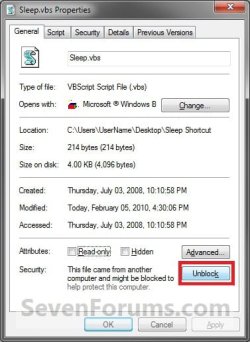
Unblock_VBS.jpg

6.
Right click on the "Sleep Shortcut" folder on the desktop, and click on Cut.

7. Open a Windows Explorer window and navigate to the C:\Program Files folder, then right click on the C:\Program Files folder and click on Paste. (See screenshot below)
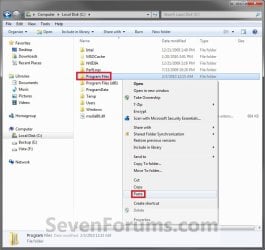
METHOD-1_Step1.jpg

8.
If prompted, click on Continue and Yes to approve copying the "Sleep Shortcut" folder into the C:\Program Files folder.

9. Right click on the Sleep shortcut, and click on Properties, General tab, and on the Unblock button. (See screenshot below)
NOTE: If you do not have a Unblock button under the General tab, then the shortcut is already unblocked and you can continue on to step 10.Unblock_Sleep_VBS.jpg
10. Move the Sleep shortcut on the desktop to where you like for easy use.

11. When done, you can delete the downloaded .zip file on the desktop if you like, or save it to use again.


METHOD TWO

A Normal Sleep Shortcut


NOTE: This method for a sleep or standby shortcut will allow you to put your computer to sleep, but you must have hibernate disabled for this shortcut to not have your computer hibernate instead.


OPTION ONE

Download the Shortcut

1. Click on the download button below to download the Sleep.zip file.
Download


2. Click on Save, and save the .zip file to the desktop.

3. Open the .zip file and extract the Sleep shortcut to the desktop.

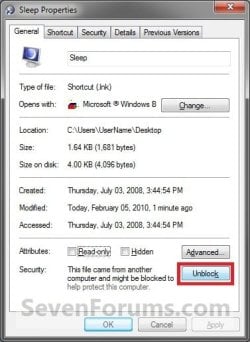
4. Right click on the Sleep shortcut, and click on Properties, General tab, and on the Unblock button. (See screenshot below)
NOTE: If you do not have a Unblock button under the General tab, then the shortcut is already unblocked and you can continue on to step 5.
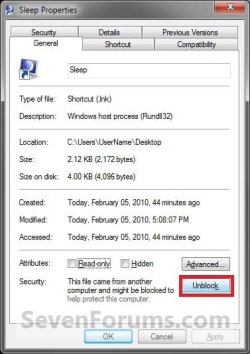
Unblock.jpg

5. Move the shortcut to where you like for easy use.

6. When done, you can delete the downloaded .zip file on the desktop if you like, or save it to use again.


OPTION TWO

Manually Create the Shortcut

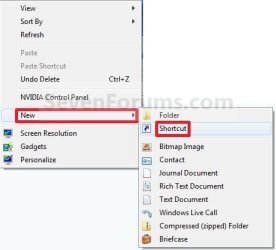
1. Right click on a empty area on desktop, and click on New and Shortcut.

2. Type the command below into the location area, and click on the Next button. (See screenshot below)

Code:
rundll32.exe powrprof.dll,SetSuspendState
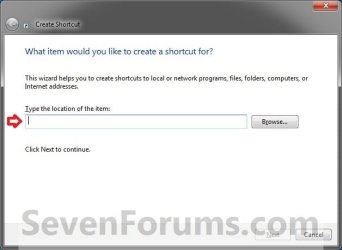
Step1.jpg
3. Type Sleep for the name, and click on the Finish button. (See screenshot below)
NOTE: You can name this anything you would like though.
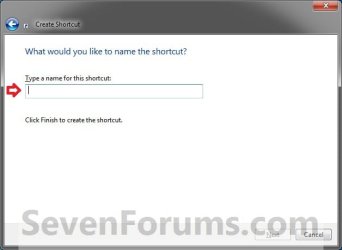
Step2.jpg
4. Right click on the new Sleep shortcut on the Desktop and click on Properties.

5. Click on the Shortcut tab, then click on the Change Icon button. (See screenshot below)
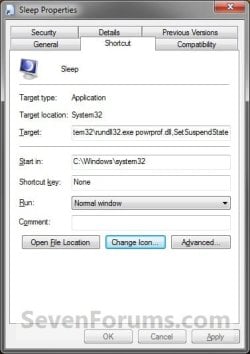
METHOD-2_Step3.jpg

6.
In the line under "Look for icons in this file", type the location below and press Enter. (See screenshot below)

Code:
C:\Windows\System32\imageres.dll
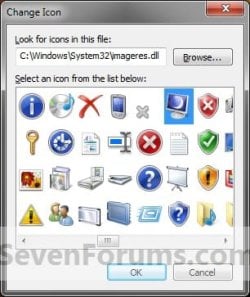
Step4.jpg

7.
Select the icon highlighted in blue above and click on OK. (See screenshot above)
NOTE: You can use any icon that you would like instead though.

8. Click on OK. (See screenshot below step 5)

9. Disable hibernate.

10. Move the shortcut to where you like for easy use.
That's it,
Shawn


Attachments

Last edited:
This is all I use on my desktop shortcut.
C:\Windows\System32\rundll32.exe Powrprof.dll,SetSuspendState Sleep
 

My Computer

Computer type
PC/Desktop
Computer Manufacturer/Model Number
Self Built
OS
Windows 10 Pro
CPU
Intel i5
Motherboard
I have a fatherboard
Memory
I'm old and lost a few chips
Graphics Card(s)
Yup
Sound Card
Yup
Monitor(s) Displays
Samsung 32" UHD
Screen Resolution
3840 x 2160
Hard Drives
Samsung 860 EVO drives
PSU
450 Watt and some fans that blow
Case
Small tower
Cooling
Yes I am cool. lol
Keyboard
Who needs a keyboard?
Mouse
Logitech Laser G7 wireless
Internet Speed
Zippy fast UP and DOWN
Antivirus
I got a shot
Browser
The new Improved EDGE 2020
Hello Iggy,

Yeah, it does the same thing as in METHOD TWO with hibernate disabled. With hibernate enabled, it hibernated instead of sleep for me as well though. :)
 

My Computer

Computer type
PC/Desktop
Computer Manufacturer/Model Number
Self built custom
OS
64-bit Windows 11 Pro for Workstations
CPU
Intel i7-8700K OC'd to 5 GHz
Motherboard
ASUS ROG Maximus XI Formula Z390
Memory
64 GB (4x16GB) G.SKILL TridentZ RGB DDR4 3600 MHz
Graphics Card(s)
ASUS ROG-STRIX-GTX1080TI-O11G-GAMING
Sound Card
Integrated
Monitor(s) Displays
2 x Samsung Odyssey G7 27"
Screen Resolution
2560x1440
Hard Drives
1TB Samsung 990 PRO M.2,
4TB Samsung 990 PRO PRO M.2,
TerraMaster F8 SSD Plus NAS
PSU
Seasonic Prime Titanium 850W
Case
Thermaltake Core P3
Cooling
Corsair Hydro H115i
Keyboard
Logitech wireless K800
Mouse
Logitech MX Master 4
Internet Speed
2 Gb/s Download and 100 Mb/s Upload
Antivirus
Malwarebyte Anti-Malware Premium
Browser
Google Chrome
Other Info
Logitech Z625 speaker system,
Logitech BRIO 4K Pro webcam,
HP Color LaserJet Pro MFP M477fdn,
APC SMART-UPS RT 1000 XL - SURT1000XLI,
Galaxy S23 Plus phone
It shuts down my PC instead

I tried using this tutorial in order to sleep my PC easily but what actually happened is that my PC turned off completely (COMPLETE SHUTDOWN). Any clue of what is wrong? I wish I can sleep without having hibernation disabled because I need to hibernate my PC after finishing my day.

I'm running windows 7 x64

Thanks in advance.
 

My Computer

Computer Manufacturer/Model Number
Assembled
OS
Windows 7 x64
CPU
Core i5
Motherboard
Gigabyte P55A-UD3P
Memory
4 GB DDR3 memory
Graphics Card(s)
ATI Radeon HD5450
Monitor(s) Displays
LG Flatron 19in wide screen
Hard Drives
500 GB WD x 1
Hello Magoood,

Which Method/option did you use? :)
 

My Computer

Computer type
PC/Desktop
Computer Manufacturer/Model Number
Self built custom
OS
64-bit Windows 11 Pro for Workstations
CPU
Intel i7-8700K OC'd to 5 GHz
Motherboard
ASUS ROG Maximus XI Formula Z390
Memory
64 GB (4x16GB) G.SKILL TridentZ RGB DDR4 3600 MHz
Graphics Card(s)
ASUS ROG-STRIX-GTX1080TI-O11G-GAMING
Sound Card
Integrated
Monitor(s) Displays
2 x Samsung Odyssey G7 27"
Screen Resolution
2560x1440
Hard Drives
1TB Samsung 990 PRO M.2,
4TB Samsung 990 PRO PRO M.2,
TerraMaster F8 SSD Plus NAS
PSU
Seasonic Prime Titanium 850W
Case
Thermaltake Core P3
Cooling
Corsair Hydro H115i
Keyboard
Logitech wireless K800
Mouse
Logitech MX Master 4
Internet Speed
2 Gb/s Download and 100 Mb/s Upload
Antivirus
Malwarebyte Anti-Malware Premium
Browser
Google Chrome
Other Info
Logitech Z625 speaker system,
Logitech BRIO 4K Pro webcam,
HP Color LaserJet Pro MFP M477fdn,
APC SMART-UPS RT 1000 XL - SURT1000XLI,
Galaxy S23 Plus phone
Hello Magoood,

Which Method/option did you use? :)
I used the visual basic script file in Method 1 and I used the VBS only without the need of anything else. I assigned a button on my keyboard (Microsoft Digital Media 3000) for this vbs file and when I pressed it, I was astonished to find all open windows and programs are closed and windows followed them!
 

My Computer

Computer Manufacturer/Model Number
Assembled
OS
Windows 7 x64
CPU
Core i5
Motherboard
Gigabyte P55A-UD3P
Memory
4 GB DDR3 memory
Graphics Card(s)
ATI Radeon HD5450
Monitor(s) Displays
LG Flatron 19in wide screen
Hard Drives
500 GB WD x 1
Magoood,

It's due to what your Start Menu power button is set to. It will need to be set to Sleep for the shortcut to put the computer to sleep instead of shutdown. I have updated the tutorial and add step 1 under METHOD ONE for this to help. :)
 

My Computer

Computer type
PC/Desktop
Computer Manufacturer/Model Number
Self built custom
OS
64-bit Windows 11 Pro for Workstations
CPU
Intel i7-8700K OC'd to 5 GHz
Motherboard
ASUS ROG Maximus XI Formula Z390
Memory
64 GB (4x16GB) G.SKILL TridentZ RGB DDR4 3600 MHz
Graphics Card(s)
ASUS ROG-STRIX-GTX1080TI-O11G-GAMING
Sound Card
Integrated
Monitor(s) Displays
2 x Samsung Odyssey G7 27"
Screen Resolution
2560x1440
Hard Drives
1TB Samsung 990 PRO M.2,
4TB Samsung 990 PRO PRO M.2,
TerraMaster F8 SSD Plus NAS
PSU
Seasonic Prime Titanium 850W
Case
Thermaltake Core P3
Cooling
Corsair Hydro H115i
Keyboard
Logitech wireless K800
Mouse
Logitech MX Master 4
Internet Speed
2 Gb/s Download and 100 Mb/s Upload
Antivirus
Malwarebyte Anti-Malware Premium
Browser
Google Chrome
Other Info
Logitech Z625 speaker system,
Logitech BRIO 4K Pro webcam,
HP Color LaserJet Pro MFP M477fdn,
APC SMART-UPS RT 1000 XL - SURT1000XLI,
Galaxy S23 Plus phone
Magoood,

It's due to what your Start Menu power button is set to. It will need to be set to Sleep for the shortcut to put the computer to sleep instead of shutdown. I have updated the tutorial and add step 1 under METHOD ONE for this to help. :)
Thanks for the reply. Yes, my start menu power button was set to shut down so I set it to standby as you wanted but now what the vbs file is doing is that it brings me the "Shut Down Windows" Dialog box and that's it! :sarc: I have to do an extra step which is clicking OK (because sleep is the selected option by default) but I believe this is not the proper behavior.:confused:
 

My Computer

Computer Manufacturer/Model Number
Assembled
OS
Windows 7 x64
CPU
Core i5
Motherboard
Gigabyte P55A-UD3P
Memory
4 GB DDR3 memory
Graphics Card(s)
ATI Radeon HD5450
Monitor(s) Displays
LG Flatron 19in wide screen
Hard Drives
500 GB WD x 1
Magoood,

With my Start Menu power button setting set to Sleep, the shortcut puts my computer to sleep no matter what I have set in Power Options or if hibernate it enabled or disabled.

As a test, delete the downloads from the tutorial, then start over on METHOD ONE in tutorial to see if may just be a simple mistake somewhere.

If it still doesn't work after redoing it, then could you post back with screenshots of all related settings? (start menu power button, all settings under "Sleep" in advanced power settings) This way I'll test it with the same settings that you are using.
 

My Computer

Computer type
PC/Desktop
Computer Manufacturer/Model Number
Self built custom
OS
64-bit Windows 11 Pro for Workstations
CPU
Intel i7-8700K OC'd to 5 GHz
Motherboard
ASUS ROG Maximus XI Formula Z390
Memory
64 GB (4x16GB) G.SKILL TridentZ RGB DDR4 3600 MHz
Graphics Card(s)
ASUS ROG-STRIX-GTX1080TI-O11G-GAMING
Sound Card
Integrated
Monitor(s) Displays
2 x Samsung Odyssey G7 27"
Screen Resolution
2560x1440
Hard Drives
1TB Samsung 990 PRO M.2,
4TB Samsung 990 PRO PRO M.2,
TerraMaster F8 SSD Plus NAS
PSU
Seasonic Prime Titanium 850W
Case
Thermaltake Core P3
Cooling
Corsair Hydro H115i
Keyboard
Logitech wireless K800
Mouse
Logitech MX Master 4
Internet Speed
2 Gb/s Download and 100 Mb/s Upload
Antivirus
Malwarebyte Anti-Malware Premium
Browser
Google Chrome
Other Info
Logitech Z625 speaker system,
Logitech BRIO 4K Pro webcam,
HP Color LaserJet Pro MFP M477fdn,
APC SMART-UPS RT 1000 XL - SURT1000XLI,
Galaxy S23 Plus phone
Yep, those are them.

Ok. I think I know what is happening now. The only way that I can recreate getting the "Shut Down Windows" Dialog box while using the shortcut is if the VBS file was not unblocked in step 5. Double check in the "Sleep Shortcut" folder in "Program Files" to see if the Sleep.vbs is unblocked.
 

My Computer

Computer type
PC/Desktop
Computer Manufacturer/Model Number
Self built custom
OS
64-bit Windows 11 Pro for Workstations
CPU
Intel i7-8700K OC'd to 5 GHz
Motherboard
ASUS ROG Maximus XI Formula Z390
Memory
64 GB (4x16GB) G.SKILL TridentZ RGB DDR4 3600 MHz
Graphics Card(s)
ASUS ROG-STRIX-GTX1080TI-O11G-GAMING
Sound Card
Integrated
Monitor(s) Displays
2 x Samsung Odyssey G7 27"
Screen Resolution
2560x1440
Hard Drives
1TB Samsung 990 PRO M.2,
4TB Samsung 990 PRO PRO M.2,
TerraMaster F8 SSD Plus NAS
PSU
Seasonic Prime Titanium 850W
Case
Thermaltake Core P3
Cooling
Corsair Hydro H115i
Keyboard
Logitech wireless K800
Mouse
Logitech MX Master 4
Internet Speed
2 Gb/s Download and 100 Mb/s Upload
Antivirus
Malwarebyte Anti-Malware Premium
Browser
Google Chrome
Other Info
Logitech Z625 speaker system,
Logitech BRIO 4K Pro webcam,
HP Color LaserJet Pro MFP M477fdn,
APC SMART-UPS RT 1000 XL - SURT1000XLI,
Galaxy S23 Plus phone
hi again, the vbs is not blocked at all because I can use it directly by clicking it. Better yet, I placed it in the program files and then I assigned a key on my keyboard for it (using IntelliType software) so that I can use right away without the need of any shortcuts or whatever. Just a click of a button on my keyboard and I should get standby but for some reason it is not working. What is only working perfectly is a hibernate.exe file which I downloaded from somewhere a long time ago.
 

My Computer

Computer Manufacturer/Model Number
Assembled
OS
Windows 7 x64
CPU
Core i5
Motherboard
Gigabyte P55A-UD3P
Memory
4 GB DDR3 memory
Graphics Card(s)
ATI Radeon HD5450
Monitor(s) Displays
LG Flatron 19in wide screen
Hard Drives
500 GB WD x 1
Strange, I just cannot get it to give me the "Shut Down Windows" Dialog box except as above with step 5 not being unblocked no matter what setting I use.

I'm not sure what else to suggest. :(
 

My Computer

Computer type
PC/Desktop
Computer Manufacturer/Model Number
Self built custom
OS
64-bit Windows 11 Pro for Workstations
CPU
Intel i7-8700K OC'd to 5 GHz
Motherboard
ASUS ROG Maximus XI Formula Z390
Memory
64 GB (4x16GB) G.SKILL TridentZ RGB DDR4 3600 MHz
Graphics Card(s)
ASUS ROG-STRIX-GTX1080TI-O11G-GAMING
Sound Card
Integrated
Monitor(s) Displays
2 x Samsung Odyssey G7 27"
Screen Resolution
2560x1440
Hard Drives
1TB Samsung 990 PRO M.2,
4TB Samsung 990 PRO PRO M.2,
TerraMaster F8 SSD Plus NAS
PSU
Seasonic Prime Titanium 850W
Case
Thermaltake Core P3
Cooling
Corsair Hydro H115i
Keyboard
Logitech wireless K800
Mouse
Logitech MX Master 4
Internet Speed
2 Gb/s Download and 100 Mb/s Upload
Antivirus
Malwarebyte Anti-Malware Premium
Browser
Google Chrome
Other Info
Logitech Z625 speaker system,
Logitech BRIO 4K Pro webcam,
HP Color LaserJet Pro MFP M477fdn,
APC SMART-UPS RT 1000 XL - SURT1000XLI,
Galaxy S23 Plus phone
Strange, I just cannot get it to give me the "Shut Down Windows" Dialog box except as above with step 5 not being unblocked no matter what setting I use.

I'm not sure what else to suggest. :(
Never mind, You tried your best to help :) and for sure not all of us are lucky. Thanks for all your efforts. I will research this issue for a while and if I came up with an answer, I'll post it here for reference.
 

My Computer

Computer Manufacturer/Model Number
Assembled
OS
Windows 7 x64
CPU
Core i5
Motherboard
Gigabyte P55A-UD3P
Memory
4 GB DDR3 memory
Graphics Card(s)
ATI Radeon HD5450
Monitor(s) Displays
LG Flatron 19in wide screen
Hard Drives
500 GB WD x 1
If I come across anything else, I'll be sure to post back with it for you as well.
 

My Computer

Computer type
PC/Desktop
Computer Manufacturer/Model Number
Self built custom
OS
64-bit Windows 11 Pro for Workstations
CPU
Intel i7-8700K OC'd to 5 GHz
Motherboard
ASUS ROG Maximus XI Formula Z390
Memory
64 GB (4x16GB) G.SKILL TridentZ RGB DDR4 3600 MHz
Graphics Card(s)
ASUS ROG-STRIX-GTX1080TI-O11G-GAMING
Sound Card
Integrated
Monitor(s) Displays
2 x Samsung Odyssey G7 27"
Screen Resolution
2560x1440
Hard Drives
1TB Samsung 990 PRO M.2,
4TB Samsung 990 PRO PRO M.2,
TerraMaster F8 SSD Plus NAS
PSU
Seasonic Prime Titanium 850W
Case
Thermaltake Core P3
Cooling
Corsair Hydro H115i
Keyboard
Logitech wireless K800
Mouse
Logitech MX Master 4
Internet Speed
2 Gb/s Download and 100 Mb/s Upload
Antivirus
Malwarebyte Anti-Malware Premium
Browser
Google Chrome
Other Info
Logitech Z625 speaker system,
Logitech BRIO 4K Pro webcam,
HP Color LaserJet Pro MFP M477fdn,
APC SMART-UPS RT 1000 XL - SURT1000XLI,
Galaxy S23 Plus phone
I found out that the vbs file works just fine if I use it directly by clicking it with the mouse but it was not working if I assiged it to a free key on my keyboard (Using the IntelliType Pro) software. I think it's because the free keys I have on my keyboard can be programmed to work only with executable files i.e. launch executables.

In brief, it's my keyboard limitation and/or Microsoft's IntelliType Pro limitation and not the script.

If it's possible to package that vbs file in an exe file, that would be great :D
I have a hibernate.exe file that I downloaded long time ago and it works like a charm after dedicating a key for it on my keyboard.

P.S. For people to know what exactly I'm talking about, I'm using a keyboard called "Microsoft Digital Media keyboard 3000" which has 5 buttons labelled from 1 to 5 for me to program as I want using the "IntelliType Pro" Software.
 

My Computer

Computer Manufacturer/Model Number
Assembled
OS
Windows 7 x64
CPU
Core i5
Motherboard
Gigabyte P55A-UD3P
Memory
4 GB DDR3 memory
Graphics Card(s)
ATI Radeon HD5450
Monitor(s) Displays
LG Flatron 19in wide screen
Hard Drives
500 GB WD x 1
Magoood,

Ah, good. I'm glad that you found the source of the problem. Thank you for posting back with this.

As far as a command, you could use the command below from Option Two (Method Two) in a BAT or CMD file, but you would also have to disable hibernate. :(

rundll32.exe powrprof.dll,SetSuspendState
 

My Computer

Computer type
PC/Desktop
Computer Manufacturer/Model Number
Self built custom
OS
64-bit Windows 11 Pro for Workstations
CPU
Intel i7-8700K OC'd to 5 GHz
Motherboard
ASUS ROG Maximus XI Formula Z390
Memory
64 GB (4x16GB) G.SKILL TridentZ RGB DDR4 3600 MHz
Graphics Card(s)
ASUS ROG-STRIX-GTX1080TI-O11G-GAMING
Sound Card
Integrated
Monitor(s) Displays
2 x Samsung Odyssey G7 27"
Screen Resolution
2560x1440
Hard Drives
1TB Samsung 990 PRO M.2,
4TB Samsung 990 PRO PRO M.2,
TerraMaster F8 SSD Plus NAS
PSU
Seasonic Prime Titanium 850W
Case
Thermaltake Core P3
Cooling
Corsair Hydro H115i
Keyboard
Logitech wireless K800
Mouse
Logitech MX Master 4
Internet Speed
2 Gb/s Download and 100 Mb/s Upload
Antivirus
Malwarebyte Anti-Malware Premium
Browser
Google Chrome
Other Info
Logitech Z625 speaker system,
Logitech BRIO 4K Pro webcam,
HP Color LaserJet Pro MFP M477fdn,
APC SMART-UPS RT 1000 XL - SURT1000XLI,
Galaxy S23 Plus phone
So, there is no way to have a sleep shortcut AND the hibernate option available via Start > Shutdown > Hibernate?

or have I overlooked something here?

-thx
 

My Computer

Computer type
PC/Desktop
Computer Manufacturer/Model Number
HP (HP-P6212F)
OS
Microsoft Windows 7 Home Premium 64-bit 7601 Multiprocessor Free Service Pack 1
CPU
Pentium(R) Dual-Core CPU E5300 @ 2.60GHz
Motherboard
PEGATRON CORPORATION Benicia
Memory
6.00 GB
Graphics Card(s)
Intel(R) G33/G31 Express Chipset Family
Sound Card
Realtek High Definition Audio
Monitor(s) Displays
24'' HP WS LCD
Screen Resolution
1920 x 1080 x 32 bits (4294967296 colors) @ 60 Hz
Hard Drives
(1) ATA Hitachi HDT72106 SCSI Disk Device (2) Generic- Compact Flash USB Device (3) Generic- MS/MS-Pro USB Device (4) Generic- SD/MMC USB Device (5) Generic- SM/xD-Picture USB Device (6) Verbatim STORE N GO USB Device
Keyboard
Logitech G510s
Mouse
Logitech Trackball M570
Antivirus
Microsoft Security Essentials / Malwarebytes
Browser
IE / Firefox / Chrome
So, there is no way to have a sleep shortcut AND the hibernate option available via Start > Shutdown > Hibernate?

or have I overlooked something here?

-thx

Did you try Method One? It should. :)
 

My Computer

Computer type
PC/Desktop
Computer Manufacturer/Model Number
Self built custom
OS
64-bit Windows 11 Pro for Workstations
CPU
Intel i7-8700K OC'd to 5 GHz
Motherboard
ASUS ROG Maximus XI Formula Z390
Memory
64 GB (4x16GB) G.SKILL TridentZ RGB DDR4 3600 MHz
Graphics Card(s)
ASUS ROG-STRIX-GTX1080TI-O11G-GAMING
Sound Card
Integrated
Monitor(s) Displays
2 x Samsung Odyssey G7 27"
Screen Resolution
2560x1440
Hard Drives
1TB Samsung 990 PRO M.2,
4TB Samsung 990 PRO PRO M.2,
TerraMaster F8 SSD Plus NAS
PSU
Seasonic Prime Titanium 850W
Case
Thermaltake Core P3
Cooling
Corsair Hydro H115i
Keyboard
Logitech wireless K800
Mouse
Logitech MX Master 4
Internet Speed
2 Gb/s Download and 100 Mb/s Upload
Antivirus
Malwarebyte Anti-Malware Premium
Browser
Google Chrome
Other Info
Logitech Z625 speaker system,
Logitech BRIO 4K Pro webcam,
HP Color LaserJet Pro MFP M477fdn,
APC SMART-UPS RT 1000 XL - SURT1000XLI,
Galaxy S23 Plus phone
So, there is no way to have a sleep shortcut AND the hibernate option available via Start > Shutdown > Hibernate?

or have I overlooked something here?

-thx

Did you try Method One? It should. :)
My understanding of Method One is that the process replaces power button 'Shutdown' with 'Sleep' and I do not want to be without that 'Shutdown' option. Dang, I have misworded my OP.

What I want is a pure standalone Sleep shortcut that I can pin to the taskbar, while leaving all else as is.
 

My Computer

Computer type
PC/Desktop
Computer Manufacturer/Model Number
HP (HP-P6212F)
OS
Microsoft Windows 7 Home Premium 64-bit 7601 Multiprocessor Free Service Pack 1
CPU
Pentium(R) Dual-Core CPU E5300 @ 2.60GHz
Motherboard
PEGATRON CORPORATION Benicia
Memory
6.00 GB
Graphics Card(s)
Intel(R) G33/G31 Express Chipset Family
Sound Card
Realtek High Definition Audio
Monitor(s) Displays
24'' HP WS LCD
Screen Resolution
1920 x 1080 x 32 bits (4294967296 colors) @ 60 Hz
Hard Drives
(1) ATA Hitachi HDT72106 SCSI Disk Device (2) Generic- Compact Flash USB Device (3) Generic- MS/MS-Pro USB Device (4) Generic- SD/MMC USB Device (5) Generic- SM/xD-Picture USB Device (6) Verbatim STORE N GO USB Device
Keyboard
Logitech G510s
Mouse
Logitech Trackball M570
Antivirus
Microsoft Security Essentials / Malwarebytes
Browser
IE / Firefox / Chrome
I'm afraid that's the only workaround that I know of to be able to have hibernate enabled and have a sleep shortcut.

If you like, you could also create a shutdown shortcut, and have it pinned next to the sleep shortcut.
 

My Computer

Computer type
PC/Desktop
Computer Manufacturer/Model Number
Self built custom
OS
64-bit Windows 11 Pro for Workstations
CPU
Intel i7-8700K OC'd to 5 GHz
Motherboard
ASUS ROG Maximus XI Formula Z390
Memory
64 GB (4x16GB) G.SKILL TridentZ RGB DDR4 3600 MHz
Graphics Card(s)
ASUS ROG-STRIX-GTX1080TI-O11G-GAMING
Sound Card
Integrated
Monitor(s) Displays
2 x Samsung Odyssey G7 27"
Screen Resolution
2560x1440
Hard Drives
1TB Samsung 990 PRO M.2,
4TB Samsung 990 PRO PRO M.2,
TerraMaster F8 SSD Plus NAS
PSU
Seasonic Prime Titanium 850W
Case
Thermaltake Core P3
Cooling
Corsair Hydro H115i
Keyboard
Logitech wireless K800
Mouse
Logitech MX Master 4
Internet Speed
2 Gb/s Download and 100 Mb/s Upload
Antivirus
Malwarebyte Anti-Malware Premium
Browser
Google Chrome
Other Info
Logitech Z625 speaker system,
Logitech BRIO 4K Pro webcam,
HP Color LaserJet Pro MFP M477fdn,
APC SMART-UPS RT 1000 XL - SURT1000XLI,
Galaxy S23 Plus phone
Back
Top