Sleep Shortcut - Create

How to Create a Sleep Shortcut in Windows

   Information
This will show you how to create or download a Sleep shortcut to put your computer to sleep with. You can also Pin to Taskbar or Pin to Start Menu this shortcut, or move where you like for easy use.
   Tip
If you would also like to create a keyboard shortcut key to use to open the shortcut with from either method below, then see: How to Create a Keyboard Shortcut for a Program


METHOD ONE

A Sleep Shortcut from a VBS File


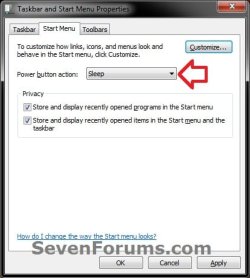
NOTE: This method for a sleep shortcut will allow you to put your computer to sleep no matter if hibernate is enabled or disabled, or what you have your power plan settings set to.1. Set your Start Menu power button to Sleep. (see screenshot below)
:warn:WARNING: This Sleep shortcut will do whatever you have your Start Menu power button set to, so it's important to have this set to Sleep for this shortcut to put your computer to sleep.Start_Menu_PWR_Button.jpg
2. Click on the download button below to download the file below.METHOD_1_Sleep_Shortcut.zip

Download


3. Click on Save, and save the .zip file to the desktop.

4. Select and extract both the Sleep shortcut and "Sleep Shortcut" folder to the desktop.

5. Open the "Sleep Shortcut" folder, then right click on the Sleep.vbs file, click on Properties, General tab, and on the Unblock button. (See screenshot below)
NOTE: If you do not have a Unblock button under the General tab, then the shortcut is already unblocked and you can continue on to step 6.
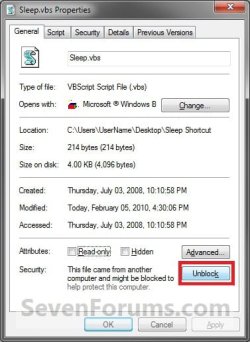
Unblock_VBS.jpg

6.
Right click on the "Sleep Shortcut" folder on the desktop, and click on Cut.

7. Open a Windows Explorer window and navigate to the C:\Program Files folder, then right click on the C:\Program Files folder and click on Paste. (See screenshot below)
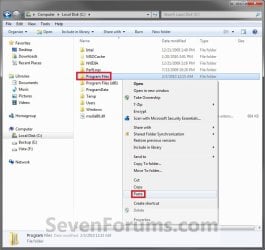
METHOD-1_Step1.jpg

8.
If prompted, click on Continue and Yes to approve copying the "Sleep Shortcut" folder into the C:\Program Files folder.

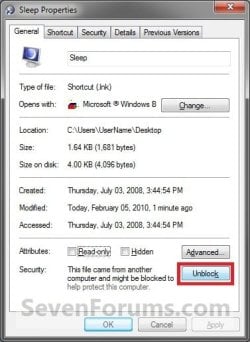
9. Right click on the Sleep shortcut, and click on Properties, General tab, and on the Unblock button. (See screenshot below)
NOTE: If you do not have a Unblock button under the General tab, then the shortcut is already unblocked and you can continue on to step 10.Unblock_Sleep_VBS.jpg
10. Move the Sleep shortcut on the desktop to where you like for easy use.

11. When done, you can delete the downloaded .zip file on the desktop if you like, or save it to use again.


METHOD TWO

A Normal Sleep Shortcut


NOTE: This method for a sleep or standby shortcut will allow you to put your computer to sleep, but you must have hibernate disabled for this shortcut to not have your computer hibernate instead.


OPTION ONE

Download the Shortcut

1. Click on the download button below to download the Sleep.zip file.
Download


2. Click on Save, and save the .zip file to the desktop.

3. Open the .zip file and extract the Sleep shortcut to the desktop.

4. Right click on the Sleep shortcut, and click on Properties, General tab, and on the Unblock button. (See screenshot below)
NOTE: If you do not have a Unblock button under the General tab, then the shortcut is already unblocked and you can continue on to step 5.
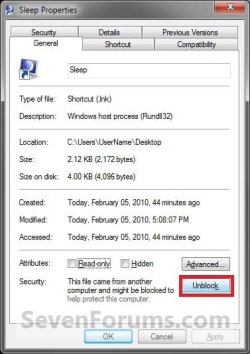
Unblock.jpg

5. Move the shortcut to where you like for easy use.

6. When done, you can delete the downloaded .zip file on the desktop if you like, or save it to use again.


OPTION TWO

Manually Create the Shortcut

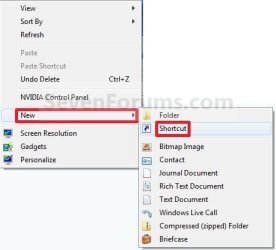
1. Right click on a empty area on desktop, and click on New and Shortcut.

2. Type the command below into the location area, and click on the Next button. (See screenshot below)

Code:
rundll32.exe powrprof.dll,SetSuspendState
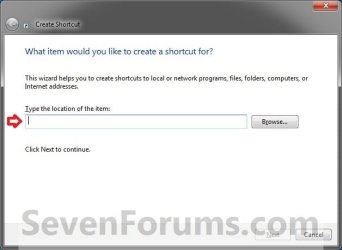
Step1.jpg
3. Type Sleep for the name, and click on the Finish button. (See screenshot below)
NOTE: You can name this anything you would like though.
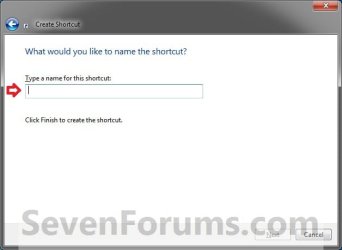
Step2.jpg
4. Right click on the new Sleep shortcut on the Desktop and click on Properties.

5. Click on the Shortcut tab, then click on the Change Icon button. (See screenshot below)
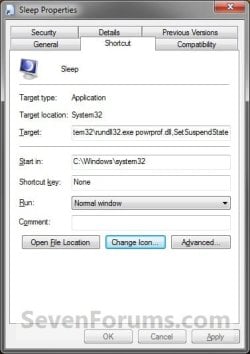
METHOD-2_Step3.jpg

6.
In the line under "Look for icons in this file", type the location below and press Enter. (See screenshot below)

Code:
C:\Windows\System32\imageres.dll
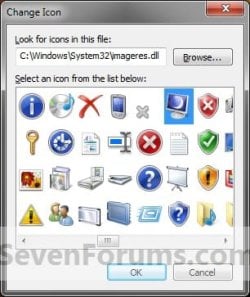
Step4.jpg

7.
Select the icon highlighted in blue above and click on OK. (See screenshot above)
NOTE: You can use any icon that you would like instead though.

8. Click on OK. (See screenshot below step 5)

9. Disable hibernate.

10. Move the shortcut to where you like for easy use.
That's it,
Shawn


Attachments

Last edited:
Shawn - thx for reply ...

What I want is a pure standalone Sleep shortcut that I can pin to the taskbar, while leaving all else as is.

I stumbled across the attached late last night - it works and meets my requirements(quoted above) thus far. I was hoping if you or someone is able to dissect it, show us how it does what it does and relay any 'concerns' if warranted.

-thx
 

Attachments

My Computer

Computer type
PC/Desktop
Computer Manufacturer/Model Number
HP (HP-P6212F)
OS
Microsoft Windows 7 Home Premium 64-bit 7601 Multiprocessor Free Service Pack 1
CPU
Pentium(R) Dual-Core CPU E5300 @ 2.60GHz
Motherboard
PEGATRON CORPORATION Benicia
Memory
6.00 GB
Graphics Card(s)
Intel(R) G33/G31 Express Chipset Family
Sound Card
Realtek High Definition Audio
Monitor(s) Displays
24'' HP WS LCD
Screen Resolution
1920 x 1080 x 32 bits (4294967296 colors) @ 60 Hz
Hard Drives
(1) ATA Hitachi HDT72106 SCSI Disk Device (2) Generic- Compact Flash USB Device (3) Generic- MS/MS-Pro USB Device (4) Generic- SD/MMC USB Device (5) Generic- SM/xD-Picture USB Device (6) Verbatim STORE N GO USB Device
Keyboard
Logitech G510s
Mouse
Logitech Trackball M570
Antivirus
Microsoft Security Essentials / Malwarebytes
Browser
IE / Firefox / Chrome
Thank you for sharing. It scanned clean with Windows Defender.
 

My Computer

Computer type
PC/Desktop
Computer Manufacturer/Model Number
Self built custom
OS
64-bit Windows 11 Pro for Workstations
CPU
Intel i7-8700K OC'd to 5 GHz
Motherboard
ASUS ROG Maximus XI Formula Z390
Memory
64 GB (4x16GB) G.SKILL TridentZ RGB DDR4 3600 MHz
Graphics Card(s)
ASUS ROG-STRIX-GTX1080TI-O11G-GAMING
Sound Card
Integrated
Monitor(s) Displays
2 x Samsung Odyssey G7 27"
Screen Resolution
2560x1440
Hard Drives
1TB Samsung 990 PRO M.2,
4TB Samsung 990 PRO PRO M.2,
TerraMaster F8 SSD Plus NAS
PSU
Seasonic Prime Titanium 850W
Case
Thermaltake Core P3
Cooling
Corsair Hydro H115i
Keyboard
Logitech wireless K800
Mouse
Logitech MX Master 4
Internet Speed
2 Gb/s Download and 100 Mb/s Upload
Antivirus
Malwarebyte Anti-Malware Premium
Browser
Google Chrome
Other Info
Logitech Z625 speaker system,
Logitech BRIO 4K Pro webcam,
HP Color LaserJet Pro MFP M477fdn,
APC SMART-UPS RT 1000 XL - SURT1000XLI,
Galaxy S23 Plus phone
Thank you for sharing. It scanned clean with Windows Defender.
Your welcome. I simply made a shortcut from the .exe via r-clik context menu's Create shortcut. So, will this qualify as a 'Method Three' for this topic?
 

My Computer

Computer type
PC/Desktop
Computer Manufacturer/Model Number
HP (HP-P6212F)
OS
Microsoft Windows 7 Home Premium 64-bit 7601 Multiprocessor Free Service Pack 1
CPU
Pentium(R) Dual-Core CPU E5300 @ 2.60GHz
Motherboard
PEGATRON CORPORATION Benicia
Memory
6.00 GB
Graphics Card(s)
Intel(R) G33/G31 Express Chipset Family
Sound Card
Realtek High Definition Audio
Monitor(s) Displays
24'' HP WS LCD
Screen Resolution
1920 x 1080 x 32 bits (4294967296 colors) @ 60 Hz
Hard Drives
(1) ATA Hitachi HDT72106 SCSI Disk Device (2) Generic- Compact Flash USB Device (3) Generic- MS/MS-Pro USB Device (4) Generic- SD/MMC USB Device (5) Generic- SM/xD-Picture USB Device (6) Verbatim STORE N GO USB Device
Keyboard
Logitech G510s
Mouse
Logitech Trackball M570
Antivirus
Microsoft Security Essentials / Malwarebytes
Browser
IE / Firefox / Chrome
I'll give it some more time to make sure it's safe first since it is an .exe file from an unknown source.
 

My Computer

Computer type
PC/Desktop
Computer Manufacturer/Model Number
Self built custom
OS
64-bit Windows 11 Pro for Workstations
CPU
Intel i7-8700K OC'd to 5 GHz
Motherboard
ASUS ROG Maximus XI Formula Z390
Memory
64 GB (4x16GB) G.SKILL TridentZ RGB DDR4 3600 MHz
Graphics Card(s)
ASUS ROG-STRIX-GTX1080TI-O11G-GAMING
Sound Card
Integrated
Monitor(s) Displays
2 x Samsung Odyssey G7 27"
Screen Resolution
2560x1440
Hard Drives
1TB Samsung 990 PRO M.2,
4TB Samsung 990 PRO PRO M.2,
TerraMaster F8 SSD Plus NAS
PSU
Seasonic Prime Titanium 850W
Case
Thermaltake Core P3
Cooling
Corsair Hydro H115i
Keyboard
Logitech wireless K800
Mouse
Logitech MX Master 4
Internet Speed
2 Gb/s Download and 100 Mb/s Upload
Antivirus
Malwarebyte Anti-Malware Premium
Browser
Google Chrome
Other Info
Logitech Z625 speaker system,
Logitech BRIO 4K Pro webcam,
HP Color LaserJet Pro MFP M477fdn,
APC SMART-UPS RT 1000 XL - SURT1000XLI,
Galaxy S23 Plus phone
I'll give it some more time to make sure it's safe first since it is an .exe file from an unknown source.
fyi, the attachment contains a text file with author contact info.
 

My Computer

Computer type
PC/Desktop
Computer Manufacturer/Model Number
HP (HP-P6212F)
OS
Microsoft Windows 7 Home Premium 64-bit 7601 Multiprocessor Free Service Pack 1
CPU
Pentium(R) Dual-Core CPU E5300 @ 2.60GHz
Motherboard
PEGATRON CORPORATION Benicia
Memory
6.00 GB
Graphics Card(s)
Intel(R) G33/G31 Express Chipset Family
Sound Card
Realtek High Definition Audio
Monitor(s) Displays
24'' HP WS LCD
Screen Resolution
1920 x 1080 x 32 bits (4294967296 colors) @ 60 Hz
Hard Drives
(1) ATA Hitachi HDT72106 SCSI Disk Device (2) Generic- Compact Flash USB Device (3) Generic- MS/MS-Pro USB Device (4) Generic- SD/MMC USB Device (5) Generic- SM/xD-Picture USB Device (6) Verbatim STORE N GO USB Device
Keyboard
Logitech G510s
Mouse
Logitech Trackball M570
Antivirus
Microsoft Security Essentials / Malwarebytes
Browser
IE / Firefox / Chrome
Shawn - thx for reply ...
What I want is a pure standalone Sleep shortcut that I can pin to the taskbar, while leaving all else as is.
I stumbled across the attached late last night - it works and meets my requirements(quoted above) thus far. I was hoping if you or someone is able to dissect it, show us how it does what it does and relay any 'concerns' if warranted.
-thx
I uploaded your Sleep.ZIP file to virustotal.com. The resulting report has 2 hits which state it could be "W32/Symmi.AJ.gen!Eldorado" infected, whatever that is. I don't know if this is correct or not. virustotal.com is a free service which uses 57 different virus scanners. These could be just false positives. However, since the report is not clean, I cannot use this file. I just wanted to give anyone who is thinking about using this file a friendly warning.

I used the create shortcut method first using the command:
C:\Windows\System32\rundll32.exe Powrprof.dll,SetSuspendState

and then:
C:\Windows\System32\rundll32.exe Powrprof.dll,SetSuspendState Sleep

Because I have Hibernate enabled, using the shortcut put my computer into Hibernation mode instead of sleep. Unless you turn off Hibernation, you cannot use a simple shortcut to put your PC to sleep. I guess Microsoft just wanted to make things harder for us.
 

My Computer

OS
Windows 7 Pro x64
It a false positive.

The file is nothing more than a shortcut that runs a .vbs file, and both are 100% safe and clean. Here's the contents of the .vbs file below.

Code:
Dim objShell 
Set objShell = CreateObject("Shell.Application") 
objShell.ShutdownWindows
set objShell = nothing
Set WshShell = CreateObject("WScript.Shell")

WshShell.SendKeys "{Enter}"
Set WshShell = Nothing


Yep, you must have hibernate disabled for the sleep shortcut to work as noted under Method Two. :(
 

My Computer

Computer type
PC/Desktop
Computer Manufacturer/Model Number
Self built custom
OS
64-bit Windows 11 Pro for Workstations
CPU
Intel i7-8700K OC'd to 5 GHz
Motherboard
ASUS ROG Maximus XI Formula Z390
Memory
64 GB (4x16GB) G.SKILL TridentZ RGB DDR4 3600 MHz
Graphics Card(s)
ASUS ROG-STRIX-GTX1080TI-O11G-GAMING
Sound Card
Integrated
Monitor(s) Displays
2 x Samsung Odyssey G7 27"
Screen Resolution
2560x1440
Hard Drives
1TB Samsung 990 PRO M.2,
4TB Samsung 990 PRO PRO M.2,
TerraMaster F8 SSD Plus NAS
PSU
Seasonic Prime Titanium 850W
Case
Thermaltake Core P3
Cooling
Corsair Hydro H115i
Keyboard
Logitech wireless K800
Mouse
Logitech MX Master 4
Internet Speed
2 Gb/s Download and 100 Mb/s Upload
Antivirus
Malwarebyte Anti-Malware Premium
Browser
Google Chrome
Other Info
Logitech Z625 speaker system,
Logitech BRIO 4K Pro webcam,
HP Color LaserJet Pro MFP M477fdn,
APC SMART-UPS RT 1000 XL - SURT1000XLI,
Galaxy S23 Plus phone
thanks!
just used it to my new win7 pc
OPTl.PNG
OPTION TWO
OPTR.PNG

Manually Create the Shortcut


- works like charm;)
 

My Computer

Computer type
PC/Desktop
OS
98SE/XP/windows7 32bit/ win10
You're most welcome prukeyhi. I'm glad it could help. :)
 

My Computer

Computer type
PC/Desktop
Computer Manufacturer/Model Number
Self built custom
OS
64-bit Windows 11 Pro for Workstations
CPU
Intel i7-8700K OC'd to 5 GHz
Motherboard
ASUS ROG Maximus XI Formula Z390
Memory
64 GB (4x16GB) G.SKILL TridentZ RGB DDR4 3600 MHz
Graphics Card(s)
ASUS ROG-STRIX-GTX1080TI-O11G-GAMING
Sound Card
Integrated
Monitor(s) Displays
2 x Samsung Odyssey G7 27"
Screen Resolution
2560x1440
Hard Drives
1TB Samsung 990 PRO M.2,
4TB Samsung 990 PRO PRO M.2,
TerraMaster F8 SSD Plus NAS
PSU
Seasonic Prime Titanium 850W
Case
Thermaltake Core P3
Cooling
Corsair Hydro H115i
Keyboard
Logitech wireless K800
Mouse
Logitech MX Master 4
Internet Speed
2 Gb/s Download and 100 Mb/s Upload
Antivirus
Malwarebyte Anti-Malware Premium
Browser
Google Chrome
Other Info
Logitech Z625 speaker system,
Logitech BRIO 4K Pro webcam,
HP Color LaserJet Pro MFP M477fdn,
APC SMART-UPS RT 1000 XL - SURT1000XLI,
Galaxy S23 Plus phone
Hi!


Three things to mention & query :


1. Sleep.vbs is taking my windows 8.1 x64 laptop to Shut Down even after setting the Power Button to Sleep. Hibernation is on But Hybrid Sleep is Off. Am I supposed to provide any images or reports ?


2. There are better Icon options available for Sleep function at the address :
%SystemRoot%\system32\SHELL32.dll

3. I am using the '' PsShutdown -d -t 0 " command ( SysInternals Utility : PsTools / PsShutdown.exe ) for the shortcut. ( Ref : Microsoft Community Thread : 2nd Response )
Is it a safe practice technically ?

Thanks. ...


UPDATE : Enjoyed! I had to Change Default Action of Alt+F4 "Shut Down Windows" Dialog to Sleep : EightForums i.e. the very same thing as the 4th Option ( Registry Option ) & 5th Option ( Group Policy ) as Change the Default Windows 7 Start Menu Power Button Action to Sleep!

But Group Policy Registry is not available in windows 8!


Last edited:

My Computer

Computer type
Laptop
Computer Manufacturer/Model Number
hp compaq presario c795VU notebook pc
OS
Windows 7 Ultimate x32 With Sp1 + Vista Ultimate x32 with Sp1 & Sp2 !!
CPU
Intel Mobile Core 2 Duo T5750 @ 2.00GHz Merom 65nm Technolog
Motherboard
Hewlett-Packard 30D9 (CPU)
Memory
2.00GB Dual-Channel DDR2 @ 332MHz (5-5-5-15)
Graphics Card(s)
Mobile Intel(R) 965 Express Chipset Family
Sound Card
High Definition Audio Device
Monitor(s) Displays
LP154WX4-TLCB on Mobile Intel 965 Express Chipset Family
Screen Resolution
1280x800 @ 60Hz
Hard Drives
149GB Western Digital WDC WD1600BEVS-60VAT0 ATA Device (SATA)
Keyboard
Standard 101/102-Key or Microsoft Natural PS/2 Key + HP QLB
Mouse
ALPS pointing device
Antivirus
Kaspersky AV 2017(Win 7) & AVG AntiVirus Free 2016 (VISTA)
Browser
google chrome
Back
Top