Slightly different Update issue

HXM

New member
Local time
8:19 PM
Messages
5
Hello all,

New member here, I have been very impressed with the help and cooperation on these forums. I have looked through a number of threads and don't believe I have come across my issue, if there has been a fix, I have not yet found it, so here goes:

My issue is that whenever I try to search for updates in the updates section of the control panel I get a message informing me I need to restart my pc to install updates, but when I do so, no updates are installed, and upon returning to the updates section of the control panel I once again get the same message informing me I need to restart my pc etc etc.

Additionally, sometimes another window will pop up, informing me the pc will restart, to install updates, unless I postpone. I am running a Gateway PC, with windows 7 home, with SP1.

Thanks in advance for your thoughts.
 

My Computer My Computer

At a glance

Windows 7 64 bit with SP1
Computer type
PC/Desktop
Computer Manufacturer/Model Number
Gateway
OS
Windows 7 64 bit with SP1
Hello and welcome:

In order for us to better assist you, we need a bit more information.

I suggest starting with the advice here:

Windows Update Posting Instructions

Then, please post the requested logs/data in your next reply here in this thread.

Thanks,
MM
 

My Computer My Computer

At a glance

OEM Windows 7 Ult (x64) SP1Intel Core-i7 3770 @ 3.4 GHz16 GB DDR3 SDRAM @ 1333 MHzNVidia GeForce GT620 1 GB
Computer type
PC/Desktop
Computer Manufacturer/Model Number
Dell Studio XPS 8500
OS
OEM Windows 7 Ult (x64) SP1
CPU
Intel Core-i7 3770 @ 3.4 GHz
Motherboard
"Dell" branded
Memory
16 GB DDR3 SDRAM @ 1333 MHz
Graphics Card(s)
NVidia GeForce GT620 1 GB
Sound Card
THX TruStudio PC
Monitor(s) Displays
Dell U2410 Full HD
Hard Drives
2.0 TB SATA2 @ 7200 RPM
PSU
350W
Keyboard
MS 4000 Ergon - Wired
Mouse
Logitech Anywhere MX
Internet Speed
Cable HSI w/Turbo (router)
Antivirus
KIS-MBAM Premium-MBAE Premium
Browser
Fx (current version); IE
Other Info
And a Win7/64 Pro laptop; And a Win10/64 Pro desktop.
Hi and welcome to SevenForums,
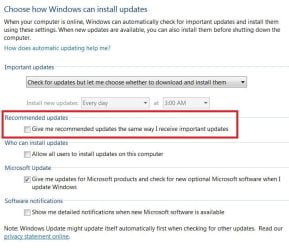
First thing I would do is switch you update settings to these,
update settings.JPG

That will at the least allow you to see which update is not installing correctly and what it's classified as Important/ recommended or optional which both of the last two will be in the Optional second now with those exact settings.

Post any screen shots you like of both sections so we can see them
You might have to use the Go Advanced instead of Quick Reply to see the Paper clip icon to upload = Forum glitch.
 

My Computer My Computer

At a glance

Win-7-Pro64bit 7-H-Prem-64biti7-5930K 2nd i9-9940x both water blocked VRM'...Trident-z 3200C14 2nd Trident-z 3600C16EVGA 1080ti ftw3 2nd Titan Xp both water blocked
Computer type
PC/Desktop
Computer Manufacturer/Model Number
Custom assembled by me :}
OS
Win-7-Pro64bit 7-H-Prem-64bit
CPU
i7-5930K 2nd i9-9940x both water blocked VRM's too
Motherboard
ASUS SABERTOOTH X99 2nd ASUS x299 Apex
Memory
Trident-z 3200C14 2nd Trident-z 3600C16
Graphics Card(s)
EVGA 1080ti ftw3 2nd Titan Xp both water blocked
Sound Card
Built-in Realtek
Monitor(s) Displays
1-AOC G2460PG 24"G-Sync 144Hz/ 2nd 1-ASUS VG248QE 24" 144Hz
Screen Resolution
1920 x 1080 144Hz
Hard Drives
2-Samsung M.2 Evo & Evo Plus
2-Samsung 850 EVO 500GB SSD's/ 3-2.5 W.D. Black 1tb-&3-1tb/3-3.5 WD Black 1tb hdd's
PSU
EVGA SuperNOVA 1000-P2 2nd 1200-P2
Case
2-Corsair Obsidian Series 450D Black ATX Mid Tower
Cooling
Custom water loops
Keyboard
Logitech G710+/ 2nd Logitech G910
Mouse
2-RedDragon M901 Perdition 16400 dpi Gaming mouse = wired
Internet Speed
Comcast Ping 19ms 89.31mbps download speed 6.12mbps upload
Antivirus
Malwarebytes Pro/ Superantispyware Pro
Browser
FireFox & Pale moon
Other Info
2nd ASUS X299 Apex/Intel i9-9940x with Custom water loop/7H-Prem-x64/Corsair 450D case/Ram Trident-z 3600C16 4x8gb / Samsung970Evo plus 500gb SSD/Dual ssd EZ swap evo/PSU EVGA SuperNova 1200w-P2 80+Platinum/GPU Titan Xp /8-ML-140 on push-pull on 2-280GTX rads
Thanks for the welcome and for both replies. I am at work now, PC is at home, I will gather more info and update settings to the suggested tonight, how do I gain access to this window to make the challenges? ,
 

My Computer My Computer

At a glance

Windows 7 64 bit with SP1
Computer type
PC/Desktop
Computer Manufacturer/Model Number
Gateway
OS
Windows 7 64 bit with SP1
Hi,
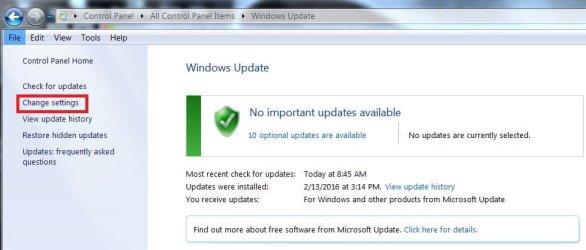
Click Start and type in the search box
windows update
Click on the suggestion

Then just use the link on the top left Change settings
change update settings.JPG
 

My Computer My Computer

At a glance

Win-7-Pro64bit 7-H-Prem-64biti7-5930K 2nd i9-9940x both water blocked VRM'...Trident-z 3200C14 2nd Trident-z 3600C16EVGA 1080ti ftw3 2nd Titan Xp both water blocked
Computer type
PC/Desktop
Computer Manufacturer/Model Number
Custom assembled by me :}
OS
Win-7-Pro64bit 7-H-Prem-64bit
CPU
i7-5930K 2nd i9-9940x both water blocked VRM's too
Motherboard
ASUS SABERTOOTH X99 2nd ASUS x299 Apex
Memory
Trident-z 3200C14 2nd Trident-z 3600C16
Graphics Card(s)
EVGA 1080ti ftw3 2nd Titan Xp both water blocked
Sound Card
Built-in Realtek
Monitor(s) Displays
1-AOC G2460PG 24"G-Sync 144Hz/ 2nd 1-ASUS VG248QE 24" 144Hz
Screen Resolution
1920 x 1080 144Hz
Hard Drives
2-Samsung M.2 Evo & Evo Plus
2-Samsung 850 EVO 500GB SSD's/ 3-2.5 W.D. Black 1tb-&3-1tb/3-3.5 WD Black 1tb hdd's
PSU
EVGA SuperNOVA 1000-P2 2nd 1200-P2
Case
2-Corsair Obsidian Series 450D Black ATX Mid Tower
Cooling
Custom water loops
Keyboard
Logitech G710+/ 2nd Logitech G910
Mouse
2-RedDragon M901 Perdition 16400 dpi Gaming mouse = wired
Internet Speed
Comcast Ping 19ms 89.31mbps download speed 6.12mbps upload
Antivirus
Malwarebytes Pro/ Superantispyware Pro
Browser
FireFox & Pale moon
Other Info
2nd ASUS X299 Apex/Intel i9-9940x with Custom water loop/7H-Prem-x64/Corsair 450D case/Ram Trident-z 3600C16 4x8gb / Samsung970Evo plus 500gb SSD/Dual ssd EZ swap evo/PSU EVGA SuperNova 1200w-P2 80+Platinum/GPU Titan Xp /8-ML-140 on push-pull on 2-280GTX rads
I have done stage 1 and 2 of the update recommendations, and enclosed are two screen shots of the issues I am having,

Thanks for your help.
 

Attachments

Last edited:

My Computer My Computer

At a glance

Windows 7 64 bit with SP1
Computer type
PC/Desktop
Computer Manufacturer/Model Number
Gateway
OS
Windows 7 64 bit with SP1
Hi HXM,
the error code means that the service, MSE, is stopping/shutting down?

Have you tried installing it directly from the MSE GUI.
If that fails then id be inclined to think about malware.

no need to use word, use the snipping tool
Screenshots and Files - Upload and Post in Seven Forums

Roy
 

My Computer My Computer

At a glance

W7 home premium 32bit/W7HP 64bit/w10 tp insid...E5300 dual core3gbNvidia Geforce 7100 Nforce 630i
Computer type
PC/Desktop
Computer Manufacturer/Model Number
medionl/Aspire 6930G/acer x55a
OS
W7 home premium 32bit/W7HP 64bit/w10 tp insider ring
CPU
E5300 dual core
Motherboard
medion MS7366
Memory
3gb
Graphics Card(s)
Nvidia Geforce 7100 Nforce 630i
Monitor(s) Displays
avixc
Internet Speed
n (isp resticted to 72)
Antivirus
mse/pands
Browser
palemoon
Other Info
Belkin Fd7050 n USB using Railink RT2870 drivers, more upto date
Hi,
You might consider dumping MSE and use Avast or Panda free instead either one is miles better than MSE :)
If you do make sure you watch the download/ install options for unneeded stuff added to the download from CNet crap website.
 

My Computer My Computer

At a glance

Win-7-Pro64bit 7-H-Prem-64biti7-5930K 2nd i9-9940x both water blocked VRM'...Trident-z 3200C14 2nd Trident-z 3600C16EVGA 1080ti ftw3 2nd Titan Xp both water blocked
Computer type
PC/Desktop
Computer Manufacturer/Model Number
Custom assembled by me :}
OS
Win-7-Pro64bit 7-H-Prem-64bit
CPU
i7-5930K 2nd i9-9940x both water blocked VRM's too
Motherboard
ASUS SABERTOOTH X99 2nd ASUS x299 Apex
Memory
Trident-z 3200C14 2nd Trident-z 3600C16
Graphics Card(s)
EVGA 1080ti ftw3 2nd Titan Xp both water blocked
Sound Card
Built-in Realtek
Monitor(s) Displays
1-AOC G2460PG 24"G-Sync 144Hz/ 2nd 1-ASUS VG248QE 24" 144Hz
Screen Resolution
1920 x 1080 144Hz
Hard Drives
2-Samsung M.2 Evo & Evo Plus
2-Samsung 850 EVO 500GB SSD's/ 3-2.5 W.D. Black 1tb-&3-1tb/3-3.5 WD Black 1tb hdd's
PSU
EVGA SuperNOVA 1000-P2 2nd 1200-P2
Case
2-Corsair Obsidian Series 450D Black ATX Mid Tower
Cooling
Custom water loops
Keyboard
Logitech G710+/ 2nd Logitech G910
Mouse
2-RedDragon M901 Perdition 16400 dpi Gaming mouse = wired
Internet Speed
Comcast Ping 19ms 89.31mbps download speed 6.12mbps upload
Antivirus
Malwarebytes Pro/ Superantispyware Pro
Browser
FireFox & Pale moon
Other Info
2nd ASUS X299 Apex/Intel i9-9940x with Custom water loop/7H-Prem-x64/Corsair 450D case/Ram Trident-z 3600C16 4x8gb / Samsung970Evo plus 500gb SSD/Dual ssd EZ swap evo/PSU EVGA SuperNova 1200w-P2 80+Platinum/GPU Titan Xp /8-ML-140 on push-pull on 2-280GTX rads
Once again, thanks for the replies. If I do go the panda route, how would I then get the missing or incomplete updates, would I have to go to MS and download and install each one individually? If so, how would I find out what updates I have missed out on, is there a "laundry list" of what has been issued for win 7 in terms of 2016 updates?

Thanks again.
 

My Computer My Computer

At a glance

Windows 7 64 bit with SP1
Computer type
PC/Desktop
Computer Manufacturer/Model Number
Gateway
OS
Windows 7 64 bit with SP1
Hi HXM,
The other updates were in a pending state, have you rebooted since?? and checked whether there still showing
The only Failed one was for MSE, which if you install Panda will become irrellevent.

Roy
 

My Computer My Computer

At a glance

W7 home premium 32bit/W7HP 64bit/w10 tp insid...E5300 dual core3gbNvidia Geforce 7100 Nforce 630i
Computer type
PC/Desktop
Computer Manufacturer/Model Number
medionl/Aspire 6930G/acer x55a
OS
W7 home premium 32bit/W7HP 64bit/w10 tp insider ring
CPU
E5300 dual core
Motherboard
medion MS7366
Memory
3gb
Graphics Card(s)
Nvidia Geforce 7100 Nforce 630i
Monitor(s) Displays
avixc
Internet Speed
n (isp resticted to 72)
Antivirus
mse/pands
Browser
palemoon
Other Info
Belkin Fd7050 n USB using Railink RT2870 drivers, more upto date
Hi,
Yep just download Panda to your downloads folder without installing it
Then uninstall MSE in uninstall a program then run this,
http://support.microsoft.com/en-us/kb/2483120

Afterwards just run the Panda free installer from your downloads folder.
Just another heads up
You do not need to associate an email address with Panda just click the link do later...
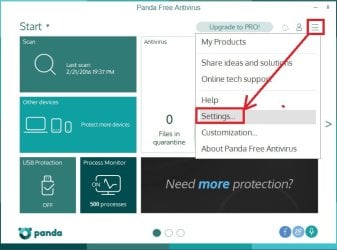
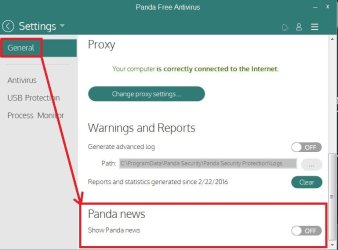
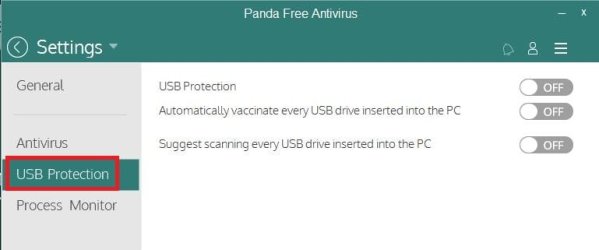
Then you can also turn off Panda news and usb scanning... too if you wish too I do

Panda settings.jpg
Panda news off.JPG
Panda usb protection.JPG

Lastly make sure windows defender is disabled
You can access defender from Start and Control panel
If when you click on it says it's disabled or off your good,
If not and defender opens
Go though the menus Administrator and Uncheck use this program.
Then you won't have to waste time with windows defender updates either or it's slow as hell-o scanning besides I doubt defender in it's existence has never found anything and if it ever did it would not be able to remove it :D
 
Last edited:

My Computer My Computer

At a glance

Win-7-Pro64bit 7-H-Prem-64biti7-5930K 2nd i9-9940x both water blocked VRM'...Trident-z 3200C14 2nd Trident-z 3600C16EVGA 1080ti ftw3 2nd Titan Xp both water blocked
Computer type
PC/Desktop
Computer Manufacturer/Model Number
Custom assembled by me :}
OS
Win-7-Pro64bit 7-H-Prem-64bit
CPU
i7-5930K 2nd i9-9940x both water blocked VRM's too
Motherboard
ASUS SABERTOOTH X99 2nd ASUS x299 Apex
Memory
Trident-z 3200C14 2nd Trident-z 3600C16
Graphics Card(s)
EVGA 1080ti ftw3 2nd Titan Xp both water blocked
Sound Card
Built-in Realtek
Monitor(s) Displays
1-AOC G2460PG 24"G-Sync 144Hz/ 2nd 1-ASUS VG248QE 24" 144Hz
Screen Resolution
1920 x 1080 144Hz
Hard Drives
2-Samsung M.2 Evo & Evo Plus
2-Samsung 850 EVO 500GB SSD's/ 3-2.5 W.D. Black 1tb-&3-1tb/3-3.5 WD Black 1tb hdd's
PSU
EVGA SuperNOVA 1000-P2 2nd 1200-P2
Case
2-Corsair Obsidian Series 450D Black ATX Mid Tower
Cooling
Custom water loops
Keyboard
Logitech G710+/ 2nd Logitech G910
Mouse
2-RedDragon M901 Perdition 16400 dpi Gaming mouse = wired
Internet Speed
Comcast Ping 19ms 89.31mbps download speed 6.12mbps upload
Antivirus
Malwarebytes Pro/ Superantispyware Pro
Browser
FireFox & Pale moon
Other Info
2nd ASUS X299 Apex/Intel i9-9940x with Custom water loop/7H-Prem-x64/Corsair 450D case/Ram Trident-z 3600C16 4x8gb / Samsung970Evo plus 500gb SSD/Dual ssd EZ swap evo/PSU EVGA SuperNova 1200w-P2 80+Platinum/GPU Titan Xp /8-ML-140 on push-pull on 2-280GTX rads
Hello All,

I wanted to check in as you were so quick to come to my aid, and don't want to be ungrateful for your time.

3 kids, homework and life has not left me much time to work on the pc, however, on starting it up last night, it went through a number of update and re-boots so 'something' is getting through.

As soon as I can I will continue with your suggestions etc, but did want to pop in to say hi, and thanks again.
 

My Computer My Computer

At a glance

Windows 7 64 bit with SP1
Computer type
PC/Desktop
Computer Manufacturer/Model Number
Gateway
OS
Windows 7 64 bit with SP1
Back
Top