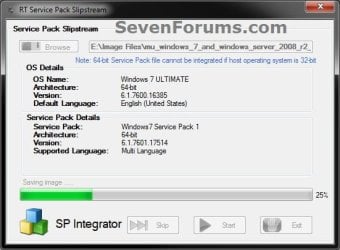
Slipstream Windows 7 SP1 into a Installation DVD or ISO File

How to Slipstream Windows 7 SP1 and Updates to Create a Bootable USB, Installation DVD, or ISO File

   Information
This will show you how to slipstream Windows 7 SP1 with your retail or student copy of Windows 7 without SP1 to create a slipstream Windows 7 SP1 installation "DVD", a slipstream Windows 7 SP1 bootable "ISO file", or a slipstream Windows 7 SP1 bootable installation "USB flash drive".

This will also show you how to integrate Windows Updates into your new or previously created slipstream Windows 7 SP1 to create a new updated slipstream Windows 7 SP1 installation "DVD", a slipstream Windows 7 SP1 bootable "ISO file", or a slipstream Windows 7 SP1 bootable installation "USB flash drive".

   Warning

  • You can only do this tutorial while logged in as an administrator.
  • You can only use a retail copy or student copy of a Windows 7 installation DVD, bootable USB flash drive, or ISO file to create a slipstream Windows 7 SP1 with.
  • You can only use a previously created slipstream Windows 7 SP1 installation DVD, bootable USB flash drive, or ISO file using this tutorial to integrate new Windows Updates to create a new updated slipstream Windows 7 SP1 installation DVD, bootable USB flash drive, or ISO file with.
  • You can only create a 64-bit slipstreamed Windows 7 SP1 DVD or ISO if your current Windows 7 installation is also 64-bit.
  • You can create a 32-bit slipstreamed Windows 7 SP1 DVD or ISO if your current Windows 7 installation is 32-bit or 64-bit.
  • When you install Windows 7 SP1 using the slipstreamed Windows 7 SP1 DVD/ISO/USB created in this tutorial, you will not be able to uninstall SP1.
   Tip

  • You cannot use a slipstream Windows 7 installation disc to do a repair install with on a currently installed Windows 7 SP1.
  • You cannot use a slipstream Windows 7 installation disc to do a repair install with on a currently installed slipstream Windows 7 SP1.
  • You can use a Windows 7 with SP1 installation disc (ex: Technet, MSDN, or retail) to do a repair install with on a current slipstream Windows 7 SP1 installation.
   Note
This tutorial is designed to be followed like a flow chart to help make it easier to use and select the options (ex: DVD or ISO) you want.


Here's How: 1. If you have not already, then you will need download and install the free 32-bit (x86) or 64-bit (x64) RT Seven Lite "Beta 2.6.0" for your same 32-bit or 64-bit Windows 7 installation DVD or ISO file.
   Note
Alternative RT Seven Lite Beta download link: RT Seven Lite Download - Softpedia

Softpedia.jpg

   Warning
At the rt7lite.com site, you will need to scroll down a bit past the RC 1.7.0 build to see the Beta 2.6.0 build download links.

This tutorial will not work using the RC 1.7.0 build.

2. Click on the RT Seven Lite shortcut on your desktop or in the Start Menu to run the program. (see screenshot below) Step1.jpg
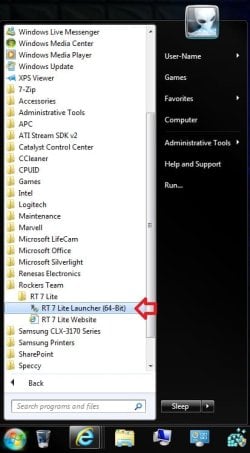
3. Do either step 4 or 5 for what you have to use to integrate the Windows 7 SP1 and/or Windows Updates into.

4. To Select and Use a Windows 7 Installation DVD or Bootable USB A) Insert your retail or previously slipstreamed Windows 7 installation DVD into the DVD drive and close it, OR plug in your Windows 7 bootable USB flash drive. If a AutoPlay pop-up opens, close it.

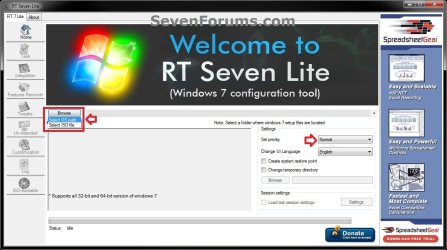
B) In RT Seven Lite, click on the Browse button, and select the Select OS path option. (see screenshot below)
NOTE: If you do not have much else running, then you may wish to change the Set priority setting to High first to help speed the slipstreaming process up some. DVD-1.jpg
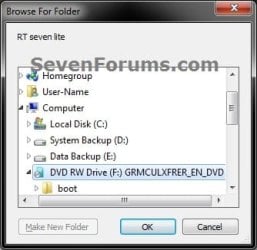
C) Navigate to and select your DVD drive or bootable USB flash drive with Windows 7 on it from steps 4A, and click on OK. (see screeshow below) DVD-2.jpg
D) Click on OK. (see screenshot below) DVD-3.jpg
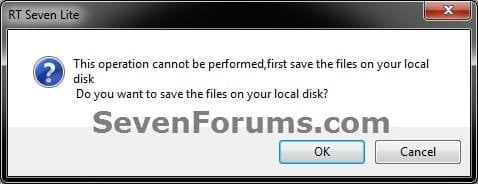
E) Select your Desktop, and click on the Make New Folder button. (see screenshot below) DVD-4.jpg
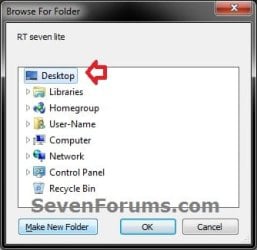
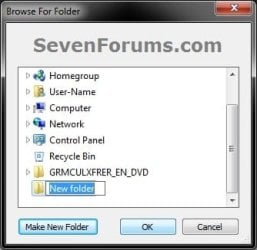
F) Select the New folder on the desktop, and click on OK. (see screenshot below) DVD-5.jpg
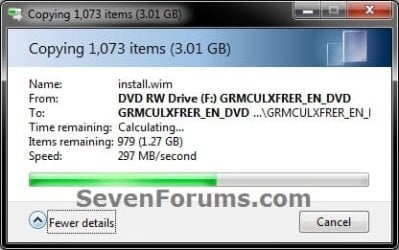
G) The contents of the Windows 7 installation DVD from steps 4A and 4C will now be copied into the New folder (step 4F) on the desktop. (see screenshot below)
NOTE: This may take a few minutes to complete. DVD-6.jpg
H) Go to step 6.
5. To Select and Use a Windows 7 ISO File

   Note
You could use a Windows 7 ISO file that you already created from say RT Seven Lite, or a Windows 7 w/SP1 U ISO downloaded from: Microsoft: Windows 7 Direct Download Links

A) In RT Seven Lite, click on the Browse button, and select the Select ISO file option. (see screenshot below)
NOTE: If you do not have much else running, then you may wish to change the Set priority setting to High first to help speed the slipstreaming process up some. ISO-1.jpg
B) Click on the Select a ISO button. (see screenshot below) ISO-2.jpg
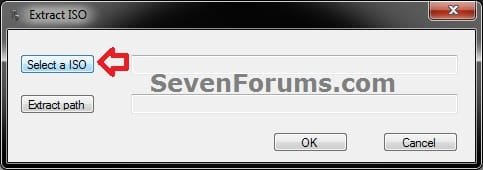
C) Navigate to and select the Windows 7 ISO file, and click on Open. (see screenshot below) ISO-3.jpg
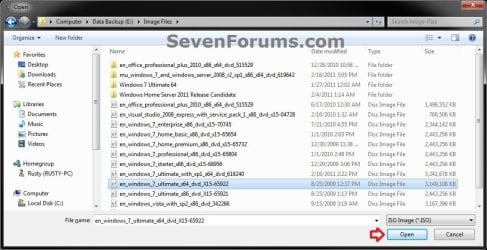
D) Select the Extract path button. (see screenshot below) ISO-4.jpg
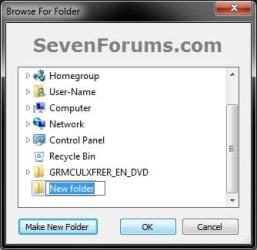
E) Select your Desktop, and click on the Make New Folder button. (see screenshot below) ISO-5.jpg
F) Select the New folder on the desktop, and click on OK. (see screenshot below) ISO-6.jpg
G) Click on OK. (see screenshot below) ISO-7.jpg
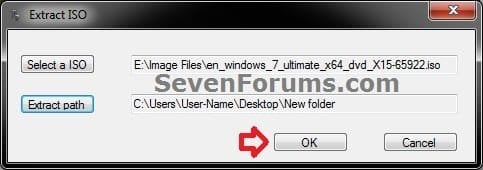
H) The contents of the Windows 7 ISO file from step 5C will now be extracted and copied into the New folder (step 5F) on the desktop. (see screenshot below)
NOTE: This may take only a few minutes to complete. ISO-8.jpg
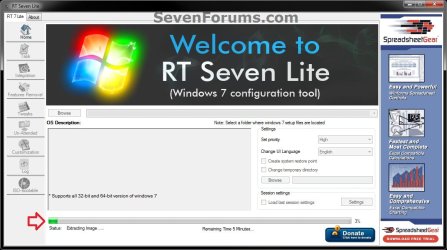
I) Continue on to step 6.
6. Do either step 7 or 8 below for what you want to do.

7. To Only Integrate New Windows Updates
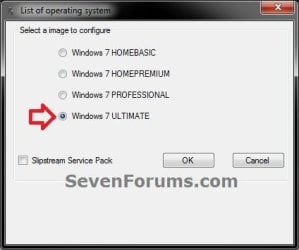
NOTE: You would only select this option if used a previously created slipstream Windows 7 SP1 installation DVD, bootable USB flash drive, or ISO file using this tutorial in step 4 or 5 above, and only want to update it by integrating new Windows Updates. A) When finished, select (dot) the Windows 7 edition that you want to create a updated SP1 slipstream version of, and click on OK. (see screenshot below)
NOTE: When this window below opens it likes to hide behind another opened active window, so you may need to check behind them when the screenshot above (step 5H) shows it's "Status" as Loading Image.... and does not appear to be doing anything. Step2.jpg
B) Go to step 9.
8. To Slipstream SP1 and to be able to Integrate Windows Updates
NOTE: You would select this option if you used a retail copy or student copy of a Windows 7 installation DVD, bootable USB flash drive, or ISO file that did not have SP1 slipstreamed in it in step 4 or 5 above. A) If you have not already, then you will need to download the same 32-bit (x86) or 64-bit (x64) Windows 7 SP1 EXE installation file for your same 32-bit or 64-bit Windows 7 installation DVD or ISO file at the Microsoft link below, and save it to your Desktop. Download details: Windows 7 and Windows Server 2008 R2 Service Pack 1 (KB976932)
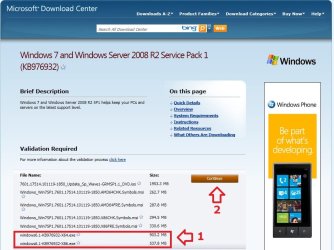
Download.jpg
B) Right click on the downloaded windows6.1-KB976932-X64.exe or windows6.1-KB976932-X86.exe file, click on Properties, click on the General tab, and click on Unblock.
NOTE: If you do not have a Unblock button under the General tab, then the SP1 exe file is already unblocked and you can continue on to step 8C.

C) When RT Seven Lite is finished from step 4G or 5H, select (dot) only the one Windows 7 edition that you want to create a slipstream SP1 version of, check the Slipstream Service Pack box, and click on OK. (see screenshot below) Step3.jpg
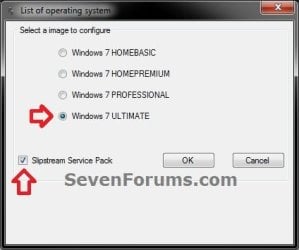
D) Click on the Browse button. (see screenshot below) Step4.jpg
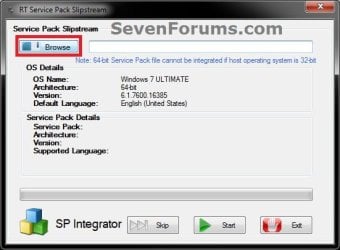
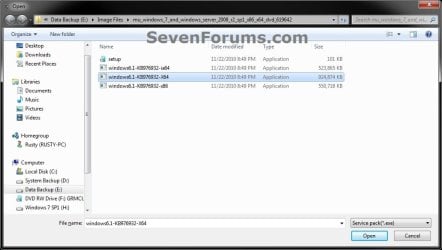
E) Navigate to and select the Windows 7 SP1 EXE installation file on your desktop from step 1, and click on Open. (see screenshot below) Step5.jpg
F) Click on the Start button. (see screenshot below) Step6.jpg
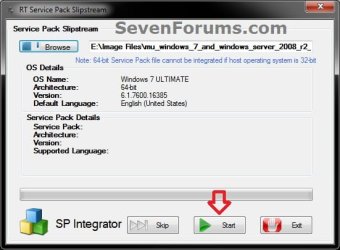
G) RT Seven Lite will now start preparing, integrating, and saving the SP1 (step 9) with the DVD (step 4) or ISO file (step 5). (see screenshots below)
NOTE: This will take a good while to complete depending on how fast your system is and what you have the priority level set as in step 4B. Step7.jpg

Step8.jpg

H) When finished, click on the Proceed button. (see screenshot below) Step10.jpg
I) RT Seven Lite will now start start loading the image. (see screenshot below)
NOTE: This will take a few minutes to complete. Step11.jpg
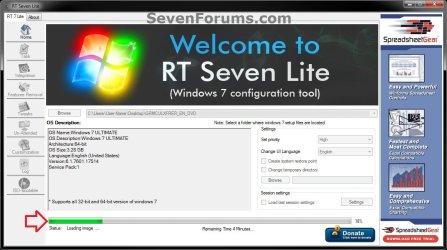
J) Continue on to step 9.
9. When finished, click on the Task tab in the left pane. (see screenshot below) Step12.jpg
10. Do either step 11 or 12 below for what you want to do.

11. To Only Slipstream SP1
NOTE: You would do this step if you did step 8 above and do not want to integrate any Windows Updates into the Slipstream Windows 7 SP1 installation DVD, bootable USB flash drive, or ISO file. A) In the Task tab, check the ISO Bootable box option, then click on the ISO-Bootable tab in the left pane. (see screenshot below)
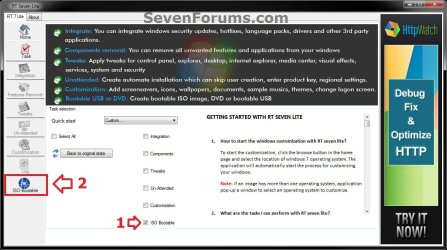
Step13.jpg
B) Go to step 12F.
12. To Integrate Windows Updates and still be able to Slipstream SP1 (if not already)
NOTE: You would do this step if you did step 7 above and want to integrate Windows Updates into this new or previously created Slipstream Windows 7 SP1 installation DVD, bootable USB flash drive, or ISO file. A) If you have not already, then you will need to download the standalone MSU installation files for each Windows Update that you want to integrate into the slipstream, and save them to your Desktop.

B) In the Task tab in RT Seven Lite, check the Integration box and ISO Bootable box options, then click on the Integration tab in the left pane. (see screenshot below) Update-1.jpg
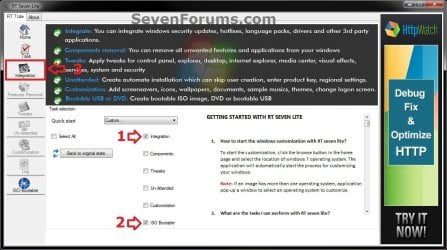
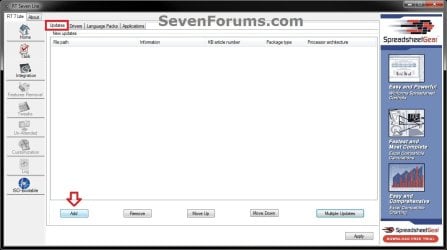
C) Under the Updates tab, click on the Add button. (see screenshot below) Update-2.jpg
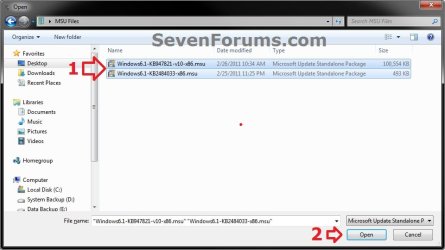
D) Navigate to and select all of the Windows Update MSU files that you want to integrate, and click on Open. (see screenshot below)
NOTE: You can press and hold the CTRL key to select more than one random MSU file. Update-3.jpg
E) When finished adding MSU files, click on Apply. (see screenshot below) Update-4.jpg
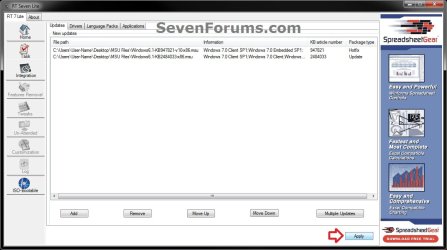
F) Do either step 12G or 12H for what type of Slipstream Windows 7 SP1 you want.

G) To Create a Single Windows 7 SP1 Edition Slipstream

NOTE: This will create a Slipstream Windows 7 SP1 with only the one Windows 7 edition that you selected in step 7A or 8C.
  • Select High priority level, select (dot) Build current image only, and click on Commit. (see screenshot below)
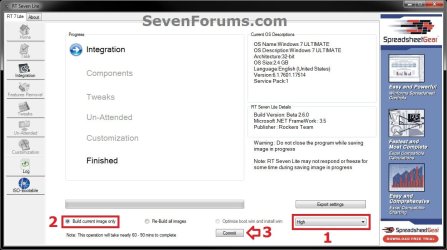
Update-5-single.jpg

  • Go to step 12I
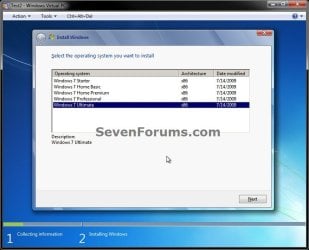
H) To Create a All-in-One Windows 7 SP1 Edition Slipstream
NOTE: This will create a Slipstream Windows 7 SP1 with all Windows 7 editions that will allow you to select which one to install during installation. (see screenshot below) All-in-one.jpg
  • Select High priority level, select (dot) Re-build all images, and click on Commit. (see screenshot below)
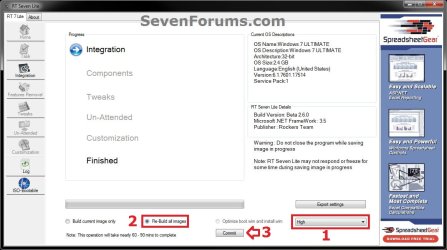
Update-5-all-in-one.jpg

  • Continue on to step 12I
I) RT Seven Lite will now start integrating the Windows Updates. (see screenshot below)
NOTE: This may take from a few minutes or longer depending on how many Windows Update MSU files you added. Update-6.jpg
J) When finished, click on the ISO-Bootable tab in the left pane. (see screenshot below) Update-7.jpg
K) Continue on to step 13.
13. Do either step 14, 15, or 16 for what you would like to have your Slipstreamed Windows 7 SP1 as.

14. To Burn a Slipstream Windows 7 SP1 Installation DVD A) Insert a blank DVD (ex: DVD-R) into the DVD drive and close it. If a AutoPlay pop-up opens, close it.

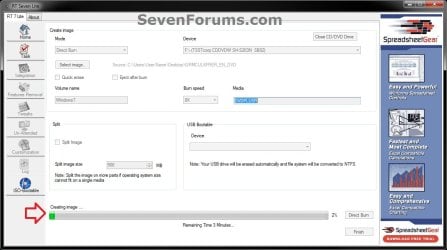
B) In RT Seven Lite, select the Direct Burn drop down menu option under Mode, select the drive letter used from step 14A under Device, then click on the Direct Burn button towards the bottom right. (see screenshot below) Step14-DVD.jpg
C) RT Seven Lite will now start creating the image. (see screenshot below)
NOTE: This will take a few minutes to complete. Step15-DVD.jpg
D) When finished, click on OK. If a AutoPlay pop-up opens, close it. (see screenshots below) Step16-DVD.jpg
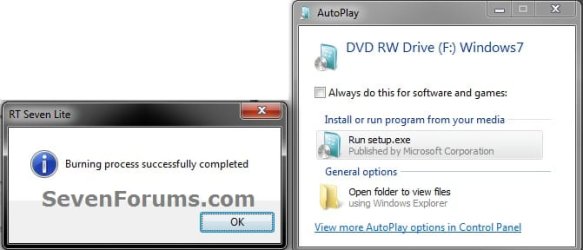
E) You now have a slipstream Windows 7 SP1 installation DVD.

F) Go to step 17.
15. To Create a Slipstream Windows 7 SP1 ISO File A) In RT Seven Lite, select the Create Image drop down menu option under Mode, then click on the Make ISO button towards the bottom right. (see screenshot below) Step14-ISO.jpg
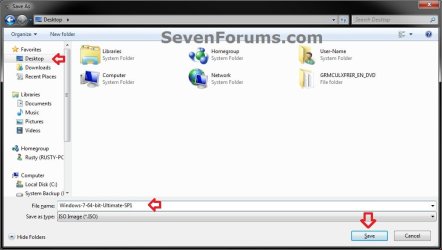
B) Navigate to and select your Desktop, type in a name that you want for the ISO file, then click on the Save button. (see screenshot below) Step15-ISO.jpg
C) When finished, click on OK. (see screenshot below) Step16-ISO.jpg

D) You now have a slipstream Windows 7 SP1 bootable ISO file.
   Note

  • You could also use this ISO file to burn and create a Slipstream Windows 7 SP1 installation DVD with.
  • You could also use this ISO file to create a Slipstream Windows 7 SP1 bootable installation USB flash drive with. For how, see part 2 here: Windows 7 USB/DVD Download Tool
  • You could also test or use this ISO file in a virtual machine if you like.

E) Go to step 17.
16. To Create a Slipstream Windows 7 SP1 Bootable Installation USB Flash Drive A) If you have not already, plug in your USB flash drive.
NOTE: You will need to have at least 4.5 GB free on the USB flash drive.

B) In RT Seven Lite, select the USB Bootable drop down menu option under Mode. (see screenshot below) USB-1.jpg
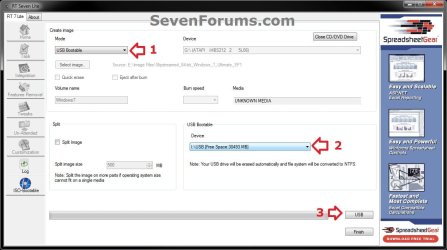
C) Select your USB flash drive from the drop down menu under USB Bootable. (see screenshot above)
NOTE: If there is not enough free space on the selected USB flash drive, you will get a notice telling you so. You will then need to select a larger USB flash drive. (see screenshot below) USB-Error.jpg
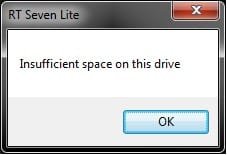
D) Click on the USB button towards the bottom right. (see screenshot below step 16B)

E) Click on OK to format the USB flash drive. (see screenshot below) USB-2.jpg
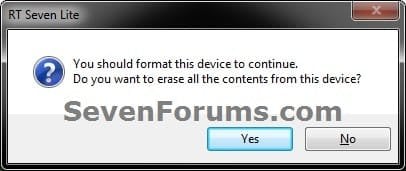
F) RT Seven Lite will now start formating the USB flash drive and copying the files to it. (see screenshot below)
NOTE: This will take a few minutes to complete. USB-3.jpg
G) When it's finished, click on OK. (see screenshot below) USB-4.jpg
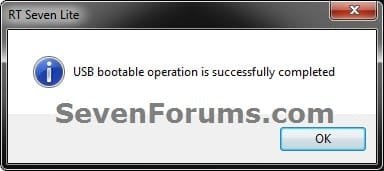
H) You now have a slipstream Windows 7 SP1 bootable installation USB flash drive.

I) Continue on to step 17.
17. Close RT Seven Lite.

18. Click on Yes to confirm closing RT Seven Lite. (see screenshot below) Step17.jpg
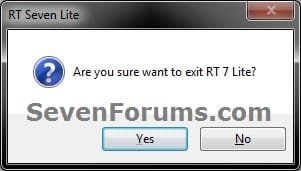
19. RT Seven Lite will now clean up it's temp files before closing. (see screenshot below)
:warn:WARNING: Do not stop or interrupt RT Seven Lite from cleaning it's temp files to avoid getting this error here the next time you try and run RT Seven Lite. Step18.jpg

20. You can now delete the New folder from step 4E or 5E and it's contents on the desktop if you like.
   Tip
You can keep your newly created slipstream Windows 7 SP1 installation DVD, bootable USB flash drive, or ISO file updated by doing this tutorial again with steps 7 and 12 to integrate any new Windows Updates released afterwards into it.

When you install Windows 7 SP1 using the slipstream Windows 7 SP1 DVD/ISO/USB created in this tutorial, you will be able to use the Windows 7 SP1 Disk Cleanup Tool (OPTION THREE at link) to delete the SP1 backup files.


That's it,
Shawn


Attachments

  • Step9.jpg
    Step9.jpg
    33.4 KB · Views: 252
  • Disk_Cleanup-1.jpg
    Disk_Cleanup-1.jpg
    35.9 KB · Views: 262
  • Disk_Cleanup-2.jpg
    Disk_Cleanup-2.jpg
    31.9 KB · Views: 276
Last edited:
You're welcome John.

It's not a must to have the updates integrated in order, but I could see some issues if a newer update required a older one to be installed first though.
 

My Computer My Computer

At a glance

64-bit Windows 11 Pro for WorkstationsIntel i7-8700K OC'd to 5 GHz64 GB (4x16GB) G.SKILL TridentZ RGB DDR4 3600...ASUS ROG-STRIX-GTX1080TI-O11G-GAMING
Computer type
PC/Desktop
Computer Manufacturer/Model Number
Self built custom
OS
64-bit Windows 11 Pro for Workstations
CPU
Intel i7-8700K OC'd to 5 GHz
Motherboard
ASUS ROG Maximus XI Formula Z390
Memory
64 GB (4x16GB) G.SKILL TridentZ RGB DDR4 3600 MHz
Graphics Card(s)
ASUS ROG-STRIX-GTX1080TI-O11G-GAMING
Sound Card
Integrated
Monitor(s) Displays
2 x Samsung Odyssey G7 27"
Screen Resolution
2560x1440
Hard Drives
1TB Samsung 990 PRO M.2,
4TB Samsung 990 PRO PRO M.2,
TerraMaster F8 SSD Plus NAS
PSU
Seasonic Prime Titanium 850W
Case
Thermaltake Core P3
Cooling
Corsair Hydro H115i
Keyboard
Logitech wireless K800
Mouse
Logitech MX Master 4
Internet Speed
2 Gb/s Download and 100 Mb/s Upload
Antivirus
Malwarebyte Anti-Malware Premium
Browser
Google Chrome
Other Info
Logitech Z625 speaker system,
Logitech BRIO 4K Pro webcam,
HP Color LaserJet Pro MFP M477fdn,
APC SMART-UPS RT 1000 XL - SURT1000XLI,
Galaxy S23 Plus phone
Slipstream Win7 SP1 with RC 1.70

Thank you Zardoc.

However, the RC build does not inlcude the SP1 Sliptream option (step 7) like the Beta build does. :(

I know this is an old thread however in looking at the RC 1.70, there is an option now to add the SP1.

Is this correct? I would like to use 1.70.

Thanks,
 

My Computer My Computer

At a glance

Microsoft Windows 7 Professional & Ultimate 6...Intel(R) Core(TM) i7-3930K-C2 CPU @ 3.20GHz O...32.00 GB - GSkill 32Gig Kit(1) NVIDIA GeForce GTX 680 (2) NVIDIA GeForce...
Computer type
PC/Desktop
Computer Manufacturer/Model Number
My New Build
OS
Microsoft Windows 7 Professional & Ultimate 64-bit 7601 Multiprocessor Free Service Pack 1
CPU
Intel(R) Core(TM) i7-3930K-C2 CPU @ 3.20GHz O.C. 4.50GHz
Motherboard
ASUSTeK COMPUTER INC. SABERTOOTH X79
Memory
32.00 GB - GSkill 32Gig Kit
Graphics Card(s)
(1) NVIDIA GeForce GTX 680 (2) NVIDIA GeForce GTX 680
Sound Card
(1) Realtek High Definition Audio (2) NVIDIA High Definiti
Monitor(s) Displays
Viewsonic 28", Samsung 40", Viewsonic 28"
Screen Resolution
(1) 1600 x 1024 x 32 bits (4294967296 colors) @ 60 Hz (2)
Hard Drives
(1) 2-Vertex 4 256G in Raid0 (2) Crusial C300-CTFDDAC256M SCSI Disk Device (3) WDC WD1002FAEX-007BA0 ATA Device (4) WDC WD1002FAEX-007BA0 ATA Device (5) 2 Vertex 3 240G
PSU
Seasonic 80+ Platinum 860W
Case
Thermaltake Level 10 GT Snow Edition
Cooling
Phantek PH-TC14PE_RD
Internet Speed
25M
Hello Barry, and welcome to Seven Forums.

Looking at their site, it appears that only the the Beta 2.6.0 build includes SP1 slipstream support still. :(
 

My Computer My Computer

At a glance

64-bit Windows 11 Pro for WorkstationsIntel i7-8700K OC'd to 5 GHz64 GB (4x16GB) G.SKILL TridentZ RGB DDR4 3600...ASUS ROG-STRIX-GTX1080TI-O11G-GAMING
Computer type
PC/Desktop
Computer Manufacturer/Model Number
Self built custom
OS
64-bit Windows 11 Pro for Workstations
CPU
Intel i7-8700K OC'd to 5 GHz
Motherboard
ASUS ROG Maximus XI Formula Z390
Memory
64 GB (4x16GB) G.SKILL TridentZ RGB DDR4 3600 MHz
Graphics Card(s)
ASUS ROG-STRIX-GTX1080TI-O11G-GAMING
Sound Card
Integrated
Monitor(s) Displays
2 x Samsung Odyssey G7 27"
Screen Resolution
2560x1440
Hard Drives
1TB Samsung 990 PRO M.2,
4TB Samsung 990 PRO PRO M.2,
TerraMaster F8 SSD Plus NAS
PSU
Seasonic Prime Titanium 850W
Case
Thermaltake Core P3
Cooling
Corsair Hydro H115i
Keyboard
Logitech wireless K800
Mouse
Logitech MX Master 4
Internet Speed
2 Gb/s Download and 100 Mb/s Upload
Antivirus
Malwarebyte Anti-Malware Premium
Browser
Google Chrome
Other Info
Logitech Z625 speaker system,
Logitech BRIO 4K Pro webcam,
HP Color LaserJet Pro MFP M477fdn,
APC SMART-UPS RT 1000 XL - SURT1000XLI,
Galaxy S23 Plus phone
Where can we download all the updates in one file up to april 2012 and slip stream them?
 

My Computer My Computer

At a glance

Windows 7 UltimateAMD Athlon II X4 630 (95W) Quad Core Socket AM3Patriot Viper Series DDR3 PC3-10666 1333MHz 4...Geforce GTX550 TI
OS
Windows 7 Ultimate
CPU
AMD Athlon II X4 630 (95W) Quad Core Socket AM3
Motherboard
GIGABYTE MA785GMT-UD2H
Memory
Patriot Viper Series DDR3 PC3-10666 1333MHz 4GB CL 7-7-7-20
Graphics Card(s)
Geforce GTX550 TI
Sound Card
built in realtech hd

My Computer My Computer

At a glance

64-bit Windows 11 Pro for WorkstationsIntel i7-8700K OC'd to 5 GHz64 GB (4x16GB) G.SKILL TridentZ RGB DDR4 3600...ASUS ROG-STRIX-GTX1080TI-O11G-GAMING
Computer type
PC/Desktop
Computer Manufacturer/Model Number
Self built custom
OS
64-bit Windows 11 Pro for Workstations
CPU
Intel i7-8700K OC'd to 5 GHz
Motherboard
ASUS ROG Maximus XI Formula Z390
Memory
64 GB (4x16GB) G.SKILL TridentZ RGB DDR4 3600 MHz
Graphics Card(s)
ASUS ROG-STRIX-GTX1080TI-O11G-GAMING
Sound Card
Integrated
Monitor(s) Displays
2 x Samsung Odyssey G7 27"
Screen Resolution
2560x1440
Hard Drives
1TB Samsung 990 PRO M.2,
4TB Samsung 990 PRO PRO M.2,
TerraMaster F8 SSD Plus NAS
PSU
Seasonic Prime Titanium 850W
Case
Thermaltake Core P3
Cooling
Corsair Hydro H115i
Keyboard
Logitech wireless K800
Mouse
Logitech MX Master 4
Internet Speed
2 Gb/s Download and 100 Mb/s Upload
Antivirus
Malwarebyte Anti-Malware Premium
Browser
Google Chrome
Other Info
Logitech Z625 speaker system,
Logitech BRIO 4K Pro webcam,
HP Color LaserJet Pro MFP M477fdn,
APC SMART-UPS RT 1000 XL - SURT1000XLI,
Galaxy S23 Plus phone
Hello Barry, and welcome to Seven Forums.

Looking at their site, it appears that only the the Beta 2.6.0 build includes SP1 slipstream support still. :(


Yeah, I just did a thorough read of the site and you are right.
So I just downloaded the older version and created my usb flash drive.
Now, I have to try and get all the updates added as well.
 

My Computer My Computer

At a glance

Microsoft Windows 7 Professional & Ultimate 6...Intel(R) Core(TM) i7-3930K-C2 CPU @ 3.20GHz O...32.00 GB - GSkill 32Gig Kit(1) NVIDIA GeForce GTX 680 (2) NVIDIA GeForce...
Computer type
PC/Desktop
Computer Manufacturer/Model Number
My New Build
OS
Microsoft Windows 7 Professional & Ultimate 64-bit 7601 Multiprocessor Free Service Pack 1
CPU
Intel(R) Core(TM) i7-3930K-C2 CPU @ 3.20GHz O.C. 4.50GHz
Motherboard
ASUSTeK COMPUTER INC. SABERTOOTH X79
Memory
32.00 GB - GSkill 32Gig Kit
Graphics Card(s)
(1) NVIDIA GeForce GTX 680 (2) NVIDIA GeForce GTX 680
Sound Card
(1) Realtek High Definition Audio (2) NVIDIA High Definiti
Monitor(s) Displays
Viewsonic 28", Samsung 40", Viewsonic 28"
Screen Resolution
(1) 1600 x 1024 x 32 bits (4294967296 colors) @ 60 Hz (2)
Hard Drives
(1) 2-Vertex 4 256G in Raid0 (2) Crusial C300-CTFDDAC256M SCSI Disk Device (3) WDC WD1002FAEX-007BA0 ATA Device (4) WDC WD1002FAEX-007BA0 ATA Device (5) 2 Vertex 3 240G
PSU
Seasonic 80+ Platinum 860W
Case
Thermaltake Level 10 GT Snow Edition
Cooling
Phantek PH-TC14PE_RD
Internet Speed
25M
You're welcome. I hope it doesn't take to long for you.
 

My Computer My Computer

At a glance

64-bit Windows 11 Pro for WorkstationsIntel i7-8700K OC'd to 5 GHz64 GB (4x16GB) G.SKILL TridentZ RGB DDR4 3600...ASUS ROG-STRIX-GTX1080TI-O11G-GAMING
Computer type
PC/Desktop
Computer Manufacturer/Model Number
Self built custom
OS
64-bit Windows 11 Pro for Workstations
CPU
Intel i7-8700K OC'd to 5 GHz
Motherboard
ASUS ROG Maximus XI Formula Z390
Memory
64 GB (4x16GB) G.SKILL TridentZ RGB DDR4 3600 MHz
Graphics Card(s)
ASUS ROG-STRIX-GTX1080TI-O11G-GAMING
Sound Card
Integrated
Monitor(s) Displays
2 x Samsung Odyssey G7 27"
Screen Resolution
2560x1440
Hard Drives
1TB Samsung 990 PRO M.2,
4TB Samsung 990 PRO PRO M.2,
TerraMaster F8 SSD Plus NAS
PSU
Seasonic Prime Titanium 850W
Case
Thermaltake Core P3
Cooling
Corsair Hydro H115i
Keyboard
Logitech wireless K800
Mouse
Logitech MX Master 4
Internet Speed
2 Gb/s Download and 100 Mb/s Upload
Antivirus
Malwarebyte Anti-Malware Premium
Browser
Google Chrome
Other Info
Logitech Z625 speaker system,
Logitech BRIO 4K Pro webcam,
HP Color LaserJet Pro MFP M477fdn,
APC SMART-UPS RT 1000 XL - SURT1000XLI,
Galaxy S23 Plus phone
More Slipstream Questions

You're welcome. I hope it doesn't take to long for you.

I do have another question or two or three.
I did do the slipstream but have not tested it. I decided to try to use the unattended and possibly the updates as well. Putting all the information in such as Key, location, updates, etc.
1. Is there a tutorial on doing the unattended as well?
I read some post with problems with the adding of the Product Key or the updates.

2. What is the order I need to do this?
Do I first do the unattended and updates then the slipstream SP1, slipstream SP1 then the unattended and updates, or can I do it all at one time?

3. Should I choose only the Security updates after the SP1 installed?
I just counted my updates and it is 250. Of those, 142 are the Definition Updates for Windows Defender, several for Office and others. It would greatly lower the number of files I need to download.

Thanks,
 

My Computer My Computer

At a glance

Microsoft Windows 7 Professional & Ultimate 6...Intel(R) Core(TM) i7-3930K-C2 CPU @ 3.20GHz O...32.00 GB - GSkill 32Gig Kit(1) NVIDIA GeForce GTX 680 (2) NVIDIA GeForce...
Computer type
PC/Desktop
Computer Manufacturer/Model Number
My New Build
OS
Microsoft Windows 7 Professional & Ultimate 64-bit 7601 Multiprocessor Free Service Pack 1
CPU
Intel(R) Core(TM) i7-3930K-C2 CPU @ 3.20GHz O.C. 4.50GHz
Motherboard
ASUSTeK COMPUTER INC. SABERTOOTH X79
Memory
32.00 GB - GSkill 32Gig Kit
Graphics Card(s)
(1) NVIDIA GeForce GTX 680 (2) NVIDIA GeForce GTX 680
Sound Card
(1) Realtek High Definition Audio (2) NVIDIA High Definiti
Monitor(s) Displays
Viewsonic 28", Samsung 40", Viewsonic 28"
Screen Resolution
(1) 1600 x 1024 x 32 bits (4294967296 colors) @ 60 Hz (2)
Hard Drives
(1) 2-Vertex 4 256G in Raid0 (2) Crusial C300-CTFDDAC256M SCSI Disk Device (3) WDC WD1002FAEX-007BA0 ATA Device (4) WDC WD1002FAEX-007BA0 ATA Device (5) 2 Vertex 3 240G
PSU
Seasonic 80+ Platinum 860W
Case
Thermaltake Level 10 GT Snow Edition
Cooling
Phantek PH-TC14PE_RD
Internet Speed
25M
Barry,

Q1) Unattended installations are a hit and miss for some. I wouldn't recommend it.

Q2) SP1 should be first, then add the updates that follow SP1. They can be done all at once.

Q3) As above, but I would skip the definition updates since you can just install the latest one when you finish installing Windows 7 instead of all those older ones. No need to add Office updates either since Office will not be included in the slipstream.


I'm not sure of what your needs may be, but have you also considered to just create a system image backup to a separate HDD instead, and just create a new one every so often to keep it updated after changes or more Windows Updates? This way the image will include everything, and can easily be restored with a system image recovery.
 

My Computer My Computer

At a glance

64-bit Windows 11 Pro for WorkstationsIntel i7-8700K OC'd to 5 GHz64 GB (4x16GB) G.SKILL TridentZ RGB DDR4 3600...ASUS ROG-STRIX-GTX1080TI-O11G-GAMING
Computer type
PC/Desktop
Computer Manufacturer/Model Number
Self built custom
OS
64-bit Windows 11 Pro for Workstations
CPU
Intel i7-8700K OC'd to 5 GHz
Motherboard
ASUS ROG Maximus XI Formula Z390
Memory
64 GB (4x16GB) G.SKILL TridentZ RGB DDR4 3600 MHz
Graphics Card(s)
ASUS ROG-STRIX-GTX1080TI-O11G-GAMING
Sound Card
Integrated
Monitor(s) Displays
2 x Samsung Odyssey G7 27"
Screen Resolution
2560x1440
Hard Drives
1TB Samsung 990 PRO M.2,
4TB Samsung 990 PRO PRO M.2,
TerraMaster F8 SSD Plus NAS
PSU
Seasonic Prime Titanium 850W
Case
Thermaltake Core P3
Cooling
Corsair Hydro H115i
Keyboard
Logitech wireless K800
Mouse
Logitech MX Master 4
Internet Speed
2 Gb/s Download and 100 Mb/s Upload
Antivirus
Malwarebyte Anti-Malware Premium
Browser
Google Chrome
Other Info
Logitech Z625 speaker system,
Logitech BRIO 4K Pro webcam,
HP Color LaserJet Pro MFP M477fdn,
APC SMART-UPS RT 1000 XL - SURT1000XLI,
Galaxy S23 Plus phone
I already do the image backup to another HD however I am starting a new system build today using all new equipment so I need to start a new install.

I think I will make two usb sticks. One with the SP1 and updates and one with the same with some of the unattended items. Just to give it a try.

I kind of thought not to use the definitions and office updates. Since my SP1 was installed on 5/7/11, I need to get all the security updates past that date.
I have been looking for a way to print out the updates to make it easier. I have found a few scripts and Belarc Advisor. I tried the Advisor and it gives me a list that I copied over to an excel sheet and word doc along with the details link. That link points to the belarc site but actually winds up at the microsoft site that I am looking for to download. For some reason it is also showing a large number of critical hotfixes I am missing on my system. Not sure if that part is accurate.

I always wanted to make a slipstream install disk but never knew how until your great tutorial.

Thanks Brink.
 

My Computer My Computer

At a glance

Microsoft Windows 7 Professional & Ultimate 6...Intel(R) Core(TM) i7-3930K-C2 CPU @ 3.20GHz O...32.00 GB - GSkill 32Gig Kit(1) NVIDIA GeForce GTX 680 (2) NVIDIA GeForce...
Computer type
PC/Desktop
Computer Manufacturer/Model Number
My New Build
OS
Microsoft Windows 7 Professional & Ultimate 64-bit 7601 Multiprocessor Free Service Pack 1
CPU
Intel(R) Core(TM) i7-3930K-C2 CPU @ 3.20GHz O.C. 4.50GHz
Motherboard
ASUSTeK COMPUTER INC. SABERTOOTH X79
Memory
32.00 GB - GSkill 32Gig Kit
Graphics Card(s)
(1) NVIDIA GeForce GTX 680 (2) NVIDIA GeForce GTX 680
Sound Card
(1) Realtek High Definition Audio (2) NVIDIA High Definiti
Monitor(s) Displays
Viewsonic 28", Samsung 40", Viewsonic 28"
Screen Resolution
(1) 1600 x 1024 x 32 bits (4294967296 colors) @ 60 Hz (2)
Hard Drives
(1) 2-Vertex 4 256G in Raid0 (2) Crusial C300-CTFDDAC256M SCSI Disk Device (3) WDC WD1002FAEX-007BA0 ATA Device (4) WDC WD1002FAEX-007BA0 ATA Device (5) 2 Vertex 3 240G
PSU
Seasonic 80+ Platinum 860W
Case
Thermaltake Level 10 GT Snow Edition
Cooling
Phantek PH-TC14PE_RD
Internet Speed
25M
You're welcome Barry.

Hotfixes are not always included in Windows Updates. They are a install as/if needed item. Be sure to read what they are for to see if you may need them first. :)
 

My Computer My Computer

At a glance

64-bit Windows 11 Pro for WorkstationsIntel i7-8700K OC'd to 5 GHz64 GB (4x16GB) G.SKILL TridentZ RGB DDR4 3600...ASUS ROG-STRIX-GTX1080TI-O11G-GAMING
Computer type
PC/Desktop
Computer Manufacturer/Model Number
Self built custom
OS
64-bit Windows 11 Pro for Workstations
CPU
Intel i7-8700K OC'd to 5 GHz
Motherboard
ASUS ROG Maximus XI Formula Z390
Memory
64 GB (4x16GB) G.SKILL TridentZ RGB DDR4 3600 MHz
Graphics Card(s)
ASUS ROG-STRIX-GTX1080TI-O11G-GAMING
Sound Card
Integrated
Monitor(s) Displays
2 x Samsung Odyssey G7 27"
Screen Resolution
2560x1440
Hard Drives
1TB Samsung 990 PRO M.2,
4TB Samsung 990 PRO PRO M.2,
TerraMaster F8 SSD Plus NAS
PSU
Seasonic Prime Titanium 850W
Case
Thermaltake Core P3
Cooling
Corsair Hydro H115i
Keyboard
Logitech wireless K800
Mouse
Logitech MX Master 4
Internet Speed
2 Gb/s Download and 100 Mb/s Upload
Antivirus
Malwarebyte Anti-Malware Premium
Browser
Google Chrome
Other Info
Logitech Z625 speaker system,
Logitech BRIO 4K Pro webcam,
HP Color LaserJet Pro MFP M477fdn,
APC SMART-UPS RT 1000 XL - SURT1000XLI,
Galaxy S23 Plus phone
You're welcome Barry.

Hotfixes are not always included in Windows Updates. They are a install as/if needed item. Be sure to read what they are for to see if you may need them first. :)


I just tried the usb flash with only the slipstream and not any updates or unattended but it will not boot.
I tried it on different computers and it still does not boot. It only shows a flashing curser. Looking at it from within Win7 and it shows up as Windows_7 and the icon looks like the Win7 Box with a DVD as well. Do I have to change the name to be the same as the installation DVD?

Am I missing something? Does the RT Seven Lite create a bootable USB stick or do I need to do something else?
 

My Computer My Computer

At a glance

Microsoft Windows 7 Professional & Ultimate 6...Intel(R) Core(TM) i7-3930K-C2 CPU @ 3.20GHz O...32.00 GB - GSkill 32Gig Kit(1) NVIDIA GeForce GTX 680 (2) NVIDIA GeForce...
Computer type
PC/Desktop
Computer Manufacturer/Model Number
My New Build
OS
Microsoft Windows 7 Professional & Ultimate 64-bit 7601 Multiprocessor Free Service Pack 1
CPU
Intel(R) Core(TM) i7-3930K-C2 CPU @ 3.20GHz O.C. 4.50GHz
Motherboard
ASUSTeK COMPUTER INC. SABERTOOTH X79
Memory
32.00 GB - GSkill 32Gig Kit
Graphics Card(s)
(1) NVIDIA GeForce GTX 680 (2) NVIDIA GeForce GTX 680
Sound Card
(1) Realtek High Definition Audio (2) NVIDIA High Definiti
Monitor(s) Displays
Viewsonic 28", Samsung 40", Viewsonic 28"
Screen Resolution
(1) 1600 x 1024 x 32 bits (4294967296 colors) @ 60 Hz (2)
Hard Drives
(1) 2-Vertex 4 256G in Raid0 (2) Crusial C300-CTFDDAC256M SCSI Disk Device (3) WDC WD1002FAEX-007BA0 ATA Device (4) WDC WD1002FAEX-007BA0 ATA Device (5) 2 Vertex 3 240G
PSU
Seasonic 80+ Platinum 860W
Case
Thermaltake Level 10 GT Snow Edition
Cooling
Phantek PH-TC14PE_RD
Internet Speed
25M
Barry,

When you restarted the computer, did you select to boot from your motherboard's boot menu to be able to select the bootable USB flash drive created in RT Seven Lite to boot from?

Usually there's an option listed on the boot screen to say something like "Press F10 for Boot Menu/Start Menu/etc...."
 

My Computer My Computer

At a glance

64-bit Windows 11 Pro for WorkstationsIntel i7-8700K OC'd to 5 GHz64 GB (4x16GB) G.SKILL TridentZ RGB DDR4 3600...ASUS ROG-STRIX-GTX1080TI-O11G-GAMING
Computer type
PC/Desktop
Computer Manufacturer/Model Number
Self built custom
OS
64-bit Windows 11 Pro for Workstations
CPU
Intel i7-8700K OC'd to 5 GHz
Motherboard
ASUS ROG Maximus XI Formula Z390
Memory
64 GB (4x16GB) G.SKILL TridentZ RGB DDR4 3600 MHz
Graphics Card(s)
ASUS ROG-STRIX-GTX1080TI-O11G-GAMING
Sound Card
Integrated
Monitor(s) Displays
2 x Samsung Odyssey G7 27"
Screen Resolution
2560x1440
Hard Drives
1TB Samsung 990 PRO M.2,
4TB Samsung 990 PRO PRO M.2,
TerraMaster F8 SSD Plus NAS
PSU
Seasonic Prime Titanium 850W
Case
Thermaltake Core P3
Cooling
Corsair Hydro H115i
Keyboard
Logitech wireless K800
Mouse
Logitech MX Master 4
Internet Speed
2 Gb/s Download and 100 Mb/s Upload
Antivirus
Malwarebyte Anti-Malware Premium
Browser
Google Chrome
Other Info
Logitech Z625 speaker system,
Logitech BRIO 4K Pro webcam,
HP Color LaserJet Pro MFP M477fdn,
APC SMART-UPS RT 1000 XL - SURT1000XLI,
Galaxy S23 Plus phone
Barry,

When you restarted the computer, did you select to boot from your motherboard's boot menu to be able to select the bootable USB flash drive created in RT Seven Lite to boot from?

Usually there's an option listed on the boot screen to say something like "Press F10 for Boot Menu/Start Menu/etc...."

Yes I did. On both computers. Both computers are F8-boot menu
 

My Computer My Computer

At a glance

Microsoft Windows 7 Professional & Ultimate 6...Intel(R) Core(TM) i7-3930K-C2 CPU @ 3.20GHz O...32.00 GB - GSkill 32Gig Kit(1) NVIDIA GeForce GTX 680 (2) NVIDIA GeForce...
Computer type
PC/Desktop
Computer Manufacturer/Model Number
My New Build
OS
Microsoft Windows 7 Professional & Ultimate 64-bit 7601 Multiprocessor Free Service Pack 1
CPU
Intel(R) Core(TM) i7-3930K-C2 CPU @ 3.20GHz O.C. 4.50GHz
Motherboard
ASUSTeK COMPUTER INC. SABERTOOTH X79
Memory
32.00 GB - GSkill 32Gig Kit
Graphics Card(s)
(1) NVIDIA GeForce GTX 680 (2) NVIDIA GeForce GTX 680
Sound Card
(1) Realtek High Definition Audio (2) NVIDIA High Definiti
Monitor(s) Displays
Viewsonic 28", Samsung 40", Viewsonic 28"
Screen Resolution
(1) 1600 x 1024 x 32 bits (4294967296 colors) @ 60 Hz (2)
Hard Drives
(1) 2-Vertex 4 256G in Raid0 (2) Crusial C300-CTFDDAC256M SCSI Disk Device (3) WDC WD1002FAEX-007BA0 ATA Device (4) WDC WD1002FAEX-007BA0 ATA Device (5) 2 Vertex 3 240G
PSU
Seasonic 80+ Platinum 860W
Case
Thermaltake Level 10 GT Snow Edition
Cooling
Phantek PH-TC14PE_RD
Internet Speed
25M
Barry, could you give more details on how you created the bootable USB flash drive to see if maybe a mistake may have been made while creating?
 

My Computer My Computer

At a glance

64-bit Windows 11 Pro for WorkstationsIntel i7-8700K OC'd to 5 GHz64 GB (4x16GB) G.SKILL TridentZ RGB DDR4 3600...ASUS ROG-STRIX-GTX1080TI-O11G-GAMING
Computer type
PC/Desktop
Computer Manufacturer/Model Number
Self built custom
OS
64-bit Windows 11 Pro for Workstations
CPU
Intel i7-8700K OC'd to 5 GHz
Motherboard
ASUS ROG Maximus XI Formula Z390
Memory
64 GB (4x16GB) G.SKILL TridentZ RGB DDR4 3600 MHz
Graphics Card(s)
ASUS ROG-STRIX-GTX1080TI-O11G-GAMING
Sound Card
Integrated
Monitor(s) Displays
2 x Samsung Odyssey G7 27"
Screen Resolution
2560x1440
Hard Drives
1TB Samsung 990 PRO M.2,
4TB Samsung 990 PRO PRO M.2,
TerraMaster F8 SSD Plus NAS
PSU
Seasonic Prime Titanium 850W
Case
Thermaltake Core P3
Cooling
Corsair Hydro H115i
Keyboard
Logitech wireless K800
Mouse
Logitech MX Master 4
Internet Speed
2 Gb/s Download and 100 Mb/s Upload
Antivirus
Malwarebyte Anti-Malware Premium
Browser
Google Chrome
Other Info
Logitech Z625 speaker system,
Logitech BRIO 4K Pro webcam,
HP Color LaserJet Pro MFP M477fdn,
APC SMART-UPS RT 1000 XL - SURT1000XLI,
Galaxy S23 Plus phone
Ok, I am starting the process over. I must have done something wrong.
I will let you know.
Also, I clicked on the unsubscribe to this thread by mistake.

Also, when I start the program there is a script error. I have to click on that and then the main screen opens.
 

Attachments

Last edited by a moderator:

My Computer My Computer

At a glance

Microsoft Windows 7 Professional & Ultimate 6...Intel(R) Core(TM) i7-3930K-C2 CPU @ 3.20GHz O...32.00 GB - GSkill 32Gig Kit(1) NVIDIA GeForce GTX 680 (2) NVIDIA GeForce...
Computer type
PC/Desktop
Computer Manufacturer/Model Number
My New Build
OS
Microsoft Windows 7 Professional & Ultimate 64-bit 7601 Multiprocessor Free Service Pack 1
CPU
Intel(R) Core(TM) i7-3930K-C2 CPU @ 3.20GHz O.C. 4.50GHz
Motherboard
ASUSTeK COMPUTER INC. SABERTOOTH X79
Memory
32.00 GB - GSkill 32Gig Kit
Graphics Card(s)
(1) NVIDIA GeForce GTX 680 (2) NVIDIA GeForce GTX 680
Sound Card
(1) Realtek High Definition Audio (2) NVIDIA High Definiti
Monitor(s) Displays
Viewsonic 28", Samsung 40", Viewsonic 28"
Screen Resolution
(1) 1600 x 1024 x 32 bits (4294967296 colors) @ 60 Hz (2)
Hard Drives
(1) 2-Vertex 4 256G in Raid0 (2) Crusial C300-CTFDDAC256M SCSI Disk Device (3) WDC WD1002FAEX-007BA0 ATA Device (4) WDC WD1002FAEX-007BA0 ATA Device (5) 2 Vertex 3 240G
PSU
Seasonic 80+ Platinum 860W
Case
Thermaltake Level 10 GT Snow Edition
Cooling
Phantek PH-TC14PE_RD
Internet Speed
25M
You might see if using run as administrator on the program may stop the error and have it run properly.
 

My Computer My Computer

At a glance

64-bit Windows 11 Pro for WorkstationsIntel i7-8700K OC'd to 5 GHz64 GB (4x16GB) G.SKILL TridentZ RGB DDR4 3600...ASUS ROG-STRIX-GTX1080TI-O11G-GAMING
Computer type
PC/Desktop
Computer Manufacturer/Model Number
Self built custom
OS
64-bit Windows 11 Pro for Workstations
CPU
Intel i7-8700K OC'd to 5 GHz
Motherboard
ASUS ROG Maximus XI Formula Z390
Memory
64 GB (4x16GB) G.SKILL TridentZ RGB DDR4 3600 MHz
Graphics Card(s)
ASUS ROG-STRIX-GTX1080TI-O11G-GAMING
Sound Card
Integrated
Monitor(s) Displays
2 x Samsung Odyssey G7 27"
Screen Resolution
2560x1440
Hard Drives
1TB Samsung 990 PRO M.2,
4TB Samsung 990 PRO PRO M.2,
TerraMaster F8 SSD Plus NAS
PSU
Seasonic Prime Titanium 850W
Case
Thermaltake Core P3
Cooling
Corsair Hydro H115i
Keyboard
Logitech wireless K800
Mouse
Logitech MX Master 4
Internet Speed
2 Gb/s Download and 100 Mb/s Upload
Antivirus
Malwarebyte Anti-Malware Premium
Browser
Google Chrome
Other Info
Logitech Z625 speaker system,
Logitech BRIO 4K Pro webcam,
HP Color LaserJet Pro MFP M477fdn,
APC SMART-UPS RT 1000 XL - SURT1000XLI,
Galaxy S23 Plus phone
Actually, I do run as administrator. Is that not the right thing to do?

The SP Integrator is running now and will take quite a while to finish.
I would rather save it as an ISO file, then run RT again to make the bootable USB stick. Should I just save it to the USB stick instead?

OH! just saw the reference to part 2. I simply, well can't remember exactly what I did, but I used RT 7 to make the SP1 integrated ISO then used it again to save it to the usb. It worked but was not bootable.
 

My Computer My Computer

At a glance

Microsoft Windows 7 Professional & Ultimate 6...Intel(R) Core(TM) i7-3930K-C2 CPU @ 3.20GHz O...32.00 GB - GSkill 32Gig Kit(1) NVIDIA GeForce GTX 680 (2) NVIDIA GeForce...
Computer type
PC/Desktop
Computer Manufacturer/Model Number
My New Build
OS
Microsoft Windows 7 Professional & Ultimate 64-bit 7601 Multiprocessor Free Service Pack 1
CPU
Intel(R) Core(TM) i7-3930K-C2 CPU @ 3.20GHz O.C. 4.50GHz
Motherboard
ASUSTeK COMPUTER INC. SABERTOOTH X79
Memory
32.00 GB - GSkill 32Gig Kit
Graphics Card(s)
(1) NVIDIA GeForce GTX 680 (2) NVIDIA GeForce GTX 680
Sound Card
(1) Realtek High Definition Audio (2) NVIDIA High Definiti
Monitor(s) Displays
Viewsonic 28", Samsung 40", Viewsonic 28"
Screen Resolution
(1) 1600 x 1024 x 32 bits (4294967296 colors) @ 60 Hz (2)
Hard Drives
(1) 2-Vertex 4 256G in Raid0 (2) Crusial C300-CTFDDAC256M SCSI Disk Device (3) WDC WD1002FAEX-007BA0 ATA Device (4) WDC WD1002FAEX-007BA0 ATA Device (5) 2 Vertex 3 240G
PSU
Seasonic 80+ Platinum 860W
Case
Thermaltake Level 10 GT Snow Edition
Cooling
Phantek PH-TC14PE_RD
Internet Speed
25M
Ah, I think that may be the issue.

If you just saved the ISO to the USB, then that's not creating a bootable USB and is why it's not working for you. Instead, you must extract the ISO to the USB using say the Windows 7 USB/DVD Download Tool program from the NOTE box in step 15D. :)
 

My Computer My Computer

At a glance

64-bit Windows 11 Pro for WorkstationsIntel i7-8700K OC'd to 5 GHz64 GB (4x16GB) G.SKILL TridentZ RGB DDR4 3600...ASUS ROG-STRIX-GTX1080TI-O11G-GAMING
Computer type
PC/Desktop
Computer Manufacturer/Model Number
Self built custom
OS
64-bit Windows 11 Pro for Workstations
CPU
Intel i7-8700K OC'd to 5 GHz
Motherboard
ASUS ROG Maximus XI Formula Z390
Memory
64 GB (4x16GB) G.SKILL TridentZ RGB DDR4 3600 MHz
Graphics Card(s)
ASUS ROG-STRIX-GTX1080TI-O11G-GAMING
Sound Card
Integrated
Monitor(s) Displays
2 x Samsung Odyssey G7 27"
Screen Resolution
2560x1440
Hard Drives
1TB Samsung 990 PRO M.2,
4TB Samsung 990 PRO PRO M.2,
TerraMaster F8 SSD Plus NAS
PSU
Seasonic Prime Titanium 850W
Case
Thermaltake Core P3
Cooling
Corsair Hydro H115i
Keyboard
Logitech wireless K800
Mouse
Logitech MX Master 4
Internet Speed
2 Gb/s Download and 100 Mb/s Upload
Antivirus
Malwarebyte Anti-Malware Premium
Browser
Google Chrome
Other Info
Logitech Z625 speaker system,
Logitech BRIO 4K Pro webcam,
HP Color LaserJet Pro MFP M477fdn,
APC SMART-UPS RT 1000 XL - SURT1000XLI,
Galaxy S23 Plus phone
Great, something happened and the program just shut down without cleaning. Now it won't open. I read somewhere else what to do but can't remember where it was.

Can you give me the commands to flush the mount files?
 

My Computer My Computer

At a glance

Microsoft Windows 7 Professional & Ultimate 6...Intel(R) Core(TM) i7-3930K-C2 CPU @ 3.20GHz O...32.00 GB - GSkill 32Gig Kit(1) NVIDIA GeForce GTX 680 (2) NVIDIA GeForce...
Computer type
PC/Desktop
Computer Manufacturer/Model Number
My New Build
OS
Microsoft Windows 7 Professional & Ultimate 64-bit 7601 Multiprocessor Free Service Pack 1
CPU
Intel(R) Core(TM) i7-3930K-C2 CPU @ 3.20GHz O.C. 4.50GHz
Motherboard
ASUSTeK COMPUTER INC. SABERTOOTH X79
Memory
32.00 GB - GSkill 32Gig Kit
Graphics Card(s)
(1) NVIDIA GeForce GTX 680 (2) NVIDIA GeForce GTX 680
Sound Card
(1) Realtek High Definition Audio (2) NVIDIA High Definiti
Monitor(s) Displays
Viewsonic 28", Samsung 40", Viewsonic 28"
Screen Resolution
(1) 1600 x 1024 x 32 bits (4294967296 colors) @ 60 Hz (2)
Hard Drives
(1) 2-Vertex 4 256G in Raid0 (2) Crusial C300-CTFDDAC256M SCSI Disk Device (3) WDC WD1002FAEX-007BA0 ATA Device (4) WDC WD1002FAEX-007BA0 ATA Device (5) 2 Vertex 3 240G
PSU
Seasonic 80+ Platinum 860W
Case
Thermaltake Level 10 GT Snow Edition
Cooling
Phantek PH-TC14PE_RD
Internet Speed
25M
Back
Top