Slow boot on SSD, fresh install

Vexillarius

New member
Local time
2:29 PM
Messages
5
Hello everyone,

I recently bought a Samsung 840 Evo 250 GB.
I first made sure my SATA controllers were set to AHCI, Secure Erased the SSD and benchmarked the SSD (didn't quite reach advertised speeds but nothing too bad) and updated the SSDs firmware (all while still under my HDD Windows 7 install), then uncoupled all drives, hooked up my SSD to SATA port 0 (the AMD one, which are all SATA 6Gb/s). Installed windows, followed http://www.overclock.net/t/1156654/s...-for-ssds-hdds to the letter.

Boot times are however not 10-12 something seconds as you usually hear from people when they upgrade to an SSD. They are in the 40-45 second range.
To avoid having to repeat myself I'll post a link to a thread I started on Overclockers.com:
Slow boot with new SSD, fresh install - Overclockers Forums

Please read that thread to see what I've tried so far (a lot of things. A lot. I've been trying for 3 full days now).

I'm hoping people here can help me solve this problem. In particular, I did a boottrace following this guide:
http://www.sevenforums.com/tutorial...up-shutdown-sleep-hibernate-reboot-trace.html

However, I have no idea how to interpret it. I really hope someone here can help me with that/interpret it for me. Also, it'd be great if someone could give me a tip on where to host the boottrace file so you can review it.

In addition to what's mentioned in that Overclockers.com thread I've also just run chkdsk on my external drive. No errors, nothing.
Also, I said in that topic that performance after boot is what you'd expect from an SSD. I'm starting to doubt that. Benchmarks are still okay though.

Thanks in advance!
 
Last edited:

My Computer

Computer type
PC/Desktop
OS
Windows 7 Home Premium 64 bit
CPU
AMD FX-8150
Motherboard
Gigabyte GA-990FX-UD7 Rev 1.1
Memory
2x 4GB Corsair Valueselect 1333 Mhz
Graphics Card(s)
2x nVidia Geforce GTX 660
Hard Drives
Samsung 840 Evo 250 GB, Kingston SSDNow V300 120 GB 506A,
Seagate 2 TB, Western Digital 320 GB External
PSU
Corsair GS800
Case
Cooler Master HAF X
Cooling
Corsair H60
Keyboard
Roccat ISKU FX Multicolor
Mouse
CMSTORM Sentinel Advance II
Did you install Samsung Magician?

Did you use it to "optimize Windows for SSD performance"? Did you activate "rapid mode"? Did you leave the recommended minimum of about 10% of the drive unallocated to partitions so as to make it available to "over-provisioning"?

All of these are significant steps to improving SSD performance with Samsung drives.

Did you cancel the normal weekly-scheduled Windows defrag and STOP/DISABLE the defrag service itself so that it can't be run? Just something good to do.
 

My Computer

Computer type
PC/Desktop
Computer Manufacturer/Model Number
Home-built, two systems (1) and (2)
OS
Windows 7 Pro x64 (1), Win7 Pro X64 (2)
CPU
i5-3350p 3.1Ghz/6MB-cache (1); E8400 3.0Ghz/6MB-cache (2)
Motherboard
ASUS P8Z77-V Pro (1); ASUS P5Q3 (2)
Memory
8GB PC3-12800 DDR3 (1); 4GB PC3-10600 DDR3 (2)
Graphics Card(s)
ATI HD7750 (1), (see TV cards); ATI R7 250 (2)
Sound Card
Realtek ALC892 HD Audio (1); Realtek ALC1200 HD Audio (2)
Monitor(s) Displays
Eizo HD2441W LCD, Eizo S2433W (1); Eizo 24" S2433W (2)
Screen Resolution
1920x1200, 1920x1200 (1); 1920x1200 (2)
Hard Drives
(1) 1TB SATA-II (7200RPM), 2x2TB SATA-III (7200RPM), 250GB SATA-III (10000RPM) for OS; 2x2TB external USB 3.0

(2) 320GB SATA-II (7200RPM), 750GB SATA-II (7200RPM), 150GB SATA-II (10000RPM) for OS; 2TB external USB 3.0
PSU
Nesteq ECS-6001 600W (1); Nesteq ECS-5001 500W (2)
Case
Acousti-Case 360 (1) and (2)
Cooling
Noctua NH-U12P SE2 for CPU, 2x120mm case fans (1) and (2)
Keyboard
IBM PS/2 (1) and (2)
Mouse
Logitech MX Revolution wireless (1); Microsoft wired (2)
Internet Speed
100mbps down / 10mbps up
Antivirus
Microsoft Security Essentials; Malwarebyte Anti-Malware Pro
Browser
Firefox
Other Info
Ceton InfiniTV 4-tuner cablecard-enabled TV card as well as Hauppauge HVR-2250 OTA/ATSC 2-tuner TV card in (1), running under Win7 WMC
I did install Magician, I optimized it manually, but I did everything Samsung wants you to do. Didn't enable Rapid Mode, but not enabling something like that should by no means cause this kind of issue.

The disk is still almost entirely empty, I did a fresh install. I also tried leaving some space unallocated which made no difference.

No defrag either, stopped that.
 

My Computer

Computer type
PC/Desktop
OS
Windows 7 Home Premium 64 bit
CPU
AMD FX-8150
Motherboard
Gigabyte GA-990FX-UD7 Rev 1.1
Memory
2x 4GB Corsair Valueselect 1333 Mhz
Graphics Card(s)
2x nVidia Geforce GTX 660
Hard Drives
Samsung 840 Evo 250 GB, Kingston SSDNow V300 120 GB 506A,
Seagate 2 TB, Western Digital 320 GB External
PSU
Corsair GS800
Case
Cooler Master HAF X
Cooling
Corsair H60
Keyboard
Roccat ISKU FX Multicolor
Mouse
CMSTORM Sentinel Advance II
I did install Magician, I optimized it manually, but I did everything Samsung wants you to do. Didn't enable Rapid Mode, but not enabling something like that should by no means cause this kind of issue.

The disk is still almost entirely empty, I did a fresh install. I also tried leaving some space unallocated which made no difference.
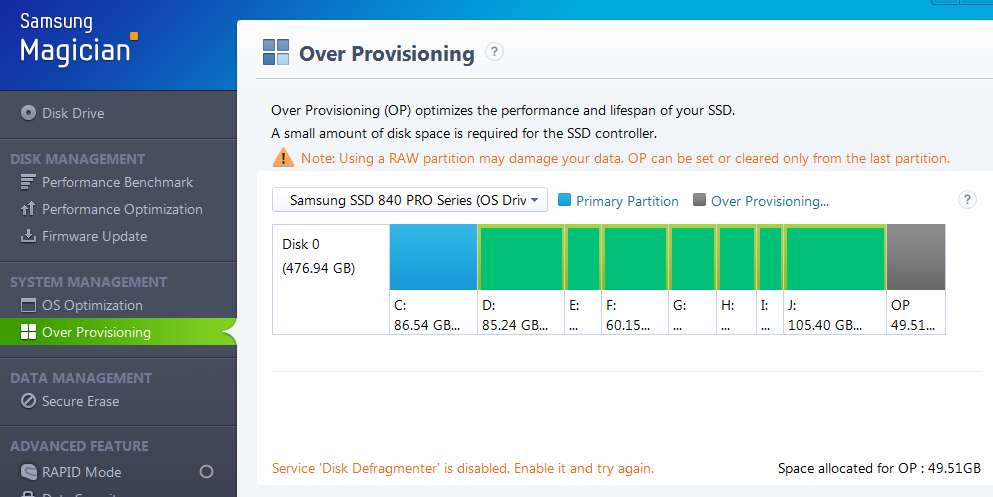
I'm just curious about over-provisioning, which isn't related to free space in your C-partition. It requires truly free space on the drive itself, unallocated to any partition.

Here's my own setup on a 512GB Samsung 840 Pro, with about 49GB not allocated to any partition. It shows up on the graphic as the "over provisioning" area at the extreme right end of the picture.

uxChuW.jpg


Actually, your boot time improvement is more than just what the SSD advantage give you. If your startup includes lots of other programs and services which kick off at Windows start time this will of course take time too.

Booting is a one-time process, so I'm not too terribly concerned if it's not 10 seconds to get to the Windows desktop because I have quite a lot that loads. I'm much more interested in how the system performs once it's up and running and the desktop fully stabilized.

So if you run the "performance benchmark" of Magician, numbers there would be much more meaningful to objectively evaluate as to whether your fresh installation can still be tweaked or if there's something significant that's been overlooked.
 

My Computer

Computer type
PC/Desktop
Computer Manufacturer/Model Number
Home-built, two systems (1) and (2)
OS
Windows 7 Pro x64 (1), Win7 Pro X64 (2)
CPU
i5-3350p 3.1Ghz/6MB-cache (1); E8400 3.0Ghz/6MB-cache (2)
Motherboard
ASUS P8Z77-V Pro (1); ASUS P5Q3 (2)
Memory
8GB PC3-12800 DDR3 (1); 4GB PC3-10600 DDR3 (2)
Graphics Card(s)
ATI HD7750 (1), (see TV cards); ATI R7 250 (2)
Sound Card
Realtek ALC892 HD Audio (1); Realtek ALC1200 HD Audio (2)
Monitor(s) Displays
Eizo HD2441W LCD, Eizo S2433W (1); Eizo 24" S2433W (2)
Screen Resolution
1920x1200, 1920x1200 (1); 1920x1200 (2)
Hard Drives
(1) 1TB SATA-II (7200RPM), 2x2TB SATA-III (7200RPM), 250GB SATA-III (10000RPM) for OS; 2x2TB external USB 3.0

(2) 320GB SATA-II (7200RPM), 750GB SATA-II (7200RPM), 150GB SATA-II (10000RPM) for OS; 2TB external USB 3.0
PSU
Nesteq ECS-6001 600W (1); Nesteq ECS-5001 500W (2)
Case
Acousti-Case 360 (1) and (2)
Cooling
Noctua NH-U12P SE2 for CPU, 2x120mm case fans (1) and (2)
Keyboard
IBM PS/2 (1) and (2)
Mouse
Logitech MX Revolution wireless (1); Microsoft wired (2)
Internet Speed
100mbps down / 10mbps up
Antivirus
Microsoft Security Essentials; Malwarebyte Anti-Malware Pro
Browser
Firefox
Other Info
Ceton InfiniTV 4-tuner cablecard-enabled TV card as well as Hauppauge HVR-2250 OTA/ATSC 2-tuner TV card in (1), running under Win7 WMC
Your post on that other forum says:

"Boot times when I only installed Windows were very good, 10-12 seconds from the end of POST to usable desktop. That changed as soon as I started installing mobo drivers. Boot took about 10 seconds longer immediately. When I was done with the above guide, boot times had gone up to about 45 seconds at least."

So, I'm wondering why you bothered to install "mobo drivers" or used the "above guide"?
 

My Computer

Computer type
PC/Desktop
Computer Manufacturer/Model Number
Ignatz Special; 4 speed manual gearbox; factory air conditioning; one of one
OS
Windows 7 Home Premium SP1, 64-bit
CPU
Intel Skylake i5-6600K, not overclocked
Motherboard
AsRock Z170M Extreme 4, micro ATX
Memory
8 GB HyperX DDR4-2666 (2 x 4 GB)
Graphics Card(s)
none; graphics are integrated on CPU
Sound Card
onboard: Realtek ALC1150; external: USB Behringer UF0-202
Monitor(s) Displays
Dell S2340M 23 inch IPS
Screen Resolution
1600 x 900
Hard Drives
System: Crucial MX100 series SSD, 128 GB;
Data: Samsung Spinpoint 103SJ, 1 TB;
Backup: WD Caviar Green WD30EZRX-00D8PB0, 3 TB
PSU
Rosewill SilentNight 500 watt fanless, semi-modular
Case
Antec Solo II
Cooling
Noctua NH-U12S; Noctua F12 intake, Noctua S12A exhaust
Keyboard
Microsoft 200 6JH-00001 USB
Mouse
Dell or Microsoft optical wired; USB
Antivirus
Microsoft Security Essentials and Malwarebytes Premium
Browser
Pale Moon
Other Info
All fans PWM; speeds at idle: CPU circa 500 rpm; intake circa 600 rpm; exhaust circa 600 rpm; CPU temps 27 idle and 47 C load in a warm room (27 C/81 F) when running Intel Extreme Tuning Utility stress test.
Why would I install Mobo drivers? Well because that's what makes my onboard internet, sound, USB controllers, etc work. Kinda required. I only installed mobo drivers mind you, no mobo utilities, those are definitely resource hogs.
I followed that guide because it provides a very comprehensive checklist and was recommended to me by pretty much everyone I asked.
And before anyone asks, nothing is overclocked right now, it's all at stock.

As for benchmarks, Magician's benchmark kinda crapped out on me, 428 MB/s read, 498 write, 67779 IOPS random read, 53172 random write. Over provisioning settings didn't make a difference. AS SSD paints a much prettier picture though (for read anyway, solid 500 MB/s). Low benchmark is probably due to 2 things though, the fact that AMD's SATA Controllers and drivers aren't great and the fact that mobo power saving settings can apparently interfere with these benchmarks. Either way, optimizing it might gain me a couple seconds every boot, but it doesn't explain the ridiculous seemingly random disparity in boot times.

Also, I really doubt that the drive is the issue. When I woke up just now my PC booted up in under 15 seconds (MainPath that is). That's with everything attached and on. Sometimes it just works, then a single reboot (or 2 or 3) later it's back to 40 seconds. So my drive and mobo CAN do it, they just don't always do. Which leads me to believe it might a driver issue or something similar, hence my request for someone to take a look at my boot trace.
 

My Computer

Computer type
PC/Desktop
OS
Windows 7 Home Premium 64 bit
CPU
AMD FX-8150
Motherboard
Gigabyte GA-990FX-UD7 Rev 1.1
Memory
2x 4GB Corsair Valueselect 1333 Mhz
Graphics Card(s)
2x nVidia Geforce GTX 660
Hard Drives
Samsung 840 Evo 250 GB, Kingston SSDNow V300 120 GB 506A,
Seagate 2 TB, Western Digital 320 GB External
PSU
Corsair GS800
Case
Cooler Master HAF X
Cooling
Corsair H60
Keyboard
Roccat ISKU FX Multicolor
Mouse
CMSTORM Sentinel Advance II
Well I think I have it narrowed down to the Etron USB 3.0 Controller drivers. Fresh install, installed mobo drivers one at a time with 3 reboots in between and every device attached. Every other driver had a negligable impact on boot times, then I installed the Etron drivers and boom, +30 seconds. Removed the Etron drivers and then removed 'Unknown USB Controller' x2 from Device Manager and poof, -30 seconds. Event 100 says total boot time of 20 seconds, MainPath is under 8! (will probably go up a little as I install all my programs, but I doubt it'll go up by 30 seconds again) Only thing is, I can't use my USB 3.0 ports now...
I should probably start a thread under Drivers now.
Thanks for all the responses guys!
 

My Computer

Computer type
PC/Desktop
OS
Windows 7 Home Premium 64 bit
CPU
AMD FX-8150
Motherboard
Gigabyte GA-990FX-UD7 Rev 1.1
Memory
2x 4GB Corsair Valueselect 1333 Mhz
Graphics Card(s)
2x nVidia Geforce GTX 660
Hard Drives
Samsung 840 Evo 250 GB, Kingston SSDNow V300 120 GB 506A,
Seagate 2 TB, Western Digital 320 GB External
PSU
Corsair GS800
Case
Cooler Master HAF X
Cooling
Corsair H60
Keyboard
Roccat ISKU FX Multicolor
Mouse
CMSTORM Sentinel Advance II
Driver issue as usual. Can't they do more tests when programming a driver?
 

My Computer

OS
Win7 64 bits FR
CPU
2500K @ 4.5 GHz
Motherboard
Asrock Z68 Gen3 Extreme3
Memory
4x4GB 1600MHz GSkill CL9.
Graphics Card(s)
HD6850 Powercolor stock
Sound Card
Integrated
Monitor(s) Displays
Samsung 2343 + Dell 20in 4/3
Screen Resolution
2048x1152, 1600x1200
Hard Drives
OCZ Vertex LE SSD, 50GB
OCZ Solid 3 120GB
OCZ Vertex 2 240GB
Western Digital Scorpio 320GB 5400 rpm
PSU
KingWin Lazer Platinum (90+) 550Watts
Case
HAF912
Cooling
CPU: OCZ Vendetta 2
Keyboard
MX5500 revolution bluetooth
Mouse
MX5500 revolution bluetooth
Internet Speed
Cable 7 Mbps
Amen.

Someone on Overclockers.com found me a driver that works much better. As long as my external USB HDD isn't plugged in these drivers actually speed up boot by about 4 seconds. Booting with external HDD plugged in lengthens boot times by about 30 seconds again... At least I can use my USB 3.0 ports after boot now, and I don't use my external drive much anyway, so I'm content for now. It still takes longer than it should to boot with this SSD but that's due to my Mobo I believe (one of the only Gigabyte boards not to have received a bios update that specifically improves SSD performance apparently, coupled with an old Award BIOS with no QuickBoot or similar option and an AMD SATA controller).
 

My Computer

Computer type
PC/Desktop
OS
Windows 7 Home Premium 64 bit
CPU
AMD FX-8150
Motherboard
Gigabyte GA-990FX-UD7 Rev 1.1
Memory
2x 4GB Corsair Valueselect 1333 Mhz
Graphics Card(s)
2x nVidia Geforce GTX 660
Hard Drives
Samsung 840 Evo 250 GB, Kingston SSDNow V300 120 GB 506A,
Seagate 2 TB, Western Digital 320 GB External
PSU
Corsair GS800
Case
Cooler Master HAF X
Cooling
Corsair H60
Keyboard
Roccat ISKU FX Multicolor
Mouse
CMSTORM Sentinel Advance II
Back
Top