
I don't know but recently I am facing this wierd issue since a few days. See screenshots below
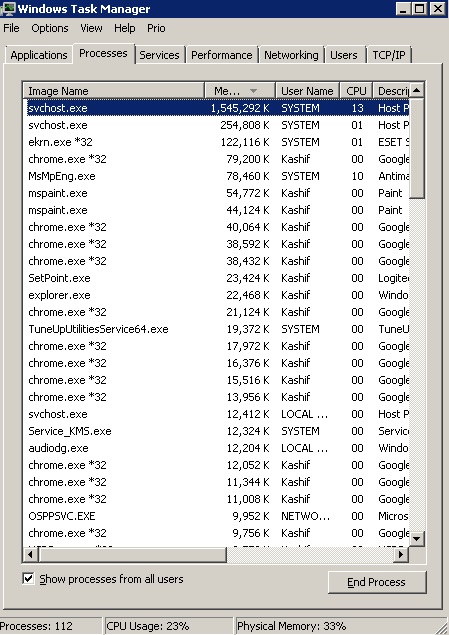
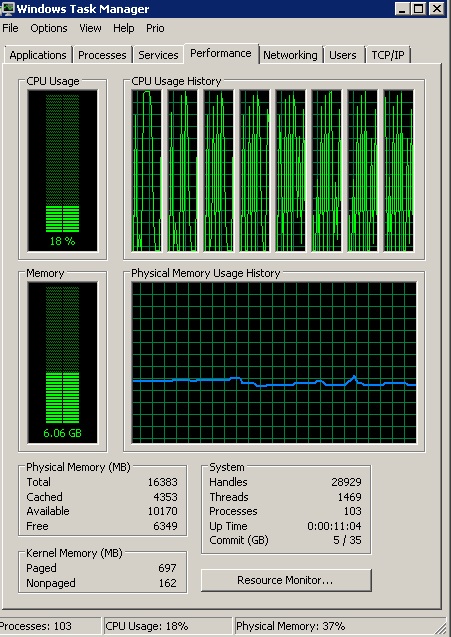
As you can see that the process svchost.exe is using way too much memory and you can also see in the second screenshot that all my cores at being used intermittently at the highest capacity when this happens my computer kind of hangs up for a few seconds although I have about 18 GB ram everything halts or even moving the cursor become very slow can some one please help me or guide me as to what can be causing this issue. I have not downloaded, installed or changed anything as far as I know. Plz help
As you can see that the process svchost.exe is using way too much memory and you can also see in the second screenshot that all my cores at being used intermittently at the highest capacity when this happens my computer kind of hangs up for a few seconds although I have about 18 GB ram everything halts or even moving the cursor become very slow can some one please help me or guide me as to what can be causing this issue. I have not downloaded, installed or changed anything as far as I know. Plz help
My Computer
At a glance
Windows 7 Ultimate x64Intel(R) Xeon(R) E5450 (Quad Core @ 3.00GHZ)FB-DDR2 Total: 16 Gb1) ATI Radeon HD 2400 2) Nvidia GeForce GT 420
- Computer type
- PC/Desktop
- Computer Manufacturer/Model Number
- HP
- OS
- Windows 7 Ultimate x64
- CPU
- Intel(R) Xeon(R) E5450 (Quad Core @ 3.00GHZ)
- Motherboard
- HP - Chipset Intel 0A98h Model No 5400B (XU1 PROCESSOR)
- Memory
- FB-DDR2 Total: 16 Gb
- Graphics Card(s)
- 1) ATI Radeon HD 2400 2) Nvidia GeForce GT 420
- Sound Card
- Creative X-Fi Audio Processor (WDM)
- Monitor(s) Displays
- Acer Monitor
- Screen Resolution
- 1024x768@29Hz
- Hard Drives
- 1 X 931GB SATA
1 X 148GB Device ATA
1 x 3725GB USB Device SATA
2 X 1863GB SATA
6 X 2794GB USB Device SATA
- PSU
- 800 Watt Power Supply
- Case
- Hewlett-Packard HP XW8600 Workstation Case
- Cooling
- 2 fans at back, 1 on top of memory, CPU & PSU Fans
- Keyboard
- Logitech Illuminated Keyboard K740
- Mouse
- Logitech Trackman Marble
- Internet Speed
- 30 Mbps
- Antivirus
- Emsisoft Anti-Malware, Eset Smart Security, MSE
- Browser
- Chrome


