
Slow Pc high core usage

kufr

New member
Member
Local time
3:26 AM
Messages
42
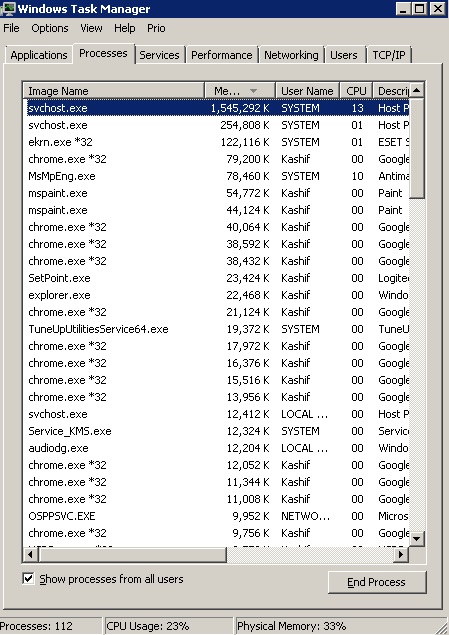
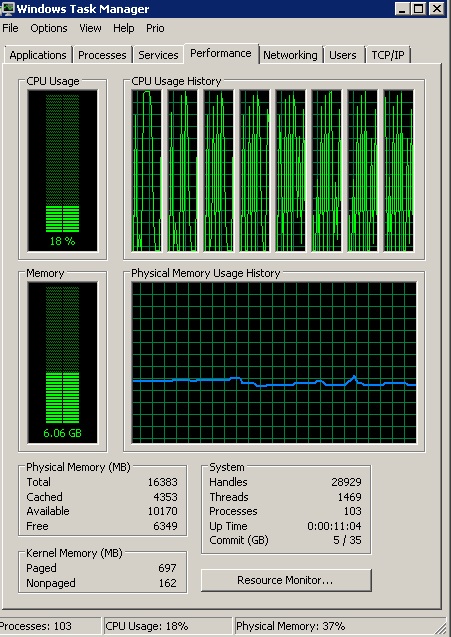
I don't know but recently I am facing this wierd issue since a few days. See screenshots below
1qcePbR.jpg


DqnyCaa.jpg


As you can see that the process svchost.exe is using way too much memory and you can also see in the second screenshot that all my cores at being used intermittently at the highest capacity when this happens my computer kind of hangs up for a few seconds although I have about 18 GB ram everything halts or even moving the cursor become very slow can some one please help me or guide me as to what can be causing this issue. I have not downloaded, installed or changed anything as far as I know. Plz help
 

My Computer

Computer type
PC/Desktop
Computer Manufacturer/Model Number
HP
OS
Windows 7 Ultimate x64
CPU
Intel(R) Xeon(R) E5450 (Quad Core @ 3.00GHZ)
Motherboard
HP - Chipset Intel 0A98h Model No 5400B (XU1 PROCESSOR)
Memory
FB-DDR2 Total: 16 Gb
Graphics Card(s)
1) ATI Radeon HD 2400 2) Nvidia GeForce GT 420
Sound Card
Creative X-Fi Audio Processor (WDM)
Monitor(s) Displays
Acer Monitor
Screen Resolution
1024x768@29Hz
Hard Drives
1 X 931GB SATA
1 X 148GB Device ATA
1 x 3725GB USB Device SATA
2 X 1863GB SATA
6 X 2794GB USB Device SATA
PSU
800 Watt Power Supply
Case
Hewlett-Packard HP XW8600 Workstation Case
Cooling
2 fans at back, 1 on top of memory, CPU & PSU Fans
Keyboard
Logitech Illuminated Keyboard K740
Mouse
Logitech Trackman Marble
Internet Speed
30 Mbps
Antivirus
Emsisoft Anti-Malware, Eset Smart Security, MSE
Browser
Chrome
Hi,
Yep it's been fairly common now days sadly enough :/
I reinstalled and finally got rid of svchost.netsvcs causing 50%++ cpu usage

What were the last round of successful windows updates ?
 

My Computer

Computer type
PC/Desktop
Computer Manufacturer/Model Number
Custom assembled by me :}
OS
Win-7-Pro64bit 7-H-Prem-64bit
CPU
i7-5930K 2nd i9-9940x both water blocked VRM's too
Motherboard
ASUS SABERTOOTH X99 2nd ASUS x299 Apex
Memory
Trident-z 3200C14 2nd Trident-z 3600C16
Graphics Card(s)
EVGA 1080ti ftw3 2nd Titan Xp both water blocked
Sound Card
Built-in Realtek
Monitor(s) Displays
1-AOC G2460PG 24"G-Sync 144Hz/ 2nd 1-ASUS VG248QE 24" 144Hz
Screen Resolution
1920 x 1080 144Hz
Hard Drives
2-Samsung M.2 Evo & Evo Plus
2-Samsung 850 EVO 500GB SSD's/ 3-2.5 W.D. Black 1tb-&3-1tb/3-3.5 WD Black 1tb hdd's
PSU
EVGA SuperNOVA 1000-P2 2nd 1200-P2
Case
2-Corsair Obsidian Series 450D Black ATX Mid Tower
Cooling
Custom water loops
Keyboard
Logitech G710+/ 2nd Logitech G910
Mouse
2-RedDragon M901 Perdition 16400 dpi Gaming mouse = wired
Internet Speed
Comcast Ping 19ms 89.31mbps download speed 6.12mbps upload
Antivirus
Malwarebytes Pro/ Superantispyware Pro
Browser
FireFox & Pale moon
Other Info
2nd ASUS X299 Apex/Intel i9-9940x with Custom water loop/7H-Prem-x64/Corsair 450D case/Ram Trident-z 3600C16 4x8gb / Samsung970Evo plus 500gb SSD/Dual ssd EZ swap evo/PSU EVGA SuperNova 1200w-P2 80+Platinum/GPU Titan Xp /8-ML-140 on push-pull on 2-280GTX rads
Hi,
Yep it's been fairly common now days sadly enough :/
I reinstalled and finally got rid of svchost.netsvcs causing 50%++ cpu usage

What were the last round of successful windows updates ?

I too have this problem, however I can still use windows update to successfully download and install updates, but periodically WU (using servhost.exe netservcs) will start churning for up to an hour doing who knows what, and then will turn off again...usually happens once a day. (I'm guessing that it is downloading or installing the MSE definition update that usually occurs once a day or so.

I was going to update the WU client with KB3138612 (march 2016) but since the situation I have is only a nuisance I loath to introduce any other issues with a change like this. :sarc::confused:

What's your opinion on updating the WU client ThrashZone?
 

My Computer

Computer Manufacturer/Model Number
hp pavilion 6680t
OS
win 7 home premium 64 bit
CPU
core i5 760
Motherboard
iona (from MSI)
Memory
6 gb
Graphics Card(s)
ati 5450
Sound Card
real tek 888
Hi,
I have the new client on all 3 of my machines and also net framework 4.6.1 everything seems fine
I didn't have 4.6.1 or 4.5.2 on a 32 bit machine and had nothing but problems.
 

My Computer

Computer type
PC/Desktop
Computer Manufacturer/Model Number
Custom assembled by me :}
OS
Win-7-Pro64bit 7-H-Prem-64bit
CPU
i7-5930K 2nd i9-9940x both water blocked VRM's too
Motherboard
ASUS SABERTOOTH X99 2nd ASUS x299 Apex
Memory
Trident-z 3200C14 2nd Trident-z 3600C16
Graphics Card(s)
EVGA 1080ti ftw3 2nd Titan Xp both water blocked
Sound Card
Built-in Realtek
Monitor(s) Displays
1-AOC G2460PG 24"G-Sync 144Hz/ 2nd 1-ASUS VG248QE 24" 144Hz
Screen Resolution
1920 x 1080 144Hz
Hard Drives
2-Samsung M.2 Evo & Evo Plus
2-Samsung 850 EVO 500GB SSD's/ 3-2.5 W.D. Black 1tb-&3-1tb/3-3.5 WD Black 1tb hdd's
PSU
EVGA SuperNOVA 1000-P2 2nd 1200-P2
Case
2-Corsair Obsidian Series 450D Black ATX Mid Tower
Cooling
Custom water loops
Keyboard
Logitech G710+/ 2nd Logitech G910
Mouse
2-RedDragon M901 Perdition 16400 dpi Gaming mouse = wired
Internet Speed
Comcast Ping 19ms 89.31mbps download speed 6.12mbps upload
Antivirus
Malwarebytes Pro/ Superantispyware Pro
Browser
FireFox & Pale moon
Other Info
2nd ASUS X299 Apex/Intel i9-9940x with Custom water loop/7H-Prem-x64/Corsair 450D case/Ram Trident-z 3600C16 4x8gb / Samsung970Evo plus 500gb SSD/Dual ssd EZ swap evo/PSU EVGA SuperNova 1200w-P2 80+Platinum/GPU Titan Xp /8-ML-140 on push-pull on 2-280GTX rads
What happens if you kill the process.
 

My Computer

Computer Manufacturer/Model Number
HP, Dell, Gateway, Toshiba - 4 laptops and 2 desktops
OS
Vista, Windows7, Mint Mate, Zorin, Windows 8
CPU
from 1.6GHz Duo to i7
Monitor(s) Displays
2x HP w2207
Hard Drives
5x HDD, 7x SSD, 12x Externals
Keyboard
with trackball - no mices
Mouse
Trackball mice
Internet Speed
DSL 6000
This could also be a problem in my opinion. Two anti virus programs.

From kufr System Specs.

Antivirus Emsisoft Anti-Malware, Eset Smart Security, MSE
 

My Computer

Computer type
PC/Desktop
Computer Manufacturer/Model Number
Home made Desktop
OS
Windows 10 Pro. 64/ version 1709 Windows 7 Pro/64
CPU
Intel i7-6800K @ 4.3
Motherboard
ASUS X-99 Deluxe II
Memory
Corsair Platinum 16 gig @2400
Graphics Card(s)
EVGA GTX 1070 OC
Monitor(s) Displays
Asus 27" LED LCD/VE278Q
Screen Resolution
1920-1080 or 1280-720 HDMI
Hard Drives
INTEL SSD 730-240 Gb Sata 3.0/
PSU
EVGA Platium 1200W
Case
Phanteks Luxe Tempered Glass 8 fans/ one radiator
Cooling
XSPC/ Water Cooled CPU
Keyboard
Das 4 Professional
Mouse
Logitech M705/MX Anywhere 2-S
Internet Speed
100 mbits
Antivirus
Microsoft Security Essentials/ Malwarebytes Premium 3.0/ SAS
Browser
I.E. 11 default/Firefox/ ISP Time Warner Cable/Spectrum
Other Info
LG BluRay Burner/
Sound system-KLipsch-THX/
Icy Dock ssd Hot Swap bays.
Hi,
Yep it's been fairly common now days sadly enough :/
I reinstalled and finally got rid of svchost.netsvcs causing 50%++ cpu usage

What were the last round of successful windows updates ?

I haven't updated since November 2015 as its a pain in the royal behind to look for updates related to Windows 10 getting installed so they are just sitting in the update list since then

What happens if you kill the process.

I killed the process and voila it went back to normal so I guess killing it at the moment seems like the best option for me until I plan to really update windows without the windows 10 crap lurking in the shadows

This could also be a problem in my opinion. Two anti virus programs.

From kufr System Specs.


Antivirus Emsisoft Anti-Malware, Eset Smart Security, MSE

Nopes have been using them both since 4 years now and never faced this issue before.
 

My Computer

Computer type
PC/Desktop
Computer Manufacturer/Model Number
HP
OS
Windows 7 Ultimate x64
CPU
Intel(R) Xeon(R) E5450 (Quad Core @ 3.00GHZ)
Motherboard
HP - Chipset Intel 0A98h Model No 5400B (XU1 PROCESSOR)
Memory
FB-DDR2 Total: 16 Gb
Graphics Card(s)
1) ATI Radeon HD 2400 2) Nvidia GeForce GT 420
Sound Card
Creative X-Fi Audio Processor (WDM)
Monitor(s) Displays
Acer Monitor
Screen Resolution
1024x768@29Hz
Hard Drives
1 X 931GB SATA
1 X 148GB Device ATA
1 x 3725GB USB Device SATA
2 X 1863GB SATA
6 X 2794GB USB Device SATA
PSU
800 Watt Power Supply
Case
Hewlett-Packard HP XW8600 Workstation Case
Cooling
2 fans at back, 1 on top of memory, CPU & PSU Fans
Keyboard
Logitech Illuminated Keyboard K740
Mouse
Logitech Trackman Marble
Internet Speed
30 Mbps
Antivirus
Emsisoft Anti-Malware, Eset Smart Security, MSE
Browser
Chrome
Hi,
All of the problematic updates are recommended/ Optional
So as long as you exclude that option in the update settings you could very well switch to auto.

Personally I would uninstall MSE if you want to use eset.
 

My Computer

Computer type
PC/Desktop
Computer Manufacturer/Model Number
Custom assembled by me :}
OS
Win-7-Pro64bit 7-H-Prem-64bit
CPU
i7-5930K 2nd i9-9940x both water blocked VRM's too
Motherboard
ASUS SABERTOOTH X99 2nd ASUS x299 Apex
Memory
Trident-z 3200C14 2nd Trident-z 3600C16
Graphics Card(s)
EVGA 1080ti ftw3 2nd Titan Xp both water blocked
Sound Card
Built-in Realtek
Monitor(s) Displays
1-AOC G2460PG 24"G-Sync 144Hz/ 2nd 1-ASUS VG248QE 24" 144Hz
Screen Resolution
1920 x 1080 144Hz
Hard Drives
2-Samsung M.2 Evo & Evo Plus
2-Samsung 850 EVO 500GB SSD's/ 3-2.5 W.D. Black 1tb-&3-1tb/3-3.5 WD Black 1tb hdd's
PSU
EVGA SuperNOVA 1000-P2 2nd 1200-P2
Case
2-Corsair Obsidian Series 450D Black ATX Mid Tower
Cooling
Custom water loops
Keyboard
Logitech G710+/ 2nd Logitech G910
Mouse
2-RedDragon M901 Perdition 16400 dpi Gaming mouse = wired
Internet Speed
Comcast Ping 19ms 89.31mbps download speed 6.12mbps upload
Antivirus
Malwarebytes Pro/ Superantispyware Pro
Browser
FireFox & Pale moon
Other Info
2nd ASUS X299 Apex/Intel i9-9940x with Custom water loop/7H-Prem-x64/Corsair 450D case/Ram Trident-z 3600C16 4x8gb / Samsung970Evo plus 500gb SSD/Dual ssd EZ swap evo/PSU EVGA SuperNova 1200w-P2 80+Platinum/GPU Titan Xp /8-ML-140 on push-pull on 2-280GTX rads
Back
Top