Slow shutdown (2-3 minutes)

Michael000

New member
Local time
10:35 AM
Messages
22

ASUS P8Z68-V LX
Intel i5
8GB Kingston DDR3
WD SATA6 and Seagate SATA1
Windows 7 Professional

Hi

My machine is taking a 2-3 minutes to shutdown (blue screen with windows logo saying shutting down with swirling circle to the left).

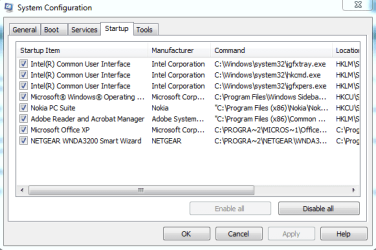
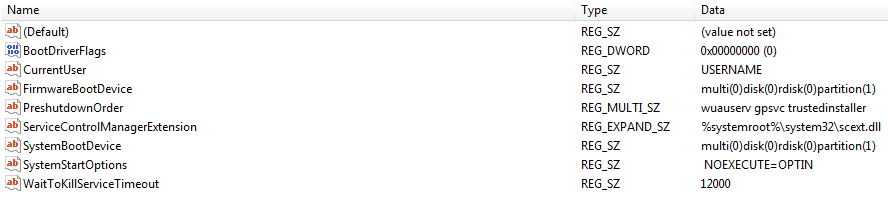
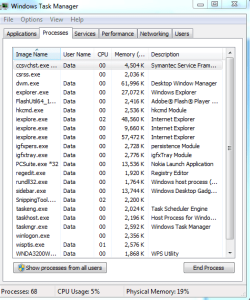
I have searched this forum for similar posts and have taken screen shots (see here) of the Task Manager processes running, the msconfig startup and the waittokillservicetimeout screen in the registry.

I have gone into the msconfig and disabled all services (made no difference).

Any ideas?

TIA
 

Attachments
  • shutdown1.PNG
    shutdown1.PNG
    19.9 KB · Views: 21
  • shutdown2.PNG
    shutdown2.PNG
    12.1 KB · Views: 20
  • shutdown3.PNG
    shutdown3.PNG
    7.5 KB · Views: 20

My Computer My Computer

Computer Manufacturer/Model Number
ASUS
OS
W7 32 aqnd 64
CPU
Intel i5
Motherboard
ASUS P8Z68-V LX
Memory
8GB
Graphics Card(s)
on board
Sound Card
on board
Monitor(s) Displays
philips
Hard Drives
WD
Please shut down after all the open programs have been closed and advise the time taken to shut down. Looking at the running processes a number of programs including IE seem to be running.

After this test we shall try the close a number of programs in start-up that appear unnecessary and retest.
 

My Computer My Computer

Computer Manufacturer/Model Number
Custom Built
OS
Windows 7 Pro with SP1 32bit
Motherboard
Intel D845GVS1 X86-based PC
Memory
2 gigs of RAM
Graphics Card(s)
Intel(R) 82845G/GL/GE/PE/GV Graphics Controller
Sound Card
Realtek AC'97 Audio
Monitor(s) Displays
Samsung SyncMaster 931BF Black 19" LCD Monitor
Screen Resolution
1280X960
Hard Drives
1. SAMSUNG SP0822N ATA Device ~ 80 GigaBytes

2. Seagate FreeAgent Go USB Device ~ 500 GigaBytes
Keyboard
COMPAQ Standard PS/2 Keyboard
Mouse
iBall Laser Precise Speedster
Internet Speed
4 mb/sec
Last edited:

My Computer My Computer

Computer Manufacturer/Model Number
HP/ Pavilion P6751C
OS
windows 7 home premium 64 bit
CPU
AMD Phenom(tm) II X4 830 Processor, 2800 Mhz, 4 core
Motherboard
N-Alvorix-RS880-uATX (Alvorix) motherboard
Memory
12.00 GB
Graphics Card(s)
ATI Radeon 4200
Sound Card
Creative Labs Sound Blaster Recon3D
Monitor(s) Displays
46" Sony TV KDL-46NX810
Screen Resolution
1920x1090P
Hard Drives
1 TB
PSU
Internal 250W
Case
Mid-size ATX
Cooling
1 rear case fan
Keyboard
Logitech USB Wireless K800
Mouse
Logitech USB Wireless M305
Internet Speed
22mb-28mb
Please shut down after all the open programs have been closed and advise the time taken to shut down. Looking at the running processes a number of programs including IE seem to be running.

After this test we shall try the close a number of programs in start-up that appear unnecessary and retest.

Hi,

Shut down all 'open programs' - by that do you mean:

1. End process in task manager of all programs running under my user name?
2. Disable all processes in msconfig startup?

Thanks

M
 

My Computer My Computer

Computer Manufacturer/Model Number
ASUS
OS
W7 32 aqnd 64
CPU
Intel i5
Motherboard
ASUS P8Z68-V LX
Memory
8GB
Graphics Card(s)
on board
Sound Card
on board
Monitor(s) Displays
philips
Hard Drives
WD
Take a look at this tutorial. Maybe it will speed up shutdown time.
Shut Down -Speed Up

Check that you haven't got the paging (aka swap) file set to clear on shutdown. See Virtual Memory Paging File - Clear at Shutdown - Vista Forums

This Microsoft forum answer may help you isolate the problem:
Windows 7 is very slow to shutdown - Microsoft Answers

Hi

The first one talks about speeding it up from 12 seconds to 2 seconds, I'd be happy with 12 seconds as I currently close on 150 seconds.

The other two I am happy to try and I'm comfortable tinkering with the registry but before I do that I would like it to be a bit more targetted if possible?

Thanks

M
 

My Computer My Computer

Computer Manufacturer/Model Number
ASUS
OS
W7 32 aqnd 64
CPU
Intel i5
Motherboard
ASUS P8Z68-V LX
Memory
8GB
Graphics Card(s)
on board
Sound Card
on board
Monitor(s) Displays
philips
Hard Drives
WD
What I mean is close all the program windows open or minimized on the Desktop.


Please shut down after all the open programs have been closed and advise the time taken to shut down. Looking at the running processes a number of programs including IE seem to be running.

After this test we shall try the close a number of programs in start-up that appear unnecessary and retest.

Hi,

Shut down all 'open programs' - by that do you mean:

1. End process in task manager of all programs running under my user name?
2. Disable all processes in msconfig startup?

Thanks

M
 

My Computer My Computer

Computer Manufacturer/Model Number
Custom Built
OS
Windows 7 Pro with SP1 32bit
Motherboard
Intel D845GVS1 X86-based PC
Memory
2 gigs of RAM
Graphics Card(s)
Intel(R) 82845G/GL/GE/PE/GV Graphics Controller
Sound Card
Realtek AC'97 Audio
Monitor(s) Displays
Samsung SyncMaster 931BF Black 19" LCD Monitor
Screen Resolution
1280X960
Hard Drives
1. SAMSUNG SP0822N ATA Device ~ 80 GigaBytes

2. Seagate FreeAgent Go USB Device ~ 500 GigaBytes
Keyboard
COMPAQ Standard PS/2 Keyboard
Mouse
iBall Laser Precise Speedster
Internet Speed
4 mb/sec
What I mean is close all the program windows open or minimized on the Desktop.

With all progams closed (apart from anything running in the background e.d. exploere.exe. and dwm.exe etc.) and all process disabled in the msconfig startup it takes about 120 to 150 seconds
 
Last edited:

My Computer My Computer

Computer Manufacturer/Model Number
ASUS
OS
W7 32 aqnd 64
CPU
Intel i5
Motherboard
ASUS P8Z68-V LX
Memory
8GB
Graphics Card(s)
on board
Sound Card
on board
Monitor(s) Displays
philips
Hard Drives
WD

My Computer My Computer

Computer Manufacturer/Model Number
Custom Built
OS
Windows 7 Pro with SP1 32bit
Motherboard
Intel D845GVS1 X86-based PC
Memory
2 gigs of RAM
Graphics Card(s)
Intel(R) 82845G/GL/GE/PE/GV Graphics Controller
Sound Card
Realtek AC'97 Audio
Monitor(s) Displays
Samsung SyncMaster 931BF Black 19" LCD Monitor
Screen Resolution
1280X960
Hard Drives
1. SAMSUNG SP0822N ATA Device ~ 80 GigaBytes

2. Seagate FreeAgent Go USB Device ~ 500 GigaBytes
Keyboard
COMPAQ Standard PS/2 Keyboard
Mouse
iBall Laser Precise Speedster
Internet Speed
4 mb/sec
Hi

Does anybody know the shutdown routine? I presume the system will go through a set routine of doing stuff before it switches off? Does it, for example check any hardware?

TIA
 

My Computer My Computer

Computer Manufacturer/Model Number
ASUS
OS
W7 32 aqnd 64
CPU
Intel i5
Motherboard
ASUS P8Z68-V LX
Memory
8GB
Graphics Card(s)
on board
Sound Card
on board
Monitor(s) Displays
philips
Hard Drives
WD
OK - shutdown now comes in 12 seconds! What did I do?

I modified the clearpagefileatshutdown in the registry from 1 to 0.

It appears (correct me if I am wrong) that this command in the registry (for security reasons) deletes the information in the page file (virtual memory on the HDD).

I kinda like the idea of stuff being deleted from my virtual memory, so the question follows; could I have solved this problems by reducing the size of my virtual memory?

I have two HDD inside my box and the system reports that the size of my page file is 8103mb (I don't know if that is the same for both drives). I have 8GB of RAM so do I really need 8GB of virtual memory?
 

My Computer My Computer

Computer Manufacturer/Model Number
ASUS
OS
W7 32 aqnd 64
CPU
Intel i5
Motherboard
ASUS P8Z68-V LX
Memory
8GB
Graphics Card(s)
on board
Sound Card
on board
Monitor(s) Displays
philips
Hard Drives
WD
It would have speeded things up but personally I don't see a need for emptying the page file.
Good call with the regedit.:)
 

My Computer My Computer

Computer Manufacturer/Model Number
DIY
OS
Windows 7 home premium x64
CPU
AMD FX-4100 AM3+ 3.6GHz 12MB Black Edition
Motherboard
Asus M5A97 Pro
Memory
Crsair vengeance 12Gb DDR3 1600MHz CL9
Graphics Card(s)
Asus GTX 560 1GB
Sound Card
Realtek onboard
Monitor(s) Displays
Hanns G 1680x1050 native
Hard Drives
OCZ 128Gb Petrol ssd
2x500 Gb Samsung
PSU
OCZ StealthXstream II 500W
Internet Speed
8Mb or better
I'm back!

I shut down last night and it seems that at a point in time sometime during the day something reset the clearpagefileatshutdown in the registry from 0 back to 1 giving me the 2 minute shutdown again!

Of course I can modify it again back to zero and then spend some time trying to figure out what is resetting it to a default value but before I do that I'd like to talk about virtual memory.

I can recall years back when windows introduced this feature and the reasons why (limits on RAM size). Now that (with the 64bit OS) that limitation is removed and in my case I have and can see 8GB, what programs want or need VM and do they really need 8GB? Next question, I have two HDD in my box, does this 8GB VM allocation apply to both of them i.e. is it a physical allocation per drive or a logical allocation to the HDD?

TIA
 

My Computer My Computer

Computer Manufacturer/Model Number
ASUS
OS
W7 32 aqnd 64
CPU
Intel i5
Motherboard
ASUS P8Z68-V LX
Memory
8GB
Graphics Card(s)
on board
Sound Card
on board
Monitor(s) Displays
philips
Hard Drives
WD

My Computer My Computer

Computer type
Laptop
Computer Manufacturer/Model Number
Sony Vaio VPCEB47GM Laptop
OS
Win 7 Pro 64-bit
CPU
Intel i5 2.4 Ghz
Memory
8GB DDR3
Graphics Card(s)
Intel HD 3000
Sound Card
IDT High Definition
Monitor(s) Displays
15.6 WGXA Anti-Glare LED
Screen Resolution
1280x800
Hard Drives
640Gb 7200rpm
Antivirus
MSE
Browser
Opera (primary) with IE9 backup
Performing a Clean Boot:

Click Start > Run > type msconfig in the searchbox
Click msconfig in the search results
Click the General tab, and click Selective Startup
Under Selective Startup uncheck Load Startup items
Click the Services tab, check the Hide all Microsoft Services box, and then click Disable All
Click OK, and when you are prompted, click Restart.

If the problem does not return while your computer is in clean boot mode, a background program is likely causing interference. You can try to determine which background program is causing the problem while the computer is in clean boot mode.

Enable half of the Services items:

In this step, you are trying to isolate which background service is causing the interference with the program. Start by turning half of the services on and turning half off.

Click Start > Run > type msconfig in the searchbox
Click msconfig in the search results
Click the Services tab, check the Hide all Microsoft Services box, and then click to select half of the check boxes in the Services list, leaving the other half unchecked.
Click OK, and when you are prompted, click Restart.

Hope problem is resolved.
 

My Computer My Computer

OS
Windows 7 Ultimate x64
It's better to disable all except AV in msconfig>Startup, then after reboots enter msconfig>Services, check the box to Hide all MS Services, then do the same again. Check back that nothing sneaks back into either list. You now have a clean boot for best performance.

You can find clues to the ongoing problem in the logs and System resources using these troubleshooting steps.

If these or the paging file inquiry doesn't solve your problem you can use the tool the Pro's use to trace with certainty the cause of the Shutdown hang: by Gathering a Startup, Shutdown, Sleep, Hibernate, or Reboot Trace. If you need help interpreting the trace our expert Cluberti can be PM'd to read the uploaded zip file.
 
Back
Top