Robert Jenkins
New member
- Local time
- 7:24 PM
- Messages
- 8
I've already posted a message dealing with one aspect of my problem. What's new is that I have managed to re-lay a mirror image from before the point when I thought the problem had arisen, yet the slowness is still there. So now I'm wondering if I might have a hardware problem of some kind.
This is what happened.
A month ago my HP Pavilion (dv7-3111ea) laptop with Windows 7 Home Premium was working really well. It was about 10 months old.
I bought a Seagate external HD with Memeo Backup already installed. I already had an Acronis continuous backup program installed (as well as an Acronis scheduled backup program), but I had forgotten about them. The 60-hour Memeo backup I carried out did not work. There may have been some conflict issues between Acronis and Memeo. Also, my anti-virus program is Kaspersky but, somehow, Windows Defender and Windows Firewall were both activated. I remember switching both off but it's possible when I was given a reminder about them I picked the wrong option.
After the Memeo failure, my computer had slowed notably. I contacted the manufacturer but they were no help. Eventually I uninstalled both the Memeo Backup program and the Seagate Dashboard program. Afterwards I found that my computer would work well and at normal speed for a while, then unaccountably it would become very slow, with CPU usage fluctuating around 95%. For example, I could watch an online recorded TV program such as The Daily Politics with normal streaming, then after about 20 or 30 minutes, the picture would become jerky. I contacted Memeo again, and they told me to try talking to Microsoft because they could not understand how I was having difficulties if their programs had been uninstalled.
Restoring my system to an earlier point was problematic. Most of the restore points available were AFTER the installation of Memeo and the two ones from BEFORE were a bit too old. I would lose the installation of some new programs.
However, I had made some Acronis backups. By now, however, my computer was going so slow that to recover one of them would have taken a month. So I bit the bullet, and restored to May 2010 using a Windows mirror image.
My system is still slow!!! CPU usage is around 45% (and rarely dropping below 20%) when I have just one IE page open but when I open a second, it shoots up to 100% and the page opening takes a minute.
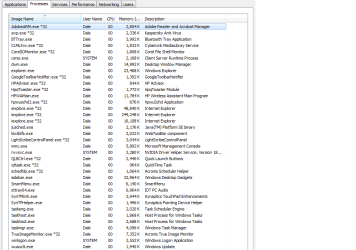
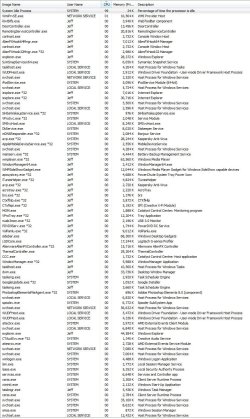
I attach a list of open services and processes. (By the way, is there a way of exporting a list of processes as there is of services, rather than having to write out the list laboriously?)
Is it possible that I have some kind of hardware problem?
This is what happened.
A month ago my HP Pavilion (dv7-3111ea) laptop with Windows 7 Home Premium was working really well. It was about 10 months old.
I bought a Seagate external HD with Memeo Backup already installed. I already had an Acronis continuous backup program installed (as well as an Acronis scheduled backup program), but I had forgotten about them. The 60-hour Memeo backup I carried out did not work. There may have been some conflict issues between Acronis and Memeo. Also, my anti-virus program is Kaspersky but, somehow, Windows Defender and Windows Firewall were both activated. I remember switching both off but it's possible when I was given a reminder about them I picked the wrong option.
After the Memeo failure, my computer had slowed notably. I contacted the manufacturer but they were no help. Eventually I uninstalled both the Memeo Backup program and the Seagate Dashboard program. Afterwards I found that my computer would work well and at normal speed for a while, then unaccountably it would become very slow, with CPU usage fluctuating around 95%. For example, I could watch an online recorded TV program such as The Daily Politics with normal streaming, then after about 20 or 30 minutes, the picture would become jerky. I contacted Memeo again, and they told me to try talking to Microsoft because they could not understand how I was having difficulties if their programs had been uninstalled.
Restoring my system to an earlier point was problematic. Most of the restore points available were AFTER the installation of Memeo and the two ones from BEFORE were a bit too old. I would lose the installation of some new programs.
However, I had made some Acronis backups. By now, however, my computer was going so slow that to recover one of them would have taken a month. So I bit the bullet, and restored to May 2010 using a Windows mirror image.
My system is still slow!!! CPU usage is around 45% (and rarely dropping below 20%) when I have just one IE page open but when I open a second, it shoots up to 100% and the page opening takes a minute.
I attach a list of open services and processes. (By the way, is there a way of exporting a list of processes as there is of services, rather than having to write out the list laboriously?)
Is it possible that I have some kind of hardware problem?
Attachments
My Computer
At a glance
Windows 7 Home Premium 64bit
- OS
- Windows 7 Home Premium 64bit