Software to help SSD Boot Drive?

vRisen

New member
Local time
9:49 AM
Messages
3
Does anyone know if there is a software that automates the things you would otherwise need to do manually to save space on an SSD boot drive?

I've already gotten several BSOD's and needed to reinstall the OS when attempting to make a joint link between several large folders that I do not want on my 40GB SSD Boot Drive. Windows itself takes up about 50% of the drive leaving very little space for games. I would have bought a larger capacity SSD when I first built my PC but that was when I did not know that I would have problems with windows files and SSD space.

So far, I need to get the pagefile, user directory, and the winsxs folder over to my larger hard drive because those directories do not need the speed that an SSD outputs. I've successfully linked the pagefile directory to the storage drive in the past, but I'm stuck with problems when attempting to make a link between other folders.

It would be nice if the directory locations were stored in the registry for easier access, so that I could just move the folder and edit the registry.
 

My Computer

OS
Windows 7 64-Bit
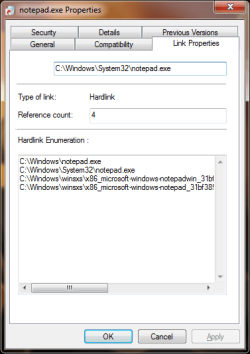
DO NOT MOVE WINSXS. Understand this, moving WinSxS will not help anything, everything hardlinks out of WinSxS moving it just duplicates data without saving space. Below the screenshot shows notepad in 4 locations. However, they all point to the same physical bytes on the HDD.
 

Attachments

  • Untitled.png
    Untitled.png
    53 KB · Views: 13

My Computer

Computer type
PC/Desktop
Computer Manufacturer/Model Number
Alienware Aurora ALX R4
OS
Windows 10 Pro (x64)
CPU
Intel Core i7-3930K (3.2GHz - 4.5GHz)
Motherboard
Alienware Aurora-R4 x79
Memory
4x Samsung 4GB PC3-12800 DDR3 (16GB 1600MHz)
Graphics Card(s)
Nvidia Geforce GTX 690
Sound Card
SteelSeries Siberia Elite
Monitor(s) Displays
Dell UltraSharp U3011
Screen Resolution
2560x1600
Hard Drives
Samsung 850 Pro 256 GB, Seagate 1TB Desktop Hybrid HDD, 2x Western Digital 4TB Green HDD
PSU
875W Some Dell PSU <.<
Case
Alienware Aurora ALX
Cooling
Custom Liquid Cooling (EK CPU & GPU blocks) dual EK 480RAD
Keyboard
Logitech G710+ Mechanical
Mouse
Logitech G700s
Internet Speed
Verizon Fios (50 mbps average)
Other Info
Server: Intel NUC D54250WYK: i5-4250U, 16GB, 256 GB mSATA, Windows Server 2012 R2
DO NOT MOVE WINSXS. Understand this, moving WinSxS will not help anything, everything hardlinks out of WinSxS moving it just duplicates data without saving space. Below the screenshot shows notepad in 4 locations. However, they all point to the same physical bytes on the HDD.

I tried making a junction with the winsxs folder about a week ago, it didn't work out too well.

I just want to be able to force it to install its duplicates on my 2TB hard drive, not my SSD. :|
 

My Computer

OS
Windows 7 64-Bit
...*sigh* forget it. I guess I should have bolded "DO NOT MOVE WINSXS" and givin a lecture on the fundamentals of hardlinks.
 

My Computer

Computer type
PC/Desktop
Computer Manufacturer/Model Number
Alienware Aurora ALX R4
OS
Windows 10 Pro (x64)
CPU
Intel Core i7-3930K (3.2GHz - 4.5GHz)
Motherboard
Alienware Aurora-R4 x79
Memory
4x Samsung 4GB PC3-12800 DDR3 (16GB 1600MHz)
Graphics Card(s)
Nvidia Geforce GTX 690
Sound Card
SteelSeries Siberia Elite
Monitor(s) Displays
Dell UltraSharp U3011
Screen Resolution
2560x1600
Hard Drives
Samsung 850 Pro 256 GB, Seagate 1TB Desktop Hybrid HDD, 2x Western Digital 4TB Green HDD
PSU
875W Some Dell PSU <.<
Case
Alienware Aurora ALX
Cooling
Custom Liquid Cooling (EK CPU & GPU blocks) dual EK 480RAD
Keyboard
Logitech G710+ Mechanical
Mouse
Logitech G700s
Internet Speed
Verizon Fios (50 mbps average)
Other Info
Server: Intel NUC D54250WYK: i5-4250U, 16GB, 256 GB mSATA, Windows Server 2012 R2
I have a 40GB SSD as a main drive as well, and its plenty of space.

I agree with LogicEarth. Moving the WinXS is a really bad idea.
It also defeats the entire purpose of using the SSD as a boot drive.

Try this instead.


1) Do you use the hibernate feature?

If not, disable it.
http://www.sevenforums.com/tutorials/819-hibernate-enable-disable.html
This will save a large amount of space.

2) Set a static Pagefile on the SSD as 500MB min and max.
Next, create a sytem managed Pagefile on your mian HD.
***Please Note*** Do NOT disable it.
The Pagefile is best left on the SSD. However, for smaller boot drives, space may be a issue. In this case moving it will help free up space.

Beyond that, moving your USER folders to another drive is a good idea.
I would recommend relocationg:
Music, Pictures, Videos, Downloads, and possibly Documents.


If you do this, you should end up with more than enough room.
Everything else, including all programs and applications should be on the SSD with Windows.
 

My Computer

Computer Manufacturer/Model Number
Custom (Self Build)
OS
Windows 7 Home Premium 64bit
CPU
Intel Core i7 2700k
Motherboard
eVGA P67 SLI
Memory
8GB Mushkin Redline Ridgebacks @1866
Graphics Card(s)
EVGA GTX570 SC
Sound Card
XiFi Titanium HD
Monitor(s) Displays
LG W2453V
Screen Resolution
1920x1080
Hard Drives
Intel 320 80GB -- Intel X25-V 40GB --WD Black 1TB x2 -- WD Blue 640GB
PSU
Seasonic x750
Case
Corsair 600T SE White
Cooling
eVGA Superclocked CPU Cooler
Keyboard
Saitek Cyborg
Antivirus
Kaspersky
Browser
IE
Other Info
LG BD/DVD
...*sigh* forget it. I guess I should have bolded "DO NOT MOVE WINSXS" and givin a lecture on the fundamentals of hardlinks.

What? I told you I did that a week ago.

I have a 40GB SSD as a main drive as well, and its plenty of space.

I agree with LogicEarth. Moving the WinXS is a really bad idea.
It also defeats the entire purpose of using the SSD as a boot drive.

If you do this, you should end up with more than enough room.
Everything else, including all programs and applications should be on the SSD with Windows.

After I reinstalled win 7, I had about 17GB free. The winsxs folder apparently keeps growing and prior to reinstalling, it was about 16GB, instead of the usual 6GB.

Isn't the winsxs folder just a bunch of .dll duplicates or similar? I don't get why this needs the speed of an SSD.
 

My Computer

OS
Windows 7 64-Bit
WinSxS is Windows, every DLL is stored in WinSxS it is the system. All the DLLs and other files you see in system32 or other places all hardlink to the corresponding file in WinSxS. The screenshot of notepad.exe showed it was located in four places, however all of those are just aliases to the same data.
 

My Computer

Computer type
PC/Desktop
Computer Manufacturer/Model Number
Alienware Aurora ALX R4
OS
Windows 10 Pro (x64)
CPU
Intel Core i7-3930K (3.2GHz - 4.5GHz)
Motherboard
Alienware Aurora-R4 x79
Memory
4x Samsung 4GB PC3-12800 DDR3 (16GB 1600MHz)
Graphics Card(s)
Nvidia Geforce GTX 690
Sound Card
SteelSeries Siberia Elite
Monitor(s) Displays
Dell UltraSharp U3011
Screen Resolution
2560x1600
Hard Drives
Samsung 850 Pro 256 GB, Seagate 1TB Desktop Hybrid HDD, 2x Western Digital 4TB Green HDD
PSU
875W Some Dell PSU <.<
Case
Alienware Aurora ALX
Cooling
Custom Liquid Cooling (EK CPU & GPU blocks) dual EK 480RAD
Keyboard
Logitech G710+ Mechanical
Mouse
Logitech G700s
Internet Speed
Verizon Fios (50 mbps average)
Other Info
Server: Intel NUC D54250WYK: i5-4250U, 16GB, 256 GB mSATA, Windows Server 2012 R2
After I reinstalled win 7, I had about 17GB free. The winsxs folder apparently keeps growing and prior to reinstalling, it was about 16GB, instead of the usual 6GB.

Isn't the winsxs folder just a bunch of .dll duplicates or similar? I don't get why this needs the speed of an SSD.
Understanding Component-Based Servicing

(Almost) every Windows update, any time an application installs that requires a specific version of a .dll, etc. - these all cause additions to the WinSxS folder. Unfortunately, the size you see in Explorer isn't exactly accurate due to how the Win32 APIs work, but unfortunately it is de facto accurate for any applications that read disk free space using these methods (which is just about all of them, unfortunately). If you use something that takes a raw view of the files on disk, you'll usually find that there is less space used than what Explorer or the cmd prompt show you, but that doesn't help much. Honestly, a 40GB disk is just not really large enough to run Windows 7 on (due to this) long-term. The minimum requirements for Windows 7 is approximately 20GB, and that's just to *install* it. Running it long-term usually will require about double that, which is just about 100% of a 40GB disk. This does *not* take into account installing applications, storing user data, etc - if you plan on doing that on the same disk, you really need at least 100GB (and that means a 128GB SSD).

What is the WINSXS directory in Windows 2008 and Windows Vista and why is it so large?
 

My Computer

Computer type
PC/Desktop
Computer Manufacturer/Model Number
Custom
OS
Windows 10 Pro x64
CPU
Intel Core i7 4790K @ 4.5GHz
Motherboard
Asus Maximus Hero VII
Memory
32GB DDR3
Graphics Card(s)
Nvidia GeForce GTX970
Sound Card
Realtek HD Audio
Screen Resolution
1920x1200
Hard Drives
1x Samsung 250GB SSD
4x WD RE 2TB (RAIDZ)
PSU
Corsair AX760i
Case
Fractal Design Define R4
Cooling
Noctua NH-D15
Back
Top