Solved Solution to RAM useage

delamite

New member
Member
Local time
5:45 PM
Messages
24
Location
USA
I just had a thought ,
this problem may have been addressed and solved already, I just want to throw in my 2 cents.

I have Win7 x 64 running, and have tried different makes of RAM, but can only get 4 gigs to be used on the Os regardless of how much I add. Have tried all solutions from many forums none have worked.

This may the the prob- Since I upgraded from XP in 32 bit, Win7 is only going to give me 4 gigs even in 64 bit enviroment because I upgraded from a 32 bit enviroment. The only way I can prove my theory is to wipe the HD and start over, which I am not prepared to do because of the work involved backing up and reloading data. Not too mention the possible problems with verification.


It is the only answer that seems to make any sense.
 

My Computer

Computer type
PC/Desktop
Computer Manufacturer/Model Number
custom build
OS
windows7 x64
CPU
Intel Q6600 quad core
Motherboard
Gigabyte G41M-combo
Memory
Corsair XMS3 CMX4GX3M2A1600C9--- 2 x 4 gig sticks
Graphics Card(s)
NVIDIA Gforce GTX 650 Ti
Sound Card
NVIDIA high defintion audio & VIA technologies high defintio
Monitor(s) Displays
View Sonic
Screen Resolution
1920 x 1080
Hard Drives
Hitachi HDS 722020ALA330 -----2TB
PSU
Rocketfish 550W modular
Case
Rummage sale
Cooling
Prolimatech Megahalems Rev 2.0 ----w/ 2 120mm scythe fans
Keyboard
Razer Lycosa
Mouse
Steel series IKARI driverless mouse
Antivirus
Bitdefender Sphere 2012
Browser
Firefox
Other Info
this system runs very cool, which might explain why the CPU has not given up yet......
Hi delamite,

Interesting theory. :)

I have done quite a bit of research on this issue, as I too was a victim of this.

Have you looked in Resource Monitor under the Memory TAB to see what RAM is being used and where?

:ar: http://www.sevenforums.com/tutorials/12523-resource-monitor.html

Sometimes the RAM is Hardware Reserved, might be worth a look to see?

The method that worked for me was :):

Open msconfig:

1. Click the Win+R key combination to open the run dialog box. Or Start and type Run in search box.
2. Type msconfig.exe
3. Click either OK or the Enter key to run the command
4. Once the System Configuration Windows opens, select the Boot tab.
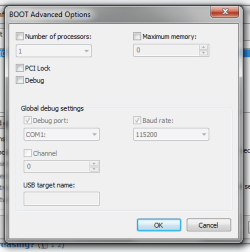
5. Click Advance Options and uncheck the boxes for "Number of Processors" and "Maximum Memory".
6. Click OK then on the Configuration Window, click Apply. Reboot and check RAM status.

Also badly seated/dirty RAM (Check for dust etc), or badly seated CPU, whereby the pins
are not making correct contact with the socket, may cause this problem, check both.

BIOS settings?!? Is the Memory Remap feature in Bios set to enabled, as this too can
be responsible for this error? (If you have this feature)

Hope this helps.

cheers

Dave
 

My Computer

Computer type
PC/Desktop
OS
Windows 7 Professional 64bit
CPU
AMD Athlon (tm) X2 5200+ Dual Core 2712 Mhz
Motherboard
Asus
Memory
4GB
Graphics Card(s)
Nividia GeForce 8600 GTS- DIED 25/7/2013 R.I.P
Sound Card
None
Monitor(s) Displays
22" Yuraku LCD (Dont ask)
Screen Resolution
1280x960
Hard Drives
2TB WD Caviar green
PSU
Windy up type
Case
Scout cm Storm
Cooling
Hair dryer on full cool power ;-)
Keyboard
QWERTY
Mouse
Microsoft Special
Internet Speed
BT Infinity 9.38Mb/s Wheeeeeeeeeeeeeeee!!
Antivirus
MSE
Browser
Internet Explore 10 and Chrome
Other Info
Don't shout...I've got a Hangover!
thx for reply,
but none of those fixed the problem. And I do not have the memory remap in my bios settings. Like I said, have tried several different brand RAM and does not affect it.
The resource monitor also shows only 4 gigs of RAM just as the bios does.

Another interesting test would be to load a Distro from DVD, and see if all the RAM added is being used. I don not know what this would prove I guess, except that the Mboard is capable of using the installed RAM?
 

My Computer

Computer type
PC/Desktop
Computer Manufacturer/Model Number
custom build
OS
windows7 x64
CPU
Intel Q6600 quad core
Motherboard
Gigabyte G41M-combo
Memory
Corsair XMS3 CMX4GX3M2A1600C9--- 2 x 4 gig sticks
Graphics Card(s)
NVIDIA Gforce GTX 650 Ti
Sound Card
NVIDIA high defintion audio & VIA technologies high defintio
Monitor(s) Displays
View Sonic
Screen Resolution
1920 x 1080
Hard Drives
Hitachi HDS 722020ALA330 -----2TB
PSU
Rocketfish 550W modular
Case
Rummage sale
Cooling
Prolimatech Megahalems Rev 2.0 ----w/ 2 120mm scythe fans
Keyboard
Razer Lycosa
Mouse
Steel series IKARI driverless mouse
Antivirus
Bitdefender Sphere 2012
Browser
Firefox
Other Info
this system runs very cool, which might explain why the CPU has not given up yet......

My Computer

Computer type
PC/Desktop
Computer Manufacturer/Model Number
Home made Desktop
OS
Windows 10 Pro. 64/ version 1709 Windows 7 Pro/64
CPU
Intel i7-6800K @ 4.3
Motherboard
ASUS X-99 Deluxe II
Memory
Corsair Platinum 16 gig @2400
Graphics Card(s)
EVGA GTX 1070 OC
Monitor(s) Displays
Asus 27" LED LCD/VE278Q
Screen Resolution
1920-1080 or 1280-720 HDMI
Hard Drives
INTEL SSD 730-240 Gb Sata 3.0/
PSU
EVGA Platium 1200W
Case
Phanteks Luxe Tempered Glass 8 fans/ one radiator
Cooling
XSPC/ Water Cooled CPU
Keyboard
Das 4 Professional
Mouse
Logitech M705/MX Anywhere 2-S
Internet Speed
100 mbits
Antivirus
Microsoft Security Essentials/ Malwarebytes Premium 3.0/ SAS
Browser
I.E. 11 default/Firefox/ ISP Time Warner Cable/Spectrum
Other Info
LG BluRay Burner/
Sound system-KLipsch-THX/
Icy Dock ssd Hot Swap bays.
ok,
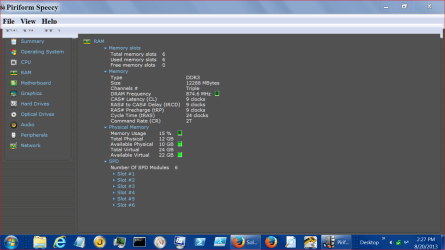
here you go, I would really like to get to the bottom of this prob.

It should also be noted my MB has (2) DDR3 slots, and I currently have 2x6 gig sticks (12 gig total) of Mushkin RAM in those slots.

I have also tried 2x4 gig Corsair sticks, with the same result.....only 4 gigs used?
 

Attachments

  • res.jpg
    res.jpg
    80.1 KB · Views: 22

My Computer

Computer type
PC/Desktop
Computer Manufacturer/Model Number
custom build
OS
windows7 x64
CPU
Intel Q6600 quad core
Motherboard
Gigabyte G41M-combo
Memory
Corsair XMS3 CMX4GX3M2A1600C9--- 2 x 4 gig sticks
Graphics Card(s)
NVIDIA Gforce GTX 650 Ti
Sound Card
NVIDIA high defintion audio & VIA technologies high defintio
Monitor(s) Displays
View Sonic
Screen Resolution
1920 x 1080
Hard Drives
Hitachi HDS 722020ALA330 -----2TB
PSU
Rocketfish 550W modular
Case
Rummage sale
Cooling
Prolimatech Megahalems Rev 2.0 ----w/ 2 120mm scythe fans
Keyboard
Razer Lycosa
Mouse
Steel series IKARI driverless mouse
Antivirus
Bitdefender Sphere 2012
Browser
Firefox
Other Info
this system runs very cool, which might explain why the CPU has not given up yet......

My Computer

Computer type
PC/Desktop
Computer Manufacturer/Model Number
Home made Desktop
OS
Windows 10 Pro. 64/ version 1709 Windows 7 Pro/64
CPU
Intel i7-6800K @ 4.3
Motherboard
ASUS X-99 Deluxe II
Memory
Corsair Platinum 16 gig @2400
Graphics Card(s)
EVGA GTX 1070 OC
Monitor(s) Displays
Asus 27" LED LCD/VE278Q
Screen Resolution
1920-1080 or 1280-720 HDMI
Hard Drives
INTEL SSD 730-240 Gb Sata 3.0/
PSU
EVGA Platium 1200W
Case
Phanteks Luxe Tempered Glass 8 fans/ one radiator
Cooling
XSPC/ Water Cooled CPU
Keyboard
Das 4 Professional
Mouse
Logitech M705/MX Anywhere 2-S
Internet Speed
100 mbits
Antivirus
Microsoft Security Essentials/ Malwarebytes Premium 3.0/ SAS
Browser
I.E. 11 default/Firefox/ ISP Time Warner Cable/Spectrum
Other Info
LG BluRay Burner/
Sound system-KLipsch-THX/
Icy Dock ssd Hot Swap bays.
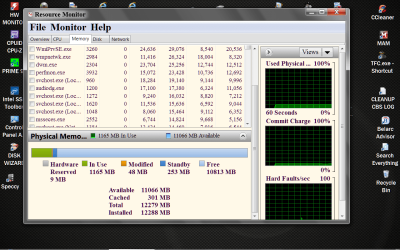
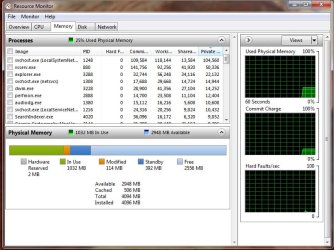
Am I going mad or did that screenshot of yours I just looked at say:

RAM Available: 11026MB free

Now it is changed to 2948MB free

:shock: :confused:
 

My Computer

Computer type
PC/Desktop
OS
Windows 7 Professional 64bit
CPU
AMD Athlon (tm) X2 5200+ Dual Core 2712 Mhz
Motherboard
Asus
Memory
4GB
Graphics Card(s)
Nividia GeForce 8600 GTS- DIED 25/7/2013 R.I.P
Sound Card
None
Monitor(s) Displays
22" Yuraku LCD (Dont ask)
Screen Resolution
1280x960
Hard Drives
2TB WD Caviar green
PSU
Windy up type
Case
Scout cm Storm
Cooling
Hair dryer on full cool power ;-)
Keyboard
QWERTY
Mouse
Microsoft Special
Internet Speed
BT Infinity 9.38Mb/s Wheeeeeeeeeeeeeeee!!
Antivirus
MSE
Browser
Internet Explore 10 and Chrome
Other Info
Don't shout...I've got a Hangover!
Northernsoul55 what picture are you referring to?
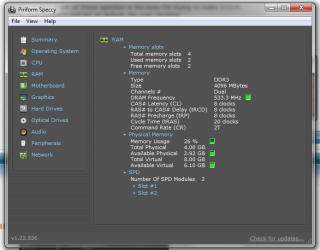
Post #4 is my system
Post #5 is delamite specs.
 

My Computer

Computer type
PC/Desktop
Computer Manufacturer/Model Number
Home made Desktop
OS
Windows 10 Pro. 64/ version 1709 Windows 7 Pro/64
CPU
Intel i7-6800K @ 4.3
Motherboard
ASUS X-99 Deluxe II
Memory
Corsair Platinum 16 gig @2400
Graphics Card(s)
EVGA GTX 1070 OC
Monitor(s) Displays
Asus 27" LED LCD/VE278Q
Screen Resolution
1920-1080 or 1280-720 HDMI
Hard Drives
INTEL SSD 730-240 Gb Sata 3.0/
PSU
EVGA Platium 1200W
Case
Phanteks Luxe Tempered Glass 8 fans/ one radiator
Cooling
XSPC/ Water Cooled CPU
Keyboard
Das 4 Professional
Mouse
Logitech M705/MX Anywhere 2-S
Internet Speed
100 mbits
Antivirus
Microsoft Security Essentials/ Malwarebytes Premium 3.0/ SAS
Browser
I.E. 11 default/Firefox/ ISP Time Warner Cable/Spectrum
Other Info
LG BluRay Burner/
Sound system-KLipsch-THX/
Icy Dock ssd Hot Swap bays.
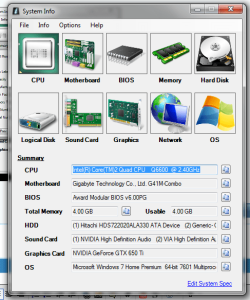
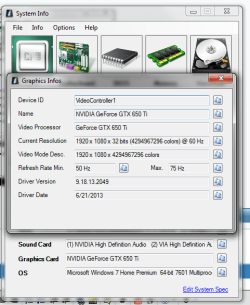
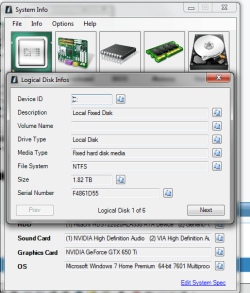
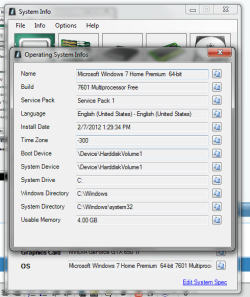
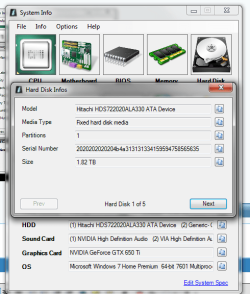
here come the pics ....
 

Attachments

  • sp1.png
    sp1.png
    40.3 KB · Views: 9

My Computer

Computer type
PC/Desktop
Computer Manufacturer/Model Number
custom build
OS
windows7 x64
CPU
Intel Q6600 quad core
Motherboard
Gigabyte G41M-combo
Memory
Corsair XMS3 CMX4GX3M2A1600C9--- 2 x 4 gig sticks
Graphics Card(s)
NVIDIA Gforce GTX 650 Ti
Sound Card
NVIDIA high defintion audio & VIA technologies high defintio
Monitor(s) Displays
View Sonic
Screen Resolution
1920 x 1080
Hard Drives
Hitachi HDS 722020ALA330 -----2TB
PSU
Rocketfish 550W modular
Case
Rummage sale
Cooling
Prolimatech Megahalems Rev 2.0 ----w/ 2 120mm scythe fans
Keyboard
Razer Lycosa
Mouse
Steel series IKARI driverless mouse
Antivirus
Bitdefender Sphere 2012
Browser
Firefox
Other Info
this system runs very cool, which might explain why the CPU has not given up yet......
more...sp2.png

sp3.png

sp4.png

sp5.png
 

My Computer

Computer type
PC/Desktop
Computer Manufacturer/Model Number
custom build
OS
windows7 x64
CPU
Intel Q6600 quad core
Motherboard
Gigabyte G41M-combo
Memory
Corsair XMS3 CMX4GX3M2A1600C9--- 2 x 4 gig sticks
Graphics Card(s)
NVIDIA Gforce GTX 650 Ti
Sound Card
NVIDIA high defintion audio & VIA technologies high defintio
Monitor(s) Displays
View Sonic
Screen Resolution
1920 x 1080
Hard Drives
Hitachi HDS 722020ALA330 -----2TB
PSU
Rocketfish 550W modular
Case
Rummage sale
Cooling
Prolimatech Megahalems Rev 2.0 ----w/ 2 120mm scythe fans
Keyboard
Razer Lycosa
Mouse
Steel series IKARI driverless mouse
Antivirus
Bitdefender Sphere 2012
Browser
Firefox
Other Info
this system runs very cool, which might explain why the CPU has not given up yet......
more yet ...
 

Attachments

  • sp10.png
    sp10.png
    44.1 KB · Views: 7
  • sp9.png
    sp9.png
    36.7 KB · Views: 3
  • sp8.png
    sp8.png
    35.6 KB · Views: 4
  • sp7.png
    sp7.png
    32.6 KB · Views: 6
  • sp6.png
    sp6.png
    39 KB · Views: 5

My Computer

Computer type
PC/Desktop
Computer Manufacturer/Model Number
custom build
OS
windows7 x64
CPU
Intel Q6600 quad core
Motherboard
Gigabyte G41M-combo
Memory
Corsair XMS3 CMX4GX3M2A1600C9--- 2 x 4 gig sticks
Graphics Card(s)
NVIDIA Gforce GTX 650 Ti
Sound Card
NVIDIA high defintion audio & VIA technologies high defintio
Monitor(s) Displays
View Sonic
Screen Resolution
1920 x 1080
Hard Drives
Hitachi HDS 722020ALA330 -----2TB
PSU
Rocketfish 550W modular
Case
Rummage sale
Cooling
Prolimatech Megahalems Rev 2.0 ----w/ 2 120mm scythe fans
Keyboard
Razer Lycosa
Mouse
Steel series IKARI driverless mouse
Antivirus
Bitdefender Sphere 2012
Browser
Firefox
Other Info
this system runs very cool, which might explain why the CPU has not given up yet......
might as well show this also
 

Attachments

  • sp11.png
    sp11.png
    12.1 KB · Views: 3

My Computer

Computer type
PC/Desktop
Computer Manufacturer/Model Number
custom build
OS
windows7 x64
CPU
Intel Q6600 quad core
Motherboard
Gigabyte G41M-combo
Memory
Corsair XMS3 CMX4GX3M2A1600C9--- 2 x 4 gig sticks
Graphics Card(s)
NVIDIA Gforce GTX 650 Ti
Sound Card
NVIDIA high defintion audio & VIA technologies high defintio
Monitor(s) Displays
View Sonic
Screen Resolution
1920 x 1080
Hard Drives
Hitachi HDS 722020ALA330 -----2TB
PSU
Rocketfish 550W modular
Case
Rummage sale
Cooling
Prolimatech Megahalems Rev 2.0 ----w/ 2 120mm scythe fans
Keyboard
Razer Lycosa
Mouse
Steel series IKARI driverless mouse
Antivirus
Bitdefender Sphere 2012
Browser
Firefox
Other Info
this system runs very cool, which might explain why the CPU has not given up yet......
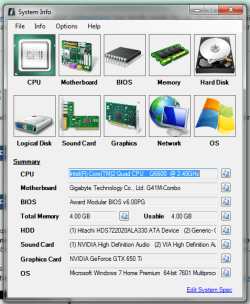
and post this ....

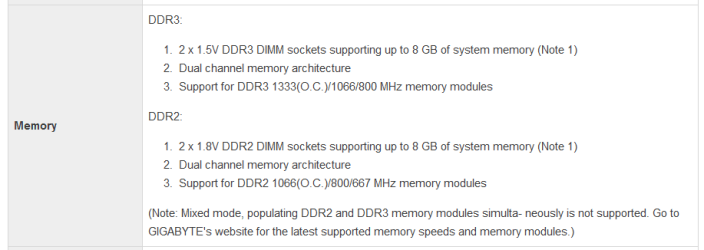
this is the specs on my MB, from reading it I do not understand if they mean 8 gigs total or 8 gigs for each slot? does not matter, i have 2x4 or 2x6 memory configurations i can use.
 

Attachments

  • sp12.png
    sp12.png
    9.7 KB · Views: 12

My Computer

Computer type
PC/Desktop
Computer Manufacturer/Model Number
custom build
OS
windows7 x64
CPU
Intel Q6600 quad core
Motherboard
Gigabyte G41M-combo
Memory
Corsair XMS3 CMX4GX3M2A1600C9--- 2 x 4 gig sticks
Graphics Card(s)
NVIDIA Gforce GTX 650 Ti
Sound Card
NVIDIA high defintion audio & VIA technologies high defintio
Monitor(s) Displays
View Sonic
Screen Resolution
1920 x 1080
Hard Drives
Hitachi HDS 722020ALA330 -----2TB
PSU
Rocketfish 550W modular
Case
Rummage sale
Cooling
Prolimatech Megahalems Rev 2.0 ----w/ 2 120mm scythe fans
Keyboard
Razer Lycosa
Mouse
Steel series IKARI driverless mouse
Antivirus
Bitdefender Sphere 2012
Browser
Firefox
Other Info
this system runs very cool, which might explain why the CPU has not given up yet......
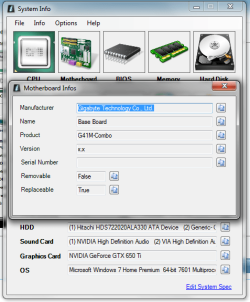
Post #13
System memory = total memory of the system.
Please look in the lower left corner of my post (My System Specs)
That is what we need and the place to install it.
I think the problem we/you are having is the understanding of terms.
That is why we need system specs display properly so we can try to eliminate such problems.

Please read and follow the instruction of this again.

System Info - See Your System Specs
 

My Computer

Computer type
PC/Desktop
Computer Manufacturer/Model Number
Home made Desktop
OS
Windows 10 Pro. 64/ version 1709 Windows 7 Pro/64
CPU
Intel i7-6800K @ 4.3
Motherboard
ASUS X-99 Deluxe II
Memory
Corsair Platinum 16 gig @2400
Graphics Card(s)
EVGA GTX 1070 OC
Monitor(s) Displays
Asus 27" LED LCD/VE278Q
Screen Resolution
1920-1080 or 1280-720 HDMI
Hard Drives
INTEL SSD 730-240 Gb Sata 3.0/
PSU
EVGA Platium 1200W
Case
Phanteks Luxe Tempered Glass 8 fans/ one radiator
Cooling
XSPC/ Water Cooled CPU
Keyboard
Das 4 Professional
Mouse
Logitech M705/MX Anywhere 2-S
Internet Speed
100 mbits
Antivirus
Microsoft Security Essentials/ Malwarebytes Premium 3.0/ SAS
Browser
I.E. 11 default/Firefox/ ISP Time Warner Cable/Spectrum
Other Info
LG BluRay Burner/
Sound system-KLipsch-THX/
Icy Dock ssd Hot Swap bays.
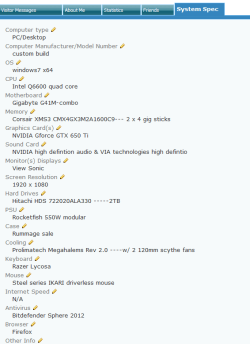
OK Ladyback & Northern ,
I think this is what you want.....
I had became busy yesterday so I could not reply.
 

Attachments

  • sp15.png
    sp15.png
    14 KB · Views: 11

My Computer

Computer type
PC/Desktop
Computer Manufacturer/Model Number
custom build
OS
windows7 x64
CPU
Intel Q6600 quad core
Motherboard
Gigabyte G41M-combo
Memory
Corsair XMS3 CMX4GX3M2A1600C9--- 2 x 4 gig sticks
Graphics Card(s)
NVIDIA Gforce GTX 650 Ti
Sound Card
NVIDIA high defintion audio & VIA technologies high defintio
Monitor(s) Displays
View Sonic
Screen Resolution
1920 x 1080
Hard Drives
Hitachi HDS 722020ALA330 -----2TB
PSU
Rocketfish 550W modular
Case
Rummage sale
Cooling
Prolimatech Megahalems Rev 2.0 ----w/ 2 120mm scythe fans
Keyboard
Razer Lycosa
Mouse
Steel series IKARI driverless mouse
Antivirus
Bitdefender Sphere 2012
Browser
Firefox
Other Info
this system runs very cool, which might explain why the CPU has not given up yet......
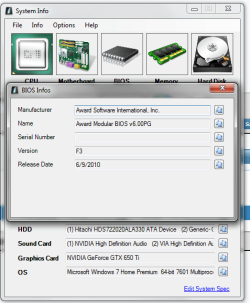
and post this ....

this is the specs on my MB, from reading it I do not understand if they mean 8 gigs total or 8 gigs for each slot? does not matter, i have 2x4 or 2x6 memory configurations i can use.

Sorry for jumping in.

Each slot can handle a max of 4GB for a total of 8GB. I believe earlier you said you had 6GB modules installed in each slot. That configuration wouldn't be supported. I think I remember hearing or reading that exceeding the maximum RAM (in this case 4GB per slot) could have an adverse affect on the mobo. It could fail to boot the computer, it could "reset" the RAM max, it could work but only record the max amount supported by the mobo, etc.

Again, my apologies for jumping in and no disrespect intended to Layback or Northernsoul.
 

My Computer

Computer type
Laptop
Computer Manufacturer/Model Number
Sony Vaio VPCEB47GM Laptop
OS
Win 7 Pro 64-bit
CPU
Intel i5 2.4 Ghz
Memory
8GB DDR3
Graphics Card(s)
Intel HD 3000
Sound Card
IDT High Definition
Monitor(s) Displays
15.6 WGXA Anti-Glare LED
Screen Resolution
1280x800
Hard Drives
640Gb 7200rpm
Antivirus
MSE
Browser
Opera (primary) with IE9 backup
oh no,
I appreciate any and all help. I chose to run with the (2) 4-gig sticks of corsair, for this Mb. I did notice that the Corsair memory runs much cooler than the Mushkin.
 

My Computer

Computer type
PC/Desktop
Computer Manufacturer/Model Number
custom build
OS
windows7 x64
CPU
Intel Q6600 quad core
Motherboard
Gigabyte G41M-combo
Memory
Corsair XMS3 CMX4GX3M2A1600C9--- 2 x 4 gig sticks
Graphics Card(s)
NVIDIA Gforce GTX 650 Ti
Sound Card
NVIDIA high defintion audio & VIA technologies high defintio
Monitor(s) Displays
View Sonic
Screen Resolution
1920 x 1080
Hard Drives
Hitachi HDS 722020ALA330 -----2TB
PSU
Rocketfish 550W modular
Case
Rummage sale
Cooling
Prolimatech Megahalems Rev 2.0 ----w/ 2 120mm scythe fans
Keyboard
Razer Lycosa
Mouse
Steel series IKARI driverless mouse
Antivirus
Bitdefender Sphere 2012
Browser
Firefox
Other Info
this system runs very cool, which might explain why the CPU has not given up yet......
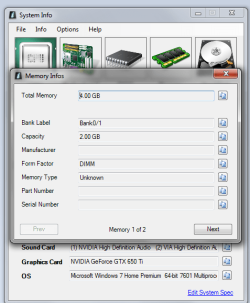
marsmimar not problem at all. You are welcome as far as I'm concerned to join the fun.
-----------------------
delamite your specs show that you have 4 sticks 2 gigs each installed which equals 8 gigs of total system memory.
Is that correct?
Are all sticks of ram matched. Same part #, same speed and the same volts. All DDR-3 or all DDR-2.
Your motherboard specs.

DDR3:

2 x 1.5V DDR3 DIMM sockets supporting up to 8 GB of system memory (Note 1)
Dual channel memory architecture
Support for DDR3 1333(O.C.)/1066/800 MHz memory modules

DDR2:

2 x 1.8V DDR2 DIMM sockets supporting up to 8 GB of system memory (Note 1)
Dual channel memory architecture
Support for DDR2 1066(O.C.)/800/667 MHz memory modules

(Note: Mixed mode, populating DDR2 and DDR3 memory modules simulta- neously is not supported. Go to GIGABYTE's website for the latest supported memory speeds and memory modules.)
------------------
The reason I ask all these question is because I'm trying to make 2+2=4.
Is your motherboard set at default. No over clocking.
Windows 7 receives the information on how much ram is installed from the motherboard.
Thanks for filling in your system specs.
 

My Computer

Computer type
PC/Desktop
Computer Manufacturer/Model Number
Home made Desktop
OS
Windows 10 Pro. 64/ version 1709 Windows 7 Pro/64
CPU
Intel i7-6800K @ 4.3
Motherboard
ASUS X-99 Deluxe II
Memory
Corsair Platinum 16 gig @2400
Graphics Card(s)
EVGA GTX 1070 OC
Monitor(s) Displays
Asus 27" LED LCD/VE278Q
Screen Resolution
1920-1080 or 1280-720 HDMI
Hard Drives
INTEL SSD 730-240 Gb Sata 3.0/
PSU
EVGA Platium 1200W
Case
Phanteks Luxe Tempered Glass 8 fans/ one radiator
Cooling
XSPC/ Water Cooled CPU
Keyboard
Das 4 Professional
Mouse
Logitech M705/MX Anywhere 2-S
Internet Speed
100 mbits
Antivirus
Microsoft Security Essentials/ Malwarebytes Premium 3.0/ SAS
Browser
I.E. 11 default/Firefox/ ISP Time Warner Cable/Spectrum
Other Info
LG BluRay Burner/
Sound system-KLipsch-THX/
Icy Dock ssd Hot Swap bays.

My Computer

Computer type
PC/Desktop
Computer Manufacturer/Model Number
Home made Desktop
OS
Windows 10 Pro. 64/ version 1709 Windows 7 Pro/64
CPU
Intel i7-6800K @ 4.3
Motherboard
ASUS X-99 Deluxe II
Memory
Corsair Platinum 16 gig @2400
Graphics Card(s)
EVGA GTX 1070 OC
Monitor(s) Displays
Asus 27" LED LCD/VE278Q
Screen Resolution
1920-1080 or 1280-720 HDMI
Hard Drives
INTEL SSD 730-240 Gb Sata 3.0/
PSU
EVGA Platium 1200W
Case
Phanteks Luxe Tempered Glass 8 fans/ one radiator
Cooling
XSPC/ Water Cooled CPU
Keyboard
Das 4 Professional
Mouse
Logitech M705/MX Anywhere 2-S
Internet Speed
100 mbits
Antivirus
Microsoft Security Essentials/ Malwarebytes Premium 3.0/ SAS
Browser
I.E. 11 default/Firefox/ ISP Time Warner Cable/Spectrum
Other Info
LG BluRay Burner/
Sound system-KLipsch-THX/
Icy Dock ssd Hot Swap bays.
ok here we are ....

RAM is not mixed, and is a matched pair of DDR3 @ 4 gigs each
 

Attachments

  • sp16.png
    sp16.png
    26.3 KB · Views: 7

My Computer

Computer type
PC/Desktop
Computer Manufacturer/Model Number
custom build
OS
windows7 x64
CPU
Intel Q6600 quad core
Motherboard
Gigabyte G41M-combo
Memory
Corsair XMS3 CMX4GX3M2A1600C9--- 2 x 4 gig sticks
Graphics Card(s)
NVIDIA Gforce GTX 650 Ti
Sound Card
NVIDIA high defintion audio & VIA technologies high defintio
Monitor(s) Displays
View Sonic
Screen Resolution
1920 x 1080
Hard Drives
Hitachi HDS 722020ALA330 -----2TB
PSU
Rocketfish 550W modular
Case
Rummage sale
Cooling
Prolimatech Megahalems Rev 2.0 ----w/ 2 120mm scythe fans
Keyboard
Razer Lycosa
Mouse
Steel series IKARI driverless mouse
Antivirus
Bitdefender Sphere 2012
Browser
Firefox
Other Info
this system runs very cool, which might explain why the CPU has not given up yet......
Back
Top