
Sound Card upgrade?

metalmania31

New member
Guru
Local time
5:07 AM
Messages
670
Location
CA
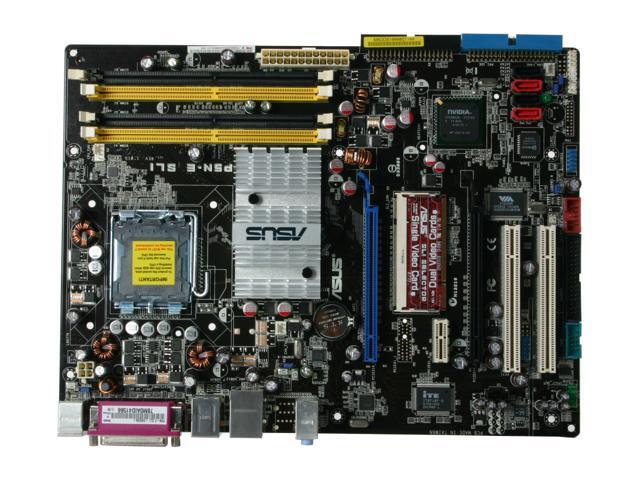
I was thinking of upgrading my sound card but my motherboards only PCI x1 slot sits right next to the graphics slot. Having the GTX 470 it uses double the space so the sound card if installed would be right below the vid card. My concern, would the heat from the vid card damage the sound card? It would practically be touching each other. Has anyone run into this? Has it caused you any issues?
13-131-142-15.jpg
 

My Computer

Computer type
PC/Desktop
Computer Manufacturer/Model Number
Custom Build
OS
Windows 7 Pro 64bit build 7601 SP1
CPU
Intel Core I5 3570K 3.4Ghz w/ Zalman CNPS9900NT RT
Motherboard
MSI Z77A-G45 Gaming
Memory
G.Skill F3-12800CL9D-8GbXL ; 4Gx2
Graphics Card(s)
EVGA Geforce GTX 770 Superclocked
Sound Card
Creative Sound Blaster Z
Monitor(s) Displays
Dual ViewSonic VX2770Smh-LED Black 27"IPS-Panel
Screen Resolution
1920x1080
Hard Drives
Kingston Hyper X 240GB SSD Win8 Pro 64bit 6GB/s Sata III
Intel 335 Series SSD 240GB Win8 Storage 6GB/s Sata III
Intel 320 Series SSD 600GB Storage 3GB/s Sata II
Western Digital Scorpio Black 1TB - Docked via Esata
PSU
Coolermaster GX 750W
Case
Corsair Vengence C70
Cooling
Coolermaster 120mm and Enermax 140mm
Keyboard
Corsair Vengence K70
Mouse
Logitech G500
Internet Speed
22mbps+
Browser
Firefox, Chrome, IE
Other Info
Swan M50W 2.1 speakers
APC UPS
Thermaltake BlacX HDD Dock
Samsung BD Optical Drive
Netgear WNDR4500
Hi.


Your motherboard has a Realtek ALC883 6 -Channel on-board audio.

Why you want to add an extra audio card?

IMO you will not gain any much difference.
 

My Computer

Computer Manufacturer/Model Number
Custom Built by me.
OS
Windows 7 Ultimate 64bit SP1
CPU
Intel Core 2 Quad Q6600
Motherboard
Gigabyte GA-X38-DS4
Memory
2X2GB DDR2 PC6400 800MHZ DUAL CHANNEL
Graphics Card(s)
XFX RADEON HD 6850 1GB GDDR5
Sound Card
2/4/5.1/7.1-channel Realtek High Definition
Monitor(s) Displays
Samsung LE40A656F1 1080p 100Hz LCD HD TV 50,000:1
Screen Resolution
1366x768 in Desktop,1920x1080p in gaming and video
Hard Drives
C:\WD VelociRaptor 150 GB,10,000 RPM
E:\WESTERN DIGITAL WD15EADS 1.5TB CAVIAR GREEN SATA2 F:\WESTERN DIGITAL WD15EADS 1.5TB CAVIAR GREEN SATA2
PSU
THERMALTAKE W0229 TOUGHPOWER XT 750W
Case
A-Case Twin Engine BB
Cooling
3 x thermaltake smart case fan II + 1 arctic cooling fan
Keyboard
Wireless Logitech LX710
Mouse
Logitech Wireless Gaming Mouse G700
Internet Speed
ADSL 12000 plus
Other Info
Mouse Logitech G700,with 13 buttons who needs keyboard in RPG?

D:\Sony high speed sata Dvd Rewriter
Logitech Cordless Rumblepad 2
I think it'd be OK.

I ran a PCI-E X1 soundcard in a slot that was immediately above the graphics card (GTX480), and neither cooked.

Alternately, you could use a PCI soundcard. There may be a wider variety of choices available for that older standard.

Discrete soundcards appear to be endangered species, even though to my (anything but golden) ears, I have yet to get a Realtek onboard sound system that came close to the sound of a decent discrete card.
 

My Computer

Computer Manufacturer/Model Number
homegrown
OS
Windows 7 Pro X64 SP1
CPU
Intel Core I7-3930k
Motherboard
Asus P9X79 Pro
Memory
16 GB Gskill DDR3-2133
Graphics Card(s)
eVGA GTX680
Sound Card
Creative X-Fi Titanium
Monitor(s) Displays
As PA246Q
Screen Resolution
1920 X 1200
Hard Drives
Corsair Force GT, 120 GB
WDC 1.5TB Caviar Black
PSU
PCP&C Silencer 750 Crossfire
Case
Silverstone FT02
Cooling
Noctua NH-D14
Keyboard
cheap Logitech USB
Mouse
Microsoft Intellimouse Explorer (old optical) USB
Internet Speed
6Mb cable
Other Info
Pioneer BDR-205
Samsung SH-203B
Monsoon 5.1 speakers
You could also put it in the second x16/x8 slot.

Hi.


Your motherboard has a Realtek ALC883 6 -Channel on-board audio.

Why you want to add an extra audio card?

IMO you will not gain any much difference.

Yes there is. If you have decent speakers or headphones, the sound will be far better than anything from Realtek audio. It has got better over the years, but the audio quality is still lacking from that of a dedicated sound card.
 

My Computer

Computer type
PC/Desktop
Computer Manufacturer/Model Number
Me
OS
Win 7 Ultimate x64
CPU
FX-8350 @ 4.6 GHz so far
Motherboard
Asus M5A97 EVO
Memory
ADATA XPG V1 Series Black 8GB DDR3 1600
Graphics Card(s)
Sapphire R9 270x Dual-X
Sound Card
Xonar DGX w/ Corsair Vengence 1300
Monitor(s) Displays
Acer S232HL Abid
Screen Resolution
1920x1080
Hard Drives
120 GB OCZ Vertex 3
500 GB Seagate 7200.12
PSU
Antec Earthwatts 650W Green
Case
Antec Three Hundred
Cooling
Cooler Master 212 EVO
Keyboard
Logitech G510
Mouse
Logitech G500s
Internet Speed
35000/3000
I already have an X-Fi xtreme music, you guys didn't read my specs? It's currently slotted in a standard pci-e slot.
And a stand alone sound card is far superior to any onboard sound. I was thinking of upgrading for better audiophile level performance. I plan to upgrade my speakers in the future as well as well as my headphones. My concern is heat from the video card since the PCI x1 slot is right below where my vid card is.
So Bobkn you had no issues from the heat? That's good to hear because I'm not ready to upgrade my whole PC yet.
 

My Computer

Computer type
PC/Desktop
Computer Manufacturer/Model Number
Custom Build
OS
Windows 7 Pro 64bit build 7601 SP1
CPU
Intel Core I5 3570K 3.4Ghz w/ Zalman CNPS9900NT RT
Motherboard
MSI Z77A-G45 Gaming
Memory
G.Skill F3-12800CL9D-8GbXL ; 4Gx2
Graphics Card(s)
EVGA Geforce GTX 770 Superclocked
Sound Card
Creative Sound Blaster Z
Monitor(s) Displays
Dual ViewSonic VX2770Smh-LED Black 27"IPS-Panel
Screen Resolution
1920x1080
Hard Drives
Kingston Hyper X 240GB SSD Win8 Pro 64bit 6GB/s Sata III
Intel 335 Series SSD 240GB Win8 Storage 6GB/s Sata III
Intel 320 Series SSD 600GB Storage 3GB/s Sata II
Western Digital Scorpio Black 1TB - Docked via Esata
PSU
Coolermaster GX 750W
Case
Corsair Vengence C70
Cooling
Coolermaster 120mm and Enermax 140mm
Keyboard
Corsair Vengence K70
Mouse
Logitech G500
Internet Speed
22mbps+
Browser
Firefox, Chrome, IE
Other Info
Swan M50W 2.1 speakers
APC UPS
Thermaltake BlacX HDD Dock
Samsung BD Optical Drive
Netgear WNDR4500
I have a X-Fi Titanium HD x1 card, that sits right below my 570 and no issues.

If however it bothers you, you can add a extra fan to push more air betwwen the Sound card and Video card.
Not only would it get air moving between them cheaply, but it would also help cool the GPU a bit better as well as cool the chipset HS.


But as mentioned, a x1 card will work in any x4, x8, or x16 PCI Express slot. So you can put it in that lower slot if you need to.
Or just stick with a PCI card.

But if buying a new sound card now, I would go with a x1 PCI-X.
 

My Computer

Computer Manufacturer/Model Number
Custom (Self Build)
OS
Windows 7 Home Premium 64bit
CPU
Intel Core i7 2700k
Motherboard
eVGA P67 SLI
Memory
8GB Mushkin Redline Ridgebacks @1866
Graphics Card(s)
EVGA GTX570 SC
Sound Card
XiFi Titanium HD
Monitor(s) Displays
LG W2453V
Screen Resolution
1920x1080
Hard Drives
Intel 320 80GB -- Intel X25-V 40GB --WD Black 1TB x2 -- WD Blue 640GB
PSU
Seasonic x750
Case
Corsair 600T SE White
Cooling
eVGA Superclocked CPU Cooler
Keyboard
Saitek Cyborg
Antivirus
Kaspersky
Browser
IE
Other Info
LG BD/DVD
I have a X-Fi Titanium HD x1 card, that sits right below my 570 and no issues.

If however it bothers you, you can add a extra fan to push more air betwwen the Sound card and Video card.
Not only would it get air moving between them cheaply, but it would also help cool the GPU a bit better as well as cool the chipset HS.


But as mentioned, a x1 card will work in any x4, x8, or x16 PCI Express slot. So you can put it in that lower slot if you need to.
Or just stick with a PCI card.

But if buying a new sound card now, I would go with a x1 PCI-X.

That sounds like a good plan to me. Thanks for the advice everyone.
 

My Computer

Computer type
PC/Desktop
Computer Manufacturer/Model Number
Custom Build
OS
Windows 7 Pro 64bit build 7601 SP1
CPU
Intel Core I5 3570K 3.4Ghz w/ Zalman CNPS9900NT RT
Motherboard
MSI Z77A-G45 Gaming
Memory
G.Skill F3-12800CL9D-8GbXL ; 4Gx2
Graphics Card(s)
EVGA Geforce GTX 770 Superclocked
Sound Card
Creative Sound Blaster Z
Monitor(s) Displays
Dual ViewSonic VX2770Smh-LED Black 27"IPS-Panel
Screen Resolution
1920x1080
Hard Drives
Kingston Hyper X 240GB SSD Win8 Pro 64bit 6GB/s Sata III
Intel 335 Series SSD 240GB Win8 Storage 6GB/s Sata III
Intel 320 Series SSD 600GB Storage 3GB/s Sata II
Western Digital Scorpio Black 1TB - Docked via Esata
PSU
Coolermaster GX 750W
Case
Corsair Vengence C70
Cooling
Coolermaster 120mm and Enermax 140mm
Keyboard
Corsair Vengence K70
Mouse
Logitech G500
Internet Speed
22mbps+
Browser
Firefox, Chrome, IE
Other Info
Swan M50W 2.1 speakers
APC UPS
Thermaltake BlacX HDD Dock
Samsung BD Optical Drive
Netgear WNDR4500
I already have an X-Fi xtreme music, you guys didn't read my specs? It's currently slotted in a standard pci-e slot.
And a stand alone sound card is far superior to any onboard sound. I was thinking of upgrading for better audiophile level performance. I plan to upgrade my speakers in the future as well as well as my headphones. My concern is heat from the video card since the PCI x1 slot is right below where my vid card is.
So Bobkn you had no issues from the heat? That's good to hear because I'm not ready to upgrade my whole PC yet.

I didn't read your specs.

If you're looking for an "audiophile" card, you would have done well to say so.

I've only tried an X1 soundcard in an X16 slot once. The system didn't boot, but I wouldn't generalize from that. I also have a PCI-E X-Fi, but I don't do a lot of 3D gaming, so its bloated driver/application suite doesn't appeal to me.

If your 570 uses anything like the normal cooling scheme, most of its heat is exhausted out the back of the machine.

I like my Asus Xonar DX. I have an analog 5.1 speaker system, and the "audiophile" cards seem to be aimed more at a digital interface to a receiver. That includes the Creative X-Fi Titanium HD, which only supports stereo on the analog side. The Asus Xonar Essence line also has limited analog outputs.
 

My Computer

Computer Manufacturer/Model Number
homegrown
OS
Windows 7 Pro X64 SP1
CPU
Intel Core I7-3930k
Motherboard
Asus P9X79 Pro
Memory
16 GB Gskill DDR3-2133
Graphics Card(s)
eVGA GTX680
Sound Card
Creative X-Fi Titanium
Monitor(s) Displays
As PA246Q
Screen Resolution
1920 X 1200
Hard Drives
Corsair Force GT, 120 GB
WDC 1.5TB Caviar Black
PSU
PCP&C Silencer 750 Crossfire
Case
Silverstone FT02
Cooling
Noctua NH-D14
Keyboard
cheap Logitech USB
Mouse
Microsoft Intellimouse Explorer (old optical) USB
Internet Speed
6Mb cable
Other Info
Pioneer BDR-205
Samsung SH-203B
Monsoon 5.1 speakers
I already have an X-Fi xtreme music, you guys didn't read my specs? It's currently slotted in a standard pci-e slot.
And a stand alone sound card is far superior to any onboard sound. I was thinking of upgrading for better audiophile level performance. I plan to upgrade my speakers in the future as well as well as my headphones. My concern is heat from the video card since the PCI x1 slot is right below where my vid card is.
So Bobkn you had no issues from the heat? That's good to hear because I'm not ready to upgrade my whole PC yet.

I didn't read your specs.

If you're looking for an "audiophile" card, you would have done well to say so.

I've only tried an X1 soundcard in an X16 slot once. The system didn't boot, but I wouldn't generalize from that. I also have a PCI-E X-Fi, but I don't do a lot of 3D gaming, so its bloated driver/application suite doesn't appeal to me.

If your 570 uses anything like the normal cooling scheme, most of its heat is exhausted out the back of the machine.

I like my Asus Xonar DX. I have an analog 5.1 speaker system, and the "audiophile" cards seem to be aimed more at a digital interface to a receiver. That includes the Creative X-Fi Titanium HD, which only supports stereo on the analog side. The Asus Xonar Essence line also has limited analog outputs.

Yeah, sorry about that. But I was asking more about the heat issue than advice for a sound card which is why I failed to mention that. I think I am going to steer away from creative this time as I also don't care for there application to run the audio. I had been looking at the Asus as well. The HT Omega brand seems pretty good too from the reviews I've read on Newegg. But I haven't decided yet.
 

My Computer

Computer type
PC/Desktop
Computer Manufacturer/Model Number
Custom Build
OS
Windows 7 Pro 64bit build 7601 SP1
CPU
Intel Core I5 3570K 3.4Ghz w/ Zalman CNPS9900NT RT
Motherboard
MSI Z77A-G45 Gaming
Memory
G.Skill F3-12800CL9D-8GbXL ; 4Gx2
Graphics Card(s)
EVGA Geforce GTX 770 Superclocked
Sound Card
Creative Sound Blaster Z
Monitor(s) Displays
Dual ViewSonic VX2770Smh-LED Black 27"IPS-Panel
Screen Resolution
1920x1080
Hard Drives
Kingston Hyper X 240GB SSD Win8 Pro 64bit 6GB/s Sata III
Intel 335 Series SSD 240GB Win8 Storage 6GB/s Sata III
Intel 320 Series SSD 600GB Storage 3GB/s Sata II
Western Digital Scorpio Black 1TB - Docked via Esata
PSU
Coolermaster GX 750W
Case
Corsair Vengence C70
Cooling
Coolermaster 120mm and Enermax 140mm
Keyboard
Corsair Vengence K70
Mouse
Logitech G500
Internet Speed
22mbps+
Browser
Firefox, Chrome, IE
Other Info
Swan M50W 2.1 speakers
APC UPS
Thermaltake BlacX HDD Dock
Samsung BD Optical Drive
Netgear WNDR4500
You need not worry about the heat. Mine are exactly so, and the temperature didn't even go up by 1C. If you wish to be on the safe side, get a 120mm fan on the front side of the case. Will ensure a good airflow. As for the soundcard, if you're going to use digital out, indeed something like a DX would be nice or a D2, if not, DS, DX, D1 will work great with very good sound quality.
 

My Computer

Computer Manufacturer/Model Number
Self-made
OS
Windows 7 Ultimate x64
CPU
AMD Athlon II X3
Motherboard
ASRock 890FX Deluxe5
Memory
A-DATA XPG Gaming Series V2.0 2x2GB
Graphics Card(s)
AMD ATI RADEON HD 5570 OC to 750Mhz
Sound Card
Asus XONAR DS 7.1
Monitor(s) Displays
PHILIPS Brilliance C-line
Screen Resolution
1680x1050 16:10
Hard Drives
Samsung Spinpoint F3 SATAII 1TB
The X-Fi Titanium Hd is a very card.

When I was shopping around for a new card a couple months back, I went through many reviews deciding which one I wanted. And they all seemed to have this common conclusion:

-The X-Fi Titanium HD (the HD part is important) was a huge improvement from the older X-Fi cards, and considered Audiophile grade.

-In music only, it performed very well, but the Xonar was slightly ahead of it in this area.
-In Gaming, the X-Fi was the better card.

So I think it depends on what your looking for as to which one to choose. But both are very good cards.


I chose the X-Fi it because I do alot of gaming, and switching to the X-Fi chip for gaming makes a huge difference in games to my ears.
And although the Xonar performed a bit better in music, the X-Fi is still no slouch. So it was a good comprimise between both areas.


As bonkn said, they are often geared more toward a digital reciever. My X-Fi has 2 RCA ports for a digital reciever (or can be converted to 3.5mm for stereo speaker) and a headphone jack.
That is somewhat of a downside, but I think some newer models out now may have support for analog 5.1.

One other downside to the X-Fi (or at least 1 thing people seem to complaina bout alot) is that it was built for Win7, and only works for Win7. The drivers will not install on any older OS. I don't find this a downside, but many do for some reason.


On mine, once you plug in headphones, it disables those RCA ports.
I use 2.1 Klipsch Pro Media Speakers, but mostly my Sennheiser Headphones, so this card suits my needs perfectly.


Also, the main reason I suggested going with a x1 is because PCI is a older technology. If you plan on keeping the card for a while, it may be the best bet. My motherboad for example doesn't have any PCI slots. Only 2 x16, 1 x8, and 3x1 slots.
Others may soon start following the same idea.
 

My Computer

Computer Manufacturer/Model Number
Custom (Self Build)
OS
Windows 7 Home Premium 64bit
CPU
Intel Core i7 2700k
Motherboard
eVGA P67 SLI
Memory
8GB Mushkin Redline Ridgebacks @1866
Graphics Card(s)
EVGA GTX570 SC
Sound Card
XiFi Titanium HD
Monitor(s) Displays
LG W2453V
Screen Resolution
1920x1080
Hard Drives
Intel 320 80GB -- Intel X25-V 40GB --WD Black 1TB x2 -- WD Blue 640GB
PSU
Seasonic x750
Case
Corsair 600T SE White
Cooling
eVGA Superclocked CPU Cooler
Keyboard
Saitek Cyborg
Antivirus
Kaspersky
Browser
IE
Other Info
LG BD/DVD
In 3-4 years, current cards will get obsolete, and PCI slots are still built in new motherboards. It really depends on the model you choose. There are some that don't have nor pci-e x1 nor pci, the just have PCI-E x16. As mentioned, it depends on the model one chooses.
IMO you'll get the same gamin experience with a xonar D1 or DX as with the creative if paired with proper 5.1 speakers. Dunno about headphones, as i don't have a proper pair. Bottom line, it's up to you and your own preference. IMO the xonar is better in my case, and with the config i have. Excellent linux driver support, and perfect positioning in games even though it's just a xonar DS. If you are uncertain, watch some reviews on the cards, and choose the one that has more chances of getting new drivers in the future(with new os for example win8). If you want recording though, stay away from the Xonar DS. It will do for beginners with an instrument, but if you want something more serious, try something like a D2 or Auzentech.
 

My Computer

Computer Manufacturer/Model Number
Self-made
OS
Windows 7 Ultimate x64
CPU
AMD Athlon II X3
Motherboard
ASRock 890FX Deluxe5
Memory
A-DATA XPG Gaming Series V2.0 2x2GB
Graphics Card(s)
AMD ATI RADEON HD 5570 OC to 750Mhz
Sound Card
Asus XONAR DS 7.1
Monitor(s) Displays
PHILIPS Brilliance C-line
Screen Resolution
1680x1050 16:10
Hard Drives
Samsung Spinpoint F3 SATAII 1TB
I do a great deal of both music and gaming. And only recently started really playing MP FPS and the surround really makes a difference in hearing an enemy creep behind you or around a corner. But I listen to quite a bit of music too. I don't know, but thanks for the input. I'm still on the fence of which to get. I'm in no hurry though.
 

My Computer

Computer type
PC/Desktop
Computer Manufacturer/Model Number
Custom Build
OS
Windows 7 Pro 64bit build 7601 SP1
CPU
Intel Core I5 3570K 3.4Ghz w/ Zalman CNPS9900NT RT
Motherboard
MSI Z77A-G45 Gaming
Memory
G.Skill F3-12800CL9D-8GbXL ; 4Gx2
Graphics Card(s)
EVGA Geforce GTX 770 Superclocked
Sound Card
Creative Sound Blaster Z
Monitor(s) Displays
Dual ViewSonic VX2770Smh-LED Black 27"IPS-Panel
Screen Resolution
1920x1080
Hard Drives
Kingston Hyper X 240GB SSD Win8 Pro 64bit 6GB/s Sata III
Intel 335 Series SSD 240GB Win8 Storage 6GB/s Sata III
Intel 320 Series SSD 600GB Storage 3GB/s Sata II
Western Digital Scorpio Black 1TB - Docked via Esata
PSU
Coolermaster GX 750W
Case
Corsair Vengence C70
Cooling
Coolermaster 120mm and Enermax 140mm
Keyboard
Corsair Vengence K70
Mouse
Logitech G500
Internet Speed
22mbps+
Browser
Firefox, Chrome, IE
Other Info
Swan M50W 2.1 speakers
APC UPS
Thermaltake BlacX HDD Dock
Samsung BD Optical Drive
Netgear WNDR4500
Considering that EAX was broken by 7 and vista, xonar software does include a GX function. It reenables eax support and all. My personal preference would be the xonar. I am sure though that either one will work.
 

My Computer

Computer Manufacturer/Model Number
Self-made
OS
Windows 7 Ultimate x64
CPU
AMD Athlon II X3
Motherboard
ASRock 890FX Deluxe5
Memory
A-DATA XPG Gaming Series V2.0 2x2GB
Graphics Card(s)
AMD ATI RADEON HD 5570 OC to 750Mhz
Sound Card
Asus XONAR DS 7.1
Monitor(s) Displays
PHILIPS Brilliance C-line
Screen Resolution
1680x1050 16:10
Hard Drives
Samsung Spinpoint F3 SATAII 1TB
Considering that EAX was broken by 7 and vista, xonar software does include a GX function. It reenables eax support and all. My personal preference would be the xonar.

Only broken for games that used EAX in conjunction with DirectSound3D, and still works with games that used EAX with OpenAL. Also Creative came out with Alchemy for those DS3D based games and is used as a wrapper and translates the DS3D audio to OpenAL, and restoring full hardware acceleration for those games that use it. It is also a much better solution than what Asus came out with as it full supports up to EAX 4, whereas GX only supports up to EAX 3 and fakes it for EAX 5 (pure software solution, and doesn't work properly).
 

My Computer

Computer type
PC/Desktop
Computer Manufacturer/Model Number
Me
OS
Win 7 Ultimate x64
CPU
FX-8350 @ 4.6 GHz so far
Motherboard
Asus M5A97 EVO
Memory
ADATA XPG V1 Series Black 8GB DDR3 1600
Graphics Card(s)
Sapphire R9 270x Dual-X
Sound Card
Xonar DGX w/ Corsair Vengence 1300
Monitor(s) Displays
Acer S232HL Abid
Screen Resolution
1920x1080
Hard Drives
120 GB OCZ Vertex 3
500 GB Seagate 7200.12
PSU
Antec Earthwatts 650W Green
Case
Antec Three Hundred
Cooling
Cooler Master 212 EVO
Keyboard
Logitech G510
Mouse
Logitech G500s
Internet Speed
35000/3000
True enough, but in configuration with the hardware i have right now, the xonar gave the best performance and quality for me. Then again, i don't game every famous recent title out, so might be off on the gaming end. I do vouch for the music quality and video.
 

My Computer

Computer Manufacturer/Model Number
Self-made
OS
Windows 7 Ultimate x64
CPU
AMD Athlon II X3
Motherboard
ASRock 890FX Deluxe5
Memory
A-DATA XPG Gaming Series V2.0 2x2GB
Graphics Card(s)
AMD ATI RADEON HD 5570 OC to 750Mhz
Sound Card
Asus XONAR DS 7.1
Monitor(s) Displays
PHILIPS Brilliance C-line
Screen Resolution
1680x1050 16:10
Hard Drives
Samsung Spinpoint F3 SATAII 1TB
Back
Top