Sound coming from both headphone & speaker but headphone is not detect

jainvebhav

New member
Local time
12:54 AM
Messages
2
Sound coming from both headphone & speaker but headphone is not detect

I have Lenovo 3000 Y410 laptop having Windows 7 Home Premium installed on it. Realtek HD Audio latest driver is installed. But from the last 3 days, when I connect headphone through laptop, following things happen : -
1) Headphone connected popup doesn't show up.
2) Mic of Headphone connected pop shows up.

1.PNG

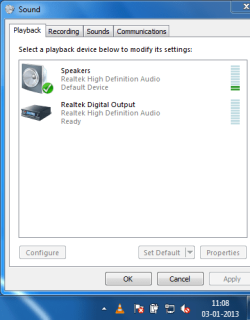
3) When I play video, sound coming from both headphone & laptop speakers.
4) When I mute sound by muting sound icon in taskbar, sound then comes only from headphone.

3.PNG
4.PNG
5.PNG

What I have tried?
1) Installed new Realtek HD Audio Manager.
2) Installed OS again.
3) Tried to change settings in Realtek Hd Audio Manager. But Nothing changes.

When I input headphone & mic jacks into laptop, & then check Realtek HD Audio Manager. The following image shows this : -
6.PNG

The green in realtek hd audio manager is for headphone & red is for mic. In the image, it is shown that headphone not connected & mic connected. But even headphone not connected shows up, sound coming form headphone.

I want to get sound from only headphone when headphone is connected. Is this a hardware problem ?

Please help....
 

My Computer My Computer

At a glance

Windows 7 Home Premium 32 bit
OS
Windows 7 Home Premium 32 bit
My Realtek HD Audio Manager has more options than yours.

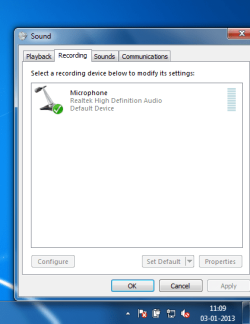
Also, I notice you only have the microphone in the Recording Section of the Sound Panel. RIGHT click in an empty space in that Panel and then LEFT click Show Disabled and Disconnected devices. The Stereo Mix should be shown and you can enable that and make it the default Recording device.

Where did you get the RealTek driver that you installed? If you are not using the Lenovo supplied sound driver, get that and install it as a first step. I have a Lenovo Laptop and it has Stereo Mix and other functions. I haven't looked at the RealTek HD manager so I'm not sure what all it shows.
 

My Computer My Computer

At a glance

Windows 10 64 bitIntel i7 6700K16GB Corsair DominatorIntel CPU Graphics
Computer type
PC/Desktop
Computer Manufacturer/Model Number
My Own Build
OS
Windows 10 64 bit
CPU
Intel i7 6700K
Motherboard
ASUS ROG Maximus VIII Hero
Memory
16GB Corsair Dominator
Graphics Card(s)
Intel CPU Graphics
Sound Card
RealTek
Monitor(s) Displays
27" Dell S2719dgf
Screen Resolution
2560X1440
Hard Drives
1 TB Samsung 850 EVO SSD for Win 10 Pro
500GB Samsung 850 EVO SSD for Win 10 Insider
2 TB drive for backup
PSU
EVGA Supernova 750G2
Case
BeQuiet Silent Base 600
Cooling
Deepcool Captain 120EX
Keyboard
Microsoft Wireless 2000
Mouse
Microsoft wireless
Internet Speed
100 MB/sec (Cable)
Antivirus
Microsoft Defender and Malwarebytes
Browser
Edge/Firefox
Other Info
Cakewalk (Sonar) by BandLab and Studio One 4.1 Pro recording studio software. MOTU 896Mk3 Hybrid recording interface, Frontier Tranzport wireless control unit, Behringer X-Touch Control Surface.
Five USB connected optical drives for CD Audio production using Nero BurningROM
My Realtek HD Audio Manager has more options than yours.

Also, I notice you only have the microphone in the Recording Section of the Sound Panel. RIGHT click in an empty space in that Panel and then LEFT click Show Disabled and Disconnected devices. The Stereo Mix should be shown and you can enable that and make it the default Recording device.

Where did you get the RealTek driver that you installed? If you are not using the Lenovo supplied sound driver, get that and install it as a first step. I have a Lenovo Laptop and it has Stereo Mix and other functions. I haven't looked at the RealTek HD manager so I'm not sure what all it shows.

I have tried with your first solution by setting stereo mix as default recording device, that doesn't work. The time I had purchased laptop, it had Realtek HD Audio driver version 1.83 installed ( that was for windows Vista ). Then when I installed Windows 7, I installed version 2.65 of it. That was working fine for me. Few days back, the problems which I mentioned above started. Then I tried installing the latest version of Realtek HD Audio Manager , i.e. , version 2.70. I have tried everything that I can do by changing every options regarding sound. But that also didn't work. Now it looks to me a hardware problem in soundboard. Probably going tommorow to some laptop service centre for its repair. Can anybody tell about possibility that I can change sound board by myself ? I have heard that most of things in laptop is directly connected to board. If that is true, then I will not be able to replace it. It has to be done by some expert...Any suggestions....
 

My Computer My Computer

At a glance

Windows 7 Home Premium 32 bit
OS
Windows 7 Home Premium 32 bit
Back
Top