Sound OK on Skype - Everything else = Silence?

OldCodger1936

New member
Local time
4:54 AM
Messages
3
Tower PC with Gigabyte 78LMT Mainboard Win7 Ultimate 32 Bit.
It has Realtek Audio built-in.
Obviously I loaded all drivers etc...
Using my Headset Only...
Sound OK on Skype, but everything else just Silence?
 

My Computer My Computer

At a glance

Windows 7 Ultimate x32unknown16GB RAMunknown
Computer type
PC/Desktop
Computer Manufacturer/Model Number
unknown
OS
Windows 7 Ultimate x32
CPU
unknown
Motherboard
gigabyte 78LMT-USB3
Memory
16GB RAM
Graphics Card(s)
unknown
Hard Drives
2 x 320 GB
2 x 1TB USB
Antivirus
Norton IS
Browser
chrome
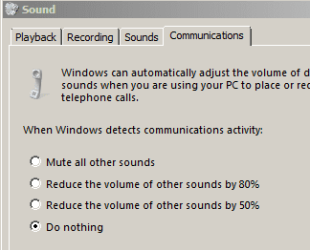
Maybe this setting will help...

sound.PNG

...or maybe not.
 

My Computer My Computer

At a glance

W7 Pro SP1 64biti78GBIntel HD Graphics
Computer type
Laptop
Computer Manufacturer/Model Number
Employer provided Dell Latitude
OS
W7 Pro SP1 64bit
CPU
i7
Memory
8GB
Graphics Card(s)
Intel HD Graphics
Hard Drives
crappy SSD
Antivirus
Employer mandated Symantec Endpoint Protection
Browser
Pale Moon 64bit, IE11 64bit & Chrome 64bit
How do I try it?

I don't see how I apply it?
 

My Computer My Computer

At a glance

Windows 7 Ultimate x32unknown16GB RAMunknown
Computer type
PC/Desktop
Computer Manufacturer/Model Number
unknown
OS
Windows 7 Ultimate x32
CPU
unknown
Motherboard
gigabyte 78LMT-USB3
Memory
16GB RAM
Graphics Card(s)
unknown
Hard Drives
2 x 320 GB
2 x 1TB USB
Antivirus
Norton IS
Browser
chrome
Are you asking how to get to that screen?

Or are you asking what to do once you get to that screen?
 

My Computer My Computer

At a glance

W7 Pro SP1 64biti78GBIntel HD Graphics
Computer type
Laptop
Computer Manufacturer/Model Number
Employer provided Dell Latitude
OS
W7 Pro SP1 64bit
CPU
i7
Memory
8GB
Graphics Card(s)
Intel HD Graphics
Hard Drives
crappy SSD
Antivirus
Employer mandated Symantec Endpoint Protection
Browser
Pale Moon 64bit, IE11 64bit & Chrome 64bit
You show a part of a screen.....
What do I do with it please?
I don't see how to get to the screen,
or if I get to it,
what do I do please?
 

My Computer My Computer

At a glance

Windows 7 Ultimate x32unknown16GB RAMunknown
Computer type
PC/Desktop
Computer Manufacturer/Model Number
unknown
OS
Windows 7 Ultimate x32
CPU
unknown
Motherboard
gigabyte 78LMT-USB3
Memory
16GB RAM
Graphics Card(s)
unknown
Hard Drives
2 x 320 GB
2 x 1TB USB
Antivirus
Norton IS
Browser
chrome
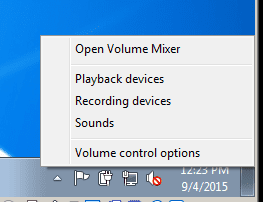
In the notification area (down by the clock)...
...right click on the speaker icon
...select Sounds from the context menu:

sound.PNG

Once the window opens, select the tab named Communications.

Select the option for Do nothing

Click on Apply.

You can leave the window open while you test sounds.
 

My Computer My Computer

At a glance

W7 Pro SP1 64biti78GBIntel HD Graphics
Computer type
Laptop
Computer Manufacturer/Model Number
Employer provided Dell Latitude
OS
W7 Pro SP1 64bit
CPU
i7
Memory
8GB
Graphics Card(s)
Intel HD Graphics
Hard Drives
crappy SSD
Antivirus
Employer mandated Symantec Endpoint Protection
Browser
Pale Moon 64bit, IE11 64bit & Chrome 64bit
Back
Top