
'Special' Documents folder shortcut on desktop in Windows 7.

Butters

Member
Member
VIP
Local time
3:07 PM
Messages
195
So, I wanted to look into getting the 'special' My Documents (now just called Documents) on my desktop in Windows 7, just as it was in Windows XP. I want to have BOTH the Users folder and the Documents folder on my desktop, not just one or the other. I did some searching through the registry to see if I could accomplish this, and finally came across HKCR\CLSID\{450D8FBA-AD25-11D0-98A8-0800361B1103}\, which still has the original My Documents Desktop registry data. I tried to add it to the desktop by going to HKLM\Software\Microsoft\Windows\CurrentVersion\Explorer\Desktop\NameSpace\ and I added the key {450D8FBA-AD25-11D0-98A8-0800361B1103} as a sub key in NameSpace.

I also went to HKCU\Software\Microsoft\Windows\CurrentVersion\Explorer\HideDesktopIcons\ and set the DWORD value for {450D8FBA-AD25-11D0-98A8-0800361B1103} to 0. However that didn't seem to work, so I repeated the process, only this time, I used the key value {450D8FBA-AD25-11D0-98A8-0800361B1104}, which I had created (This new key was not a clone of {450D8FBA-AD25-11D0-98A8-0800361B1103}, but rater a key containing only Context Menu values). And, surprisingly, it worked.

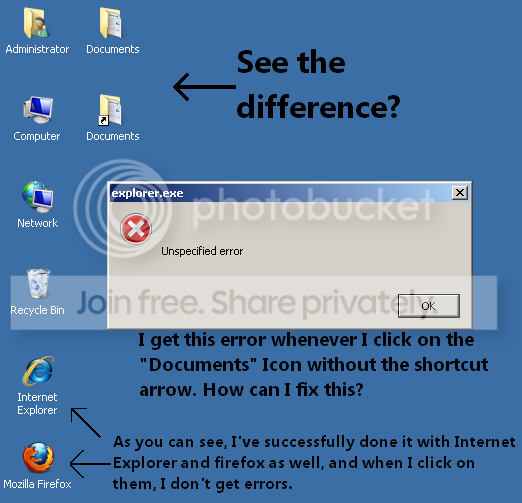
I was thrilled, until I started getting the error 'explorer.exe - unspecified error' whenever I tried clicking on it. This didn't happen before; it used to open to the Documents folder normally, and this was seemingly happening all of a sudden and out of nowhere. I tried re-tweaking the registry, but that did nothing. I even tried changing the key name, but that did nothing. I am not convinced this is impossible, as I have successfully done this with Firefox. Can someone please help? Thanks in advance.
 

My Computer My Computer

At a glance

Windows 7 Professional x64Intel Core i7-4510U CPU8 GB RAMIntel(R) HD Graphics (I so wish I could upgra...
Computer type
Laptop
Computer Manufacturer/Model Number
Dell Inspiron 15 7000 Series
OS
Windows 7 Professional x64
CPU
Intel Core i7-4510U CPU
Memory
8 GB RAM
Graphics Card(s)
Intel(R) HD Graphics (I so wish I could upgrade this)
Screen Resolution
1920x1080
Keyboard
Laptop keyboard
Mouse
Microsoft Mouse
Internet Speed
Nothing to write home about
Antivirus
Malwarebytes Anti Malware
Browser
Pale Moon (Firefox fork)
Other Info
My primary laptop has Windows 10 on it, and my shared desktop (which is actually a laptop being used as a desktop) has Windows 7 Professional on it. I still use both, but I would say I use my laptop a bit more now.
Any reason why you don't just use %userprofile%, and %userprofile%\documents for your shortcuts.
 

My Computers My Computers

  • At a glance

    7 X64i5 84002x8gb 3200mhz
    Computer type
    PC/Desktop
    OS
    7 X64
    CPU
    i5 8400
    Motherboard
    gigabyte b365m ds3h
    Memory
    2x8gb 3200mhz
    Hard Drives
    various
    PSU
    pure power 11 400w cm
    Case
    Coolermaster
    Cooling
    cryorig m9i
  • At a glance

    7x64g54008gb ddr4 2400
    Computer type
    PC/Desktop
    OS
    7x64
    CPU
    g5400
    Motherboard
    ga b365m ds3h
    Memory
    8gb ddr4 2400
    PSU
    xfx pro 450w
Any reason why you don't just use %userprofile%, and %userprofile%\documents for your shortcuts.

Well, actually I did in the registry. I assume you are talking about creating a normal shortcut. What I've done is I re-created the "My Documents" shortcut on XP in Windows 7. You know, the one without the shortcut arrow? I've attached of a picture that will hopefully clarify what I'm talking about.

f1c59b12.png


Additionally, the command value I used for the CLSID key I created is:
C:\Windows\explorer.exe %USERPROFILE%\Documents
 

My Computer My Computer

At a glance

Windows 7 Professional x64Intel Core i7-4510U CPU8 GB RAMIntel(R) HD Graphics (I so wish I could upgra...
Computer type
Laptop
Computer Manufacturer/Model Number
Dell Inspiron 15 7000 Series
OS
Windows 7 Professional x64
CPU
Intel Core i7-4510U CPU
Memory
8 GB RAM
Graphics Card(s)
Intel(R) HD Graphics (I so wish I could upgrade this)
Screen Resolution
1920x1080
Keyboard
Laptop keyboard
Mouse
Microsoft Mouse
Internet Speed
Nothing to write home about
Antivirus
Malwarebytes Anti Malware
Browser
Pale Moon (Firefox fork)
Other Info
My primary laptop has Windows 10 on it, and my shared desktop (which is actually a laptop being used as a desktop) has Windows 7 Professional on it. I still use both, but I would say I use my laptop a bit more now.

My Computer My Computer

At a glance

Windows 7 Home Premium x64 SP1intel(R)core(TM)2 duo CPU T6600 @ 2.20GHz3 gb ddr3ati radeon hd4570/512mb
Computer Manufacturer/Model Number
acer aspire 5935g
OS
Windows 7 Home Premium x64 SP1
CPU
intel(R)core(TM)2 duo CPU T6600 @ 2.20GHz
Motherboard
intel gm45/gm47 revision 07
Memory
3 gb ddr3
Graphics Card(s)
ati radeon hd4570/512mb
Monitor(s) Displays
lop156wh2-tle1 15.3 flat
Screen Resolution
1366x768
Hard Drives
OCZ-Agility3 60gig ssd
320gig external hdd
500gig external hdd
Mouse
Optical
Internet Speed
30Mbps Down/30Mbps Up
Butters

Why don't you just create a shortcut and remove the arrow if it bothers you - http://www.sevenforums.com/tutorials/3606-shortcut-arrow-change-remove-restore.html
Must be easier than doing it the long way round

Danny

Because, that will effect all shortcuts. I'm sorry to sound so picky, but I might also mention that this technique I am trying to accomplish also allows for a custom context menu. I am not convinced this is impossible to do, as it was working fine at first, and on my Windows XP machine, I used the same tactic to link to the %UserProfile% folder, and that's still working. My guess is that there is some registry key interfering with my custom value, but I can't be too sure.

Again, sorry to be so picky.

Also, I tried changing the command to another program, and it still didn't work. Could there be anything blocking the {450D8FBA-AD25-11D0-98A8-0800361B1103} key I created from executing? A registry key/value, or a GPO setting, maybe?
 
Last edited by a moderator:

My Computer My Computer

At a glance

Windows 7 Professional x64Intel Core i7-4510U CPU8 GB RAMIntel(R) HD Graphics (I so wish I could upgra...
Computer type
Laptop
Computer Manufacturer/Model Number
Dell Inspiron 15 7000 Series
OS
Windows 7 Professional x64
CPU
Intel Core i7-4510U CPU
Memory
8 GB RAM
Graphics Card(s)
Intel(R) HD Graphics (I so wish I could upgrade this)
Screen Resolution
1920x1080
Keyboard
Laptop keyboard
Mouse
Microsoft Mouse
Internet Speed
Nothing to write home about
Antivirus
Malwarebytes Anti Malware
Browser
Pale Moon (Firefox fork)
Other Info
My primary laptop has Windows 10 on it, and my shared desktop (which is actually a laptop being used as a desktop) has Windows 7 Professional on it. I still use both, but I would say I use my laptop a bit more now.
Looking too

Hello Butters
I am actually just looking to copy a shortcut to the desktop for the my documents folder, which is redirected with a GPO and do it with a script
But in my travels I came across this which is exactly what you are looking for
Vista and Windows 7 Personal Folder Link / Folder
 

My Computer My Computer

At a glance

Windows 7 Ultimate x64Many16 GB
Computer Manufacturer/Model Number
HP
OS
Windows 7 Ultimate x64
CPU
Many
Motherboard
Many
Memory
16 GB
Well try this. Right click on desktop/new/new folder/properties/customize/change icons. Then pick one, there are a bunch of them. You can also name the new folder anything you want to.
 

My Computer My Computer

At a glance

Windows 10 Pro. 64/ version 1709 Windows 7 Pr...Intel i7-6800K @ 4.3Corsair Platinum 16 gig @2400EVGA GTX 1070 OC
Computer type
PC/Desktop
Computer Manufacturer/Model Number
Home made Desktop
OS
Windows 10 Pro. 64/ version 1709 Windows 7 Pro/64
CPU
Intel i7-6800K @ 4.3
Motherboard
ASUS X-99 Deluxe II
Memory
Corsair Platinum 16 gig @2400
Graphics Card(s)
EVGA GTX 1070 OC
Monitor(s) Displays
Asus 27" LED LCD/VE278Q
Screen Resolution
1920-1080 or 1280-720 HDMI
Hard Drives
INTEL SSD 730-240 Gb Sata 3.0/
PSU
EVGA Platium 1200W
Case
Phanteks Luxe Tempered Glass 8 fans/ one radiator
Cooling
XSPC/ Water Cooled CPU
Keyboard
Das 4 Professional
Mouse
Logitech M705/MX Anywhere 2-S
Internet Speed
100 mbits
Antivirus
Microsoft Security Essentials/ Malwarebytes Premium 3.0/ SAS
Browser
I.E. 11 default/Firefox/ ISP Time Warner Cable/Spectrum
Other Info
LG BluRay Burner/
Sound system-KLipsch-THX/
Icy Dock ssd Hot Swap bays.
Got it

Sleep does wonders, code was not working because the GPO was failing, because the network identification was failing.
Anyone know how to force the network ID, I am seeing this more and more in the field
Here is the code
mklink /D "C:\users\%username%\Desktop\Documents" "%HomeDrive%"
 

My Computer My Computer

At a glance

Windows 7 Ultimate x64Many16 GB
Computer Manufacturer/Model Number
HP
OS
Windows 7 Ultimate x64
CPU
Many
Motherboard
Many
Memory
16 GB
RNR1995, thanks so much for the reply. I created the batch file from the forum you linked me to, but for some reason, my Win7 doesn't want to display {450D8FBA-AD25-11D0-98A8-0800361B1103} on the desktop. I even tried backing up the registry and completely re-creating the key myself, but that didn't work. I also double-checked the NameSpace key to be sure it was there, and the value in HideDesktopIcons was set to 0, and still nothing. Could there be anything keeping it from being displayed on the desktop?

Also, I would prefer to keep the Documents directory in %UserProfile%\Documents.
 

My Computer My Computer

At a glance

Windows 7 Professional x64Intel Core i7-4510U CPU8 GB RAMIntel(R) HD Graphics (I so wish I could upgra...
Computer type
Laptop
Computer Manufacturer/Model Number
Dell Inspiron 15 7000 Series
OS
Windows 7 Professional x64
CPU
Intel Core i7-4510U CPU
Memory
8 GB RAM
Graphics Card(s)
Intel(R) HD Graphics (I so wish I could upgrade this)
Screen Resolution
1920x1080
Keyboard
Laptop keyboard
Mouse
Microsoft Mouse
Internet Speed
Nothing to write home about
Antivirus
Malwarebytes Anti Malware
Browser
Pale Moon (Firefox fork)
Other Info
My primary laptop has Windows 10 on it, and my shared desktop (which is actually a laptop being used as a desktop) has Windows 7 Professional on it. I still use both, but I would say I use my laptop a bit more now.
Did not try it

I did not try that one because of messing with the windows shell, not a fan of that, M$ disabled it for a reason??
But there are alternatives
you can make a link, which did not do well on a workgroup
but worked fine on a domain with redirected my docs folders

mklink /D "C:\users\%username%\Desktop\Documents" "%HomeDrive%"
ping -n 6 127.0.0.1>nul
rename "C:\users\%username%\Desktop\Documents" "%username%"

Or copy the icon

"C:\users\%username%\Desktop\Shortcut.exe" /F:"C:\users\%username%\Desktop\Documents.lnk" /A:C /T:"C:\users\%username%\Documents"
"C:\users\%username%\Desktop\Shortcut.exe" /F:"C:\users\%username%\Desktop\Downloads.lnk" /A:C /T:"C:\users\%username%\Downloads"

Which is really what I wanted, you will need this program called shortcuts.exe from OptimumX
Optimum X Downloads - Freeware Utilities
 

My Computer My Computer

At a glance

Windows 7 Ultimate x64Many16 GB
Computer Manufacturer/Model Number
HP
OS
Windows 7 Ultimate x64
CPU
Many
Motherboard
Many
Memory
16 GB
Well, I want to avoid creating a standard shortcut or link (.lnk file). Does anyone have any information on the "Explorer.exe Unspecified Error" message I keep getting? I'm willing to keep digging at this problem until it's fixed.
 
Last edited:

My Computer My Computer

At a glance

Windows 7 Professional x64Intel Core i7-4510U CPU8 GB RAMIntel(R) HD Graphics (I so wish I could upgra...
Computer type
Laptop
Computer Manufacturer/Model Number
Dell Inspiron 15 7000 Series
OS
Windows 7 Professional x64
CPU
Intel Core i7-4510U CPU
Memory
8 GB RAM
Graphics Card(s)
Intel(R) HD Graphics (I so wish I could upgrade this)
Screen Resolution
1920x1080
Keyboard
Laptop keyboard
Mouse
Microsoft Mouse
Internet Speed
Nothing to write home about
Antivirus
Malwarebytes Anti Malware
Browser
Pale Moon (Firefox fork)
Other Info
My primary laptop has Windows 10 on it, and my shared desktop (which is actually a laptop being used as a desktop) has Windows 7 Professional on it. I still use both, but I would say I use my laptop a bit more now.
Google it

Well I do not have any info on your error message
but if you Google the GUID there are other people trying to do what you are
Personally I was making a customization batch file for our customers installs, when I ran across that information
here is another
How to Show Documents on the Desktop in Vista
 

My Computer My Computer

At a glance

Windows 7 Ultimate x64Many16 GB
Computer Manufacturer/Model Number
HP
OS
Windows 7 Ultimate x64
CPU
Many
Motherboard
Many
Memory
16 GB
Well I do not have any info on your error message
but if you Google the GUID there are other people trying to do what you are
Personally I was making a customization batch file for our customers installs, when I ran across that information
here is another
How to Show Documents on the Desktop in Vista

Lol, I had actually looked at this page before, but missed a few details. After reading it again, I realized I had previously only attempted to update the "{450D8FBA-AD25-11D0-98A8-0800361B1103}" registry key, and not the "Property Handlers" and the "Context menus" data.
So, after retrieving that data from a Windows Server 2003 VM, it worked perfectly. Seriously, this is more than I ever could've asked for. Thank you so much!

I attached a .reg file I put together for anyone else who wants this.

If you get any errors, just take ownership of the following registry keys:
HKCR\CLSID\{450D8FBA-AD25-11D0-98A8-0800361B1103}
HKCR\CLSID\{750fdf0e-2a26-11d1-a3ea-080036587f03}
HKCR\CLSID\{4a7ded0a-ad25-11d0-98a8-0800361b1103}
HKCR\CLSID\{596AB062-B4D2-4215-9F74-E9109B0A8153}

Again, thanks so much!
 

Attachments

Last edited:

My Computer My Computer

At a glance

Windows 7 Professional x64Intel Core i7-4510U CPU8 GB RAMIntel(R) HD Graphics (I so wish I could upgra...
Computer type
Laptop
Computer Manufacturer/Model Number
Dell Inspiron 15 7000 Series
OS
Windows 7 Professional x64
CPU
Intel Core i7-4510U CPU
Memory
8 GB RAM
Graphics Card(s)
Intel(R) HD Graphics (I so wish I could upgrade this)
Screen Resolution
1920x1080
Keyboard
Laptop keyboard
Mouse
Microsoft Mouse
Internet Speed
Nothing to write home about
Antivirus
Malwarebytes Anti Malware
Browser
Pale Moon (Firefox fork)
Other Info
My primary laptop has Windows 10 on it, and my shared desktop (which is actually a laptop being used as a desktop) has Windows 7 Professional on it. I still use both, but I would say I use my laptop a bit more now.
Ok, it's still working perfectly, but I am having one problem. I can't seem to change the icon. I tried changing the "HKCR\CLSID\{450D8FBA-AD25-11D0-98A8-0800361B1103}\DefaultIcon" data, but it doesn't do anything. It only seems to read the icon file from "C:\Windows\system32\mydocs.dll".
I tried clearing the icon cache and restarting the computer, but that did nothing.

In all honesty, this is something I can live with, but I would prefer to find a fix.
 

My Computer My Computer

At a glance

Windows 7 Professional x64Intel Core i7-4510U CPU8 GB RAMIntel(R) HD Graphics (I so wish I could upgra...
Computer type
Laptop
Computer Manufacturer/Model Number
Dell Inspiron 15 7000 Series
OS
Windows 7 Professional x64
CPU
Intel Core i7-4510U CPU
Memory
8 GB RAM
Graphics Card(s)
Intel(R) HD Graphics (I so wish I could upgrade this)
Screen Resolution
1920x1080
Keyboard
Laptop keyboard
Mouse
Microsoft Mouse
Internet Speed
Nothing to write home about
Antivirus
Malwarebytes Anti Malware
Browser
Pale Moon (Firefox fork)
Other Info
My primary laptop has Windows 10 on it, and my shared desktop (which is actually a laptop being used as a desktop) has Windows 7 Professional on it. I still use both, but I would say I use my laptop a bit more now.
Glad I could help

Well I am glad I could help!
Hopefully you will find the icon change info
RNR
 

My Computer My Computer

At a glance

Windows 7 Ultimate x64Many16 GB
Computer Manufacturer/Model Number
HP
OS
Windows 7 Ultimate x64
CPU
Many
Motherboard
Many
Memory
16 GB
A decade too late, but it works..

Note that only 1 things is actually necessary to restore "My Documents" in Windows 7:
1. (Requires taking Ownership and adding Permissions):
Code:
[HKEY_LOCAL_MACHINE\SOFTWARE\Classes\CLSID\{450D8FBA-AD25-11D0-98A8-0800361B1103}\ShellFolder]
"Attributes"=dword:f090013d
= this flag should be changed (0x00100000 = SFGAO_NONENUMERATED), so it has value:
Code:
"Attributes"=dword:f080013d

And the rest - as usual - in the user's overrides:
Code:
; Do not hide "My Documents" icon
[HKEY_CURRENT_USER\Software\Microsoft\Windows\CurrentVersion\Explorer\HideDesktopIcons\ClassicStartMenu]
"{450D8FBA-AD25-11D0-98A8-0800361B1103}"=dword:00000000
[HKEY_CURRENT_USER\Software\Microsoft\Windows\CurrentVersion\Explorer\HideDesktopIcons\NewStartPanel]
"{450D8FBA-AD25-11D0-98A8-0800361B1103}"=dword:00000000

; Set custom icon:
[HKEY_CURRENT_USER\Software\Microsoft\Windows\CurrentVersion\Explorer\CLSID\{450D8FBA-AD25-11D0-98A8-0800361B1103}\DefaultIcon]
@="C:\Windows\shell32_XP.dll,-235"

So all those other settings are excessive..
 

My Computer My Computer

At a glance

Windows 7 Pro x64
Computer type
PC/Desktop
OS
Windows 7 Pro x64
Back
Top