Speeding up windows start?

I'm logged in. For this thread only, it seems. Every time I try to connect to that 411897 thread, I get presented with the login page, the password box clears when I click login, and I'm bounced back to the login form. Carefully fill in again, click login, and same result.


So, 2 questions:
1. why is that login thing happening - it's good for this thread but not another?
2. is there another way to get that enable detail?
 

My Computer

Computer type
PC/Desktop
Computer Manufacturer/Model Number
custom build
OS
windows 7 home premium 64bit
CPU
Intel core i3-4700
Motherboard
Gigabyte GA-H97M-d3H
Memory
8gb
Hard Drives
1x256gb SSD
3x500gb HDD
Regarding my last post q2, I tried another approach; google search.
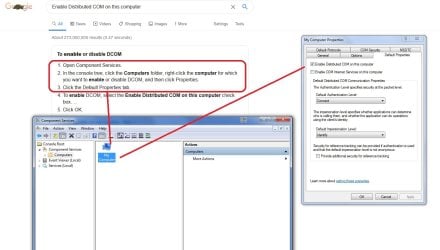
Got a result, followed the script, and found that DCOM was already enabled. Marked up screenshot attached.


Is it possible that the DCOM 'program' - altho enabled in the config - isn't actually on the computer?? What is the actual program folder/name(s) so I can check?


Related sidebar
Usually patience is rewarded after 3mins by a network connect on start. Today - 1st time I experienced it - I started and then went out to a chore, left windows start to do it's thing. Came back after 15 mins and there was no network connection. had to restart, and 3 mins the desktop+icons appear, network connect was there.
 

Attachments

  • Enable DCOM.jpg
    Enable DCOM.jpg
    108.4 KB · Views: 0

My Computer

Computer type
PC/Desktop
Computer Manufacturer/Model Number
custom build
OS
windows 7 home premium 64bit
CPU
Intel core i3-4700
Motherboard
Gigabyte GA-H97M-d3H
Memory
8gb
Hard Drives
1x256gb SSD
3x500gb HDD
Regarding my last post q2, I tried another approach; google search.
Got a result, followed the script, and found that DCOM was already enabled. Marked up screenshot attached.


Is it possible that the DCOM 'program' - altho enabled in the config - isn't actually on the computer?? What is the actual program folder/name(s) so I can check?

I'm afraid I do not know the program folder, I just know it reveals itself when you type in program name into the windows search box.

From :orb: type DCOMCNFG.EXE, and select from list.
 

My Computer

Computer type
PC/Desktop
OS
Windows 7 x64, Vista x64, 8.1 smartphone
CPU
Intel E8400 65W 64-bit
Motherboard
Gigabyte EP45-UD3LR
Memory
DDR2 2 x 2GB, 1GB x 2
Graphics Card(s)
XFX Radeon HD5750
Sound Card
AMD High Definition Audio; Realtek High Definition Audio
Monitor(s) Displays
iiyama prolite X2377HDS
Screen Resolution
1920 x 1080
Hard Drives
500GB 7200 rpm Seagate ST3500413AS 16MB, 500GB 5400 rpm Toshiba MQ02ABF050H 32MB, 200GB 7200 rpm Seagate ST3200820AS 8MB, 2TB 7200 rpm Western Digital WD20EZRX 64MB
PSU
Enermax Liberty Modular
Case
Antec P193 Midi Tower
Keyboard
Mionix ZIBAL 60
Mouse
Razer USB 2.0 Diamondback Mouse or Huion Graphics Tablet
Browser
Internet Explorer, Lunascape, Firefox, Opera, Avast Safezone
I'm logged in. For this thread only, it seems. Every time I try to connect to that 411897 thread, I get presented with the login page, the password box clears when I click login, and I'm bounced back to the login form. Carefully fill in again, click login, and same result.


So, 2 questions:
1. why is that login thing happening - it's good for this thread but not another?
2. is there another way to get that enable detail?

Yes, I get the same problem with this Forum. Sometimes the Forum or the Browser does not allow you to see the other poster's uploaded images. Yet, if you ask them to post again, invariably the image shows.

You are not alone. Just I have not yet found a solution to this mystery.
 

My Computer

Computer type
PC/Desktop
OS
Windows 7 x64, Vista x64, 8.1 smartphone
CPU
Intel E8400 65W 64-bit
Motherboard
Gigabyte EP45-UD3LR
Memory
DDR2 2 x 2GB, 1GB x 2
Graphics Card(s)
XFX Radeon HD5750
Sound Card
AMD High Definition Audio; Realtek High Definition Audio
Monitor(s) Displays
iiyama prolite X2377HDS
Screen Resolution
1920 x 1080
Hard Drives
500GB 7200 rpm Seagate ST3500413AS 16MB, 500GB 5400 rpm Toshiba MQ02ABF050H 32MB, 200GB 7200 rpm Seagate ST3200820AS 8MB, 2TB 7200 rpm Western Digital WD20EZRX 64MB
PSU
Enermax Liberty Modular
Case
Antec P193 Midi Tower
Keyboard
Mionix ZIBAL 60
Mouse
Razer USB 2.0 Diamondback Mouse or Huion Graphics Tablet
Browser
Internet Explorer, Lunascape, Firefox, Opera, Avast Safezone
Hi,
Interesting results for DCOM the service so far. BlackViper says it is essential, but it's not on my desktop: started, stopped or anything else - just not listed in the msconfig services list. Yet every check we've done says it is enabled.


I have 2 other win7 home premium computers, both laptops; one a Toshiba C665, a 32bit machine used by my wife her networking activity: it's elderly but patched up to and including Jan 20 and still working fine; and the 2nd is an HP g6-2002 unit, a 64bit machine that's been used for class instruction weekly for 6 years, also fully patched and working. By working, that includes regular network access every start on both of them. I ran msconfig on both of these computers, and DCOM is not listed in the services list in either of them. The same situation on 3 differnet machines cannot be an accident. So, I'm wondering just how valid that Blackviper assertion about DCOM really is.


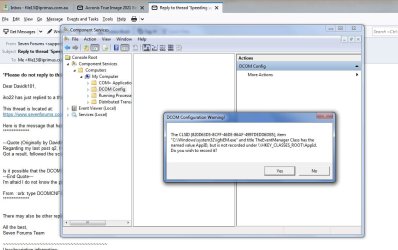
I ran that dcomcnfg.exe item you mention from the start search box, it returned a hit, and I followed it. Screenshot attached. There's a question box there; what do I do about that?
 

Attachments

  • dcomcnfg.jpg
    dcomcnfg.jpg
    87.3 KB · Views: 1

My Computer

Computer type
PC/Desktop
Computer Manufacturer/Model Number
custom build
OS
windows 7 home premium 64bit
CPU
Intel core i3-4700
Motherboard
Gigabyte GA-H97M-d3H
Memory
8gb
Hard Drives
1x256gb SSD
3x500gb HDD
You have gone too far in Expanding the nodes in Component Services.
Stop when you see My Computer. Then Right-mouse click My Computer, select Properties, then select Default Properties Tab.
Under the Default Properties Tab is a checkbox labelled Enable Distributed COM on this computer.
Make sure the checkbox is ticked.
See post #17 for complete description of the procedure.
 

My Computer

Computer type
PC/Desktop
OS
Windows 7 x64, Vista x64, 8.1 smartphone
CPU
Intel E8400 65W 64-bit
Motherboard
Gigabyte EP45-UD3LR
Memory
DDR2 2 x 2GB, 1GB x 2
Graphics Card(s)
XFX Radeon HD5750
Sound Card
AMD High Definition Audio; Realtek High Definition Audio
Monitor(s) Displays
iiyama prolite X2377HDS
Screen Resolution
1920 x 1080
Hard Drives
500GB 7200 rpm Seagate ST3500413AS 16MB, 500GB 5400 rpm Toshiba MQ02ABF050H 32MB, 200GB 7200 rpm Seagate ST3200820AS 8MB, 2TB 7200 rpm Western Digital WD20EZRX 64MB
PSU
Enermax Liberty Modular
Case
Antec P193 Midi Tower
Keyboard
Mionix ZIBAL 60
Mouse
Razer USB 2.0 Diamondback Mouse or Huion Graphics Tablet
Browser
Internet Explorer, Lunascape, Firefox, Opera, Avast Safezone
You may recall I mentioned not being able to access that page procedure in an earlier post. But I did find one using google search, and using it found that the default properties for DCOM was already enabled. I included a screenshot of that result.


I checked that again today after reading your latest advice. And found that the check box was unticked. :mad: Why?? AFAIK, haven't done anything to affect that prior result, but it's changed from on to off. But then proceeded to
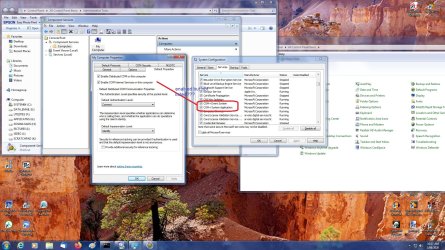
- create a restore point
- checked the DCOM default properties to on (box ticked), apply, OK
- reboot
- after start, checked the default properties box again - still ticked
- checked the services list in msconfig - DCOM still not listed.
- composed a screenshot showing both these enabled but not listed/running cases, from component services and msconfig in the same boot session, attached.


Weird :o is what it is. How can you get an enabled but not used result????
 

Attachments

  • Enable DCOM 2.jpg
    Enable DCOM 2.jpg
    302.5 KB · Views: 1

My Computer

Computer type
PC/Desktop
Computer Manufacturer/Model Number
custom build
OS
windows 7 home premium 64bit
CPU
Intel core i3-4700
Motherboard
Gigabyte GA-H97M-d3H
Memory
8gb
Hard Drives
1x256gb SSD
3x500gb HDD
And here's an image of the absence of DCOM in the list whilst enabled - previous one showed the COM services, did not stretch to the 'D' list items
 

Attachments

  • Enable DCOM 3.jpg
    Enable DCOM 3.jpg
    229.2 KB · Views: 0

My Computer

Computer type
PC/Desktop
Computer Manufacturer/Model Number
custom build
OS
windows 7 home premium 64bit
CPU
Intel core i3-4700
Motherboard
Gigabyte GA-H97M-d3H
Memory
8gb
Hard Drives
1x256gb SSD
3x500gb HDD
Wierd, yes. Now, you have completed 1-5(a-d) in this link DCOM settings, next try steps 6-7(a-e) of that same link.
Also make sure that a rpcss.dll file exists in the %WinDir%\system32 folder
Also open a command prompt window, and type
sc config DcomLaunch start= auto
sc start DcomLaunch

press enter after each line. Make a note of any error messages. If no error message, then open services.msc again and look to see if the DCOM service process launcher has actually started.
 

My Computer

Computer type
PC/Desktop
OS
Windows 7 x64, Vista x64, 8.1 smartphone
CPU
Intel E8400 65W 64-bit
Motherboard
Gigabyte EP45-UD3LR
Memory
DDR2 2 x 2GB, 1GB x 2
Graphics Card(s)
XFX Radeon HD5750
Sound Card
AMD High Definition Audio; Realtek High Definition Audio
Monitor(s) Displays
iiyama prolite X2377HDS
Screen Resolution
1920 x 1080
Hard Drives
500GB 7200 rpm Seagate ST3500413AS 16MB, 500GB 5400 rpm Toshiba MQ02ABF050H 32MB, 200GB 7200 rpm Seagate ST3200820AS 8MB, 2TB 7200 rpm Western Digital WD20EZRX 64MB
PSU
Enermax Liberty Modular
Case
Antec P193 Midi Tower
Keyboard
Mionix ZIBAL 60
Mouse
Razer USB 2.0 Diamondback Mouse or Huion Graphics Tablet
Browser
Internet Explorer, Lunascape, Firefox, Opera, Avast Safezone
Thanks for the extra bits. But I did not have to make any changes: they were already set the way described in sections 6-7.
- rpcss.dll does exist in the C:\windows\system32 directory. 506Kb, last modified 15/11/2019, during patch tuesday of that time???
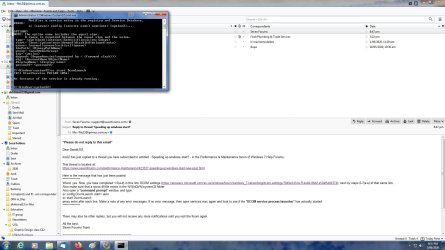
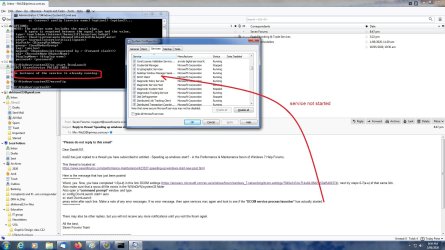
- run cmd and executed the command lines as specified. For the first line, no error reported but I got a explanatory series of syntax meanings. The 2nd line returned a fail error number - service already running.
Screenshot of both these items attached.


Next, I ran msconfig again to review the Dcom service process launcher item - not listed in the services list after alpha sort. Screenshot of that attached, showing both the start fail message and the msc result, marked up with comment.


So, the dll is in the folder, correctly configured, enabled, already running, but not in the services list??? extra weird.
 

Attachments

  • start dcomLaunch fail.jpg
    start dcomLaunch fail.jpg
    171.5 KB · Views: 0
  • Dcom process launcher not started.jpg
    Dcom process launcher not started.jpg
    220.5 KB · Views: 1

My Computer

Computer type
PC/Desktop
Computer Manufacturer/Model Number
custom build
OS
windows 7 home premium 64bit
CPU
Intel core i3-4700
Motherboard
Gigabyte GA-H97M-d3H
Memory
8gb
Hard Drives
1x256gb SSD
3x500gb HDD
Well, the service is running, but there is no show under that name - I wonder why? Open Task Manager, and select on the Services tab.
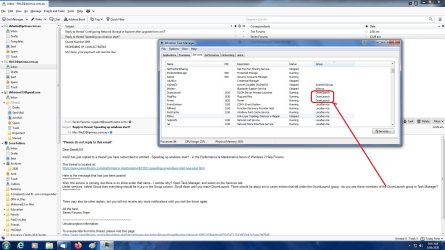
Under services, select Group then everything should be in a-z in the Group column. Scroll down until you reach DcomLaunch. There should be about six to seven entries that fall under the DcomLaunch group - do you see those members of the DcomLaunch group in Task Manager?
 

My Computer

Computer type
PC/Desktop
OS
Windows 7 x64, Vista x64, 8.1 smartphone
CPU
Intel E8400 65W 64-bit
Motherboard
Gigabyte EP45-UD3LR
Memory
DDR2 2 x 2GB, 1GB x 2
Graphics Card(s)
XFX Radeon HD5750
Sound Card
AMD High Definition Audio; Realtek High Definition Audio
Monitor(s) Displays
iiyama prolite X2377HDS
Screen Resolution
1920 x 1080
Hard Drives
500GB 7200 rpm Seagate ST3500413AS 16MB, 500GB 5400 rpm Toshiba MQ02ABF050H 32MB, 200GB 7200 rpm Seagate ST3200820AS 8MB, 2TB 7200 rpm Western Digital WD20EZRX 64MB
PSU
Enermax Liberty Modular
Case
Antec P193 Midi Tower
Keyboard
Mionix ZIBAL 60
Mouse
Razer USB 2.0 Diamondback Mouse or Huion Graphics Tablet
Browser
Internet Explorer, Lunascape, Firefox, Opera, Avast Safezone
Did that, only 3 items in the group. See screenshot.
 

Attachments

  • Tskmgr services grp1.jpg
    Tskmgr services grp1.jpg
    208.2 KB · Views: 2

My Computer

Computer type
PC/Desktop
Computer Manufacturer/Model Number
custom build
OS
windows 7 home premium 64bit
CPU
Intel core i3-4700
Motherboard
Gigabyte GA-H97M-d3H
Memory
8gb
Hard Drives
1x256gb SSD
3x500gb HDD
It's been a few days since the last results were posted. Is there anything further on the DCOM situation?
 

My Computer

Computer type
PC/Desktop
Computer Manufacturer/Model Number
custom build
OS
windows 7 home premium 64bit
CPU
Intel core i3-4700
Motherboard
Gigabyte GA-H97M-d3H
Memory
8gb
Hard Drives
1x256gb SSD
3x500gb HDD

My Computer

Computer type
PC/Desktop
OS
Windows 7 x64, Vista x64, 8.1 smartphone
CPU
Intel E8400 65W 64-bit
Motherboard
Gigabyte EP45-UD3LR
Memory
DDR2 2 x 2GB, 1GB x 2
Graphics Card(s)
XFX Radeon HD5750
Sound Card
AMD High Definition Audio; Realtek High Definition Audio
Monitor(s) Displays
iiyama prolite X2377HDS
Screen Resolution
1920 x 1080
Hard Drives
500GB 7200 rpm Seagate ST3500413AS 16MB, 500GB 5400 rpm Toshiba MQ02ABF050H 32MB, 200GB 7200 rpm Seagate ST3200820AS 8MB, 2TB 7200 rpm Western Digital WD20EZRX 64MB
PSU
Enermax Liberty Modular
Case
Antec P193 Midi Tower
Keyboard
Mionix ZIBAL 60
Mouse
Razer USB 2.0 Diamondback Mouse or Huion Graphics Tablet
Browser
Internet Explorer, Lunascape, Firefox, Opera, Avast Safezone
Back
Top