SSD Alignment

Problem description

The traditional rotating disks are divided into physical sectors. The Windows operating systems and their components operate according to this sector logic. Despite the fact that SSDs store the data in a completely different way, they are still being treated with this sector logic.

The alignment of the SSD is required to assure that a logical sector starts exactly at the beginning of a physical page of the SSD. Without the alignment, the sector boundaries and the page boundaries will not match and sectors will span pages. That would require for a Windows write operation to clear two blocks in lieu of only one thus reducing the write speed by 50%.

Situation

If you install Windows7 on a brand new SSD, you need not make any special arrangements because the Windows7 installer will do the alignment for you. For Vista you are lucky because the start sector happens to match a SSD page. For XP the start sector is 126 which would be in the middle of a SSD page, thus a prior alignment is required.
A similar situation is present when you clone an existing OS (including Windows7) on a new SSD.

Solution

The easiest way to align an SSD is to create an aligned partition on the SSD with the help of Diskpart. Open an elevated command prompt and run the following sequence of commands – each line followed by Enter.

Diskpart
List disk
Select disk n (where n is the number that was given for your SSD in List disk)
Clean
Create partition primary align=1024
Format fs=ntfs quick
Active (assuming you want to install an OS)
Exit

Note: If you want to create a 100MB partition with alignment, the create command is:

Create partition primary size=100 align=1024

The size unit is always MB.

Verification

If you want to verify the alignment (e.g. for a SSD where you are not certain whether the proper alignment was done), you use the following commands.

Diskpart
List disk
Select disk n (where n is the number that was given for your SSD in List disk)
List partition

Now you should see a result like this.

Partition ### Type Size Offset
------------- ---------------- ------- -------
Partition 1 Primary 59 GB 1024 KB - but 64KB or any number divisible by 4 is also good

The offset (in KBs) has to be divisible by 4.


Note: Some readers and users of this tutorial got confused because the alignment numbers in a typical Windows7 installation are shown as:

1024KB for the 100MB partition
101MB for the next partition - which is most likely the C partition

They think that 101MB is not divisible by 4 and that there must be a problem. But that is not so. If you convert 101MBs into KBs (multiply by 1024), then the number is divisible by 4 and the partition is aligned.


Last edited by a moderator:
See post 117
 

My Computer

Computer Manufacturer/Model Number
HP, Dell, Gateway, Toshiba - 4 laptops and 2 desktops
OS
Vista, Windows7, Mint Mate, Zorin, Windows 8
CPU
from 1.6GHz Duo to i7
Monitor(s) Displays
2x HP w2207
Hard Drives
5x HDD, 7x SSD, 12x Externals
Keyboard
with trackball - no mices
Mouse
Trackball mice
Internet Speed
DSL 6000
Apparently the AOMEI program is faulty. That does not really amaze me because their Imaging program is buggy too. It does not work at all on 32bit systems. You are probably best off to do what John suggests.
I tried to image mine with AOMEI and it didn't work. I finally did what I didn't want to do... I did a clean install, and now that it's done, I'm glad I did. I owe a lot to whs for all the great advice, tutorials, and most of all, his patience. Now I can delete the AOMEI programs for good.
Thanks again
 

My Computer

Computer Manufacturer/Model Number
home built
OS
Windows 7 Professional x64
CPU
AMD Athlon 64 X2 6000 3.1GHz
Motherboard
Asus M3A78-EM
Memory
G.SKILL 4GB (2 x 2GB) 240-Pin DDR2 SDRAM DDR2 800 (PC2 6400)
Graphics Card(s)
ATI Radeon HD4350 512mb
Sound Card
on board
Monitor(s) Displays
Samsung SyncMaster 206bw
Screen Resolution
1680x1050
Hard Drives
Seagate 250gb
WD 160gb
WD 250gb USB
Maxtor 40gb (backup)
PSU
Thermaltake PurePower 500watt
Case
Apevia
Cooling
2x120 case fans
Keyboard
wireless Logitech
Mouse
wireless Logitech
Internet Speed
DSL (best I can do in the boonies)
Other Info
Lord make my word sweet, in case I have to eat them later...
You are very welcome. I am glad to help.
 

My Computer

Computer Manufacturer/Model Number
HP, Dell, Gateway, Toshiba - 4 laptops and 2 desktops
OS
Vista, Windows7, Mint Mate, Zorin, Windows 8
CPU
from 1.6GHz Duo to i7
Monitor(s) Displays
2x HP w2207
Hard Drives
5x HDD, 7x SSD, 12x Externals
Keyboard
with trackball - no mices
Mouse
Trackball mice
Internet Speed
DSL 6000
I recovered the Windows 7 system partition from my spinner to an SSD using Acronis, and although it booted/worked I was surprised to see that the alignment wasn't right. The starting offset was 32,256 bytes so Acronis must not have recognized that the Kingston HyperX drive was an SSD maybe. But after reading thru this thread, and downloading MiniTool Partition Wizard Home Edition 8.1.1 (freeware) I was able to re-align the loaded partition to 1,048,576 bytes. Took some 10-15 minutes total so I assume the process involved reading-and-rewriting all the data.

After doing this however, the SSD no longer booted the computer. "Missing boot blocks" or loader or something. But upon restarting with a W7 Repair Disc inserted to my DVD drive, the repair of the boot loader took just a second and the SSD now boots again just fine.

I've since tweaked this with EasyBCD to be able to boot the SSD or the older spinner, or Acronis, and it's all good.

Thanks whs for the thread, and to Britton30--may he R.I.P. :(--for mentioning MiniTool. Looks to be a wonderful free addition to the toolbox.

:)
 

My Computer

Computer type
Laptop
Computer Manufacturer/Model Number
Dell Latitude E6540 Laptop
OS
Windows 7 Professional 64bit
CPU
Intel Core i7 4600M @ 2.90GHz
Motherboard
Dell Inc. 0CYT5F (SOCKET 0)
Memory
16.0GB Dual-Channel DDR3 @ 797MHz (11-11-11-28)
Graphics Card(s)
Intel HD Graphics 4600 (Dell) 2048MB ATI AMD Radeon HD 8790M
Sound Card
Realtek High Definition Audio
Monitor(s) Displays
HP ZR30w (2560x1600@60Hz)
Hard Drives
256GB LITEONIT LMT-256M6M-41 mm SATA (SSD)
1TB Samsung SSD 860 EVO mSATA SATA (SSD)
2TB USB 3.0 USB Device
115GB SanDisk Ultra Fit USB
Other Info
Multiple Dell E-Port Plus II Port Replicator/Docking Stations 0Y72NH USB 3.0 + 130W AC Adapters
Yes Max Britton and I were great friends and we both discovered this great program while looking for an alternative to Ease US - I use it a lot for all manner of jobs and if you look there is an addition to the partitioning and surface testing stuff in the data recovery part of the start up GUI - really good stuff.
 

My Computer

Computer type
PC/Desktop
Computer Manufacturer/Model Number
Own build (new) Desk1 / Asus ROG Win 7 / Desk2 1st build
OS
Desk1 7 Home Prem / Desk2 10 Pro / Main lap Asus ROG 10 Pro 2 laptop Toshiba 7 Pro Asus P2520 7 & 10
CPU
Desk1 i5 3750K / Laptop i7 GTX 860M / Desk2 i5 2500
Motherboard
Desk1 Asus P877-V / Desk2 Gigabyte H67 UD3H / Laptop ?
Memory
Desk1 8GB (1866) / Desk2 16GB (1333) / Laptop 8Gb DDR3
Graphics Card(s)
Desk 1& 2NVidia GTX 650 & Laptops on board Intel
Sound Card
Desk 1 & 2 -XONAR DG Realtek High Def audio Laptop
Monitor(s) Displays
Desk 1 Benq HD 2450 / Desk2 Philips 24" / Laptop 17.5"
Screen Resolution
1920x1080 D1 & D2 & Laptop 1
Hard Drives
Desk1 Samsung 120GB 830 SSD
Asus ROG 256GB 850 Pro SSD
Desk2 Samsung 840 256 SSD
Toshiba 120GB EVO
PSU
Desk 1 Corsair HX 1050/ Laptop ? / Desk 2 Corsair HX 650
Case
Desk 1 Cooler HAF XM ? Toshiba laptop / Desk2 Coolermaster
Cooling
Fans on all Desk1 -2 Desk2 - all Coolermasters 5 Laptop ?
Keyboard
Desk 1 MS Sidewinder X6 Desk 2 MS Sidewinder X 4
Mouse
Desk 1&2 - Gigabyte MS 900 gamer - laptop - Logitec wireless
Internet Speed
ADSL2+
Other Info
One other Desktop (tester) and spare Toshba laptop both with SSD's
Running Kaspersky 2016 ISS on all machines config'd identically
Logitec audio stereo systems on each machine (x3)
Canon MG5250MFC
Router/modem TP-Link running WPA2SK
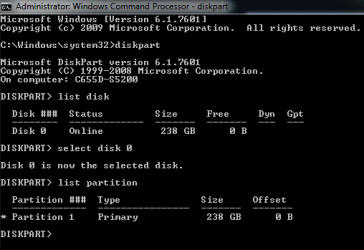
Has anyone seen a '0' offset number when checking alignment using Diskpart?

I realize any '0' number divided by four will return a zero which would say that its aligned but I question whether the SSD is truly aligned.

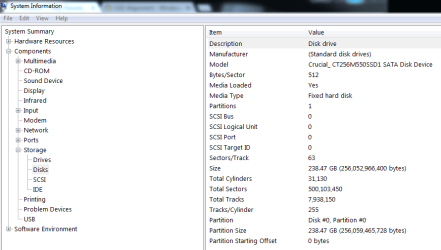
I also noticed on the msinfo32 page the starting offset showing the same. Also, there were 512 bytes/sector and 63 sectors/track which might indicate it not be running efficiently.

Makes be wonder if the SSD is aligned correctly. Any thoughts out there?
 

Attachments

  • SSD Alignment.png
    SSD Alignment.png
    6 KB · Views: 899
  • Msinfo32.png
    Msinfo32.png
    19.4 KB · Views: 375

My Computer

Computer type
PC/Desktop
OS
Windows 7 Home 64-bit
This disk is not aligned - offset 0 is no good.
 

My Computer

Computer Manufacturer/Model Number
HP, Dell, Gateway, Toshiba - 4 laptops and 2 desktops
OS
Vista, Windows7, Mint Mate, Zorin, Windows 8
CPU
from 1.6GHz Duo to i7
Monitor(s) Displays
2x HP w2207
Hard Drives
5x HDD, 7x SSD, 12x Externals
Keyboard
with trackball - no mices
Mouse
Trackball mice
Internet Speed
DSL 6000
Thanks. I could have sworn it was aligned six months ago when I installed the new SSD.

I was planning on doing a clean install this weekend anyway.

Cheers.
 

My Computer

Computer type
PC/Desktop
OS
Windows 7 Home 64-bit
I wanted to create a dual boot XP/W7 on an old Acer laptop. I replaced the hard drive in my laptop with a new 250 GB SSD, then loaded a Windows XP image from a backup that came with my laptop, taking it back to stock. I updated some of the drivers, but nothing specifically for the SSD. Windows XP was running perfectly, and all updates were installed thanks to LifeHacker and his POS registry hack for Windows Update. Then I used PerfectDisk and Diskpart to lower the partition size down to 33 GB (because Windows XP puts a set of files in the middle of whatever disk you install on...thus I had to use diskpart to shrink the size of the partition, then PerfectDisk to move the files again, then diskpart to shrink again, etc). The problem is that I didn't understand at the time why PerfectDisk was warning me not to use the "Prepare for Shrink" mode instead of the recommended "SSD" mode. Anyway, now I can load Windows 7, but I cannot get Windows Update to work. I have tried several reinstalls of W7 and worked with the Microsoft techs to solve the problem, but nothing works. Then I came across this thread and started to wonder if I screwed things up early on. So in diskpart, my list partition now looks like "Partition 1 - Primary - 33GB - 31KB offset" and "Partition 2 - Primary - 199GB - 33GB offset". Are my offsets totally screwed up? Can I fix it? And is it possible that that my W7 offset is screwing up Windows Update, or is it most likely a separate issue?
 

My Computer

Computer type
PC/Desktop
Computer Manufacturer/Model Number
Acer Travelmate 8204
OS
Windows XP 32 - Windows 7 Pro x64 Dual Boot (Attempting)
CPU
Upgraded to Intel T7600 (x64)
Memory
2 GB
Graphics Card(s)
ATI Mobility X1600
Screen Resolution
1680 x 1050
Hard Drives
Upgraded to Samsung 850 EVO 250GB SSD
This is not a good scenario for a variety of reasons. Starting with XP is no good and then XP does not support Trim which means your SSD is going to be slowed down over time. XP should not be on SSDs - period.

I suggest you start anew. Clear the whole SSD - best with a Secure Erase - but that is compulsory. The commands below will clean the disk too.. Then allocate an aligned partition for Windows 7. You can use these commands:

Diskpart
List disk
Select disk n (where n is the number that was given for your SSD in List disk)
Clean
Create partition primary align=1024 size=xMB (where x is the amount of MB's you want the partition to be)
Format fs=ntfs quick
Active
Exit

If you leave some remaining space on the SSD (e.g. your planned 33GBs for the XP partition), then you can define that partition with Disk Management.

Then install Windows 7 in the first partition without any XP and see whether that works. If yes, add XP to the second partition. In principle it should work too except for the performance degradation part mentioned earlier. If you run into new gremlins, post back.
 

My Computer

Computer Manufacturer/Model Number
HP, Dell, Gateway, Toshiba - 4 laptops and 2 desktops
OS
Vista, Windows7, Mint Mate, Zorin, Windows 8
CPU
from 1.6GHz Duo to i7
Monitor(s) Displays
2x HP w2207
Hard Drives
5x HDD, 7x SSD, 12x Externals
Keyboard
with trackball - no mices
Mouse
Trackball mice
Internet Speed
DSL 6000
This is not a good scenario for a variety of reasons. Starting with XP is no good and then XP does not support Trim which means your SSD is going to be slowed down over time. XP should not be on SSDs - period.

I suggest you start anew. Clear the whole SSD - best with a Secure Erase - but that is compulsory. The commands below will clean the disk too.. Then allocate an aligned partition for Windows 7. You can use these commands:

Diskpart
List disk
Select disk n (where n is the number that was given for your SSD in List disk)
Clean
Create partition primary align=1024 size=xMB (where x is the amount of MB's you want the partition to be)
Format fs=ntfs quick
Active
Exit

If you leave some remaining space on the SSD (e.g. your planned 33GBs for the XP partition), then you can define that partition with Disk Management.

Then install Windows 7 in the first partition without any XP and see whether that works. If yes, add XP to the second partition. In principle it should work too except for the performance degradation part mentioned earlier. If you run into new gremlins, post back.

Thank you, whs. As you have explained it, I completely understand how these instructions would streamline and speed up my computer, making it more efficient. However, it's very important for me to maintain the ability to use Windows XP. And since I don't have an extra copy of it, I have to use the restoration disk that came with my laptop, which completely wipes the drive and reinstalls everything. I don't think I have the option to install it on a partition that I create myself. (Update: I guess I could download an ISO for XP and use the product key from the bottom of the laptop.) And though I'm early enough into this project to start over and experiment with different setups, my MAIN concern is the fact that I cannot get Windows Update to work with W7. So unless there's a reason why my disk alignment might be causing that problem, I need to keep looking for another solution before I decide to bail on XP for good.
 

My Computer

Computer type
PC/Desktop
Computer Manufacturer/Model Number
Acer Travelmate 8204
OS
Windows XP 32 - Windows 7 Pro x64 Dual Boot (Attempting)
CPU
Upgraded to Intel T7600 (x64)
Memory
2 GB
Graphics Card(s)
ATI Mobility X1600
Screen Resolution
1680 x 1050
Hard Drives
Upgraded to Samsung 850 EVO 250GB SSD
Windows update not working can have many reasons. I would run an sfc /scannow operation in W7 and if that foes not help a startup/repair (http://www.sevenforums.com/tutorials/681-startup-repair.html).

Using the XP key from the bottom of the laptop is a good option for installing XP. As long as you install XP as first system, you will have a mess.
 

My Computer

Computer Manufacturer/Model Number
HP, Dell, Gateway, Toshiba - 4 laptops and 2 desktops
OS
Vista, Windows7, Mint Mate, Zorin, Windows 8
CPU
from 1.6GHz Duo to i7
Monitor(s) Displays
2x HP w2207
Hard Drives
5x HDD, 7x SSD, 12x Externals
Keyboard
with trackball - no mices
Mouse
Trackball mice
Internet Speed
DSL 6000

My Computer

Computer type
PC/Desktop
Computer Manufacturer/Model Number
Own build
OS
Windows 7x64 Home Premium SP1
CPU
Intel i7 2600k
Motherboard
ASUS P8Z68 Deluxe
Memory
G.Skill Ripjaws (DDR3-1600) 2x4GB
Graphics Card(s)
Nvidia GeForce GTS 450; Intel HD Graphics 3000(GT2+)
Monitor(s) Displays
Dell Ultrasharp IPS panel U2311H, Samsung SyncMaster P2350
Screen Resolution
1920x1080
Hard Drives
Samsung 850 Pro SSD 256GB, Samsung SSD 840 120GB, Seagates 1TB Barracuda ST31000528AS x2
PSU
Seasonic M12II 520W
Case
Lian Li Lancool PC-K60
Cooling
Case: 1x120mm, 3x140mm CPU: Hyper 212+
Keyboard
Logitech MK520 (wireless)
Mouse
Logitech MK520
Internet Speed
6-7 Mbps
Antivirus
Norton Security Premium, Malwarebytes on 2 (MSE on 3rd PC)
Browser
FireFox
Other Info
Audio: Logitech Z523 2.1
Nevermind I got it now.

If I partition my 120gb ssd and create a 20gb partition for installing windows on it. Will setup still create the ESP/EFI partition needed for my machine (not talking about the MSR partition)?
 
Last edited:

My Computer

Computer type
Laptop
Computer Manufacturer/Model Number
Asus
OS
Windows7
CPU
i5
Memory
4GB
Graphics Card(s)
Intel 7 series
Hard Drives
SSD
Nevermind I got it now.

If I partition my 120gb ssd and create a 20gb partition for installing windows on it. Will setup still create the ESP/EFI partition needed for my machine (not talking about the MSR partition)?

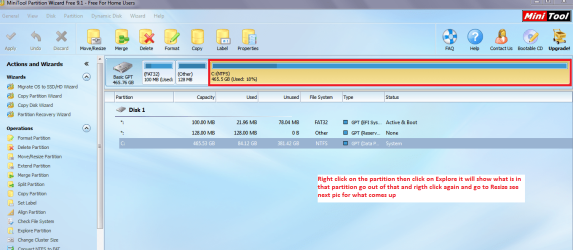
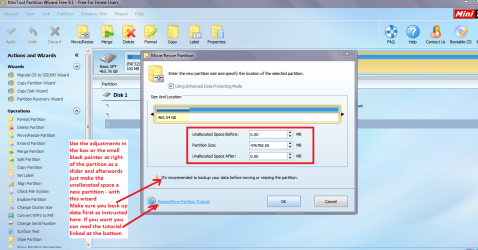
Pete now I would just install Windows onto the drive and partition it afterwards with the Partition Wizard - that is very simple to do. When the partition is resized the unallocated part of the partition can then be made a new partition with the wizard. This is how I do it and maybe the others may not agree but I have had no problems doing it this way.

Anyhow the choice is yours of course

Edit: this is the PW software download Best Free Partition Manager for Windows | MiniTool Partition Free
 

Attachments

  • PW RESIZE.PNG
    PW RESIZE.PNG
    181.7 KB · Views: 115
  • PW RESIZE 2.PNG
    PW RESIZE 2.PNG
    182.3 KB · Views: 125

My Computer

Computer type
PC/Desktop
Computer Manufacturer/Model Number
Own build (new) Desk1 / Asus ROG Win 7 / Desk2 1st build
OS
Desk1 7 Home Prem / Desk2 10 Pro / Main lap Asus ROG 10 Pro 2 laptop Toshiba 7 Pro Asus P2520 7 & 10
CPU
Desk1 i5 3750K / Laptop i7 GTX 860M / Desk2 i5 2500
Motherboard
Desk1 Asus P877-V / Desk2 Gigabyte H67 UD3H / Laptop ?
Memory
Desk1 8GB (1866) / Desk2 16GB (1333) / Laptop 8Gb DDR3
Graphics Card(s)
Desk 1& 2NVidia GTX 650 & Laptops on board Intel
Sound Card
Desk 1 & 2 -XONAR DG Realtek High Def audio Laptop
Monitor(s) Displays
Desk 1 Benq HD 2450 / Desk2 Philips 24" / Laptop 17.5"
Screen Resolution
1920x1080 D1 & D2 & Laptop 1
Hard Drives
Desk1 Samsung 120GB 830 SSD
Asus ROG 256GB 850 Pro SSD
Desk2 Samsung 840 256 SSD
Toshiba 120GB EVO
PSU
Desk 1 Corsair HX 1050/ Laptop ? / Desk 2 Corsair HX 650
Case
Desk 1 Cooler HAF XM ? Toshiba laptop / Desk2 Coolermaster
Cooling
Fans on all Desk1 -2 Desk2 - all Coolermasters 5 Laptop ?
Keyboard
Desk 1 MS Sidewinder X6 Desk 2 MS Sidewinder X 4
Mouse
Desk 1&2 - Gigabyte MS 900 gamer - laptop - Logitec wireless
Internet Speed
ADSL2+
Other Info
One other Desktop (tester) and spare Toshba laptop both with SSD's
Running Kaspersky 2016 ISS on all machines config'd identically
Logitec audio stereo systems on each machine (x3)
Canon MG5250MFC
Router/modem TP-Link running WPA2SK
120GB is now considered a small SSD but fully capable of supporting Windows plus installed programs.
20GB is far too small for your OS partition and I wouldn't consider going below 60GB. If your total drive capacity is 120GB then you don't really have much room to play with.
 

My Computer

Computer type
PC/Desktop
Computer Manufacturer/Model Number
Own build
OS
Windows 7x64 Home Premium SP1
CPU
Intel i7 2600k
Motherboard
ASUS P8Z68 Deluxe
Memory
G.Skill Ripjaws (DDR3-1600) 2x4GB
Graphics Card(s)
Nvidia GeForce GTS 450; Intel HD Graphics 3000(GT2+)
Monitor(s) Displays
Dell Ultrasharp IPS panel U2311H, Samsung SyncMaster P2350
Screen Resolution
1920x1080
Hard Drives
Samsung 850 Pro SSD 256GB, Samsung SSD 840 120GB, Seagates 1TB Barracuda ST31000528AS x2
PSU
Seasonic M12II 520W
Case
Lian Li Lancool PC-K60
Cooling
Case: 1x120mm, 3x140mm CPU: Hyper 212+
Keyboard
Logitech MK520 (wireless)
Mouse
Logitech MK520
Internet Speed
6-7 Mbps
Antivirus
Norton Security Premium, Malwarebytes on 2 (MSE on 3rd PC)
Browser
FireFox
Other Info
Audio: Logitech Z523 2.1
120GB is now considered a small SSD but fully capable of supporting Windows plus installed programs.
20GB is far too small for your OS partition and I wouldn't consider going below 60GB. If your total drive capacity is 120GB then you don't really have much room to play with.

Oops I missed that one completely - I should have looked properly as I thought we were dealing with a larger drive:o
 

My Computer

Computer type
PC/Desktop
Computer Manufacturer/Model Number
Own build (new) Desk1 / Asus ROG Win 7 / Desk2 1st build
OS
Desk1 7 Home Prem / Desk2 10 Pro / Main lap Asus ROG 10 Pro 2 laptop Toshiba 7 Pro Asus P2520 7 & 10
CPU
Desk1 i5 3750K / Laptop i7 GTX 860M / Desk2 i5 2500
Motherboard
Desk1 Asus P877-V / Desk2 Gigabyte H67 UD3H / Laptop ?
Memory
Desk1 8GB (1866) / Desk2 16GB (1333) / Laptop 8Gb DDR3
Graphics Card(s)
Desk 1& 2NVidia GTX 650 & Laptops on board Intel
Sound Card
Desk 1 & 2 -XONAR DG Realtek High Def audio Laptop
Monitor(s) Displays
Desk 1 Benq HD 2450 / Desk2 Philips 24" / Laptop 17.5"
Screen Resolution
1920x1080 D1 & D2 & Laptop 1
Hard Drives
Desk1 Samsung 120GB 830 SSD
Asus ROG 256GB 850 Pro SSD
Desk2 Samsung 840 256 SSD
Toshiba 120GB EVO
PSU
Desk 1 Corsair HX 1050/ Laptop ? / Desk 2 Corsair HX 650
Case
Desk 1 Cooler HAF XM ? Toshiba laptop / Desk2 Coolermaster
Cooling
Fans on all Desk1 -2 Desk2 - all Coolermasters 5 Laptop ?
Keyboard
Desk 1 MS Sidewinder X6 Desk 2 MS Sidewinder X 4
Mouse
Desk 1&2 - Gigabyte MS 900 gamer - laptop - Logitec wireless
Internet Speed
ADSL2+
Other Info
One other Desktop (tester) and spare Toshba laptop both with SSD's
Running Kaspersky 2016 ISS on all machines config'd identically
Logitec audio stereo systems on each machine (x3)
Canon MG5250MFC
Router/modem TP-Link running WPA2SK
Why an offset of 1024 kilobyte = 1megabyte?

I thought old drives use 512Bytes/sector, SSDs use 1024Byte =1k/sector. And AF HDD drives use 4096Bytes=4k/sector.
Is 1024kilobyte=1Megabyte not a bit much?
 

My Computer

Computer type
Laptop
Computer Manufacturer/Model Number
Asus
OS
Windows7
CPU
i5
Memory
4GB
Graphics Card(s)
Intel 7 series
Hard Drives
SSD
Back
Top