SSD Alignment

Problem description

The traditional rotating disks are divided into physical sectors. The Windows operating systems and their components operate according to this sector logic. Despite the fact that SSDs store the data in a completely different way, they are still being treated with this sector logic.

The alignment of the SSD is required to assure that a logical sector starts exactly at the beginning of a physical page of the SSD. Without the alignment, the sector boundaries and the page boundaries will not match and sectors will span pages. That would require for a Windows write operation to clear two blocks in lieu of only one thus reducing the write speed by 50%.

Situation

If you install Windows7 on a brand new SSD, you need not make any special arrangements because the Windows7 installer will do the alignment for you. For Vista you are lucky because the start sector happens to match a SSD page. For XP the start sector is 126 which would be in the middle of a SSD page, thus a prior alignment is required.
A similar situation is present when you clone an existing OS (including Windows7) on a new SSD.

Solution

The easiest way to align an SSD is to create an aligned partition on the SSD with the help of Diskpart. Open an elevated command prompt and run the following sequence of commands – each line followed by Enter.

Diskpart
List disk
Select disk n (where n is the number that was given for your SSD in List disk)
Clean
Create partition primary align=1024
Format fs=ntfs quick
Active (assuming you want to install an OS)
Exit

Note: If you want to create a 100MB partition with alignment, the create command is:

Create partition primary size=100 align=1024

The size unit is always MB.

Verification

If you want to verify the alignment (e.g. for a SSD where you are not certain whether the proper alignment was done), you use the following commands.

Diskpart
List disk
Select disk n (where n is the number that was given for your SSD in List disk)
List partition

Now you should see a result like this.

Partition ### Type Size Offset
------------- ---------------- ------- -------
Partition 1 Primary 59 GB 1024 KB - but 64KB or any number divisible by 4 is also good

The offset (in KBs) has to be divisible by 4.


Note: Some readers and users of this tutorial got confused because the alignment numbers in a typical Windows7 installation are shown as:

1024KB for the 100MB partition
101MB for the next partition - which is most likely the C partition

They think that 101MB is not divisible by 4 and that there must be a problem. But that is not so. If you convert 101MBs into KBs (multiply by 1024), then the number is divisible by 4 and the partition is aligned.


Last edited by a moderator:
From within Windows 8, Change Partition ID is also greyed out. Only Check Partition is active.

I'll try booting the flash drive again and see what happens.
 

My Computer

Computer type
PC/Desktop
Computer Manufacturer/Model Number
Lenovo IdeaCenter 450
OS
Windows 10 Pro X64
CPU
Intel Quad Core i7-4770 @ 3.4Ghz
Memory
16.0GB PC3-12800 DDR3 SDRAM 1600 MHz
Graphics Card(s)
Intel Integrated HD Graphics
Sound Card
Realtek HD Audio
Monitor(s) Displays
HP 22" LCD
Screen Resolution
1680 x 1050
Hard Drives
250GB Samsung EVO SATA-3 SSD
2TB Seagate ST2000DM001 SATA-2
1.5TB Seagate ST3150041AS SATA
Keyboard
Dell USB
Mouse
Lenovo USB
Internet Speed
Cable via Road Runner 3MB Upload, 30MB Download
Antivirus
Windows Defender, MBAM Pro, MBAE
Browser
Seamonkey
Other Info
UEFI/GPT
PLDS DVD-RW DH16AERSH
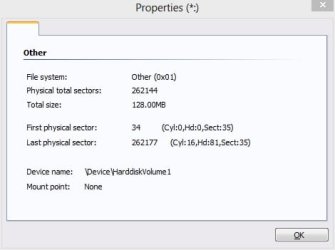
No good, still greyed out. Current partition type is 0x01.
 

My Computer

Computer type
PC/Desktop
Computer Manufacturer/Model Number
Lenovo IdeaCenter 450
OS
Windows 10 Pro X64
CPU
Intel Quad Core i7-4770 @ 3.4Ghz
Memory
16.0GB PC3-12800 DDR3 SDRAM 1600 MHz
Graphics Card(s)
Intel Integrated HD Graphics
Sound Card
Realtek HD Audio
Monitor(s) Displays
HP 22" LCD
Screen Resolution
1680 x 1050
Hard Drives
250GB Samsung EVO SATA-3 SSD
2TB Seagate ST2000DM001 SATA-2
1.5TB Seagate ST3150041AS SATA
Keyboard
Dell USB
Mouse
Lenovo USB
Internet Speed
Cable via Road Runner 3MB Upload, 30MB Download
Antivirus
Windows Defender, MBAM Pro, MBAE
Browser
Seamonkey
Other Info
UEFI/GPT
PLDS DVD-RW DH16AERSH
Rats, this really does not seem to work for you. Remind me what you were trying to do. Maybe I know an alternate method.
 

My Computer

Computer Manufacturer/Model Number
HP, Dell, Gateway, Toshiba - 4 laptops and 2 desktops
OS
Vista, Windows7, Mint Mate, Zorin, Windows 8
CPU
from 1.6GHz Duo to i7
Monitor(s) Displays
2x HP w2207
Hard Drives
5x HDD, 7x SSD, 12x Externals
Keyboard
with trackball - no mices
Mouse
Trackball mice
Internet Speed
DSL 6000
I was trying to align the SSD.

Just ordered a new SSD:

Samsung Electronics 840 EVO-Series 250GB 2.5-Inch SATA III Solid State Drive MZ-7TE250BW

I'm going to try the Lenovo Recovery discs (6 of them) first and see how that goes. If okay, I'll upgrade to 8.0 Propack then to 8.1 and finally restore data, install software, etc.

If I'm not happy with it I'll do a clean install of 8 Pro, upgrade to Propack then 8.1 etc.

I use Acronis so I can always get back to where I am now by restoring to the new SSD.
 

My Computer

Computer type
PC/Desktop
Computer Manufacturer/Model Number
Lenovo IdeaCenter 450
OS
Windows 10 Pro X64
CPU
Intel Quad Core i7-4770 @ 3.4Ghz
Memory
16.0GB PC3-12800 DDR3 SDRAM 1600 MHz
Graphics Card(s)
Intel Integrated HD Graphics
Sound Card
Realtek HD Audio
Monitor(s) Displays
HP 22" LCD
Screen Resolution
1680 x 1050
Hard Drives
250GB Samsung EVO SATA-3 SSD
2TB Seagate ST2000DM001 SATA-2
1.5TB Seagate ST3150041AS SATA
Keyboard
Dell USB
Mouse
Lenovo USB
Internet Speed
Cable via Road Runner 3MB Upload, 30MB Download
Antivirus
Windows Defender, MBAM Pro, MBAE
Browser
Seamonkey
Other Info
UEFI/GPT
PLDS DVD-RW DH16AERSH
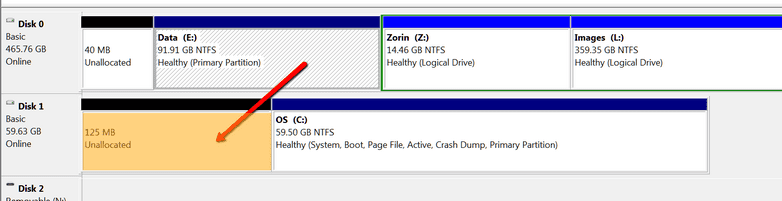
Onr quick and dirty alignment I once did was with the Partition Wizard CD. I created an itty bitty 125MB unallocated space in front of the first partition. I actually still have it like that (see pic). Has always worked.
 

Attachments

  • 2014-01-19_1845.png
    2014-01-19_1845.png
    12.6 KB · Views: 189

My Computer

Computer Manufacturer/Model Number
HP, Dell, Gateway, Toshiba - 4 laptops and 2 desktops
OS
Vista, Windows7, Mint Mate, Zorin, Windows 8
CPU
from 1.6GHz Duo to i7
Monitor(s) Displays
2x HP w2207
Hard Drives
5x HDD, 7x SSD, 12x Externals
Keyboard
with trackball - no mices
Mouse
Trackball mice
Internet Speed
DSL 6000
I don't follow. What will that do for alignment?
 

My Computer

Computer type
PC/Desktop
Computer Manufacturer/Model Number
Lenovo IdeaCenter 450
OS
Windows 10 Pro X64
CPU
Intel Quad Core i7-4770 @ 3.4Ghz
Memory
16.0GB PC3-12800 DDR3 SDRAM 1600 MHz
Graphics Card(s)
Intel Integrated HD Graphics
Sound Card
Realtek HD Audio
Monitor(s) Displays
HP 22" LCD
Screen Resolution
1680 x 1050
Hard Drives
250GB Samsung EVO SATA-3 SSD
2TB Seagate ST2000DM001 SATA-2
1.5TB Seagate ST3150041AS SATA
Keyboard
Dell USB
Mouse
Lenovo USB
Internet Speed
Cable via Road Runner 3MB Upload, 30MB Download
Antivirus
Windows Defender, MBAM Pro, MBAE
Browser
Seamonkey
Other Info
UEFI/GPT
PLDS DVD-RW DH16AERSH
With the few MBs in front of the first partition that first partition start will be divisible by 4 because the offset will be in MBs which are always divisible by 4 - remember: it must be divisible by 4 at the KB level. See my example:

DISKPART> list disk

Disk ### Status Size Free Dyn Gpt
-------- ------------- ------- ------- --- ---
Disk 0 Online 465 GB 46 MB
Disk 1 Online 59 GB 128 MB
Disk 2 No Media 0 B 0 B
Disk 3 No Media 0 B 0 B
Disk 4 No Media 0 B 0 B
Disk 5 No Media 0 B 0 B

DISKPART> select disk 1

Disk 1 is now the selected disk.

DISKPART> list partition

Partition ### Type Size Offset
------------- ---------------- ------- -------
Partition 1 Primary 59 GB 125 MB
 

My Computer

Computer Manufacturer/Model Number
HP, Dell, Gateway, Toshiba - 4 laptops and 2 desktops
OS
Vista, Windows7, Mint Mate, Zorin, Windows 8
CPU
from 1.6GHz Duo to i7
Monitor(s) Displays
2x HP w2207
Hard Drives
5x HDD, 7x SSD, 12x Externals
Keyboard
with trackball - no mices
Mouse
Trackball mice
Internet Speed
DSL 6000
Are you sure it is 0x01 ?

That is fat12. Might be another efi annoyance - to do with the special hidden efi recovery partition types not allowing access perhaps. They have gpt attribute 0x8000000000000001
 

My Computers

System One System Two

  • Computer type
    PC/Desktop
    OS
    7 X64
    CPU
    i5 8400
    Motherboard
    gigabyte b365m ds3h
    Memory
    2x8gb 3200mhz
    Hard Drives
    various
    PSU
    pure power 11 400w cm
    Case
    Coolermaster
    Cooling
    cryorig m9i
  • Computer type
    PC/Desktop
    OS
    7x64
    CPU
    g5400
    Motherboard
    ga b365m ds3h
    Memory
    8gb ddr4 2400
    PSU
    xfx pro 450w
Yes, 0X01

PartTtypeID.jpg
 

My Computer

Computer type
PC/Desktop
Computer Manufacturer/Model Number
Lenovo IdeaCenter 450
OS
Windows 10 Pro X64
CPU
Intel Quad Core i7-4770 @ 3.4Ghz
Memory
16.0GB PC3-12800 DDR3 SDRAM 1600 MHz
Graphics Card(s)
Intel Integrated HD Graphics
Sound Card
Realtek HD Audio
Monitor(s) Displays
HP 22" LCD
Screen Resolution
1680 x 1050
Hard Drives
250GB Samsung EVO SATA-3 SSD
2TB Seagate ST2000DM001 SATA-2
1.5TB Seagate ST3150041AS SATA
Keyboard
Dell USB
Mouse
Lenovo USB
Internet Speed
Cable via Road Runner 3MB Upload, 30MB Download
Antivirus
Windows Defender, MBAM Pro, MBAE
Browser
Seamonkey
Other Info
UEFI/GPT
PLDS DVD-RW DH16AERSH
I'm going to hold off on trying the small partition at the front. My new SSD should be here in a day or two. I'll see what happens when I use the 6 disc recovery set from Lenovo. If that doesn't come out right I'll feel comfortable messing with it.

Thanks for all the help and information. I'm slowly learning the mysteries of EFI/GPT.
 

My Computer

Computer type
PC/Desktop
Computer Manufacturer/Model Number
Lenovo IdeaCenter 450
OS
Windows 10 Pro X64
CPU
Intel Quad Core i7-4770 @ 3.4Ghz
Memory
16.0GB PC3-12800 DDR3 SDRAM 1600 MHz
Graphics Card(s)
Intel Integrated HD Graphics
Sound Card
Realtek HD Audio
Monitor(s) Displays
HP 22" LCD
Screen Resolution
1680 x 1050
Hard Drives
250GB Samsung EVO SATA-3 SSD
2TB Seagate ST2000DM001 SATA-2
1.5TB Seagate ST3150041AS SATA
Keyboard
Dell USB
Mouse
Lenovo USB
Internet Speed
Cable via Road Runner 3MB Upload, 30MB Download
Antivirus
Windows Defender, MBAM Pro, MBAE
Browser
Seamonkey
Other Info
UEFI/GPT
PLDS DVD-RW DH16AERSH
New SSD arrived today so I'll start playing with it later. Should be fun.
 

My Computer

Computer type
PC/Desktop
Computer Manufacturer/Model Number
Lenovo IdeaCenter 450
OS
Windows 10 Pro X64
CPU
Intel Quad Core i7-4770 @ 3.4Ghz
Memory
16.0GB PC3-12800 DDR3 SDRAM 1600 MHz
Graphics Card(s)
Intel Integrated HD Graphics
Sound Card
Realtek HD Audio
Monitor(s) Displays
HP 22" LCD
Screen Resolution
1680 x 1050
Hard Drives
250GB Samsung EVO SATA-3 SSD
2TB Seagate ST2000DM001 SATA-2
1.5TB Seagate ST3150041AS SATA
Keyboard
Dell USB
Mouse
Lenovo USB
Internet Speed
Cable via Road Runner 3MB Upload, 30MB Download
Antivirus
Windows Defender, MBAM Pro, MBAE
Browser
Seamonkey
Other Info
UEFI/GPT
PLDS DVD-RW DH16AERSH
It should go without a hitch Rich, it's so easy even a cave man I can do it. First time was a bit nerve wracking though.
 

My Computer

Computer type
PC/Desktop
Computer Manufacturer/Model Number
Home Built Desktop By DataTech
OS
Windows 7 Ultimate X64 SP1
CPU
Intel i5-2550K, Differing ~4.4-4.8GHz No built in GPU
Motherboard
ASUS P8Z68-V PRO/GEN3
Memory
16GB G.Skill Sniper 1866MHz @ 2133MHz 2x8GB
Graphics Card(s)
ASUS GTX650TIB-DC2OC-2GD5, (650TI Boost)
Sound Card
Onboard Realtek 5-1
Monitor(s) Displays
Samsung P2570HD
Screen Resolution
1920x1080
Hard Drives
Samsung 840 Pro 256GB SSD for OS, 500GB Seagate Constellation (Enterprise drive) for Data
PSU
Corsair HX650W
Case
Inwin Dragon Rider
Cooling
Hyper 212 EVO w/two Noctua fans, push-pull, @1300 RPM
Keyboard
E-Z Eyes, bright yellow keys with large characters
Mouse
steelseries SENSEI Laser Pro Gaming
Internet Speed
48-51Mbs Mbs down, 11 Mbs up Xfinity Cable
Antivirus
Norton Internet Security 2013
Browser
IE 10, Opera, Pale Moon if needed
Other Info
4 case fans, LG BluRay-RE, ASUS DVD-RW, Mr. Fusion power supply, 1.21 gigawatts.
Strike #1. The Samsung Data Migration assistant that came with the SSD was useless. Hung first time then did nothing the next few times.

I finally booted my Acronis 2013 disc and used the Clone tool to clone the 128GB SSD to the new 250GB SSD. I had to disable Secure Boot and enable Compatibility mode to boot the Acronis CD but once I did that it booted and cloned the drive flawlessly, including the bad alignment:
Code:
DISKPART> list par

  Partition ###  Type              Size     Offset
  -------------  ----------------  -------  -------
  Partition 1    Reserved           128 MB    17 KB
  Partition 2    Recovery          1000 MB   129 MB
  Partition 3    System             260 MB  1129 MB
  Partition 4    Unknown            691 MB  1389 MB
  Partition 5    Primary            206 GB  2080 MB
  Partition 6    Recovery            24 GB   208 GB

I'm going to leave it for now as everything is working great.
 

My Computer

Computer type
PC/Desktop
Computer Manufacturer/Model Number
Lenovo IdeaCenter 450
OS
Windows 10 Pro X64
CPU
Intel Quad Core i7-4770 @ 3.4Ghz
Memory
16.0GB PC3-12800 DDR3 SDRAM 1600 MHz
Graphics Card(s)
Intel Integrated HD Graphics
Sound Card
Realtek HD Audio
Monitor(s) Displays
HP 22" LCD
Screen Resolution
1680 x 1050
Hard Drives
250GB Samsung EVO SATA-3 SSD
2TB Seagate ST2000DM001 SATA-2
1.5TB Seagate ST3150041AS SATA
Keyboard
Dell USB
Mouse
Lenovo USB
Internet Speed
Cable via Road Runner 3MB Upload, 30MB Download
Antivirus
Windows Defender, MBAM Pro, MBAE
Browser
Seamonkey
Other Info
UEFI/GPT
PLDS DVD-RW DH16AERSH
Yeah, Acronis took your bad alignment from the old disk and did not fix it. But since there seems to be really nothing essential in Partition 1, you can live with it.
 
Last edited:

My Computer

Computer Manufacturer/Model Number
HP, Dell, Gateway, Toshiba - 4 laptops and 2 desktops
OS
Vista, Windows7, Mint Mate, Zorin, Windows 8
CPU
from 1.6GHz Duo to i7
Monitor(s) Displays
2x HP w2207
Hard Drives
5x HDD, 7x SSD, 12x Externals
Keyboard
with trackball - no mices
Mouse
Trackball mice
Internet Speed
DSL 6000
Is it because the cloning operation copies the disk exactly as the source drive? Maybe an image instead would work better if the SSD is first formatted as in Ted's tutorial?
 

My Computer

Computer type
PC/Desktop
Computer Manufacturer/Model Number
Home Built Desktop By DataTech
OS
Windows 7 Ultimate X64 SP1
CPU
Intel i5-2550K, Differing ~4.4-4.8GHz No built in GPU
Motherboard
ASUS P8Z68-V PRO/GEN3
Memory
16GB G.Skill Sniper 1866MHz @ 2133MHz 2x8GB
Graphics Card(s)
ASUS GTX650TIB-DC2OC-2GD5, (650TI Boost)
Sound Card
Onboard Realtek 5-1
Monitor(s) Displays
Samsung P2570HD
Screen Resolution
1920x1080
Hard Drives
Samsung 840 Pro 256GB SSD for OS, 500GB Seagate Constellation (Enterprise drive) for Data
PSU
Corsair HX650W
Case
Inwin Dragon Rider
Cooling
Hyper 212 EVO w/two Noctua fans, push-pull, @1300 RPM
Keyboard
E-Z Eyes, bright yellow keys with large characters
Mouse
steelseries SENSEI Laser Pro Gaming
Internet Speed
48-51Mbs Mbs down, 11 Mbs up Xfinity Cable
Antivirus
Norton Internet Security 2013
Browser
IE 10, Opera, Pale Moon if needed
Other Info
4 case fans, LG BluRay-RE, ASUS DVD-RW, Mr. Fusion power supply, 1.21 gigawatts.
The more I read, the more confused I get... I have ordered the Crucial M500 (120) I need to clone my old drive because my DSL isn't that fast. I ran diskpart "clean" on the old drive. Installed Windows 7 Pro and updated through sp1. Installed Kaspersky, and my WiFi adapter. That's all.

When my SSD arrives and before cloning, do I need to run diskpart on the SSD to align properly or what. I can use either AMOMEI or EaseUS ToDo for cloning. I have both. I need some help. Like I said. The more I read, the more confused I get.
 

My Computer

Computer Manufacturer/Model Number
home built
OS
Windows 7 Professional x64
CPU
AMD Athlon 64 X2 6000 3.1GHz
Motherboard
Asus M3A78-EM
Memory
G.SKILL 4GB (2 x 2GB) 240-Pin DDR2 SDRAM DDR2 800 (PC2 6400)
Graphics Card(s)
ATI Radeon HD4350 512mb
Sound Card
on board
Monitor(s) Displays
Samsung SyncMaster 206bw
Screen Resolution
1680x1050
Hard Drives
Seagate 250gb
WD 160gb
WD 250gb USB
Maxtor 40gb (backup)
PSU
Thermaltake PurePower 500watt
Case
Apevia
Cooling
2x120 case fans
Keyboard
wireless Logitech
Mouse
wireless Logitech
Internet Speed
DSL (best I can do in the boonies)
Other Info
Lord make my word sweet, in case I have to eat them later...
The more I read, the more confused I get... I have ordered the Crucial M500 (120) I need to clone my old drive because my DSL isn't that fast. I ran diskpart "clean" on the old drive. Installed Windows 7 Pro and updated through sp1. Installed Kaspersky, and my WiFi adapter. That's all.

When my SSD arrives and before cloning, do I need to run diskpart on the SSD to align properly or what. I can use either AMOMEI or EaseUS ToDo for cloning. I have both. I need some help. Like I said. The more I read, the more confused I get.
DSL speed has nothing to do with installing an OS. With a nice new SSD it would be superior to do a fresh install to it with all other drives disconnected.
But if you have a good clean and updated new OS on a HDD I would recommend Macrium Reflect to make an image of it and then restore to the SSD. This will align the drive properly in 2-3 clicks and you're done.

You have extra drive so one can be used to store your image for the restore. http://www.sevenforums.com/tutorials/73828-imaging-free-macrium.html#post648001

Aomei Backupper can do much the same thing, both are free. http://www.sevenforums.com/backup-restore/277423-aomei-backuper-free-new-version.html#post2283763
 

My Computer

Computer type
PC/Desktop
Computer Manufacturer/Model Number
Home Built Desktop By DataTech
OS
Windows 7 Ultimate X64 SP1
CPU
Intel i5-2550K, Differing ~4.4-4.8GHz No built in GPU
Motherboard
ASUS P8Z68-V PRO/GEN3
Memory
16GB G.Skill Sniper 1866MHz @ 2133MHz 2x8GB
Graphics Card(s)
ASUS GTX650TIB-DC2OC-2GD5, (650TI Boost)
Sound Card
Onboard Realtek 5-1
Monitor(s) Displays
Samsung P2570HD
Screen Resolution
1920x1080
Hard Drives
Samsung 840 Pro 256GB SSD for OS, 500GB Seagate Constellation (Enterprise drive) for Data
PSU
Corsair HX650W
Case
Inwin Dragon Rider
Cooling
Hyper 212 EVO w/two Noctua fans, push-pull, @1300 RPM
Keyboard
E-Z Eyes, bright yellow keys with large characters
Mouse
steelseries SENSEI Laser Pro Gaming
Internet Speed
48-51Mbs Mbs down, 11 Mbs up Xfinity Cable
Antivirus
Norton Internet Security 2013
Browser
IE 10, Opera, Pale Moon if needed
Other Info
4 case fans, LG BluRay-RE, ASUS DVD-RW, Mr. Fusion power supply, 1.21 gigawatts.

My Computer

Computer Manufacturer/Model Number
HP, Dell, Gateway, Toshiba - 4 laptops and 2 desktops
OS
Vista, Windows7, Mint Mate, Zorin, Windows 8
CPU
from 1.6GHz Duo to i7
Monitor(s) Displays
2x HP w2207
Hard Drives
5x HDD, 7x SSD, 12x Externals
Keyboard
with trackball - no mices
Mouse
Trackball mice
Internet Speed
DSL 6000
Do I need to run diskpart to align before I image to the new SSD? I've made the image using Macrium Reflect. Just waiting for the SSD to arrive.
 

My Computer

Computer Manufacturer/Model Number
home built
OS
Windows 7 Professional x64
CPU
AMD Athlon 64 X2 6000 3.1GHz
Motherboard
Asus M3A78-EM
Memory
G.SKILL 4GB (2 x 2GB) 240-Pin DDR2 SDRAM DDR2 800 (PC2 6400)
Graphics Card(s)
ATI Radeon HD4350 512mb
Sound Card
on board
Monitor(s) Displays
Samsung SyncMaster 206bw
Screen Resolution
1680x1050
Hard Drives
Seagate 250gb
WD 160gb
WD 250gb USB
Maxtor 40gb (backup)
PSU
Thermaltake PurePower 500watt
Case
Apevia
Cooling
2x120 case fans
Keyboard
wireless Logitech
Mouse
wireless Logitech
Internet Speed
DSL (best I can do in the boonies)
Other Info
Lord make my word sweet, in case I have to eat them later...
If the image comes from an aligned SSD, Macrium will maintain the alignment. But if the image comes from a HDD, it will most likely not be properly aligned. So it is wise to align it.
 

My Computer

Computer Manufacturer/Model Number
HP, Dell, Gateway, Toshiba - 4 laptops and 2 desktops
OS
Vista, Windows7, Mint Mate, Zorin, Windows 8
CPU
from 1.6GHz Duo to i7
Monitor(s) Displays
2x HP w2207
Hard Drives
5x HDD, 7x SSD, 12x Externals
Keyboard
with trackball - no mices
Mouse
Trackball mice
Internet Speed
DSL 6000
Back
Top