SSD / HDD : Optimize for Windows Reinstallation

How to Optimize an SSD / HDD When You're Ready to Reinstall the Operating System

This will show how to remove / over-write all existing data from a Solid State Drive (SSD) or a Hard Disk Drive (HDD), it'll work for both, then how to create a partition and then format that partition before install begins so you have a clean drive to start the installation with.

   Note

Before you start this, in the Windows start menu search box type diskmgmt.msc right click the entry and click "Run as Administrator" if you get a User Account Control (UAC) prompt enter your user credentials and click Yes; make very sure you know the correct drive number of the drive you want to do this to if you have more than one SSD / HDD in the machine, you don't want to do the wrong one.
   Warning

Do not do this to any SSD or HDD that has data on it you don't want to lose, the first thing this does is to mark the drive as "Unallocated Space" and then writes zeroes ( 0's ) to the entire drive, it's known as a "Secure Erase" and it will make data un-recoverable, it cannot be done to just a single partition on a drive, it will do the whole drive.
You have been warned!
   Information

It may be a help to over-write the HDD Master Boot Record (MBR) before you start any other procedure using the diskpart clean command, rather than the clean all; it takes just seconds to complete so you will have "unallocated" space to use either the Windows installer to create and format the partition(s) or use diskpart for that, however you choose.

Let's get started!


Step One

Boot To DISKPART


If need be, view this tutorial at the link below for an out-line of the process.
How to Boot to DISKPART at PC Startup

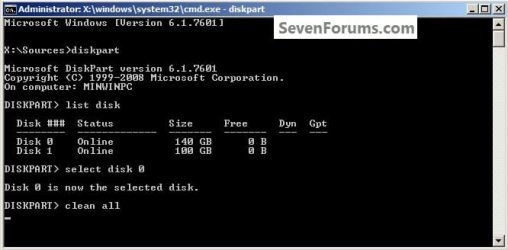
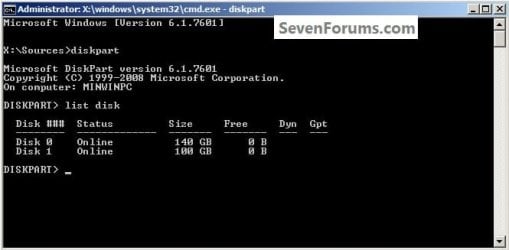
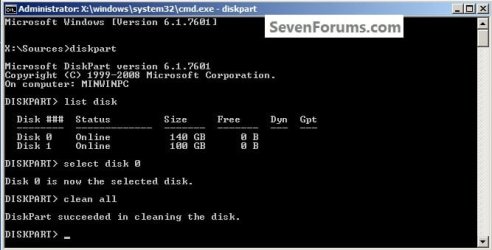
1) In the command window that opens type diskpart then hit the <enter> key then type list disk <enter> if you have more than one SSD / HDD in the machine it'll list them all.

Have a look here to view additional important information on this entire process.
click any image to enlarge
One_1.jpg
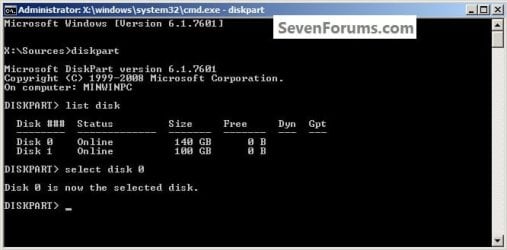
2) Now in the command window type select disk # (# = target disk number) then <enter>, you will get "Disk # is now the selected disk".
One_2.jpg
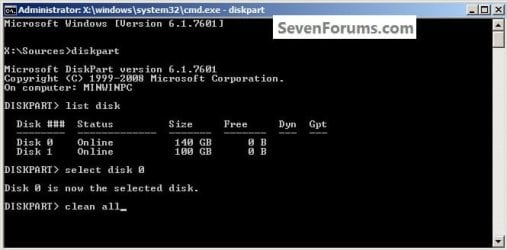
3) Now type clean <enter> you will get a blinking cursor telling you that clean all is working like in the second snip down, just relax and let it work.
One_3.1.jpg
One_3.2.jpg
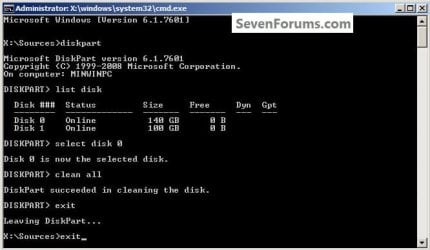
4) When it finishes you'll get "DiskPart succeeded in cleaning the disk" in the command window.
One_4.1.jpg
To leave diskpart at any time and return to the Windows 7 installer type exit two (2) separate times and hit <enter> after each and you will be returned to the installer to continue the installation process.
One_4.2.jpg


Step Two

Create a Partition


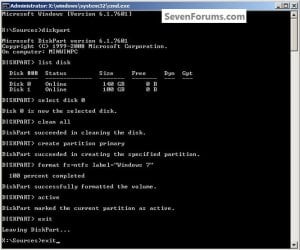
1) Create a single partition of the entire HDD / SSD

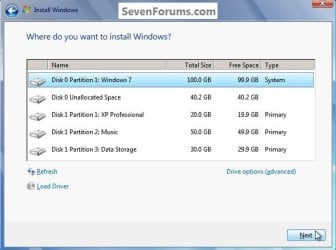
Still in the same command window, to create a partition of the entire HDD / SSD, it is suggested if you are using one of the larger, 1 - 2TB HDDs that you use the outline in #2 below to create a single 100GB partition to do the installation to or #3 below if you would like to include the new Windows 7 System Reserved partition, as we're now seeing serious issues with some trying to install to such large partitions.

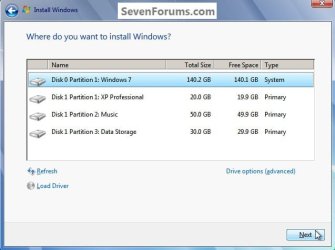
Do not format the created partition(s) with the installer if you create them using this process as the installer will delete all this info, the second snip shows how to select "where to install" during the installation process, click to highlight/select the "Windows 7" partition and click next.

Now skip down to #5 below to start the installation.
click any image to enlarge
Two_1.1.jpg
Two_1.2.jpg
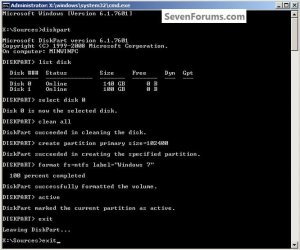
2) Create a specific size partition

If you wanted to create a specific size partition, say 100GB you would add the size you want to create in MBs like in the command below.
create partition primary size=102400 <enter>
1024MB = 1GB - 1024x100 = 102400, you can use/create any size you like.

You can always extend the Windows partition to include the remaining unallocated space on the HDD / SSD or create additional Primary partitions or an Extended partition after the installation completes if you choose.

Do not format the created partition(s) with the installer if you create them using this process as the installer will delete all this info, the second snip shows how to select "where to install" during the installation process, click to highlight/select the "Windows 7" partition and click next.

Now skip down to #5 below to start the installation.
Two_2.1.jpg
Two_2.2.jpg
3) Create the System Reserved partition

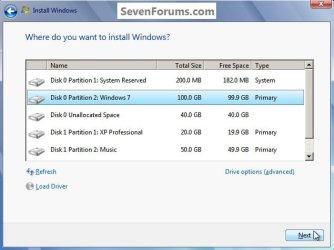
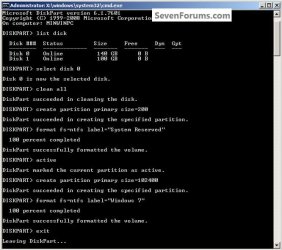
If you should want to add the "System Reserved" partition back after the clean all, see this snip; of course you would have to select to install Windows 7 to the partition labeled as "Windows 7" during the install and do not format either partition with the installer.

The reason for suggesting to create the System Reserved at 200MB instead of the new default of 100MB is an attempt to curb some of the issues we're now seeing with the partition being too small when dual/multi booting and it also being needed for use with the Windows 7 Backup and Restore and BitLocker programs.

You can always extend the Windows partition to include the remaining unallocated space on the HDD / SSD or create additional Primary partitions or an Extended partition after the installation completes if you choose.

The second snip shows how to select "where to install" during the installation process, click to highlight/select the "Windows 7" partition and click next.
Two_3.1.jpg
Two_3.2.jpg
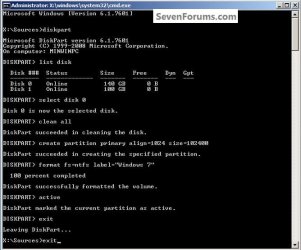
4) See this tutorial for the "align" argument

Align a Solid State Drive for Windows Installation
Two_4.1.jpg
5) That's it, you're now done with the command window, type exit <enter> to leave diskpart and exit <enter> again to close the command window; if you're using a Windows 7 full installer it will go to the "Select Language" screen to continue the installation process as usual.

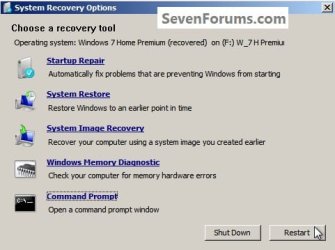
For those using a created repair CD or a Vista installer type exit <enter> to leave diskpart and exit <enter> again to close the command window; at the System Recovery Options dialog box that's still open click Restart to finish the process.
Restart.jpg
Enjoy! :)


Last edited by a moderator:
Hey Bare Foot Kid, thanks so much for the prompt response. Have a great weekend.

Thanks for writing up the tutorial.


My pleasure mate, be sure to post back here with updates.
 

My Computer My Computer

Computer Manufacturer/Model Number
* BFK Customs *
OS
W 7 64-bit Ultimate
CPU
Intel Q9550 Yorkfield
Motherboard
ASUS P5Q Pro
Memory
8GB Dominator 8500C5D
Graphics Card(s)
ATI : XFX 5870
Sound Card
Realtek HD Audio 7-1
Monitor(s) Displays
1x 47" LCD HDMI & 3x 26" LCD HDMI
Screen Resolution
1920x1080P & 1920x1200
Hard Drives
1x 80GB Intel X25-M G2 SSD : 1x 500GB & 1x 640GB WD Caviar Black(s)
PSU
Corsair 620HX
Case
Cooler Master RC-690
Cooling
Tuniq Tower 120, 2x 140mm and 3x 120mm case fans
Keyboard
Microsoft 500
Mouse
Razer Diamondback 3G
Internet Speed
14 Mb/s
Other Info
1x Koutech 3Gb/s SATA HDD Hot Swap Rack
i just bought a 64Gb SSD drive, got it cheep! i started to install windows and it errored out then windows couldnt find the drive at all, after several reboots and that i then started this tutorial when i ran clean all on disk 0 which was showing as 55gb it started to clean then popped up an error Virtual Disk Service Error: The object has been deleted. Then afte rthat i tried to select disck 0 again and it said there is no disk selected, so i changed over to disk 1 which is 1909mb and i ran clean all on it and it succeded with no problems.
Now im still missing the 55gb drive,, i have yet to reboot but will shortly and see what if anything that does.......

Disreguard, the drive was bad i tried everything and was unable to get it to work right so i returned it and got a new one thats working PERFECT!
 
Last edited:

My Computer My Computer

Computer type
PC/Desktop
Computer Manufacturer/Model Number
JRockZ
OS
Win 7 64 Ultimate
CPU
AMD 8350 Bulldozer 4ghz
Motherboard
Asus M5a97 R2
Memory
6gb
Graphics Card(s)
ATI Radeon HD 5770 X 2
Sound Card
Board
Monitor(s) Displays
Dual Gateway 19" and 32" TV 3 displays at once :D
Screen Resolution
1440X900
Hard Drives
OCZ Agility SSD Patriot Blaze 120
PSU
750 Watt Thermaltake Tough Power
Case
Diablotek EVO Mid Tower Case CPA-6170 - 8X 120mm case fans
Cooling
Corsair Liquid Cooled
Antivirus
NAV
Browser
Always IE
Cant give rep cause Im a newbie I guess, but thanks. Ended my 24hr struggle.
 

My Computer My Computer

Computer Manufacturer/Model Number
Dell Studio XPS 8100
OS
Windows 7 Home Prem x64
Hey everyone. New to this forum. Read your guide BFK and it's great work. This forum is doing a nice job with all these tutorials/guides. I am trying the 'clean all' command for the second time. The first time I tried and moved onto the installation part, I made an 80GB partition for the system and the rest for other data. I went on to install windows on to the 80GB partition but I got the 'windows could not format a partition on disk 0, error: 0x80070057'. I'm trying the 'clean all' command again but it has been ~2 hours [it's not frozen because the cursor is blinking] for a 230GB HDD. Is that abnormal? Should I restart the computer and try again? Thanks.
 

My Computer My Computer

OS
Windows 7 Home Premium 64bit
Hello Miqballin, and welcome to Seven Forums. :)

That is a bit longer than usual for only a 230GB HDD, but if you still have HDD activity (HDD light blinking on case), then it's best to let it finish so you don't have to start over.
 

My Computer My Computer

Computer type
PC/Desktop
Computer Manufacturer/Model Number
Self built custom
OS
64-bit Windows 11 Pro for Workstations
CPU
Intel i7-8700K OC'd to 5 GHz
Motherboard
ASUS ROG Maximus XI Formula Z390
Memory
64 GB (4x16GB) G.SKILL TridentZ RGB DDR4 3600 MHz
Graphics Card(s)
ASUS ROG-STRIX-GTX1080TI-O11G-GAMING
Sound Card
Integrated
Monitor(s) Displays
2 x Samsung Odyssey G7 27"
Screen Resolution
2560x1440
Hard Drives
1TB Samsung 990 PRO M.2,
4TB Samsung 990 PRO PRO M.2,
TerraMaster F8 SSD Plus NAS
PSU
Seasonic Prime Titanium 850W
Case
Thermaltake Core P3
Cooling
Corsair Hydro H115i
Keyboard
Logitech wireless K800
Mouse
Logitech MX Master 4
Internet Speed
2 Gb/s Download and 100 Mb/s Upload
Antivirus
Malwarebyte Anti-Malware Premium
Browser
Google Chrome
Other Info
Logitech Z625 speaker system,
Logitech BRIO 4K Pro webcam,
HP Color LaserJet Pro MFP M477fdn,
APC SMART-UPS RT 1000 XL - SURT1000XLI,
Galaxy S23 Plus phone
I forogt to post back here, i had found a few SSD drives that were returned as defective at (not sure i can say the name so i'll abbreviate) McCntr 60Gb drives for 30 bucks and only had the problem with that first one i posted about above, ive since used this tut about 6 more times with perfect results! So TYVM BFK!
 

My Computer My Computer

Computer type
PC/Desktop
Computer Manufacturer/Model Number
JRockZ
OS
Win 7 64 Ultimate
CPU
AMD 8350 Bulldozer 4ghz
Motherboard
Asus M5a97 R2
Memory
6gb
Graphics Card(s)
ATI Radeon HD 5770 X 2
Sound Card
Board
Monitor(s) Displays
Dual Gateway 19" and 32" TV 3 displays at once :D
Screen Resolution
1440X900
Hard Drives
OCZ Agility SSD Patriot Blaze 120
PSU
750 Watt Thermaltake Tough Power
Case
Diablotek EVO Mid Tower Case CPA-6170 - 8X 120mm case fans
Cooling
Corsair Liquid Cooled
Antivirus
NAV
Browser
Always IE
Hello Miqballin, and welcome to Seven Forums. :)

That is a bit longer than usual for only a 230GB HDD, but if you still have HDD activity (HDD light blinking on case), then it's best to let it finish so you don't have to start over.

I don't think the lights on my case work for HDD or power. I might have forgotten to plug the cables in when I first build this PC or maybe something happened later on. However, it had been 3+ hours actually and I had a gut feeling that something wasn't right so I closed the command window. I then went on to make a partition from the 'Disk 0 Unallocated Space' by clicking 'New' but after a few seconds of the blue circle spinning/loading, nothing happened. I restarted the PC and tried to make a partition again and this time it has been spinning/loading for 10+ minutes. Should I restart and try again? I just want to make a partition so I can do this process:
Type diskpart and press enter.
Enter list disk and note the number of the disk you want to install on.
Enter select disk n n is the number of the disk.
Enter list partition and note the number of the partition you want to install on.
Enter select partition n n is the number of the partition.
Enter active

Thanks.
 

My Computer My Computer

OS
Windows 7 Home Premium 64bit
You could start over, but try using "Clean" instead of "Clean all" to see how it does.
 

My Computer My Computer

Computer type
PC/Desktop
Computer Manufacturer/Model Number
Self built custom
OS
64-bit Windows 11 Pro for Workstations
CPU
Intel i7-8700K OC'd to 5 GHz
Motherboard
ASUS ROG Maximus XI Formula Z390
Memory
64 GB (4x16GB) G.SKILL TridentZ RGB DDR4 3600 MHz
Graphics Card(s)
ASUS ROG-STRIX-GTX1080TI-O11G-GAMING
Sound Card
Integrated
Monitor(s) Displays
2 x Samsung Odyssey G7 27"
Screen Resolution
2560x1440
Hard Drives
1TB Samsung 990 PRO M.2,
4TB Samsung 990 PRO PRO M.2,
TerraMaster F8 SSD Plus NAS
PSU
Seasonic Prime Titanium 850W
Case
Thermaltake Core P3
Cooling
Corsair Hydro H115i
Keyboard
Logitech wireless K800
Mouse
Logitech MX Master 4
Internet Speed
2 Gb/s Download and 100 Mb/s Upload
Antivirus
Malwarebyte Anti-Malware Premium
Browser
Google Chrome
Other Info
Logitech Z625 speaker system,
Logitech BRIO 4K Pro webcam,
HP Color LaserJet Pro MFP M477fdn,
APC SMART-UPS RT 1000 XL - SURT1000XLI,
Galaxy S23 Plus phone
You could start over, but try using "Clean" instead of "Clean all" to see how it does.

Alright so I started diskpart again > list disk > select disk 0 > create partition primary size=71680 (for 70GB) > select partition 1 > active but active doesnt go through and I receive this error:

DiskPart has encountered an error: Data error <cyclic redundancy check>. See the System Even Log for more information.

:(

Edit: Realized I forgot clean command after select disk 0. Will try again after restarting PC.

Edit#2: Also, sometimes when I restart, it stays at the first screen longer than usual. It happens at random restarts. What could be causing that? Thanks.
 
Last edited:

My Computer My Computer

OS
Windows 7 Home Premium 64bit
Did you run clean on the disk first before trying to create a new partition on the disk?
 

My Computer My Computer

Computer type
PC/Desktop
Computer Manufacturer/Model Number
Self built custom
OS
64-bit Windows 11 Pro for Workstations
CPU
Intel i7-8700K OC'd to 5 GHz
Motherboard
ASUS ROG Maximus XI Formula Z390
Memory
64 GB (4x16GB) G.SKILL TridentZ RGB DDR4 3600 MHz
Graphics Card(s)
ASUS ROG-STRIX-GTX1080TI-O11G-GAMING
Sound Card
Integrated
Monitor(s) Displays
2 x Samsung Odyssey G7 27"
Screen Resolution
2560x1440
Hard Drives
1TB Samsung 990 PRO M.2,
4TB Samsung 990 PRO PRO M.2,
TerraMaster F8 SSD Plus NAS
PSU
Seasonic Prime Titanium 850W
Case
Thermaltake Core P3
Cooling
Corsair Hydro H115i
Keyboard
Logitech wireless K800
Mouse
Logitech MX Master 4
Internet Speed
2 Gb/s Download and 100 Mb/s Upload
Antivirus
Malwarebyte Anti-Malware Premium
Browser
Google Chrome
Other Info
Logitech Z625 speaker system,
Logitech BRIO 4K Pro webcam,
HP Color LaserJet Pro MFP M477fdn,
APC SMART-UPS RT 1000 XL - SURT1000XLI,
Galaxy S23 Plus phone
Did you run clean on the disk first before trying to create a new partition on the disk?

I made sure to do that this time however a new problem has arise. After I enter in create partition primary size=71680 I receive this error:

Virtual Disk Service error:
The service's cache has become corrupt.

DiskPart has referenced an object which is not up-to-date.
Refresh the object by using the RESCAN command.
If the problem persists exit DiskPart, then restart DiskPart or restart the computer.


I am going to try the RESCAN command and redo it and post back. Thanks.
 

My Computer My Computer

OS
Windows 7 Home Premium 64bit
Ok so I did the RESCAN command and it says DiskPart has finished scanning your configuration.

Edit: I started again from select disk 0 > clean > create partition primary size=71680 > select partition 1 > active > format fs=ntfs and guess what.. I received this error at 100% completed: DiskPart has encountered an error: The parameter is incorrect. See the System Event Log for more information.

This is getting more and more confusing :confused:
 
Last edited:

My Computer My Computer

OS
Windows 7 Home Premium 64bit
Thank you but the partition I create on my SSD never saves. It may be because I am forced to reboot my computer in order to reattempt the installation process. I'm trying to clean install Windows 8 on a SSD and this didn't work either. I keep getting the same error.
 

Attachments

  • image.jpg
    image.jpg
    456.8 KB · Views: 408

My Computer My Computer

OS
Windows 7 [64-Bit]
CPU
AMD Phenom II X6 1100T Black Edition Thuban 3.3GHz, 3.7GHz
Motherboard
GIGABYTE GA-990XA-UD3 AM3+ AMD
Memory
G.SKILL Ripjaws X Series 8GB 240-Pin DDR3 SDRAM DDR3 186
Graphics Card(s)
ATI Radeon HD 5870 1GB DDR5 PCI-Express Card
Sound Card
N/A (On-board Sound)
Monitor(s) Displays
HANNSpree 42" Class LCD 1080p 120Hz HDTV
Screen Resolution
1920 x 1080
Hard Drives
SSD: Crucial M4 CT064M4SSD2 2.5" 64GB SATA

HDD 1: Western Digital Caviar Blue WD5000AAKS 2TB 7200 RPM 16MB Cache

HDD 2: Western Digital Caviar Blue WD5000AAKS 1TB 7200 RPM 16MB Cache

HDD 3: Western Digital Caviar Blue WD5000AAKS 500GB 7200 R
PSU
Antec High Current Gamer Series HCG-900 900W
Case
NZXT Phantom PHAN-001WT Red Steel / Plastic Enthusiast ATX
Cooling
FANS: 140MM (x1), 120MM (x3), 200MM (x2)
Keyboard
Logitech G13 & Steelseries Merc Stealth
Mouse
Cyborg M.M.O. 7 Gaming Mouse, Logitech G700 & Steelseries Wo
Internet Speed
25 Mbps Download / 2 Mbps Upload

My Computer My Computer

Computer type
PC/Desktop
Computer Manufacturer/Model Number
Self built custom
OS
64-bit Windows 11 Pro for Workstations
CPU
Intel i7-8700K OC'd to 5 GHz
Motherboard
ASUS ROG Maximus XI Formula Z390
Memory
64 GB (4x16GB) G.SKILL TridentZ RGB DDR4 3600 MHz
Graphics Card(s)
ASUS ROG-STRIX-GTX1080TI-O11G-GAMING
Sound Card
Integrated
Monitor(s) Displays
2 x Samsung Odyssey G7 27"
Screen Resolution
2560x1440
Hard Drives
1TB Samsung 990 PRO M.2,
4TB Samsung 990 PRO PRO M.2,
TerraMaster F8 SSD Plus NAS
PSU
Seasonic Prime Titanium 850W
Case
Thermaltake Core P3
Cooling
Corsair Hydro H115i
Keyboard
Logitech wireless K800
Mouse
Logitech MX Master 4
Internet Speed
2 Gb/s Download and 100 Mb/s Upload
Antivirus
Malwarebyte Anti-Malware Premium
Browser
Google Chrome
Other Info
Logitech Z625 speaker system,
Logitech BRIO 4K Pro webcam,
HP Color LaserJet Pro MFP M477fdn,
APC SMART-UPS RT 1000 XL - SURT1000XLI,
Galaxy S23 Plus phone
My apologies.
 

My Computer My Computer

OS
Windows 7 [64-Bit]
CPU
AMD Phenom II X6 1100T Black Edition Thuban 3.3GHz, 3.7GHz
Motherboard
GIGABYTE GA-990XA-UD3 AM3+ AMD
Memory
G.SKILL Ripjaws X Series 8GB 240-Pin DDR3 SDRAM DDR3 186
Graphics Card(s)
ATI Radeon HD 5870 1GB DDR5 PCI-Express Card
Sound Card
N/A (On-board Sound)
Monitor(s) Displays
HANNSpree 42" Class LCD 1080p 120Hz HDTV
Screen Resolution
1920 x 1080
Hard Drives
SSD: Crucial M4 CT064M4SSD2 2.5" 64GB SATA

HDD 1: Western Digital Caviar Blue WD5000AAKS 2TB 7200 RPM 16MB Cache

HDD 2: Western Digital Caviar Blue WD5000AAKS 1TB 7200 RPM 16MB Cache

HDD 3: Western Digital Caviar Blue WD5000AAKS 500GB 7200 R
PSU
Antec High Current Gamer Series HCG-900 900W
Case
NZXT Phantom PHAN-001WT Red Steel / Plastic Enthusiast ATX
Cooling
FANS: 140MM (x1), 120MM (x3), 200MM (x2)
Keyboard
Logitech G13 & Steelseries Merc Stealth
Mouse
Cyborg M.M.O. 7 Gaming Mouse, Logitech G700 & Steelseries Wo
Internet Speed
25 Mbps Download / 2 Mbps Upload
No apology needed mate. I just wanted to make sure you get the best help with it. :)
 

My Computer My Computer

Computer type
PC/Desktop
Computer Manufacturer/Model Number
Self built custom
OS
64-bit Windows 11 Pro for Workstations
CPU
Intel i7-8700K OC'd to 5 GHz
Motherboard
ASUS ROG Maximus XI Formula Z390
Memory
64 GB (4x16GB) G.SKILL TridentZ RGB DDR4 3600 MHz
Graphics Card(s)
ASUS ROG-STRIX-GTX1080TI-O11G-GAMING
Sound Card
Integrated
Monitor(s) Displays
2 x Samsung Odyssey G7 27"
Screen Resolution
2560x1440
Hard Drives
1TB Samsung 990 PRO M.2,
4TB Samsung 990 PRO PRO M.2,
TerraMaster F8 SSD Plus NAS
PSU
Seasonic Prime Titanium 850W
Case
Thermaltake Core P3
Cooling
Corsair Hydro H115i
Keyboard
Logitech wireless K800
Mouse
Logitech MX Master 4
Internet Speed
2 Gb/s Download and 100 Mb/s Upload
Antivirus
Malwarebyte Anti-Malware Premium
Browser
Google Chrome
Other Info
Logitech Z625 speaker system,
Logitech BRIO 4K Pro webcam,
HP Color LaserJet Pro MFP M477fdn,
APC SMART-UPS RT 1000 XL - SURT1000XLI,
Galaxy S23 Plus phone
To clarify "Clean All" is not the same as a secure erase from Parted Magic or HDD Erase ?
 

My Computer My Computer

OS
Windows 7 Ultimate X64 RTM
CPU
Q6600 @ 3.4Ghz
Motherboard
Abit IP35-E
Memory
8GB DDR2-800
Graphics Card(s)
GTX285 1GB
Sound Card
Creative X-Fi Extreme Music
Monitor(s) Displays
Samsung T220
Hard Drives
Samsung F1 Spinpoint 1TB
PSU
Silverstone Zues 750ZF
Case
Lian Li PC-P80
Cooling
Thermalright Ultra 120-Extreme
To clarify "Clean All" is not the same as a secure erase from Parted Magic or HDD Erase ?

Hello Earl,

With a secure erase, each pass it does is one overwrite of everything on the drive. The more overwrites that are done, the less likely anything can be recovered.

"Clean All" does 1 pass each time you run it. This is usually good enough unless you are concerned about professionals trying to recover data.

The others can do many passes, but it will take a lot longer to finish.

Hope this helps. :)
 

My Computer My Computer

Computer type
PC/Desktop
Computer Manufacturer/Model Number
Self built custom
OS
64-bit Windows 11 Pro for Workstations
CPU
Intel i7-8700K OC'd to 5 GHz
Motherboard
ASUS ROG Maximus XI Formula Z390
Memory
64 GB (4x16GB) G.SKILL TridentZ RGB DDR4 3600 MHz
Graphics Card(s)
ASUS ROG-STRIX-GTX1080TI-O11G-GAMING
Sound Card
Integrated
Monitor(s) Displays
2 x Samsung Odyssey G7 27"
Screen Resolution
2560x1440
Hard Drives
1TB Samsung 990 PRO M.2,
4TB Samsung 990 PRO PRO M.2,
TerraMaster F8 SSD Plus NAS
PSU
Seasonic Prime Titanium 850W
Case
Thermaltake Core P3
Cooling
Corsair Hydro H115i
Keyboard
Logitech wireless K800
Mouse
Logitech MX Master 4
Internet Speed
2 Gb/s Download and 100 Mb/s Upload
Antivirus
Malwarebyte Anti-Malware Premium
Browser
Google Chrome
Other Info
Logitech Z625 speaker system,
Logitech BRIO 4K Pro webcam,
HP Color LaserJet Pro MFP M477fdn,
APC SMART-UPS RT 1000 XL - SURT1000XLI,
Galaxy S23 Plus phone
Does this process on all hdd or can it be made on the windows partition
 

My Computer My Computer

OS
windows 7 ultimate x64
Question re: Partitions

This thread has been helpful. I am doing a clean install of Windows 7 on a 232 GB HDD. The laptop will be used for basic home computing, nothing heavy duty. Which of the three options within Step Two should I select? (I suspect my needs/use of the machine will not require something as sophisticated as Option 3.)

I read in this tutorial that there have been problems with some HDDs or partitions that are "too large". So, my questions: 1) Which of the three options do you recommend for me (I prefer simplicity so long as the machine will run well)? 2) If more than one partition is recommended, then how many and what size for each?

[A note to Barefoot Kid if he happens to see this - I appreciate your personal website.]
 

My Computer My Computer

Computer Manufacturer/Model Number
Dell Latitude E6500
OS
Windows 7 Professional SP1, 32-bit
Hard Drives
250 GB
Back
Top