
ssd help

indysoccer16

New member
Local time
8:56 AM
Messages
2
Hey everyone, this is my first post but I have been a lurker for a little while and have to say thank you for everyone's help that I have used.

My question is about my ssd's
I do a lot of photo and video editing and I run those programs from my ssd's because the actions are much quicker this way. But when editing I save edited copies to my main drive which is my ssd's and at one point had almost all 250gb filled.
So I went in and cleared out what I didn't really need but the ssd's still dont seem as fast as they were.
Any help on speeding them back up is greatly appreciated.
Here is a windir pic I have seen people use before to see if any extra room can be cleared.
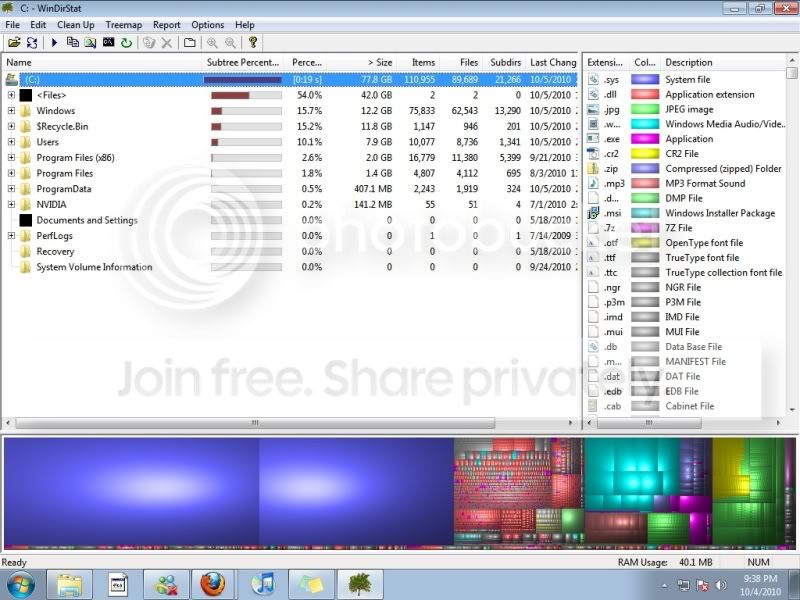
pic.jpg
 

My Computer

OS
windowns 7 and OsX
CPU
Dual Nehalem 2.66 quad core
Motherboard
Asus Z8NA-D6
Memory
24 gb Patriot DDR3 6 x 4gb
Graphics Card(s)
Nvidia 9800gtx and pci video card
Sound Card
Asus
Monitor(s) Displays
Main Monitor 27" hp Second and Third Monitors 21" hp
Hard Drives
Main 2 Kingston 128gb SSD set to raid 0
Second 2tb WD
Third 2tb WD
PSU
Corsair HX1000
Case
ThermalTake Element G
Cooling
water cooled see below
Other Info
Water Cooling
2 Mp655 pumps
2 Black Ice xtreme radiators each with 4 fans in Push/Pull
2 Apogee xt cpu blocks
Ek Full gpu block
Custom made NB/SB chipset water block
Hello Indysoccer and Welcome to SevenForums,

Your problem is not with your SSD.

What anti-virus are you running?

To clean your SSD:
CCleaner CCleaner

WIN | type CleanMgr | ENTER
 

My Computer

Computer Manufacturer/Model Number
Toshiba Satellite S875D-S7239 laptop
OS
MS Windows 7 Ultimate SP1 64-bit
CPU
AMD A10-4600M
Motherboard
AMD Pumori (Socket FT1)
Memory
6.00 GB Dual-Channel DDR3 @ 798MHz (11-11-12-28)
Graphics Card(s)
AMD Radeon HD 7660G
Sound Card
High Definition Audio Device
Monitor(s) Displays
Generic PnP Monitor (1600x900@60Hz)
Screen Resolution
1600x900@60Hz
Hard Drives
SSD 119GB Corsair CSSD-V128GB2 ATA Device
Keyboard
Standard PS/2 Keyboard
Mouse
HP Wireless Optical Mobile Mouse Model FHA-3410
Internet Speed
What the local pub, local coffee shop offers.
Other Info
Optical Drive:MATSHITA BD-CMB UJ160B ATA Device


Also have an Asus ha1002xp netbook with Win 7 Ultimate installed.
I actually am not running a virus scan on this computer because the only time its online is really to upload files or download them from my partners and to browse a couple small forums
I will give that cleaner a try and see if they speed up!
 

My Computer

OS
windowns 7 and OsX
CPU
Dual Nehalem 2.66 quad core
Motherboard
Asus Z8NA-D6
Memory
24 gb Patriot DDR3 6 x 4gb
Graphics Card(s)
Nvidia 9800gtx and pci video card
Sound Card
Asus
Monitor(s) Displays
Main Monitor 27" hp Second and Third Monitors 21" hp
Hard Drives
Main 2 Kingston 128gb SSD set to raid 0
Second 2tb WD
Third 2tb WD
PSU
Corsair HX1000
Case
ThermalTake Element G
Cooling
water cooled see below
Other Info
Water Cooling
2 Mp655 pumps
2 Black Ice xtreme radiators each with 4 fans in Push/Pull
2 Apogee xt cpu blocks
Ek Full gpu block
Custom made NB/SB chipset water block
Well at least your av isn't slowing you down.

However, I do recommend the lightest weight, least interfering, auto-updated, free antivirus program which the majority of those who answer questions use: Microsoft Security Essentials:
MSE - Microsoft Security Essentials
 

My Computer

Computer Manufacturer/Model Number
Toshiba Satellite S875D-S7239 laptop
OS
MS Windows 7 Ultimate SP1 64-bit
CPU
AMD A10-4600M
Motherboard
AMD Pumori (Socket FT1)
Memory
6.00 GB Dual-Channel DDR3 @ 798MHz (11-11-12-28)
Graphics Card(s)
AMD Radeon HD 7660G
Sound Card
High Definition Audio Device
Monitor(s) Displays
Generic PnP Monitor (1600x900@60Hz)
Screen Resolution
1600x900@60Hz
Hard Drives
SSD 119GB Corsair CSSD-V128GB2 ATA Device
Keyboard
Standard PS/2 Keyboard
Mouse
HP Wireless Optical Mobile Mouse Model FHA-3410
Internet Speed
What the local pub, local coffee shop offers.
Other Info
Optical Drive:MATSHITA BD-CMB UJ160B ATA Device


Also have an Asus ha1002xp netbook with Win 7 Ultimate installed.
Hi,

CCleaner is a good place to start but be sure to uncheck the Wipe Free Space option because this is not made for SSDs.

I see you use Kingston SSDs, what type exactly?

MK2
 

My Computer

OS
7
Back
Top