
indysoccer16
New member
- Local time
- 2:36 AM
- Messages
- 2
Hey everyone, this is my first post but I have been a lurker for a little while and have to say thank you for everyone's help that I have used.
My question is about my ssd's
I do a lot of photo and video editing and I run those programs from my ssd's because the actions are much quicker this way. But when editing I save edited copies to my main drive which is my ssd's and at one point had almost all 250gb filled.
So I went in and cleared out what I didn't really need but the ssd's still dont seem as fast as they were.
Any help on speeding them back up is greatly appreciated.
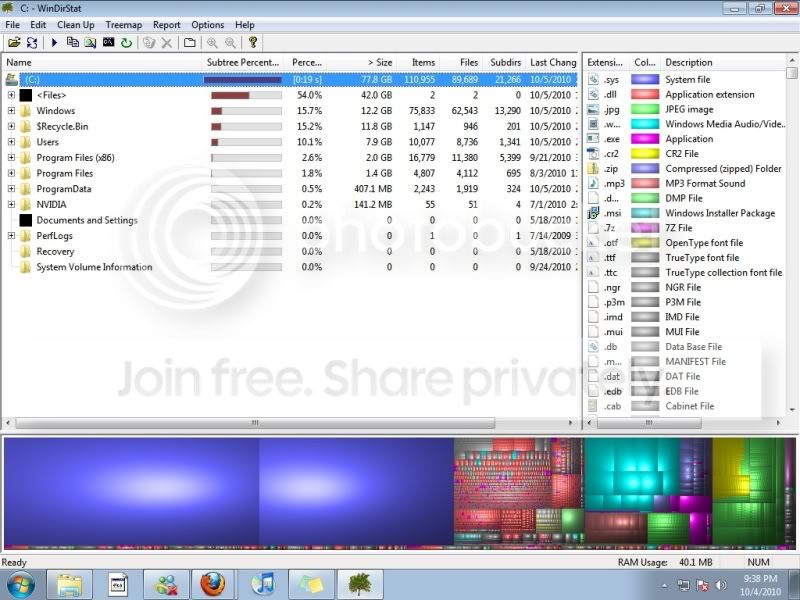
Here is a windir pic I have seen people use before to see if any extra room can be cleared.
My question is about my ssd's
I do a lot of photo and video editing and I run those programs from my ssd's because the actions are much quicker this way. But when editing I save edited copies to my main drive which is my ssd's and at one point had almost all 250gb filled.
So I went in and cleared out what I didn't really need but the ssd's still dont seem as fast as they were.
Any help on speeding them back up is greatly appreciated.
Here is a windir pic I have seen people use before to see if any extra room can be cleared.
My Computer
- OS
- windowns 7 and OsX
- CPU
- Dual Nehalem 2.66 quad core
- Motherboard
- Asus Z8NA-D6
- Memory
- 24 gb Patriot DDR3 6 x 4gb
- Graphics Card(s)
- Nvidia 9800gtx and pci video card
- Sound Card
- Asus
- Monitor(s) Displays
- Main Monitor 27" hp Second and Third Monitors 21" hp
- Hard Drives
- Main 2 Kingston 128gb SSD set to raid 0
Second 2tb WD
Third 2tb WD
- PSU
- Corsair HX1000
- Case
- ThermalTake Element G
- Cooling
- water cooled see below
- Other Info
- Water Cooling
2 Mp655 pumps
2 Black Ice xtreme radiators each with 4 fans in Push/Pull
2 Apogee xt cpu blocks
Ek Full gpu block
Custom made NB/SB chipset water block

