Solved SSD installed with Windows 7, now to format old HDD

AIchemyst

New member
Local time
4:46 AM
Messages
2
So, I just got a SSD and Windows 7. I plugged everything up, and did the boot install with my Windows 7 disk.

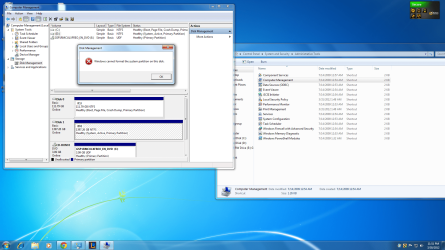
Now, my old 1.5 TB HDD that I want to format (which originally contained Windows Vista), but I'm being told that I cannot from the Disk Management console. More specifically:

"Windows cannot format the system partition on this disk."

I downloaded and installed all the files and software I need to my SSD, and just want to purge everything from my old disk. Suggestions?
 

My Computer My Computer

At a glance

Windows 7Core i7
OS
Windows 7
CPU
Core i7
Motherboard
Asus P6T Deluxe
Hi,

When you installed Windows 7 to the SSD, did you unplug the original HDD from the motherboard?

Please post a screen capture image of your Disk Managment screen here.

Regards,
Golden
 

My Computer My Computer

At a glance

Windows 10 Pro x64 ; Xubuntu x64Intel i7 860 @ 2.80 GHz O/C'ed to 4.0GHz16GB Corsair Vengance DDR3 @ 661 MHz Dual Cha...EVGA NVidia GTX 560 1024MB
Computer type
PC/Desktop
Computer Manufacturer/Model Number
Golden Mk. I.4
OS
Windows 10 Pro x64 ; Xubuntu x64
CPU
Intel i7 860 @ 2.80 GHz O/C'ed to 4.0GHz
Motherboard
Gigabyte P55A-UD3R Rev.1. Award BIOS F13
Memory
16GB Corsair Vengance DDR3 @ 661 MHz Dual Channel (9-9-9-24)
Graphics Card(s)
EVGA NVidia GTX 560 1024MB
Sound Card
Realtek Integrated
Monitor(s) Displays
Dual Samsung SyncMaster 2494HS
Screen Resolution
1920*1080 and 1920*1080
Hard Drives
1*Samsung 840 EVO 120GB SSD;
1*OCZ Vertex 2 60GB SSD;
2*Samsung F3 SpinPoint 1TB in RAID0;
1*Samsung F1 SpinPoint 1TB;
2*Western Digital 1TB External USB 3.0
1*Western Digital 500GB External USB 3.0
1*Seagate 500GB External USB 2.0
PSU
Thermaltake ToughPower QFan 750W
Case
Thermaltake Element S VK60001W2Z
Cooling
Corsair H60 Water Cooling, 2*230mm and 2*80mm case fans
Keyboard
Logitech G110
Mouse
Logitech MX518
No, I didn't unplug it during the install.
 

Attachments

  • Screenshot.png
    Screenshot.png
    299.4 KB · Views: 114

My Computer My Computer

At a glance

Windows 7Core i7
OS
Windows 7
CPU
Core i7
Motherboard
Asus P6T Deluxe
Go / Start / "Type" in "CMD" when that showes up right click it and open as "ADMEN" and open// then type (cd C:\ to give you "C:\>" at the end of that type in: your drive you won't to format) like this;;; C:\>format d: and hit enter, then it will tell you that all of your files on your drive will be lost,, do you won't to go ahead?? and that is it. Your drive will be formated.

"" now if you have named that drive then you will have to put that name in the place of (D: or what ever your drive is)
 

My Computer My Computer

At a glance

win7_x86_64bitA6-35008GB GskillPowerColor Radaion 6450 2GB PCX
OS
win7_x86_64bit
CPU
A6-3500
Motherboard
ASUS FM1755m
Memory
8GB Gskill
Graphics Card(s)
PowerColor Radaion 6450 2GB PCX
Hard Drives
2-SSD 128s and 2-WD7200 1TB ea
PSU
ANTEC 500w
I would try deleting the partition, then recreate the partition and format.
 

My Computer My Computer

At a glance

W10 Pro desktop, W11 laptop, W11 Pro tablet (...3.7Ghz 8700K i7, i7-11800H, i7-1065G716G desktop, 16G laptop, 4G tabletAMD Radeon RX580, RTX 3060, Intel Iris Plus
Computer type
PC/Desktop
Computer Manufacturer/Model Number
Home Built desktop, Dell G15 5511 Gaming laptop,MS Surface Pro 7 tablet
OS
W10 Pro desktop, W11 laptop, W11 Pro tablet (all 64-bit)
CPU
3.7Ghz 8700K i7, i7-11800H, i7-1065G7
Motherboard
ASUS TUF Z370-Pro Gaming in desktop
Memory
16G desktop, 16G laptop, 4G tablet
Graphics Card(s)
AMD Radeon RX580, RTX 3060, Intel Iris Plus
Sound Card
High Definition Audio (Built-in to mobo)
Monitor(s) Displays
Samsung U32J59 32" (2x), 15.6", 12"
Screen Resolution
3840x2160, 3840x2160, 1920x1080, 2160x1440
Hard Drives
500G SSD for OS; 2T, 10T & 15T HDDs for Data on Desktop, 1TB SSD laptop, 128G SSD tablet.
PSU
Corsair CX 750M
Case
Antec 100
Cooling
CM 212+
Keyboard
IBM Model M - used continuously since 1986
Mouse
Microsoft Pro IntelliMouse
Internet Speed
400M down 8M up
Antivirus
Windows Defender
Browser
FireFox
Other Info
Built my first computer (8Mhz 8088cpu, 640K RAM, 20MB HDD, 2 360K floppy drives) in 1985 and have been building them for myself, relatives and friends ever since.
You'll need to write the System boot files to C so that it can boot on its own.

To do this mark C Active: Partition - Mark as Active

Next power down to unplug HD, reboot into BIOS setup to set SSD first to boot in BIOS setup, after DVD drive.

Now boot into DVD System Recovery Options to run Startup Repair - Run 3 Separate Times until WIn7 starts on its own and holds the System Active flags.

You can then plug back in HD, making sure it is not set to boot first in BIOS, copy any files over to SSD that are needed, then to wipe it open an Elevated Command Prompt to run Diskpart Clean Command. Once HD is wiped you can create new partitions as desired in Disk Mgmt: Partition or Volume - Create New
 
Back
Top