SSD Performance Confusing

Well, first of all, I was not aware you were booting with external drives attached. Boot time will always be slower with externals attached and turned on. That being said, it shouldn't be that much longer. If you can boot to the desktop in 30 seconds, that's about as fast as you are going to do it, no matter what the performance tests show. As said, even with the USB drives attached, it shouldn't take that long to boot, but will take longer than without them.
 

My Computers

System One System Two

  • Computer type
    PC/Desktop
    Computer Manufacturer/Model Number
    ALWAYS UNDER CONSTRUCTION
    OS
    Windows 11 Pro
    CPU
    Ryzen 9 5900X
    Motherboard
    Asus X570 Crosshair Viii Hero
    Memory
    32GB G Skill DDR4-3600
    Graphics Card(s)
    EVGA RTX 3080 FTW 3 Ultra
    Sound Card
    On Board/Sennheiser PC37X Headset
    Monitor(s) Displays
    3 X Asus 27"
    Screen Resolution
    2560x1440
    Hard Drives
    2 X 1 TB NVME drives
    PSU
    EVGA 850
    Case
    Phanteks Eclipse P400A
    Cooling
    EVGA 280 AIO
    Keyboard
    Logitech G510s/ Logitech G13
    Mouse
    Logitech G502
    Internet Speed
    24/1
    Antivirus
    ESET/MBAM Pro/SAS Pro
    Browser
    Chrome/ Firefox/ Edge
  • Computer type
    Laptop
    System Manufacturer/Model Number
    Dell 16 Plus
    OS
    Windows 11 Pro
    CPU
    Intel Ultra 9 288V
    Memory
    32 GB LPDDR5X 8533
    Monitor(s) Displays
    16" Mini-LED HDR600 Touch 90 Hz
    Screen Resolution
    2560X1600
    Hard Drives
    1 TB NVME
have you loaded it as uefi(efi) as the boot choice? efi natively boots faster than the older 16bit bios. usually a choice in the bios.

2 min is extreme, i would start by removing all non essential hardware and bare bones that system and do a clean install from there with 1 stick of ram the optical drive and the ssd alone if possible doing it without the graphics card as well...some boards have their own.

see if you can get a normal boot, also disable updates when you do as they can slow down boot times on clean installs and give misleading results early on.
 

My Computer

Computer Manufacturer/Model Number
.
OS
.
CPU
.
Motherboard
.
Memory
.
Graphics Card(s)
.
Monitor(s) Displays
.
Screen Resolution
.
Hard Drives
.
PSU
.
Case
.
Cooling
.
Keyboard
.
Mouse
.
Internet Speed
.
Other Info
.
Deacon, it should read 1024 if you have no system reserved, if you do have the 100MB partition it reads as his does.
Good to know! I install without the 100 MB partition, so mine always read 1024K. Thanks.
Yup. If you divide that 103424 by 1024 you get 101MB which is good and also divisible evenly by 4. I always scarp the 100MB reserved too after Steve told me how to do it. :D
 

My Computer

Computer type
PC/Desktop
Computer Manufacturer/Model Number
Home Built Desktop By DataTech
OS
Windows 7 Ultimate X64 SP1
CPU
Intel i5-2550K, Differing ~4.4-4.8GHz No built in GPU
Motherboard
ASUS P8Z68-V PRO/GEN3
Memory
16GB G.Skill Sniper 1866MHz @ 2133MHz 2x8GB
Graphics Card(s)
ASUS GTX650TIB-DC2OC-2GD5, (650TI Boost)
Sound Card
Onboard Realtek 5-1
Monitor(s) Displays
Samsung P2570HD
Screen Resolution
1920x1080
Hard Drives
Samsung 840 Pro 256GB SSD for OS, 500GB Seagate Constellation (Enterprise drive) for Data
PSU
Corsair HX650W
Case
Inwin Dragon Rider
Cooling
Hyper 212 EVO w/two Noctua fans, push-pull, @1300 RPM
Keyboard
E-Z Eyes, bright yellow keys with large characters
Mouse
steelseries SENSEI Laser Pro Gaming
Internet Speed
48-51Mbs Mbs down, 11 Mbs up Xfinity Cable
Antivirus
Norton Internet Security 2013
Browser
IE 10, Opera, Pale Moon if needed
Other Info
4 case fans, LG BluRay-RE, ASUS DVD-RW, Mr. Fusion power supply, 1.21 gigawatts.
Update-

I still intend to do all remaining tests and procedures suggested, but I see a pattern that might get us where we need to go more quickly.

I disconnected the 2 WD External HDD's. The computer went from off to loaded desktop in 35 seconds.

I turned the computer off. I reconnected both WD External HDD's and the computer went from off to loaded desktop in 35 seconds.

I then clicked on restart and it took almost 4 minutes to go from the motherboard screen to a loaded desktop. The majority of the delay was on the starting windows screen, where it took about 2 .75 minutes of the 4 minutes for the logo to appear after the words "Starting Windows" was visible.

My theory, although I don't know what is causing it is that regardless of what is plugged in and what isn't plugged in, the computer reaches desktop from completely off in 35 seconds, while it takes 2.5 to 4.0 minutes from the loading operating system screen to desktop if the computer is restarted rather than shut down.

Thanks Guys

Rick (Goosegas)
 

My Computer

Computer Manufacturer/Model Number
Custom Build
OS
Windows 7 Home Premium 64 bit
CPU
Intel Core i7-2700K @ 3.50 GHz
Motherboard
Gigabyte Z68AP-D3
Memory
Corsair Vengeance 8 GB (2 x 4 GB) 1600 MHz
Graphics Card(s)
NVIDIA GeForce GTX 570
Sound Card
On Motherboard 7.1
Monitor(s) Displays
Hanns-G 27.5 Inch 1920 x 1200 LCD Monitor
Hard Drives
Seagate Barracuda 1TB 7200 RPM 32MB Cache SATA 6.0Gb/s 3.5" Internal Hard Drive

Crucial M4 128 GB SATA lll SSD
PSU
Coolermaster 850W Silent Pro
Case
Coolermaster HAF X Gaming Case
Cooling
Asetek 570LC Liquid Cooling System with 120 MM Radiator w PP
Keyboard
Logitech G15 Gaming Keyboard
Mouse
Razer Imperator 5600 DPI Gaming Mouse
Internet Speed
75 Gbps Download / 35 Gbps Upload (FIOS Quantum)
Deacon, it should read 1024 if you have no system reserved, if you do have the 100MB partition it reads as his does.
Good to know! I install without the 100 MB partition, so mine always read 1024K. Thanks.
Yup. If you divide that 103424 by 1024 you get 101MB which is good and also divisible evenly by 4. I always scarp the 100MB reserved too after Steve told me how to do it. :D

Gary, the system reserved is aligned at 1024, the "C" partition is aligned at 101.
1024 X 101 = 103424
 

My Computers

System One System Two

  • Computer type
    PC/Desktop
    Computer Manufacturer/Model Number
    ALWAYS UNDER CONSTRUCTION
    OS
    Windows 11 Pro
    CPU
    Ryzen 9 5900X
    Motherboard
    Asus X570 Crosshair Viii Hero
    Memory
    32GB G Skill DDR4-3600
    Graphics Card(s)
    EVGA RTX 3080 FTW 3 Ultra
    Sound Card
    On Board/Sennheiser PC37X Headset
    Monitor(s) Displays
    3 X Asus 27"
    Screen Resolution
    2560x1440
    Hard Drives
    2 X 1 TB NVME drives
    PSU
    EVGA 850
    Case
    Phanteks Eclipse P400A
    Cooling
    EVGA 280 AIO
    Keyboard
    Logitech G510s/ Logitech G13
    Mouse
    Logitech G502
    Internet Speed
    24/1
    Antivirus
    ESET/MBAM Pro/SAS Pro
    Browser
    Chrome/ Firefox/ Edge
  • Computer type
    Laptop
    System Manufacturer/Model Number
    Dell 16 Plus
    OS
    Windows 11 Pro
    CPU
    Intel Ultra 9 288V
    Memory
    32 GB LPDDR5X 8533
    Monitor(s) Displays
    16" Mini-LED HDR600 Touch 90 Hz
    Screen Resolution
    2560X1600
    Hard Drives
    1 TB NVME
Have you tried restart with just the SSD plugged in?
 

My Computers

System One System Two

  • Computer type
    PC/Desktop
    Computer Manufacturer/Model Number
    ALWAYS UNDER CONSTRUCTION
    OS
    Windows 11 Pro
    CPU
    Ryzen 9 5900X
    Motherboard
    Asus X570 Crosshair Viii Hero
    Memory
    32GB G Skill DDR4-3600
    Graphics Card(s)
    EVGA RTX 3080 FTW 3 Ultra
    Sound Card
    On Board/Sennheiser PC37X Headset
    Monitor(s) Displays
    3 X Asus 27"
    Screen Resolution
    2560x1440
    Hard Drives
    2 X 1 TB NVME drives
    PSU
    EVGA 850
    Case
    Phanteks Eclipse P400A
    Cooling
    EVGA 280 AIO
    Keyboard
    Logitech G510s/ Logitech G13
    Mouse
    Logitech G502
    Internet Speed
    24/1
    Antivirus
    ESET/MBAM Pro/SAS Pro
    Browser
    Chrome/ Firefox/ Edge
  • Computer type
    Laptop
    System Manufacturer/Model Number
    Dell 16 Plus
    OS
    Windows 11 Pro
    CPU
    Intel Ultra 9 288V
    Memory
    32 GB LPDDR5X 8533
    Monitor(s) Displays
    16" Mini-LED HDR600 Touch 90 Hz
    Screen Resolution
    2560X1600
    Hard Drives
    1 TB NVME
It sounds like it could be doing a quick hard drive error check on the external HDD's on reboot.

Even a quick check on two external USB drives will take a while compared to onboard SSD/HDD checks.

Just a possibility.
 

My Computer

Computer Manufacturer/Model Number
Hopalong/ Godzilla
OS
Windows7 Pro 64bit SP-1; Windows XP Pro 32bit
CPU
Intel Core i7-870 Lynnfield 2.93GHz LGA 1156 95W Quad-Core
Motherboard
ASUS P7P55D-E PRO
Memory
8GB@1400MHz Crucial Ballistix DDR3-1600 4x2GB
Graphics Card(s)
ASUS ENGTX460 DirectCU/2DI/1GD5 1GB 256-bit GDDR5
Sound Card
VIA Onboard
Monitor(s) Displays
Asus VS248H-P 24"; Samsung SyncMaster 941BW 19"ws
Screen Resolution
1920x1080; 1440x900
Hard Drives
Samsung 830 120GB SSD
Intel 320 120GB SSD
Western Digital Caviar Black WD7501AALS 750GB 7200 RPM SATA 3.0Gb/s
Western Digital Caviar Black WD6401AALS 640GB 7200 RPM SATA 3.0Gb/s
PSU
COOLER MASTER Silent Pro RS850-AMBAJ3-US 850W Modular
Case
COOLER MASTER HAF 932 RC-932-KKN5-GP Black
Cooling
Scythe "Mugen-2 Rev.B" (2 ScytheKaze-Jyuni PWM fans)
Keyboard
Logitech K-320
Mouse
Kensington
Antivirus
Avast Inernet Suite
Browser
IE 9 ; Chrome
even if they are not connected?
 

My Computer

Computer Manufacturer/Model Number
Custom Build
OS
Windows 7 Home Premium 64 bit
CPU
Intel Core i7-2700K @ 3.50 GHz
Motherboard
Gigabyte Z68AP-D3
Memory
Corsair Vengeance 8 GB (2 x 4 GB) 1600 MHz
Graphics Card(s)
NVIDIA GeForce GTX 570
Sound Card
On Motherboard 7.1
Monitor(s) Displays
Hanns-G 27.5 Inch 1920 x 1200 LCD Monitor
Hard Drives
Seagate Barracuda 1TB 7200 RPM 32MB Cache SATA 6.0Gb/s 3.5" Internal Hard Drive

Crucial M4 128 GB SATA lll SSD
PSU
Coolermaster 850W Silent Pro
Case
Coolermaster HAF X Gaming Case
Cooling
Asetek 570LC Liquid Cooling System with 120 MM Radiator w PP
Keyboard
Logitech G15 Gaming Keyboard
Mouse
Razer Imperator 5600 DPI Gaming Mouse
Internet Speed
75 Gbps Download / 35 Gbps Upload (FIOS Quantum)
I then clicked on restart and it took almost 4 minutes to go from the motherboard screen to a loaded desktop. The majority of the delay was on the starting windows screen, where it took about 2 .75 minutes of the 4 minutes for the logo to appear after the words "Starting Windows" was visible.
If you did this with connected and disconnected externals with extended length start ups then disregard my post. My bad. :o
 

My Computer

Computer Manufacturer/Model Number
Hopalong/ Godzilla
OS
Windows7 Pro 64bit SP-1; Windows XP Pro 32bit
CPU
Intel Core i7-870 Lynnfield 2.93GHz LGA 1156 95W Quad-Core
Motherboard
ASUS P7P55D-E PRO
Memory
8GB@1400MHz Crucial Ballistix DDR3-1600 4x2GB
Graphics Card(s)
ASUS ENGTX460 DirectCU/2DI/1GD5 1GB 256-bit GDDR5
Sound Card
VIA Onboard
Monitor(s) Displays
Asus VS248H-P 24"; Samsung SyncMaster 941BW 19"ws
Screen Resolution
1920x1080; 1440x900
Hard Drives
Samsung 830 120GB SSD
Intel 320 120GB SSD
Western Digital Caviar Black WD7501AALS 750GB 7200 RPM SATA 3.0Gb/s
Western Digital Caviar Black WD6401AALS 640GB 7200 RPM SATA 3.0Gb/s
PSU
COOLER MASTER Silent Pro RS850-AMBAJ3-US 850W Modular
Case
COOLER MASTER HAF 932 RC-932-KKN5-GP Black
Cooling
Scythe "Mugen-2 Rev.B" (2 ScytheKaze-Jyuni PWM fans)
Keyboard
Logitech K-320
Mouse
Kensington
Antivirus
Avast Inernet Suite
Browser
IE 9 ; Chrome
Hey no problem....I appreciate any help I can get. Yes I did try all scenarios of connected and disconnected and the delay is on restart in all scenarios, and there is no delay from cold start in any scenarios.

I need to go back and see if I actually did try these two boot methods with both Externals and Internal HDD disconnected.

I will let you know
 

My Computer

Computer Manufacturer/Model Number
Custom Build
OS
Windows 7 Home Premium 64 bit
CPU
Intel Core i7-2700K @ 3.50 GHz
Motherboard
Gigabyte Z68AP-D3
Memory
Corsair Vengeance 8 GB (2 x 4 GB) 1600 MHz
Graphics Card(s)
NVIDIA GeForce GTX 570
Sound Card
On Motherboard 7.1
Monitor(s) Displays
Hanns-G 27.5 Inch 1920 x 1200 LCD Monitor
Hard Drives
Seagate Barracuda 1TB 7200 RPM 32MB Cache SATA 6.0Gb/s 3.5" Internal Hard Drive

Crucial M4 128 GB SATA lll SSD
PSU
Coolermaster 850W Silent Pro
Case
Coolermaster HAF X Gaming Case
Cooling
Asetek 570LC Liquid Cooling System with 120 MM Radiator w PP
Keyboard
Logitech G15 Gaming Keyboard
Mouse
Razer Imperator 5600 DPI Gaming Mouse
Internet Speed
75 Gbps Download / 35 Gbps Upload (FIOS Quantum)

My Computer

Computer type
PC/Desktop
Computer Manufacturer/Model Number
Home Built Desktop By DataTech
OS
Windows 7 Ultimate X64 SP1
CPU
Intel i5-2550K, Differing ~4.4-4.8GHz No built in GPU
Motherboard
ASUS P8Z68-V PRO/GEN3
Memory
16GB G.Skill Sniper 1866MHz @ 2133MHz 2x8GB
Graphics Card(s)
ASUS GTX650TIB-DC2OC-2GD5, (650TI Boost)
Sound Card
Onboard Realtek 5-1
Monitor(s) Displays
Samsung P2570HD
Screen Resolution
1920x1080
Hard Drives
Samsung 840 Pro 256GB SSD for OS, 500GB Seagate Constellation (Enterprise drive) for Data
PSU
Corsair HX650W
Case
Inwin Dragon Rider
Cooling
Hyper 212 EVO w/two Noctua fans, push-pull, @1300 RPM
Keyboard
E-Z Eyes, bright yellow keys with large characters
Mouse
steelseries SENSEI Laser Pro Gaming
Internet Speed
48-51Mbs Mbs down, 11 Mbs up Xfinity Cable
Antivirus
Norton Internet Security 2013
Browser
IE 10, Opera, Pale Moon if needed
Other Info
4 case fans, LG BluRay-RE, ASUS DVD-RW, Mr. Fusion power supply, 1.21 gigawatts.
Nice suggestion, Gary. I would be curious to see what AS SSD or ATTO say with only the SSD connected. The numbers he posted in the first post were below what they should be for that drive. But, my 2 year old Intel X25M will never reach those numbers and will boot in 25 seconds. But we have the same drive as him, and we have, or I do, AS SSD benchmarks and ATTO to compare it to. I still really think it is a problem with one of the other drives connected or the switch to AHCI didn't complete. But, I've followed that tutorial a half dozen times and never had a problem.
 

My Computers

System One System Two

  • Computer type
    PC/Desktop
    Computer Manufacturer/Model Number
    ALWAYS UNDER CONSTRUCTION
    OS
    Windows 11 Pro
    CPU
    Ryzen 9 5900X
    Motherboard
    Asus X570 Crosshair Viii Hero
    Memory
    32GB G Skill DDR4-3600
    Graphics Card(s)
    EVGA RTX 3080 FTW 3 Ultra
    Sound Card
    On Board/Sennheiser PC37X Headset
    Monitor(s) Displays
    3 X Asus 27"
    Screen Resolution
    2560x1440
    Hard Drives
    2 X 1 TB NVME drives
    PSU
    EVGA 850
    Case
    Phanteks Eclipse P400A
    Cooling
    EVGA 280 AIO
    Keyboard
    Logitech G510s/ Logitech G13
    Mouse
    Logitech G502
    Internet Speed
    24/1
    Antivirus
    ESET/MBAM Pro/SAS Pro
    Browser
    Chrome/ Firefox/ Edge
  • Computer type
    Laptop
    System Manufacturer/Model Number
    Dell 16 Plus
    OS
    Windows 11 Pro
    CPU
    Intel Ultra 9 288V
    Memory
    32 GB LPDDR5X 8533
    Monitor(s) Displays
    16" Mini-LED HDR600 Touch 90 Hz
    Screen Resolution
    2560X1600
    Hard Drives
    1 TB NVME
Okay...here is the latest.

I disconnected both WD External HDD's and the Internal Seagate HDD. I also removed every other USB device except for the KB & the mouse.

The computer went from cold off to loaded desktop in 35 seconds. Here is where we have a change....On restart, where it would take 2.5 to 4 minutes, it also took only 35 seconds.

There is absolutely no way I can use my computer the way I need to, if I have to have my External HDD's and my Internal HDD disconnected. It would take considerably too long and too much effort to plug everything back in to save 2 minutes on a restart. Certainly 2-4 minutes with everything connected is better than having to take off the side of my case and then fumble around for cables to get everything reconnected.

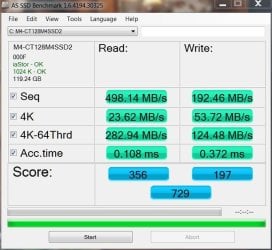
Unfortunately I think that the SSD is not performing as it should either. I have attached a screenshot of the AS-SSD test I just ran, WITH ONLY THE SSD CONNECTED. I don't know how bad these numbers are or what light they might shed, but here they are.

By the way, don't ask me why the AS-SSD download was in German...I guess I am just tired. I am sure that all you need is the numbers, the language doesn't matter I'm sure.

Let me know what you think.

Rick
 

Attachments

  • as-ssd-bench M4-CT128M4SSD2 A 8.10.2012 2-30-28 AM.png
    as-ssd-bench M4-CT128M4SSD2 A 8.10.2012 2-30-28 AM.png
    14.2 KB · Views: 1

My Computer

Computer Manufacturer/Model Number
Custom Build
OS
Windows 7 Home Premium 64 bit
CPU
Intel Core i7-2700K @ 3.50 GHz
Motherboard
Gigabyte Z68AP-D3
Memory
Corsair Vengeance 8 GB (2 x 4 GB) 1600 MHz
Graphics Card(s)
NVIDIA GeForce GTX 570
Sound Card
On Motherboard 7.1
Monitor(s) Displays
Hanns-G 27.5 Inch 1920 x 1200 LCD Monitor
Hard Drives
Seagate Barracuda 1TB 7200 RPM 32MB Cache SATA 6.0Gb/s 3.5" Internal Hard Drive

Crucial M4 128 GB SATA lll SSD
PSU
Coolermaster 850W Silent Pro
Case
Coolermaster HAF X Gaming Case
Cooling
Asetek 570LC Liquid Cooling System with 120 MM Radiator w PP
Keyboard
Logitech G15 Gaming Keyboard
Mouse
Razer Imperator 5600 DPI Gaming Mouse
Internet Speed
75 Gbps Download / 35 Gbps Upload (FIOS Quantum)
Seagate's program is called sea Tools. Seatools for Windows is a program you install, Seatools for dos should be an iso that you burn to a CD and boot from the CD. The dos program will give you the best test as it tests the disk when not in use. It sounds to me that the problem is with your Seagate drive. Whether it is the drive itself or whether it is the OS on the drive I don't know. But, if I understand you correctly, you boot like you are supposed to if the Seagate isn't connected. That says it is an issue with the Seagate drive. If you have another hard drive, try to use that and see if the results are the same. I am also assuming that the firmware on your SSD is up to date. Have you installed IRST? If not, you may try to download it from gigabyte for your motherboard. It is Intels Raid driver but also contains their AHCI driver IaStor. That is the driver I use. And don't worry, you do not have to run raid by installing the IRST. It is just the way to get the Intel AHCI driver. you said when you changed from IDE to AHCI some of the drivers didn't seem to load. Installing IaStor may resolve that issue if it is the problem. Let us know how the tests come out.

One more update for the night.

I downloaded and installed the correct IRST driver for my motherboard. Although the restart speed was a little faster...maybe about 1.5 minutes, I now have a driver software installation message telling me that it loaded the driver for my Seagate HDD but is still trying to find drivers for my DVD drive and my SSD. It has been trying for about 10 minutes with no luck.

I will give it a few more minutes. If I restart the computer without it finding these drivers, can I roll this back or should we try to keep this driver and try to fix the driver message?
 

My Computer

Computer Manufacturer/Model Number
Custom Build
OS
Windows 7 Home Premium 64 bit
CPU
Intel Core i7-2700K @ 3.50 GHz
Motherboard
Gigabyte Z68AP-D3
Memory
Corsair Vengeance 8 GB (2 x 4 GB) 1600 MHz
Graphics Card(s)
NVIDIA GeForce GTX 570
Sound Card
On Motherboard 7.1
Monitor(s) Displays
Hanns-G 27.5 Inch 1920 x 1200 LCD Monitor
Hard Drives
Seagate Barracuda 1TB 7200 RPM 32MB Cache SATA 6.0Gb/s 3.5" Internal Hard Drive

Crucial M4 128 GB SATA lll SSD
PSU
Coolermaster 850W Silent Pro
Case
Coolermaster HAF X Gaming Case
Cooling
Asetek 570LC Liquid Cooling System with 120 MM Radiator w PP
Keyboard
Logitech G15 Gaming Keyboard
Mouse
Razer Imperator 5600 DPI Gaming Mouse
Internet Speed
75 Gbps Download / 35 Gbps Upload (FIOS Quantum)
The AS SSD score is good but a bit low on the 4K read (Lesen) That should be a fine SSD.
I was thinking you had only EXternal drives with USB connections? I think it would be a lot faster to boot in 35 seconds and take 10 seconds to plug in two cables.
FWIW I have a Crucial M4 and it takes 46-57 seconds for a reboot. I never timed a cold start.
 

My Computer

Computer type
PC/Desktop
Computer Manufacturer/Model Number
Home Built Desktop By DataTech
OS
Windows 7 Ultimate X64 SP1
CPU
Intel i5-2550K, Differing ~4.4-4.8GHz No built in GPU
Motherboard
ASUS P8Z68-V PRO/GEN3
Memory
16GB G.Skill Sniper 1866MHz @ 2133MHz 2x8GB
Graphics Card(s)
ASUS GTX650TIB-DC2OC-2GD5, (650TI Boost)
Sound Card
Onboard Realtek 5-1
Monitor(s) Displays
Samsung P2570HD
Screen Resolution
1920x1080
Hard Drives
Samsung 840 Pro 256GB SSD for OS, 500GB Seagate Constellation (Enterprise drive) for Data
PSU
Corsair HX650W
Case
Inwin Dragon Rider
Cooling
Hyper 212 EVO w/two Noctua fans, push-pull, @1300 RPM
Keyboard
E-Z Eyes, bright yellow keys with large characters
Mouse
steelseries SENSEI Laser Pro Gaming
Internet Speed
48-51Mbs Mbs down, 11 Mbs up Xfinity Cable
Antivirus
Norton Internet Security 2013
Browser
IE 10, Opera, Pale Moon if needed
Other Info
4 case fans, LG BluRay-RE, ASUS DVD-RW, Mr. Fusion power supply, 1.21 gigawatts.
The 4kb reads on mine usually run between 18-23. Yours are about right for that drive. For comparason here is mine.

Crucial 128 000F.JPG
 

My Computers

System One System Two

  • Computer type
    PC/Desktop
    Computer Manufacturer/Model Number
    ALWAYS UNDER CONSTRUCTION
    OS
    Windows 11 Pro
    CPU
    Ryzen 9 5900X
    Motherboard
    Asus X570 Crosshair Viii Hero
    Memory
    32GB G Skill DDR4-3600
    Graphics Card(s)
    EVGA RTX 3080 FTW 3 Ultra
    Sound Card
    On Board/Sennheiser PC37X Headset
    Monitor(s) Displays
    3 X Asus 27"
    Screen Resolution
    2560x1440
    Hard Drives
    2 X 1 TB NVME drives
    PSU
    EVGA 850
    Case
    Phanteks Eclipse P400A
    Cooling
    EVGA 280 AIO
    Keyboard
    Logitech G510s/ Logitech G13
    Mouse
    Logitech G502
    Internet Speed
    24/1
    Antivirus
    ESET/MBAM Pro/SAS Pro
    Browser
    Chrome/ Firefox/ Edge
  • Computer type
    Laptop
    System Manufacturer/Model Number
    Dell 16 Plus
    OS
    Windows 11 Pro
    CPU
    Intel Ultra 9 288V
    Memory
    32 GB LPDDR5X 8533
    Monitor(s) Displays
    16" Mini-LED HDR600 Touch 90 Hz
    Screen Resolution
    2560X1600
    Hard Drives
    1 TB NVME
AS SSD

Sprache is the language tab. Click Sprache and your choices are Deutsch and Englisch. Click Englisch and it will show everything in English. ;)

--------------------------------------------------------------------------------------------------------------------------------------------------------------------
Suggestion.

Plug in the internal HDD only and check restart time. If it is 30 seconds then the internal HDD isn't the problem.

Write down the combinations as tested so you only need to do it once. :D
Continue plugging in hardware one at a time until the reboot goes to your +2 minutes and that is the culprit.
External hardware I would plug in and if it works properly then unplug it.
Then try the next external.

Then if they all work properly one at a time then their is a clash between two hardware devices.
Plug them in two at a time until you find the two that are not playing nice with each other.

A pain in the behind I realize but the only way I can think of to find the one or two that are problematic.
Process of elimination.

Britton30's suggestion in Post #31 may be a better way to try.
His suggestion or mine or it may take both to narrow the problem down.

Good luck.
 
Last edited:

My Computer

Computer Manufacturer/Model Number
Hopalong/ Godzilla
OS
Windows7 Pro 64bit SP-1; Windows XP Pro 32bit
CPU
Intel Core i7-870 Lynnfield 2.93GHz LGA 1156 95W Quad-Core
Motherboard
ASUS P7P55D-E PRO
Memory
8GB@1400MHz Crucial Ballistix DDR3-1600 4x2GB
Graphics Card(s)
ASUS ENGTX460 DirectCU/2DI/1GD5 1GB 256-bit GDDR5
Sound Card
VIA Onboard
Monitor(s) Displays
Asus VS248H-P 24"; Samsung SyncMaster 941BW 19"ws
Screen Resolution
1920x1080; 1440x900
Hard Drives
Samsung 830 120GB SSD
Intel 320 120GB SSD
Western Digital Caviar Black WD7501AALS 750GB 7200 RPM SATA 3.0Gb/s
Western Digital Caviar Black WD6401AALS 640GB 7200 RPM SATA 3.0Gb/s
PSU
COOLER MASTER Silent Pro RS850-AMBAJ3-US 850W Modular
Case
COOLER MASTER HAF 932 RC-932-KKN5-GP Black
Cooling
Scythe "Mugen-2 Rev.B" (2 ScytheKaze-Jyuni PWM fans)
Keyboard
Logitech K-320
Mouse
Kensington
Antivirus
Avast Inernet Suite
Browser
IE 9 ; Chrome
The below zip file has the English language pack.

Extract and open new folder. Click the AS SSD exe. emblem to run. Leave the file marked en-US alone. That is the English language pack ;)

It should open and run in English. Mine does so. :geek:
 

Attachments

My Computer

Computer Manufacturer/Model Number
Hopalong/ Godzilla
OS
Windows7 Pro 64bit SP-1; Windows XP Pro 32bit
CPU
Intel Core i7-870 Lynnfield 2.93GHz LGA 1156 95W Quad-Core
Motherboard
ASUS P7P55D-E PRO
Memory
8GB@1400MHz Crucial Ballistix DDR3-1600 4x2GB
Graphics Card(s)
ASUS ENGTX460 DirectCU/2DI/1GD5 1GB 256-bit GDDR5
Sound Card
VIA Onboard
Monitor(s) Displays
Asus VS248H-P 24"; Samsung SyncMaster 941BW 19"ws
Screen Resolution
1920x1080; 1440x900
Hard Drives
Samsung 830 120GB SSD
Intel 320 120GB SSD
Western Digital Caviar Black WD7501AALS 750GB 7200 RPM SATA 3.0Gb/s
Western Digital Caviar Black WD6401AALS 640GB 7200 RPM SATA 3.0Gb/s
PSU
COOLER MASTER Silent Pro RS850-AMBAJ3-US 850W Modular
Case
COOLER MASTER HAF 932 RC-932-KKN5-GP Black
Cooling
Scythe "Mugen-2 Rev.B" (2 ScytheKaze-Jyuni PWM fans)
Keyboard
Logitech K-320
Mouse
Kensington
Antivirus
Avast Inernet Suite
Browser
IE 9 ; Chrome
Dankeschön Mike! It works perfectly. :D
My other one didn't even have the en-US file.
 

My Computer

Computer type
PC/Desktop
Computer Manufacturer/Model Number
Home Built Desktop By DataTech
OS
Windows 7 Ultimate X64 SP1
CPU
Intel i5-2550K, Differing ~4.4-4.8GHz No built in GPU
Motherboard
ASUS P8Z68-V PRO/GEN3
Memory
16GB G.Skill Sniper 1866MHz @ 2133MHz 2x8GB
Graphics Card(s)
ASUS GTX650TIB-DC2OC-2GD5, (650TI Boost)
Sound Card
Onboard Realtek 5-1
Monitor(s) Displays
Samsung P2570HD
Screen Resolution
1920x1080
Hard Drives
Samsung 840 Pro 256GB SSD for OS, 500GB Seagate Constellation (Enterprise drive) for Data
PSU
Corsair HX650W
Case
Inwin Dragon Rider
Cooling
Hyper 212 EVO w/two Noctua fans, push-pull, @1300 RPM
Keyboard
E-Z Eyes, bright yellow keys with large characters
Mouse
steelseries SENSEI Laser Pro Gaming
Internet Speed
48-51Mbs Mbs down, 11 Mbs up Xfinity Cable
Antivirus
Norton Internet Security 2013
Browser
IE 10, Opera, Pale Moon if needed
Other Info
4 case fans, LG BluRay-RE, ASUS DVD-RW, Mr. Fusion power supply, 1.21 gigawatts.
Dankeschön Mike! It works perfectly. :D
My other one didn't even have the en-US file.
I figured that the en-US file was missing.
 

My Computer

Computer Manufacturer/Model Number
Hopalong/ Godzilla
OS
Windows7 Pro 64bit SP-1; Windows XP Pro 32bit
CPU
Intel Core i7-870 Lynnfield 2.93GHz LGA 1156 95W Quad-Core
Motherboard
ASUS P7P55D-E PRO
Memory
8GB@1400MHz Crucial Ballistix DDR3-1600 4x2GB
Graphics Card(s)
ASUS ENGTX460 DirectCU/2DI/1GD5 1GB 256-bit GDDR5
Sound Card
VIA Onboard
Monitor(s) Displays
Asus VS248H-P 24"; Samsung SyncMaster 941BW 19"ws
Screen Resolution
1920x1080; 1440x900
Hard Drives
Samsung 830 120GB SSD
Intel 320 120GB SSD
Western Digital Caviar Black WD7501AALS 750GB 7200 RPM SATA 3.0Gb/s
Western Digital Caviar Black WD6401AALS 640GB 7200 RPM SATA 3.0Gb/s
PSU
COOLER MASTER Silent Pro RS850-AMBAJ3-US 850W Modular
Case
COOLER MASTER HAF 932 RC-932-KKN5-GP Black
Cooling
Scythe "Mugen-2 Rev.B" (2 ScytheKaze-Jyuni PWM fans)
Keyboard
Logitech K-320
Mouse
Kensington
Antivirus
Avast Inernet Suite
Browser
IE 9 ; Chrome
Back
Top