Solved SSD problem

corruptDNA

New member
Member
Local time
10:46 PM
Messages
90
I have figured out whats wrong. For some apparent reason, my master boot record keeps getting corrupted and when i boot after hilbernating, its as if theres no operating system whatsoever. So my question is, why does my mbr keep getting erased/corrupted after every few days? (fixed the problem by using startup repair through windows 7 usb)
 

My Computer

Computer type
Laptop
Computer Manufacturer/Model Number
Dell Inspiron 7559
OS
Windows 10 64 bit
CPU
Intel(R) Core(TM) i7-6700HQ CPU @ 2.60GHz (8 CPUs), ~2.6GHz
Memory
16 GB RAM
Graphics Card(s)
NVIDIA GeForce GTX 960M
Monitor(s) Displays
1
Screen Resolution
1920 x 1080
Hard Drives
Samsung SSD 850 EVO M.2 250GB (NTFS, 238.3 GB)
ST1000LM014-1EJ164 (NTFS, 940.5 GB)
DNA mate have you run any of these yet?

http://www.sevenforums.com/tutorials/1538-sfc-scannow-command-system-file-checker.html

http://www.sevenforums.com/tutorials/433-disk-check.html < use the /f option in Option 2 if necessary

http://www.superantispyware.com/

http://www.malwarebytes.org/products/malwarebytes_free/

http://www.bleepingcomputer.com/download/adwcleaner/

download from bleeping computer – delete any rubbish these find.
If not try them and I see you are running a dual boot too it might be having conflicts within the system - I know when I tried dual booting Linux Mint and 7 I had no choice in the end but to wipe and reinstall just the 7 because booting the thing to 7 first ended up with it more often than not booting Mint.
Some system specs would be good too mate.
http://www.sevenforums.com/tutorials/180324-system-info-see-your-system-specs.html
 

My Computer

Computer type
PC/Desktop
Computer Manufacturer/Model Number
Own build (new) Desk1 / Asus ROG Win 7 / Desk2 1st build
OS
Desk1 7 Home Prem / Desk2 10 Pro / Main lap Asus ROG 10 Pro 2 laptop Toshiba 7 Pro Asus P2520 7 & 10
CPU
Desk1 i5 3750K / Laptop i7 GTX 860M / Desk2 i5 2500
Motherboard
Desk1 Asus P877-V / Desk2 Gigabyte H67 UD3H / Laptop ?
Memory
Desk1 8GB (1866) / Desk2 16GB (1333) / Laptop 8Gb DDR3
Graphics Card(s)
Desk 1& 2NVidia GTX 650 & Laptops on board Intel
Sound Card
Desk 1 & 2 -XONAR DG Realtek High Def audio Laptop
Monitor(s) Displays
Desk 1 Benq HD 2450 / Desk2 Philips 24" / Laptop 17.5"
Screen Resolution
1920x1080 D1 & D2 & Laptop 1
Hard Drives
Desk1 Samsung 120GB 830 SSD
Asus ROG 256GB 850 Pro SSD
Desk2 Samsung 840 256 SSD
Toshiba 120GB EVO
PSU
Desk 1 Corsair HX 1050/ Laptop ? / Desk 2 Corsair HX 650
Case
Desk 1 Cooler HAF XM ? Toshiba laptop / Desk2 Coolermaster
Cooling
Fans on all Desk1 -2 Desk2 - all Coolermasters 5 Laptop ?
Keyboard
Desk 1 MS Sidewinder X6 Desk 2 MS Sidewinder X 4
Mouse
Desk 1&2 - Gigabyte MS 900 gamer - laptop - Logitec wireless
Internet Speed
ADSL2+
Other Info
One other Desktop (tester) and spare Toshba laptop both with SSD's
Running Kaspersky 2016 ISS on all machines config'd identically
Logitec audio stereo systems on each machine (x3)
Canon MG5250MFC
Router/modem TP-Link running WPA2SK
DNA mate have you run any of these yet?

http://www.sevenforums.com/tutorials/1538-sfc-scannow-command-system-file-checker.html

http://www.sevenforums.com/tutorials/433-disk-check.html < use the /f option in Option 2 if necessary

http://www.superantispyware.com/

http://www.malwarebytes.org/products/malwarebytes_free/

http://www.bleepingcomputer.com/download/adwcleaner/

download from bleeping computer – delete any rubbish these find.
If not try them and I see you are running a dual boot too it might be having conflicts within the system - I know when I tried dual booting Linux Mint and 7 I had no choice in the end but to wipe and reinstall just the 7 because booting the thing to 7 first ended up with it more often than not booting Mint.
Some system specs would be good too mate.
http://www.sevenforums.com/tutorials/180324-system-info-see-your-system-specs.html

Updated my system specs :) Also, it is no longer dual boot as i deleted the ubuntu partition and formatted both drives and re installed windows 7 to check if ubuntu was the problem , and its not apparently. Will run the programs you suggested and post back.
 

My Computer

Computer type
Laptop
Computer Manufacturer/Model Number
Dell Inspiron 7559
OS
Windows 10 64 bit
CPU
Intel(R) Core(TM) i7-6700HQ CPU @ 2.60GHz (8 CPUs), ~2.6GHz
Memory
16 GB RAM
Graphics Card(s)
NVIDIA GeForce GTX 960M
Monitor(s) Displays
1
Screen Resolution
1920 x 1080
Hard Drives
Samsung SSD 850 EVO M.2 250GB (NTFS, 238.3 GB)
ST1000LM014-1EJ164 (NTFS, 940.5 GB)
Ok now I am assuming you have run those scans too?? if not run them it just goes to eleiminate possibilities.
Now how did you reinstall - factory restore?? or some rescue media?
 

My Computer

Computer type
PC/Desktop
Computer Manufacturer/Model Number
Own build (new) Desk1 / Asus ROG Win 7 / Desk2 1st build
OS
Desk1 7 Home Prem / Desk2 10 Pro / Main lap Asus ROG 10 Pro 2 laptop Toshiba 7 Pro Asus P2520 7 & 10
CPU
Desk1 i5 3750K / Laptop i7 GTX 860M / Desk2 i5 2500
Motherboard
Desk1 Asus P877-V / Desk2 Gigabyte H67 UD3H / Laptop ?
Memory
Desk1 8GB (1866) / Desk2 16GB (1333) / Laptop 8Gb DDR3
Graphics Card(s)
Desk 1& 2NVidia GTX 650 & Laptops on board Intel
Sound Card
Desk 1 & 2 -XONAR DG Realtek High Def audio Laptop
Monitor(s) Displays
Desk 1 Benq HD 2450 / Desk2 Philips 24" / Laptop 17.5"
Screen Resolution
1920x1080 D1 & D2 & Laptop 1
Hard Drives
Desk1 Samsung 120GB 830 SSD
Asus ROG 256GB 850 Pro SSD
Desk2 Samsung 840 256 SSD
Toshiba 120GB EVO
PSU
Desk 1 Corsair HX 1050/ Laptop ? / Desk 2 Corsair HX 650
Case
Desk 1 Cooler HAF XM ? Toshiba laptop / Desk2 Coolermaster
Cooling
Fans on all Desk1 -2 Desk2 - all Coolermasters 5 Laptop ?
Keyboard
Desk 1 MS Sidewinder X6 Desk 2 MS Sidewinder X 4
Mouse
Desk 1&2 - Gigabyte MS 900 gamer - laptop - Logitec wireless
Internet Speed
ADSL2+
Other Info
One other Desktop (tester) and spare Toshba laptop both with SSD's
Running Kaspersky 2016 ISS on all machines config'd identically
Logitec audio stereo systems on each machine (x3)
Canon MG5250MFC
Router/modem TP-Link running WPA2SK
Ok now I am assuming you have run those scans too?? if not run them it just goes to eleiminate possibilities.
Now how did you reinstall - factory restore?? or some rescue media?

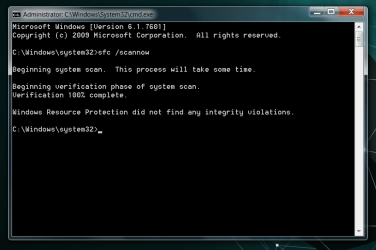
running the scan this very moment, i reinstalled by scratch, booted from a windows 7 usb, formatted everything making it unallocated space, installed and put in a windows 7 key i grabbed from my computer long time back (in case something happened) .

Update:
No errors from first scan, restarting computer for disk check.
 

Attachments

  • Untitled.png
    Untitled.png
    24.4 KB · Views: 2

My Computer

Computer type
Laptop
Computer Manufacturer/Model Number
Dell Inspiron 7559
OS
Windows 10 64 bit
CPU
Intel(R) Core(TM) i7-6700HQ CPU @ 2.60GHz (8 CPUs), ~2.6GHz
Memory
16 GB RAM
Graphics Card(s)
NVIDIA GeForce GTX 960M
Monitor(s) Displays
1
Screen Resolution
1920 x 1080
Hard Drives
Samsung SSD 850 EVO M.2 250GB (NTFS, 238.3 GB)
ST1000LM014-1EJ164 (NTFS, 940.5 GB)

Attachments

  • ISO.PNG
    ISO.PNG
    22.9 KB · Views: 3

My Computer

Computer type
PC/Desktop
Computer Manufacturer/Model Number
Own build (new) Desk1 / Asus ROG Win 7 / Desk2 1st build
OS
Desk1 7 Home Prem / Desk2 10 Pro / Main lap Asus ROG 10 Pro 2 laptop Toshiba 7 Pro Asus P2520 7 & 10
CPU
Desk1 i5 3750K / Laptop i7 GTX 860M / Desk2 i5 2500
Motherboard
Desk1 Asus P877-V / Desk2 Gigabyte H67 UD3H / Laptop ?
Memory
Desk1 8GB (1866) / Desk2 16GB (1333) / Laptop 8Gb DDR3
Graphics Card(s)
Desk 1& 2NVidia GTX 650 & Laptops on board Intel
Sound Card
Desk 1 & 2 -XONAR DG Realtek High Def audio Laptop
Monitor(s) Displays
Desk 1 Benq HD 2450 / Desk2 Philips 24" / Laptop 17.5"
Screen Resolution
1920x1080 D1 & D2 & Laptop 1
Hard Drives
Desk1 Samsung 120GB 830 SSD
Asus ROG 256GB 850 Pro SSD
Desk2 Samsung 840 256 SSD
Toshiba 120GB EVO
PSU
Desk 1 Corsair HX 1050/ Laptop ? / Desk 2 Corsair HX 650
Case
Desk 1 Cooler HAF XM ? Toshiba laptop / Desk2 Coolermaster
Cooling
Fans on all Desk1 -2 Desk2 - all Coolermasters 5 Laptop ?
Keyboard
Desk 1 MS Sidewinder X6 Desk 2 MS Sidewinder X 4
Mouse
Desk 1&2 - Gigabyte MS 900 gamer - laptop - Logitec wireless
Internet Speed
ADSL2+
Other Info
One other Desktop (tester) and spare Toshba laptop both with SSD's
Running Kaspersky 2016 ISS on all machines config'd identically
Logitec audio stereo systems on each machine (x3)
Canon MG5250MFC
Router/modem TP-Link running WPA2SK
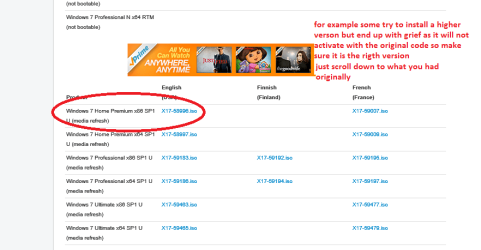
Ok now if you still get problems the best way of getting the freshest ISO of Windows 7 is using this tutorial
http://www.sevenforums.com/tutorials/219487-clean-reinstall-factory-oem-windows-7-a.html#post1839164
Just make sure you pick the ISO for the original version and the best thing about this way is you can dump the bloatware. See my pic for the ISO.

check disk produced no errors, and i dont see what a fresh install would do. I've freshly installed my windows with the right windows 7 dvd (downloaded from windows website) many times and would not like to go through the process again. Do you have any other suggestions?
 

My Computer

Computer type
Laptop
Computer Manufacturer/Model Number
Dell Inspiron 7559
OS
Windows 10 64 bit
CPU
Intel(R) Core(TM) i7-6700HQ CPU @ 2.60GHz (8 CPUs), ~2.6GHz
Memory
16 GB RAM
Graphics Card(s)
NVIDIA GeForce GTX 960M
Monitor(s) Displays
1
Screen Resolution
1920 x 1080
Hard Drives
Samsung SSD 850 EVO M.2 250GB (NTFS, 238.3 GB)
ST1000LM014-1EJ164 (NTFS, 940.5 GB)
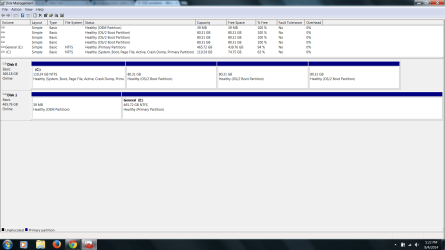
Could you post a screen shot of your Disc Management, please. Include all the information from the Disc Management window.
 

My Computer

Computer type
PC/Desktop
Computer Manufacturer/Model Number
Self built using existing case
OS
Windows 7 Home Premium 64 bit sp1
CPU
Intel i5 3570 3.4Ghz Ivy Bridge SKT 1155 quad core
Motherboard
Gigabyte Z77-HD3 SKT 1155 2xSata 3, 4x USB 3.0
Memory
G-Skill Rip Jaws 16Gb (8x2) DDR3 -1600 PC3 12800 CL 10 red
Graphics Card(s)
Gigabyte NVIDIA GT610 1Gb DDR3 810/1200 PCI-E 2.0 Silent
Sound Card
NVIDIA High Definition & Realtech High Definition Audio
Monitor(s) Displays
2 x Philips 226V4L 16:9 aspect ratio
Screen Resolution
1920 x 1080 HD
Hard Drives
Samsung 840 Pro 256gb SSD, SATA 3.
Hitachi Touro Portable 1tb, USB 3.0 HDD used for image b/ups.
PSU
Corsair VS450
Case
Codeng
Cooling
PSU fan & CPU fan
Keyboard
Logitech
Mouse
Logitech Wireless trackball M570
Internet Speed
Wireless 3G. 3mg down & 550kb up.
Antivirus
Bitdefender Internet Security 2020
Browser
Opera (Current Version) & Firefox
Other Info
MS Office 2013 Pro. Davis weather station software. MGE Nova 600 avr UPS.
Ok now if you still get problems the best way of getting the freshest ISO of Windows 7 is using this tutorial
http://www.sevenforums.com/tutorials/219487-clean-reinstall-factory-oem-windows-7-a.html#post1839164
Just make sure you pick the ISO for the original version and the best thing about this way is you can dump the bloatware. See my pic for the ISO.

check disk produced no errors, and i dont see what a fresh install would do. I've freshly installed my windows with the right windows 7 dvd (downloaded from windows website) many times and would not like to go through the process again. Do you have any other suggestions?
Well go with Rangers suggestion as I was going to suggest a drive test but as you are booting from a SSD the only test stuff for those is the manufacturers one and they are usually for performance rather than faults. The Seatools one is for Seagate SSD's and when I saw it earlier on today in another thread it didn't do much apart form what I said and testing the SMART feature.
As a matter of fact there was someone else I was posting to with a Transcend SSD and I could find very little in the way of support so I guess I am really going to have to rethink a few things.
 

My Computer

Computer type
PC/Desktop
Computer Manufacturer/Model Number
Own build (new) Desk1 / Asus ROG Win 7 / Desk2 1st build
OS
Desk1 7 Home Prem / Desk2 10 Pro / Main lap Asus ROG 10 Pro 2 laptop Toshiba 7 Pro Asus P2520 7 & 10
CPU
Desk1 i5 3750K / Laptop i7 GTX 860M / Desk2 i5 2500
Motherboard
Desk1 Asus P877-V / Desk2 Gigabyte H67 UD3H / Laptop ?
Memory
Desk1 8GB (1866) / Desk2 16GB (1333) / Laptop 8Gb DDR3
Graphics Card(s)
Desk 1& 2NVidia GTX 650 & Laptops on board Intel
Sound Card
Desk 1 & 2 -XONAR DG Realtek High Def audio Laptop
Monitor(s) Displays
Desk 1 Benq HD 2450 / Desk2 Philips 24" / Laptop 17.5"
Screen Resolution
1920x1080 D1 & D2 & Laptop 1
Hard Drives
Desk1 Samsung 120GB 830 SSD
Asus ROG 256GB 850 Pro SSD
Desk2 Samsung 840 256 SSD
Toshiba 120GB EVO
PSU
Desk 1 Corsair HX 1050/ Laptop ? / Desk 2 Corsair HX 650
Case
Desk 1 Cooler HAF XM ? Toshiba laptop / Desk2 Coolermaster
Cooling
Fans on all Desk1 -2 Desk2 - all Coolermasters 5 Laptop ?
Keyboard
Desk 1 MS Sidewinder X6 Desk 2 MS Sidewinder X 4
Mouse
Desk 1&2 - Gigabyte MS 900 gamer - laptop - Logitec wireless
Internet Speed
ADSL2+
Other Info
One other Desktop (tester) and spare Toshba laptop both with SSD's
Running Kaspersky 2016 ISS on all machines config'd identically
Logitec audio stereo systems on each machine (x3)
Canon MG5250MFC
Router/modem TP-Link running WPA2SK
Wow really freaky. Here check my disk management out.
 

Attachments

  • Untitled2.png
    Untitled2.png
    55.7 KB · Views: 14

My Computer

Computer type
Laptop
Computer Manufacturer/Model Number
Dell Inspiron 7559
OS
Windows 10 64 bit
CPU
Intel(R) Core(TM) i7-6700HQ CPU @ 2.60GHz (8 CPUs), ~2.6GHz
Memory
16 GB RAM
Graphics Card(s)
NVIDIA GeForce GTX 960M
Monitor(s) Displays
1
Screen Resolution
1920 x 1080
Hard Drives
Samsung SSD 850 EVO M.2 250GB (NTFS, 238.3 GB)
ST1000LM014-1EJ164 (NTFS, 940.5 GB)
Hum corrupt mate did you wipe that drive 0 before you installed - normally you shouldn't have to on a reinstall even the repair one but looks like you have ended up with a bit of a mess for some reason.

Have you backed up all the data you really need? because I think you need to store the data via an image or just save the stuff you want to another drive wipe this one and reinstall:(
 

My Computer

Computer type
PC/Desktop
Computer Manufacturer/Model Number
Own build (new) Desk1 / Asus ROG Win 7 / Desk2 1st build
OS
Desk1 7 Home Prem / Desk2 10 Pro / Main lap Asus ROG 10 Pro 2 laptop Toshiba 7 Pro Asus P2520 7 & 10
CPU
Desk1 i5 3750K / Laptop i7 GTX 860M / Desk2 i5 2500
Motherboard
Desk1 Asus P877-V / Desk2 Gigabyte H67 UD3H / Laptop ?
Memory
Desk1 8GB (1866) / Desk2 16GB (1333) / Laptop 8Gb DDR3
Graphics Card(s)
Desk 1& 2NVidia GTX 650 & Laptops on board Intel
Sound Card
Desk 1 & 2 -XONAR DG Realtek High Def audio Laptop
Monitor(s) Displays
Desk 1 Benq HD 2450 / Desk2 Philips 24" / Laptop 17.5"
Screen Resolution
1920x1080 D1 & D2 & Laptop 1
Hard Drives
Desk1 Samsung 120GB 830 SSD
Asus ROG 256GB 850 Pro SSD
Desk2 Samsung 840 256 SSD
Toshiba 120GB EVO
PSU
Desk 1 Corsair HX 1050/ Laptop ? / Desk 2 Corsair HX 650
Case
Desk 1 Cooler HAF XM ? Toshiba laptop / Desk2 Coolermaster
Cooling
Fans on all Desk1 -2 Desk2 - all Coolermasters 5 Laptop ?
Keyboard
Desk 1 MS Sidewinder X6 Desk 2 MS Sidewinder X 4
Mouse
Desk 1&2 - Gigabyte MS 900 gamer - laptop - Logitec wireless
Internet Speed
ADSL2+
Other Info
One other Desktop (tester) and spare Toshba laptop both with SSD's
Running Kaspersky 2016 ISS on all machines config'd identically
Logitec audio stereo systems on each machine (x3)
Canon MG5250MFC
Router/modem TP-Link running WPA2SK
Hum corrupt mate did you wipe that drive 0 before you installed - normally you shouldn't have to on a reinstall even the repair one but looks like you have ended up with a bit of a mess for some reason.

Have you backed up all the data you really need? because I think you need to store the data via an image or just save the stuff you want to another drive wipe this one and reinstall:(

No data on the ssd is atm relevant, so when i didnt recieve an answer, i used diskpart to format the ssd but then realized that you shouldnt do that, so i restarted my computer halfway through format (bad idea)

then i followed these steps but for some reason now my windows 8.1 (trying it out) usb is assigned the letter C (who cares)
so i followed these steps to wipe the ssd.

DiskPart <ENTER>

list disk <ENTER>

select disk 0 <ENTER>

clean <ENTER>

create partition primary align=1024 <ENTER>

format fs=ntfs quick <ENTER>

assign letter=C <ENTER>

active <ENTER>

exit <ENTER>

exit <ENTER>

and installed windows 8.1 on the ssddrive. Are these steps sufficient?
 

My Computer

Computer type
Laptop
Computer Manufacturer/Model Number
Dell Inspiron 7559
OS
Windows 10 64 bit
CPU
Intel(R) Core(TM) i7-6700HQ CPU @ 2.60GHz (8 CPUs), ~2.6GHz
Memory
16 GB RAM
Graphics Card(s)
NVIDIA GeForce GTX 960M
Monitor(s) Displays
1
Screen Resolution
1920 x 1080
Hard Drives
Samsung SSD 850 EVO M.2 250GB (NTFS, 238.3 GB)
ST1000LM014-1EJ164 (NTFS, 940.5 GB)
Yes that is ok DNA but it would have been more thorough but much longer at the "clean" input as
"clean all" and you don't really need to assign a drive letter Windows does that by default and it may be why there are so many partitions.

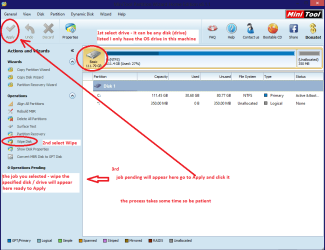
Another option is a disk wipe with Partition Wizard but you may need to have access to another machine and do that using a USB to SATA gadget.
http://www.partitionwizard.com/free-partition-manager.html (very handy tool to keep for future use) see my pic for the process and again it take while to do this.

PS Meant to say you can then follow this
http://www.sevenforums.com/tutorials/113967-ssd-alignment.html
 

Attachments

  • MINI TOOLS _ WIPE.PNG
    MINI TOOLS _ WIPE.PNG
    34.5 KB · Views: 2

My Computer

Computer type
PC/Desktop
Computer Manufacturer/Model Number
Own build (new) Desk1 / Asus ROG Win 7 / Desk2 1st build
OS
Desk1 7 Home Prem / Desk2 10 Pro / Main lap Asus ROG 10 Pro 2 laptop Toshiba 7 Pro Asus P2520 7 & 10
CPU
Desk1 i5 3750K / Laptop i7 GTX 860M / Desk2 i5 2500
Motherboard
Desk1 Asus P877-V / Desk2 Gigabyte H67 UD3H / Laptop ?
Memory
Desk1 8GB (1866) / Desk2 16GB (1333) / Laptop 8Gb DDR3
Graphics Card(s)
Desk 1& 2NVidia GTX 650 & Laptops on board Intel
Sound Card
Desk 1 & 2 -XONAR DG Realtek High Def audio Laptop
Monitor(s) Displays
Desk 1 Benq HD 2450 / Desk2 Philips 24" / Laptop 17.5"
Screen Resolution
1920x1080 D1 & D2 & Laptop 1
Hard Drives
Desk1 Samsung 120GB 830 SSD
Asus ROG 256GB 850 Pro SSD
Desk2 Samsung 840 256 SSD
Toshiba 120GB EVO
PSU
Desk 1 Corsair HX 1050/ Laptop ? / Desk 2 Corsair HX 650
Case
Desk 1 Cooler HAF XM ? Toshiba laptop / Desk2 Coolermaster
Cooling
Fans on all Desk1 -2 Desk2 - all Coolermasters 5 Laptop ?
Keyboard
Desk 1 MS Sidewinder X6 Desk 2 MS Sidewinder X 4
Mouse
Desk 1&2 - Gigabyte MS 900 gamer - laptop - Logitec wireless
Internet Speed
ADSL2+
Other Info
One other Desktop (tester) and spare Toshba laptop both with SSD's
Running Kaspersky 2016 ISS on all machines config'd identically
Logitec audio stereo systems on each machine (x3)
Canon MG5250MFC
Router/modem TP-Link running WPA2SK
Yes that is ok DNA but it would have been more thorough but much longer at the "clean" input as
"clean all" and you don't really need to assign a drive letter Windows does that by default and it may be why there are so many partitions.

Another option is a disk wipe with Partition Wizard but you may need to have access to another machine and do that using a USB to SATA gadget.
http://www.partitionwizard.com/free-partition-manager.html (very handy tool to keep for future use) see my pic for the process and again it take while to do this.

PS Meant to say you can then follow this
http://www.sevenforums.com/tutorials/113967-ssd-alignment.html

well i installed windows 8.1 but stuck at finalizing system but i found what was wrong so im going to reinstall. I only have access to diskpart through cmd in windows 8.1 usb, what do you suggest i run, clean command or what? Can you give me a step by step instruction like the one i showed you assuming my disk is disk 0?
 

My Computer

Computer type
Laptop
Computer Manufacturer/Model Number
Dell Inspiron 7559
OS
Windows 10 64 bit
CPU
Intel(R) Core(TM) i7-6700HQ CPU @ 2.60GHz (8 CPUs), ~2.6GHz
Memory
16 GB RAM
Graphics Card(s)
NVIDIA GeForce GTX 960M
Monitor(s) Displays
1
Screen Resolution
1920 x 1080
Hard Drives
Samsung SSD 850 EVO M.2 250GB (NTFS, 238.3 GB)
ST1000LM014-1EJ164 (NTFS, 940.5 GB)
Just a quick note. Make sure you disconnect your HDD & only have the SSD connected for the install. This will prevent a possible mix up of the install, with part going to the SSD & part to the HDD. After installation & all seems to be running properly you can reconnect the HDD.

I will leave Icit2lol to guide you with the installation as he knows what's needed to help you from here on.
 

My Computer

Computer type
PC/Desktop
Computer Manufacturer/Model Number
Self built using existing case
OS
Windows 7 Home Premium 64 bit sp1
CPU
Intel i5 3570 3.4Ghz Ivy Bridge SKT 1155 quad core
Motherboard
Gigabyte Z77-HD3 SKT 1155 2xSata 3, 4x USB 3.0
Memory
G-Skill Rip Jaws 16Gb (8x2) DDR3 -1600 PC3 12800 CL 10 red
Graphics Card(s)
Gigabyte NVIDIA GT610 1Gb DDR3 810/1200 PCI-E 2.0 Silent
Sound Card
NVIDIA High Definition & Realtech High Definition Audio
Monitor(s) Displays
2 x Philips 226V4L 16:9 aspect ratio
Screen Resolution
1920 x 1080 HD
Hard Drives
Samsung 840 Pro 256gb SSD, SATA 3.
Hitachi Touro Portable 1tb, USB 3.0 HDD used for image b/ups.
PSU
Corsair VS450
Case
Codeng
Cooling
PSU fan & CPU fan
Keyboard
Logitech
Mouse
Logitech Wireless trackball M570
Internet Speed
Wireless 3G. 3mg down & 550kb up.
Antivirus
Bitdefender Internet Security 2020
Browser
Opera (Current Version) & Firefox
Other Info
MS Office 2013 Pro. Davis weather station software. MGE Nova 600 avr UPS.
Just a quick note. Make sure you disconnect your HDD & only have the SSD connected for the install. This will prevent a possible mix up of the install, with part going to the SSD & part to the HDD. After installation & all seems to be running properly you can reconnect the HDD.

I will leave Icit2lol to guide you with the installation as he knows what's needed to help you from here on.
Thanks Ranger I had not thought of that other HDD good point and maybe part due for the other mix up.
Now what you actually need is the SSD completely cleaned / wiped of all data - the wipe option actually writes 0"s to the whole disk / drive for example.
When that is done all you need to do is follow that tutorial re alignment by whs.

http://www.sevenforums.com/tutorials/113967-ssd-alignment.html
The SSD is then ready for installation.
Now you can just leave out the part where it says align=1024 as Windows if I am right will create that partition anyway on install.

Let us know how you go.
 

My Computer

Computer type
PC/Desktop
Computer Manufacturer/Model Number
Own build (new) Desk1 / Asus ROG Win 7 / Desk2 1st build
OS
Desk1 7 Home Prem / Desk2 10 Pro / Main lap Asus ROG 10 Pro 2 laptop Toshiba 7 Pro Asus P2520 7 & 10
CPU
Desk1 i5 3750K / Laptop i7 GTX 860M / Desk2 i5 2500
Motherboard
Desk1 Asus P877-V / Desk2 Gigabyte H67 UD3H / Laptop ?
Memory
Desk1 8GB (1866) / Desk2 16GB (1333) / Laptop 8Gb DDR3
Graphics Card(s)
Desk 1& 2NVidia GTX 650 & Laptops on board Intel
Sound Card
Desk 1 & 2 -XONAR DG Realtek High Def audio Laptop
Monitor(s) Displays
Desk 1 Benq HD 2450 / Desk2 Philips 24" / Laptop 17.5"
Screen Resolution
1920x1080 D1 & D2 & Laptop 1
Hard Drives
Desk1 Samsung 120GB 830 SSD
Asus ROG 256GB 850 Pro SSD
Desk2 Samsung 840 256 SSD
Toshiba 120GB EVO
PSU
Desk 1 Corsair HX 1050/ Laptop ? / Desk 2 Corsair HX 650
Case
Desk 1 Cooler HAF XM ? Toshiba laptop / Desk2 Coolermaster
Cooling
Fans on all Desk1 -2 Desk2 - all Coolermasters 5 Laptop ?
Keyboard
Desk 1 MS Sidewinder X6 Desk 2 MS Sidewinder X 4
Mouse
Desk 1&2 - Gigabyte MS 900 gamer - laptop - Logitec wireless
Internet Speed
ADSL2+
Other Info
One other Desktop (tester) and spare Toshba laptop both with SSD's
Running Kaspersky 2016 ISS on all machines config'd identically
Logitec audio stereo systems on each machine (x3)
Canon MG5250MFC
Router/modem TP-Link running WPA2SK
Just a quick note. Make sure you disconnect your HDD & only have the SSD connected for the install. This will prevent a possible mix up of the install, with part going to the SSD & part to the HDD. After installation & all seems to be running properly you can reconnect the HDD.

I will leave Icit2lol to guide you with the installation as he knows what's needed to help you from here on.
Thanks Ranger I had not thought of that other HDD good point and maybe part due for the other mix up.
Now what you actually need is the SSD completely cleaned / wiped of all data - the wipe option actually writes 0"s to the whole disk / drive for example.
When that is done all you need to do is follow that tutorial re alignment by whs.

http://www.sevenforums.com/tutorials/113967-ssd-alignment.html
The SSD is then ready for installation.
Now you can just leave out the part where it says align=1024 as Windows if I am right will create that partition anyway on install.

Let us know how you go.

Done, thanks man. Lets hope the error doesn't repeat itself. If it does then the problem definitely lies with the ssd hardware. Also id like to thank everyone who replied to the thread to help me out :)
 

My Computer

Computer type
Laptop
Computer Manufacturer/Model Number
Dell Inspiron 7559
OS
Windows 10 64 bit
CPU
Intel(R) Core(TM) i7-6700HQ CPU @ 2.60GHz (8 CPUs), ~2.6GHz
Memory
16 GB RAM
Graphics Card(s)
NVIDIA GeForce GTX 960M
Monitor(s) Displays
1
Screen Resolution
1920 x 1080
Hard Drives
Samsung SSD 850 EVO M.2 250GB (NTFS, 238.3 GB)
ST1000LM014-1EJ164 (NTFS, 940.5 GB)
Yescorrupt it might be as well to check out the firmware for it is up to date too:) Though good luck because I have tried all sorts of ways to access their site www.transcendusa.com and I get nothing - most odd.

In the eventuality of it being a no goer then personally I would go for a Samsung (1st) Crucial (2nd) SanDisk (3rd) Corsair (4th) although there are many to choose from and even the ones I mentioned were at first expensive now are very reasonable - even out here.
 

My Computer

Computer type
PC/Desktop
Computer Manufacturer/Model Number
Own build (new) Desk1 / Asus ROG Win 7 / Desk2 1st build
OS
Desk1 7 Home Prem / Desk2 10 Pro / Main lap Asus ROG 10 Pro 2 laptop Toshiba 7 Pro Asus P2520 7 & 10
CPU
Desk1 i5 3750K / Laptop i7 GTX 860M / Desk2 i5 2500
Motherboard
Desk1 Asus P877-V / Desk2 Gigabyte H67 UD3H / Laptop ?
Memory
Desk1 8GB (1866) / Desk2 16GB (1333) / Laptop 8Gb DDR3
Graphics Card(s)
Desk 1& 2NVidia GTX 650 & Laptops on board Intel
Sound Card
Desk 1 & 2 -XONAR DG Realtek High Def audio Laptop
Monitor(s) Displays
Desk 1 Benq HD 2450 / Desk2 Philips 24" / Laptop 17.5"
Screen Resolution
1920x1080 D1 & D2 & Laptop 1
Hard Drives
Desk1 Samsung 120GB 830 SSD
Asus ROG 256GB 850 Pro SSD
Desk2 Samsung 840 256 SSD
Toshiba 120GB EVO
PSU
Desk 1 Corsair HX 1050/ Laptop ? / Desk 2 Corsair HX 650
Case
Desk 1 Cooler HAF XM ? Toshiba laptop / Desk2 Coolermaster
Cooling
Fans on all Desk1 -2 Desk2 - all Coolermasters 5 Laptop ?
Keyboard
Desk 1 MS Sidewinder X6 Desk 2 MS Sidewinder X 4
Mouse
Desk 1&2 - Gigabyte MS 900 gamer - laptop - Logitec wireless
Internet Speed
ADSL2+
Other Info
One other Desktop (tester) and spare Toshba laptop both with SSD's
Running Kaspersky 2016 ISS on all machines config'd identically
Logitec audio stereo systems on each machine (x3)
Canon MG5250MFC
Router/modem TP-Link running WPA2SK
Yescorrupt it might be as well to check out the firmware for it is up to date too:) Though good luck because I have tried all sorts of ways to access their site www.transcendusa.com and I get nothing - most odd.

In the eventuality of it being a no goer then personally I would go for a Samsung (1st) Crucial (2nd) SanDisk (3rd) Corsair (4th) although there are many to choose from and even the ones I mentioned were at first expensive now are very reasonable - even out here.

yeah i regret not getting samsung evo ssd instead.. well now i have experience, first do research instead of relying on the store guys recommendation.. (i was in a hurry to install an ssd)
 

My Computer

Computer type
Laptop
Computer Manufacturer/Model Number
Dell Inspiron 7559
OS
Windows 10 64 bit
CPU
Intel(R) Core(TM) i7-6700HQ CPU @ 2.60GHz (8 CPUs), ~2.6GHz
Memory
16 GB RAM
Graphics Card(s)
NVIDIA GeForce GTX 960M
Monitor(s) Displays
1
Screen Resolution
1920 x 1080
Hard Drives
Samsung SSD 850 EVO M.2 250GB (NTFS, 238.3 GB)
ST1000LM014-1EJ164 (NTFS, 940.5 GB)
Sorry late reply mate suns just up so have been in the land of Nod;)
Yep I have the 830 in two machines and an EVO in the Ivy Bridge I swapped out the original 120 for a 256 as I don't do much in the way of huge amounts of data. Personally I don't like large drives cos a cash mean trying to recover large amounts of data.

But that is getting OT. I can also recommend Crucial and SanDisk (the Extreme model) I have in this laptop is a flyer and it is now coming on two years old so no chicken. Now prices are really quite reasonable it does pay to research as you and if you are in the market for another one just post in the forum there are plenty of members who are way better off than me to advise you - I can only go off my experience.

In general store people if you want to be honest about it are out for a sale and like so many other stores that handle electrical goods I find some of the sales staff are not that competent in what they are telling you about what they are selling.
For example I am in the market for a new laptop as this one is four years old now and I want one of those that have the high res screens and a bit of grunt (love overkill;)) and the BS that I have heard about CPU's RAM drives an screens etc get so to be very annoying because they genuinely think they know it all or like I said are just out for commission. Not that I am any expert but you can tell as soon s they open their mouth if they are wised up or just plain dumb.
Even more annoying is when you are within earshot of a sales person lading some poor unsuspecting individual with some "brilliant features" when you know darn well it is crap.
But yes like you I have bought so many things because of the rush to get going so you just have to put it down to experience eh albeit an expensive one sometimes.
Good luck.
John
 

My Computer

Computer type
PC/Desktop
Computer Manufacturer/Model Number
Own build (new) Desk1 / Asus ROG Win 7 / Desk2 1st build
OS
Desk1 7 Home Prem / Desk2 10 Pro / Main lap Asus ROG 10 Pro 2 laptop Toshiba 7 Pro Asus P2520 7 & 10
CPU
Desk1 i5 3750K / Laptop i7 GTX 860M / Desk2 i5 2500
Motherboard
Desk1 Asus P877-V / Desk2 Gigabyte H67 UD3H / Laptop ?
Memory
Desk1 8GB (1866) / Desk2 16GB (1333) / Laptop 8Gb DDR3
Graphics Card(s)
Desk 1& 2NVidia GTX 650 & Laptops on board Intel
Sound Card
Desk 1 & 2 -XONAR DG Realtek High Def audio Laptop
Monitor(s) Displays
Desk 1 Benq HD 2450 / Desk2 Philips 24" / Laptop 17.5"
Screen Resolution
1920x1080 D1 & D2 & Laptop 1
Hard Drives
Desk1 Samsung 120GB 830 SSD
Asus ROG 256GB 850 Pro SSD
Desk2 Samsung 840 256 SSD
Toshiba 120GB EVO
PSU
Desk 1 Corsair HX 1050/ Laptop ? / Desk 2 Corsair HX 650
Case
Desk 1 Cooler HAF XM ? Toshiba laptop / Desk2 Coolermaster
Cooling
Fans on all Desk1 -2 Desk2 - all Coolermasters 5 Laptop ?
Keyboard
Desk 1 MS Sidewinder X6 Desk 2 MS Sidewinder X 4
Mouse
Desk 1&2 - Gigabyte MS 900 gamer - laptop - Logitec wireless
Internet Speed
ADSL2+
Other Info
One other Desktop (tester) and spare Toshba laptop both with SSD's
Running Kaspersky 2016 ISS on all machines config'd identically
Logitec audio stereo systems on each machine (x3)
Canon MG5250MFC
Router/modem TP-Link running WPA2SK
Back
Top