Hi!
I have a Samsung 840 EVO 120Gb SSD (which I bought in March 2014). Never had any problems with it, but recently I've been having doubts about it.
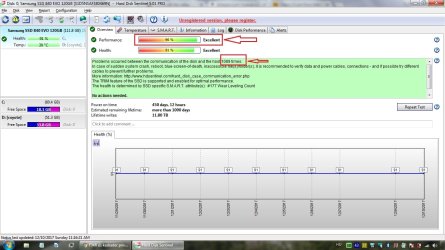
I attached a HDSentinel screenshot, which shows there's some sort of problems between the host and drive (1089 times as of now, but every system start increases that number by 1).
Most sources say this problem is caused by a faulty Sata cable/connector - which can be the actual problem, because I bought a second-hand laptop in 2016 August, took out the original HDD and put this SSD into it and that's when this "Problems occurred between the communication of the disk and the host" thing started.
My question is, is there a way to verify the cable without disassembling the laptop itself? When I take out the SSD, I only see the connector itself, no cable, in order to see that, I would have disassemble it ever further and I don't have the tools needed.
I'm also worried that this cable problem causes performance issues as well- the boot itself is lightning quick (15 sec) but when it comes to opening programs, I think it could be faster.
I have a Samsung 840 EVO 120Gb SSD (which I bought in March 2014). Never had any problems with it, but recently I've been having doubts about it.
I attached a HDSentinel screenshot, which shows there's some sort of problems between the host and drive (1089 times as of now, but every system start increases that number by 1).
Most sources say this problem is caused by a faulty Sata cable/connector - which can be the actual problem, because I bought a second-hand laptop in 2016 August, took out the original HDD and put this SSD into it and that's when this "Problems occurred between the communication of the disk and the host" thing started.
My question is, is there a way to verify the cable without disassembling the laptop itself? When I take out the SSD, I only see the connector itself, no cable, in order to see that, I would have disassemble it ever further and I don't have the tools needed.
I'm also worried that this cable problem causes performance issues as well- the boot itself is lightning quick (15 sec) but when it comes to opening programs, I think it could be faster.
Attachments
My Computer
At a glance
Windows 7 Professional 64 bitIB Intel Core i3-3110M6GB 1333 Mhz-
- Computer type
- Laptop
- Computer Manufacturer/Model Number
- HP
- OS
- Windows 7 Professional 64 bit
- CPU
- IB Intel Core i3-3110M
- Memory
- 6GB 1333 Mhz
- Graphics Card(s)
- -
- Screen Resolution
- 1366*768
- Hard Drives
- Samsung 840 EVO 120 GB
- Internet Speed
- 20/1
- Browser
- Chrome