Start in Safe Mode

huffman

New member
Pro User
Local time
6:44 PM
Messages
715
I have Windows 7 64 bit installed.

I have tried to start Windows in Safe Mode several times and it still boots into normal Windows 7 mode.

This is what I did as my preferred method:

I restart the PC and as soon as it shuts down and starts to reboot, I press and hold down the F8 key. As I understand it I should get the option to boot into Safe Mode but this option never shows up.

One thing that might be causing this is that I am using a wireless keyboard. Unfortunately I have no option but to use a wireless keyboard. There is no plug-in for a P2S type keyboard on my mother board.

I have PC with Windows 7 32 bit and has a USB keyboard and it does the same thing.

Any help would be greatly appreciated. Thank you.
 

My Computer

OS
Windows 7 Pro
CPU
Intel(R) Pentium(R) Duel CPU E2200 2.20 Ghz
Motherboard
GA-G41M-ES2L
Memory
4 gb 2.96 Usable
Graphics Card(s)
Onboard
Sound Card
Onboard
Hard Drives
2 - 1TB WD Sata Drives
Sounds like you need to either get a cheap usb keyboard, or an adapter for ps2 to usb.
That's the only way your going to get it in safe mode, bios, etc.
Depending on where you live, to get a cheap one.. big lots or a good will should have them :)
 

My Computer

Computer Manufacturer/Model Number
Custom
OS
win 7 pro x64
CPU
AMD [email protected]
Motherboard
MSI NF-980a
Memory
16gb G.Skill RipJaws 1333mhz
Graphics Card(s)
Tri Sli MSI GTX 470
Sound Card
Audigy
Monitor(s) Displays
View Sonic G220f
Screen Resolution
2046x1536
Hard Drives
SATA

Raid0-3x64gbSSD-500-640-1TB
PSU
Corsair TX950
Case
CM 932KWN3
Cooling
Corsair H-50 2kP&P
Keyboard
Microsoft
Mouse
G9x
Internet Speed
25mb/4mb
Try tapping the F8 key instead of holding it down, that should do the trick.
 

My Computer

Computer Manufacturer/Model Number
Put together
OS
Win7 Pro-64 Bit
CPU
i7-2600-3.4GHz
Motherboard
ASRock Z68M
Memory
8 GIG DDR3
Graphics Card(s)
onboard
Sound Card
onboard
Hard Drives
Seagate 1TB 7200RPM
PSU
680 W
Case
black
Cooling
stock fans
Keyboard
Microsoft
Mouse
Microsoft optical
I have Windows 7 64 bit installed.

I have tried to start Windows in Safe Mode several times and it still boots into normal Windows 7 mode.

This is what I did as my preferred method:

I restart the PC and as soon as it shuts down and starts to reboot, I press and hold down the F8 key. As I understand it I should get the option to boot into Safe Mode but this option never shows up.

One thing that might be causing this is that I am using a wireless keyboard. Unfortunately I have no option but to use a wireless keyboard. There is no plug-in for a P2S type keyboard on my mother board.

I have PC with Windows 7 32 bit and has a USB keyboard and it does the same thing.

Any help would be greatly appreciated. Thank you.

You can start "SafeBoot" (same as Safe Mode) from Windows 7 by using MSConfig and selecting the Boot tab.

Here are the steps;

http://www.sevenforums.com/tutorials/69585-safe-mode.html

Click the Start Orb
Type "msconfig" without the quotes in the caption box
Select the "Boot" tab from the tabs menu
Check the "Safe boot" box and it will automatically choose the "Minimal" button

HTH
 
Last edited by a moderator:

My Computer

Computer type
PC/Desktop
Computer Manufacturer/Model Number
Custom Built
OS
Windows 7 Professional x64
CPU
Intel i5 quad processor
Motherboard
DP67BG
Memory
16 GB
Graphics Card(s)
Radeon HD 5770
Sound Card
Realtek High Definition Audio
Monitor(s) Displays
Samsung SyncMaster
Screen Resolution
1920X1080
Hard Drives
WD 2TB (SATA Internal)
WD 1TB (USB External)
PSU
Corsair GS800
Case
Tower (Generic)
Cooling
3 Internal Fans
Keyboard
MS Wireless
Mouse
MS Optical Wired
Internet Speed
54 mbps
Antivirus
Emsisoft
Browser
IE-Version 9, Palemoon-Version 24.2.0
I can try a P2S keyboard on the 32 bit machine but the 64 bit has now way to put any adapter to use a P2S keyboard.

I have tried taping and holding the F8 key down and results are the same.

Yes I know how to use msconfig to boot into the safe mode, but what if Windows will not boot to use msconfig.

Thanks for the responses.
 

My Computer

OS
Windows 7 Pro
CPU
Intel(R) Pentium(R) Duel CPU E2200 2.20 Ghz
Motherboard
GA-G41M-ES2L
Memory
4 gb 2.96 Usable
Graphics Card(s)
Onboard
Sound Card
Onboard
Hard Drives
2 - 1TB WD Sata Drives
I can try a P2S keyboard on the 32 bit machine but the 64 bit has now way to put any adapter to use a P2S keyboard.

I have tried taping and holding the F8 key down and results are the same.

Yes I know how to use msconfig to boot into the safe mode, but what if Windows will not boot to use msconfig.

Thanks for the responses.

The following is quoted from your original message;
"I have tried to start Windows in Safe Mode several times and it still boots into normal Windows 7 mode."

There is nothing in your statement to indicate you can't boot to Windows. So, I have no idea what you mean when you say "...but what if Windows will not boot to use msconfig."
 

My Computer

Computer type
PC/Desktop
Computer Manufacturer/Model Number
Custom Built
OS
Windows 7 Professional x64
CPU
Intel i5 quad processor
Motherboard
DP67BG
Memory
16 GB
Graphics Card(s)
Radeon HD 5770
Sound Card
Realtek High Definition Audio
Monitor(s) Displays
Samsung SyncMaster
Screen Resolution
1920X1080
Hard Drives
WD 2TB (SATA Internal)
WD 1TB (USB External)
PSU
Corsair GS800
Case
Tower (Generic)
Cooling
3 Internal Fans
Keyboard
MS Wireless
Mouse
MS Optical Wired
Internet Speed
54 mbps
Antivirus
Emsisoft
Browser
IE-Version 9, Palemoon-Version 24.2.0
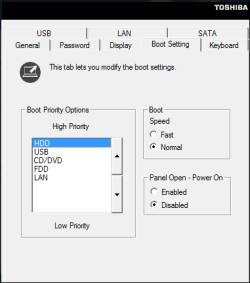
You could try changing the boot settings:

Capture.PNG

Note: These settings are for a Toshiba laptop

So, you could try setting the 'High priority' as USB first (since you have a wireless keyboard)

To get these settings go to Start, All Programs, TOSHIBA, Utilities, HWSetup, Boot setting
(not sure how to do this if you have a laptop that is not Toshiba)
 

My Computer

Computer type
Laptop
Computer Manufacturer/Model Number
Toshiba, Satellite L750/0T1
OS
Windows 7 64-bit SP1 (VM)
CPU
Intel(R) Core(TM) i7-2670QM CPU @ 2.20GHz (8 CPUs), ~2.2GHz
Motherboard
Intel Corp, PSK2YA-0T102S, Sandy Bridge - 09
Memory
4 GB (Expandable to 8 GB)
Graphics Card(s)
NVIDIA GeForce GT 525M
Sound Card
Conexant SmartAudio HD & NVIDIA High Definition Audio
Monitor(s) Displays
2 (Mobile PC Display, Dell E2009W)
Screen Resolution
1366 x 768 & 1680 x 1050
Hard Drives
TOSHIBA MK7575GSX - 698GB (Main Hard Drive)
WD Elements - 1TB (External Hard Drive)
Keyboard
Standard PS/2 Keyboard & Dell SK-8165
Mouse
Synaptics PS/2 Port TouchPad, Logitech Wireless Mouse M185
Internet Speed
Download: 49 Mb/s, Upload: 2 Mb/s 'via Ethernet' (OOKLA)
Antivirus
AVG AntiVirus Free Edition (Outside VM)
Browser
Internet Explorer, Google Chrome
Other Info
Main OS:Windows 10 64-bit
Back
Top