Start Menu All Programs - Add or Delete Shortcuts

How to Add or Delete Start Menu All Programs Shortcuts in Windows 7


   Information
This will show you how to add or delete shortcuts in the All Programs area of the Start Menu for the Current User or All Users in Windows 7.
   Note
It appears that the context menu items for the Start Menu to open the Start Menu folders has been ommitted in the Windows 7 beta for now. Instead of adding and removing shortcuts directly out of the Start Menu, you could manually navigate to the two Start Menu folder locations.

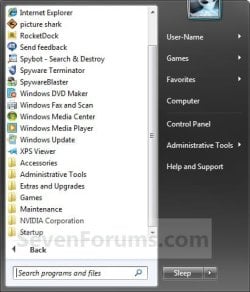
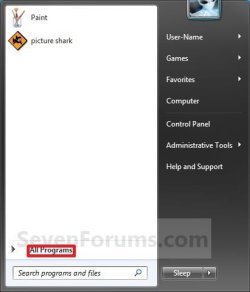
EXAMPLE: Start Menu All Programs
NOTE: All Programs is the right screenshot. You would click on All Programs (left screenshot) to open it.
Start_Menu_All_Programs-1.jpgStart_Menu_All_Programs-2.jpg


OPTION ONE

Start Menu for Only Current Logged On User
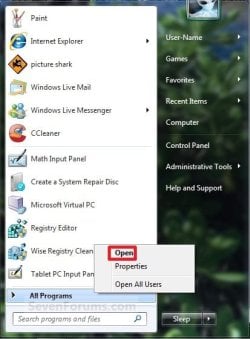
1. Open the Start Menu. A) Right click on All Programs and click on Open. (See screenshot below) Start_Menu_Open.jpg
B) Go to step 4.
OR

2. Open the Start Menu. A) In the search box, type shell:start menu and press Enter. (See screenshot below) Start_Menu_Current.jpg
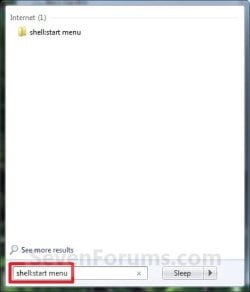
B) Open the Programs folder.

C) Go to step 4.
OR
3. Open Folder Options. A) Dot Show hidden files, folders, or drives., and click on apply. (See screenshot below) Folder_Options_Unhide.jpg
B) Open Windows Explorer and navigate to the location below. (See screenshot below step 6)

Code:
C:\Users\(user name)\AppData\Roaming\Microsoft\Windows\Start Menu\Programs
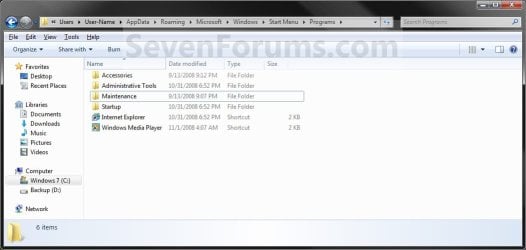
4. You can now Copy and Paste shortcuts, Drag and Drop shortcuts, and create New Folders that you want in the Start Menu in this window below. Current_User_Start_Menu.jpg
5. If you did step 3, then in Folder Options again, dot Don't show hidden files, folders, or drives and click on OK. (See screenshot below step 3)


OPTION TWO

Start Menu Shared by All Users
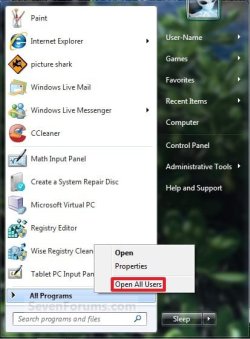
1. Open the Start Menu. A) Right click on All Programs and click on Open All Users. (See screenshot below) Start_Menu_Open_All_Users.jpg
B) Go to step 3.
OR

2. Open the Start Menu. A) In the search box, type shell:common start menu and press Enter.

B) Go to step 3.
OR

3. Open Folder Options. A) Dot Show hidden files, folders, or drives, and click on Apply. (See screenshot below) Folder_Options_Unhide.jpg
B) Open Windows Explorer and navigate to the location below. (See screenshot below step 5)

Code:
C:\ProgramData\Microsoft\Windows\Start Menu\Programs
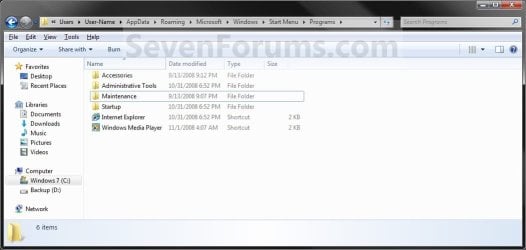
4. You can now Copy and Paste shortcuts, Drag and Drop shortcuts, and create New Folders that you want in the Start Menu in this window below. All_Users_Start_Menu.jpg
5. If you did step 3, then in Folder Options again, dot Don't show hidden files, folders, or drives and click on OK. (See screenshot below step 3)
That's it,
Shawn


Last edited:
I have lost my Accessories folder from All Programs. Please help, I still have disk clean-up and paint, etc available but everytime I want to use the things included in the accessories folder, I have to search for it.
 

My Computer

Computer Manufacturer/Model Number
Custom Built
OS
XP Pro
CPU
AMD Sempron Processor 3000+ 1.8GHz
Motherboard
Asus K8V-MX
Memory
2.0 GB
Graphics Card(s)
Ge Force FX 5500
Sound Card
Intergrated
Monitor(s) Displays
yusmart 19" Monitor 1280x1024
Hard Drives
320GB HD
PSU
N/A
Case
N/A
Cooling
N/A
Hello Kazaam,

Here's a copy of my Accessories folder from the "All Users" Start Menu location that you can use to copy back. :)

Hope it helps,
Shawn
 

Attachments

My Computer

Computer type
PC/Desktop
Computer Manufacturer/Model Number
Self built custom
OS
64-bit Windows 11 Pro for Workstations
CPU
Intel i7-8700K OC'd to 5 GHz
Motherboard
ASUS ROG Maximus XI Formula Z390
Memory
64 GB (4x16GB) G.SKILL TridentZ RGB DDR4 3600 MHz
Graphics Card(s)
ASUS ROG-STRIX-GTX1080TI-O11G-GAMING
Sound Card
Integrated
Monitor(s) Displays
2 x Samsung Odyssey G7 27"
Screen Resolution
2560x1440
Hard Drives
1TB Samsung 990 PRO M.2,
4TB Samsung 990 PRO PRO M.2,
TerraMaster F8 SSD Plus NAS
PSU
Seasonic Prime Titanium 850W
Case
Thermaltake Core P3
Cooling
Corsair Hydro H115i
Keyboard
Logitech wireless K800
Mouse
Logitech MX Master 4
Internet Speed
2 Gb/s Download and 100 Mb/s Upload
Antivirus
Malwarebyte Anti-Malware Premium
Browser
Google Chrome
Other Info
Logitech Z625 speaker system,
Logitech BRIO 4K Pro webcam,
HP Color LaserJet Pro MFP M477fdn,
APC SMART-UPS RT 1000 XL - SURT1000XLI,
Galaxy S23 Plus phone
Thanks SOO much for this I was unable to ad to your Rep for this as i have been trying on my own for a bit now and your post helped me make my start menu the way i want after a month of trying on my own! :D Give Brink Rep as he deserves it! (i know since this is a tutorial you cant do it here Brink helps so much if he helps you dont forget to thank him with rep!)
 

My Computer

Computer Manufacturer/Model Number
HP DV7 3165dx
OS
Windows 7 Home Premium X64
CPU
AMD Turion II Ultra Dual-Core Mobile M620
Memory
4GB DDR 800
Graphics Card(s)
ATI M Radeon HD 4200
Sound Card
IDT High Def SRS Audio
Screen Resolution
1600x900
Hard Drives
Hitachi 500GB Sata 7200 RPM
Mouse
Razer Copperhead
Internet Speed
20 Mbits
You're most welcome Matthew. Thank you. :)
 

My Computer

Computer type
PC/Desktop
Computer Manufacturer/Model Number
Self built custom
OS
64-bit Windows 11 Pro for Workstations
CPU
Intel i7-8700K OC'd to 5 GHz
Motherboard
ASUS ROG Maximus XI Formula Z390
Memory
64 GB (4x16GB) G.SKILL TridentZ RGB DDR4 3600 MHz
Graphics Card(s)
ASUS ROG-STRIX-GTX1080TI-O11G-GAMING
Sound Card
Integrated
Monitor(s) Displays
2 x Samsung Odyssey G7 27"
Screen Resolution
2560x1440
Hard Drives
1TB Samsung 990 PRO M.2,
4TB Samsung 990 PRO PRO M.2,
TerraMaster F8 SSD Plus NAS
PSU
Seasonic Prime Titanium 850W
Case
Thermaltake Core P3
Cooling
Corsair Hydro H115i
Keyboard
Logitech wireless K800
Mouse
Logitech MX Master 4
Internet Speed
2 Gb/s Download and 100 Mb/s Upload
Antivirus
Malwarebyte Anti-Malware Premium
Browser
Google Chrome
Other Info
Logitech Z625 speaker system,
Logitech BRIO 4K Pro webcam,
HP Color LaserJet Pro MFP M477fdn,
APC SMART-UPS RT 1000 XL - SURT1000XLI,
Galaxy S23 Plus phone
Thanks for the super-helpful guide. :) I'd like to create individual Start Menus for each user (primarily because we have a young son that likes to use the computer, but I'd like to have his Start Menu be only his programs and not be cluttered up with dozens and dozens of our work programs that aren't appropriate for him to mess around with). I tried doing the "open" as described in "Start Menu for Only Current Logged On User", but it only brings up a very limited menu selection of what could be removed (most programs aren't listed, so they can't be removed). But of course if I do "All Users", then it erases them from our accounts as well as his. Back in XP there were shortcut folders for each individual user as well as a Default folder that held shortcuts that were common to all users. I was able to get around this problem by copying all the Default shortcuts to our individual Shortcut folders, wiping the Default folder, and then erasing programs from only my son's Shortcut directory. But I can't seem to locate individual Shortcut folders in Windows 7. Any suggestions? ETA: Er, maybe not. If I open two windows - one for the "open as current user", and the other "open all users" - then I can move the shortcuts from the All Users into the Current User section, and open up additional folders for the other accounts that should have access to the programs and copy them there as well. Basically the same thing I did before, just a bit more of a round-about way. :) I'll leave this here in case anyone has the same issue.
 

My Computer

OS
Windows 7
Hello Tamago, and welcome to Seven Forums.

A workaround for this would be to open the "All Users" Start Menu location (Option Two in tutorial) and copy what you want into your "Current User" Start Menu for your two (parents) user accounts, then delete the ones you do not want your son to have available from the "All Users" Start Menu location.

Hope this helps,
Shawn
 

My Computer

Computer type
PC/Desktop
Computer Manufacturer/Model Number
Self built custom
OS
64-bit Windows 11 Pro for Workstations
CPU
Intel i7-8700K OC'd to 5 GHz
Motherboard
ASUS ROG Maximus XI Formula Z390
Memory
64 GB (4x16GB) G.SKILL TridentZ RGB DDR4 3600 MHz
Graphics Card(s)
ASUS ROG-STRIX-GTX1080TI-O11G-GAMING
Sound Card
Integrated
Monitor(s) Displays
2 x Samsung Odyssey G7 27"
Screen Resolution
2560x1440
Hard Drives
1TB Samsung 990 PRO M.2,
4TB Samsung 990 PRO PRO M.2,
TerraMaster F8 SSD Plus NAS
PSU
Seasonic Prime Titanium 850W
Case
Thermaltake Core P3
Cooling
Corsair Hydro H115i
Keyboard
Logitech wireless K800
Mouse
Logitech MX Master 4
Internet Speed
2 Gb/s Download and 100 Mb/s Upload
Antivirus
Malwarebyte Anti-Malware Premium
Browser
Google Chrome
Other Info
Logitech Z625 speaker system,
Logitech BRIO 4K Pro webcam,
HP Color LaserJet Pro MFP M477fdn,
APC SMART-UPS RT 1000 XL - SURT1000XLI,
Galaxy S23 Plus phone
Heh, we cross-posted - I'd figured it out and was editing my comment to reflect the new solution. :) Thanks for the quick reply!
 

My Computer

OS
Windows 7
LOL, you're most welcome. :)
 

My Computer

Computer type
PC/Desktop
Computer Manufacturer/Model Number
Self built custom
OS
64-bit Windows 11 Pro for Workstations
CPU
Intel i7-8700K OC'd to 5 GHz
Motherboard
ASUS ROG Maximus XI Formula Z390
Memory
64 GB (4x16GB) G.SKILL TridentZ RGB DDR4 3600 MHz
Graphics Card(s)
ASUS ROG-STRIX-GTX1080TI-O11G-GAMING
Sound Card
Integrated
Monitor(s) Displays
2 x Samsung Odyssey G7 27"
Screen Resolution
2560x1440
Hard Drives
1TB Samsung 990 PRO M.2,
4TB Samsung 990 PRO PRO M.2,
TerraMaster F8 SSD Plus NAS
PSU
Seasonic Prime Titanium 850W
Case
Thermaltake Core P3
Cooling
Corsair Hydro H115i
Keyboard
Logitech wireless K800
Mouse
Logitech MX Master 4
Internet Speed
2 Gb/s Download and 100 Mb/s Upload
Antivirus
Malwarebyte Anti-Malware Premium
Browser
Google Chrome
Other Info
Logitech Z625 speaker system,
Logitech BRIO 4K Pro webcam,
HP Color LaserJet Pro MFP M477fdn,
APC SMART-UPS RT 1000 XL - SURT1000XLI,
Galaxy S23 Plus phone
Thank you.

Admin, Brink, Thank you so much for this fix/tutorial. It is so simple yet absolutly impossible to find any where else. I am running Windows7 Home Pre 64bit SP1 and MS has the damn thing locked down - I dont know what they are afraid of. Its guys like you with this knowledge that make me breath a sigh of relief when it comes to work around solutions, like this one, when the regular security tab/ properties do not work anymore.

Thanks again!
 

My Computer

Computer Manufacturer/Model Number
Custom
OS
Windows 7 Home Premium 64 bit
CPU
i5 2500k
Motherboard
Asus
Memory
8GB Patriot 1333
Graphics Card(s)
EVGA
Sound Card
OB
Monitor(s) Displays
XHD30
Hard Drives
1 - 500 GB Platter
PSU
750W
Case
Thermaltake
Cooling
4 Fans
You're most welcome Southerus, and welcome to Seven Forums. :)
 

My Computer

Computer type
PC/Desktop
Computer Manufacturer/Model Number
Self built custom
OS
64-bit Windows 11 Pro for Workstations
CPU
Intel i7-8700K OC'd to 5 GHz
Motherboard
ASUS ROG Maximus XI Formula Z390
Memory
64 GB (4x16GB) G.SKILL TridentZ RGB DDR4 3600 MHz
Graphics Card(s)
ASUS ROG-STRIX-GTX1080TI-O11G-GAMING
Sound Card
Integrated
Monitor(s) Displays
2 x Samsung Odyssey G7 27"
Screen Resolution
2560x1440
Hard Drives
1TB Samsung 990 PRO M.2,
4TB Samsung 990 PRO PRO M.2,
TerraMaster F8 SSD Plus NAS
PSU
Seasonic Prime Titanium 850W
Case
Thermaltake Core P3
Cooling
Corsair Hydro H115i
Keyboard
Logitech wireless K800
Mouse
Logitech MX Master 4
Internet Speed
2 Gb/s Download and 100 Mb/s Upload
Antivirus
Malwarebyte Anti-Malware Premium
Browser
Google Chrome
Other Info
Logitech Z625 speaker system,
Logitech BRIO 4K Pro webcam,
HP Color LaserJet Pro MFP M477fdn,
APC SMART-UPS RT 1000 XL - SURT1000XLI,
Galaxy S23 Plus phone
You're welcome Marcosi, and Welcome to Seven Forums. :)
 

My Computer

Computer type
PC/Desktop
Computer Manufacturer/Model Number
Self built custom
OS
64-bit Windows 11 Pro for Workstations
CPU
Intel i7-8700K OC'd to 5 GHz
Motherboard
ASUS ROG Maximus XI Formula Z390
Memory
64 GB (4x16GB) G.SKILL TridentZ RGB DDR4 3600 MHz
Graphics Card(s)
ASUS ROG-STRIX-GTX1080TI-O11G-GAMING
Sound Card
Integrated
Monitor(s) Displays
2 x Samsung Odyssey G7 27"
Screen Resolution
2560x1440
Hard Drives
1TB Samsung 990 PRO M.2,
4TB Samsung 990 PRO PRO M.2,
TerraMaster F8 SSD Plus NAS
PSU
Seasonic Prime Titanium 850W
Case
Thermaltake Core P3
Cooling
Corsair Hydro H115i
Keyboard
Logitech wireless K800
Mouse
Logitech MX Master 4
Internet Speed
2 Gb/s Download and 100 Mb/s Upload
Antivirus
Malwarebyte Anti-Malware Premium
Browser
Google Chrome
Other Info
Logitech Z625 speaker system,
Logitech BRIO 4K Pro webcam,
HP Color LaserJet Pro MFP M477fdn,
APC SMART-UPS RT 1000 XL - SURT1000XLI,
Galaxy S23 Plus phone
Thank you Shawn - it works fine doing it as in Option1.

I got Access Denied when I navigated to:
C:\Users\xc7990\Start Menu

Why is that?

As I am the only User, I would like to have complete access and full permissions to everything. How do I arrange that? I got into a muddle when I used the Sharing tabs and had to Restore (message said "conflicting" and "unstable").
 

My Computer

Computer Manufacturer/Model Number
Toshiba notebook
OS
windows 7 32 bit
CPU
intel(R) core (TM) i3-2350M cpu @2.30GHZ
Memory
4.00GB
You're welcome Fred.

Even as an administrator, you will just need to open any other user account's folder and allow permission when prompted first. Afterwards, you will be able to access the user's folders without issue. :)
 

My Computer

Computer type
PC/Desktop
Computer Manufacturer/Model Number
Self built custom
OS
64-bit Windows 11 Pro for Workstations
CPU
Intel i7-8700K OC'd to 5 GHz
Motherboard
ASUS ROG Maximus XI Formula Z390
Memory
64 GB (4x16GB) G.SKILL TridentZ RGB DDR4 3600 MHz
Graphics Card(s)
ASUS ROG-STRIX-GTX1080TI-O11G-GAMING
Sound Card
Integrated
Monitor(s) Displays
2 x Samsung Odyssey G7 27"
Screen Resolution
2560x1440
Hard Drives
1TB Samsung 990 PRO M.2,
4TB Samsung 990 PRO PRO M.2,
TerraMaster F8 SSD Plus NAS
PSU
Seasonic Prime Titanium 850W
Case
Thermaltake Core P3
Cooling
Corsair Hydro H115i
Keyboard
Logitech wireless K800
Mouse
Logitech MX Master 4
Internet Speed
2 Gb/s Download and 100 Mb/s Upload
Antivirus
Malwarebyte Anti-Malware Premium
Browser
Google Chrome
Other Info
Logitech Z625 speaker system,
Logitech BRIO 4K Pro webcam,
HP Color LaserJet Pro MFP M477fdn,
APC SMART-UPS RT 1000 XL - SURT1000XLI,
Galaxy S23 Plus phone
I have a variation on this issue which doesn't appear to be covered here; I hope someone can help me with it. In Win7, I understand how to pin programs I use most often (and only those) to the left side of the start menu. However, in WinXP, I was also able to pin a FOLDER to the same part of the start menu, containing shortcuts to programs I use frequently but less often - essentially a 'half way house' between my 'most often' list and 'all programs'. Opening that folder gave me a sub-menu of my 'tier 2' programs. Is there any way to do that (or something equivalent) in Win7?
 

My Computer

OS
Win7 home premium, 64 bit

My Computer

Computer type
PC/Desktop
Computer Manufacturer/Model Number
Self built custom
OS
64-bit Windows 11 Pro for Workstations
CPU
Intel i7-8700K OC'd to 5 GHz
Motherboard
ASUS ROG Maximus XI Formula Z390
Memory
64 GB (4x16GB) G.SKILL TridentZ RGB DDR4 3600 MHz
Graphics Card(s)
ASUS ROG-STRIX-GTX1080TI-O11G-GAMING
Sound Card
Integrated
Monitor(s) Displays
2 x Samsung Odyssey G7 27"
Screen Resolution
2560x1440
Hard Drives
1TB Samsung 990 PRO M.2,
4TB Samsung 990 PRO PRO M.2,
TerraMaster F8 SSD Plus NAS
PSU
Seasonic Prime Titanium 850W
Case
Thermaltake Core P3
Cooling
Corsair Hydro H115i
Keyboard
Logitech wireless K800
Mouse
Logitech MX Master 4
Internet Speed
2 Gb/s Download and 100 Mb/s Upload
Antivirus
Malwarebyte Anti-Malware Premium
Browser
Google Chrome
Other Info
Logitech Z625 speaker system,
Logitech BRIO 4K Pro webcam,
HP Color LaserJet Pro MFP M477fdn,
APC SMART-UPS RT 1000 XL - SURT1000XLI,
Galaxy S23 Plus phone
THANKS!

Excellent answer.
 

My Computer

Computer type
PC/Desktop
Computer Manufacturer/Model Number
HP
OS
Windows 7 65-bit
Thank you, I've lost suddenly a folder and icon of Opera, but now it's added to the startmenu again.
Indeed Start/ Display All users/ Program's (*not the start/ open option) did the trick.
 

My Computer

Computer type
PC/Desktop
OS
Microsoft Windows 7 Ultimate 64-bits 7601 Multiprocessor Free Service Pack 1
CPU
Intel(R) Core(TM)2 Duo CPU E8400 @ 3.00GHz
Motherboard
ASRock G41MH/USB3.
Memory
8,00 GB
Graphics Card(s)
(1) Intel(R) G41 Express Chipset (2) Intel(R) G41 Express
Sound Card
(1) VIA High Definition Audio (2) Intel(R) High Definition
Monitor(s) Displays
S24B350 Samsung
Screen Resolution
1920 x 1080 x 32 bits (4294967296 colors) @ 60 Hz
Hard Drives
(1) ST31000528AS ATA Device (2) Generic- Compact Flash USB Device (3) Generic- MS/MS-Pro USB Device (4) Generic- SD/MMC USB Device (5) Generic- SM/xD-Picture USB Device
Antivirus
ZoneAlarm Free Antivirus + Firewall version: 12.0.104.000 Vs
:thumbsup:
 

My Computer

Computer type
PC/Desktop
Computer Manufacturer/Model Number
Self built custom
OS
64-bit Windows 11 Pro for Workstations
CPU
Intel i7-8700K OC'd to 5 GHz
Motherboard
ASUS ROG Maximus XI Formula Z390
Memory
64 GB (4x16GB) G.SKILL TridentZ RGB DDR4 3600 MHz
Graphics Card(s)
ASUS ROG-STRIX-GTX1080TI-O11G-GAMING
Sound Card
Integrated
Monitor(s) Displays
2 x Samsung Odyssey G7 27"
Screen Resolution
2560x1440
Hard Drives
1TB Samsung 990 PRO M.2,
4TB Samsung 990 PRO PRO M.2,
TerraMaster F8 SSD Plus NAS
PSU
Seasonic Prime Titanium 850W
Case
Thermaltake Core P3
Cooling
Corsair Hydro H115i
Keyboard
Logitech wireless K800
Mouse
Logitech MX Master 4
Internet Speed
2 Gb/s Download and 100 Mb/s Upload
Antivirus
Malwarebyte Anti-Malware Premium
Browser
Google Chrome
Other Info
Logitech Z625 speaker system,
Logitech BRIO 4K Pro webcam,
HP Color LaserJet Pro MFP M477fdn,
APC SMART-UPS RT 1000 XL - SURT1000XLI,
Galaxy S23 Plus phone
Thanks, great tips.. but I want a bit more details. For example let say I have 10 shortcuts (below the line) on the left side. Then, how to remove only two of them - I mean two shortcuts, not all of them.. Is it possible?
Note: If I right-click 'Remove from This List', it can't...
 

My Computer

Computer type
PC/Desktop
Computer Manufacturer/Model Number
own assembly
OS
Windows 7 Ult x64
CPU
AMD X4 Quad Core 3.1GHz
Motherboard
Gigabyte socket FM2+
Memory
DDR3 16GB
Graphics Card(s)
Radeon R5 230 2GB
Sound Card
Xonar D-KARAX
Monitor(s) Displays
ViewSonic 24'
Hard Drives
SSD + WDC
PSU
Antec VP500W
Antivirus
Kaspersky
Browser
Firefox
Back
Top