Start Menu - Customize

How to Open and Set "Customize Start Menu" Settings in Windows 7


   Information
This will show you how to customize the links, icons, and menus look and behave in the Windows 7 Start Menu using the Taskbar Start Menu Propertes page settings.
   Note

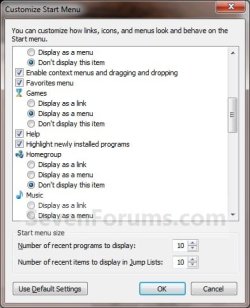
  • Display as a link - When the Start Menu button is clicked on, it opens a window for it.
  • Display as a menu - When the Start Menu button is clicked on or hovered over, it expands a menu for it.

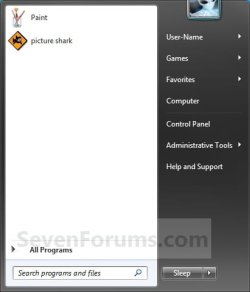
EXAMPLE: Customized Windows 7 Start Menu Start_Menu.jpg


OPTION ONE

Through Customize Start Menu Property Settings

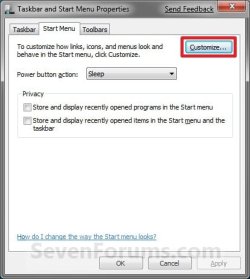
1. Right click on the Start button and click on Properties.

2. Click on the Customize button. (See screenshot below)Properties.jpg

3. To Customize the Start MenuA) Dot, check, and uncheck the settings for how you want them to look and behave in the Start Menu.
NOTE: The four screenshots below show all available customize settings.Customize-1.jpgCustomize-2.jpg
Customize-3.jpgCustomize-4.jpg

B) Go to step 5.

4. To Restore All Default Customize SettingsA) Click on the Use Default Settings button at the bottom. (See bottom right screenshot above)

5. Click on OK. (See screenshots below step 3A)

6. Click on OK. (See screenshot below step 2)


OPTION TWO

Manually Through Registry Editor

1. Open the Start Menu, then type regedit in the search box and press Enter.

2. If prompted by UAC, then click on Yes.

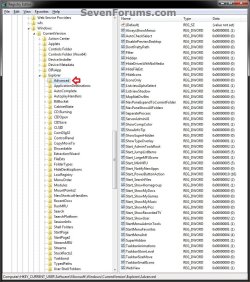
3. In regedit, navigate to the location below. (see screenshot below)

Code:
HKEY_CURRENT_USER\Software\Microsoft\Windows\CurrentVersion\Explorer\Advanced
REG-1.jpg


4. For User Folder, Computer, and Control Panel Links or Menu ButtonsA) In the right pane of Advanced, double click on the DWORD value for the Customize Start Menu option that you want to set. (see screenshot above and table below)
NOTE: If the DWORD value is not here, then right click on a blank space in the right pane of Advanced, click on New and DWORD (32-bit) value, type in the DWORD value name below and press enter.

Customize Start Menu optionDWORD value
ComputerStart_ShowMyComputer
Control PanelStart_ShowControlPanel
DocumentsStart_ShowMyDocs
DownloadsStart_ShowDownloads
GamesStart_ShowMyGames
MusicStart_ShowMyMusic
Personal folderStart_ShowUser
PicturesStart_ShowMyPics
Recorded TVStart_ShowRecordedTV
VideosStart_ShowVideos

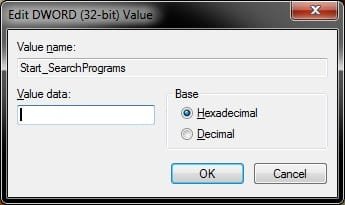
B) Type in the Data value for the Display option that you want for the selected Customize Start Menu option (step 4A), then click on OK. (see screenshot below)
Display optionData value
Don't display this item0
Display as link1
Display as a menu2

REG-2.jpg


5. For Enable or Disable Only OptionsA) In the right pane of Advanced, double click on the DWORD value for the Customize Start Menu option that you want to set. (see screenshot below step 3 and table below)
NOTE: If the DWORD value is not here, then right click on a blank space in the right pane of Advanced, click on New and DWORD (32-bit) value, type in the DWORD value name below and press enter.

Customize Start Menu optionDWORD value
Connect ToStart_ShowNetConn
Default ProgramsStart_ShowSetProgramAccessAndDefaults
Devices and PrintersStart_ShowPrinters
Enable context menus and dragging and droppingStart_EnableDragDrop
Favorites menuStartMenuFavorites
HelpStart_ShowHelp
Highlight newly installed programsStart_NotifyNewApps
HomegroupStart_ShowHomegroup
NetworkStart_ShowNetPlaces
Open submenus when I pause on them with the mouse pointerStart_AutoCascade
Recent ItemsStart_ShowRecentDocs
Run commandStart_ShowRun
Search programs and Control PaneStart_SearchPrograms
Sort All Programs menu by nameStart_SortByName
Use large iconsStart_LargeMFUIcons

B) Type in the Data value for the Display option that you want for the selected Customize Start Menu option (step 4A), then click on OK. (see screenshot below)
Display optionData value
Disable this item0
Enable this item1

REG-2.jpg


6. For the "Search other files and libraries" OptionA) In the right pane of Advanced, double click on the Start_SearchFiles. (see screenshot below step 3)
NOTE: If the Start_SearchFiles DWORD value is not here, then right click on a blank space in the right pane of Advanced, click on New and DWORD (32-bit) value, type in Start_SearchFiles and press enter.

B) Type in the Data value for the Display option that you want for this Customize Start Menu option, then click on OK. (see screenshot below)
Display optionData value
Don't search0
Search without public folders1
Search with public folders2

REG-2.jpg


7. For the "System administrative tools" Option

A) See OPTION TWO or OPTION THREE at this tutorial link below for how.Administrative Tools - Add or Remove from Start Menu


8. Close regedit.

9. Log off and log on, or restart the computer to apply.

That's it,
Shawn Brink


Last edited:
Not quite

Hi Brink,

No, this doesn't quite do what I want. It does get me part-way there, in that I can end up with a "second start menu", labeled in text, that I can use to store my hierarchy of links.

But it doesn't get me keyboard/hot key access to that list--and that is my primary desire. Microsoft seems to ignore people who use the keyboard to do things, in that, e.g., going from one version of Word to another, the menus all change (or disappear entirely in recent versions, so now we have only icons and no keyboard shortcuts to menus at all--and no, I don't want to memorize arbitrary keypresses for 100 different options, I just want to navigate the menus using the keyboard). It's frustrating to power users--makes me not want to upgrade a Microsoft app ever again. I'm certainly not using the new version of Word voluntarily. Heck, if I wanted to use an OS that ignored keyboard users, I'd just switch to Mac.

Anyone else have any ideas? Or do I need to write an app to avoid this usability failure in W7?

Tim
 
Last edited:

My Computer

Computer Manufacturer/Model Number
Lenovo W500
OS
Windows 7 x64
CPU
Core 2 Duo
Memory
4Gb
Graphics Card(s)
ATI / Intel
Hard Drives
500Gb
Tim,

No, you will not be able to use the Windows Key + (0-9) shortcut keys on that. Only the first 10 pinned taskbar icons can use them.


For shortcuts in the pinned folder, you could add your own keyboard shortcut to them though.

Another alternative, is to use a program like the Vista Start Menu one.
 

My Computer

Computer type
PC/Desktop
Computer Manufacturer/Model Number
Self built custom
OS
64-bit Windows 11 Pro for Workstations
CPU
Intel i7-8700K OC'd to 5 GHz
Motherboard
ASUS ROG Maximus XI Formula Z390
Memory
64 GB (4x16GB) G.SKILL TridentZ RGB DDR4 3600 MHz
Graphics Card(s)
ASUS ROG-STRIX-GTX1080TI-O11G-GAMING
Sound Card
Integrated
Monitor(s) Displays
2 x Samsung Odyssey G7 27"
Screen Resolution
2560x1440
Hard Drives
1TB Samsung 990 PRO M.2,
4TB Samsung 990 PRO PRO M.2,
TerraMaster F8 SSD Plus NAS
PSU
Seasonic Prime Titanium 850W
Case
Thermaltake Core P3
Cooling
Corsair Hydro H115i
Keyboard
Logitech wireless K800
Mouse
Logitech MX Master 4
Internet Speed
2 Gb/s Download and 100 Mb/s Upload
Antivirus
Malwarebyte Anti-Malware Premium
Browser
Google Chrome
Other Info
Logitech Z625 speaker system,
Logitech BRIO 4K Pro webcam,
HP Color LaserJet Pro MFP M477fdn,
APC SMART-UPS RT 1000 XL - SURT1000XLI,
Galaxy S23 Plus phone
Brink, I have the same issue as in post 7 only with My Music. I have checked the group policy and they are all not configured. Got a registry fix for this one too?

Thanks
 

My Computer

OS
Windows 7 Enterpise
Hello ATLTypeS, and welcome to Seven Forums.

Sure thing. Here you go. :)

Hope this helps,
Shawn
 

Attachments

My Computer

Computer type
PC/Desktop
Computer Manufacturer/Model Number
Self built custom
OS
64-bit Windows 11 Pro for Workstations
CPU
Intel i7-8700K OC'd to 5 GHz
Motherboard
ASUS ROG Maximus XI Formula Z390
Memory
64 GB (4x16GB) G.SKILL TridentZ RGB DDR4 3600 MHz
Graphics Card(s)
ASUS ROG-STRIX-GTX1080TI-O11G-GAMING
Sound Card
Integrated
Monitor(s) Displays
2 x Samsung Odyssey G7 27"
Screen Resolution
2560x1440
Hard Drives
1TB Samsung 990 PRO M.2,
4TB Samsung 990 PRO PRO M.2,
TerraMaster F8 SSD Plus NAS
PSU
Seasonic Prime Titanium 850W
Case
Thermaltake Core P3
Cooling
Corsair Hydro H115i
Keyboard
Logitech wireless K800
Mouse
Logitech MX Master 4
Internet Speed
2 Gb/s Download and 100 Mb/s Upload
Antivirus
Malwarebyte Anti-Malware Premium
Browser
Google Chrome
Other Info
Logitech Z625 speaker system,
Logitech BRIO 4K Pro webcam,
HP Color LaserJet Pro MFP M477fdn,
APC SMART-UPS RT 1000 XL - SURT1000XLI,
Galaxy S23 Plus phone
That didn't seem to help, i still cant manage that option in the customize start menu...strange....another strange thing is that I cant seem to add anything to the windows explorer favorites. I noticed everything is ok in my off domain profile, I think I'm gonna delete me profile and let it rebuild on Monday.

Thanks for the help anyway Brink.
 

My Computer

OS
Windows 7 Enterpise
You're welcome ATLTypeS. Please let us know how it went for you on this. :)
 

My Computer

Computer type
PC/Desktop
Computer Manufacturer/Model Number
Self built custom
OS
64-bit Windows 11 Pro for Workstations
CPU
Intel i7-8700K OC'd to 5 GHz
Motherboard
ASUS ROG Maximus XI Formula Z390
Memory
64 GB (4x16GB) G.SKILL TridentZ RGB DDR4 3600 MHz
Graphics Card(s)
ASUS ROG-STRIX-GTX1080TI-O11G-GAMING
Sound Card
Integrated
Monitor(s) Displays
2 x Samsung Odyssey G7 27"
Screen Resolution
2560x1440
Hard Drives
1TB Samsung 990 PRO M.2,
4TB Samsung 990 PRO PRO M.2,
TerraMaster F8 SSD Plus NAS
PSU
Seasonic Prime Titanium 850W
Case
Thermaltake Core P3
Cooling
Corsair Hydro H115i
Keyboard
Logitech wireless K800
Mouse
Logitech MX Master 4
Internet Speed
2 Gb/s Download and 100 Mb/s Upload
Antivirus
Malwarebyte Anti-Malware Premium
Browser
Google Chrome
Other Info
Logitech Z625 speaker system,
Logitech BRIO 4K Pro webcam,
HP Color LaserJet Pro MFP M477fdn,
APC SMART-UPS RT 1000 XL - SURT1000XLI,
Galaxy S23 Plus phone
Hey guys,

Just wanted to report that rebuilding the profile seems to have taken care of all my funky little issues.

Thanks for the help.
 

My Computer

OS
Windows 7 Enterpise
That's great news ATLTypeS. I'm happy to hear that you got it sorted. Thank you for posting back with your results. :)
 

My Computer

Computer type
PC/Desktop
Computer Manufacturer/Model Number
Self built custom
OS
64-bit Windows 11 Pro for Workstations
CPU
Intel i7-8700K OC'd to 5 GHz
Motherboard
ASUS ROG Maximus XI Formula Z390
Memory
64 GB (4x16GB) G.SKILL TridentZ RGB DDR4 3600 MHz
Graphics Card(s)
ASUS ROG-STRIX-GTX1080TI-O11G-GAMING
Sound Card
Integrated
Monitor(s) Displays
2 x Samsung Odyssey G7 27"
Screen Resolution
2560x1440
Hard Drives
1TB Samsung 990 PRO M.2,
4TB Samsung 990 PRO PRO M.2,
TerraMaster F8 SSD Plus NAS
PSU
Seasonic Prime Titanium 850W
Case
Thermaltake Core P3
Cooling
Corsair Hydro H115i
Keyboard
Logitech wireless K800
Mouse
Logitech MX Master 4
Internet Speed
2 Gb/s Download and 100 Mb/s Upload
Antivirus
Malwarebyte Anti-Malware Premium
Browser
Google Chrome
Other Info
Logitech Z625 speaker system,
Logitech BRIO 4K Pro webcam,
HP Color LaserJet Pro MFP M477fdn,
APC SMART-UPS RT 1000 XL - SURT1000XLI,
Galaxy S23 Plus phone
Updated tutorial to add OPTION TWO to be able to manually change the Customize Start Menu options in the registry.
 

My Computer

Computer type
PC/Desktop
Computer Manufacturer/Model Number
Self built custom
OS
64-bit Windows 11 Pro for Workstations
CPU
Intel i7-8700K OC'd to 5 GHz
Motherboard
ASUS ROG Maximus XI Formula Z390
Memory
64 GB (4x16GB) G.SKILL TridentZ RGB DDR4 3600 MHz
Graphics Card(s)
ASUS ROG-STRIX-GTX1080TI-O11G-GAMING
Sound Card
Integrated
Monitor(s) Displays
2 x Samsung Odyssey G7 27"
Screen Resolution
2560x1440
Hard Drives
1TB Samsung 990 PRO M.2,
4TB Samsung 990 PRO PRO M.2,
TerraMaster F8 SSD Plus NAS
PSU
Seasonic Prime Titanium 850W
Case
Thermaltake Core P3
Cooling
Corsair Hydro H115i
Keyboard
Logitech wireless K800
Mouse
Logitech MX Master 4
Internet Speed
2 Gb/s Download and 100 Mb/s Upload
Antivirus
Malwarebyte Anti-Malware Premium
Browser
Google Chrome
Other Info
Logitech Z625 speaker system,
Logitech BRIO 4K Pro webcam,
HP Color LaserJet Pro MFP M477fdn,
APC SMART-UPS RT 1000 XL - SURT1000XLI,
Galaxy S23 Plus phone
Looks nice and clean! Personally I would be using the "2" value when going to modify the ones that will remain visible to be seen as folders. "0" for the others. That seems to work out the best rather then using links all the time. :D
 

My Computers

System One System Two

  • Computer type
    PC/Desktop
    Computer Manufacturer/Model Number
    Custom builds = 2
    OS
    W7 Ultimate x64/W10 Pro x64/W11 Pro Triple Boot - Main PC W7 Remote PC Micro ATX W7 Pro x64/W11 Pro
    CPU
    AMD Phenom II X4 975 Deneb 3.6ghz - 965 2nd remote pc
    Motherboard
    Gigabyte GA-790XTA-UD4-Gigabyte GA-880GM-D2H remote pc
    Memory
    Kingston Hyper X DDR3 1600 1.5v 16gb - Hyper X Fury 8gb 2nd
    Graphics Card(s)
    MSI HD Radeon 5750 1gb - MSI HD Radeon 6450 on mini tower
    Sound Card
    Creative Labs X-Fi Xtreme Audio P - Realtek onooard 2nd case
    Monitor(s) Displays
    ASUS VW199T-P 19" HP 2082a Main-HP 2082a 20" remote pc
    Screen Resolution
    Asus 1440x900 - HP 1600x900
    Hard Drives
    WD Black 1TB HD per OS W7, W10, and pending W11 presently on 500gb OS Drive - Pending Triple 1TB HDs for Spanned Storage/backup volume
    Single 2TB external USB enclosure, single 1TB System 7 Host/Boot drive, Pending 8TB external HD for system image b
    PSU
    Corsair 750TX - primary / Corsair CX600 - second
    Case
    Antec 900-2 - SSD compatible / NZXT Vulcan mini tower
    Cooling
    Zalman CNPS9900A
    Keyboard
    AZIO L70 Backlit Letters Gaming - ONN Cordless/USB
    Mouse
    MSI DS200 Programmable, Logitech Cordless
    Internet Speed
    30mbps upgrade - primary hard wired - mini tower usb WiFi
    Antivirus
    GFI VIPRE Internet Security 2014 on W7 2016 beta on W10,
    Browser
    Cyberfox, WaterFox 64bit FF variants, FireFox x64, Pale Moon
    Other Info
    Accomdata fan cooled usb 2.0 PIDE/Sata II, III external enclosure.
    Sambient usb/eSata PATA/Sata II, III external enclosure.
  • Computer type
    PC/Desktop
    System Manufacturer/Model Number
    CUSTOM ASSEMBLY
    OS
    W7 Pro x64/W11 Pro
    CPU
    AMD Deneb 3.6ghz - 965
    Motherboard
    Gigabyte GA-880GM-D2H remote pc
    Memory
    Kingston Hyper X Fury 8gb
    Graphics Card(s)
    MSI HD Radeon 6450 DVI Output
    Sound Card
    Realtek onooard Creative or Other separate PENDING
    Monitor(s) Displays
    VIZIO 32" LCD TV Separate LCD Pending
    Screen Resolution
    1600x1080
    Hard Drives
    WD 500GB OS Host/Boot WD Green 1TB Storage/Backup
    PSU
    Corsair 600W - THERMALTAKE 600W spare case
    Case
    NZXT Vulcan mini tower
    Cooling
    Twin 120mm Top Fans - 240mm Side Cover
    Keyboard
    ONN Cordless/USB Logitech Cordless
    Mouse
    ONN USB/Cordless - Logitech Cordless
    Internet Speed
    DSL 5G
    Browser
    MS Edge, FireFox, WaterFox x64, FireFox Nightly
    Other Info
    OS Testing-Remote Access to Main TeamViewer
Can i have "my computer" and Control Panel icons, on start menu ?
 

My Computer

Computer type
PC/Desktop
OS
Windows 7 Ultimate x64
CPU
Intel7 4790K
Motherboard
Gigabyte GA-Z97X UD5H
Memory
8 GB DDR3
Graphics Card(s)
GTX 980Ti G1
Sound Card
SoundBlaster X-FI XtremeGamer
Monitor(s) Displays
Samsung UE40JU6550 UHD
Screen Resolution
3840 X 2160
Hard Drives
1 SSD Intel 330
2 x Western Digital 6400 AAKS
1 x Western Digital 3200 AAKS
PSU
Corsair 750W
Case
Cooler Master HAF 922
Hello stereo,

You could set both "Computer" and "Control Panel" to Display as menu to have it expand out to see the icons. :)
 

My Computer

Computer type
PC/Desktop
Computer Manufacturer/Model Number
Self built custom
OS
64-bit Windows 11 Pro for Workstations
CPU
Intel i7-8700K OC'd to 5 GHz
Motherboard
ASUS ROG Maximus XI Formula Z390
Memory
64 GB (4x16GB) G.SKILL TridentZ RGB DDR4 3600 MHz
Graphics Card(s)
ASUS ROG-STRIX-GTX1080TI-O11G-GAMING
Sound Card
Integrated
Monitor(s) Displays
2 x Samsung Odyssey G7 27"
Screen Resolution
2560x1440
Hard Drives
1TB Samsung 990 PRO M.2,
4TB Samsung 990 PRO PRO M.2,
TerraMaster F8 SSD Plus NAS
PSU
Seasonic Prime Titanium 850W
Case
Thermaltake Core P3
Cooling
Corsair Hydro H115i
Keyboard
Logitech wireless K800
Mouse
Logitech MX Master 4
Internet Speed
2 Gb/s Download and 100 Mb/s Upload
Antivirus
Malwarebyte Anti-Malware Premium
Browser
Google Chrome
Other Info
Logitech Z625 speaker system,
Logitech BRIO 4K Pro webcam,
HP Color LaserJet Pro MFP M477fdn,
APC SMART-UPS RT 1000 XL - SURT1000XLI,
Galaxy S23 Plus phone
I know that, Brink.
But i thought it's possible to see the "my computer" icon, as well.
 

My Computer

Computer type
PC/Desktop
OS
Windows 7 Ultimate x64
CPU
Intel7 4790K
Motherboard
Gigabyte GA-Z97X UD5H
Memory
8 GB DDR3
Graphics Card(s)
GTX 980Ti G1
Sound Card
SoundBlaster X-FI XtremeGamer
Monitor(s) Displays
Samsung UE40JU6550 UHD
Screen Resolution
3840 X 2160
Hard Drives
1 SSD Intel 330
2 x Western Digital 6400 AAKS
1 x Western Digital 3200 AAKS
PSU
Corsair 750W
Case
Cooler Master HAF 922
Only when you select the Computer button is when you should see it's icon display at the top right. :(
 

My Computer

Computer type
PC/Desktop
Computer Manufacturer/Model Number
Self built custom
OS
64-bit Windows 11 Pro for Workstations
CPU
Intel i7-8700K OC'd to 5 GHz
Motherboard
ASUS ROG Maximus XI Formula Z390
Memory
64 GB (4x16GB) G.SKILL TridentZ RGB DDR4 3600 MHz
Graphics Card(s)
ASUS ROG-STRIX-GTX1080TI-O11G-GAMING
Sound Card
Integrated
Monitor(s) Displays
2 x Samsung Odyssey G7 27"
Screen Resolution
2560x1440
Hard Drives
1TB Samsung 990 PRO M.2,
4TB Samsung 990 PRO PRO M.2,
TerraMaster F8 SSD Plus NAS
PSU
Seasonic Prime Titanium 850W
Case
Thermaltake Core P3
Cooling
Corsair Hydro H115i
Keyboard
Logitech wireless K800
Mouse
Logitech MX Master 4
Internet Speed
2 Gb/s Download and 100 Mb/s Upload
Antivirus
Malwarebyte Anti-Malware Premium
Browser
Google Chrome
Other Info
Logitech Z625 speaker system,
Logitech BRIO 4K Pro webcam,
HP Color LaserJet Pro MFP M477fdn,
APC SMART-UPS RT 1000 XL - SURT1000XLI,
Galaxy S23 Plus phone
You're welcome Phantom. I'm glad that it was able to help. :)
 

My Computer

Computer type
PC/Desktop
Computer Manufacturer/Model Number
Self built custom
OS
64-bit Windows 11 Pro for Workstations
CPU
Intel i7-8700K OC'd to 5 GHz
Motherboard
ASUS ROG Maximus XI Formula Z390
Memory
64 GB (4x16GB) G.SKILL TridentZ RGB DDR4 3600 MHz
Graphics Card(s)
ASUS ROG-STRIX-GTX1080TI-O11G-GAMING
Sound Card
Integrated
Monitor(s) Displays
2 x Samsung Odyssey G7 27"
Screen Resolution
2560x1440
Hard Drives
1TB Samsung 990 PRO M.2,
4TB Samsung 990 PRO PRO M.2,
TerraMaster F8 SSD Plus NAS
PSU
Seasonic Prime Titanium 850W
Case
Thermaltake Core P3
Cooling
Corsair Hydro H115i
Keyboard
Logitech wireless K800
Mouse
Logitech MX Master 4
Internet Speed
2 Gb/s Download and 100 Mb/s Upload
Antivirus
Malwarebyte Anti-Malware Premium
Browser
Google Chrome
Other Info
Logitech Z625 speaker system,
Logitech BRIO 4K Pro webcam,
HP Color LaserJet Pro MFP M477fdn,
APC SMART-UPS RT 1000 XL - SURT1000XLI,
Galaxy S23 Plus phone
Good tutorial, very helpful :)
 

My Computer

Computer Manufacturer/Model Number
Custom self assembled
OS
Windows 7 Ultimate x64
CPU
Intel Core i7 930
Motherboard
Gigabyte GA X58A UD7
Memory
Gskill 2x3 GB Ram
Graphics Card(s)
Sapphire ATI Radeon HD 5870
Monitor(s) Displays
LG 24MP88 24" LED Monitor
Screen Resolution
1920 X 1080
Hard Drives
Seagate barracuda 1 TB
PSU
Corsair GS 600W
Case
Cooler Master 690 II Plus
Cooling
Cooler Master Hyper 212X
Keyboard
Logitech G15 Gaming keyboard
Mouse
Logitech MX518 Gaming Mouse
Internet Speed
Broadband 50 Mbps speed [Hathway]
Other Info
Xbox 360 Wired Controller (x2)
AverMedia TV tuner Card [Internal]
Logitech HD C110 Web Camera
Netgear WGR614 Wireless-N 150 Router
Razer Goliathus Fragged Alpha Control Edition Mouse Pad
I want to create a .reg file to be able to easily hide links, instead of having to go through on each computer and setting them I could just merge and restart.

I'm guessing I just cant put =0 at the end of each one.

[HKEY_CURRENT_USER\Software\Microsoft\Windows\CurrentVersion\Explorer\Advanced]
"Start_ShowHelp"=0
"Start_ShowMyGames"=0


etc
 

My Computer

Computer type
PC/Desktop
OS
Windows 7 Home 64bit
CPU
i5-4670 Quad Core @ 3.40GHz
Motherboard
Gigabyte H87-D3H
Memory
8 GB
Graphics Card(s)
GTX 780
Hard Drives
Samsung SSD 840 EVO 250GB | OZC-VERTEX2 120GB
PSU
SST-ST75F-P
Hello Nums,

Yes, that would work as well. :)
 

My Computer

Computer type
PC/Desktop
Computer Manufacturer/Model Number
Self built custom
OS
64-bit Windows 11 Pro for Workstations
CPU
Intel i7-8700K OC'd to 5 GHz
Motherboard
ASUS ROG Maximus XI Formula Z390
Memory
64 GB (4x16GB) G.SKILL TridentZ RGB DDR4 3600 MHz
Graphics Card(s)
ASUS ROG-STRIX-GTX1080TI-O11G-GAMING
Sound Card
Integrated
Monitor(s) Displays
2 x Samsung Odyssey G7 27"
Screen Resolution
2560x1440
Hard Drives
1TB Samsung 990 PRO M.2,
4TB Samsung 990 PRO PRO M.2,
TerraMaster F8 SSD Plus NAS
PSU
Seasonic Prime Titanium 850W
Case
Thermaltake Core P3
Cooling
Corsair Hydro H115i
Keyboard
Logitech wireless K800
Mouse
Logitech MX Master 4
Internet Speed
2 Gb/s Download and 100 Mb/s Upload
Antivirus
Malwarebyte Anti-Malware Premium
Browser
Google Chrome
Other Info
Logitech Z625 speaker system,
Logitech BRIO 4K Pro webcam,
HP Color LaserJet Pro MFP M477fdn,
APC SMART-UPS RT 1000 XL - SURT1000XLI,
Galaxy S23 Plus phone
Can this be done for "All Users"?

I know you wrote this quite a while ago, but is there a way to do this in the registry and have it apply to all users? We try to configure our systems so that all our users have the same experience to begin with. If they change it to something else, so be it. But I really want to give them a default.
 

My Computer

OS
Windows 7 Pro 32bit,
Back
Top