Start Menu - Pin or Unpin a Program to

How to Pin or Unpin a Program to the Windows 7 Start Menu

   Information
This will show you how to pin or unpin a program of your choice to the Windows 7 Start Menu pin area to have a easy to access shortcut of it.
   Note
The pinned items in the Start Menu are located in the hidden system folder:

Code:
C:\Users\(User-Name)\AppData\Roaming\Microsoft\Internet Explorer\Quick Launch\User Pinned\StartMenu

   Warning
It is best to pin the program from it's EXE file location instead of from a shortcut of the program. It is easier for a shortcut to be moved or deleted, causing the pinned program in the Start Menu to not work anymore.

EXAMPLE: Pin to area of the Start Menu
NOTE: This is the white left side of the Start Menu.
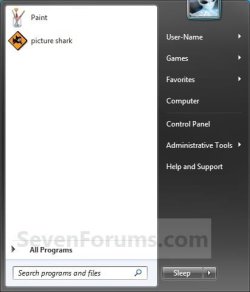
Large_Icons.jpg


OPTION ONE

Pin a Program to the Start Menu


1. Right click on the program exe file or shortcut that you want to pin to the Start Menu.
NOTE: If you delete or move this program exe file or shortcut, the pinned program in the Start Menu will no longer work.

2. Click on Pin to Start Menu. (See screenshot below)
NOTE: Sometimes you may need to press and hold the Shift key, then right click on the program exe file or shortcut to see the Pin to Start Menu option.
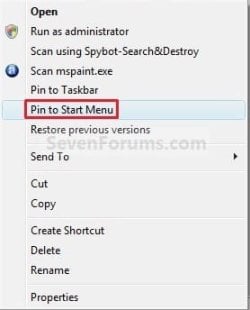
Pin_to.jpg


OPTION TWO

Unpin a Program from the Start Menu


1. Right click on the pinned program in the Start Menu, and click on Unpin from Start Menu. (See screenshot below)
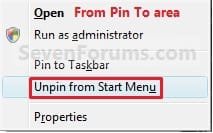
Unpin_Pin_to_Area.jpg
OR

2. Right click on the program exe file or shortcut, and click on Unpin from Start Menu. (See screenshot below)
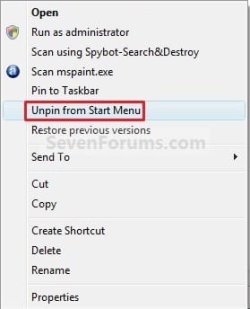
Unpin.jpg
That's it,
Shawn


Last edited:
I just dragged the Computer to the StartMenu and realized that I can't take it off...anybody help? This problem come with build 6956...
extreme1pv3.jpg
 

My Computer My Computer

Computer Manufacturer/Model Number
Thinkpad T60
OS
Windows 7 build 6956
CPU
Core Duo 2Ghz
Memory
2GB
Graphics Card(s)
ATI Mobility x1400
Monitor(s) Displays
15''
Internet Speed
20 - 100megabyte/s
Hello Natri,

What options do you have when you right click on this Computer shortcut in the pin area?

Shawn
 

My Computer My Computer

Computer type
PC/Desktop
Computer Manufacturer/Model Number
Self built custom
OS
64-bit Windows 11 Pro for Workstations
CPU
Intel i7-8700K OC'd to 5 GHz
Motherboard
ASUS ROG Maximus XI Formula Z390
Memory
64 GB (4x16GB) G.SKILL TridentZ RGB DDR4 3600 MHz
Graphics Card(s)
ASUS ROG-STRIX-GTX1080TI-O11G-GAMING
Sound Card
Integrated
Monitor(s) Displays
2 x Samsung Odyssey G7 27"
Screen Resolution
2560x1440
Hard Drives
1TB Samsung 990 PRO M.2,
4TB Samsung 990 PRO PRO M.2,
TerraMaster F8 SSD Plus NAS
PSU
Seasonic Prime Titanium 850W
Case
Thermaltake Core P3
Cooling
Corsair Hydro H115i
Keyboard
Logitech wireless K800
Mouse
Logitech MX Master 4
Internet Speed
2 Gb/s Download and 100 Mb/s Upload
Antivirus
Malwarebyte Anti-Malware Premium
Browser
Google Chrome
Other Info
Logitech Z625 speaker system,
Logitech BRIO 4K Pro webcam,
HP Color LaserJet Pro MFP M477fdn,
APC SMART-UPS RT 1000 XL - SURT1000XLI,
Galaxy S23 Plus phone
When right click on that:


And when Shift+right click:


The Libraries even worst
 
Last edited by a moderator:

My Computer My Computer

Computer Manufacturer/Model Number
Thinkpad T60
OS
Windows 7 build 6956
CPU
Core Duo 2Ghz
Memory
2GB
Graphics Card(s)
ATI Mobility x1400
Monitor(s) Displays
15''
Internet Speed
20 - 100megabyte/s
Natri,

Strange. I will have to do some research on this to see if I can find the registry location on this to manually remove them. I will get back with you if and when I find them.l
 

My Computer My Computer

Computer type
PC/Desktop
Computer Manufacturer/Model Number
Self built custom
OS
64-bit Windows 11 Pro for Workstations
CPU
Intel i7-8700K OC'd to 5 GHz
Motherboard
ASUS ROG Maximus XI Formula Z390
Memory
64 GB (4x16GB) G.SKILL TridentZ RGB DDR4 3600 MHz
Graphics Card(s)
ASUS ROG-STRIX-GTX1080TI-O11G-GAMING
Sound Card
Integrated
Monitor(s) Displays
2 x Samsung Odyssey G7 27"
Screen Resolution
2560x1440
Hard Drives
1TB Samsung 990 PRO M.2,
4TB Samsung 990 PRO PRO M.2,
TerraMaster F8 SSD Plus NAS
PSU
Seasonic Prime Titanium 850W
Case
Thermaltake Core P3
Cooling
Corsair Hydro H115i
Keyboard
Logitech wireless K800
Mouse
Logitech MX Master 4
Internet Speed
2 Gb/s Download and 100 Mb/s Upload
Antivirus
Malwarebyte Anti-Malware Premium
Browser
Google Chrome
Other Info
Logitech Z625 speaker system,
Logitech BRIO 4K Pro webcam,
HP Color LaserJet Pro MFP M477fdn,
APC SMART-UPS RT 1000 XL - SURT1000XLI,
Galaxy S23 Plus phone
Ok Natri,

I think I found something that may help you out with this. It will basically reset the Pin To area of the Start Menu back to default.


If you cannot remove the shortcuts from the hidden folder C:\Users\(user name)\AppData\Roaming\Microsoft\Internet Explorer\Quick Launch\Taskbar Pinned\StartMenu and after restarting the computer, then this below may help instead.

http://www.sevenforums.com/tutorials/899-start-menu-reset-pin-area.html


Hope this helps,
Shawn
 

My Computer My Computer

Computer type
PC/Desktop
Computer Manufacturer/Model Number
Self built custom
OS
64-bit Windows 11 Pro for Workstations
CPU
Intel i7-8700K OC'd to 5 GHz
Motherboard
ASUS ROG Maximus XI Formula Z390
Memory
64 GB (4x16GB) G.SKILL TridentZ RGB DDR4 3600 MHz
Graphics Card(s)
ASUS ROG-STRIX-GTX1080TI-O11G-GAMING
Sound Card
Integrated
Monitor(s) Displays
2 x Samsung Odyssey G7 27"
Screen Resolution
2560x1440
Hard Drives
1TB Samsung 990 PRO M.2,
4TB Samsung 990 PRO PRO M.2,
TerraMaster F8 SSD Plus NAS
PSU
Seasonic Prime Titanium 850W
Case
Thermaltake Core P3
Cooling
Corsair Hydro H115i
Keyboard
Logitech wireless K800
Mouse
Logitech MX Master 4
Internet Speed
2 Gb/s Download and 100 Mb/s Upload
Antivirus
Malwarebyte Anti-Malware Premium
Browser
Google Chrome
Other Info
Logitech Z625 speaker system,
Logitech BRIO 4K Pro webcam,
HP Color LaserJet Pro MFP M477fdn,
APC SMART-UPS RT 1000 XL - SURT1000XLI,
Galaxy S23 Plus phone
Thank you very much, Shawn! Editing Regedit works fine...I also create a reg file if someone needs it
 

Attachments

My Computer My Computer

Computer Manufacturer/Model Number
Thinkpad T60
OS
Windows 7 build 6956
CPU
Core Duo 2Ghz
Memory
2GB
Graphics Card(s)
ATI Mobility x1400
Monitor(s) Displays
15''
Internet Speed
20 - 100megabyte/s
Thanks for this Shawn,
and to Natri, for the reg file,

I had this problem on my previous 6956 install and did some quite extensive searching for an answer - this is the first solution to this problem, as far as I know, to emerge on the web.

another first for the SevenForums :D
 

My Computers My Computers

System One System Two

  • Computer type
    PC/Desktop
    Computer Manufacturer/Model Number
    ChillBlast - Custom to my design
    OS
    Windows 11 Pro x64 [Latest Release and Release Preview]
    CPU
    Ryzen 9 5950X, 3.8 - 5.2 MHz
    Motherboard
    Asus Prime X570-Pro
    Memory
    64GB [2 x 32GB] DDR4 3200MHz
    Graphics Card(s)
    4GB NVIDIA GEFORCE GTX 1650 Ti
    Sound Card
    On-board SPDIF to 5.1 System + HDMI [5.1 system]
    Monitor(s) Displays
    32" UHD 32 Bit HDR Monitor + 43" UHD 4K 32Bit HDR TV
    Screen Resolution
    2 x 3840 x 2160 @60Hz
    Hard Drives
    1TB M2 SSD OS, 500GB Fast Access SSD, 2 x 8TB Data + Various Externals from 1TB to 4TB, 10TB NAS
    PSU
    NZXT C750 80 PLUS Gold 750W Modular PSU
    Case
    Workstation Case [Matt Black]
    Cooling
    NZXT Kraken X63 280mm CPU Cooler +2x Quiet Case fans
    Keyboard
    Logitech Wireless MX Keys & K400 + others
    Mouse
    Logitech Wireless MX Master 3S
    Internet Speed
    920 MB Down 50 MB Up
    Antivirus
    BitDefender Total Security Pro
    Browser
    Chrome (always run latest Non-Beta)
    Other Info
    Also run ...
    Laptop - Quad 8GB - Windows 10 Pro x64
    Nexus 7 Android tablet x2
    Samsung 10.2" tablet
    Blackview TAB 8 4G Android Tablet c/w Keyboard
    Wacom Intuos Pro Medium Pen Pad
    Wacom Intuos Pro Small Pen Pad
    Wacom Expresskeys Remote
    Loopdeck+ Graphics Controller
    Shuttle Pro v2 Control
  • Computer type
    Laptop
    System Manufacturer/Model Number
    Dell XPS 17 10750H
    OS
    Windows 11 Pro x64 Latest RP
    CPU
    Intel I7 10750H 5.0GHz
    Motherboard
    Dell XPS
    Memory
    32GB [2x16GB] DDR4 2933 MHz
    Graphics Card(s)
    nVidia GTX1650Ti 4 GB GDDR6
    Sound Card
    Stock [Realtek] 4 Speaker
    Monitor(s) Displays
    17" IPS UHD+ Infinity Edge Touchscreen
    Screen Resolution
    3840 x 2400
    Hard Drives
    2TB M2 NVMe, 4TB External + various 500GB & 1TB External NVMe (also have access to spinner HDD from
    PSU
    Stock
    Case
    Stock XPS Aluminium & Carbon Fibre
    Cooling
    Stock - Active Fan Control
    Keyboard
    Backlit + Various Logitech
    Mouse
    Stock Track Pad + Logitech MX Trackball
    Internet Speed
    72 MB Down 18MB Up
    Browser
    Chrome
    Other Info
    Also run ...
    Laptop - Quad 8GB - Windows 10 Pro x64
    Nexus 7 Android tablet x2
    10.2" tablet
    Sony Z3 Android Smartphone
    Wacom Intuos Pro Medium Pen Pad
    Wacom Intuos Pro Small Pen Pad
    Wacom Expresskeys Remote
    Loopdeck+ Graphics Controller
    Shuttle Pro v2 Control Pad
    10TB NAS
You're welcome guys.

Thank you for the reg file Natri.

Guess what the next new tutorial is going to be. ;)
 

My Computer My Computer

Computer type
PC/Desktop
Computer Manufacturer/Model Number
Self built custom
OS
64-bit Windows 11 Pro for Workstations
CPU
Intel i7-8700K OC'd to 5 GHz
Motherboard
ASUS ROG Maximus XI Formula Z390
Memory
64 GB (4x16GB) G.SKILL TridentZ RGB DDR4 3600 MHz
Graphics Card(s)
ASUS ROG-STRIX-GTX1080TI-O11G-GAMING
Sound Card
Integrated
Monitor(s) Displays
2 x Samsung Odyssey G7 27"
Screen Resolution
2560x1440
Hard Drives
1TB Samsung 990 PRO M.2,
4TB Samsung 990 PRO PRO M.2,
TerraMaster F8 SSD Plus NAS
PSU
Seasonic Prime Titanium 850W
Case
Thermaltake Core P3
Cooling
Corsair Hydro H115i
Keyboard
Logitech wireless K800
Mouse
Logitech MX Master 4
Internet Speed
2 Gb/s Download and 100 Mb/s Upload
Antivirus
Malwarebyte Anti-Malware Premium
Browser
Google Chrome
Other Info
Logitech Z625 speaker system,
Logitech BRIO 4K Pro webcam,
HP Color LaserJet Pro MFP M477fdn,
APC SMART-UPS RT 1000 XL - SURT1000XLI,
Galaxy S23 Plus phone
this

can i put add/rem programs in this zone ?
 

Attachments

  • add.jpg
    add.jpg
    30.9 KB · Views: 40,695

My Computer My Computer

Computer Manufacturer/Model Number
my precious
OS
Windows 7 Ultimate 64bit
CPU
Intel Core2 Duo E8400 3.00GHz Wolfdale Box
Motherboard
MSI P35 NEO2-FR
Memory
A-DATA 2 GB DDR2 800+
Graphics Card(s)
Gigabyte GeForce 8800GT Zalman 512MB DDR3 256-bit
Hard Drives
Seagate 320 GB BARRACUDA SATA-II 7200.10
Hello Madbusu, and welcome to Seven Forums.

Sorry, but no. :(

Shawn
 

My Computer My Computer

Computer type
PC/Desktop
Computer Manufacturer/Model Number
Self built custom
OS
64-bit Windows 11 Pro for Workstations
CPU
Intel i7-8700K OC'd to 5 GHz
Motherboard
ASUS ROG Maximus XI Formula Z390
Memory
64 GB (4x16GB) G.SKILL TridentZ RGB DDR4 3600 MHz
Graphics Card(s)
ASUS ROG-STRIX-GTX1080TI-O11G-GAMING
Sound Card
Integrated
Monitor(s) Displays
2 x Samsung Odyssey G7 27"
Screen Resolution
2560x1440
Hard Drives
1TB Samsung 990 PRO M.2,
4TB Samsung 990 PRO PRO M.2,
TerraMaster F8 SSD Plus NAS
PSU
Seasonic Prime Titanium 850W
Case
Thermaltake Core P3
Cooling
Corsair Hydro H115i
Keyboard
Logitech wireless K800
Mouse
Logitech MX Master 4
Internet Speed
2 Gb/s Download and 100 Mb/s Upload
Antivirus
Malwarebyte Anti-Malware Premium
Browser
Google Chrome
Other Info
Logitech Z625 speaker system,
Logitech BRIO 4K Pro webcam,
HP Color LaserJet Pro MFP M477fdn,
APC SMART-UPS RT 1000 XL - SURT1000XLI,
Galaxy S23 Plus phone
i learn so many things from this forum !

ok Ty !
 

My Computer My Computer

Computer Manufacturer/Model Number
my precious
OS
Windows 7 Ultimate 64bit
CPU
Intel Core2 Duo E8400 3.00GHz Wolfdale Box
Motherboard
MSI P35 NEO2-FR
Memory
A-DATA 2 GB DDR2 800+
Graphics Card(s)
Gigabyte GeForce 8800GT Zalman 512MB DDR3 256-bit
Hard Drives
Seagate 320 GB BARRACUDA SATA-II 7200.10
Maybe one day though. :)
 

My Computer My Computer

Computer type
PC/Desktop
Computer Manufacturer/Model Number
Self built custom
OS
64-bit Windows 11 Pro for Workstations
CPU
Intel i7-8700K OC'd to 5 GHz
Motherboard
ASUS ROG Maximus XI Formula Z390
Memory
64 GB (4x16GB) G.SKILL TridentZ RGB DDR4 3600 MHz
Graphics Card(s)
ASUS ROG-STRIX-GTX1080TI-O11G-GAMING
Sound Card
Integrated
Monitor(s) Displays
2 x Samsung Odyssey G7 27"
Screen Resolution
2560x1440
Hard Drives
1TB Samsung 990 PRO M.2,
4TB Samsung 990 PRO PRO M.2,
TerraMaster F8 SSD Plus NAS
PSU
Seasonic Prime Titanium 850W
Case
Thermaltake Core P3
Cooling
Corsair Hydro H115i
Keyboard
Logitech wireless K800
Mouse
Logitech MX Master 4
Internet Speed
2 Gb/s Download and 100 Mb/s Upload
Antivirus
Malwarebyte Anti-Malware Premium
Browser
Google Chrome
Other Info
Logitech Z625 speaker system,
Logitech BRIO 4K Pro webcam,
HP Color LaserJet Pro MFP M477fdn,
APC SMART-UPS RT 1000 XL - SURT1000XLI,
Galaxy S23 Plus phone
Hello everybody,
the folder: C:\Users\(User-Name)\AppData\Roaming\Microsoft\Internet Explorer\Quick Launch\User Pinned\StartMenu in my OS contain some shortcut but some of them aren't pinned to Start Menu
also I can pin or unpin folder to Start menu
but I can't pin or unpin shortcut of any program to Start menu
I search some help in internet but all of them are un-usefull.
Anybody can help me to fix this problem.

It looks like:
 

Attachments

  • startmenu.jpg
    startmenu.jpg
    28.1 KB · Views: 775

My Computer My Computer

OS
Windows 7
Start Menu Unpinning

What if neither system of unpinning on start menu works. I've tried right clicking on icons on start menu to unpin but the unpin option does not show up. I've tried to go to the program file, find the .exe file and unpin from there, still no luck. Any idea what else might work?
 

My Computer My Computer

Computer type
PC/Desktop
Computer Manufacturer/Model Number
Microsoft/Windows 7
OS
Windows 7 Home Premium 32 bit and 64 bit
CPU
Pentium(R) Dual-Core CPU T4400 @ 2.20 GHz
Motherboard
ASUSTek Computer Inc. K501J
Memory
3.00 GB
Graphics Card(s)
(1) Mobile Intel(R) 4 Series Express Chipset Family (2) Mo
Sound Card
VIA High Definition Audio
Monitor(s) Displays
LCD
Hard Drives
ST9320325AS Fixed hard disk media 2 partitions
SB Flash Memory USB Device
PSU
AC/Battery/USB
Case
Not sure
Cooling
Not sure. I've tried to find it online but no luck
Keyboard
Altec SRS
Mouse
ONN wireless mouse
Internet Speed
2194MHz processor speed
Antivirus
Norton
Browser
Mozilla Firefox 28.0
Other Info
I am technologically deficient. I don't understand a lot about the workings of computers. So if anyone answers any of my questions (and I definitely hope they will), I would appreciate it greatly if they dumbed it down and put everything in simple terms.

My Computer My Computer

Computer type
PC/Desktop
Computer Manufacturer/Model Number
Self built custom
OS
64-bit Windows 11 Pro for Workstations
CPU
Intel i7-8700K OC'd to 5 GHz
Motherboard
ASUS ROG Maximus XI Formula Z390
Memory
64 GB (4x16GB) G.SKILL TridentZ RGB DDR4 3600 MHz
Graphics Card(s)
ASUS ROG-STRIX-GTX1080TI-O11G-GAMING
Sound Card
Integrated
Monitor(s) Displays
2 x Samsung Odyssey G7 27"
Screen Resolution
2560x1440
Hard Drives
1TB Samsung 990 PRO M.2,
4TB Samsung 990 PRO PRO M.2,
TerraMaster F8 SSD Plus NAS
PSU
Seasonic Prime Titanium 850W
Case
Thermaltake Core P3
Cooling
Corsair Hydro H115i
Keyboard
Logitech wireless K800
Mouse
Logitech MX Master 4
Internet Speed
2 Gb/s Download and 100 Mb/s Upload
Antivirus
Malwarebyte Anti-Malware Premium
Browser
Google Chrome
Other Info
Logitech Z625 speaker system,
Logitech BRIO 4K Pro webcam,
HP Color LaserJet Pro MFP M477fdn,
APC SMART-UPS RT 1000 XL - SURT1000XLI,
Galaxy S23 Plus phone
I tried this with a batch file that launches the client for a game I run. It didn't work. However, if I did the same thing (using Shift) with the shortcut on the desktop, it worked. Just for everyone's information.
 

My Computer My Computer

Computer Manufacturer/Model Number
Dell Inspiron 570
OS
Windows 7 Home Premium 64 SP1
CPU
AMD Athalon II x2 250
Motherboard
not sure
Memory
4GB
Graphics Card(s)
NVIDIA GTX 560 Ti
Monitor(s) Displays
various flatscreen
PSU
Thermaltake 600W
I also do not have the option to pin or unpin in my right click menu. The easy solution: Right click on the item in the Program Menu and create a shortcut. This will show as another item in the Program Menu with (2) after it. Drag that over the the Start Menu in the position you want it. To unpin, just right click on the offending shortcut and delete it.
---ask a girl
 

My Computer My Computer

OS
xp 32 bit
Hello CA, and welcome to Seven Forums.

Are the pin to options missing in all shortcuts and .exe files, or just that one?

Was the tutorial able to restore them for you?
 

My Computer My Computer

Computer type
PC/Desktop
Computer Manufacturer/Model Number
Self built custom
OS
64-bit Windows 11 Pro for Workstations
CPU
Intel i7-8700K OC'd to 5 GHz
Motherboard
ASUS ROG Maximus XI Formula Z390
Memory
64 GB (4x16GB) G.SKILL TridentZ RGB DDR4 3600 MHz
Graphics Card(s)
ASUS ROG-STRIX-GTX1080TI-O11G-GAMING
Sound Card
Integrated
Monitor(s) Displays
2 x Samsung Odyssey G7 27"
Screen Resolution
2560x1440
Hard Drives
1TB Samsung 990 PRO M.2,
4TB Samsung 990 PRO PRO M.2,
TerraMaster F8 SSD Plus NAS
PSU
Seasonic Prime Titanium 850W
Case
Thermaltake Core P3
Cooling
Corsair Hydro H115i
Keyboard
Logitech wireless K800
Mouse
Logitech MX Master 4
Internet Speed
2 Gb/s Download and 100 Mb/s Upload
Antivirus
Malwarebyte Anti-Malware Premium
Browser
Google Chrome
Other Info
Logitech Z625 speaker system,
Logitech BRIO 4K Pro webcam,
HP Color LaserJet Pro MFP M477fdn,
APC SMART-UPS RT 1000 XL - SURT1000XLI,
Galaxy S23 Plus phone
it's my work computer so....

I didn't see the pin/unpin option on any of the programs I looked at. I am at work. This might have something to do with it. I do not have administrator rights and our IT Dept hides a lot of stuff. However, my create shortcut and drag it worked fine. I also deleted one just by deleting it. Thanks for the topic. Now I will go home and try to remember how I did it there.
 

My Computer My Computer

OS
xp 32 bit
Back
Top