Start Menu - Pin or Unpin a Program to

How to Pin or Unpin a Program to the Windows 7 Start Menu

   Information
This will show you how to pin or unpin a program of your choice to the Windows 7 Start Menu pin area to have a easy to access shortcut of it.
   Note
The pinned items in the Start Menu are located in the hidden system folder:

Code:
C:\Users\(User-Name)\AppData\Roaming\Microsoft\Internet Explorer\Quick Launch\User Pinned\StartMenu

   Warning
It is best to pin the program from it's EXE file location instead of from a shortcut of the program. It is easier for a shortcut to be moved or deleted, causing the pinned program in the Start Menu to not work anymore.

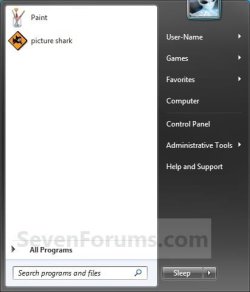
EXAMPLE: Pin to area of the Start Menu
NOTE: This is the white left side of the Start Menu.
Large_Icons.jpg


OPTION ONE

Pin a Program to the Start Menu


1. Right click on the program exe file or shortcut that you want to pin to the Start Menu.
NOTE: If you delete or move this program exe file or shortcut, the pinned program in the Start Menu will no longer work.

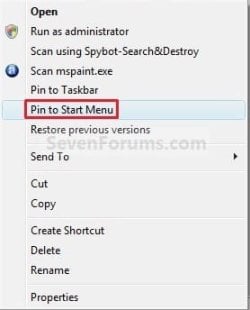
2. Click on Pin to Start Menu. (See screenshot below)
NOTE: Sometimes you may need to press and hold the Shift key, then right click on the program exe file or shortcut to see the Pin to Start Menu option.
Pin_to.jpg


OPTION TWO

Unpin a Program from the Start Menu


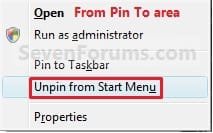
1. Right click on the pinned program in the Start Menu, and click on Unpin from Start Menu. (See screenshot below)
Unpin_Pin_to_Area.jpg
OR

2. Right click on the program exe file or shortcut, and click on Unpin from Start Menu. (See screenshot below)
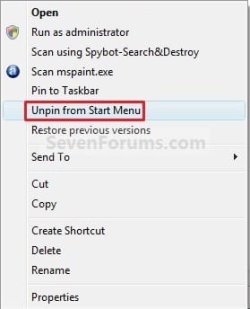
Unpin.jpg
That's it,
Shawn


Last edited:
Ah, ok. It could be something your IT Dept set for them to be disabled. If so, then there's nothing you can do other than ask if they could enable it again.
 

My Computer My Computer

Computer type
PC/Desktop
Computer Manufacturer/Model Number
Self built custom
OS
64-bit Windows 11 Pro for Workstations
CPU
Intel i7-8700K OC'd to 5 GHz
Motherboard
ASUS ROG Maximus XI Formula Z390
Memory
64 GB (4x16GB) G.SKILL TridentZ RGB DDR4 3600 MHz
Graphics Card(s)
ASUS ROG-STRIX-GTX1080TI-O11G-GAMING
Sound Card
Integrated
Monitor(s) Displays
2 x Samsung Odyssey G7 27"
Screen Resolution
2560x1440
Hard Drives
1TB Samsung 990 PRO M.2,
4TB Samsung 990 PRO PRO M.2,
TerraMaster F8 SSD Plus NAS
PSU
Seasonic Prime Titanium 850W
Case
Thermaltake Core P3
Cooling
Corsair Hydro H115i
Keyboard
Logitech wireless K800
Mouse
Logitech MX Master 4
Internet Speed
2 Gb/s Download and 100 Mb/s Upload
Antivirus
Malwarebyte Anti-Malware Premium
Browser
Google Chrome
Other Info
Logitech Z625 speaker system,
Logitech BRIO 4K Pro webcam,
HP Color LaserJet Pro MFP M477fdn,
APC SMART-UPS RT 1000 XL - SURT1000XLI,
Galaxy S23 Plus phone
hi Brink, out of curiosity I've just stupidly unchecked the 'store and display..' start menu items options..

I lost the start menu pins, so I'm readding them....

I found a Restore_Pin_to_Start_Menu.reg, and checked my reg and already have 'Default' Start Menu Pin @
HKEY_CLASSES_ROOT\*\shellex\ContextMenuHandlers\{a2a9545d-a0c2-42b4-9708-a0b2badd77c8}


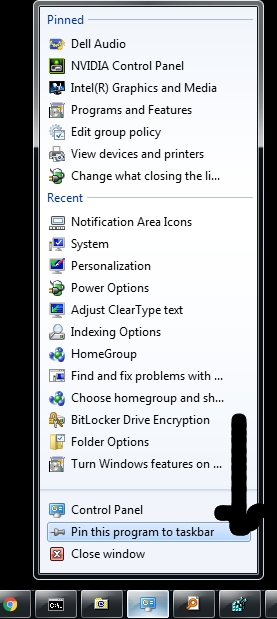
I'm TRYING to add Pin to start Menu to the context menu available from taskbar (running program) entries, specifically so I can pinToStartMenu my Control Panel...

um0kCV1.png


is this possible? (sure I had this working before)

Thanks!!
 

My Computer My Computer

Computer type
Laptop
Computer Manufacturer/Model Number
Dell
OS
Windows 7 Ultimate 64bit
CPU
2.2
Memory
8Gb
Graphics Card(s)
NVIDIA
Screen Resolution
1280/762
Mouse
built in pad || iphone || MS wireless
Internet Speed
100MB
Antivirus
Avast
Browser
Chrome, Chrome portable

My Computer My Computer

Computer type
PC/Desktop
Computer Manufacturer/Model Number
Self built custom
OS
64-bit Windows 11 Pro for Workstations
CPU
Intel i7-8700K OC'd to 5 GHz
Motherboard
ASUS ROG Maximus XI Formula Z390
Memory
64 GB (4x16GB) G.SKILL TridentZ RGB DDR4 3600 MHz
Graphics Card(s)
ASUS ROG-STRIX-GTX1080TI-O11G-GAMING
Sound Card
Integrated
Monitor(s) Displays
2 x Samsung Odyssey G7 27"
Screen Resolution
2560x1440
Hard Drives
1TB Samsung 990 PRO M.2,
4TB Samsung 990 PRO PRO M.2,
TerraMaster F8 SSD Plus NAS
PSU
Seasonic Prime Titanium 850W
Case
Thermaltake Core P3
Cooling
Corsair Hydro H115i
Keyboard
Logitech wireless K800
Mouse
Logitech MX Master 4
Internet Speed
2 Gb/s Download and 100 Mb/s Upload
Antivirus
Malwarebyte Anti-Malware Premium
Browser
Google Chrome
Other Info
Logitech Z625 speaker system,
Logitech BRIO 4K Pro webcam,
HP Color LaserJet Pro MFP M477fdn,
APC SMART-UPS RT 1000 XL - SURT1000XLI,
Galaxy S23 Plus phone
Be advised in windows 7 right click on a program in start menu does nothing for last several months or years though think it did a few years ago but no longer and be advised that in the folder you give as:
C:\Users\(User-Name)\AppData\Roaming\Microsoft\Internet Explorer\Quick Launch\User Pinned\StartMenu
and deleting a certain program from that list Does NOt remove it from the start menu as i just did it and the program was still in the start menu. Unless by
some remote chance it won't be there in the future sometime after say rebooting ? But that is very doubtful. Too bad that right clicking on the
start menu routine no longer works as it did a few years ago as that was most convenient - now right clicking in windows 7 no longer does
anything.
 

My Computer My Computer

Computer type
Laptop
OS
7 64
Hello zmth, and welcome to Seven Forums. :-)

You should still be able to right click on items in the Start Menu (white area) and see a context menu.

The pinned to Start items are also referenced in a registry value.

If you like, you might see if resetting and clearing your pinned Start items using the tutorial below may help. You will have to manually Pin to Start anything you want again afterwards though.

:ar: Start Menu - Reset Pin To Area
 

My Computer My Computer

Computer type
PC/Desktop
Computer Manufacturer/Model Number
Self built custom
OS
64-bit Windows 11 Pro for Workstations
CPU
Intel i7-8700K OC'd to 5 GHz
Motherboard
ASUS ROG Maximus XI Formula Z390
Memory
64 GB (4x16GB) G.SKILL TridentZ RGB DDR4 3600 MHz
Graphics Card(s)
ASUS ROG-STRIX-GTX1080TI-O11G-GAMING
Sound Card
Integrated
Monitor(s) Displays
2 x Samsung Odyssey G7 27"
Screen Resolution
2560x1440
Hard Drives
1TB Samsung 990 PRO M.2,
4TB Samsung 990 PRO PRO M.2,
TerraMaster F8 SSD Plus NAS
PSU
Seasonic Prime Titanium 850W
Case
Thermaltake Core P3
Cooling
Corsair Hydro H115i
Keyboard
Logitech wireless K800
Mouse
Logitech MX Master 4
Internet Speed
2 Gb/s Download and 100 Mb/s Upload
Antivirus
Malwarebyte Anti-Malware Premium
Browser
Google Chrome
Other Info
Logitech Z625 speaker system,
Logitech BRIO 4K Pro webcam,
HP Color LaserJet Pro MFP M477fdn,
APC SMART-UPS RT 1000 XL - SURT1000XLI,
Galaxy S23 Plus phone
When right click there absolutely nothing happens so there is no sense in rt clicking when it is exactly the same as doing nothing!
 

My Computer My Computer

Computer type
Laptop
OS
7 64
yea i may could try the 2nd thing but having to go thru all that is quite painstaking. I already opened the registry and took ages to stop everywhere it found something not applicable - had to stop out of taking way too much time. Also most things in registry are put in there multiple places and one has to take them out everywhere and then one cannot be sure that even after doing all that they still sometimes appear back there again. I have done registry editing involving other things many times in past many years- most always a painstaking task.
 

My Computer My Computer

Computer type
Laptop
OS
7 64
Back
Top