Startup Programs - Change

How to Change, Add, or Remove Startup Programs in Windows 7

   Information
This will show you how to either add, remove, enable, or disable a startup program in Windows 7.
   Note
You can also view the startup logs in Event Viewer (C:\Windows\system32\eventvwr.msc) under Applications and Services Logs, Microsoft, Windows, Diagnostics-Performance, and Operational. The logs will be in the middle to show you what ran at startup, how long it took, and more.
   Warning
User Account Control prevents programs that require elevated (run as administrator) permission or an administrator password from running automatically when Windows 7 starts. If a program is blocked, you'll see a message in the notification area that says some startup programs need permission to run. You can then right click on the notification area message and either select to run the blocked program by giving UAC permission, remove the blocked program from the startup program list, or ignore the notification and not run the program.


:note: For the Windows 10 tutorial please see here - Startup Items - Add, Delete, Enable, Disable in Windows 10 - Windows 10 Tutorials


METHOD ONE

Through the Program Itself


NOTE: Some programs may have a setting in them to allow it to run at startup or not. You will need to consult the program's documentations on how to do this specifically for their program if it is available for that program.
1. Open the program's settings menu.

2. To Add the Program to Startup
A) Select the program's Run at startup type option.
3. To Remove the Program from Startup
A) Unselect the program's Run at startup type option.


METHOD TWO

Through the Startup Folder


NOTE: You can add or remove shortcuts to programs or files from the Startup folder to have them run or open at the startup of Windows 7.

1. Right click on the exe file of the program you want to run at startup, or file to open at startup, and click on Create Shortcut.
NOTE: This is the shortcut that you will add to the Startup folder in either Option One or Option Two below. Skip this step if you are only removing a shortcut from the Startup folder.
A) Do either OPTION ONE "Current User" or OPTION TWO "All Users" below for what you want.


OPTION ONE

For Current Single User Only


:note:NOTE: The single (current) user Startup folder is a hidden system folder located at:
C:\Users\(User-Name)\AppData\Roaming\Microsoft\Windows\Start Menu\Programs\Startup
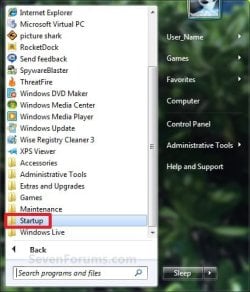
2. Open the Start Menu, click on All Programs, right click on the Startup folder, click on Open or Explore, and go to step 4 below. (See screenshot below)
Start_Menu_Startup_Folder.jpg
OR

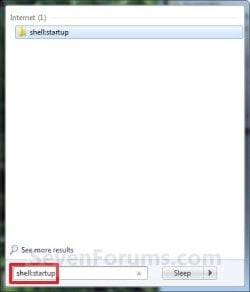
3. In the Start Menu search line, type shell:startup, press Enter, and go to step 4 below. (See screenshot below)
Start_Menu_shell-Startup.jpg
4. Do step 5 or 6 below for what you would like to do.

5. To Add a Startup Program or File Shortcut
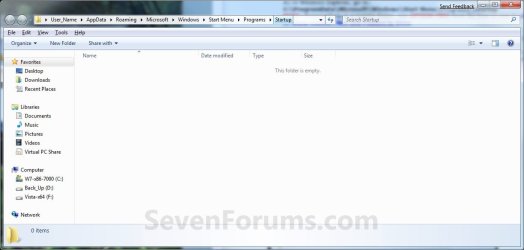
A) Drag the shortcut created from step 1 to inside the Startup folder and drop it. (See screenshot below)
Startup_Folder.jpg
6. To Remove a Startup Program or File Shortcut
A) Right click on the shortcut in the Startup folder and click on Delete. (See screenshot above)
7. Close the Startup folder when done. (See screenshot below step 5A)


OPTION TWO

For All Users


:note:NOTE: The all users Startup folder is a hidden system folder located at:

C:\ProgramData\Microsoft\Windows\Start Menu\Programs\Startup
2. Open the Start Menu, click on All Programs, right click on the Startup folder, click on Open All Users or Explore All Users, and go to step 4 below. (See screenshot below)
Start_Menu_Startup_Folder.jpg
OR

3. In the Start Menu search line, type shell:common startup, press Enter, and go to step 4 below.

4. Do step 5 or 6 below for what you would like to do.

5. To Add a Startup Program or File Shortcut
A) Drag the shortcut created from step 1 to inside the Startup folder and drop it. (See screenshot below)
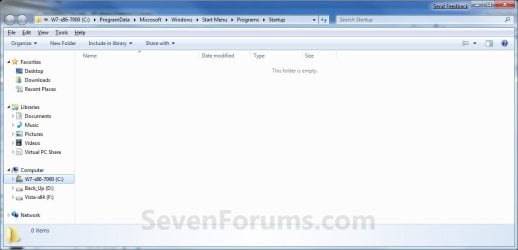
Startup_Folder_All.jpg
6. To Remove a Startup Program or File Shortcut
A) Right click on the shortcut in the Startup folder and click on Delete. (See screenshot above)
6. Close the Startup folder when done. (See screenshot below step 4A)


METHOD THREE

Through System Configuration (msconfig)


NOTE: Using the Selective Startup option in System Configuration (msconfig), you can enable or disable startup programs. You will need to be logged into an administator account, or provide the administrator password to open System Configuration.

WARNING: It would be best to also check the registry entries in METHOD FOUR below as well, since msconfig may not always show all startup programs.
1. Open the Start Menu, type msconfig in the search box, press Enter, and go to step 3 below. (See screenshot below)
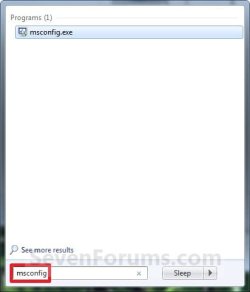
Start_Menu_msconfig.jpg
OR

2. Open the Control Panel (icons view) and click on the Administrative Tools icon, then click on System Configuration. Close the Control Panel and Administrative Tools windows.

3. If prompted, click on Continue for the UAC prompt, or type in the administrator's password.

4. Click on the Startup tab. (See screenshot below)

   Tip
If you look under the Location column for the Start Item, you will see the registry location for it that you can use to remove the startup item using METHOD FOUR below instead.
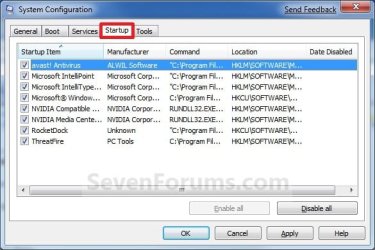
System_Configuration_Startup_Tab.jpg
5. To Disable a Startup Program
A) Select a listed startup program and uncheck it. (See screenshot above)

B) Repeat to disable anymore listed startup programs.
6. To Enable a Startup Program
A) Select a listed startup program and check it. (See screenshot below step 4)

B) Repeat to enable anymore listed startup programs.
7. To Disable All Listed Startup Programs
A) Click on the Disable all button. (See screenshot below step 4)

B) Go to step 9.
8. To Enable All Listed Startup Programs
A) Click on the Enable all button. (See screenshot below step 4)
9. Click on Apply. (See screenshot below step 4)

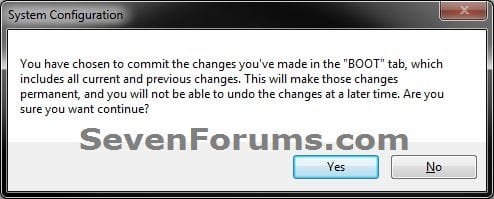
10. Click on the Boot tab, then check the Make all boot settings permanent box and click on OK. (See screenshot below)
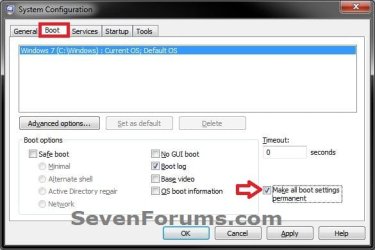
Boot-1.jpg
11. Click on Yes. (See screenshot below)
Boot-2.jpg
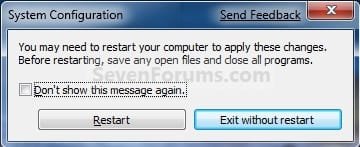
12. Click on the Restart button to apply. (See screenshot below)
WARNING: This will restart your computer immediately. Save and close anything that you are working on first.
Restart.jpg


METHOD FOUR

Manually in Registry Editor


NOTE: This will allow you to remove a startup program for either the current single user or all users. If you wanted to add a startup program, then METHOD TWO above would be a safer and easier way to do so.
1. Open the Start Menu.

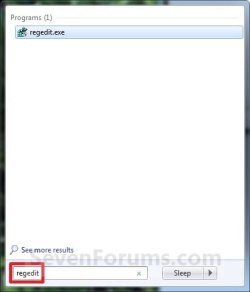
2. In the search line, type regedit and press Enter. (See screenshot below)
Start_Menu_regedit.jpg
3. For "Current User" Only Locations
A) In regedit, go to: (See screenshots below)

HKEY_CURRENT_USER\Software\Microsoft\Windows\CurrentVersion\Run
AND
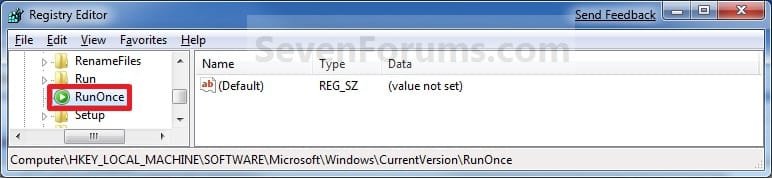
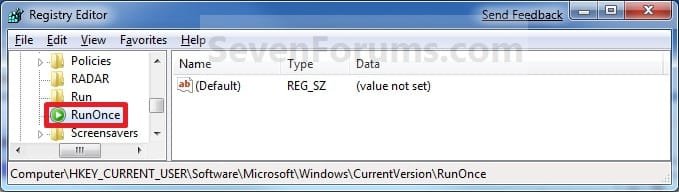
HKEY_CURRENT_USER\Software\Microsoft\Windows\CurrentVersion\RunOnce
Current_Reg_Run.jpg

Current_Reg_RunOnce.jpg
4. For "All Users" Locations
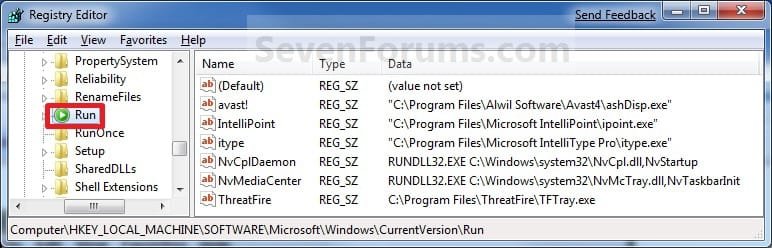
A) In regedit, go to: (See screenshots below)
For 32-bit and 64-bit Windows 7:
HKEY_LOCAL_MACHINE\SOFTWARE\Microsoft\Windows\CurrentVersion\Run
AND
HKEY_LOCAL_MACHINE\SOFTWARE\Microsoft\Windows\CurrentVersion\RunOnce
AND (If added by Group Policy)
HKEY_CURRENT_USER\Software\Microsoft\Windows\CurrentVersion\Policies\Explorer\Run
AND (If added by Group Policy)
HKEY_LOCAL_MACHINE\SOFTWARE\Microsoft\Windows\CurrentVersion\Policies\Explorer\Run
AND
For 64-bit Windows 7 only:
HKEY_LOCAL_MACHINE\SOFTWARE\Wow6432Node\Microsoft\Windows\CurrentVersion\Run
AND
HKEY_LOCAL_MACHINE\SOFTWARE\Wow6432Node\Microsoft\Windows\CurrentVersion\RunOnce
All_Users_Reg_Run.jpg

All_Users_Reg_RunOnce.jpg
5. In the right pane of Run and/or RunOnce, right click on the startup program you want to remove and click on Delete. (See screenshots above)
NOTE: RunOnce is only to run the program once for the next time that Windows 7 starts up. Run is to run the program everytime that Windows 7 starts up.

6. Click on Yes to confirm deletion.

7. When done, close regedit.


METHOD FIVE

Using CCleaner


1. If you have not already, download and install the free program CCleaner.

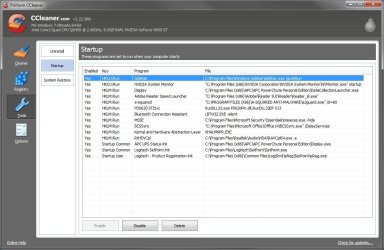
2. Open CCleaner, and click on the Tools icon (left side) and on the Startup button. (See screenshot below)
CCleaner.jpg
3. Select a startup item, then either enable, disable, or delete it from the Vista startup programs list. (See screenshot above)


METHOD SIX

Through Task Scheduler


   Note
By default, you cannot run a elevated (Run as administrator) program that requires UAC permission at startup using the normal Windows 7 startup programs above.

For a Administrator User Account:
You can have Run as administrator (elevated) programs run at startup for a administrator account by running it in a startup task in Task Scheduler.

For a Standard User Account:
You will not be able to run elevated programs at startup for a standard user account though. Only unelevated programs (ex: Notepad).


1. For how to create a startup task, see:

How to Create a Task to Run a Program at Startup and Log On in Windows 7
That's it,
Shawn


Last edited:
sorry to bust this move here, but how do i quit following/receiving emails to this thread?
thX
 

My Computer

Computer type
PC/Desktop
Computer Manufacturer/Model Number
Homemade Heap
OS
Windows 7 x64 Ultimate
CPU
AMD Phenom II X4 965 Black Edition 3.4Ghz (OC @ 3.7Ghz)
Motherboard
ASUS M5A97 LE R2.0
Memory
G-Skill (2x4GB) DDR3 1333 1.5v (OV to 1.65v @ 1432)
Graphics Card(s)
EVGA GeForce GTS 450 SC Edition
Sound Card
Onboard
Monitor(s) Displays
42 inch HP Television/Monitor
Screen Resolution
1920x1080
Hard Drives
SSD OS:OCZ RevoDrive X2 220GB PCIe SSD >>>
HDD Storage: 1x Western Digital Black 750GB, 32MB, 6.0,
2x Western Digital Blue 1TB, 32MB, 6.0,
1x Seagate Baracuda 3TB, 64MB, 6.0
PSU
Antec EarthWatts EA750 750W
Case
IN WIN Dragon Rider Black Steel Full Tower
Cooling
ALL AIR. Case:1x 220mm, 4x 120mm / CPU:Stock 4 pipe AMD PIB
Keyboard
Steelseries MERC Stealth
Mouse
Tek Republic TM Black 7 Button + 1 Wheel
Internet Speed
10Mb/s
Antivirus
ESET Security Suite v6
Browser
Firefox
Other Info
Optical Drive: Sony Optiarc 24x DVD Double Layer Lightscribe,
Fan Controller: NZXT Sentry-2 Touch Screen (5 fans + temps),
Audio: Kenwood 500w Home System

My Computer

Computer type
PC/Desktop
Computer Manufacturer/Model Number
Self built custom
OS
64-bit Windows 11 Pro for Workstations
CPU
Intel i7-8700K OC'd to 5 GHz
Motherboard
ASUS ROG Maximus XI Formula Z390
Memory
64 GB (4x16GB) G.SKILL TridentZ RGB DDR4 3600 MHz
Graphics Card(s)
ASUS ROG-STRIX-GTX1080TI-O11G-GAMING
Sound Card
Integrated
Monitor(s) Displays
2 x Samsung Odyssey G7 27"
Screen Resolution
2560x1440
Hard Drives
1TB Samsung 990 PRO M.2,
4TB Samsung 990 PRO PRO M.2,
TerraMaster F8 SSD Plus NAS
PSU
Seasonic Prime Titanium 850W
Case
Thermaltake Core P3
Cooling
Corsair Hydro H115i
Keyboard
Logitech wireless K800
Mouse
Logitech MX Master 4
Internet Speed
2 Gb/s Download and 100 Mb/s Upload
Antivirus
Malwarebyte Anti-Malware Premium
Browser
Google Chrome
Other Info
Logitech Z625 speaker system,
Logitech BRIO 4K Pro webcam,
HP Color LaserJet Pro MFP M477fdn,
APC SMART-UPS RT 1000 XL - SURT1000XLI,
Galaxy S23 Plus phone
Hey John,

Yeah, that's running in the background for the Sidebar.
Thanks Shawn yes mate I "opened" it out and found the side bar ref:o
 

My Computer

Computer type
PC/Desktop
Computer Manufacturer/Model Number
Own build (new) Desk1 / Asus ROG Win 7 / Desk2 1st build
OS
Desk1 7 Home Prem / Desk2 10 Pro / Main lap Asus ROG 10 Pro 2 laptop Toshiba 7 Pro Asus P2520 7 & 10
CPU
Desk1 i5 3750K / Laptop i7 GTX 860M / Desk2 i5 2500
Motherboard
Desk1 Asus P877-V / Desk2 Gigabyte H67 UD3H / Laptop ?
Memory
Desk1 8GB (1866) / Desk2 16GB (1333) / Laptop 8Gb DDR3
Graphics Card(s)
Desk 1& 2NVidia GTX 650 & Laptops on board Intel
Sound Card
Desk 1 & 2 -XONAR DG Realtek High Def audio Laptop
Monitor(s) Displays
Desk 1 Benq HD 2450 / Desk2 Philips 24" / Laptop 17.5"
Screen Resolution
1920x1080 D1 & D2 & Laptop 1
Hard Drives
Desk1 Samsung 120GB 830 SSD
Asus ROG 256GB 850 Pro SSD
Desk2 Samsung 840 256 SSD
Toshiba 120GB EVO
PSU
Desk 1 Corsair HX 1050/ Laptop ? / Desk 2 Corsair HX 650
Case
Desk 1 Cooler HAF XM ? Toshiba laptop / Desk2 Coolermaster
Cooling
Fans on all Desk1 -2 Desk2 - all Coolermasters 5 Laptop ?
Keyboard
Desk 1 MS Sidewinder X6 Desk 2 MS Sidewinder X 4
Mouse
Desk 1&2 - Gigabyte MS 900 gamer - laptop - Logitec wireless
Internet Speed
ADSL2+
Other Info
One other Desktop (tester) and spare Toshba laptop both with SSD's
Running Kaspersky 2016 ISS on all machines config'd identically
Logitec audio stereo systems on each machine (x3)
Canon MG5250MFC
Router/modem TP-Link running WPA2SK
No problem John. :)
 

My Computer

Computer type
PC/Desktop
Computer Manufacturer/Model Number
Self built custom
OS
64-bit Windows 11 Pro for Workstations
CPU
Intel i7-8700K OC'd to 5 GHz
Motherboard
ASUS ROG Maximus XI Formula Z390
Memory
64 GB (4x16GB) G.SKILL TridentZ RGB DDR4 3600 MHz
Graphics Card(s)
ASUS ROG-STRIX-GTX1080TI-O11G-GAMING
Sound Card
Integrated
Monitor(s) Displays
2 x Samsung Odyssey G7 27"
Screen Resolution
2560x1440
Hard Drives
1TB Samsung 990 PRO M.2,
4TB Samsung 990 PRO PRO M.2,
TerraMaster F8 SSD Plus NAS
PSU
Seasonic Prime Titanium 850W
Case
Thermaltake Core P3
Cooling
Corsair Hydro H115i
Keyboard
Logitech wireless K800
Mouse
Logitech MX Master 4
Internet Speed
2 Gb/s Download and 100 Mb/s Upload
Antivirus
Malwarebyte Anti-Malware Premium
Browser
Google Chrome
Other Info
Logitech Z625 speaker system,
Logitech BRIO 4K Pro webcam,
HP Color LaserJet Pro MFP M477fdn,
APC SMART-UPS RT 1000 XL - SURT1000XLI,
Galaxy S23 Plus phone

My Computer

Computer type
PC/Desktop
Computer Manufacturer/Model Number
Homemade Heap
OS
Windows 7 x64 Ultimate
CPU
AMD Phenom II X4 965 Black Edition 3.4Ghz (OC @ 3.7Ghz)
Motherboard
ASUS M5A97 LE R2.0
Memory
G-Skill (2x4GB) DDR3 1333 1.5v (OV to 1.65v @ 1432)
Graphics Card(s)
EVGA GeForce GTS 450 SC Edition
Sound Card
Onboard
Monitor(s) Displays
42 inch HP Television/Monitor
Screen Resolution
1920x1080
Hard Drives
SSD OS:OCZ RevoDrive X2 220GB PCIe SSD >>>
HDD Storage: 1x Western Digital Black 750GB, 32MB, 6.0,
2x Western Digital Blue 1TB, 32MB, 6.0,
1x Seagate Baracuda 3TB, 64MB, 6.0
PSU
Antec EarthWatts EA750 750W
Case
IN WIN Dragon Rider Black Steel Full Tower
Cooling
ALL AIR. Case:1x 220mm, 4x 120mm / CPU:Stock 4 pipe AMD PIB
Keyboard
Steelseries MERC Stealth
Mouse
Tek Republic TM Black 7 Button + 1 Wheel
Internet Speed
10Mb/s
Antivirus
ESET Security Suite v6
Browser
Firefox
Other Info
Optical Drive: Sony Optiarc 24x DVD Double Layer Lightscribe,
Fan Controller: NZXT Sentry-2 Touch Screen (5 fans + temps),
Audio: Kenwood 500w Home System
Anytime Chris. :)
 

My Computer

Computer type
PC/Desktop
Computer Manufacturer/Model Number
Self built custom
OS
64-bit Windows 11 Pro for Workstations
CPU
Intel i7-8700K OC'd to 5 GHz
Motherboard
ASUS ROG Maximus XI Formula Z390
Memory
64 GB (4x16GB) G.SKILL TridentZ RGB DDR4 3600 MHz
Graphics Card(s)
ASUS ROG-STRIX-GTX1080TI-O11G-GAMING
Sound Card
Integrated
Monitor(s) Displays
2 x Samsung Odyssey G7 27"
Screen Resolution
2560x1440
Hard Drives
1TB Samsung 990 PRO M.2,
4TB Samsung 990 PRO PRO M.2,
TerraMaster F8 SSD Plus NAS
PSU
Seasonic Prime Titanium 850W
Case
Thermaltake Core P3
Cooling
Corsair Hydro H115i
Keyboard
Logitech wireless K800
Mouse
Logitech MX Master 4
Internet Speed
2 Gb/s Download and 100 Mb/s Upload
Antivirus
Malwarebyte Anti-Malware Premium
Browser
Google Chrome
Other Info
Logitech Z625 speaker system,
Logitech BRIO 4K Pro webcam,
HP Color LaserJet Pro MFP M477fdn,
APC SMART-UPS RT 1000 XL - SURT1000XLI,
Galaxy S23 Plus phone
i googled a bit but couldnt find a conclusive answer... i'd like to disable apsdaemo, ituneshelper, google update, rimbb launch agent, and groovemonitor utility from startup.

i'd like to ask... based on your experiences.. which ones are safe to disable on startup and which ones i shud leave alone...?
 

My Computer

Computer type
Laptop
Computer Manufacturer/Model Number
Asus K43S
OS
windows 7 home premium 64bit
CPU
Intel Core i3-2330m
Memory
6 Gib 10600 DDR3 RAM
Graphics Card(s)
Radeon 6730
Monitor(s) Displays
Generic PnP Monitor
Hard Drives
Intel SSD 330 Series 120 Gb
Seagate Momentus 750 Gb
Internet Speed
Slow, lol
Antivirus
KIS 2013
Uncheck everything but the antivirus software .
 

My Computer

Computer Manufacturer/Model Number
Custom Built
OS
Windows 7 Ultimate 32-Bit & Windows 7 Ultimate 64-Bit
CPU
Intel Core i7 CPU 950 @ 3.07GHz
Motherboard
ASUS P6T DELUXE V2
Memory
OCZ 6GB (3 x 2GB) 240-Pin DDR3 SDRAM DDR3 1600 OCZ3X1600R2
Graphics Card(s)
ATI Radeon HD 5700 Series
Sound Card
OnBoard
Hard Drives
WD6400AACS-00M3B0 (640GB SATA )
PSU
CORSAIR 850w
Case
NZXT LEXA
Cooling
Intel Stock Heatsink Fan
Keyboard
Microsoft Wireless Laser Keyboard 7000
Mouse
Microsoft Wireless Laser Mouse 7000
Second that. There's nothing that's unsafe to disable in msconfig>Startup and >Services after Hiding all MS Services. Of course you want your AV starting if its required to be checked, but anything else can wait til it's needed unless that is when you start the PC.

Ask yourself "Do I want a bunch of freeloaders riding around with me everywhere I go, when most are spying on me?"
 
Last edited:
tq gregrocker and vistaking for your answer... i've disabled many services and startups significantly increased from 60-ish seconds to 25-ish seconds.

i have another question... there are some services and startups for auto-update like

Services :
mozilla maintenance service
skype updater

Startup :
google update
java platform autoupdater


i want to uncheck these auto-updater thing as well... but I'm a bit confused, if i disable the auto-updater running on startup... how do i get updates from them?

do i in turn have to click 1 by 1 of these programs manually tools -> options -> check for update thingy for each program... or... will the auto-updater still going to work when i run the program say, an hour after i turn on my computer, when i run it...


sorry if the Q is too long, and let me know if its unclear...

KP
 

My Computer

Computer type
Laptop
Computer Manufacturer/Model Number
Asus K43S
OS
windows 7 home premium 64bit
CPU
Intel Core i3-2330m
Memory
6 Gib 10600 DDR3 RAM
Graphics Card(s)
Radeon 6730
Monitor(s) Displays
Generic PnP Monitor
Hard Drives
Intel SSD 330 Series 120 Gb
Seagate Momentus 750 Gb
Internet Speed
Slow, lol
Antivirus
KIS 2013
I believe the software will still auto update its just you don't need them running when the PC boots up .
 

My Computer

Computer Manufacturer/Model Number
Custom Built
OS
Windows 7 Ultimate 32-Bit & Windows 7 Ultimate 64-Bit
CPU
Intel Core i7 CPU 950 @ 3.07GHz
Motherboard
ASUS P6T DELUXE V2
Memory
OCZ 6GB (3 x 2GB) 240-Pin DDR3 SDRAM DDR3 1600 OCZ3X1600R2
Graphics Card(s)
ATI Radeon HD 5700 Series
Sound Card
OnBoard
Hard Drives
WD6400AACS-00M3B0 (640GB SATA )
PSU
CORSAIR 850w
Case
NZXT LEXA
Cooling
Intel Stock Heatsink Fan
Keyboard
Microsoft Wireless Laser Keyboard 7000
Mouse
Microsoft Wireless Laser Mouse 7000
The program will check if its up to date when you run it. Updaters are spyware that are not needed.

Google is pernicious spyware which tracks your every move and pastes interest ads everywhere you go. I would uninstall any Google in Control Panel and stay signed out of their sites. Use the stable Google search box built into your browser, but do not use Chrome. You can also mitigate this spying some and at least stop the ads from profiling you by running Consumer Opt-out | NAI: Network Advertising Initiative.
 
hi gregrocker and vistaking, tq very much for your answer. i've disabled many things now including google update.
i have 1 thing that's still enabled that i want to disable and need you guys take once again on it.

do you guys disabled the startup option of java platform auto-updater...?

I've read a couple months ago about java security problems and stuff, so... to be honest i want to disable it, i like having as little startup program as possible.. but how and when does java auto-update if i disable it...?


cheers,

KP!
 

My Computer

Computer type
Laptop
Computer Manufacturer/Model Number
Asus K43S
OS
windows 7 home premium 64bit
CPU
Intel Core i3-2330m
Memory
6 Gib 10600 DDR3 RAM
Graphics Card(s)
Radeon 6730
Monitor(s) Displays
Generic PnP Monitor
Hard Drives
Intel SSD 330 Series 120 Gb
Seagate Momentus 750 Gb
Internet Speed
Slow, lol
Antivirus
KIS 2013
If you don't enable the Updater then the program will normally update when you run it.

Do you know that you even use Java? I've stopped including it on my installs and no one has been prompted for it yet as far as I know.
 
If you don't enable the Updater then the program will normally update when you run it.

Do you know that you even use Java? I've stopped including it on my installs and no one has been prompted for it yet as far as I know.

Totally agree with Greg. I uninstalled Java about 2 years ago and haven't missed it at all.

I also followed Greg's advice about disabling everything except my anti-virus program in msconfig>Startup and >Services. Again, no problems at all and everything that was disabled still gets required updates when I run it.

You might be interested in a free product called Secunia PSI (Personal Software Inspector.) It checks your installed software and lets you know if something needs updating. I run it once a week (just before making my system image) just to double-check things. And it too can be disabled at startup. :)

Free Computer Security - Personal Software Inspector (PSI) - Secunia
 

My Computer

Computer type
Laptop
Computer Manufacturer/Model Number
Sony Vaio VPCEB47GM Laptop
OS
Win 7 Pro 64-bit
CPU
Intel i5 2.4 Ghz
Memory
8GB DDR3
Graphics Card(s)
Intel HD 3000
Sound Card
IDT High Definition
Monitor(s) Displays
15.6 WGXA Anti-Glare LED
Screen Resolution
1280x800
Hard Drives
640Gb 7200rpm
Antivirus
MSE
Browser
Opera (primary) with IE9 backup
You could also do this with gpedit.msc
User Configuration - Administrative Templates - System - Login - Run these programs at startup
 

My Computer

Computer type
PC/Desktop
Computer Manufacturer/Model Number
Novatech iRush Pro
OS
Windows 7 Ultimate SP1 - 64 Bit
CPU
Intel Core i5 2500k
Motherboard
Foxconn H67M-S/H67M-V/H67
Memory
2x4GB DDR3 1333Hz
Graphics Card(s)
Ati Radeon 6770
Sound Card
None
Monitor(s) Displays
Samsung S22B150
Screen Resolution
1920x1080
Hard Drives
2x500GB
PSU
500W
Cooling
Fan
Keyboard
HP KU0316
Mouse
Wireless Logitech M185
Internet Speed
20MB/s
Antivirus
Avast Free
Browser
Google Chrome
Other Info
Logitech M185 Mouse
KU-M316 Keyboard

My Computer

Computer type
Laptop
Computer Manufacturer/Model Number
Sony Vaio VPCEB47GM Laptop
OS
Win 7 Pro 64-bit
CPU
Intel i5 2.4 Ghz
Memory
8GB DDR3
Graphics Card(s)
Intel HD 3000
Sound Card
IDT High Definition
Monitor(s) Displays
15.6 WGXA Anti-Glare LED
Screen Resolution
1280x800
Hard Drives
640Gb 7200rpm
Antivirus
MSE
Browser
Opera (primary) with IE9 backup
You could also do this with gpedit.msc
User Configuration - Administrative Templates - System - Login - Run these programs at startup

Providing you're running 7 Pro, Enterprise or Ultimate since gpedit isn't included in Home Premium, Home Basic and Starter Editions. ;)

This previous Forum thread has some info about adding gpedit to those versions:

http://www.sevenforums.com/performa...able-tweak-add-gdedit-win-7-home-premium.html

Unfortunately it's no longer available with this message at the link for this.

11 Aug 2012. The download is no longer available and comments closed.
 

My Computer

Computer type
PC/Desktop
Computer Manufacturer/Model Number
Self built custom
OS
64-bit Windows 11 Pro for Workstations
CPU
Intel i7-8700K OC'd to 5 GHz
Motherboard
ASUS ROG Maximus XI Formula Z390
Memory
64 GB (4x16GB) G.SKILL TridentZ RGB DDR4 3600 MHz
Graphics Card(s)
ASUS ROG-STRIX-GTX1080TI-O11G-GAMING
Sound Card
Integrated
Monitor(s) Displays
2 x Samsung Odyssey G7 27"
Screen Resolution
2560x1440
Hard Drives
1TB Samsung 990 PRO M.2,
4TB Samsung 990 PRO PRO M.2,
TerraMaster F8 SSD Plus NAS
PSU
Seasonic Prime Titanium 850W
Case
Thermaltake Core P3
Cooling
Corsair Hydro H115i
Keyboard
Logitech wireless K800
Mouse
Logitech MX Master 4
Internet Speed
2 Gb/s Download and 100 Mb/s Upload
Antivirus
Malwarebyte Anti-Malware Premium
Browser
Google Chrome
Other Info
Logitech Z625 speaker system,
Logitech BRIO 4K Pro webcam,
HP Color LaserJet Pro MFP M477fdn,
APC SMART-UPS RT 1000 XL - SURT1000XLI,
Galaxy S23 Plus phone
Unfortunately it's no longer available with this message at the link for this.

11 Aug 2012. The download is no longer available and comments closed.

How about this?

Or don't you support associations with AskVG?
 

My Computer

Computer type
PC/Desktop
Computer Manufacturer/Model Number
Novatech iRush Pro
OS
Windows 7 Ultimate SP1 - 64 Bit
CPU
Intel Core i5 2500k
Motherboard
Foxconn H67M-S/H67M-V/H67
Memory
2x4GB DDR3 1333Hz
Graphics Card(s)
Ati Radeon 6770
Sound Card
None
Monitor(s) Displays
Samsung S22B150
Screen Resolution
1920x1080
Hard Drives
2x500GB
PSU
500W
Cooling
Fan
Keyboard
HP KU0316
Mouse
Wireless Logitech M185
Internet Speed
20MB/s
Antivirus
Avast Free
Browser
Google Chrome
Other Info
Logitech M185 Mouse
KU-M316 Keyboard
It doesn't matter to me where you link. It's just that I have never seen a method to enable GPEDIT on unsupported editions that worked or worked without issues. That's the main reason why I never did a tutorial on it myself.
 

My Computer

Computer type
PC/Desktop
Computer Manufacturer/Model Number
Self built custom
OS
64-bit Windows 11 Pro for Workstations
CPU
Intel i7-8700K OC'd to 5 GHz
Motherboard
ASUS ROG Maximus XI Formula Z390
Memory
64 GB (4x16GB) G.SKILL TridentZ RGB DDR4 3600 MHz
Graphics Card(s)
ASUS ROG-STRIX-GTX1080TI-O11G-GAMING
Sound Card
Integrated
Monitor(s) Displays
2 x Samsung Odyssey G7 27"
Screen Resolution
2560x1440
Hard Drives
1TB Samsung 990 PRO M.2,
4TB Samsung 990 PRO PRO M.2,
TerraMaster F8 SSD Plus NAS
PSU
Seasonic Prime Titanium 850W
Case
Thermaltake Core P3
Cooling
Corsair Hydro H115i
Keyboard
Logitech wireless K800
Mouse
Logitech MX Master 4
Internet Speed
2 Gb/s Download and 100 Mb/s Upload
Antivirus
Malwarebyte Anti-Malware Premium
Browser
Google Chrome
Other Info
Logitech Z625 speaker system,
Logitech BRIO 4K Pro webcam,
HP Color LaserJet Pro MFP M477fdn,
APC SMART-UPS RT 1000 XL - SURT1000XLI,
Galaxy S23 Plus phone
Back
Top