
Startup Repair

How to Run a Startup Repair in Windows 7

   Information
Startup Repair is a system recovery tool that automates common diagnostic and repair tasks of unbootable Windows 7 installations. If the computer fails over into Windows RE because of a detected boot failure, Startup Repair launches automatically. If automatic failover to an on-disk Windows RE is not available, Startup Repair can also be launched as a manual recovery tool from a Windows RE CD/DVD.

This tutorial will show you how to run Startup Repair to allow it to scan your Windows 7 computer for a startup problem and try to fix it so your computer can start correctly.

Startup Repair is located on the System Recovery Options menu, which is on the Windows 7 installation disc. If your computer manufacturer (OEM) has preinstalled recovery options, Startup Repair might also be installed on your hard disk. If your computer does not include Startup Repair, your computer manufacturer (OEM) might have customized or replaced the tool. Check the information that came with your computer or go to the manufacturer's website.

   Note
Startup Repair Process

Startup Repair will try to repair computers that are unbootable because of the following reasons:
  • Registry corruption
  • Missing or damaged system and driver files
  • Disk metadata corruption (MBR, partition table, and boot sector)
  • File system metadata corruption
  • Installation of problematic or incompatible drivers
  • Installation of incompatible Windows service packs and patches
  • Corrupt boot configuration data
  • Bad memory and hard disk hardware (detection only)
Startup Repair will not repair unbootable systems caused by the following issues:
  • Malfunctioning firmware and other hardware components
  • Problems with clean Windows installations or Windows upgrades (for example, from Windows XP to Windows Vista)
  • Windows logon errors
  • Viruses and malicious software

After Startup Repair has run, a text log with diagnostic information and repair results is generated. The log file is located at: C:\Windows\System32\Logfiles\Srt\SrtTrail.txt


For more information, see: How Windows RE Works

   Warning
Startup Repair cannot fix hardware failures, such as a failing hard disk or incompatible memory, nor does it protect against virus attacks. Startup Repair is not designed to fix Windows installation problems. Startup Repair is not a backup tool, so it cannot help you recover personal files, such as photos or documents. To help protect your computer, back up your system and files regularly.


:note: For the updated Windows 10 tutorial, please see - Startup Repair - Run in Windows 10 - Windows 10 Tutorials

Here's How:
1. Boot to the System Recovery Options screen using your retail Windows 7 installation disk or system repair disc.

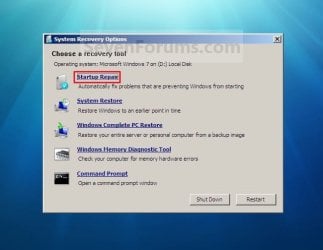
2. Select the Startup Repair option. (See screenshot below) Repair.jpg
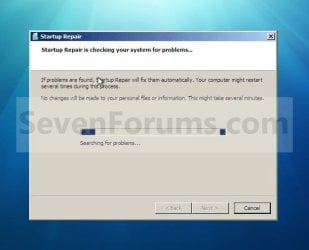
3. Startup Repair will now scan your computer to attempt to find and fix any startup problems. (See screenshot below)
NOTE: Startup Repair might prompt you to make choices as it tries to fix the problem, and if necessary, it might restart your computer as it makes repairs. If repairs are not successful, you'll see a summary of the problem and links to contact information for support. Your computer manufacturer might include additional assistance information. Startup_Repair-1.jpg
4. If problems cannot be found, then click on Finish. (See screenshot below)
NOTE: You can click on the View diagnostic and repair details link to see a detailed summary of what Startup Repair has done. Startup_Repair-2.jpg
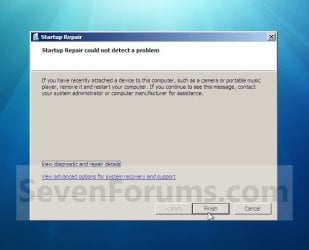
A) Click on the Restart button to return to the Windows 7 log on screen. (See screenshot below step 2)
   Tip
Sometimes it may take running a startup repair (3) separate times with restarting the computer after each time before it fully fixes the startup issue.


That's it,
Shawn


Last edited:
please find the log in your recommended location in the first post of yours.
Startup Repair diagnosis and repair log
Code:
---------------------------
Last successful boot time: ‎8/‎14/‎2017 6:55:28 AM (GMT)
Number of repair attempts: 1

Session details
---------------------------
System Disk = \Device\Harddisk0
Windows directory = D:\Windows
AutoChk Run = 0
Number of root causes = 1

Test Performed: 
---------------------------
Name: Check for updates
Result: Completed successfully. Error code =  0x0
Time taken = 0 ms

Test Performed: 
---------------------------
Name: System disk test
Result: Completed successfully. Error code =  0x0
Time taken = 0 ms

Test Performed: 
---------------------------
Name: Disk failure diagnosis
Result: Completed successfully. Error code =  0x0
Time taken = 79 ms

Test Performed: 
---------------------------
Name: Disk metadata test
Result: Completed successfully. Error code =  0x0
Time taken = 15 ms

Test Performed: 
---------------------------
Name: Target OS test
Result: Completed successfully. Error code =  0x0
Time taken = 156 ms

Test Performed: 
---------------------------
Name: Volume content check
Result: Completed successfully. Error code =  0x0
Time taken = 547 ms

Test Performed: 
---------------------------
Name: Boot manager diagnosis
Result: Completed successfully. Error code =  0x0
Time taken = 78 ms

Test Performed: 
---------------------------
Name: System boot log diagnosis
Result: Completed successfully. Error code =  0x0
Time taken = 0 ms

Test Performed: 
---------------------------
Name: Event log diagnosis
Result: Completed successfully. Error code =  0x0
Time taken = 94 ms

Test Performed: 
---------------------------
Name: Internal state check
Result: Completed successfully. Error code =  0x0
Time taken = 0 ms

Test Performed: 
---------------------------
Name: Boot status test
Result: Completed successfully. Error code =  0x0
Time taken = 0 ms

Test Performed: 
---------------------------
Name: Setup state check
Result: Completed successfully. Error code =  0x0
Time taken = 1047 ms

Test Performed: 
---------------------------
Name: Registry hives test
Result: Completed successfully. Error code =  0x0
Time taken = 4000 ms

Test Performed: 
---------------------------
Name: Windows boot log diagnosis
Result: Completed successfully. Error code =  0x0
Time taken = 0 ms

Test Performed: 
---------------------------
Name: Bugcheck analysis
Result: Completed successfully. Error code =  0x0
Time taken = 2156 ms

Test Performed: 
---------------------------
Name: Access control test
Result: Completed successfully. Error code =  0x0
Time taken = 26265 ms

Test Performed: 
---------------------------
Name: File system test (chkdsk)
Result: Completed successfully. Error code =  0x0
Time taken = 0 ms

Test Performed: 
---------------------------
Name: Software installation log diagnosis
Result: Completed successfully. Error code =  0x0
Time taken = 0 ms

Test Performed: 
---------------------------
Name: Fallback diagnosis
Result: Completed successfully. Error code =  0x0
Time taken = 0 ms

Root cause found: 
---------------------------
Unspecified changes to system configuration might have caused the problem.

Repair action: System Restore
Result: Completed successfully. Error code =  0x0
Time taken = 154406 ms

---------------------------
---------------------------
 
Last edited by a moderator:

My Computer

Computer type
PC/Desktop
Computer Manufacturer/Model Number
custom build
OS
Microsoft Windows 7 Ultimate 64-bit 7601 Multiprocessor Free Service Pack 1
CPU
Intel(R) Core(TM)2 Duo CPU E7200 @ 2.53GHz
Motherboard
To be filled by O.E.M. To be filled by O.E.M.
Memory
4.00 GB
Graphics Card(s)
NVIDIA GeForce 210
Sound Card
(1) NVIDIA High Definition Audio (2) Realtek High Definiti
Screen Resolution
1920 x 1080 x 32 bits (4294967296 colors) @ 60 Hz
Hard Drives
ST3500312CS ATA Device
Hello jraju, :)

That would be the startup repair log. It shows this below as the cause, and did a system restore to repair.

Code:
Root cause found: 
---------------------------
Unspecified changes to system configuration might have caused the problem.

Repair action: System Restore
Result: Completed successfully. Error code =  0x0
Time taken = 154406 ms
 

My Computer

Computer type
PC/Desktop
Computer Manufacturer/Model Number
Self built custom
OS
64-bit Windows 11 Pro for Workstations
CPU
Intel i7-8700K OC'd to 5 GHz
Motherboard
ASUS ROG Maximus XI Formula Z390
Memory
64 GB (4x16GB) G.SKILL TridentZ RGB DDR4 3600 MHz
Graphics Card(s)
ASUS ROG-STRIX-GTX1080TI-O11G-GAMING
Sound Card
Integrated
Monitor(s) Displays
2 x Samsung Odyssey G7 27"
Screen Resolution
2560x1440
Hard Drives
1TB Samsung 990 PRO M.2,
4TB Samsung 990 PRO PRO M.2,
TerraMaster F8 SSD Plus NAS
PSU
Seasonic Prime Titanium 850W
Case
Thermaltake Core P3
Cooling
Corsair Hydro H115i
Keyboard
Logitech wireless K800
Mouse
Logitech MX Master 4
Internet Speed
2 Gb/s Download and 100 Mb/s Upload
Antivirus
Malwarebyte Anti-Malware Premium
Browser
Google Chrome
Other Info
Logitech Z625 speaker system,
Logitech BRIO 4K Pro webcam,
HP Color LaserJet Pro MFP M477fdn,
APC SMART-UPS RT 1000 XL - SURT1000XLI,
Galaxy S23 Plus phone
Hi, what is unspecified change? Can i see what it does? Ofcourse, i remember, i prompted yes, when it asked for system restore in the system repair process.
can i see what it corrected in the explorer. exe. Still , i get the same module failed to load, when i try to register the exploreframe.dll.
All the logs only pointed out that there is problem in explore.exe, while i tried in vain to boot in normal mode about six and seven times.
Would you please clarify, and let me know, what it did find and how it restored . pl
 

My Computer

Computer type
PC/Desktop
Computer Manufacturer/Model Number
custom build
OS
Microsoft Windows 7 Ultimate 64-bit 7601 Multiprocessor Free Service Pack 1
CPU
Intel(R) Core(TM)2 Duo CPU E7200 @ 2.53GHz
Motherboard
To be filled by O.E.M. To be filled by O.E.M.
Memory
4.00 GB
Graphics Card(s)
NVIDIA GeForce 210
Sound Card
(1) NVIDIA High Definition Audio (2) Realtek High Definiti
Screen Resolution
1920 x 1080 x 32 bits (4294967296 colors) @ 60 Hz
Hard Drives
ST3500312CS ATA Device
I'm afraid that's all the details it provides.

Basically, it found an "unspecified" (aka: unknown) change to your system configuration, and did a system restore to undo the change.

You could try doing a system restore using a restore point dated before you got this exploreframe.dll issue to hopefully fix it.

:ar: How to Do a System Restore in Windows 7
 

My Computer

Computer type
PC/Desktop
Computer Manufacturer/Model Number
Self built custom
OS
64-bit Windows 11 Pro for Workstations
CPU
Intel i7-8700K OC'd to 5 GHz
Motherboard
ASUS ROG Maximus XI Formula Z390
Memory
64 GB (4x16GB) G.SKILL TridentZ RGB DDR4 3600 MHz
Graphics Card(s)
ASUS ROG-STRIX-GTX1080TI-O11G-GAMING
Sound Card
Integrated
Monitor(s) Displays
2 x Samsung Odyssey G7 27"
Screen Resolution
2560x1440
Hard Drives
1TB Samsung 990 PRO M.2,
4TB Samsung 990 PRO PRO M.2,
TerraMaster F8 SSD Plus NAS
PSU
Seasonic Prime Titanium 850W
Case
Thermaltake Core P3
Cooling
Corsair Hydro H115i
Keyboard
Logitech wireless K800
Mouse
Logitech MX Master 4
Internet Speed
2 Gb/s Download and 100 Mb/s Upload
Antivirus
Malwarebyte Anti-Malware Premium
Browser
Google Chrome
Other Info
Logitech Z625 speaker system,
Logitech BRIO 4K Pro webcam,
HP Color LaserJet Pro MFP M477fdn,
APC SMART-UPS RT 1000 XL - SURT1000XLI,
Galaxy S23 Plus phone
Can't find the information I need anywhere

I've tried Googling Windows 7 Startup Repair and found it a very confusing experience. All the pages I've found (including this one) seem to be focussed on HOW to get into Windows Startup Repair.

That is NOT my problem.

My problem is "what the hell am I supposed to do when I get into it?".

Let me start at the beginning. My computer (about one time in three) fails to boot successfully. Sometimes I get the blue screen. Usually I don't. I'm then offered a choice between Start Windows Normally (which usually works, by the way) and the dreaded Windows Startup Repair (Recommended!!!). That's when my troubles begin.

I'm then asked a series of questions which I don't understand and to which I do not know the answers. I feel like screaming "YOU'RE ASKING ME??????".

If anybody understands these questions and can give me a clue as to how I might answer them (and what sort of technical books or courses I should study in order to understand them) I would be most grateful.

Thanks in advance.

Maf9222
 

My Computer

Computer type
Laptop
Computer Manufacturer/Model Number
Lenovo T500
OS
windows 7 professional 64 bit
Memory
8GB
Antivirus
Bitdefender
Hello Maf9222, and welcome to Seven Forums. :-)

What are the questions it's asking you?
 

My Computer

Computer type
PC/Desktop
Computer Manufacturer/Model Number
Self built custom
OS
64-bit Windows 11 Pro for Workstations
CPU
Intel i7-8700K OC'd to 5 GHz
Motherboard
ASUS ROG Maximus XI Formula Z390
Memory
64 GB (4x16GB) G.SKILL TridentZ RGB DDR4 3600 MHz
Graphics Card(s)
ASUS ROG-STRIX-GTX1080TI-O11G-GAMING
Sound Card
Integrated
Monitor(s) Displays
2 x Samsung Odyssey G7 27"
Screen Resolution
2560x1440
Hard Drives
1TB Samsung 990 PRO M.2,
4TB Samsung 990 PRO PRO M.2,
TerraMaster F8 SSD Plus NAS
PSU
Seasonic Prime Titanium 850W
Case
Thermaltake Core P3
Cooling
Corsair Hydro H115i
Keyboard
Logitech wireless K800
Mouse
Logitech MX Master 4
Internet Speed
2 Gb/s Download and 100 Mb/s Upload
Antivirus
Malwarebyte Anti-Malware Premium
Browser
Google Chrome
Other Info
Logitech Z625 speaker system,
Logitech BRIO 4K Pro webcam,
HP Color LaserJet Pro MFP M477fdn,
APC SMART-UPS RT 1000 XL - SURT1000XLI,
Galaxy S23 Plus phone
Hi, Brink,
Long time no see.
No error in startup repair. All the repair consists of 0x0 enoting nil error
But , i get unspecified error in system configuration to be the cause of the problem.
It alerted system restore and i got the windows boot up to normal
My query is,
which unspecified error.
i checked memory no error
i checked sfc /scannow no error.
what would have the erro it would have found it.
Will there be any logs left, other than startup logs located in system 32 logs.
If this coud be found out, then we could see that what causes the problem be found and sollution applied.
Any idea , brink
 

My Computer

Computer type
PC/Desktop
Computer Manufacturer/Model Number
custom build
OS
Microsoft Windows 7 Ultimate 64-bit 7601 Multiprocessor Free Service Pack 1
CPU
Intel(R) Core(TM)2 Duo CPU E7200 @ 2.53GHz
Motherboard
To be filled by O.E.M. To be filled by O.E.M.
Memory
4.00 GB
Graphics Card(s)
NVIDIA GeForce 210
Sound Card
(1) NVIDIA High Definition Audio (2) Realtek High Definiti
Screen Resolution
1920 x 1080 x 32 bits (4294967296 colors) @ 60 Hz
Hard Drives
ST3500312CS ATA Device
Hi, Brink,
Long time no see.
No error in startup repair. All the repair consists of 0x0 enoting nil error
But , i get unspecified error in system configuration to be the cause of the problem.
It alerted system restore and i got the windows boot up to normal
My query is,
which unspecified error.
i checked memory no error
i checked sfc /scannow no error.
what would have the erro it would have found it.
Will there be any logs left, other than startup logs located in system 32 logs.
If this coud be found out, then we could see that what causes the problem be found and sollution applied.
Any idea , brink


Hello jraju, :-)

Is this something that happens each time you boot, or just a one time issue?
 

My Computer

Computer type
PC/Desktop
Computer Manufacturer/Model Number
Self built custom
OS
64-bit Windows 11 Pro for Workstations
CPU
Intel i7-8700K OC'd to 5 GHz
Motherboard
ASUS ROG Maximus XI Formula Z390
Memory
64 GB (4x16GB) G.SKILL TridentZ RGB DDR4 3600 MHz
Graphics Card(s)
ASUS ROG-STRIX-GTX1080TI-O11G-GAMING
Sound Card
Integrated
Monitor(s) Displays
2 x Samsung Odyssey G7 27"
Screen Resolution
2560x1440
Hard Drives
1TB Samsung 990 PRO M.2,
4TB Samsung 990 PRO PRO M.2,
TerraMaster F8 SSD Plus NAS
PSU
Seasonic Prime Titanium 850W
Case
Thermaltake Core P3
Cooling
Corsair Hydro H115i
Keyboard
Logitech wireless K800
Mouse
Logitech MX Master 4
Internet Speed
2 Gb/s Download and 100 Mb/s Upload
Antivirus
Malwarebyte Anti-Malware Premium
Browser
Google Chrome
Other Info
Logitech Z625 speaker system,
Logitech BRIO 4K Pro webcam,
HP Color LaserJet Pro MFP M477fdn,
APC SMART-UPS RT 1000 XL - SURT1000XLI,
Galaxy S23 Plus phone
Hi, sometimes. Not always. If you give any other clues then it could say which part of hardware or software
That would give a specified error. There ate some more files in srt folder. Would that give a clue.
Cculd you
 

My Computer

Computer type
PC/Desktop
Computer Manufacturer/Model Number
custom build
OS
Microsoft Windows 7 Ultimate 64-bit 7601 Multiprocessor Free Service Pack 1
CPU
Intel(R) Core(TM)2 Duo CPU E7200 @ 2.53GHz
Motherboard
To be filled by O.E.M. To be filled by O.E.M.
Memory
4.00 GB
Graphics Card(s)
NVIDIA GeForce 210
Sound Card
(1) NVIDIA High Definition Audio (2) Realtek High Definiti
Screen Resolution
1920 x 1080 x 32 bits (4294967296 colors) @ 60 Hz
Hard Drives
ST3500312CS ATA Device
Does your startup repair log below have anything else in it?

C:\Windows\System32\Logfiles\Srt\SrtTrail.txt
 

My Computer

Computer type
PC/Desktop
Computer Manufacturer/Model Number
Self built custom
OS
64-bit Windows 11 Pro for Workstations
CPU
Intel i7-8700K OC'd to 5 GHz
Motherboard
ASUS ROG Maximus XI Formula Z390
Memory
64 GB (4x16GB) G.SKILL TridentZ RGB DDR4 3600 MHz
Graphics Card(s)
ASUS ROG-STRIX-GTX1080TI-O11G-GAMING
Sound Card
Integrated
Monitor(s) Displays
2 x Samsung Odyssey G7 27"
Screen Resolution
2560x1440
Hard Drives
1TB Samsung 990 PRO M.2,
4TB Samsung 990 PRO PRO M.2,
TerraMaster F8 SSD Plus NAS
PSU
Seasonic Prime Titanium 850W
Case
Thermaltake Core P3
Cooling
Corsair Hydro H115i
Keyboard
Logitech wireless K800
Mouse
Logitech MX Master 4
Internet Speed
2 Gb/s Download and 100 Mb/s Upload
Antivirus
Malwarebyte Anti-Malware Premium
Browser
Google Chrome
Other Info
Logitech Z625 speaker system,
Logitech BRIO 4K Pro webcam,
HP Color LaserJet Pro MFP M477fdn,
APC SMART-UPS RT 1000 XL - SURT1000XLI,
Galaxy S23 Plus phone
Point of Order

Screenshot referance on pg1 “click NEXT” ... screenshot showing “FINISH” ,not Next .. :geek:
 

My Computer

Computer type
PC/Desktop
Computer Manufacturer/Model Number
custom
OS
Win 7 ultimatte x64
CPU
AMD 6core
Motherboard
MSI
Memory
Patriot
Graphics Card(s)
Old
Hard Drives
Tooo many
Antivirus
Webroot - best in the buisness
Browser
Ipad air 2 lol
Screenshot referance on pg1 “click NEXT” ... screenshot showing “FINISH” ,not Next .. :geek:


Thank you Crash, and welcome to Seven Forums. :-)
 

My Computer

Computer type
PC/Desktop
Computer Manufacturer/Model Number
Self built custom
OS
64-bit Windows 11 Pro for Workstations
CPU
Intel i7-8700K OC'd to 5 GHz
Motherboard
ASUS ROG Maximus XI Formula Z390
Memory
64 GB (4x16GB) G.SKILL TridentZ RGB DDR4 3600 MHz
Graphics Card(s)
ASUS ROG-STRIX-GTX1080TI-O11G-GAMING
Sound Card
Integrated
Monitor(s) Displays
2 x Samsung Odyssey G7 27"
Screen Resolution
2560x1440
Hard Drives
1TB Samsung 990 PRO M.2,
4TB Samsung 990 PRO PRO M.2,
TerraMaster F8 SSD Plus NAS
PSU
Seasonic Prime Titanium 850W
Case
Thermaltake Core P3
Cooling
Corsair Hydro H115i
Keyboard
Logitech wireless K800
Mouse
Logitech MX Master 4
Internet Speed
2 Gb/s Download and 100 Mb/s Upload
Antivirus
Malwarebyte Anti-Malware Premium
Browser
Google Chrome
Other Info
Logitech Z625 speaker system,
Logitech BRIO 4K Pro webcam,
HP Color LaserJet Pro MFP M477fdn,
APC SMART-UPS RT 1000 XL - SURT1000XLI,
Galaxy S23 Plus phone
Back
Top