Static IP addresses on multiple adapters simultaneously

dkamm65

New member
Local time
6:49 PM
Messages
19
I want to use a static IP address on my Local Area Connection adapter and my Wireless adapter at the same time, cause I switch between the two often, but I'm having a problem.

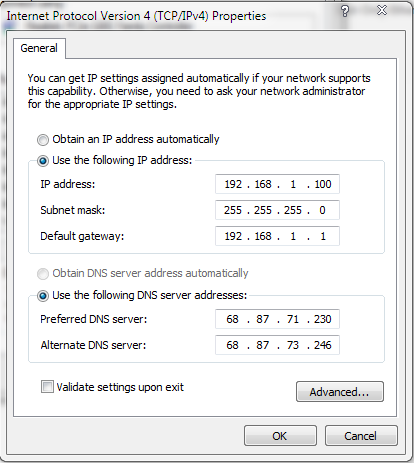
I know how to set up a static IP address, it's set up and working on my Local Area Connection adapter. These are my current settings:
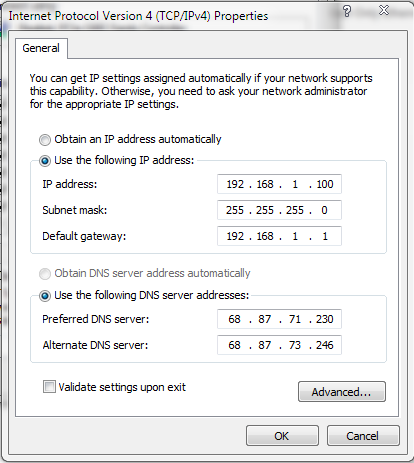
vDf6k.png


I'm trying to do the same on my Wireless adapter using these settings:
UO0sV.png


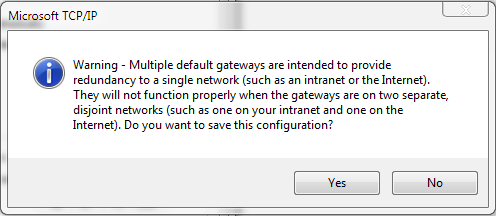
But I get this error:
6ZnF4.png


I'm not sure what to change the Default Gateway to, so what should I put there?

So far, the only way I can have a static IP address on my Wireless adapter is to clear the setting on my Local Area Connection adapter, but this is a real pain to do every time I switch.

Thanks in advance. :D
 

My Computer

Computer Manufacturer/Model Number
Asus
OS
Windows 7 Ultimate 64bit
CPU
Intel Core 2 Duo P7450 @ 2.13GH/z
Memory
4GB
Graphics Card(s)
Nvidia GeForce 9800m GS
Screen Resolution
1366x768
Hard Drives
320GB
Internet Speed
29.94Mb/s down, 2.71Mb/s up.
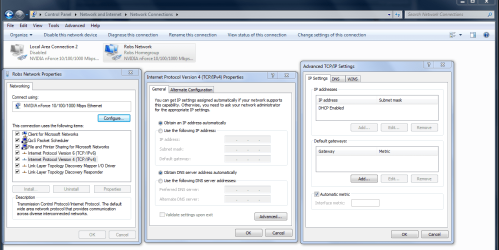
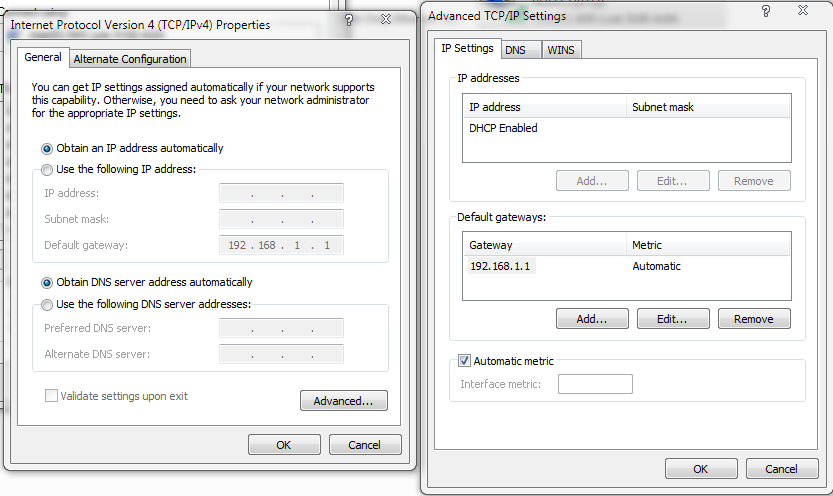
You should be able to go into the TCP/IP advanced settings window and set up both adaptors using that window. Although having the same gateway's for both IPv4 connections might be problematic.

Click on the advanced button at the bottom right of the IPv4 connection properties window to get to the TCP/IP connections window.

The default gateway's should both be the same if you are using the same router for both connections.

First click on the "use the following IP address" and the use the following DNS server addresses, in the IPv4 properties window. Then click the advanced tab to get into the TCP/IP set up window.

You should be able to list both IP addresses and subnets in the upper right window, and both gateway's in the next window down, on the DNS tab you can list the DNS and secondary DNS for both. Use the ADD button for this.

Although I havn't tried doing this myself. Usually the TCP/IP windows is used for two different subnets but it may work for dual IPv4 connections.
 

Attachments

  • IPv4 alternate configuration and TCPip settings.PNG
    IPv4 alternate configuration and TCPip settings.PNG
    187.8 KB · Views: 224
Last edited:

My Computer

Computer type
PC/Desktop
Computer Manufacturer/Model Number
Home built
OS
Windows 7 Ult, Windows 8.1 Pro,
CPU
Q9650-4.275GHz, E8600 4.5GHz, E6750-3.8GHz
Motherboard
Evga 780i FTW
Memory
G.Skill PC2 9600 1200Mhz 5 5 5 15 2T
Graphics Card(s)
GTX480
Sound Card
Asus Xonar D2
Monitor(s) Displays
HannsG
Screen Resolution
1680X1050
Hard Drives
GSkill Phoenix Pro 120GB SSD
PSU
ThermalTake Toughpower 1000Watt modular
Case
ThermalTake XaserV
Cooling
Xigmatek S1283
Keyboard
Logitech G15
Mouse
Logitech G9
Internet Speed
T1

My Computer

Computer Manufacturer/Model Number
Asus
OS
Windows 7 Ultimate 64bit
CPU
Intel Core 2 Duo P7450 @ 2.13GH/z
Memory
4GB
Graphics Card(s)
Nvidia GeForce 9800m GS
Screen Resolution
1366x768
Hard Drives
320GB
Internet Speed
29.94Mb/s down, 2.71Mb/s up.
Yes, you would only have the 1 gateway since both networks you connect to are using the exact same IP address.
 

My Computer

Computer Manufacturer/Model Number
Self-Built in July 2009
OS
Windows 7 Ultimate x64
CPU
Intel Q9550 2.83Ghz OC'd to 3.40Ghz
Motherboard
Gigabyte GA-EP45-UD3R rev. 1.1, F12 BIOS
Memory
8GB G.Skill PI DDR2-800, 4-4-4-12 timings
Graphics Card(s)
EVGA 1280MB Nvidia GeForce GTX570
Sound Card
Realtek ALC899A 8 channel onboard audio
Monitor(s) Displays
23" Acer x233H
Screen Resolution
1920x1080
Hard Drives
Intel X25-M 80GB Gen 2 SSD
Western Digital 1TB Caviar Black, 32MB cache. WD1001FALS
PSU
Corsair 620HX modular
Case
Antec P182
Cooling
stock
Keyboard
ABS M1 Mechanical
Mouse
Logitech G9 Laser Mouse
Internet Speed
15/2 cable modem
Other Info
Windows and Linux enthusiast. Logitech G35 Headset.
So, what do I do?
 

My Computer

Computer Manufacturer/Model Number
Asus
OS
Windows 7 Ultimate 64bit
CPU
Intel Core 2 Duo P7450 @ 2.13GH/z
Memory
4GB
Graphics Card(s)
Nvidia GeForce 9800m GS
Screen Resolution
1366x768
Hard Drives
320GB
Internet Speed
29.94Mb/s down, 2.71Mb/s up.
So, what do I do?
and both gateway's in the next window down

What do you mean? I only have one gateway to use, 192.168.1.1.

Yes I know this, use the same gateway and different IP's, input that info into the TCP/IP window.

You would still be using the same gateway for both, thanks for making that clear PParks.

You need use the Add button to input that info into the TCP/IP window instead of the ipv4 window.

I just explained the process in the last post complete with pictures, although I didn't put my IP info into the TCP/IP window it should be obvious where the info goes.

Not sure what else I can do to help but if you get stuck let me know. :)
 

My Computer

Computer type
PC/Desktop
Computer Manufacturer/Model Number
Home built
OS
Windows 7 Ult, Windows 8.1 Pro,
CPU
Q9650-4.275GHz, E8600 4.5GHz, E6750-3.8GHz
Motherboard
Evga 780i FTW
Memory
G.Skill PC2 9600 1200Mhz 5 5 5 15 2T
Graphics Card(s)
GTX480
Sound Card
Asus Xonar D2
Monitor(s) Displays
HannsG
Screen Resolution
1680X1050
Hard Drives
GSkill Phoenix Pro 120GB SSD
PSU
ThermalTake Toughpower 1000Watt modular
Case
ThermalTake XaserV
Cooling
Xigmatek S1283
Keyboard
Logitech G15
Mouse
Logitech G9
Internet Speed
T1
Yes I know this, use the same gateway and different IP's, input that info into the TCP/IP window.

You would still be using the same gateway for both, thanks for making that clear PParks.

You need use the Add button to input that info into the TCP/IP window instead of the ipv4 window.

I just explained the process in the last post complete with pictures, although I didn't put my IP info into the TCP/IP window it should be obvious where the info goes.

Not sure what else I can do to help but if you get stuck let me know. :)

That still gives me an error.
 

Attachments

  • Capture.PNG
    Capture.PNG
    51.5 KB · Views: 145

My Computer

Computer Manufacturer/Model Number
Asus
OS
Windows 7 Ultimate 64bit
CPU
Intel Core 2 Duo P7450 @ 2.13GH/z
Memory
4GB
Graphics Card(s)
Nvidia GeForce 9800m GS
Screen Resolution
1366x768
Hard Drives
320GB
Internet Speed
29.94Mb/s down, 2.71Mb/s up.
You don't need to put in the default gateway twice. The gateway is exactly the same for your two nodes on the same network using a 255.255.255.0 netmask (/24)
 

My Computer

Computer Manufacturer/Model Number
Self-Built in July 2009
OS
Windows 7 Ultimate x64
CPU
Intel Q9550 2.83Ghz OC'd to 3.40Ghz
Motherboard
Gigabyte GA-EP45-UD3R rev. 1.1, F12 BIOS
Memory
8GB G.Skill PI DDR2-800, 4-4-4-12 timings
Graphics Card(s)
EVGA 1280MB Nvidia GeForce GTX570
Sound Card
Realtek ALC899A 8 channel onboard audio
Monitor(s) Displays
23" Acer x233H
Screen Resolution
1920x1080
Hard Drives
Intel X25-M 80GB Gen 2 SSD
Western Digital 1TB Caviar Black, 32MB cache. WD1001FALS
PSU
Corsair 620HX modular
Case
Antec P182
Cooling
stock
Keyboard
ABS M1 Mechanical
Mouse
Logitech G9 Laser Mouse
Internet Speed
15/2 cable modem
Other Info
Windows and Linux enthusiast. Logitech G35 Headset.
It's still not working.

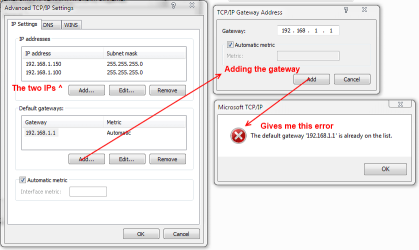
I click advanced, enter in both IP addresses, and leave one gateway so that it looks like this:
GG3WO.png


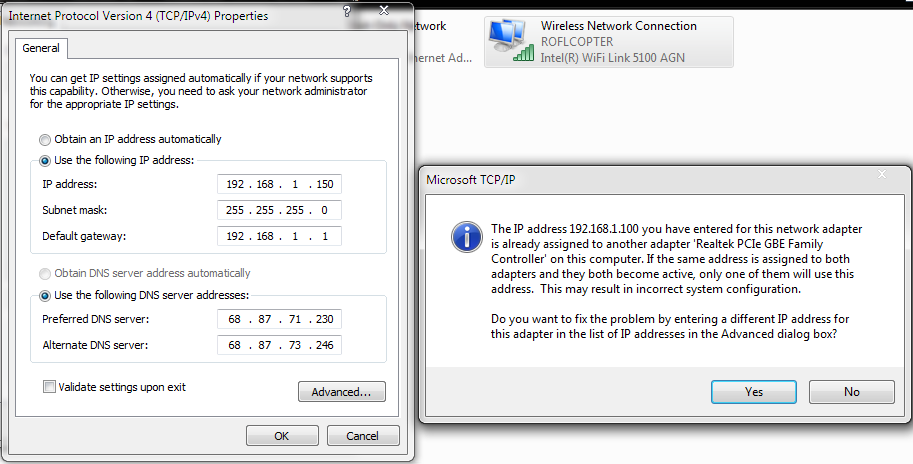
But when I click OK, I get this message:
u2WFW.png


That's because I already have 192.168.1.100 assigned to my wired internet adapter. Here:
oPeqw.png


I'm starting to think what I want to accomplish is impossible.
 

My Computer

Computer Manufacturer/Model Number
Asus
OS
Windows 7 Ultimate 64bit
CPU
Intel Core 2 Duo P7450 @ 2.13GH/z
Memory
4GB
Graphics Card(s)
Nvidia GeForce 9800m GS
Screen Resolution
1366x768
Hard Drives
320GB
Internet Speed
29.94Mb/s down, 2.71Mb/s up.
Don't put both IP addresses in the TCP/IP properties on the same adapter. You can set a static for the wireless, a static for the wired and they can be different IP's. should be able to ping either if you are connected to both.
 

My Computer

Computer Manufacturer/Model Number
Self-Built in July 2009
OS
Windows 7 Ultimate x64
CPU
Intel Q9550 2.83Ghz OC'd to 3.40Ghz
Motherboard
Gigabyte GA-EP45-UD3R rev. 1.1, F12 BIOS
Memory
8GB G.Skill PI DDR2-800, 4-4-4-12 timings
Graphics Card(s)
EVGA 1280MB Nvidia GeForce GTX570
Sound Card
Realtek ALC899A 8 channel onboard audio
Monitor(s) Displays
23" Acer x233H
Screen Resolution
1920x1080
Hard Drives
Intel X25-M 80GB Gen 2 SSD
Western Digital 1TB Caviar Black, 32MB cache. WD1001FALS
PSU
Corsair 620HX modular
Case
Antec P182
Cooling
stock
Keyboard
ABS M1 Mechanical
Mouse
Logitech G9 Laser Mouse
Internet Speed
15/2 cable modem
Other Info
Windows and Linux enthusiast. Logitech G35 Headset.
If I only put only one in the Advanced, it puts me exactly where I when I started.
 

My Computer

Computer Manufacturer/Model Number
Asus
OS
Windows 7 Ultimate 64bit
CPU
Intel Core 2 Duo P7450 @ 2.13GH/z
Memory
4GB
Graphics Card(s)
Nvidia GeForce 9800m GS
Screen Resolution
1366x768
Hard Drives
320GB
Internet Speed
29.94Mb/s down, 2.71Mb/s up.
It's still not working.

I click advanced, enter in both IP addresses, and leave one gateway so that it looks like this:
GG3WO.png


But when I click OK, I get this message:
u2WFW.png


That's because I already have 192.168.1.100 assigned to my wired internet adapter. Here:
oPeqw.png


I'm starting to think what I want to accomplish is impossible.

As I mentioned earlier you do not use the IPv4 properties window for any of your connections any longer.

All info for both adaptors needs to go into the TCP/ip window instead.

Having them both connected at the same time may still be problematic.
 

My Computer

Computer type
PC/Desktop
Computer Manufacturer/Model Number
Home built
OS
Windows 7 Ult, Windows 8.1 Pro,
CPU
Q9650-4.275GHz, E8600 4.5GHz, E6750-3.8GHz
Motherboard
Evga 780i FTW
Memory
G.Skill PC2 9600 1200Mhz 5 5 5 15 2T
Graphics Card(s)
GTX480
Sound Card
Asus Xonar D2
Monitor(s) Displays
HannsG
Screen Resolution
1680X1050
Hard Drives
GSkill Phoenix Pro 120GB SSD
PSU
ThermalTake Toughpower 1000Watt modular
Case
ThermalTake XaserV
Cooling
Xigmatek S1283
Keyboard
Logitech G15
Mouse
Logitech G9
Internet Speed
T1
If I don't in anything in the IPv4 window, the advanced window looks like this and I can't change anything.
2RUPJ.png
 

My Computer

Computer Manufacturer/Model Number
Asus
OS
Windows 7 Ultimate 64bit
CPU
Intel Core 2 Duo P7450 @ 2.13GH/z
Memory
4GB
Graphics Card(s)
Nvidia GeForce 9800m GS
Screen Resolution
1366x768
Hard Drives
320GB
Internet Speed
29.94Mb/s down, 2.71Mb/s up.
You first need to click where it says "Use the following IP address" in the first window. At that point you will be able to use the "add" button to add your IP's and other info to the second TCP/IP window.

And there is no telling if this will work because TCP/ip is mostly for adding a secondary subnet. Hoping it works for you as I really havn't tried using the TCP/ip window for adding a secondary IP.
 
Last edited:

My Computer

Computer type
PC/Desktop
Computer Manufacturer/Model Number
Home built
OS
Windows 7 Ult, Windows 8.1 Pro,
CPU
Q9650-4.275GHz, E8600 4.5GHz, E6750-3.8GHz
Motherboard
Evga 780i FTW
Memory
G.Skill PC2 9600 1200Mhz 5 5 5 15 2T
Graphics Card(s)
GTX480
Sound Card
Asus Xonar D2
Monitor(s) Displays
HannsG
Screen Resolution
1680X1050
Hard Drives
GSkill Phoenix Pro 120GB SSD
PSU
ThermalTake Toughpower 1000Watt modular
Case
ThermalTake XaserV
Cooling
Xigmatek S1283
Keyboard
Logitech G15
Mouse
Logitech G9
Internet Speed
T1
I don't want multiple IP addresses for one adapter. I want one static IP for each adapter so I'll have forwarded ports on both wired and wireless.
 

My Computer

Computer Manufacturer/Model Number
Asus
OS
Windows 7 Ultimate 64bit
CPU
Intel Core 2 Duo P7450 @ 2.13GH/z
Memory
4GB
Graphics Card(s)
Nvidia GeForce 9800m GS
Screen Resolution
1366x768
Hard Drives
320GB
Internet Speed
29.94Mb/s down, 2.71Mb/s up.
Like I said earlier, I'm not sure if this will work or not. Windows 7 does not like IP's assigned to multiple adaptors at once and this isn't something I can test out on this machine.
 

My Computer

Computer type
PC/Desktop
Computer Manufacturer/Model Number
Home built
OS
Windows 7 Ult, Windows 8.1 Pro,
CPU
Q9650-4.275GHz, E8600 4.5GHz, E6750-3.8GHz
Motherboard
Evga 780i FTW
Memory
G.Skill PC2 9600 1200Mhz 5 5 5 15 2T
Graphics Card(s)
GTX480
Sound Card
Asus Xonar D2
Monitor(s) Displays
HannsG
Screen Resolution
1680X1050
Hard Drives
GSkill Phoenix Pro 120GB SSD
PSU
ThermalTake Toughpower 1000Watt modular
Case
ThermalTake XaserV
Cooling
Xigmatek S1283
Keyboard
Logitech G15
Mouse
Logitech G9
Internet Speed
T1
Oh I know exactly what you want. It's too bad you can't seem to follow the directions though.

Too bad you're not giving me correct directions.
 

My Computer

Computer Manufacturer/Model Number
Asus
OS
Windows 7 Ultimate 64bit
CPU
Intel Core 2 Duo P7450 @ 2.13GH/z
Memory
4GB
Graphics Card(s)
Nvidia GeForce 9800m GS
Screen Resolution
1366x768
Hard Drives
320GB
Internet Speed
29.94Mb/s down, 2.71Mb/s up.
Well actually windows does not support the use of multiple adaptors with common gateways on the same system so there are no directions that can help in this case. Although I mentioned this may not work to begin with, I figured you were determined to try anyway so I tried to help.
 
Last edited:

My Computer

Computer type
PC/Desktop
Computer Manufacturer/Model Number
Home built
OS
Windows 7 Ult, Windows 8.1 Pro,
CPU
Q9650-4.275GHz, E8600 4.5GHz, E6750-3.8GHz
Motherboard
Evga 780i FTW
Memory
G.Skill PC2 9600 1200Mhz 5 5 5 15 2T
Graphics Card(s)
GTX480
Sound Card
Asus Xonar D2
Monitor(s) Displays
HannsG
Screen Resolution
1680X1050
Hard Drives
GSkill Phoenix Pro 120GB SSD
PSU
ThermalTake Toughpower 1000Watt modular
Case
ThermalTake XaserV
Cooling
Xigmatek S1283
Keyboard
Logitech G15
Mouse
Logitech G9
Internet Speed
T1
Back to your original post.

The wording on that error message indicates that either the message is in error or there is a bug in the TPC/IP setup code.

Clearly your are not using the same gateway on "two disjoint networks". The warning should not have even come up at all in that case. I can only assume they throw it up /always/ just in case, but that can be misleading.

Have you tried simply clicking "Yes" to the warning and moving on?
 

My Computer

Computer Manufacturer/Model Number
Scratch built
OS
Windows 7 x64 Ultimate
CPU
i7 960
Motherboard
Asus P6X58D
Memory
12 Gig Corsair Dominator
Graphics Card(s)
Nvidia 480
Sound Card
Maudio Delta 44 + breakout box
Monitor(s) Displays
Dell UltraSharp U2410 24in and Samsung 21 dual monitors
Screen Resolution
1920x1200 and 1280x1024
Hard Drives
Primary: Intel X-25M G2 160G SSD
Secondary: Segate baracuda 1.0 TB
HDs in AHCI mode.
PSU
Corasair TX850
Case
Cooler Master HAF
Cooling
Corsair H50
Keyboard
Logitech G15 + N52 game pad
Mouse
Logitech MX518
Internet Speed
15kbs down 4.5kbps up
Other Info
WEI 7.6
CPU & RAM 7.6
Graphics 7.9
Hard disk 7.7
That disconnects me from the internet and brings up the Windows Network Diagnostics window. It tells me it can fix my setting s for me. I click "Apply this Fix", and it's solution was DHCP was not enabled, so it's enabled and it reconnects me to the internet, but it reverts my IPv4 settings to "Obtain an IP address automatically".
 

My Computer

Computer Manufacturer/Model Number
Asus
OS
Windows 7 Ultimate 64bit
CPU
Intel Core 2 Duo P7450 @ 2.13GH/z
Memory
4GB
Graphics Card(s)
Nvidia GeForce 9800m GS
Screen Resolution
1366x768
Hard Drives
320GB
Internet Speed
29.94Mb/s down, 2.71Mb/s up.
Back
Top