SUPER FAST HardDrive/RAMDISK

E982

New member
Local time
12:46 PM
Messages
23
I made a RAMDISK
 

Attachments

  • Untitled.jpg
    Untitled.jpg
    42.8 KB · Views: 46

My Computer

Computer type
PC/Desktop
Computer Manufacturer/Model Number
Custom build
OS
Windows 7 Ultimate 64bit
CPU
i7 2600k LGA1156
Motherboard
Msi GD-80 P55
Memory
Kingston 4x4Gb
Graphics Card(s)
Amd HIS HD Radeon 6970
Hard Drives
OCZ Aggility 4 256Gb For Os & other HDDs for files.
Antivirus
Avg 2013 Free
Browser
Google Chrome
It's a nice game but there is not really much you can do with it.
 

My Computer

Computer Manufacturer/Model Number
HP, Dell, Gateway, Toshiba - 4 laptops and 2 desktops
OS
Vista, Windows7, Mint Mate, Zorin, Windows 8
CPU
from 1.6GHz Duo to i7
Monitor(s) Displays
2x HP w2207
Hard Drives
5x HDD, 7x SSD, 12x Externals
Keyboard
with trackball - no mices
Mouse
Trackball mice
Internet Speed
DSL 6000
Yeah I have it set so when my computer boots it reloads an img from last backup that happens when I shut off my computer.
 

My Computer

Computer type
PC/Desktop
Computer Manufacturer/Model Number
Custom build
OS
Windows 7 Ultimate 64bit
CPU
i7 2600k LGA1156
Motherboard
Msi GD-80 P55
Memory
Kingston 4x4Gb
Graphics Card(s)
Amd HIS HD Radeon 6970
Hard Drives
OCZ Aggility 4 256Gb For Os & other HDDs for files.
Antivirus
Avg 2013 Free
Browser
Google Chrome
What do you mean?

Yeah I have it set so when my computer boots it reloads an img from last backup that happens when I shut off my computer.

You're supposed to use it to boost performance by swapping the Windows Temp and User Temp folder (Environment variables) onto it and if you're really brave you could swap the page file for your windows partition onto it but I don't see where backup comes into it.

Maybe you could explain what files you're keeping on it.
 

My Computer

Computer type
Laptop
Computer Manufacturer/Model Number
ASUS
OS
Microsoft Windows 7 Home Premium 64-bit 7601 Multiprocessor Free Service Pack 1
CPU
AMD C-60 APU with Radeon(tm) HD Graphics
Motherboard
ASUSTeK COMPUTER INC. X501U
Memory
4.00 GB
Graphics Card(s)
AMD Radeon HD 6290 Graphics
Sound Card
(1) AMD High Definition Audio Device (2) Realtek High Defi
Screen Resolution
1366 x 768 x 32 bits (4294967296 colors) @ 60 Hz
Hard Drives
Hitachi HTS545050A7E380 SATA Disk Device
Antivirus
Comodo CIS & FW, SecureAplus App Whitelisting, Threatfire
Browser
Cyberfox 64bit, Opera 64bit, Airfox
Other Info
Spy-The-Spy, HitmanPro.Alert, Norton Connect Safe, MJRegWatcher, BitDefender TrafficLight, Voodoo Shield, Zemana AntiMalware
The page file is a waste of time and precious RAM. With 4, 6 or 8GB of RAM you will practically never see a page swap. In my book, RAMdisk only makes sense if you have 16GB or more RAM. Then you can afford the space on the RAM.
 

My Computer

Computer Manufacturer/Model Number
HP, Dell, Gateway, Toshiba - 4 laptops and 2 desktops
OS
Vista, Windows7, Mint Mate, Zorin, Windows 8
CPU
from 1.6GHz Duo to i7
Monitor(s) Displays
2x HP w2207
Hard Drives
5x HDD, 7x SSD, 12x Externals
Keyboard
with trackball - no mices
Mouse
Trackball mice
Internet Speed
DSL 6000
The speed benefits gained while using the ramdisk are mostly lost by the need to load the ramdisk at startup and save the ramdisk's contents prior to shutdown.

For me, ramdisks were only truly useful on my early, floppy disk drive only computers.
 

My Computer

Computer type
PC/Desktop
Computer Manufacturer/Model Number
Home Built desktop, Dell G15 5511 Gaming laptop,MS Surface Pro 7 tablet
OS
W10 Pro desktop, W11 laptop, W11 Pro tablet (all 64-bit)
CPU
3.7Ghz 8700K i7, i7-11800H, i7-1065G7
Motherboard
ASUS TUF Z370-Pro Gaming in desktop
Memory
16G desktop, 16G laptop, 4G tablet
Graphics Card(s)
AMD Radeon RX580, RTX 3060, Intel Iris Plus
Sound Card
High Definition Audio (Built-in to mobo)
Monitor(s) Displays
Samsung U32J59 32" (2x), 15.6", 12"
Screen Resolution
3840x2160, 3840x2160, 1920x1080, 2160x1440
Hard Drives
500G SSD for OS; 2T, 10T & 15T HDDs for Data on Desktop, 1TB SSD laptop, 128G SSD tablet.
PSU
Corsair CX 750M
Case
Antec 100
Cooling
CM 212+
Keyboard
IBM Model M - used continuously since 1986
Mouse
Microsoft Pro IntelliMouse
Internet Speed
400M down 8M up
Antivirus
Windows Defender
Browser
FireFox
Other Info
Built my first computer (8Mhz 8088cpu, 640K RAM, 20MB HDD, 2 360K floppy drives) in 1985 and have been building them for myself, relatives and friends ever since.
Agree

The page file is a waste of time and precious RAM. With 4, 6 or 8GB of RAM you will practically never see a page swap. In my book, RAMdisk only makes sense if you have 16GB or more RAM. Then you can afford the space on the RAM.

Hi,

I'd agree with you! I tried using the swapadd64 utility to force the page file swap to RAMdisk and noticed no significant performance boost. I was just curious about the OP's intentions.

Best,

Chris.
 

My Computer

Computer type
Laptop
Computer Manufacturer/Model Number
ASUS
OS
Microsoft Windows 7 Home Premium 64-bit 7601 Multiprocessor Free Service Pack 1
CPU
AMD C-60 APU with Radeon(tm) HD Graphics
Motherboard
ASUSTeK COMPUTER INC. X501U
Memory
4.00 GB
Graphics Card(s)
AMD Radeon HD 6290 Graphics
Sound Card
(1) AMD High Definition Audio Device (2) Realtek High Defi
Screen Resolution
1366 x 768 x 32 bits (4294967296 colors) @ 60 Hz
Hard Drives
Hitachi HTS545050A7E380 SATA Disk Device
Antivirus
Comodo CIS & FW, SecureAplus App Whitelisting, Threatfire
Browser
Cyberfox 64bit, Opera 64bit, Airfox
Other Info
Spy-The-Spy, HitmanPro.Alert, Norton Connect Safe, MJRegWatcher, BitDefender TrafficLight, Voodoo Shield, Zemana AntiMalware
The page file is a waste of time and precious RAM. With 4, 6 or 8GB of RAM you will practically never see a page swap. In my book, RAMdisk only makes sense if you have 16GB or more RAM. Then you can afford the space on the RAM.

Hi,

I'd agree with you! I tried using the swapadd64 utility to force the page file swap to RAMdisk and noticed no significant performance boost. I was just curious about the OP's intentions.

Best,

Chris.


Yeah Linus Tech Tips told me about that its good because most games and programs skip strait to the page.
 

My Computer

Computer type
PC/Desktop
Computer Manufacturer/Model Number
Custom build
OS
Windows 7 Ultimate 64bit
CPU
i7 2600k LGA1156
Motherboard
Msi GD-80 P55
Memory
Kingston 4x4Gb
Graphics Card(s)
Amd HIS HD Radeon 6970
Hard Drives
OCZ Aggility 4 256Gb For Os & other HDDs for files.
Antivirus
Avg 2013 Free
Browser
Google Chrome
The page file is a waste of time and precious RAM. With 4, 6 or 8GB of RAM you will practically never see a page swap. In my book, RAMdisk only makes sense if you have 16GB or more RAM. Then you can afford the space on the RAM.

Yeah I have the RAM to Do it
 

My Computer

Computer type
PC/Desktop
Computer Manufacturer/Model Number
Custom build
OS
Windows 7 Ultimate 64bit
CPU
i7 2600k LGA1156
Motherboard
Msi GD-80 P55
Memory
Kingston 4x4Gb
Graphics Card(s)
Amd HIS HD Radeon 6970
Hard Drives
OCZ Aggility 4 256Gb For Os & other HDDs for files.
Antivirus
Avg 2013 Free
Browser
Google Chrome
The page file is a waste of time and precious RAM. With 4, 6 or 8GB of RAM you will practically never see a page swap. In my book, RAMdisk only makes sense if you have 16GB or more RAM. Then you can afford the space on the RAM.

Yeah I have it set so when my computer boots it reloads an img from last backup that happens when I shut off my computer.

You're supposed to use it to boost performance by swapping the Windows Temp and User Temp folder (Environment variables) onto it and if you're really brave you could swap the page file for your windows partition onto it but I don't see where backup comes into it.

Maybe you could explain what files you're keeping on it.

At the moment nothing but yeah I will do some temp and a Page File is going on it for sure.
 

My Computer

Computer type
PC/Desktop
Computer Manufacturer/Model Number
Custom build
OS
Windows 7 Ultimate 64bit
CPU
i7 2600k LGA1156
Motherboard
Msi GD-80 P55
Memory
Kingston 4x4Gb
Graphics Card(s)
Amd HIS HD Radeon 6970
Hard Drives
OCZ Aggility 4 256Gb For Os & other HDDs for files.
Antivirus
Avg 2013 Free
Browser
Google Chrome
Never do that! Putting the page file on a RAM disk is the biggest mistake one could do, because it negates the very function of the page file to begin with.

The page file is there to "simulate" that there is more RAM than really is installed. When Windows runs out of memory, it unloads the least recently used (at least, in theory) and saves to disk, so that memory is available to something else. But by putting it in a RAM drive, to simulate that extra memory, you're consuming memory. So, what you gain by the page file, you're losing on the RAM disk.

Because of that, putting the page file on a RAM drive is WORSE than disabling the page file altogether. The ideal place is a second, physically different hard disk, or the system drive if there is nothing better. But never on RAM.

 

My Computer

Computer type
Laptop
Computer Manufacturer/Model Number
Toshiba Sattelite A665-S6092
OS
Windows 7 Ultimate x64
CPU
Intel Core i7-740QM
Memory
8 GB DDR3
Graphics Card(s)
NVIDIA GeForce 330GT
Screen Resolution
1366x768
Hard Drives
Samsung 840 SSD 500GB
1TB USB3 external HD
Cooling
Coolermaster Notepal U3 notebook cooling pad
Internet Speed
3mbps ASDL
Antivirus
ClamWin 0.98.7
Browser
Opera 12.17 x86 (main), Firefox 38 (sec), IE11 (last resort)
Right - it is catch 22.
 

My Computer

Computer Manufacturer/Model Number
HP, Dell, Gateway, Toshiba - 4 laptops and 2 desktops
OS
Vista, Windows7, Mint Mate, Zorin, Windows 8
CPU
from 1.6GHz Duo to i7
Monitor(s) Displays
2x HP w2207
Hard Drives
5x HDD, 7x SSD, 12x Externals
Keyboard
with trackball - no mices
Mouse
Trackball mice
Internet Speed
DSL 6000
I have never been a fan of using a RAMDisk with a modern OS. It was useful with DOS and 16 bit versions of Windows. But that was a long time ago. Modern operating systems have a sophisticated caching system that provides most of the benefits of a RAMDisk with fewer of the problems.

A RAMDisk provides very fast access to whatever files you have chosen to store there. The system cache is essentially a smart and dynamic RAMDisk. But you don't have to choose what is kept there, the OS does that for you based on actual usage. Portions of files that are frequently accessed will be kept in the cache for quick access. And the contents of the cache varies according to how it is used. And the size of the cache is dynamically adjusted according to current needs. If you are running applications that really benefit from the cache it will grow accordingly, always consistent with overall system needs for memory. On the other hand, if you are using a large application that makes little use of the cache it will be trimmed back.

A RAMDisk offers none of those advantages but it does deprive the system cache of a substantial amount of memory that it could be using to improve performance. If you really understand how the system memory manager works and you really understand how it interacts with your workload you may be able to use a RAMDisk to your advantage. But the odds against that are pretty long.

The pagefile is a particularly bad use of a RAMDisk. There are two possible scenarios here:

1. You have sufficient RAM that diverting a substantial amount of it to a RAMDisk will not significantly impact performance. In that case the pagefile isn't going to be used enough to impact performance anyway and you have gained nothing.

2. You do not have sufficient RAM to spare for a RAMDisk pagefile. In this case the gains in pagefile performance are more than offset by the losses of the RAM for process working set and the system cache. The pagefile is a net drain on performance.

All of this becomes clear when you understand how the memory manager works. That is far to complex to explain here.
 

My Computer

Computer type
PC/Desktop
Computer Manufacturer/Model Number
HP
OS
Windows 7 Pro 64 bit
CPU
Xeon W3520
Memory
8 GB
Graphics Card(s)
Nvidia Geforce 210
Never do that! Putting the page file on a RAM disk is the biggest mistake one could do, because it negates the very function of the page file to begin with.

The page file is there to "simulate" that there is more RAM than really is installed. When Windows runs out of memory, it unloads the least recently used (at least, in theory) and saves to disk, so that memory is available to something else. But by putting it in a RAM drive, to simulate that extra memory, you're consuming memory. So, what you gain by the page file, you're losing on the RAM disk.

Because of that, putting the page file on a RAM drive is WORSE than disabling the page file altogether. The ideal place is a second, physically different hard disk, or the system drive if there is nothing better. But never on RAM.

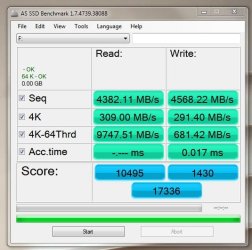
I was told that some games and programs will skip to the page file so if you put your page file on the RAM DISK you know its FAST!
 

My Computer

Computer type
PC/Desktop
Computer Manufacturer/Model Number
Custom build
OS
Windows 7 Ultimate 64bit
CPU
i7 2600k LGA1156
Motherboard
Msi GD-80 P55
Memory
Kingston 4x4Gb
Graphics Card(s)
Amd HIS HD Radeon 6970
Hard Drives
OCZ Aggility 4 256Gb For Os & other HDDs for files.
Antivirus
Avg 2013 Free
Browser
Google Chrome
I was told that some games and programs will skip to the page file so if you put your page file on the RAM DISK you know its FAST!
Can you explain what that means?
 

My Computer

Computer type
PC/Desktop
Computer Manufacturer/Model Number
HP
OS
Windows 7 Pro 64 bit
CPU
Xeon W3520
Memory
8 GB
Graphics Card(s)
Nvidia Geforce 210
I have found that if one just lets Windows 7 handle caching and page filing things work just great. If their is a way of out smarting Windows 7 memory handling I don't know what it is.
Just install a bunch of ram and enjoy.
Back in the XP days we wondered why Microsoft didn't design a system to take care of this Ram thing. Well they answered with Windows 7 taking care of the Ram thing.

LMiller7 good job with you post # 13. It won't let me rep you.
 

My Computer

Computer type
PC/Desktop
Computer Manufacturer/Model Number
Home made Desktop
OS
Windows 10 Pro. 64/ version 1709 Windows 7 Pro/64
CPU
Intel i7-6800K @ 4.3
Motherboard
ASUS X-99 Deluxe II
Memory
Corsair Platinum 16 gig @2400
Graphics Card(s)
EVGA GTX 1070 OC
Monitor(s) Displays
Asus 27" LED LCD/VE278Q
Screen Resolution
1920-1080 or 1280-720 HDMI
Hard Drives
INTEL SSD 730-240 Gb Sata 3.0/
PSU
EVGA Platium 1200W
Case
Phanteks Luxe Tempered Glass 8 fans/ one radiator
Cooling
XSPC/ Water Cooled CPU
Keyboard
Das 4 Professional
Mouse
Logitech M705/MX Anywhere 2-S
Internet Speed
100 mbits
Antivirus
Microsoft Security Essentials/ Malwarebytes Premium 3.0/ SAS
Browser
I.E. 11 default/Firefox/ ISP Time Warner Cable/Spectrum
Other Info
LG BluRay Burner/
Sound system-KLipsch-THX/
Icy Dock ssd Hot Swap bays.
Back in the XP days we wondered why Microsoft didn't design a system to take care of this Ram thing. Well they answered with Windows 7 taking care of the Ram thing.

XP wasn't as bad as many people think. Actually memory management in XP was very good. Of course Windows 7 is better.

One problem was the misleading information in Task Manager. It wasn't wrong, just mislabeled and thus misinterpreted.
I am speaking of the graphs labeled "PF Usage" and "Pagefile usage" which actually referred to the commit charge. Many computer professionals didn't understand this. I saw one forum thread where a number of "experts" were stumbling over themselves trying to explain the apparent behavior, but never understanding what they were seeing. The designers of XP were seriously maligned, all over a mislabeled graph. This was by no means an isolated incident. Task Manager often confused rather than informed.

NT4, Windows 2000, and XP all had a graph showing the commit charge but labeled otherwise. The graph was finally done away with in Vista. It really wasn't that important anyway.
 

My Computer

Computer type
PC/Desktop
Computer Manufacturer/Model Number
HP
OS
Windows 7 Pro 64 bit
CPU
Xeon W3520
Memory
8 GB
Graphics Card(s)
Nvidia Geforce 210
I made a ramdisk once and linked the "SoftwareDistribution" folder on a clean Vista x64 install, ran windows update and the updates were downloaded and installed incredibly fast, it shaved 4/5 of the time of the full update process.
 

My Computer

Computer type
PC/Desktop
OS
Microsoft Windows 10 Professional / Windows 7 Professional
CPU
Intel i5-3570
Motherboard
Lenovo Mahobay
Memory
16GB DDR3
Graphics Card(s)
AMD Radeon HD 7850 2GB
Sound Card
(1) Realtek HD Audio (2) AMD HD Audio
Monitor(s) Displays
LG LS192WS
Screen Resolution
1440 x 900 @ 32bit color
Hard Drives
(1) SUV300S37A/120G (2) ST3500413AS SATA Disk Device AHCI mode enabled.
PSU
Corsair HX620
Case
Thermaltake V4 Black Edition
Cooling
Cooler Master Hyper 212 + Artic Silver 5 on CPU/GPU
Keyboard
Dell SK-8115
Mouse
Razer Copperhead with MAPED mat (awesome!)
Internet Speed
100 Mbps up/down
Browser
Chrome
Back
Top