svchost.exe uses all of my memory at startup

vikike76

New member
Local time
12:50 AM
Messages
6
Dear Everybody,

I wonder if somebody could help me!
I'm from Hungary.
I use a Win 7 Pro 64bit HUN.
A week ago at the startup the svchost.exe loads all of my memory (4GB).
During eating memory, the system freeze.
After loaded all of memory, discharge all, and the system works normal...

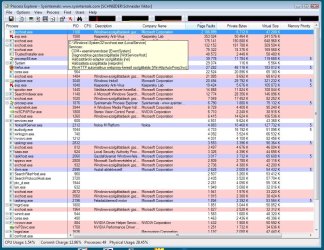
Please see the attached pictures and the startup list.

On picture #2, you can see services of this svchost process (PID 1100).

I beg your help!

Thanks in advance!

Viktor
 

Attachments

  • 1.jpg
    1.jpg
    82.5 KB · Views: 166
  • 2.jpg
    2.jpg
    171.1 KB · Views: 190
  • startuplist.txt
    startuplist.txt
    52 KB · Views: 10

My Computer My Computer

At a glance

Win 7 Pro 64bit HUN
OS
Win 7 Pro 64bit HUN
try to disable windows automatic update from control panel and also from services.msc, this worked for me on a friend's pc (his problem was 100% CPU usage)

or, sometimes, the process hides an infection in the computer, in this case do a scan with Malwarebytes Anti-Malware or SUPERAntiSpyware and see if u find any problems

/didn't see your post theog, i was writing mine, lol on malwarebytes, truly a great utility
 
Last edited:

My Computer My Computer

At a glance

Windows 8.1 x64 Enterprisei5 4690KCorsair 16 GB DDR3 2000MhzAsus GTX760 2GB 256bit
Computer type
PC/Desktop
Computer Manufacturer/Model Number
2015 Home Made with Great Performance
OS
Windows 8.1 x64 Enterprise
CPU
i5 4690K
Motherboard
Gigabyte GA-Z87X-UD5H
Memory
Corsair 16 GB DDR3 2000Mhz
Graphics Card(s)
Asus GTX760 2GB 256bit
Sound Card
Realtek OnBoard
Monitor(s) Displays
Samsung SyncMaster SA350 + LG 42LA660S
Screen Resolution
1920x1080 Full HD
Hard Drives
1x 640GB Western Digital SATA
1x 4TB Western Digital Green SATA
3x 2TB Western Digital Caviar Green RS SATA
1x 3TB Western Digital Caviar Green SATA
1x 128GB Corsair Force Red SSD
PSU
Corsair CX 600W
Case
Nexus Prominent 5
Cooling
CPU: Artic Cooler Freezer 13 + 5x120mm Case Fans @ 700RPM
Keyboard
Microsoft Wired Keyboard 600
Mouse
Microsoft Wireless Mobile Mouse 1000
Internet Speed
FO 1 Gbit/s
Antivirus
ESET / Malwarebytes
Browser
Opera / Chrome
Other Info
- Fan Controller Aerocool X-Vision 5
- 1x 1TB Hitachi DeskPlus External USB
- 1x 1TB Western Digital Passport External USB3
Hi,

I did check with Malwarebytes many times. Nothing.
I'm trying the disable of update.

Thanks!! I come back.
 

My Computer My Computer

At a glance

Win 7 Pro 64bit HUN
OS
Win 7 Pro 64bit HUN
Hi,

Malwarebytes found nothing.
But I found the offender: netprofm.dll (Network List Manager)
I uncheked in msconfig, the startup will be perfect, but I have no network.
If I start it, it will eat my all RAM and I have network again.
Should I download netprofm.dll from an filerepair webpage and replace the old corrupted to new one?

Thanks, bye!
Viktor
 

My Computer My Computer

At a glance

Win 7 Pro 64bit HUN
OS
Win 7 Pro 64bit HUN
What in the world are you seeing? Your memory usage is not even above 30%.
 

My Computer My Computer

At a glance

Windows 10 Pro (x64)Intel Core i7-3930K (3.2GHz - 4.5GHz)4x Samsung 4GB PC3-12800 DDR3 (16GB 1600MHz)Nvidia Geforce GTX 690
Computer type
PC/Desktop
Computer Manufacturer/Model Number
Alienware Aurora ALX R4
OS
Windows 10 Pro (x64)
CPU
Intel Core i7-3930K (3.2GHz - 4.5GHz)
Motherboard
Alienware Aurora-R4 x79
Memory
4x Samsung 4GB PC3-12800 DDR3 (16GB 1600MHz)
Graphics Card(s)
Nvidia Geforce GTX 690
Sound Card
SteelSeries Siberia Elite
Monitor(s) Displays
Dell UltraSharp U3011
Screen Resolution
2560x1600
Hard Drives
Samsung 850 Pro 256 GB, Seagate 1TB Desktop Hybrid HDD, 2x Western Digital 4TB Green HDD
PSU
875W Some Dell PSU <.<
Case
Alienware Aurora ALX
Cooling
Custom Liquid Cooling (EK CPU & GPU blocks) dual EK 480RAD
Keyboard
Logitech G710+ Mechanical
Mouse
Logitech G700s
Internet Speed
Verizon Fios (50 mbps average)
Other Info
Server: Intel NUC D54250WYK: i5-4250U, 16GB, 256 GB mSATA, Windows Server 2012 R2
Hi,

During startup the memory usage 100% by svchost.exe (netprofm.dll).
The memory usage grow up tho 100% in 10min, and as soon as full it fall back.
This total process take 10-12min every startup.
After the end of this long process my computer works perfect.
 

My Computer My Computer

At a glance

Win 7 Pro 64bit HUN
OS
Win 7 Pro 64bit HUN
try updating all the drivers on your pc
 

My Computer My Computer

At a glance

Windows 8.1 x64 Enterprisei5 4690KCorsair 16 GB DDR3 2000MhzAsus GTX760 2GB 256bit
Computer type
PC/Desktop
Computer Manufacturer/Model Number
2015 Home Made with Great Performance
OS
Windows 8.1 x64 Enterprise
CPU
i5 4690K
Motherboard
Gigabyte GA-Z87X-UD5H
Memory
Corsair 16 GB DDR3 2000Mhz
Graphics Card(s)
Asus GTX760 2GB 256bit
Sound Card
Realtek OnBoard
Monitor(s) Displays
Samsung SyncMaster SA350 + LG 42LA660S
Screen Resolution
1920x1080 Full HD
Hard Drives
1x 640GB Western Digital SATA
1x 4TB Western Digital Green SATA
3x 2TB Western Digital Caviar Green RS SATA
1x 3TB Western Digital Caviar Green SATA
1x 128GB Corsair Force Red SSD
PSU
Corsair CX 600W
Case
Nexus Prominent 5
Cooling
CPU: Artic Cooler Freezer 13 + 5x120mm Case Fans @ 700RPM
Keyboard
Microsoft Wired Keyboard 600
Mouse
Microsoft Wireless Mobile Mouse 1000
Internet Speed
FO 1 Gbit/s
Antivirus
ESET / Malwarebytes
Browser
Opera / Chrome
Other Info
- Fan Controller Aerocool X-Vision 5
- 1x 1TB Hitachi DeskPlus External USB
- 1x 1TB Western Digital Passport External USB3
all drivers? it sounds very badly :shock:

not only network cards drivers?
 

My Computer My Computer

At a glance

Win 7 Pro 64bit HUN
OS
Win 7 Pro 64bit HUN
network cards drivers updated. No change. :(
 

My Computer My Computer

At a glance

Win 7 Pro 64bit HUN
OS
Win 7 Pro 64bit HUN
try this
disable your network card, pull out the net cable and restart pc
 

My Computer My Computer

At a glance

Windows 8.1 x64 Enterprisei5 4690KCorsair 16 GB DDR3 2000MhzAsus GTX760 2GB 256bit
Computer type
PC/Desktop
Computer Manufacturer/Model Number
2015 Home Made with Great Performance
OS
Windows 8.1 x64 Enterprise
CPU
i5 4690K
Motherboard
Gigabyte GA-Z87X-UD5H
Memory
Corsair 16 GB DDR3 2000Mhz
Graphics Card(s)
Asus GTX760 2GB 256bit
Sound Card
Realtek OnBoard
Monitor(s) Displays
Samsung SyncMaster SA350 + LG 42LA660S
Screen Resolution
1920x1080 Full HD
Hard Drives
1x 640GB Western Digital SATA
1x 4TB Western Digital Green SATA
3x 2TB Western Digital Caviar Green RS SATA
1x 3TB Western Digital Caviar Green SATA
1x 128GB Corsair Force Red SSD
PSU
Corsair CX 600W
Case
Nexus Prominent 5
Cooling
CPU: Artic Cooler Freezer 13 + 5x120mm Case Fans @ 700RPM
Keyboard
Microsoft Wired Keyboard 600
Mouse
Microsoft Wireless Mobile Mouse 1000
Internet Speed
FO 1 Gbit/s
Antivirus
ESET / Malwarebytes
Browser
Opera / Chrome
Other Info
- Fan Controller Aerocool X-Vision 5
- 1x 1TB Hitachi DeskPlus External USB
- 1x 1TB Western Digital Passport External USB3
Also, try opening MSconfig and uncheck everything in the startup tab. Then restart. If that eliminates the problem, start checking items 1 at a time and restarting each time until it recurrs. When the problem reappears, you have your culprit. If disabling all visible startup options has no effect, then start looking for malware/adware/spyware. You can also right click on the offending instance of svchost.exe and go to the list of services hosted by the process.. one of them is causing the problem, but if it's malware, it might not be visible
 
Is your computer running slow or does it have a rapid increase in CPU temperature?
The svchost.exe software may act weird, displaying high CPU usage when the computer is simply idling.
Other times it's a virus impersonating the svchost.exe, but since your scans have shown otherwise, it is normal.
Your second image shows CPU Usage at 1.54% while Physical Usage is 28.54%.
This is quite normal for the computer.
 

My Computer My Computer

At a glance

Windows 7 Ultimate
OS
Windows 7 Ultimate
I've just been working on my managers computer, as he was experiencing the same issue.
I used Process Explorer to identify what the svchost.exe was responsible for.
On inspection it was running the services nsi and netprofm.
I went to the services, and noted that the 'nsi' service was being depended on by too many things to make it feasable to disable it, even for a test.
The service netprofm was on being depended on by one thing, ( which i've forgotten currently ) but I decided to disable that service and see what the effects were.
This fixed the memory max out issue, and after 4 hours my manager has yet to experience any ill effects from this action.

It may be that this service is important for your daily operations, so it may not be practical for you to test this.

I hope that was helpful.
 

My Computer My Computer

At a glance

Windows 7 Ultimate
OS
Windows 7 Ultimate
Back
Top