martski
New member
Hello,
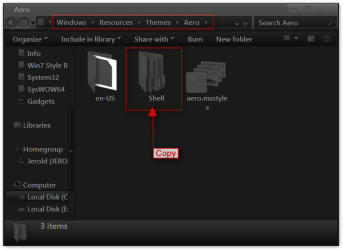
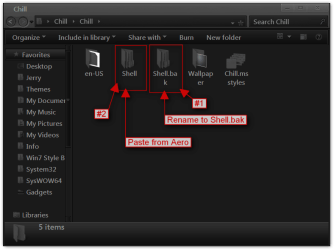
After much googling, I turn back to this forum in search of an answer to my question - is there a way to switch my explorer navigation pane back to the original/left side? I recently changed my theme to a 3rd party one (Browsing deviantART) and love it.. except that the navigation pane is on the right side now.
I'm sure I could get used to it, but my pseudo-OCD nature in me needs it back to how it was for some reason; any help would be appreciated. I obviously followed a how-to in order to set it up and everything is working fine, but I was just wondering if there was a quick fix in order to maintain the style but have the pane switch locations.
I normally search here for answers, then head over to Goggle but have come up short, hence my post.
Thanks
After much googling, I turn back to this forum in search of an answer to my question - is there a way to switch my explorer navigation pane back to the original/left side? I recently changed my theme to a 3rd party one (Browsing deviantART) and love it.. except that the navigation pane is on the right side now.
I'm sure I could get used to it, but my pseudo-OCD nature in me needs it back to how it was for some reason; any help would be appreciated. I obviously followed a how-to in order to set it up and everything is working fine, but I was just wondering if there was a quick fix in order to maintain the style but have the pane switch locations.
I normally search here for answers, then head over to Goggle but have come up short, hence my post.
Thanks
My Computer
At a glance
Windows 7 ProIntel Core2 Duo 2.20GHz3 GBnvidia 8600M GT
- Computer Manufacturer/Model Number
- Dell Vostro 1500
- OS
- Windows 7 Pro
- CPU
- Intel Core2 Duo 2.20GHz
- Memory
- 3 GB
- Graphics Card(s)
- nvidia 8600M GT