Solved Switch explorer navigation pane back to left side

martski

New member
Local time
12:46 AM
Messages
9
Location
Brooklyn, NY
Hello,

After much googling, I turn back to this forum in search of an answer to my question - is there a way to switch my explorer navigation pane back to the original/left side? I recently changed my theme to a 3rd party one (Browsing deviantART) and love it.. except that the navigation pane is on the right side now.

I'm sure I could get used to it, but my pseudo-OCD nature in me needs it back to how it was for some reason; any help would be appreciated. I obviously followed a how-to in order to set it up and everything is working fine, but I was just wondering if there was a quick fix in order to maintain the style but have the pane switch locations.

I normally search here for answers, then head over to Goggle but have come up short, hence my post.

Thanks
 

My Computer My Computer

At a glance

Windows 7 ProIntel Core2 Duo 2.20GHz3 GBnvidia 8600M GT
Computer Manufacturer/Model Number
Dell Vostro 1500
OS
Windows 7 Pro
CPU
Intel Core2 Duo 2.20GHz
Memory
3 GB
Graphics Card(s)
nvidia 8600M GT
Switch to the different theme logoff/logon then
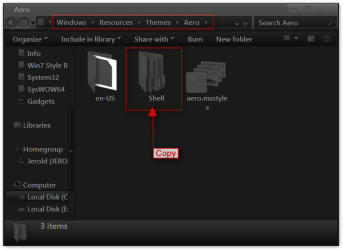
Go to C:\Windows\Resources\Themes\Aero get a copy of the Shell folder
Aero.png

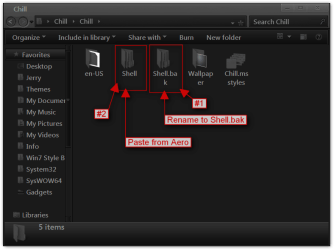
Then go to C:\Windows\Resources\Themes\Chill and rename the Shell to Shell.bak and paste the Shell folder from aero in there
Chill.png

this will put it back but it will put the Details pane back to the bottom.

Jerry
 

My Computer My Computer

At a glance

Win 7 Pro x64 / Win 10 ProIntel(R) Core(TM) i7-3630QM CPU @ 2.40GHz12 GB(1) Intel(R) HD Graphics 4000 (2) NVIDIA GeFo...
Computer type
Laptop
Computer Manufacturer/Model Number
Sager NP9170
OS
Win 7 Pro x64 / Win 10 Pro
CPU
Intel(R) Core(TM) i7-3630QM CPU @ 2.40GHz
Motherboard
CLEVO P170EM
Memory
12 GB
Graphics Card(s)
(1) Intel(R) HD Graphics 4000 (2) NVIDIA GeForce GTX 675M
Sound Card
(1) Realtek High Definition Audio (2) Intel(R) Display Aud
Monitor(s) Displays
17.3
Screen Resolution
1920x1080
Hard Drives
(1) Samsung 860 EVO 500GB(OS) (1) Samsung 860 EVO 500GB(Data)
Keyboard
Backlite
Antivirus
MSE, Malwarebytes Pro
Browser
Firefox
Other Info
DESKTOP: Custom-built.
OS: Win 10 Pro x64.
CASE: Rosewill R5.
CPU: Intel I5 4670K CPU @ 3.40GHz.
CPU COOLER: Cool Master Hyper 212 EVO.
MOTHERBOARD: Asus Z87-A.
MEMORY: Kingston HyperX 2x4 GB.
GPU: Nvidia Geforce 650 TI.
PSU: Corsair TX750.
DRIVES: (1) Samsung 840 120 GB SSD (2) Western Digital blue 500 GB 7200 RPM.
Hey Jerry,

Thanks for the excellent step by step tutorial on how to fix my problem. I followed your directions to the letter yet I still have the pane on the right side. I also tried restarting my computer in addition to just logging off/on, to no avail. Are there any other suggestions you might have for me?

I can live with the pane on the right but, as stated before, I would rather it be back on the left. If I was more familiar with how the .dll files affect the explorer window, I might have a better sense of how to modify it.

Thanks again Jerry!
 

My Computer My Computer

At a glance

Windows 7 ProIntel Core2 Duo 2.20GHz3 GBnvidia 8600M GT
Computer Manufacturer/Model Number
Dell Vostro 1500
OS
Windows 7 Pro
CPU
Intel Core2 Duo 2.20GHz
Memory
3 GB
Graphics Card(s)
nvidia 8600M GT
Try it again I did it and it was back to normal.
Jerry
 

My Computer My Computer

At a glance

Win 7 Pro x64 / Win 10 ProIntel(R) Core(TM) i7-3630QM CPU @ 2.40GHz12 GB(1) Intel(R) HD Graphics 4000 (2) NVIDIA GeFo...
Computer type
Laptop
Computer Manufacturer/Model Number
Sager NP9170
OS
Win 7 Pro x64 / Win 10 Pro
CPU
Intel(R) Core(TM) i7-3630QM CPU @ 2.40GHz
Motherboard
CLEVO P170EM
Memory
12 GB
Graphics Card(s)
(1) Intel(R) HD Graphics 4000 (2) NVIDIA GeForce GTX 675M
Sound Card
(1) Realtek High Definition Audio (2) Intel(R) Display Aud
Monitor(s) Displays
17.3
Screen Resolution
1920x1080
Hard Drives
(1) Samsung 860 EVO 500GB(OS) (1) Samsung 860 EVO 500GB(Data)
Keyboard
Backlite
Antivirus
MSE, Malwarebytes Pro
Browser
Firefox
Other Info
DESKTOP: Custom-built.
OS: Win 10 Pro x64.
CASE: Rosewill R5.
CPU: Intel I5 4670K CPU @ 3.40GHz.
CPU COOLER: Cool Master Hyper 212 EVO.
MOTHERBOARD: Asus Z87-A.
MEMORY: Kingston HyperX 2x4 GB.
GPU: Nvidia Geforce 650 TI.
PSU: Corsair TX750.
DRIVES: (1) Samsung 840 120 GB SSD (2) Western Digital blue 500 GB 7200 RPM.
Jerry,

I'm sorry for the late reply but wanted to thank you for your responses. I did what you said a second time and still no luck at first - a little while later, the navigation pane was back on the left side. To be honest, it was probably back to where I wanted it for a while but it only jumped out at me today, hence my late reply.

Thanks again,

Marty
 

My Computer My Computer

At a glance

Windows 7 ProIntel Core2 Duo 2.20GHz3 GBnvidia 8600M GT
Computer Manufacturer/Model Number
Dell Vostro 1500
OS
Windows 7 Pro
CPU
Intel Core2 Duo 2.20GHz
Memory
3 GB
Graphics Card(s)
nvidia 8600M GT
You're Welcome, and Thank you for letting us know it worked.
Jerry
 

My Computer My Computer

At a glance

Win 7 Pro x64 / Win 10 ProIntel(R) Core(TM) i7-3630QM CPU @ 2.40GHz12 GB(1) Intel(R) HD Graphics 4000 (2) NVIDIA GeFo...
Computer type
Laptop
Computer Manufacturer/Model Number
Sager NP9170
OS
Win 7 Pro x64 / Win 10 Pro
CPU
Intel(R) Core(TM) i7-3630QM CPU @ 2.40GHz
Motherboard
CLEVO P170EM
Memory
12 GB
Graphics Card(s)
(1) Intel(R) HD Graphics 4000 (2) NVIDIA GeForce GTX 675M
Sound Card
(1) Realtek High Definition Audio (2) Intel(R) Display Aud
Monitor(s) Displays
17.3
Screen Resolution
1920x1080
Hard Drives
(1) Samsung 860 EVO 500GB(OS) (1) Samsung 860 EVO 500GB(Data)
Keyboard
Backlite
Antivirus
MSE, Malwarebytes Pro
Browser
Firefox
Other Info
DESKTOP: Custom-built.
OS: Win 10 Pro x64.
CASE: Rosewill R5.
CPU: Intel I5 4670K CPU @ 3.40GHz.
CPU COOLER: Cool Master Hyper 212 EVO.
MOTHERBOARD: Asus Z87-A.
MEMORY: Kingston HyperX 2x4 GB.
GPU: Nvidia Geforce 650 TI.
PSU: Corsair TX750.
DRIVES: (1) Samsung 840 120 GB SSD (2) Western Digital blue 500 GB 7200 RPM.
Back
Top