Windows keeps me from changing folder name in Explorer navigation pane

MasterConfurius

New member
Local time
12:19 PM
Messages
3
Hello,

I run Windows 7 Professional 64-bit.


In the navigation pane in Windows Explorer, there's a shortcut to the default "Downloads" folder.

I would like to make this all caps, in other words, rename it to "DOWNLOADS".

A simple request, but Windows refuses to do it.


How can I force this change via registry?


Thank you,

Dan
 

My Computer My Computer

Computer type
PC/Desktop
OS
Windows 7 Professional 64-bit
If you are using files in the folder, it will not allow to change &or renamed.

So, check any files which are open, then close the file, if not using, and then rename the folder.
 

My Computer My Computer

Computer type
Laptop
Computer Manufacturer/Model Number
Toshiba L630 and L735
OS
Windows 7 x64
Hard Drives
240 GB SSD
Easy solution :
You cannot change directly from lowcase to uppercase. Windows refuse to ... but ...
Il you change from downloads to down1 and then rename to DOWNLOADS. It works

See Ya
 

My Computer My Computer

Computer type
PC/Desktop
Computer Manufacturer/Model Number
Dell Optiplex 760
OS
Windows7 Pro
CPU
Intel Core Duo
Motherboard
Dell
Memory
4 Gb
Graphics Card(s)
ATI Radeon Hd 6450
Hard Drives
250 Gb Sata
Antivirus
Avast ! Free
Browser
Firefox 25.0
it keeps naming it "Downloads" despite entering all caps

The folder contains no files, that's not what causes it. It must be something else.


I can rename the folder to something else entirely, but even after that it won't allow me to give it a name that is all caps.

It simply ignores that I have entered all caps... it's insane.


Strange thing is, I remember that I once had it all caps, so there must be a way.

Any ideas how to get this done through the registry?


Thanks
 

My Computer My Computer

Computer type
PC/Desktop
OS
Windows 7 Professional 64-bit
DO NOT EDIT IN REGISTRY.
Any error may cause unnecessary issue if you made an error, as it is effective once you confirm (enter key).

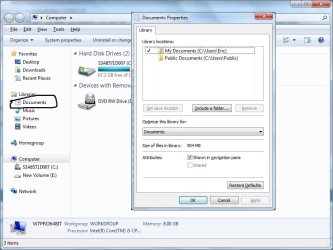
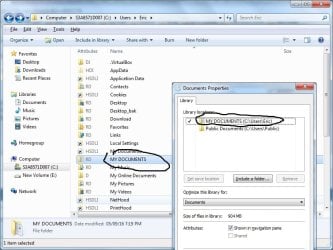
You cannot rename in the Short-cut.

You must go into the folder itself.

Example:

Select and right click -> Properties.
It will show you the correct location of the folder.
Go to the location of the folder, then rename.

But the shortcut is no change, as it is just a link name.
This shortcut do not belong to just to you.
Only inside your User then it can be changed.
If another user log in, it will show the same.
 

Attachments

  • Rename.jpg
    Rename.jpg
    64.1 KB · Views: 0
  • DOCUMENTS.jpg
    DOCUMENTS.jpg
    77.3 KB · Views: 0

My Computer My Computer

Computer type
Laptop
Computer Manufacturer/Model Number
Toshiba L630 and L735
OS
Windows 7 x64
Hard Drives
240 GB SSD
The method described by pippoxO should work. I have used it many times. Folder names are not defined in the registry.
 

My Computer My Computer

Computer type
PC/Desktop
Computer Manufacturer/Model Number
HP
OS
Windows 7 Pro 64 bit
CPU
Xeon W3520
Memory
8 GB
Graphics Card(s)
Nvidia Geforce 210
The method described by pippoxO should work. I have used it many times. Folder names are not defined in the registry.


The OP want to change the name for those shortcut name on the left side of the Explorer panel.
Refer to the attachments and OP post, highlighted in bold, below.
Inside the User folder is not an issue.
Tested.

In the navigation pane in Windows Explorer, there's a shortcut to the default "Downloads" folder.
I would like to make this all caps, in other words, rename it to "DOWNLOADS".
A simple request, but Windows refuses to do it.
 

My Computer My Computer

Computer type
Laptop
Computer Manufacturer/Model Number
Toshiba L630 and L735
OS
Windows 7 x64
Hard Drives
240 GB SSD
Thank you all for your ideas.


I tried what pippoxO suggested multiple times, but my Windows just won't do it. See explanation further below.


Eric:

I went to the actual folder itself and renamed it to all caps, no problem.

AND YET, Windows will not display the shortcut (to that all-caps-folder) under Favorites in the navigation pane with all caps.

If I rename the shortcut directly to, for example, DOWNLOADZ (with a Z in the end), Windows does accept my wish for all caps.

In other words, as long as the word "Downloads" is the name of the shortcut under Favorites in the navigation pane, Windows will force it to look exactly like that... capital D and the rest of it lower case.

Why? Because Windows is designed for people with a need for technology with a patronizing attitude, and because Microsoft is scared or incapable of giving users the flexibility to rename stuff as they wish. I have no other explanation.
 

My Computer My Computer

Computer type
PC/Desktop
OS
Windows 7 Professional 64-bit
Windows may reserve certain folder names that cannot be changed.

Since it is rename to non- Windows standard folder name, it is no problem.
 

My Computer My Computer

Computer type
Laptop
Computer Manufacturer/Model Number
Toshiba L630 and L735
OS
Windows 7 x64
Hard Drives
240 GB SSD
Back
Top