Switching Dual Display from Horizontal to Vertical

Sneakattack879

New member
Local time
12:24 AM
Messages
6
Location
Canada
Hello everyone, I am new to this forum. I just picked up a new HP Laptop and am also new to Windows 7.

Specs are:

CPU: AMD Vision 2.2gHz
Memory: 3Gb DDR3
Video Card: ATI HD 4250
HDMI Out connected to 37" Toshiba HD LCD

My problem is really more of an inconvenience than a problem, but even so I am curious to know if it is possible to have vertical dual-displays. Currently the dual screen is working perfectly, however my laptop display is on the left and the TV display is on the right and I'm trying to figure out a way to have my TV's display be on the top.

Any help that any of you can offer for me to solve this problem would be excellent.

All that being said, I know my way around the OS reasonably well but I'm not well versed in the coding aspects that some of the special features require.
 

My Computer My Computer

At a glance

Windows 7 Home Premium (64bit)AMD Vision3 GB DDR3ATI (I think) HD 4250
Computer Manufacturer/Model Number
Hewlett Packard G62 Laptop
OS
Windows 7 Home Premium (64bit)
CPU
AMD Vision
Motherboard
Unknown
Memory
3 GB DDR3
Graphics Card(s)
ATI (I think) HD 4250
Monitor(s) Displays
Laptop Screen & 37" Toshiba HD LCD
Hard Drives
320 5200RPM
Cooling
Stock
Welcome to Seven Forums Sneakattack879. Try this:

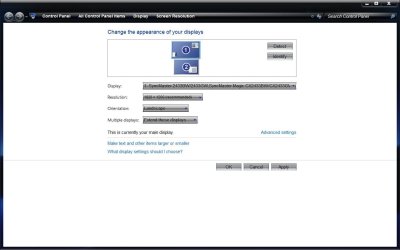
Right click on empty area of primary monitors desktop> Click on Screen Resolution

1.jpg

Grab the primary monitor icon and drag it to the position above the secondary (or visa versa)

2.jpg

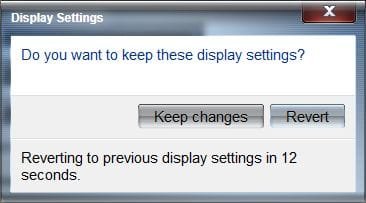
Click on apply, the screen will black out and popup will ask if you want to save changes (if you don't in time, it will revert to original settings)

3.jpg

OK way out and you should have one above the other. Also see the Orientation settings dropdown below for any possible settings you'd like to use.

A Guy
 

My Computer My Computer

At a glance

Windows 10 Home x64INTEL Core i5-750 Quad-Core 3.37GHzHyperX Fury Black Series 8GB (2 x 4GB) 1866MhzEVGA GeForce GTX 750 Superclocked 1GB 128-Bit...
Computer type
PC/Desktop
OS
Windows 10 Home x64
CPU
INTEL Core i5-750 Quad-Core 3.37GHz
Motherboard
ASUS P7P55D
Memory
HyperX Fury Black Series 8GB (2 x 4GB) 1866Mhz
Graphics Card(s)
EVGA GeForce GTX 750 Superclocked 1GB 128-Bit GDDR5
Monitor(s) Displays
LG 32MA68HY 32" IPS
Screen Resolution
1920 x 1080
Hard Drives
Samsung 840 Evo 120GB, SEAGATE 500GB Barracuda® 7200.12, SATA 3 Gb/s, 7200 RPM, 16MB cache
PSU
ANTEC TruePower New TP-550, 80 PLUS, 550W
Case
ANTEC Three Hundred Illusion
Cooling
COOLER MASTER Hyper 212 Plus, 4 x 120mm 1 x 140mm Noctua's
Internet Speed
85 + Mbps
Antivirus
Avast
Browser
Vivaldi
Thanks

Thanks so much, that is exactly what I was looking to do.

I honestly tried about two dozen different things to get it to work. I've always wanted the ability to have two displays and with your help I now have exactly what I've wanted.

Thank you also for the welcome, I'm quite fond of this website already I've found the tutorials very informative and helpful thusfar.

-Sneak
 

My Computer My Computer

At a glance

Windows 7 Home Premium (64bit)AMD Vision3 GB DDR3ATI (I think) HD 4250
Computer Manufacturer/Model Number
Hewlett Packard G62 Laptop
OS
Windows 7 Home Premium (64bit)
CPU
AMD Vision
Motherboard
Unknown
Memory
3 GB DDR3
Graphics Card(s)
ATI (I think) HD 4250
Monitor(s) Displays
Laptop Screen & 37" Toshiba HD LCD
Hard Drives
320 5200RPM
Cooling
Stock
Great, I'm glad I could help, and glad you got it sorted. And we hope you'll stick around and join us here. A Guy
 

My Computer My Computer

At a glance

Windows 10 Home x64INTEL Core i5-750 Quad-Core 3.37GHzHyperX Fury Black Series 8GB (2 x 4GB) 1866MhzEVGA GeForce GTX 750 Superclocked 1GB 128-Bit...
Computer type
PC/Desktop
OS
Windows 10 Home x64
CPU
INTEL Core i5-750 Quad-Core 3.37GHz
Motherboard
ASUS P7P55D
Memory
HyperX Fury Black Series 8GB (2 x 4GB) 1866Mhz
Graphics Card(s)
EVGA GeForce GTX 750 Superclocked 1GB 128-Bit GDDR5
Monitor(s) Displays
LG 32MA68HY 32" IPS
Screen Resolution
1920 x 1080
Hard Drives
Samsung 840 Evo 120GB, SEAGATE 500GB Barracuda® 7200.12, SATA 3 Gb/s, 7200 RPM, 16MB cache
PSU
ANTEC TruePower New TP-550, 80 PLUS, 550W
Case
ANTEC Three Hundred Illusion
Cooling
COOLER MASTER Hyper 212 Plus, 4 x 120mm 1 x 140mm Noctua's
Internet Speed
85 + Mbps
Antivirus
Avast
Browser
Vivaldi
Back
Top