SyncToy - Backup User Data

How to Use SyncToy for Data Backups

   Information
SyncToy is a FREE application for synchronising file and folders between different data locations/devices. It has a simple graphical interface and logic that makes it very easy to implement a robust backup routine for everyday data files (e.g. documents, music, photo's etc.).

This tutorial will show you how to:
  • Create simple backups from your computer to an external USB device
  • Execute the backup manually
  • Optionally execute the backup automatically using Windows Task Scheduler
SyncToy is probably the easiest way to ensure your important data files are backed up. It caters for the simple needs of novices or less experienced computer users, but also has some powerful features that more experienced users will appreciate.


You will firstly need to to download and install SyncToy. The current version is SyncToy 2.1.

:note: Download SyncToy:

For 32-bit versions of Windows 7:
Download


For 64-bit versions of Windows 7:
Download


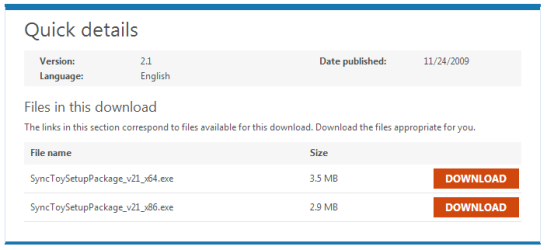
If you prefer, you can navigate to the Microsoft Download Centre and can choose the download from there:0.PNG
Choose:
  • SyncToySetupPackage_v21_x86.exe download for 32-bit versions of Windows 7
  • SyncToySetupPackage_v21_x64.exe download for 64-bit versions of Windows 7
   Note
If you currently use an earlier version of SyncToy, it is strongly recommended that you complete any existing folder synchronisation prior to installing SyncToy 2.1.

In order to run, SyncToy requires Microsoft Sync Framework 2.0 components. These are included in the SyncToy installation executable download.


:note: Installing SyncToy:

Install SyncToy by double-clicking the downloaded executable file.

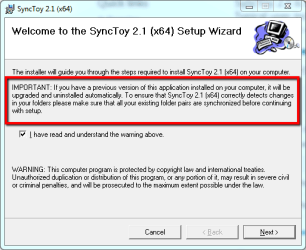
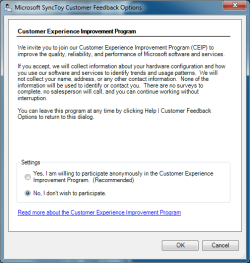
Take note of the important message on the first panel if you are currently using an earlier version of SyncToy. If this is your first installation of SyncToy, you can ignore the message.1.png
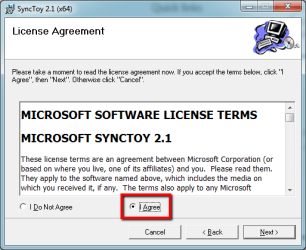
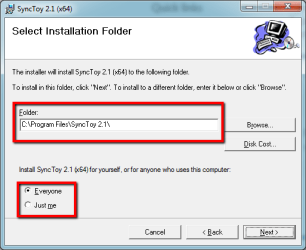
Now finalise the installation by completing the remaining panels as shown below. Once installed, SyncToy only occupies about 1.46 MB of disk space.2.png
3.png
4.png


:note: Understanding the SyncToy Concepts:

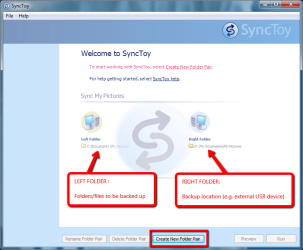
When you first open SyncToy, you will be presented with the main panel, as shown below.5.png
SyncToy employs simple logic to make effective backups. To use SyncToy you need to understand 3 key concepts:
  • the LEFT folder - the location of the folder you want to backup (e.g. My Music)
  • the RIGHT folder - the location to which the backup is to be made (e.g. external USB drive)
  • the Folder PAIR - the rule describing the backup between the LEFT and RIGHT folder
   Tip
Although SyncToy also allows for synchronisation from the RIGHT to LEFT folder if required, the easiest way to understand SyncToy is to remember the basic rule : LEFT folder to RIGHT folder using a FOLDER PAIR.


:note: Using SyncToy:

Backing-up or synchronising data using SyncToy involves creating, and then running, one or more folder pairs.

Step 1 - Creating a FOLDER PAIR:

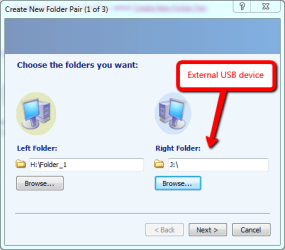
From the SyncToy main panel, select the button Create New Folder Pair. Select the LEFT and RIGHT folders using the browsing feature.7.png
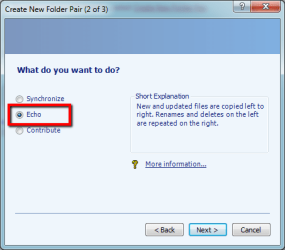
After clicking Next, you will be prompted to select the sychronisation method on the next panel. There are three choices:

  • Echo
    - New and updated (renamed and deleted) files are copied LEFT to RIGHT only
    - Use this option if you want to backup data files one-way, from your computer to an external drive.

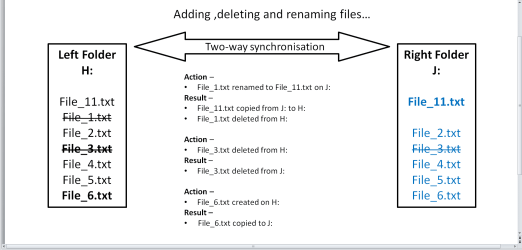
  • Synchronize
    - New and updated (renamed and deleted) files are copied BOTH ways
    - Use this option if you want to synchronise data files between two computers, or your computer and an external drive.

  • Contribute
    - New and updated (renamed) files are copied LEFT to RIGHT only. Deleted files are not mirrored.
    - Use this option if you want to backup data files one-way, with the exception of deleted files.
   Tip
The Echo option is the easiest method to achieve complete backups, especially for novices. It always follows the basic LEFT to RIGHT SyncToy copy rule.


   Note
How does ECHO work?echo_1.png
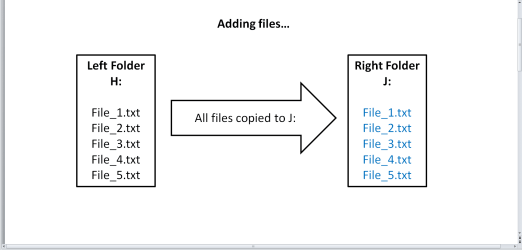
echo_2.png
echo_3.png
How does SYNCHRONIZE work?sync_1.png
How does CONTRIBUTE work?contri_1.png

Select the Echo option.8.png
Now provide a name for the FOLDER PAIR.9.png
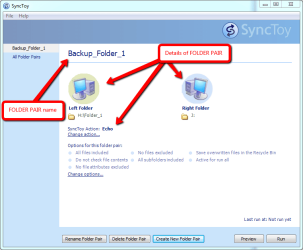
Click Finish to save the folder pair name. The FOLDER PAIR and its details will be shown on the main SyncToy panel.10.png
You can place additional conditions, such as wildcards to determine which files should be included or excluded from the folder pair once it is run. By default, all files are included for processing by SyncToy when the folder pair is run.

   Note
Folder pair information is saved to C:\{User}\AppData\Local\Microsoft\SyncToy\2.0 as shown below:14.png
In order to maintain the folder pair link, a file withe name convention SyncToy_{number}.dat is saved in the root of each folder in the pair.If you delete this file, you will be unable to run the folder pair.

Step 2 - Running a FOLDER PAIR:

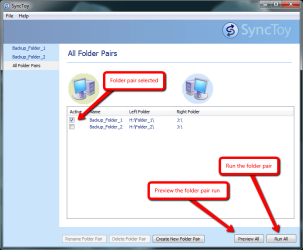
From the SyncToy main panel, select the folder pair you wish to run. The example below shows two folder pairs. The can select as many pairs as are available, or select individual pairs as required.11.png
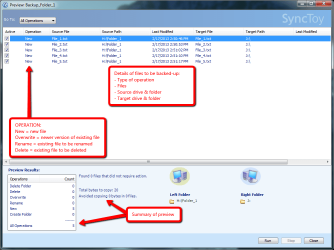
You can use the Preview All option to preview the actions of the selected folder pair.12.png
You Run All option will execute the folder pair to create the backup.13.png
   Tip
SyncToy actions are saved to SyncToyLog.txt in C:\{User}\AppData\Local\Microsoft\SyncToy\2.0


:note: Running SyncToy from Windows Task Scheduler:

SyncToy backups can be automated by adding it as a task to the Windows Task Scheduler.

Step 1 - Create the SyncToy FOLDER PAIR/S:

If you haven't already done so, use SyncToy to create the folder pair/s you wish to use to backup your data.

Step 2 - Add SyncToy as a Task to Windows Task Scheduler:

Click the :orb: orb, and then browse to All Programs > Accessories > System Tools and click Task Scheduler. From the main panel, click Create Basic Task as shown below.t1.png
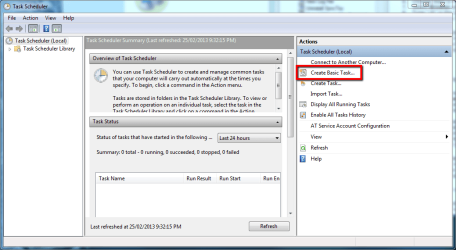
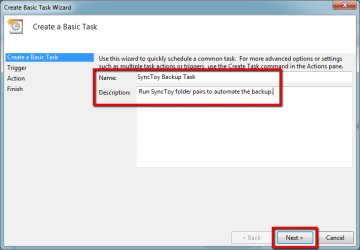
Provide a name and optional description for the task, and click Next.t2.png
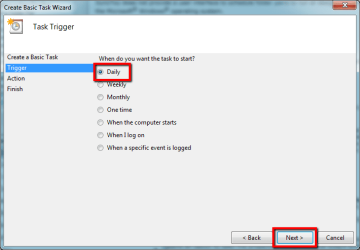
Now select the trigger that causes Task Scheduler to run the SyncToy backup - I use a Daily trigger.t3.png
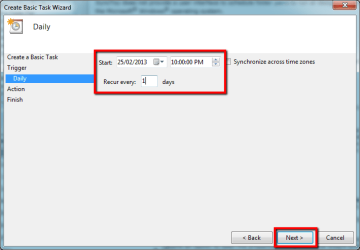
Specify the start date and time, and recurrence of the task, then click Next.t4.png
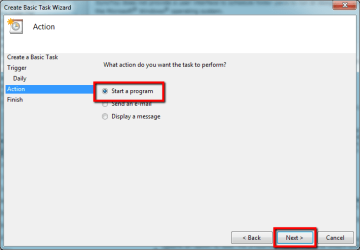
The action Task Scheduler should perform is to open a program - select that, and click Next.t5.png
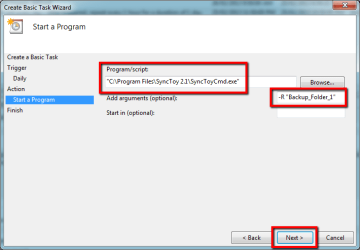
Browse to the SyncToyCmd application.

   Tip
For 32-bit installations the default path is C:\Program Files (x86)\Synctoy2.1
For 64-bit installations the default path is C:\Program Files\Synctoy2.1

To have Task Scheduler run every folder pair, add -R in the Add arguments box. To run only a single folder pair, use -R and the folder pair name enclosed in double quotes, as shown in the example below. Click Next to proceed.t6.png
Click Finish to finalise the basic parameters of the task.t7.png
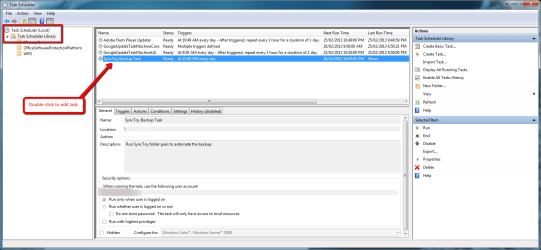
To specify additional parameters for the task, locate and double-click the task you just created.t8.png
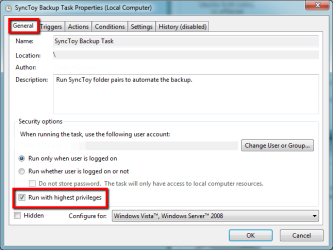
In the General tab, add a check mark in the Run with highest privileges option to force the task to run with administrator rights.t9.png
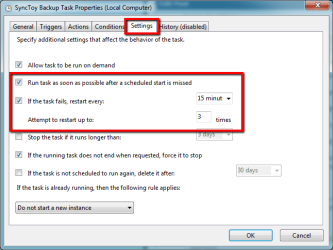
In the Settings tab, use the options shown below to ensure the task runs if the schedule is missed (e.g. the computer is turned off at the time the task is scheduled to run), or if the task fails to start.t10.png


That's all there is to SyncToy - if you don't already have a data file backup strategy, then I hope you find this useful.

Regards,
Golden

 
Last edited:
^What Jim said
 

My Computer

Computer type
PC/Desktop
Computer Manufacturer/Model Number
Golden Mk. I.4
OS
Windows 10 Pro x64 ; Xubuntu x64
CPU
Intel i7 860 @ 2.80 GHz O/C'ed to 4.0GHz
Motherboard
Gigabyte P55A-UD3R Rev.1. Award BIOS F13
Memory
16GB Corsair Vengance DDR3 @ 661 MHz Dual Channel (9-9-9-24)
Graphics Card(s)
EVGA NVidia GTX 560 1024MB
Sound Card
Realtek Integrated
Monitor(s) Displays
Dual Samsung SyncMaster 2494HS
Screen Resolution
1920*1080 and 1920*1080
Hard Drives
1*Samsung 840 EVO 120GB SSD;
1*OCZ Vertex 2 60GB SSD;
2*Samsung F3 SpinPoint 1TB in RAID0;
1*Samsung F1 SpinPoint 1TB;
2*Western Digital 1TB External USB 3.0
1*Western Digital 500GB External USB 3.0
1*Seagate 500GB External USB 2.0
PSU
Thermaltake ToughPower QFan 750W
Case
Thermaltake Element S VK60001W2Z
Cooling
Corsair H60 Water Cooling, 2*230mm and 2*80mm case fans
Keyboard
Logitech G110
Mouse
Logitech MX518
What I would love to find is a sync program that can also copy the files that were synced in a backup to another drive or folder.

In SyncToy you just set up different parings. Some of my data is backed up to 2 external drives (I & X)

View attachment 301088

Jim :cool:

I can do that with FreeFileSync but it won't give me what I want. Here is an example of what I want:

I have Folder 5 (out of ten folders) on HDD E paired with Folder 5 (out of ten folders) on HDD F.

I add two files to Folder 4 and change three files in Folder 5 on HDD E.

When I run the syncing program, it will copy the two new files in Folder 4 on HDD E to Folder 4 on HDD F and the three changed files in Folder 5 on HDD E to Folder 5 of HDD F and delete the older version of the three changed files in Folder 5 on HDD F.

What I would like is to have an additional copy of the two new files and the three changed files that got sent to HDD F also sent to Folder 10 on HDD E. Then I could send only those files to a cloud backup service.

(Complicated, isn't it?)
 

My Computer

Computer type
PC/Desktop
Computer Manufacturer/Model Number
Custom Build
OS
Win 7 Ultimate 64 bit
CPU
Intel i7-3930K
Motherboard
ASUS P9X79 WS
Memory
Kingston HyperX Genesis 32GB Kit (8x4GB Modules) 1600MHz DDR
Graphics Card(s)
MSI R7850 Twin Frozr 2GD5/OC Radeon HD 7850 2GB 256-bit GDDR
Sound Card
Asus Xonar Essence STX
Monitor(s) Displays
3x Asus VG248QE 24", Vizio 32" TV
Screen Resolution
1920 x 1080, ?
Hard Drives
Samsung 128GB 840 Pro SSD (1),
Samsung 4TB 850 EVO SSDs (4)
Samsung 4TB 850 EVO SSDs (16) external backup drives used in 2.5" hot swap bays in the computer.
PSU
Corsair HX750w
Case
Antec Two Hundred v2 (modified)
Cooling
Cooler Master GeminII S524 120mm (fan replaced with a 140mm)
Keyboard
Logitech G510s
Mouse
Logitech M525 (two in use)
Internet Speed
=< 32Mbps down, 8Mbps up
Antivirus
AVAST!, MBAM, SAS, Spybot S&D (all but MBAM free) Glary Util
Browser
IE11
Other Info
LSI 9211-8i HBA card (8 SATA III ports), 2.5" & 3.5" Hot Swap Bays, HooToo HT-CR001 PCI-E to USB 3.0 Internal Hub + 6 Slot Card Reader, and LG Model CH12LS28 BD-ROM Optical Drive. Also, ScanSnap S1500 ADF duplexing scanner, Canon 9000F flat bed scanner, Corsair SP2500 2.1 speakers, Samsung CLP 415nw laser color printer, Cyberpower PP2200SW UPS
Try SyncToy then
 

My Computer

Computer type
PC/Desktop
Computer Manufacturer/Model Number
Golden Mk. I.4
OS
Windows 10 Pro x64 ; Xubuntu x64
CPU
Intel i7 860 @ 2.80 GHz O/C'ed to 4.0GHz
Motherboard
Gigabyte P55A-UD3R Rev.1. Award BIOS F13
Memory
16GB Corsair Vengance DDR3 @ 661 MHz Dual Channel (9-9-9-24)
Graphics Card(s)
EVGA NVidia GTX 560 1024MB
Sound Card
Realtek Integrated
Monitor(s) Displays
Dual Samsung SyncMaster 2494HS
Screen Resolution
1920*1080 and 1920*1080
Hard Drives
1*Samsung 840 EVO 120GB SSD;
1*OCZ Vertex 2 60GB SSD;
2*Samsung F3 SpinPoint 1TB in RAID0;
1*Samsung F1 SpinPoint 1TB;
2*Western Digital 1TB External USB 3.0
1*Western Digital 500GB External USB 3.0
1*Seagate 500GB External USB 2.0
PSU
Thermaltake ToughPower QFan 750W
Case
Thermaltake Element S VK60001W2Z
Cooling
Corsair H60 Water Cooling, 2*230mm and 2*80mm case fans
Keyboard
Logitech G110
Mouse
Logitech MX518
Jeannie, how Sync Toy works, depends on how tou set up rge folder pairs. It will copy the files different if you set it with different settings. I think Golden covered that in the tutorial I kinked to. And, uncomplicate your life, it makes everything better.:thumbsup:
 

My Computers

System One System Two

  • Computer type
    PC/Desktop
    Computer Manufacturer/Model Number
    ALWAYS UNDER CONSTRUCTION
    OS
    Windows 11 Pro
    CPU
    Ryzen 9 5900X
    Motherboard
    Asus X570 Crosshair Viii Hero
    Memory
    32GB G Skill DDR4-3600
    Graphics Card(s)
    EVGA RTX 3080 FTW 3 Ultra
    Sound Card
    On Board/Sennheiser PC37X Headset
    Monitor(s) Displays
    3 X Asus 27"
    Screen Resolution
    2560x1440
    Hard Drives
    2 X 1 TB NVME drives
    PSU
    EVGA 850
    Case
    Phanteks Eclipse P400A
    Cooling
    EVGA 280 AIO
    Keyboard
    Logitech G510s/ Logitech G13
    Mouse
    Logitech G502
    Internet Speed
    24/1
    Antivirus
    ESET/MBAM Pro/SAS Pro
    Browser
    Chrome/ Firefox/ Edge
  • Computer type
    Laptop
    System Manufacturer/Model Number
    Dell 16 Plus
    OS
    Windows 11 Pro
    CPU
    Intel Ultra 9 288V
    Memory
    32 GB LPDDR5X 8533
    Monitor(s) Displays
    16" Mini-LED HDR600 Touch 90 Hz
    Screen Resolution
    2560X1600
    Hard Drives
    1 TB NVME
Jeannie, how Sync Toy works, depends on how tou set up rge folder pairs. It will copy the files different if you set it with different settings. I think Golden covered that in the tutorial I kinked to...

You all are missing the point. I took another look at SyncToy and it works the same as FreeFileSync, other than FreeFileSync having at least a couple of extra features I like (folder pair comparison separate from syncing and the ability to send deleted files from the folder being synced to to a folder other than the recycle bin or being permanently deleted). Both depend on folder pairing to determine what files and folders are sent where. Basically, no matter which method you choose, you wind up with two folders that are essentially identical. That's fine for backing up a HDD to another HDD where you want an identical copy but don't want to spend the time necessary for a complete clone (not to mention the added wear and tear on the destination HDD from frequent cloning).

What I also want is only a copy of what was sent to the destination folder to also be sent to another folder. I only want that data in that folder so it couldn't be considered a folder pair. The reason behind that is both of my local backups are subject to loss from fire, storm, flood, theft, etc. (mechanical or other failure of one backup HDD is reasonably mitigated by having a duplicate backup on a second HDD). I can avoid loss from those scenarios by also having offsite backups. I used to keep a third backup in my safe deposit box at my credit union to reduce the amount of loss possible from losing both local backups. However, any data added or changed since that backup was made would be lost. I was depending on Carbonite to fill that gap and to serve as a second backup to backup the HDD in the safe deposit box should it decide to go belly up (face it, HDDs do die). Unfortunately, after the size of a backup on Carbonite exceeds 200GB, Carbonite throttles the connection. Most of the time, that isn't too large of a problem but I frequently dump large amounts of data onto my computer. When that happens, it takes forever for Carbonite to upload it and it's starting to be unable to keep up keep up with what I'm adding to my data drives.

The only way I can ensure I will not lose data added or changed since the backups in my safe deposit box were made, should I lose both local backups, is to have a cloud backup to fill that gap. I have not found any other cloud backup that is as reliable as Carbonite so I needed to modify my backup strategy. I have already added a second backup on a second HDD in my safe deposit box so I don't need Carbonite to backup that data anymore. What I do need is a way to have Carbonite to backup only the data that is added or changed between the offsite backups (I generally swap out the drives in the safe deposit box with the local backup drives once a month; more often if I dump large amounts of data onto my computer) so I can reduce the amount of data kept online to well below 200GB so my upload speeds won't be throttled. Since Carbonite also backs up data using folder pairing, I need to have only the data that FreeFileSync (or SyncToy, if I was using it) sends to a backup drive also sent to a dedicated Carbonite folder on a drive in my computer and have Carbonite backup only what is in that folder. Whenever I swap out my offsite and onsite drives, I would then delete the data in the dedicated Carbonite folder. Carbonite has 30 day versioning so the data that had been uploaded would be deleted 30 days after it is deleted from the dedicated Carbonite folder on my computer. That would easily keep the amount of data on Carbonite at any given time well under 200GB, avoiding throttling.

...And, uncomplicate your life, it makes everything better.:thumbsup:
Honey, that is the whole idea of all this. Right now, I have to manually save all new and changed files both to their destination on my computer and to the dedicated Carbonite folder (I haven't cleared out all the files I already have on Carbonite yet; I want to make sure I'm consistently adhering to the double save workflow first). It's fairly easy to do in some programs but a little more difficult in others. If I could find a file sync program that could do what I'm wanting, it would dramatically uncomplicated my life.
 

My Computer

Computer type
PC/Desktop
Computer Manufacturer/Model Number
Custom Build
OS
Win 7 Ultimate 64 bit
CPU
Intel i7-3930K
Motherboard
ASUS P9X79 WS
Memory
Kingston HyperX Genesis 32GB Kit (8x4GB Modules) 1600MHz DDR
Graphics Card(s)
MSI R7850 Twin Frozr 2GD5/OC Radeon HD 7850 2GB 256-bit GDDR
Sound Card
Asus Xonar Essence STX
Monitor(s) Displays
3x Asus VG248QE 24", Vizio 32" TV
Screen Resolution
1920 x 1080, ?
Hard Drives
Samsung 128GB 840 Pro SSD (1),
Samsung 4TB 850 EVO SSDs (4)
Samsung 4TB 850 EVO SSDs (16) external backup drives used in 2.5" hot swap bays in the computer.
PSU
Corsair HX750w
Case
Antec Two Hundred v2 (modified)
Cooling
Cooler Master GeminII S524 120mm (fan replaced with a 140mm)
Keyboard
Logitech G510s
Mouse
Logitech M525 (two in use)
Internet Speed
=< 32Mbps down, 8Mbps up
Antivirus
AVAST!, MBAM, SAS, Spybot S&D (all but MBAM free) Glary Util
Browser
IE11
Other Info
LSI 9211-8i HBA card (8 SATA III ports), 2.5" & 3.5" Hot Swap Bays, HooToo HT-CR001 PCI-E to USB 3.0 Internal Hub + 6 Slot Card Reader, and LG Model CH12LS28 BD-ROM Optical Drive. Also, ScanSnap S1500 ADF duplexing scanner, Canon 9000F flat bed scanner, Corsair SP2500 2.1 speakers, Samsung CLP 415nw laser color printer, Cyberpower PP2200SW UPS
You really do need to uncomplicate things
 

My Computer

Computer type
PC/Desktop
Computer Manufacturer/Model Number
Golden Mk. I.4
OS
Windows 10 Pro x64 ; Xubuntu x64
CPU
Intel i7 860 @ 2.80 GHz O/C'ed to 4.0GHz
Motherboard
Gigabyte P55A-UD3R Rev.1. Award BIOS F13
Memory
16GB Corsair Vengance DDR3 @ 661 MHz Dual Channel (9-9-9-24)
Graphics Card(s)
EVGA NVidia GTX 560 1024MB
Sound Card
Realtek Integrated
Monitor(s) Displays
Dual Samsung SyncMaster 2494HS
Screen Resolution
1920*1080 and 1920*1080
Hard Drives
1*Samsung 840 EVO 120GB SSD;
1*OCZ Vertex 2 60GB SSD;
2*Samsung F3 SpinPoint 1TB in RAID0;
1*Samsung F1 SpinPoint 1TB;
2*Western Digital 1TB External USB 3.0
1*Western Digital 500GB External USB 3.0
1*Seagate 500GB External USB 2.0
PSU
Thermaltake ToughPower QFan 750W
Case
Thermaltake Element S VK60001W2Z
Cooling
Corsair H60 Water Cooling, 2*230mm and 2*80mm case fans
Keyboard
Logitech G110
Mouse
Logitech MX518
You really do need to uncomplicate things

That's why I have a computer; to uncomplicated things. I have ADHD and it literally takes a computer for me to manage my life. I have to keep my finances as uncomplicated as possible, including having most the few bills I have paid automatically. Ridiculous as it may seem, sitting down and writing checks to pay bills is daunting to the point I used to have a horrible credit rating until I started using auto bill pay and using a computer to track my finances. I would never be able to find any of my records if I didn't have them on my computer (ironically, I was anal about keeping good records at work but I couldn't carry that over into my personal life).

I also have a lot of physical books, music CDs, DVDs, etc. that I just don't have the room to store physically and physically keep track of so I'm slowly moving all that over to my computer (all the CDs are already done and I'm past the halfway point on my books). All my data is critical (or it wouldn't be on my computer) so I need to ensure I won't lose any of it.
 

My Computer

Computer type
PC/Desktop
Computer Manufacturer/Model Number
Custom Build
OS
Win 7 Ultimate 64 bit
CPU
Intel i7-3930K
Motherboard
ASUS P9X79 WS
Memory
Kingston HyperX Genesis 32GB Kit (8x4GB Modules) 1600MHz DDR
Graphics Card(s)
MSI R7850 Twin Frozr 2GD5/OC Radeon HD 7850 2GB 256-bit GDDR
Sound Card
Asus Xonar Essence STX
Monitor(s) Displays
3x Asus VG248QE 24", Vizio 32" TV
Screen Resolution
1920 x 1080, ?
Hard Drives
Samsung 128GB 840 Pro SSD (1),
Samsung 4TB 850 EVO SSDs (4)
Samsung 4TB 850 EVO SSDs (16) external backup drives used in 2.5" hot swap bays in the computer.
PSU
Corsair HX750w
Case
Antec Two Hundred v2 (modified)
Cooling
Cooler Master GeminII S524 120mm (fan replaced with a 140mm)
Keyboard
Logitech G510s
Mouse
Logitech M525 (two in use)
Internet Speed
=< 32Mbps down, 8Mbps up
Antivirus
AVAST!, MBAM, SAS, Spybot S&D (all but MBAM free) Glary Util
Browser
IE11
Other Info
LSI 9211-8i HBA card (8 SATA III ports), 2.5" & 3.5" Hot Swap Bays, HooToo HT-CR001 PCI-E to USB 3.0 Internal Hub + 6 Slot Card Reader, and LG Model CH12LS28 BD-ROM Optical Drive. Also, ScanSnap S1500 ADF duplexing scanner, Canon 9000F flat bed scanner, Corsair SP2500 2.1 speakers, Samsung CLP 415nw laser color printer, Cyberpower PP2200SW UPS
error msg

can anyone help please. trying to create first new pair on new Seagate 2t hard drive. get message; "failed to create provider" .
 

My Computer

Computer type
Laptop
Computer Manufacturer/Model Number
acer
OS
windows 7 32 bit
Antivirus
msse
Browser
ie
You should be able to follow the tutorial on Sync Toy. Is your backup drive seen in computer and is it formatted NTFS? If so, create a folder on it call it whatever you are backing up. For example Music. Open sync toy, click create new folder pair. In the left Folder click the browse button and navigate to the folder you want backed up like My Music, in the right part of the pair click the browse button and navigate to the folder you just created, Music, click next and select which you want. For a straight backup select Echo. It will copy the left folder to the right folder, and additions or deletions in the left folder will be duplicated in the right folder. Click next and give the pair a name. Make it descriptive enough so you know which one you are doing. Then click finish. Select the name you just created in the left column and click run. It should copy left to right. It will work with folders, partitions or entire drives if you want to set it up that way.
 

My Computers

System One System Two

  • Computer type
    PC/Desktop
    Computer Manufacturer/Model Number
    ALWAYS UNDER CONSTRUCTION
    OS
    Windows 11 Pro
    CPU
    Ryzen 9 5900X
    Motherboard
    Asus X570 Crosshair Viii Hero
    Memory
    32GB G Skill DDR4-3600
    Graphics Card(s)
    EVGA RTX 3080 FTW 3 Ultra
    Sound Card
    On Board/Sennheiser PC37X Headset
    Monitor(s) Displays
    3 X Asus 27"
    Screen Resolution
    2560x1440
    Hard Drives
    2 X 1 TB NVME drives
    PSU
    EVGA 850
    Case
    Phanteks Eclipse P400A
    Cooling
    EVGA 280 AIO
    Keyboard
    Logitech G510s/ Logitech G13
    Mouse
    Logitech G502
    Internet Speed
    24/1
    Antivirus
    ESET/MBAM Pro/SAS Pro
    Browser
    Chrome/ Firefox/ Edge
  • Computer type
    Laptop
    System Manufacturer/Model Number
    Dell 16 Plus
    OS
    Windows 11 Pro
    CPU
    Intel Ultra 9 288V
    Memory
    32 GB LPDDR5X 8533
    Monitor(s) Displays
    16" Mini-LED HDR600 Touch 90 Hz
    Screen Resolution
    2560X1600
    Hard Drives
    1 TB NVME
for syncing folders without mess try
folder actions for windows , a very clever bit of kit and no going back to manually sync,
 

My Computer

Computer Manufacturer/Model Number
Hewlett packard/p6512uk
OS
Microsoft Windows 7 Home Premium 64-bit 7600
CPU
IIx4 amd athelon 635 processor
Motherboard
FOXCONN 2AA9
Memory
2x2gb
Graphics Card(s)
ati radeon HD 5450
Sound Card
(1) Realtek High Definition Audio (2) AMD High Definition
Monitor(s) Displays
samsung lcd tv 32"
Screen Resolution
1360x 768
Hard Drives
(1) WDC WD10 01FAES-60Z2A0 SATA Disk Device (2) Maxtor OneTouch USB Device (3) ST310003 33AS USB Device (4) WD My Book 1111 USB Device
PSU
?
Cooling
air!
Keyboard
wireless hp
Mouse
wireless Hp,optical
Internet Speed
1.10mb/s
Antivirus
MSE
Browser
Firefox
MS Synch Toy 2.0

I have a fried who has an external drive his old boss used to backup files to. He needs these files. How can he recover these files from the external drive to his own pc?
Does the Synch toy program help or did it just keep the bosses files synched?

I thought he should usb cable the two, then find the drive and copy and paste to his new pc.
I do not know if mounting is necessary to copy and paste.
Thank you
 

My Computer

Computer Manufacturer/Model Number
Dell
OS
Windows 7 Home premium 64 bit
CPU
Intel R i5 3.3Ghz
Motherboard
Dell 2.6
Memory
6 GB
Graphics Card(s)
Nvidea GT 420
Sound Card
Nvidea Hi Def
Monitor(s) Displays
Dell pnp
Hard Drives
Seagate 931 GB
PSU
Dell xps 8300
Case
Dell Balck
Cooling
unknown
How can he recover these files from the external drive to his own pc?
Simply connect the external drive to the computer and use Windows Explorer to browse the files, and copy & paste as required.
 

My Computer

Computer type
PC/Desktop
Computer Manufacturer/Model Number
Golden Mk. I.4
OS
Windows 10 Pro x64 ; Xubuntu x64
CPU
Intel i7 860 @ 2.80 GHz O/C'ed to 4.0GHz
Motherboard
Gigabyte P55A-UD3R Rev.1. Award BIOS F13
Memory
16GB Corsair Vengance DDR3 @ 661 MHz Dual Channel (9-9-9-24)
Graphics Card(s)
EVGA NVidia GTX 560 1024MB
Sound Card
Realtek Integrated
Monitor(s) Displays
Dual Samsung SyncMaster 2494HS
Screen Resolution
1920*1080 and 1920*1080
Hard Drives
1*Samsung 840 EVO 120GB SSD;
1*OCZ Vertex 2 60GB SSD;
2*Samsung F3 SpinPoint 1TB in RAID0;
1*Samsung F1 SpinPoint 1TB;
2*Western Digital 1TB External USB 3.0
1*Western Digital 500GB External USB 3.0
1*Seagate 500GB External USB 2.0
PSU
Thermaltake ToughPower QFan 750W
Case
Thermaltake Element S VK60001W2Z
Cooling
Corsair H60 Water Cooling, 2*230mm and 2*80mm case fans
Keyboard
Logitech G110
Mouse
Logitech MX518
recover

I very much appreciate the help.
 

My Computer

Computer Manufacturer/Model Number
Dell
OS
Windows 7 Home premium 64 bit
CPU
Intel R i5 3.3Ghz
Motherboard
Dell 2.6
Memory
6 GB
Graphics Card(s)
Nvidea GT 420
Sound Card
Nvidea Hi Def
Monitor(s) Displays
Dell pnp
Hard Drives
Seagate 931 GB
PSU
Dell xps 8300
Case
Dell Balck
Cooling
unknown
Great work Golden.

I have everything set up, but have run into one problem. When I try to use SyncToy to backup the SyncToy pairs folder, it will not copy the .log and pulls an error, but worse it will not copy any of the .dat files, which would be needed to restore the folder pairs along with the .bin file that does copy. What am I missing?
 

My Computer

Computer type
PC/Desktop
Computer Manufacturer/Model Number
hp
OS
W7x64
Antivirus
Avast
Browser
Firefox
Wheeeel Golden, you have already hear it, but must say this article is an astounding job! To put things in a bit more enlightened perspective, Like usual I gathered all the better articles to make sure I got the best information, here eight in total. Out of these eight, yours was beyond doubt the absolute best and complete. No this is not just talking it up at all. I MEAN IT!! Doing this kind of work really does have a real meaningful impact to the more novice user world on this subject. Thank You so Very Much, Diligent.:D
 

My Computer

Computer type
PC/Desktop
Computer Manufacturer/Model Number
Gateway SX2855
OS
Windows 7 Home premium 64bit
Antivirus
avast
Browser
firefos (main), IE11 (as needed only), GChrome (secondary)
Is SyncToy suitable for a complete system back-up system that could be used to restore if the C drive completely fails?
 

My Computer

Computer type
PC/Desktop
Computer Manufacturer/Model Number
Custm build
OS
Win7 Pro 64bit
CPU
Intel 15-2400
Motherboard
Gigabyte H61M
Memory
16Gb
Graphics Card(s)
NVIDIA GeForce 760
Hard Drives
C: 500Gb SSD
D 1Tb Seagate
Antivirus
Avira
Browser
Chrome
Is SyncToy suitable for a complete system back-up system that could be used to restore if the C drive completely fails?

Never used it, but I seriously doubt it.

I think it's a "file by file" data backup tool.

Not an imaging application, which is what you'd need to "restore if the C drive completely fails".
 

My Computer

Computer type
PC/Desktop
Computer Manufacturer/Model Number
Ignatz Special; 4 speed manual gearbox; factory air conditioning; one of one
OS
Windows 7 Home Premium SP1, 64-bit
CPU
Intel Skylake i5-6600K, not overclocked
Motherboard
AsRock Z170M Extreme 4, micro ATX
Memory
8 GB HyperX DDR4-2666 (2 x 4 GB)
Graphics Card(s)
none; graphics are integrated on CPU
Sound Card
onboard: Realtek ALC1150; external: USB Behringer UF0-202
Monitor(s) Displays
Dell S2340M 23 inch IPS
Screen Resolution
1600 x 900
Hard Drives
System: Crucial MX100 series SSD, 128 GB;
Data: Samsung Spinpoint 103SJ, 1 TB;
Backup: WD Caviar Green WD30EZRX-00D8PB0, 3 TB
PSU
Rosewill SilentNight 500 watt fanless, semi-modular
Case
Antec Solo II
Cooling
Noctua NH-U12S; Noctua F12 intake, Noctua S12A exhaust
Keyboard
Microsoft 200 6JH-00001 USB
Mouse
Dell or Microsoft optical wired; USB
Antivirus
Microsoft Security Essentials and Malwarebytes Premium
Browser
Pale Moon
Other Info
All fans PWM; speeds at idle: CPU circa 500 rpm; intake circa 600 rpm; exhaust circa 600 rpm; CPU temps 27 idle and 47 C load in a warm room (27 C/81 F) when running Intel Extreme Tuning Utility stress test.

My Computer

Computer type
Laptop
Computer Manufacturer/Model Number
Hewlett-Packard/G62-107SA Notebook
OS
Microsoft Windows 7 Home Premium 64-bit Service Pack 1
CPU
Intel(R) Core(TM) i3 CPU M 330 @ 2.13GHz
Motherboard
Hewlett-Packard 1425
Memory
8 GB DDR3
Graphics Card(s)
Intel(R) HD Graphics
Sound Card
Realtek High Definition Audio
Monitor(s) Displays
Builtin
Screen Resolution
1366 x 768 x 32 bits (4294967296 colors) @ 60 Hz
Hard Drives
250 GB SATA Hard Disk Drive 7200 rpm
2TB Seagate GoFlex USB 2 Drive
1TB Iomega Prestige USB 2 Drive
1.5TB Iomega Prestige USB 2 Drive (Samsung)
2TB WD MyBook Live NAS.
Mouse
Logitech Anywhere MX
Internet Speed
152 Mbs download 10 Mbs upload
Antivirus
Norton 360
Browser
Chrome
OK many thanks.

I am currently using it to sync a drive with all my photo files to an external USB3 and it works so well. I'll check out Macrium.
 

My Computer

Computer type
PC/Desktop
Computer Manufacturer/Model Number
Custm build
OS
Win7 Pro 64bit
CPU
Intel 15-2400
Motherboard
Gigabyte H61M
Memory
16Gb
Graphics Card(s)
NVIDIA GeForce 760
Hard Drives
C: 500Gb SSD
D 1Tb Seagate
Antivirus
Avira
Browser
Chrome
I would suggest that you continue to use SyncToy to back up your data (far more efficient, faster, and requires less storage space). However, an imaging program, such as Macrium Reflect is best for backing up System files (OS and programs).
 

My Computer

Computer type
PC/Desktop
Computer Manufacturer/Model Number
Custom Build
OS
Win 7 Ultimate 64 bit
CPU
Intel i7-3930K
Motherboard
ASUS P9X79 WS
Memory
Kingston HyperX Genesis 32GB Kit (8x4GB Modules) 1600MHz DDR
Graphics Card(s)
MSI R7850 Twin Frozr 2GD5/OC Radeon HD 7850 2GB 256-bit GDDR
Sound Card
Asus Xonar Essence STX
Monitor(s) Displays
3x Asus VG248QE 24", Vizio 32" TV
Screen Resolution
1920 x 1080, ?
Hard Drives
Samsung 128GB 840 Pro SSD (1),
Samsung 4TB 850 EVO SSDs (4)
Samsung 4TB 850 EVO SSDs (16) external backup drives used in 2.5" hot swap bays in the computer.
PSU
Corsair HX750w
Case
Antec Two Hundred v2 (modified)
Cooling
Cooler Master GeminII S524 120mm (fan replaced with a 140mm)
Keyboard
Logitech G510s
Mouse
Logitech M525 (two in use)
Internet Speed
=< 32Mbps down, 8Mbps up
Antivirus
AVAST!, MBAM, SAS, Spybot S&D (all but MBAM free) Glary Util
Browser
IE11
Other Info
LSI 9211-8i HBA card (8 SATA III ports), 2.5" & 3.5" Hot Swap Bays, HooToo HT-CR001 PCI-E to USB 3.0 Internal Hub + 6 Slot Card Reader, and LG Model CH12LS28 BD-ROM Optical Drive. Also, ScanSnap S1500 ADF duplexing scanner, Canon 9000F flat bed scanner, Corsair SP2500 2.1 speakers, Samsung CLP 415nw laser color printer, Cyberpower PP2200SW UPS
Back
Top