sys image fails

green98ls

New member
Power User
Local time
7:43 PM
Messages
87
Location
Washington State
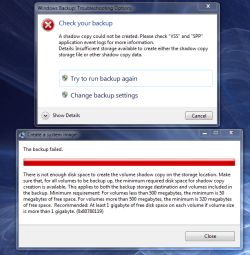
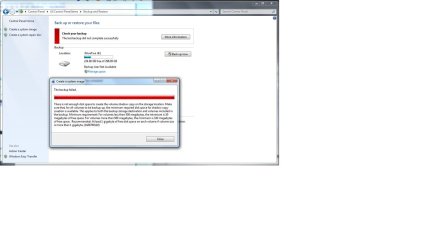
i've been trying to create a system image, but I keep getting an error saying there isn't enough room for the image which is about 21 gigs, but my 2nd hdd has 243gig of free space.


thanks
 

Attachments

  • backup.jpg
    backup.jpg
    42.4 KB · Views: 181

My Computer

Computer Manufacturer/Model Number
Custom Built
OS
Windows 7 Pro 64-bit
CPU
AMD Phenom II X2 550 BE
Motherboard
ASUS M4A79XTD EVO
Memory
A-Data DDR3 1600 4gb
Graphics Card(s)
HIS Radeon HD 4670
Sound Card
VIA VT1708S (8 channel onboard)
Monitor(s) Displays
Dell 23" S2309W
Screen Resolution
1920 x 1080
Hard Drives
WD 320,750gb, Seagate 500gb External Backup
PSU
Rosewill Green Series 430W
Case
Coolermaster
Cooling
Scythe SCKTN-3000
bump

anyone know anything about this. I tried doing a system image to a brand new 500gb drive and still got the same error.

thanks
 

My Computer

Computer Manufacturer/Model Number
Custom Built
OS
Windows 7 Pro 64-bit
CPU
AMD Phenom II X2 550 BE
Motherboard
ASUS M4A79XTD EVO
Memory
A-Data DDR3 1600 4gb
Graphics Card(s)
HIS Radeon HD 4670
Sound Card
VIA VT1708S (8 channel onboard)
Monitor(s) Displays
Dell 23" S2309W
Screen Resolution
1920 x 1080
Hard Drives
WD 320,750gb, Seagate 500gb External Backup
PSU
Rosewill Green Series 430W
Case
Coolermaster
Cooling
Scythe SCKTN-3000
Hi, sorry for the late reply.

What space do you have available on your primary (OS) drive? It looks like it's running out of Shadow space which means it's creating the backup file then will copy it accross (not 100% sure on this)
 

My Computer

Computer Manufacturer/Model Number
Compaq Desktop
OS
Windows 7 Ultimate x64
CPU
AMD Sempron Dual Core
Memory
3GB
Graphics Card(s)
NVIDIA GeForce 6150SE nForce 430
Screen Resolution
1024x768
Hard Drives
150GB Sata
thanks for the reply, i have about 30.6 gb free on the Windows drive, see picture below.

I've been able to make an image with macrium reflect, but for some reason Windows Backup and Restore wont let me, which is strange, and it'd be nice to figure out the issue, I even made sure that I didnt have the services off or disabled. Maye I'm missing one that isn't obvious
 

Attachments

  • hdspace.PNG
    hdspace.PNG
    4.7 KB · Views: 44

My Computer

Computer Manufacturer/Model Number
Custom Built
OS
Windows 7 Pro 64-bit
CPU
AMD Phenom II X2 550 BE
Motherboard
ASUS M4A79XTD EVO
Memory
A-Data DDR3 1600 4gb
Graphics Card(s)
HIS Radeon HD 4670
Sound Card
VIA VT1708S (8 channel onboard)
Monitor(s) Displays
Dell 23" S2309W
Screen Resolution
1920 x 1080
Hard Drives
WD 320,750gb, Seagate 500gb External Backup
PSU
Rosewill Green Series 430W
Case
Coolermaster
Cooling
Scythe SCKTN-3000
The only thing I can suggest is to try & free up some space on your system drive. I would advise the following
  • turn off 'System Restore' (temporarily) and run 'Disk Cleanup'.
  • Navigate to C:\users\[username]\AppData\Local\Temp and clean that folder out
  • then C:\Windows\Temp and clean that out
   Tip
Disk Cleanup does not empty the 2 Temp folders mentioned above, even though it'll say 'clean temp files'

Another very handy tool to use would be www.ccleaner.com]cCleaner[/url] (but don't user the registry cleaning part ;)

Hope this helps :)


OS
 

My Computer

Computer Manufacturer/Model Number
Compaq Desktop
OS
Windows 7 Ultimate x64
CPU
AMD Sempron Dual Core
Memory
3GB
Graphics Card(s)
NVIDIA GeForce 6150SE nForce 430
Screen Resolution
1024x768
Hard Drives
150GB Sata
The only thing I can suggest is to try & free up some space on your system drive. I would advise the following
  • turn off 'System Restore' (temporarily) and run 'Disk Cleanup'.
  • Navigate to C:\users\[username]\AppData\Local\Temp and clean that folder out
  • then C:\Windows\Temp and clean that out
   Tip
Disk Cleanup does not empty the 2 Temp folders mentioned above, even though it'll say 'clean temp files'

Another very handy tool to use would be http://[URL="http://www.ccleaner.com"ccleaner

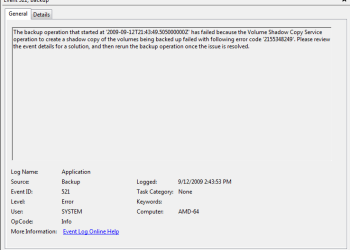
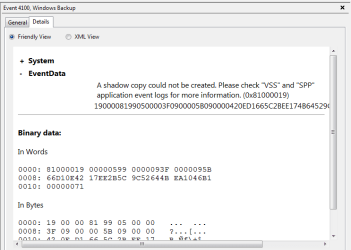
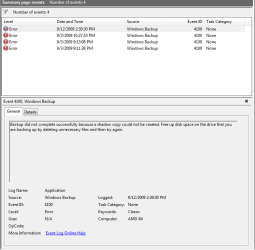
I did all the things you mentioned and still no success. Really strange this doesn't want to work. I went ahead and took screen caps of all the error msgs and the info from the event viewer log files, came with an error code "2155348249" so I'll try and google that and see if I can figure this out.
 

Attachments

  • error2.PNG
    error2.PNG
    8.7 KB · Views: 25
  • error1.PNG
    error1.PNG
    58 KB · Views: 29
  • error.PNG
    error.PNG
    11 KB · Views: 20
  • error log.PNG
    error log.PNG
    13.2 KB · Views: 39

My Computer

Computer Manufacturer/Model Number
Custom Built
OS
Windows 7 Pro 64-bit
CPU
AMD Phenom II X2 550 BE
Motherboard
ASUS M4A79XTD EVO
Memory
A-Data DDR3 1600 4gb
Graphics Card(s)
HIS Radeon HD 4670
Sound Card
VIA VT1708S (8 channel onboard)
Monitor(s) Displays
Dell 23" S2309W
Screen Resolution
1920 x 1080
Hard Drives
WD 320,750gb, Seagate 500gb External Backup
PSU
Rosewill Green Series 430W
Case
Coolermaster
Cooling
Scythe SCKTN-3000
Please post a screenshot of Disk Management.
 

My Computers

System One System Two

  • Computer type
    PC/Desktop
    OS
    7 X64
    CPU
    i5 8400
    Motherboard
    gigabyte b365m ds3h
    Memory
    2x8gb 3200mhz
    Hard Drives
    various
    PSU
    pure power 11 400w cm
    Case
    Coolermaster
    Cooling
    cryorig m9i
  • Computer type
    PC/Desktop
    OS
    7x64
    CPU
    g5400
    Motherboard
    ga b365m ds3h
    Memory
    8gb ddr4 2400
    PSU
    xfx pro 450w
Hi, sorry for the late reply.

What space do you have available on your primary (OS) drive? It looks like it's running out of Shadow space which means it's creating the backup file then will copy it accross (not 100% sure on this)

+1. i had a similar prob, it even said somet about the shadowcopy folder. actually i still never completed my system image, i'll take this a nudge to give it another try.
 

My Computer

OS
Windows 7 Ultimate 64Bit
CPU
AMD Athlon x4 650 3Ghz
Motherboard
ASUS
Memory
4gb
Graphics Card(s)
ATI Radeon 3000 series Onboard
Hi matt,

You had the same problem ?

Do you have a 100mb system partition?
 

My Computers

System One System Two

  • Computer type
    PC/Desktop
    OS
    7 X64
    CPU
    i5 8400
    Motherboard
    gigabyte b365m ds3h
    Memory
    2x8gb 3200mhz
    Hard Drives
    various
    PSU
    pure power 11 400w cm
    Case
    Coolermaster
    Cooling
    cryorig m9i
  • Computer type
    PC/Desktop
    OS
    7x64
    CPU
    g5400
    Motherboard
    ga b365m ds3h
    Memory
    8gb ddr4 2400
    PSU
    xfx pro 450w

Attachments

  • diskmng.PNG
    diskmng.PNG
    21.5 KB · Views: 123

My Computer

Computer Manufacturer/Model Number
Custom Built
OS
Windows 7 Pro 64-bit
CPU
AMD Phenom II X2 550 BE
Motherboard
ASUS M4A79XTD EVO
Memory
A-Data DDR3 1600 4gb
Graphics Card(s)
HIS Radeon HD 4670
Sound Card
VIA VT1708S (8 channel onboard)
Monitor(s) Displays
Dell 23" S2309W
Screen Resolution
1920 x 1080
Hard Drives
WD 320,750gb, Seagate 500gb External Backup
PSU
Rosewill Green Series 430W
Case
Coolermaster
Cooling
Scythe SCKTN-3000
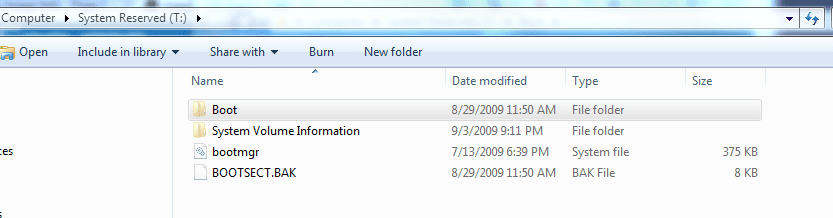
You have 38mb free on the system reserved partition.

According to the error message, 50mb is required for the volume bitmap.

In Disk Management, rt click that 100mb partition - give it a drive letter and post a screenshot of the contents.

You might also try imaging it with Macrium - should only take a minute.
 

My Computers

System One System Two

  • Computer type
    PC/Desktop
    OS
    7 X64
    CPU
    i5 8400
    Motherboard
    gigabyte b365m ds3h
    Memory
    2x8gb 3200mhz
    Hard Drives
    various
    PSU
    pure power 11 400w cm
    Case
    Coolermaster
    Cooling
    cryorig m9i
  • Computer type
    PC/Desktop
    OS
    7x64
    CPU
    g5400
    Motherboard
    ga b365m ds3h
    Memory
    8gb ddr4 2400
    PSU
    xfx pro 450w
i've used macrium and made a good sys image. I'm just trying to figure out why this doesn't work
 

Attachments

  • sys.PNG
    sys.PNG
    15.3 KB · Views: 26
  • sys2.PNG
    sys2.PNG
    18.9 KB · Views: 39

My Computer

Computer Manufacturer/Model Number
Custom Built
OS
Windows 7 Pro 64-bit
CPU
AMD Phenom II X2 550 BE
Motherboard
ASUS M4A79XTD EVO
Memory
A-Data DDR3 1600 4gb
Graphics Card(s)
HIS Radeon HD 4670
Sound Card
VIA VT1708S (8 channel onboard)
Monitor(s) Displays
Dell 23" S2309W
Screen Resolution
1920 x 1080
Hard Drives
WD 320,750gb, Seagate 500gb External Backup
PSU
Rosewill Green Series 430W
Case
Coolermaster
Cooling
Scythe SCKTN-3000
To check if it is a problem with lack of space on the sys 100mb:

In Disk Management, rt click C and mark active.

Try windows pc backup and see if you still get the error.

Obviously mark sys partition active again after.
 

My Computers

System One System Two

  • Computer type
    PC/Desktop
    OS
    7 X64
    CPU
    i5 8400
    Motherboard
    gigabyte b365m ds3h
    Memory
    2x8gb 3200mhz
    Hard Drives
    various
    PSU
    pure power 11 400w cm
    Case
    Coolermaster
    Cooling
    cryorig m9i
  • Computer type
    PC/Desktop
    OS
    7x64
    CPU
    g5400
    Motherboard
    ga b365m ds3h
    Memory
    8gb ddr4 2400
    PSU
    xfx pro 450w
...
Another very handy tool to use would be www.ccleaner.com]cCleaner[/url] (but don't user the registry cleaning part ;)

Hope this helps :)


OS
DONT USE THAT???? OOps..... might be why my computer is being odd-lately... As soon as i installed it... i ran the reg. cleaner part and cleaned it all... Is that not safe???!!!
 

My Computer

Computer Manufacturer/Model Number
HP dv6000t CTO Entertainment Lappy |My Desktop @ Bottom
OS
7 x64/ Back-Track 4
CPU
Intel Core 2 Duo CPU 8300@ 2.4 Ghz
Motherboard
HP's Own
Memory
4096 MB DDR2
Graphics Card(s)
Nvidia 8400M GS
Sound Card
Altec Lansing (The usual on Laptops )
Monitor(s) Displays
Laptop Screen. 17' Wide.
Screen Resolution
1280 x 800
Hard Drives
150 GB HDD.
Cooling
2 External Fans, Undervolted, Coolant
Keyboard
Norm. Cheap Random Keyboard
Mouse
Norm. Cheap Random Mouse
Other Info
This is my Homemade Desktop :)
HDD: Western Digital Caviar Blue 320GB 16MB 7200RPM SATA2
And more to come in a bit! :D
Did you make a backup as offered by Ccleaner registry module?

Try restoring the backup it made.

I don't recommend using the registry cleaner part of Ccleaner
 

My Computers

System One System Two

  • Computer type
    PC/Desktop
    OS
    7 X64
    CPU
    i5 8400
    Motherboard
    gigabyte b365m ds3h
    Memory
    2x8gb 3200mhz
    Hard Drives
    various
    PSU
    pure power 11 400w cm
    Case
    Coolermaster
    Cooling
    cryorig m9i
  • Computer type
    PC/Desktop
    OS
    7x64
    CPU
    g5400
    Motherboard
    ga b365m ds3h
    Memory
    8gb ddr4 2400
    PSU
    xfx pro 450w
To check if it is a problem with lack of space on the sys 100mb:

In Disk Management, rt click C and mark active.

Try windows pc backup and see if you still get the error.

Obviously mark sys partition active again after.


still get the same disk space error.

searching online has given me no help either. i found one link with the error code '2155348249' that im having but it's in another language

WinFuture-Forum.de > Complete Pc-sicherung: Irgentwer Hat Hier Ne Rechenschwäche
 

My Computer

Computer Manufacturer/Model Number
Custom Built
OS
Windows 7 Pro 64-bit
CPU
AMD Phenom II X2 550 BE
Motherboard
ASUS M4A79XTD EVO
Memory
A-Data DDR3 1600 4gb
Graphics Card(s)
HIS Radeon HD 4670
Sound Card
VIA VT1708S (8 channel onboard)
Monitor(s) Displays
Dell 23" S2309W
Screen Resolution
1920 x 1080
Hard Drives
WD 320,750gb, Seagate 500gb External Backup
PSU
Rosewill Green Series 430W
Case
Coolermaster
Cooling
Scythe SCKTN-3000

My Computers

System One System Two

  • Computer type
    PC/Desktop
    OS
    7 X64
    CPU
    i5 8400
    Motherboard
    gigabyte b365m ds3h
    Memory
    2x8gb 3200mhz
    Hard Drives
    various
    PSU
    pure power 11 400w cm
    Case
    Coolermaster
    Cooling
    cryorig m9i
  • Computer type
    PC/Desktop
    OS
    7x64
    CPU
    g5400
    Motherboard
    ga b365m ds3h
    Memory
    8gb ddr4 2400
    PSU
    xfx pro 450w
i guess windows back up just doesn't want to work for my computer.

thanks for all the suggestions and help
 

My Computer

Computer Manufacturer/Model Number
Custom Built
OS
Windows 7 Pro 64-bit
CPU
AMD Phenom II X2 550 BE
Motherboard
ASUS M4A79XTD EVO
Memory
A-Data DDR3 1600 4gb
Graphics Card(s)
HIS Radeon HD 4670
Sound Card
VIA VT1708S (8 channel onboard)
Monitor(s) Displays
Dell 23" S2309W
Screen Resolution
1920 x 1080
Hard Drives
WD 320,750gb, Seagate 500gb External Backup
PSU
Rosewill Green Series 430W
Case
Coolermaster
Cooling
Scythe SCKTN-3000
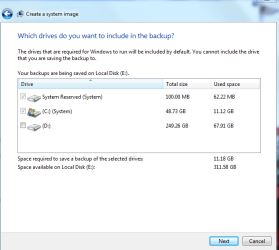
Which drives did you select to back up?
 

My Computer

Computer Manufacturer/Model Number
Dell XPS 15 L502x
OS
Windows 7 Ultimate x64 SP1
CPU
Core i7-2670QM
Memory
8GB DDR3 PC3-10600
Graphics Card(s)
Intel HD Graphics 3000 + GeForce GT 540M
Screen Resolution
1920x1080
Hard Drives
1TB 5400RPM Seagate
Which drives did you select to back up?


im just trying to create a system image of my windows partition in windows backup and restore. but I keep getting a stupid disk space error.

which is why I'm thinking if I can delete the 100mb partition I wont get the error anymore
 

Attachments

  • backup.PNG
    backup.PNG
    18 KB · Views: 60

My Computer

Computer Manufacturer/Model Number
Custom Built
OS
Windows 7 Pro 64-bit
CPU
AMD Phenom II X2 550 BE
Motherboard
ASUS M4A79XTD EVO
Memory
A-Data DDR3 1600 4gb
Graphics Card(s)
HIS Radeon HD 4670
Sound Card
VIA VT1708S (8 channel onboard)
Monitor(s) Displays
Dell 23" S2309W
Screen Resolution
1920 x 1080
Hard Drives
WD 320,750gb, Seagate 500gb External Backup
PSU
Rosewill Green Series 430W
Case
Coolermaster
Cooling
Scythe SCKTN-3000
Back
Top