
System + Boot partition - Can I boot to a 3rd partition

waynerr

New member
Local time
4:57 AM
Messages
2
Hello

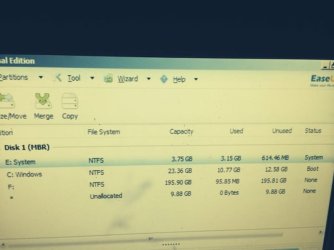
My HP machine came with a system partition E: and boot partition C:
See screenshot

Its windows 7 MBR - BIOS-

attachment.php


1. How come EaseUS petition Master shows me both partitions are not active - I always thought that C had to be marked "active".

2. I resized C: and made F:

Is it possible for me to Install a new Installation of windows 7 on F

How would i get it to boot to F

Thanks
 

Attachments
  • Easeus.jpg
    Easeus.jpg
    29.2 KB · Views: 8

My Computer My Computer

OS
win7 home
What is your goal? If you want to http://www.sevenforums.com/tutorials/219487-clean-reinstall-factory-oem-windows-7-a.html#post1839164 then everything needed is in the blue link to get and keep a perfect install. Read the SPecial Note to HP Owners at the end as there may be even an easier way to do it.

You wouldn't want to install a second Win7 because you'd have to buy another license. Just ditch the bloated mess which comes with HP and go completely clean to enjoy native Win7 performance for the first time on there.
 
The C partition need not be active if the bootmgr sits in another partition - apparently in the E partition in your case.

I am puzzled like Greg - why would you want to have 2 Windows on the same disk. Either you do a completly new install like Greg suggests, or you make C a bit bigger (e.g. 50GB) and move your user files to F.
 

My Computer My Computer

Computer Manufacturer/Model Number
HP, Dell, Gateway, Toshiba - 4 laptops and 2 desktops
OS
Vista, Windows7, Mint Mate, Zorin, Windows 8
CPU
from 1.6GHz Duo to i7
Monitor(s) Displays
2x HP w2207
Hard Drives
5x HDD, 7x SSD, 12x Externals
Keyboard
with trackball - no mices
Mouse
Trackball mice
Internet Speed
DSL 6000
Back
Top