
Solved System Drive correction

Gudea

New member
Local time
3:06 AM
Messages
5
Location
Anchorage, AK
Hi,
I have a problem with my hard drives. It started suddenly in the past week as I have been unable to load any new programs. I continually get a message that the Windows Installer service could not be accessed...something like that. Nothing worked in terms of fixing this.

I have two drives on the computer. Drive C is the system drive, and E is the backup. Just now I noticed that in "My Computer" Drive E is all of a sudden listed as the system drive and C just hangs around (I suppose) waiting to be 'cloned to' (which is the purpose of E in the first place).

Is there any way that I can change this back to the original arrangement. It's probably a fairly simple process, but I'm at a loss. And, I am thinking that the Installer problem is probably related to this sudden switch. I have no clue what I must have done to facilitate the change, but I'm not having any success finding a similar problem in the messages I'm reading.
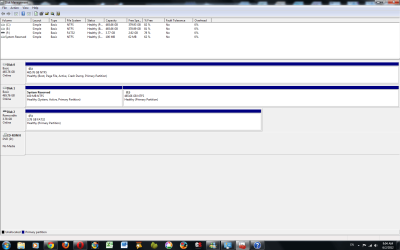
dskmgt.png
 

My Computer

Computer Manufacturer/Model Number
Home built
OS
Windows 7 Home Premium 64
CPU
Intel(R) Core(TM) i3 CPU [email protected] 3.06GHz
Motherboard
Intel Desktop Board DH55HC
Memory
8 Gb
Graphics Card(s)
NVIDIA GeForce GTS 250
Sound Card
Realtek HD Audio
Monitor(s) Displays
Viewsonic Energy Star
Screen Resolution
1680x1050
Hard Drives
2 - 500Gb WDC WD5000AAVS-00N7B0 ATA Device
both internal, C is primary, E is secondary...at least, up until the other day
PSU
650W
Case
Soprano RS
Cooling
Air/fans cooled
Keyboard
Logitech Access Keyboard
Mouse
Microsoft USB Wireless IntelliMouse Explorer
Internet Speed
12Mb/sec download...1Mb upload

My Computer

Computer Manufacturer/Model Number
Hewlett packard/p6512uk
OS
Microsoft Windows 7 Home Premium 64-bit 7600
CPU
IIx4 amd athelon 635 processor
Motherboard
FOXCONN 2AA9
Memory
2x2gb
Graphics Card(s)
ati radeon HD 5450
Sound Card
(1) Realtek High Definition Audio (2) AMD High Definition
Monitor(s) Displays
samsung lcd tv 32"
Screen Resolution
1360x 768
Hard Drives
(1) WDC WD10 01FAES-60Z2A0 SATA Disk Device (2) Maxtor OneTouch USB Device (3) ST310003 33AS USB Device (4) WD My Book 1111 USB Device
PSU
?
Cooling
air!
Keyboard
wireless hp
Mouse
wireless Hp,optical
Internet Speed
1.10mb/s
Antivirus
MSE
Browser
Firefox
Disconnect the E: drive and see if the system boots normally.
 

My Computer

Computer type
PC/Desktop
Computer Manufacturer/Model Number
Lenovo IdeaCenter 450
OS
Windows 10 Pro X64
CPU
Intel Quad Core i7-4770 @ 3.4Ghz
Memory
16.0GB PC3-12800 DDR3 SDRAM 1600 MHz
Graphics Card(s)
Intel Integrated HD Graphics
Sound Card
Realtek HD Audio
Monitor(s) Displays
HP 22" LCD
Screen Resolution
1680 x 1050
Hard Drives
250GB Samsung EVO SATA-3 SSD
2TB Seagate ST2000DM001 SATA-2
1.5TB Seagate ST3150041AS SATA
Keyboard
Dell USB
Mouse
Lenovo USB
Internet Speed
Cable via Road Runner 3MB Upload, 30MB Download
Antivirus
Windows Defender, MBAM Pro, MBAE
Browser
Seamonkey
Other Info
UEFI/GPT
PLDS DVD-RW DH16AERSH
To both replies...thanks for the suggestions but nothing has worked. Tried all of the possibilities, and the end result is now:

in the computer management screen...E is now listed as disk 0, while C is now 1. Both are now listed as active (don't know why), which caused me a couple of hours of an inoperative computer. The repeating message on the screen was BOOTMGR is missing, press ctrl-Alt-Del. That was tons of fun. After disconnecting both hard drives and having the Windows 7 Installation disk repair the boot manager, I am still unable to switch the primary drive from E to C, nor is the Windows Installer program working at all. This is very frustrating.

I have an idea that I wanted to pass by anyone...I have Norton Ghost on my computer. If I do a clone from E to C, and only check "set drive active (for booting OS)" (which refers to setting the destination, C, active" is it possible to correct the active drive problem without messing up the contents of the drives?....if that makes any sense.

Can you tell this is very frustrating?

Thanks for your help so far.
 

My Computer

Computer Manufacturer/Model Number
Home built
OS
Windows 7 Home Premium 64
CPU
Intel(R) Core(TM) i3 CPU [email protected] 3.06GHz
Motherboard
Intel Desktop Board DH55HC
Memory
8 Gb
Graphics Card(s)
NVIDIA GeForce GTS 250
Sound Card
Realtek HD Audio
Monitor(s) Displays
Viewsonic Energy Star
Screen Resolution
1680x1050
Hard Drives
2 - 500Gb WDC WD5000AAVS-00N7B0 ATA Device
both internal, C is primary, E is secondary...at least, up until the other day
PSU
650W
Case
Soprano RS
Cooling
Air/fans cooled
Keyboard
Logitech Access Keyboard
Mouse
Microsoft USB Wireless IntelliMouse Explorer
Internet Speed
12Mb/sec download...1Mb upload
Apparently, having the Windows 7 Installation disc repair the boot manager did solve the problem. Somehow the boot manager had become corrupted in the C hard drive, and then when I rebooted the computer, I was given the option of choosing one of the two drives, picked C and both problems were solved: I am able to install software now, and as long as I choose the correct option, then the C drive is the primary.
 

My Computer

Computer Manufacturer/Model Number
Home built
OS
Windows 7 Home Premium 64
CPU
Intel(R) Core(TM) i3 CPU [email protected] 3.06GHz
Motherboard
Intel Desktop Board DH55HC
Memory
8 Gb
Graphics Card(s)
NVIDIA GeForce GTS 250
Sound Card
Realtek HD Audio
Monitor(s) Displays
Viewsonic Energy Star
Screen Resolution
1680x1050
Hard Drives
2 - 500Gb WDC WD5000AAVS-00N7B0 ATA Device
both internal, C is primary, E is secondary...at least, up until the other day
PSU
650W
Case
Soprano RS
Cooling
Air/fans cooled
Keyboard
Logitech Access Keyboard
Mouse
Microsoft USB Wireless IntelliMouse Explorer
Internet Speed
12Mb/sec download...1Mb upload
Back
Top