Solved System image windows 7 empty?

Donbo

New member
Local time
1:25 PM
Messages
33
I installed windows on a new hard drive on my computer, wanted a bigger drive and a clean install would make it fast again. I did a windows image backup on the old drive. I looked on my drive that I did the image on and it has this.


F:\windowsimagebackup
size 0 bytes
size on disk 0 bytes
contains 0 files 0 folders


I am assuming it didn't work? What did I do wrong?
 

My Computer

Computer type
PC/Desktop
Computer Manufacturer/Model Number
Custom build
OS
Windows 7 Professional 64 bit
You haven't told us what you did.
 

My Computers

System One System Two

  • Computer type
    PC/Desktop
    OS
    7 X64
    CPU
    i5 8400
    Motherboard
    gigabyte b365m ds3h
    Memory
    2x8gb 3200mhz
    Hard Drives
    various
    PSU
    pure power 11 400w cm
    Case
    Coolermaster
    Cooling
    cryorig m9i
  • Computer type
    PC/Desktop
    OS
    7x64
    CPU
    g5400
    Motherboard
    ga b365m ds3h
    Memory
    8gb ddr4 2400
    PSU
    xfx pro 450w
I tried to create a system image and when I viewed the results on the drive it appears there isn't anything on it.


F:\windowsimagebackup
size 0 bytes
size on disk 0 bytes
contains 0 files 0 folders
 

My Computer

Computer type
PC/Desktop
Computer Manufacturer/Model Number
Custom build
OS
Windows 7 Professional 64 bit
How did you go about it, what did you select to include in the image, were there any messages?

Where is this "drive", is it an external hard disk? Have you checked to see if there are any shadow copies?
 

My Computers

System One System Two

  • Computer type
    PC/Desktop
    OS
    7 X64
    CPU
    i5 8400
    Motherboard
    gigabyte b365m ds3h
    Memory
    2x8gb 3200mhz
    Hard Drives
    various
    PSU
    pure power 11 400w cm
    Case
    Coolermaster
    Cooling
    cryorig m9i
  • Computer type
    PC/Desktop
    OS
    7x64
    CPU
    g5400
    Motherboard
    ga b365m ds3h
    Memory
    8gb ddr4 2400
    PSU
    xfx pro 450w
I went to system image and it selected c and the small partition file. Asked me what drive I wanted it put on. I selected F, it is the original ssd that I just replaced in a icy dock. Everything went fine even made a boot cd afterwards.
 

My Computer

Computer type
PC/Desktop
Computer Manufacturer/Model Number
Custom build
OS
Windows 7 Professional 64 bit
Never heard of shadow copies? Doing a search on duck duck go.
 

My Computer

Computer type
PC/Desktop
Computer Manufacturer/Model Number
Custom build
OS
Windows 7 Professional 64 bit

My Computers

System One System Two

  • Computer type
    PC/Desktop
    OS
    7 X64
    CPU
    i5 8400
    Motherboard
    gigabyte b365m ds3h
    Memory
    2x8gb 3200mhz
    Hard Drives
    various
    PSU
    pure power 11 400w cm
    Case
    Coolermaster
    Cooling
    cryorig m9i
  • Computer type
    PC/Desktop
    OS
    7x64
    CPU
    g5400
    Motherboard
    ga b365m ds3h
    Memory
    8gb ddr4 2400
    PSU
    xfx pro 450w
I am assuming you looked through the folders to see if the xml and .vhd files are in there? You might need to take ownership to access them. (When you have ownership, you can also see the size.)

Take Ownership Shortcut

It looks like this:
WindowsImageBackup
[Your Computer name]
Backup [date and time of backup]
A bunch of XML files
A bunch of .vhd files

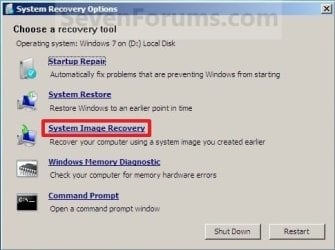
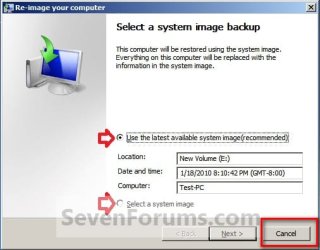
Or you can boot the cd you made and get it to check for system images
System_Recovery_Options.jpg

It will list any system images it finds, then because you don't want to restore , just click cancel

[Step7.jpg
 

My Computers

System One System Two

  • Computer type
    PC/Desktop
    OS
    7 X64
    CPU
    i5 8400
    Motherboard
    gigabyte b365m ds3h
    Memory
    2x8gb 3200mhz
    Hard Drives
    various
    PSU
    pure power 11 400w cm
    Case
    Coolermaster
    Cooling
    cryorig m9i
  • Computer type
    PC/Desktop
    OS
    7x64
    CPU
    g5400
    Motherboard
    ga b365m ds3h
    Memory
    8gb ddr4 2400
    PSU
    xfx pro 450w
I don't know what I am doing but it has this in the top pane:
Snapshot Name Explorer Path Volume Path Volume Name Originating Machine Service Machine Creation Time Attributes Exposed Name Exposed Path Snapshot ID SnapshotSet ID Provider ID
\\?\GLOBALROOT\Device\HarddiskVolumeShadowCopy18 \\localhost\F$\@GMT-2020.01.01-23.32.32 F:\ \\?\Volume{cd112bd8-2ca2-11ea-bf45-94de80b60ca6}\ Master-Blaster Master-Blaster 1/1/2020 5:32:32 PM Persistent, No Auto-Release, No Writers, Differential {CFB3FFC8-F4DD-4BC6-BAD2-939C45403789} {FFDC2CCB-DF1C-4FC2-AD38-B640E6DF8B0E} {B5946137-7B9F-4925-AF80-51ABD60B20D5}
 

My Computer

Computer type
PC/Desktop
Computer Manufacturer/Model Number
Custom build
OS
Windows 7 Professional 64 bit
I booted to the cd but my wireless keyboard would not work. I knew that but had forgotten it. When I booted up win 7, decided to check on the image and all the files showed up on there. I don't know why, I had disconnected the drive from the computer and turned it off but decided to try to see what was going on so hooked it back up. Thank you for your help. Problem solved. One last question, does disk imaging need to be done once in a while or is once enough?
 

My Computer

Computer type
PC/Desktop
Computer Manufacturer/Model Number
Custom build
OS
Windows 7 Professional 64 bit
Once in a while. If you have to restore an image it will restore everything as it was at the time the image was made.

When the shadow storage has filled up, older images will drop off.
 

My Computers

System One System Two

  • Computer type
    PC/Desktop
    OS
    7 X64
    CPU
    i5 8400
    Motherboard
    gigabyte b365m ds3h
    Memory
    2x8gb 3200mhz
    Hard Drives
    various
    PSU
    pure power 11 400w cm
    Case
    Coolermaster
    Cooling
    cryorig m9i
  • Computer type
    PC/Desktop
    OS
    7x64
    CPU
    g5400
    Motherboard
    ga b365m ds3h
    Memory
    8gb ddr4 2400
    PSU
    xfx pro 450w
I did a windows image backup on the old drive. I looked on my drive that I did the image on and it has this.

F:\windowsimagebackup
size 0 bytes
size on disk 0 bytes
contains 0 files 0 folders

I am assuming it didn't work? What did I do wrong?

Nothing. It almost certainly did work. The permissions on the WindowsImageBackup folder don't allow you to see the files and folders it contains, that's why Explorer cannot tell you the size.

Try to open the WindowsImageBackup folder. The system will say 'you do not have permission, do you want to gain permanent access?'. Say Yes and you will open it.

Here you should find a folder with the name of your PC. You will need to gain permission to open that too. In that folder you will find three folders: Catalog, SPMeatadataCache, and one with the date of the backup: 'Backup yyyy-mm-dd hhmmss'. You will need permission to open those. Once you have permission for all the folders then Explore can tell you the correct size.

NB: granting yourself permission does not interfere with the ability to restore the image. But do NOT change anything in any of the folders - look but don't touch. Any modification to any of these files may result in the image not being able to be restored.
 

My Computers

System One System Two

  • Computer type
    Laptop
    Computer Manufacturer/Model Number
    Toshiba satellite C650D
    OS
    Windows 7 Home Premium x64
    CPU
    AMD V120
    Memory
    4GB
    Internet Speed
    150 Mbps
    Antivirus
    MSE
    Browser
    IE11, Edge, Firefox
    Other Info
    I also have W7 Pro on my System Two, and several W7 Hyper-V VMs. My other machines run Windows 10/11. Their specs are in my Ten Forums & Eleven Forum profiles.
  • Computer type
    Laptop
    System Manufacturer/Model Number
    Lenovo Thinkpad T430
    OS
    Windows 7 Pro x64
    CPU
    Intel i5-3320M
    Memory
    8 GB
    Hard Drives
    250GB Samsung SSD 860 EVO
    Other Info
    Antivirus: MSE
It was done hours ago. The OP should mark this as solved
 

My Computers

System One System Two

  • Computer type
    PC/Desktop
    OS
    7 X64
    CPU
    i5 8400
    Motherboard
    gigabyte b365m ds3h
    Memory
    2x8gb 3200mhz
    Hard Drives
    various
    PSU
    pure power 11 400w cm
    Case
    Coolermaster
    Cooling
    cryorig m9i
  • Computer type
    PC/Desktop
    OS
    7x64
    CPU
    g5400
    Motherboard
    ga b365m ds3h
    Memory
    8gb ddr4 2400
    PSU
    xfx pro 450w
Thank you SIW2 I learned a lot. Thank you BREE!
 

My Computer

Computer type
PC/Desktop
Computer Manufacturer/Model Number
Custom build
OS
Windows 7 Professional 64 bit
Back
Top