goopy
Greets,
Thanks for the wonderful write up!
Glad to know that your problems are resolved.
I don't know how to create / write Recovery Environment to an internal disk. So, i can't help you with that.
To
All
There are somethings to mention :
1. The desired GPT partition layout for win 7 & 8 is mentioned
here
2. GPT partition layout for Win 7 & 8 :
(i) The default config is :
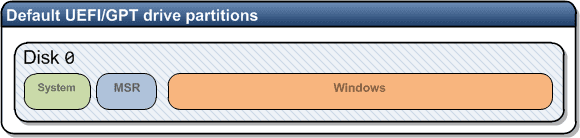
It is the configuration that is made / achieved by a normal installation, begun on an unallocated GPT drive.
(ii) but the recommended is :
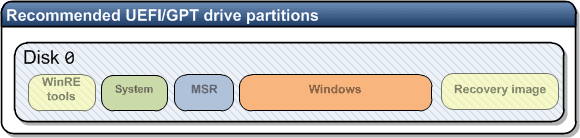
It is supplied by OEMs & needs some extra steps to be made so.
3. To avoid any problems, the drive letter assigned to
EFI partition, is dropped automatically after Boot data is written to it. If not, it should be done so manually.
4. If one is not easy with command line options,
(i) he can use
"DiskGenius" to make EFI, MSR & OS partitions. It can create EFI and/ or MSR partitions straight away!
(ii) After making the partitions, one can apply the disk image of
C: ( the main OS partition ) to the planned GPT OS partition. I like to use
Macrium Reflect for that.
(iii) Then he can boot into a Win 7/8/8.1 UEFI + GPT Installation / System repair disk & run
Startup Repair consecutively for three times. It will automatically write the boot data to
EFI partition & make the OS bootable.
5.
Well, there's no Recovery Environment on the new drive.
Thanks for the info. I suppose you are talking about MBR's OEM Recovery Partition. It will need some extra steps.
Thanks & Regards. ...



