System Protection - Turn On or Off

How to Turn System Protection On or Off in Windows 7

   Information
System Restore regularly tracks changes to your computer's system files, and uses a feature called System Protection to create restore points of selected hard disks in your computer. System Protection is turned on by default for the Windows 7 hard disk or partition on your computer.

This will show you how to turn System Protection On or Off for creating System Restore Points for system settings and previous versions (shadow copies) of files in Windows 7. You could also use previous versions (shadow copies) to restore older copies of files and folders.

You can select which disks have System Protection turned on for.

   Note
It is not recommended to turn off system protection for your C: system drive (Windows 7) since it is a great tool to easily undo a mistake, for example one that may have crippled Windows 7, by just doing a system restore to go back to a previous restore point of your system dated before the mistake.
   Warning

  • System Restore doesn't protect FAT32 and other FAT disks because FAT disks don't support the use of shadow copies. Shadow copies contain information about changes to documents and system files. Shadow copies require the NTFS file system. Windows 7 uses the NTFS file system.
  • Turning off System Protection for a disk deletes all restore points for that disk. You cannot restore the disk until you turn on System Protection again and a restore point is created for that disk.


Here's How: 1. Open the Control Panel (Icons View). A) Click on the System icon.

B) Go to step 3.
OR

2. Open the Start Menu. A) Right click on the Computer button and click on Properties.
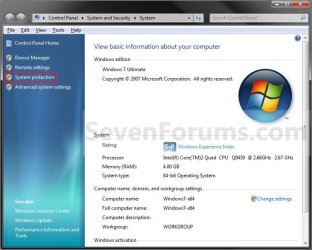
3. Click on the System Protection link. (see screenshot below) System.jpg
4. If prompted by UAC, then click on Yes if administrator or type in the adminstrator's password if standard user.

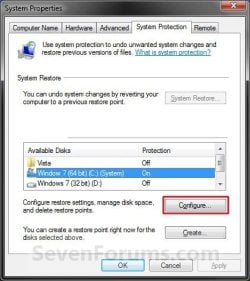
5. Click on the available hard disk drive or partition, that you want to turn System Protection on or off for, to select it. (see screenshot below step 6)
NOTE: Windows 7 should be the C: drive with (System). Under the Protection column, you will see if System Protection is turned On or Off for the available disk.

6. Click on the Configure button. (see screenshot below) System_Properties.jpg
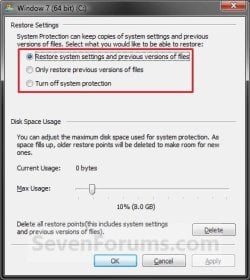
7. To Turn On System Protection for System Settings and Previous Versions of Files A) Dot Restore system settings and previous versions of files. (see screenshot below step 10)
NOTE: This turns on creating restore points and Previous Versions for the selected drive in step 5.

B) Move the Max Usage slider to set the maximum disk space usage you want to be used by system protection on the selected drive letter.

C) Go to step 10.

8. To Turn On System Protection for Only Previous Versions of Files A) Dot Only restore previous versions of files. (see screenshot below step 10)
NOTE: This turns on only Previous Versions for the selected drive in step 5.

B) Move the Max Usage slider to set the maximum disk space usage you want to be used by system protection on the selected drive letter.

C) Go to step 10.
9. To Turn Off System Protection for the Selected Disk A) Dot Turn off system protection. (see screenshot below step 10)
NOTE: This turns off both creating restore points and Previous Versions for the selected drive in step 5.

B) Go to step 10.
10. Click on OK. (see screenshot below) Configure.jpg
11. Repeat steps 5 to 10 if you wanted to turn System Protection on or off for another listed drive.

12. When finished, click on OK. (see screenshot below step 6)
That's it,
Shawn


Last edited:

My Computer

Computer type
PC/Desktop
Computer Manufacturer/Model Number
Self built custom
OS
64-bit Windows 11 Pro for Workstations
CPU
Intel i7-8700K OC'd to 5 GHz
Motherboard
ASUS ROG Maximus XI Formula Z390
Memory
64 GB (4x16GB) G.SKILL TridentZ RGB DDR4 3600 MHz
Graphics Card(s)
ASUS ROG-STRIX-GTX1080TI-O11G-GAMING
Sound Card
Integrated
Monitor(s) Displays
2 x Samsung Odyssey G7 27"
Screen Resolution
2560x1440
Hard Drives
1TB Samsung 990 PRO M.2,
4TB Samsung 990 PRO PRO M.2,
TerraMaster F8 SSD Plus NAS
PSU
Seasonic Prime Titanium 850W
Case
Thermaltake Core P3
Cooling
Corsair Hydro H115i
Keyboard
Logitech wireless K800
Mouse
Logitech MX Master 4
Internet Speed
2 Gb/s Download and 100 Mb/s Upload
Antivirus
Malwarebyte Anti-Malware Premium
Browser
Google Chrome
Other Info
Logitech Z625 speaker system,
Logitech BRIO 4K Pro webcam,
HP Color LaserJet Pro MFP M477fdn,
APC SMART-UPS RT 1000 XL - SURT1000XLI,
Galaxy S23 Plus phone
Shawn,

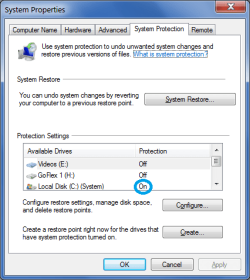
I'm running Win 7x64 OEM version on a built Desktop PC w/Asus MoBo. My C HDD is a 1 Tb size with about 115 Gb used space at present.

I've been seeing a strange issue with my "C" OS drive where the Protection is getting switched to "off" mode. I just started to track the problem to see what may be happening but here's what I've seen recently.

When I installed this month's Windows "Patch Tuesday" updates, all went ok. I saw the normal "Creating a Restore Point" dialog appear before the updates began installing. I'm assuming at that time that my "C" HDD Protection State was in an "on" state. Perhaps that's not accurate to assume that but since the Restore Points appeared to be created by the WU process, I'm thinking that this was the case at that time.

Yesterday, Sat 02/21 U.S. time, I encountered an unrelated issue with Norton AV where my IE11 was inaccessible (this made a lot of "buzz" news around the 'net since Fri 02/20 evening U.S. time; Norton has since fixed the issue). The issue with Norton prompted me to look at my Restore Point selection dialog but to my surprise, there were no Restore Points present. I saw the "error" dialog that's been mentioned earlier in this thread.

When I checked my "Protection" tab, my C HDD Protection was "off". I changed it to "on" and manually created a Restore Point without issue but I've seen this happen several times over the last 2-3 years where it seems that my C HDD Protection State is being toggled off for some reason. I never think to check the Protection state on my C drive until I'm looking at the Restore Points selection dialog.

Have you heard of this issue occurring with other Win 7 users?

I am a frequent HDD Cloner so I wonder if that's causing this issue? That wouldn't be my first guess but I'm probably Cloning and Imaging more frequently than some other Win 7 users.
 

Attachments

  • Sys Prot.png
    Sys Prot.png
    48.3 KB · Views: 804

My Computer

Computer type
PC/Desktop
Computer Manufacturer/Model Number
Built at Micro Center Richardson, TX
OS
Windows 7 Home Premium 64 bit
CPU
Intel i5 650 Dual Core 3.20 GHz Cache 4MB Threads: 4
Motherboard
ASUS PRO P7P55D-E
Memory
Corsair 16GB DDR3 1600MHz 9-9-9-24 P/N: CMZ8GX3M2A1600C
Graphics Card(s)
ZOTAC GeFORCE 9500 ZT-95TEK2M-FSL 1GB GDDR2
Sound Card
Mother Bd
Monitor(s) Displays
ASUS V228H 21.5” Diag
Screen Resolution
1440 x 900
Hard Drives
SEAGATE BARRACUDA (2ea) 3.5” INTERNAL 1Tb 16 MB SATA ST1000DM003-9YN162 7200RPM, 64MB, SATA 6Gb/s ** 2 Sata Hot-Swap Racks installed in Tower
PSU
Thermaltake Model TR2 RX 750W
Cooling
2 Tower Fans
Keyboard
Dell Quietkey PS/2 Windows 104 P/N 0463CD
Mouse
Kensington Mechanical Trackball USB Model 64217
Internet Speed
35/35
Antivirus
Norton 360 & MBAM Pro
Browser
IE10
Other Info
Printer: HP DeskJet 3520 USB 2.0 **
Speakers: ALTEC Model VS4621 2.1 28 W/Channel w/Sub-woofer **
IOGEAR HDMI Monitor Switcher Swx3 MODEL GHDSW3 ** Addonics ZDRWESU3 eSata/USB 3.0 external DVD Read/Write DVD Drive** SEAGATE GoFlex USB 2.0 Portable HD 500GB 5400 RPM P/N: 9ZF2A2-570

My Computer

Computer type
PC/Desktop
Computer Manufacturer/Model Number
Self built custom
OS
64-bit Windows 11 Pro for Workstations
CPU
Intel i7-8700K OC'd to 5 GHz
Motherboard
ASUS ROG Maximus XI Formula Z390
Memory
64 GB (4x16GB) G.SKILL TridentZ RGB DDR4 3600 MHz
Graphics Card(s)
ASUS ROG-STRIX-GTX1080TI-O11G-GAMING
Sound Card
Integrated
Monitor(s) Displays
2 x Samsung Odyssey G7 27"
Screen Resolution
2560x1440
Hard Drives
1TB Samsung 990 PRO M.2,
4TB Samsung 990 PRO PRO M.2,
TerraMaster F8 SSD Plus NAS
PSU
Seasonic Prime Titanium 850W
Case
Thermaltake Core P3
Cooling
Corsair Hydro H115i
Keyboard
Logitech wireless K800
Mouse
Logitech MX Master 4
Internet Speed
2 Gb/s Download and 100 Mb/s Upload
Antivirus
Malwarebyte Anti-Malware Premium
Browser
Google Chrome
Other Info
Logitech Z625 speaker system,
Logitech BRIO 4K Pro webcam,
HP Color LaserJet Pro MFP M477fdn,
APC SMART-UPS RT 1000 XL - SURT1000XLI,
Galaxy S23 Plus phone
Shawn, thanks for the suggestion. I've been thinking about that, installing another AV to use as a troubleshooting tool to eliminate Norton when questions like this one arise.
 

My Computer

Computer type
PC/Desktop
Computer Manufacturer/Model Number
Built at Micro Center Richardson, TX
OS
Windows 7 Home Premium 64 bit
CPU
Intel i5 650 Dual Core 3.20 GHz Cache 4MB Threads: 4
Motherboard
ASUS PRO P7P55D-E
Memory
Corsair 16GB DDR3 1600MHz 9-9-9-24 P/N: CMZ8GX3M2A1600C
Graphics Card(s)
ZOTAC GeFORCE 9500 ZT-95TEK2M-FSL 1GB GDDR2
Sound Card
Mother Bd
Monitor(s) Displays
ASUS V228H 21.5” Diag
Screen Resolution
1440 x 900
Hard Drives
SEAGATE BARRACUDA (2ea) 3.5” INTERNAL 1Tb 16 MB SATA ST1000DM003-9YN162 7200RPM, 64MB, SATA 6Gb/s ** 2 Sata Hot-Swap Racks installed in Tower
PSU
Thermaltake Model TR2 RX 750W
Cooling
2 Tower Fans
Keyboard
Dell Quietkey PS/2 Windows 104 P/N 0463CD
Mouse
Kensington Mechanical Trackball USB Model 64217
Internet Speed
35/35
Antivirus
Norton 360 & MBAM Pro
Browser
IE10
Other Info
Printer: HP DeskJet 3520 USB 2.0 **
Speakers: ALTEC Model VS4621 2.1 28 W/Channel w/Sub-woofer **
IOGEAR HDMI Monitor Switcher Swx3 MODEL GHDSW3 ** Addonics ZDRWESU3 eSata/USB 3.0 external DVD Read/Write DVD Drive** SEAGATE GoFlex USB 2.0 Portable HD 500GB 5400 RPM P/N: 9ZF2A2-570
Thanks for your sharing.
 

My Computer

Computer type
PC/Desktop
OS
win 7 x64 ulti sp1
CPU
4790k
Motherboard
asus z97-k
Memory
2x 8gb
Graphics Card(s)
none
Hard Drives
wd 1tb sata3
Keeps turning back on

I turn if off and disable, fine. But come back half an hour later, and it's ON again. Have got to disable the damn thing five or six times a day. Is there a way to just "remove" it?
 

My Computers

System One System Two

  • Computer type
    PC/Desktop
    OS
    w10
  • Computer type
    PC/Desktop

My Computer

Computer type
PC/Desktop
Computer Manufacturer/Model Number
Self built custom
OS
64-bit Windows 11 Pro for Workstations
CPU
Intel i7-8700K OC'd to 5 GHz
Motherboard
ASUS ROG Maximus XI Formula Z390
Memory
64 GB (4x16GB) G.SKILL TridentZ RGB DDR4 3600 MHz
Graphics Card(s)
ASUS ROG-STRIX-GTX1080TI-O11G-GAMING
Sound Card
Integrated
Monitor(s) Displays
2 x Samsung Odyssey G7 27"
Screen Resolution
2560x1440
Hard Drives
1TB Samsung 990 PRO M.2,
4TB Samsung 990 PRO PRO M.2,
TerraMaster F8 SSD Plus NAS
PSU
Seasonic Prime Titanium 850W
Case
Thermaltake Core P3
Cooling
Corsair Hydro H115i
Keyboard
Logitech wireless K800
Mouse
Logitech MX Master 4
Internet Speed
2 Gb/s Download and 100 Mb/s Upload
Antivirus
Malwarebyte Anti-Malware Premium
Browser
Google Chrome
Other Info
Logitech Z625 speaker system,
Logitech BRIO 4K Pro webcam,
HP Color LaserJet Pro MFP M477fdn,
APC SMART-UPS RT 1000 XL - SURT1000XLI,
Galaxy S23 Plus phone
Yes, you are right. Was able, using the "registry shortcut" download, to turn it off. That's excellent, thanks and rgds.

You're most welcome. :-)
 

My Computer

Computer type
PC/Desktop
Computer Manufacturer/Model Number
Self built custom
OS
64-bit Windows 11 Pro for Workstations
CPU
Intel i7-8700K OC'd to 5 GHz
Motherboard
ASUS ROG Maximus XI Formula Z390
Memory
64 GB (4x16GB) G.SKILL TridentZ RGB DDR4 3600 MHz
Graphics Card(s)
ASUS ROG-STRIX-GTX1080TI-O11G-GAMING
Sound Card
Integrated
Monitor(s) Displays
2 x Samsung Odyssey G7 27"
Screen Resolution
2560x1440
Hard Drives
1TB Samsung 990 PRO M.2,
4TB Samsung 990 PRO PRO M.2,
TerraMaster F8 SSD Plus NAS
PSU
Seasonic Prime Titanium 850W
Case
Thermaltake Core P3
Cooling
Corsair Hydro H115i
Keyboard
Logitech wireless K800
Mouse
Logitech MX Master 4
Internet Speed
2 Gb/s Download and 100 Mb/s Upload
Antivirus
Malwarebyte Anti-Malware Premium
Browser
Google Chrome
Other Info
Logitech Z625 speaker system,
Logitech BRIO 4K Pro webcam,
HP Color LaserJet Pro MFP M477fdn,
APC SMART-UPS RT 1000 XL - SURT1000XLI,
Galaxy S23 Plus phone
Back
Top